Clay Prospecting: The Builder Writes the Table, the Rep Needs a Socket
Clay prospecting has two jobs in two rooms. The GTM engineer builds the table; the rep is on a LinkedIn profile that needs a mobile number. What Clay does on LinkedIn today, the Clay prospecting workflows that work, and the routes that put Clay in a rep's day.
Clay prospecting is finding and enriching prospects with Clay: a GTM engineer builds tables that run Clay's waterfall across 200+ data vendors, and reps run those tables on the people and accounts they are working, then sync the result to the CRM.
The rep has a VP of Sales open on LinkedIn, a 2nd-degree connection at an account she has wanted for a year, and no mobile number. She knows the company has Clay. So she does what reps at Clay companies do: she pastes the profile URL into a Slack thread and asks RevOps to run it. The answer comes back the next morning, with a verified mobile, and by then she has moved on to four other accounts. The table worked. The timing did not.
Clay prospecting is finding and enriching prospects with Clay: a GTM engineer builds tables that run Clay’s waterfall across 200+ data vendors, and reps run those tables on the people and accounts they are working, then sync the result to the CRM. The short answer on how to do it well, for a team that already has Clay:
- Supered Prospector. For teams whose reps prospect on LinkedIn, Sales Navigator, company websites, and the CRM record: your Clay tables as a button in each of those places, $45 per rep per month billed annually.
- Clay’s CRM auto-sync. For teams where Ops builds every list and reps work what lands in HubSpot, Salesforce or Pipedrive, on Clay’s Growth plan.
- Clay MCP. For reps who already spend the day in ChatGPT or Claude, with Ops governing spend from Clay.
The rest of this page sorts out who does which job, what Clay itself does on LinkedIn as of October 1, 2026, which workflows hold up, and how the table the builder wrote reaches the rep at the moment she needs it.
What is Clay prospecting, and why is it two jobs?
Clay says plainly who it is built for. Its homepage, opened October 1, 2026, reads “GTM engineers build on Clay,” offers to “Buy data from 200+ providers in one place,” and promises to “Build systems that make reps more productive” (clay.com). The verbs are worth reading slowly. The engineer builds. The rep is made more productive by what was built. Clay prospecting is those two jobs, done by two people, usually in two different places.
The builder’s job happens inside Clay. A table takes a list of people or accounts, runs the waterfall (ask this provider for a work email, then that one, stop at the first verified result, the method waterfall enrichment explains), scores the account, researches it, and writes the result somewhere useful. Clay’s pricing page adds the rule that makes the waterfall cheap to run: “If an enrichment returns no result, you’re not charged Data Credits or Actions” (clay.com/pricing, October 1, 2026). Clay’s own GTM engineering guide describes how its in-house team works: when a seller built a custom Clay table to track buying signals, “the GTME team templated the build and rolled it out org-wide within days” (clay.com/blog/gtm-engineering).
The rep’s job happens everywhere else. The Bridge Group’s 2025 SDR report, 351 B2B companies, puts the median SDR at 112 activities a day: 44 phone, 41 email, 19 LinkedIn, and 8 text or other (Bridge Group, 2025). None of the 112 happens in a Clay table. Clay’s own Clay for Sales page makes the same point from the other side, under the heading “Avoid breaking sellers’ rhythm”: “Keep reps selling instead of switching tools to find contacts, fix data, or research accounts.”
So the hard part of Clay prospecting sits after the table: getting its output to the room the rep is standing in.
Clay works like a power station. The GTM engineer runs it, and it is a good one: 200+ fuel suppliers on one contract, a turbine that switches suppliers the moment one runs dry, and no bill for the fuel that never arrived. The rep works in the rooms of a house: the LinkedIn room, the Sales Navigator room, the company-website room, the CRM room, the inbox. Power reaches some of those rooms by a fixed line (Ops pushes a finished list into the CRM overnight). In the rest, there is no socket, so the rep asks someone at the station to carry over a battery, and the Slack thread is the battery. A rep-side surface is a socket in the wall of the room she is already in.
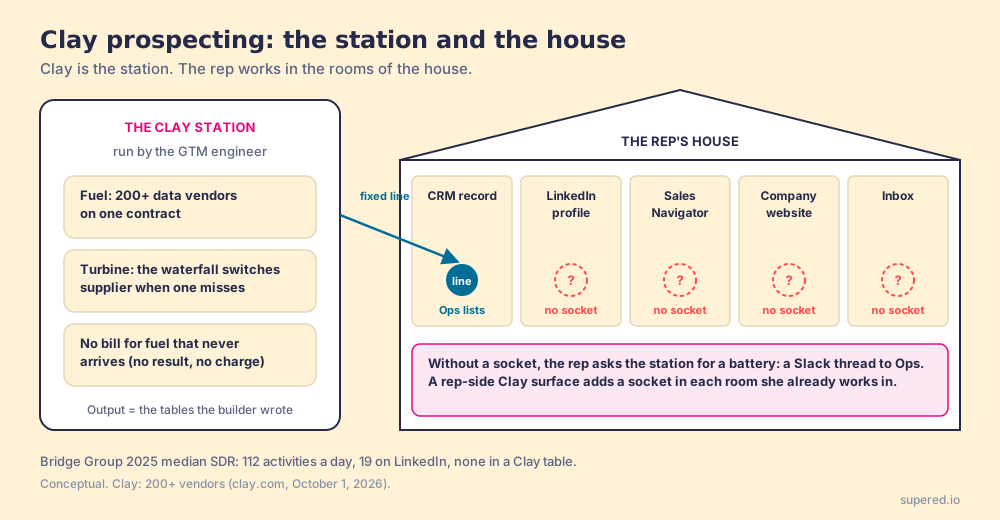
The comparison stops short in one place, and it matters. Electricity is the same in every socket. Clay’s output is not: what comes out of the socket is whatever table the builder wrote, with the providers, tiers, and buying-committee rules she chose. The builder should like that. A socket in the rep’s room carries her work further.
What can Clay do on LinkedIn today?
The phrase “Clay LinkedIn” covers four separate features, and buyers often merge them. Each was checked on October 1, 2026.
- The LinkedIn integration. Connected with your own LinkedIn account (”+ Add account”), it has two sources and two actions: Find Brand Mentions (“LinkedIn posts and reposts that mention your brand”), Find Post Audiences, which returns who “reacted to or commented on a LinkedIn post” by the post’s URN, and Enrich Social Metadata (Clay docs, LinkedIn integration). It feeds a builder’s table with people who engaged. It does not appear on a profile a rep is reading, and it is a different thing from the HubSpot LinkedIn integration, which shows Sales Navigator data inside the CRM.
- LinkedIn URLs as the key. Clay’s own lesson on finding people asks for an identifier and says “Ideally, this should be LinkedIn profile URLs, but if unavailable, you can use company domains instead” (Clay University). Marketplace actions run on the same key: Snov.io’s “Enrich Person from LinkedIn URL” takes a Contact Social URL and returns a work email, its validity status, title, and location (clay.com integrations). The URL is the ticket; the waterfall does the lookup.
- Clay for Chrome. Clay’s own extension, listed on the Chrome Web Store as “Turn the entire internet into a data source and pull specific data points from any website straight into Clay,” with 10,000 users and a 4.4 rating from 9 ratings on October 1, 2026, version 1.0.0 (Chrome Web Store). Clay’s docs list it beside Clip to Clay, which saves whole web pages to a table, and two third-party extensions, Exportly and The Swarm (Clay docs, Chrome extensions). The listing does not mention LinkedIn. Its arrow points into the table.
- LinkedIn as a destination. Clay’s rep-prospecting page and its MCP page both offer to “Sync targeted ad audiences to Linkedin, Meta, and Google,” and the pricing page puts “audience pushes to ads platforms” on Growth. Here LinkedIn is where a finished list goes, as an ad audience.
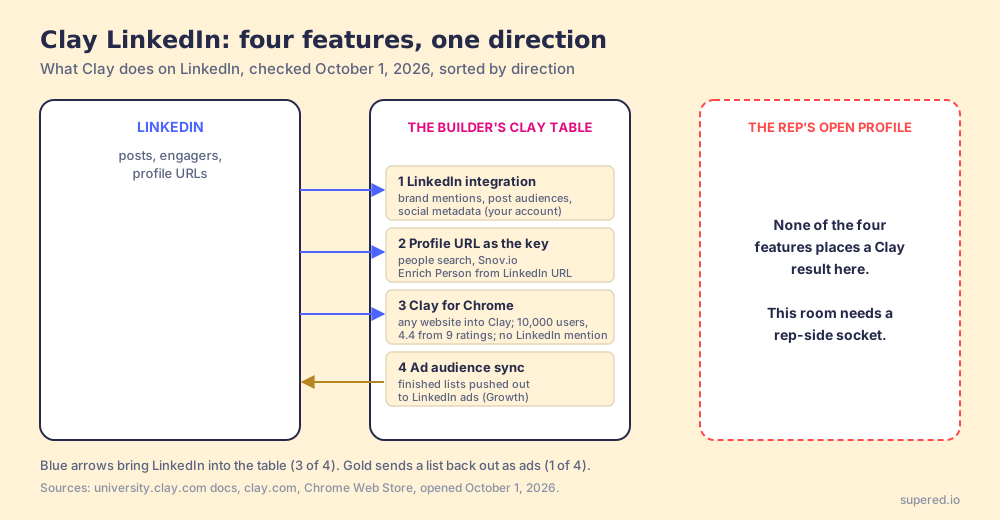
Sorted by direction, the four features tell one story. Three bring LinkedIn into the station, and one sends finished lists back out as ads. Clay builds for the builder, which is its stated job, and it does that job well. Getting the station’s output onto the profile a rep is reading is a separate job, and Clay’s own rep-prospecting page hands it to a Chrome-extension partner: one that “lets reps enrich with Clay and sync prospects to your CRM anywhere on the web” (clay.com/use-cases/rep-prospecting, checked October 1, 2026, where the partner named is still Exportly, now Frontier).
A word on the forum question that comes up in every buying conversation about Clay LinkedIn work. A July 2025 thread in Clay’s community, about a free LinkedIn extension a member built for Clay, turned on one distinction: one member warned that extensions which interact with the LinkedIn page put accounts at risk, and the builder answered that his only pushed the page URL to Clay (community.clay.com). Two members disagreeing is not Clay policy. The distinction is still the right question for any rep-side tool: does it read the page, or send the URL to your table and let the waterfall do the lookup? The Clay Chrome extension guide sets out the full spec to hold an extension to.
Which Clay prospecting workflows work for sales teams?
Six workflows show up again and again in teams that get pipeline out of Clay, and each has the same three parts: something that starts it, a Clay table that does the work, and a room where the result lands. The difference between the ones that pay off and the ones that sit idle is usually the third part. Clay use cases catalogues the tables themselves; this section is about where their output lands.
- Post engagers to a worked list. Find Post Audiences pulls the people who commented on a competitor’s launch post or your founder’s post; the table finds their work email and mobile and scores the account; the list lands in the CRM with an owner. Builder runs it, rep works it.
- Champion job changes. Clay’s Launch plan includes “job change and signal tracking” (clay.com/pricing). A former customer’s champion moves to a new company, the table re-enriches her at the new one, and the account owner hears about it the same week.
- The rep’s own LinkedIn finds. The rep is on a profile or a Sales Navigator list she built herself, and she wants that person, or those 25 people, enriched and in the CRM. The table is the same one Ops uses; the trigger is the rep. It needs a socket in her room, and it is the workflow teams most often ask Ops to run by hand. Exporting Sales Navigator leads covers the list half of it.
- The company website to the buying committee. The rep is on acme.com before a first call and wants the people who sign: the VP of Sales, the RevOps lead, the CFO. A buying-committee table, tuned by title and seniority, returns them with verified contact data.
- The CRM record backfill. The contact is already in HubSpot or Salesforce with no mobile, or with a title two jobs out of date. Clay’s Growth plan includes “CRM auto-sync and enrichment” for this, run in bulk by Ops; the rep-side version runs it on the one record she has open before she calls.
- The ad audience for the accounts you are working. The same target-account list syncs to LinkedIn as an ad audience on Growth, so the buying committee sees your name before the rep’s first email.
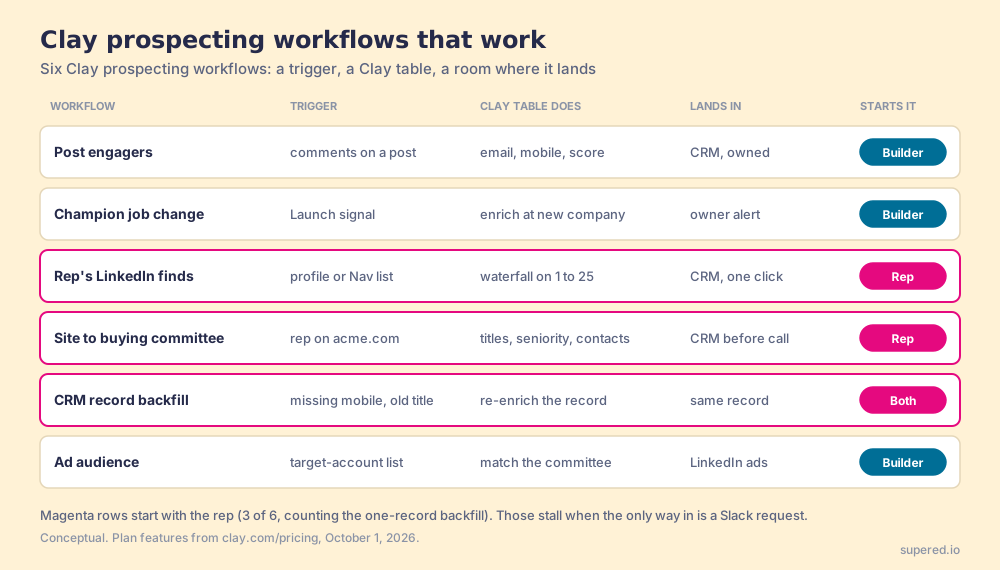
Read down the “who starts it” column and the pattern is plain. The builder-started workflows run well in Clay alone, because the builder lives in Clay. The rep-started ones are where the Slack thread from the opening lives. A team can have a beautiful buying-committee table and still have reps guessing at titles on acme.com, because the table is in a room they do not work in.
There is a second reason the rep-started workflows deserve the effort. A rep who builds her own list has chosen the accounts, so she already knows why each person is on it, and the first touch carries that reason. The same table, run by Ops on a list the rep never saw, produces the same verified email with none of the context. If you want to see what a good rep-built LinkedIn motion looks like end to end, the LinkedIn prospecting post walks one practitioner’s sequence step by step.
How do reps get Clay into their day?
There are six routes in use today, and they sort cleanly once you name the job. The job here is narrow: a rep on a LinkedIn profile, a Sales Navigator list, a company site, or a CRM record gets a verified email and phone from your Clay tables into the CRM, without leaving the page, and the leader can see whether the list was worked. Each route is scored 1 to 5 on five criteria and weighted, for a maximum of 50. This is our scoring, not vendor data, and the weights are stated so you can flip them.
| Criterion | Weight | What it rewards |
|---|---|---|
| Reach into the rep’s rooms | x3 | Runs on the profile, list, site, or record the rep has open |
| Runs your Clay tables | x2 | The builder’s own tables and waterfalls, unchanged |
| Writes to the CRM | x2 | One click or automatic, field mapping set once |
| Leader sees the list worked | x2 | Which sourced lists got worked and which closed |
| Setup effort | x1 | Live without engineering |
| Rank | Route | Grade | Score | Best fit | CRM | Setup | Pricing |
|---|---|---|---|---|---|---|---|
| 1 | Supered Prospector | A | 47 | Teams with Clay whose reps prospect on LinkedIn, Sales Navigator, sites, and the CRM | HubSpot, Salesforce, Pipedrive | Under a week on an existing Clay account | $45 per rep per month, billed annually, plus your Clay plan |
| 2 | Frontier (formerly Exportly) | A- | 42 | Teams that want a Clay-powered extension and AI agents for reps | Salesforce, HubSpot, Outreach, Salesloft (per Clay’s page) | Demo-led | Not published |
| 3 | Clay MCP | B | 32 | Reps who already work in ChatGPT, Claude, or Codex | Push to CRM and sequencer | Ops sets up Functions | Your Clay plan |
| 4 | Clay CRM auto-sync | B | 30 | Ops builds every list; reps work what lands | HubSpot, Salesforce (Growth) | Ops builds the sync | Growth from $495 a month |
| 5 | Clay alerts to Slack or email | C | 26 | Signal alerts for account owners | Indirect | Ops builds the alert | Your Clay plan |
| 6 | Clay for Chrome | C | 20 | Builders pulling lists off web pages into tables | Through the table | Install | Free extension |
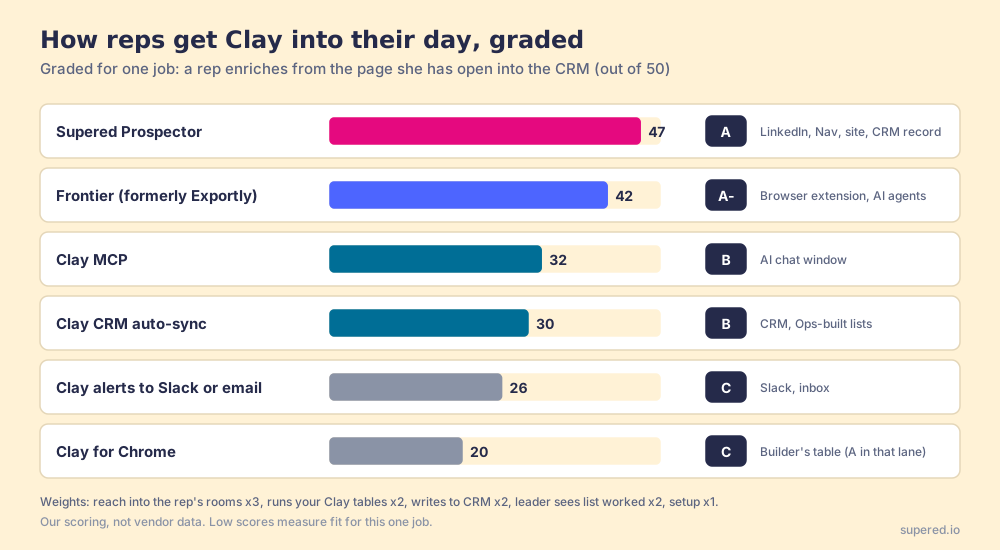
The low scores measure fit for this one job. Clay for Chrome is the right tool for a builder scraping a directory into a table; it was never meant to sit on a rep’s LinkedIn tab. CRM auto-sync is how a mature Ops team should feed territories, and a rep who receives a clean list every Monday is well served. Clay MCP is a strong route for a rep who already lives in an AI chat; Clay says its page lets Ops “centrally control CRM write-backs, compliance logic, and enrichment spend” (clay.com/mcp, October 1, 2026). The chat is still a separate room from the LinkedIn tab, which is why its reach score is a 2.
Frontier deserves its A-. It is the extension Clay’s own pages still name as its Chrome-extension partner, and the reach is real. Two facts to weigh, both from October 1, 2026: the company now sells itself as AI agents for every rep, and its Chrome Web Store listing shows 3,000 users and a 5.0 from 1 rating with no pricing page live. Exportly to Frontier covers the change, and Exportly alternatives covers the options for teams that bought it for the extension.
Why trust this page?
I started RevPartners, a HubSpot partner that did only sales implementations; it sold roughly twice as much Sales Hub as any other partner and reached Elite tier in 13 months. Supered came out of that work, and today it holds 4.9 out of 5 from 81 reviews on G2 and 5.0 from 122 reviews on the HubSpot App Marketplace (both checked October 1, 2026). The disclosure: we make Prospector, and it ranks first above for the job this page grades. Change the job (a builder scraping web lists, a rep who works in Claude all day) and the order changes with it.
Where does Supered Prospector fit?
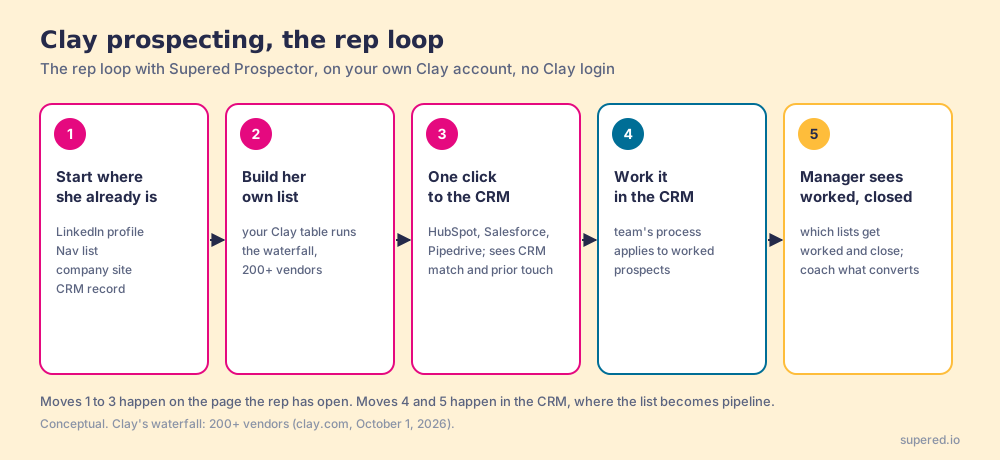
Prospector is the socket. It does not bring its own database; it brings Clay’s waterfall, which is every database in Clay’s marketplace, routed, on your own Clay account. We chose Clay as our only data provider for that reason. Clay governs the data. Supered governs the motion.
What it does for a rep, with no Clay login:
- A button in the rooms she works in. A LinkedIn profile, a Sales Navigator list, a company website with company research alongside, or a HubSpot, Salesforce, or Pipedrive record. Your table runs on whichever she has open.
- The builder’s tables, unchanged. Any custom Clay workflow runs from Prospector, connected by the table’s webhook, and a rep can push a whole list into one. Your waterfalls, tiers, and buying-committee rules stay yours.
- Context before the first touch. On a LinkedIn profile, the rep sees the matching CRM record and whether the prospect was already worked in the past, before she adds a duplicate or steps on a teammate.
- One click to the CRM. Ops sets the field mapping once; every sync after that is one click.
- Lists the leader can follow. The team’s process applies to worked prospects, so the manager sees which lists get worked and which ones close, and coaches from what is converting.
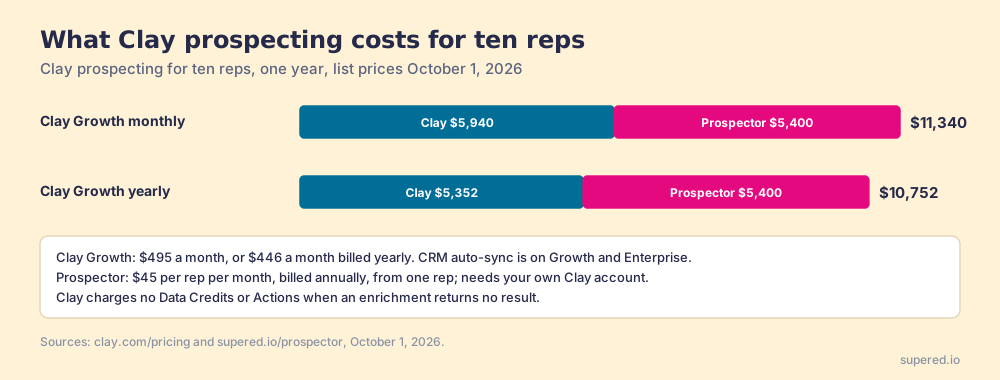
The arithmetic, since a socket has a price. Prospector is $45 per rep per month, billed annually, from one rep (Prospector). Clay Growth lists at $495 a month, or $446 a month billed yearly (clay.com/pricing, October 1, 2026). Ten reps on Prospector plus Clay Growth at the monthly list price come to $11,340 a year: $5,940 for Clay and $5,400 for Prospector. On yearly Clay billing the Clay half drops to $5,352, for $10,752 in all.
Choose something else if you do not have Clay. Prospector runs on your Clay account and does nothing without one, and a team with no one to build tables needs a builder before it needs a socket; Clay itself says “GTM engineers build on Clay.” Choose something else, too, if your reps work all day in an AI chat (Clay MCP is the closer fit) or if you want the tool to write and send the emails, which Prospector does not do. For a team without Clay, a single database with its own extension is simpler: the Apollo alternatives page and the Kaspr alternatives page grade those.
What should a sales leader set up first?
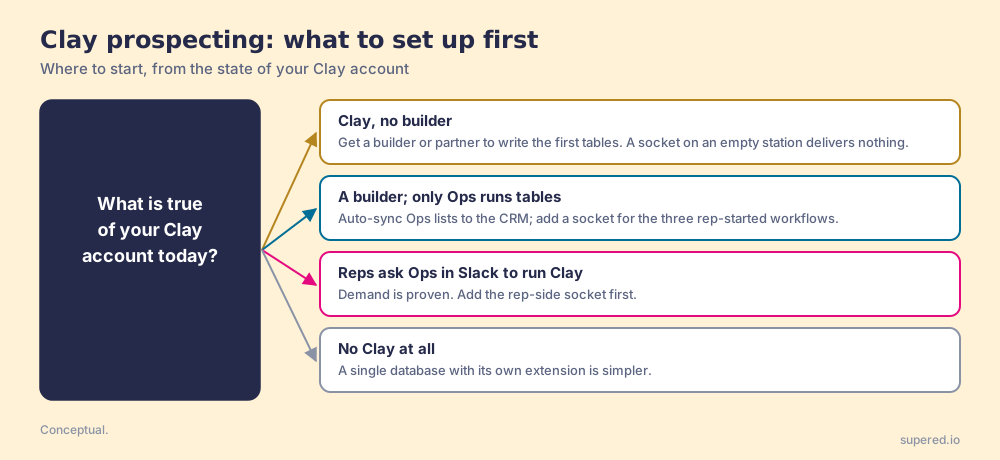
Three ways forward, depending on where your Clay account stands today.
- A Clay account with no builder. Hire or borrow one before you buy anything rep-side. The GTM engineer post covers the role, and a partner can build the first tables. A socket on a station with no turbine delivers nothing.
- A builder whose tables only Ops runs. Start with the CRM auto-sync for the lists Ops owns, then give reps a socket for the three rep-started workflows: their own LinkedIn finds, the buying committee from a company site, and the backfill on the record they have open.
- Reps already running Clay through Slack requests. You have proven demand. The socket pays for itself in the hours between the request and the reply.
Our recommendation, grounded in what this page has shown. Clay’s own LinkedIn features are built to feed the builder’s table, and they do that well. The Bridge Group’s median rep logs 112 activities a day, 19 of them on LinkedIn and none in Clay, and Clay’s Clay for Sales page says the goal is to keep reps “selling instead of switching tools to find contacts.” So keep Clay for building, keep Ops in charge of the tables, and put the tables where the rep already stands. Then watch which lists turn into pipeline, and coach from the ones that do.
The rep in the Slack thread did nothing wrong. She asked for the battery because there was no socket. For the full method behind building lists where reps already work, read the sales prospecting guide; for how sourcing fits the rest of the sales process, see sourcing with Supered; and for what each Clay plan costs on your own account, see Clay pricing.
Frequently asked questions
What is Clay prospecting?+
Does Clay integrate with LinkedIn?+
Does Clay scrape LinkedIn?+
Can sales reps use Clay without a Clay login?+
Which Clay plan do I need for prospecting?+
What does Supered Prospector cost?+
Your process, running itself.