Clay Pricing 3.0, Explained for the Sales Leader Who Is Not the GTM Engineer
Clay's March 2026 pricing split one credit into two meters, and the write-ups explain it to the builder. This one is for the sales leader who signs the renewal: what a rep-run enrichment costs, why per-result beats per-seat at 40% SDR turnover, and what the bill cannot say.
Clay pricing since Pricing 3.0 (March 11, 2026) runs on two meters, Data Credits for data bought from the marketplace (from $0.05 each) and Actions for platform work (under $0.01 each), sold as Free, Launch from $185 a month, Growth from $495, and Enterprise on custom terms.
The RevOps lead forwards the renewal with a one-line note, “same Clay account, new plan names,” and the sales leader opens clay.com/pricing to find out what the team is paying for. The page shows two plans where there used to be three, a toggle for monthly or annual, and a pair of counters on each card, one for something called Data Credits and one for something called Actions. Neither counter is denominated in reps. The tools a sales leader has bought for a team before were priced per seat, and this is not.
Clay pricing since the March 11, 2026 update (the one the market calls Clay Pricing 3.0) runs on two meters: Data Credits for data bought from the marketplace, from $0.05 each, and Actions for platform work, under $0.01 each, sold as Free, Launch from $185 a month, Growth from $495, and Enterprise on custom annual terms (clay.com/pricing, opened September 25, 2026). The plans are the part the builder-facing write-ups have already counted for you. What follows is written for the person who signs the renewal: what one rep’s enrichment costs, what happens to the bill when that rep leaves, and what the bill still cannot say. We run on the customer’s own Clay account, so we read that page the way you do, as a customer.
What is Clay pricing after Pricing 3.0, in kitchen words?
Go to a hardware store and have a key cut. You pay two things at the counter, and you have never thought about them separately. The blank costs money, because a piece of brass was bought from somewhere. The cutting costs a few cents of the machine’s time. If the key does not turn in your lock, a decent shop hands you a new one and charges nothing. And if you walk in with your own blank, you pay for the cut alone.
That is the whole of Clay Pricing 3.0. Before March, one credit bundled the brass and the cutting, and Clay’s founders say why that failed in their own announcement: “If you were focused on acquiring data, Clay felt expensive; if you were orchestrating complex workflows, Clay didn’t share in the value of that work” (Introducing Clay’s new pricing, Varun Anand and Karan Parekh, March 11, 2026). So they split it.
- Data Credits, the blank. Spent when Clay buys a result for you: a verified email, a phone number, a company field, from what the pricing page calls “150+ data partners” (the homepage, opened the same day, says 200+ vendors; cite whichever page you read). From $0.05 each, cheaper as volume rises, and they roll over up to 2x the monthly amount on Launch and Growth.
- Actions, the cut. Spent on platform work: running a table, calling a model, routing a request to a provider, pushing a record to HubSpot or Salesforce. Under $0.01 each, and they reset every billing cycle because, in Clay’s words, they reflect “the platform capacity your plan includes.”
- No result, no charge. Clay’s FAQ states it plainly: “If an enrichment returns no result, you’re not charged Data Credits or Actions.” The waterfall asks provider after provider, and you pay for the one that answers.
- Your own blank. “If you bring your own API keys for a data provider, you skip Data Credits entirely and only use Actions.” Each run still counts one Action.
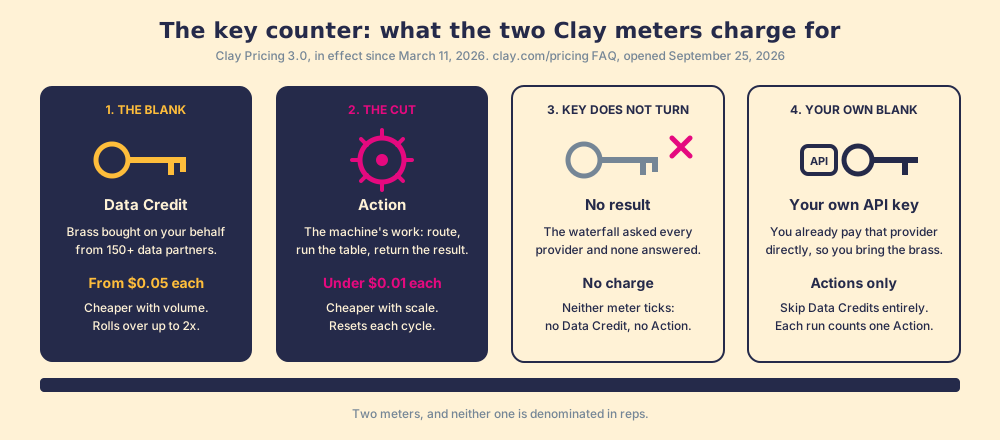
The picture has one edge. A locksmith cuts one key per customer; a Clay table cuts thousands, for every record that enters it. That scale is why the cut got its own meter, and why a sales leader looking for a per-seat line will not find one. Nothing on this page is priced by the chair.
How much does clay.com pricing come to, and what is inside the sticker?
The four plans, as the page showed them on September 25, 2026:
| Plan | Monthly | Annual billing | Data Credits a month | Actions a month | What it adds |
|---|---|---|---|---|---|
| Free | $0 | $0 | 100 | 500 | Unlimited seats and tables, waterfalls, Claygent, 200 rows per table |
| Launch | from $185 | from $167 | 2,500 | 15,000 | Phone enrichment, signals, Audiences search, sequencer integrations, 50,000 rows |
| Growth | from $495 | from $446 | 6,000 | 40,000 | CRM auto-sync, data warehouse sync, HTTP API, webhooks, web intent, ads, priority support |
| Enterprise | custom | annual commitment | 100,000+ | 200,000+ | SSO, RBAC with workbook-level credit budgets, Clay API, dedicated Growth Strategist |
Annual billing saves 10%. Seats are unlimited on every plan, including Free, which is the first thing to say out loud to anyone who has paid a database vendor per user.
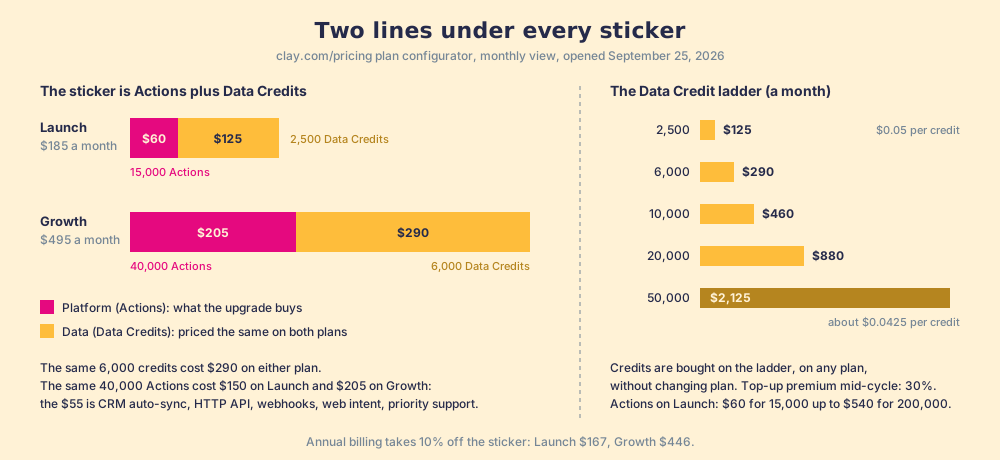
The sticker price is two lines added together, and the plan configurator on the page shows both. Launch at $185 is $60 for the 15,000-Action tier plus $125 for the 2,500-credit tier. Growth at $495 is $205 for 40,000 Actions plus $290 for 6,000 credits. That pairing tells you what the upgrade buys. The same 6,000 Data Credits cost $290 on either plan; brass is brass. The same 40,000 Actions cost $150 on Launch and $205 on Growth, so the $55 difference is the price of CRM auto-sync, the HTTP API, webhooks, web intent, and priority support. The data is priced the same wherever you stand.
The credit ladder is the other number a buyer wants and rarely finds. Data Credits run 2,500 a month for $125, 6,000 for $290, 10,000 for $460, 20,000 for $880, and 50,000 for $2,125; divide, and the unit price walks from $0.05 down to about $0.0425. Actions on Launch run from $60 for 15,000 to $540 for 200,000, four tenths of a cent down to about a quarter. Clay’s announcement adds three lines that date the table: marketplace data prices fell 50 to 90%, the mid-cycle top-up premium fell from 50% to 30%, and the plans were sized so that “90% of customers will never hit a limit on Actions.”
What does a rep-run enrichment cost in Clay credits?
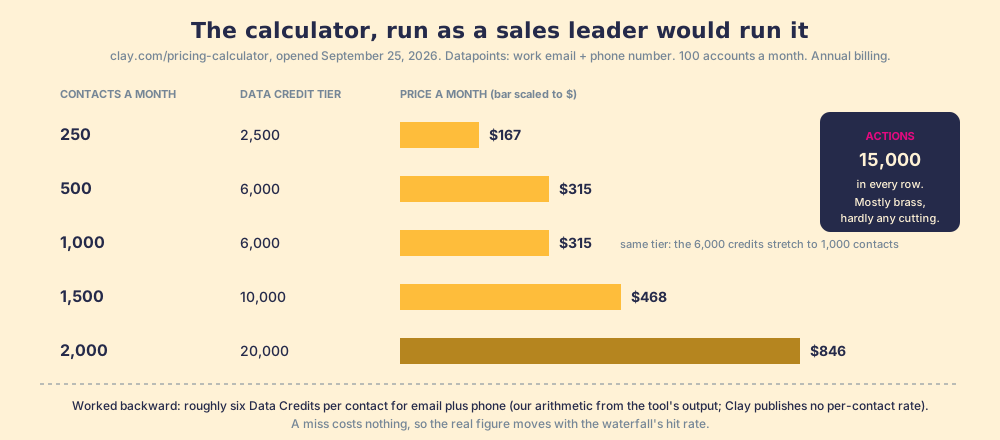
The builder-facing guides stop at the plan table, because the builder thinks in tables and the sales leader thinks in reps. So run the calculator as a sales leader would. Clay publishes one at clay.com/pricing-calculator; it asks for accounts and contacts a month and the datapoints you want, then names a plan and a credit tier. We opened it on September 25, 2026 and set it to the job a rep does on a LinkedIn profile: work email and phone number, 100 accounts, and a rising number of contacts.
| Contacts a month (email + phone) | Plan the calculator names | Data Credit tier | Price a month, annual billing |
|---|---|---|---|
| 250 | Launch | 2,500 | $167 |
| 500 | Launch | 6,000 | $315 |
| 1,000 | Launch | 6,000 | $315 |
| 1,500 | Launch | 10,000 | $468 |
| 2,000 | Launch | 20,000 | $846 |
Two things fall out of that table. First, the calculator budgets roughly six Data Credits per contact for email plus phone (1,500 contacts fit inside 10,000 credits; 1,700 tipped it to 20,000). That is our arithmetic, worked backward from Clay’s tool (Clay publishes no per-contact rate), and it moves with the waterfall’s hit rate, since a miss costs nothing. Second, the Actions column never moved. Fifteen thousand Actions covered every row: a sales team’s enrichment is mostly brass, hardly any cutting.
Now put a team on it. Suppose ten SDRs each source 200 net-new contacts a month with email and phone, a supposition we are naming as one. That is 2,000 contacts, the 20,000-credit tier, $846 a month on annual billing, about $10,150 a year for data and platform together, on a plan with no seat count. For scale, the median buyer on Vendr’s marketplace pays $19,000 a year for Apollo (Vendr, Apollo page, 101 purchases) and $33,500 for ZoomInfo (Vendr, ZoomInfo page, 1,573 purchases), both opened September 25, 2026; the contract-by-contract arithmetic is in Apollo alternatives and ZoomInfo competitors. The Clay number is a function of contacts pulled. The others are a function of chairs.
Why does per-result beat per-seat when SDRs turn over 40% a year?
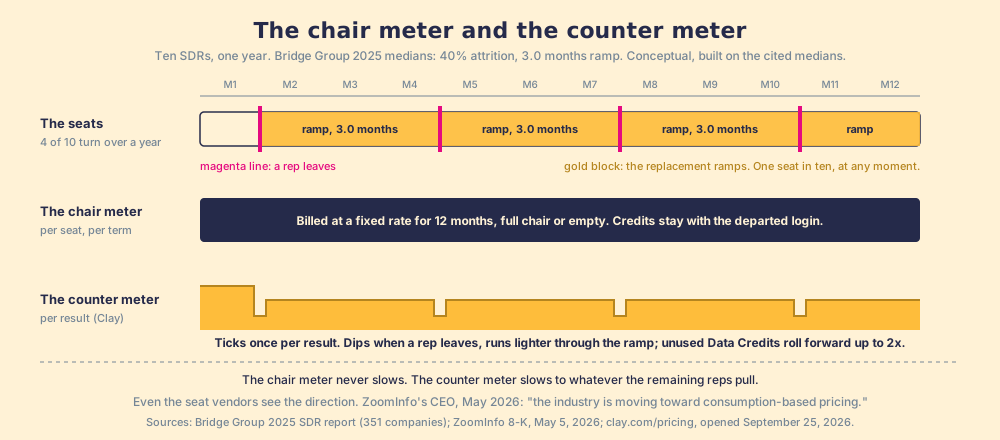
Start with a fact about the chairs. The Bridge Group’s 2025 SDR report, 351 B2B companies, puts annual SDR attrition at 40%, average tenure at 1.9 years, and ramp at 3.0 months (Bridge Group, 2025). Read those three together. On a team of ten, four seats change hands in a year, and each new occupant spends three months producing below rate. That is twelve ramping seat-months out of 120, one seat in ten, before you count the empty weeks between a resignation and a start date.
A per-seat contract does not notice any of this. The seat is bought for the term, and the vendor’s terms say so; Apollo’s pricing page, opened September 25, 2026, grants credits “per seat per year” up front and states that cancellations take effect at the end of the current term and downgrades are not refunded mid-term (apollo.io/pricing). The chair is billed whether or not anyone is sitting in it.
A per-result meter notices everything. Picture two meters on the wall of the sales floor. One is wired to the chairs and spins at a fixed rate from the day the contract is signed, empty chair or full. The other is wired to the counter and ticks once for each key cut. When a rep resigns, the chair meter keeps its speed. The counter meter slows to whatever the remaining reps pull, and the Data Credits the departed rep would have used roll forward, up to 2x the monthly amount, for the replacement to spend after ramp. The counter meter is Clay’s. It is also the direction the per-seat vendors are conceding: ZoomInfo’s CEO, announcing a 20% headcount reduction in May 2026, told staff “the industry is moving toward consumption-based pricing” (ZoomInfo 8-K, May 5, 2026).
You might say a seat is at least predictable, and that a meter is what keeps a finance lead awake. Fair, and Clay seems to have heard the same objection: it sized Actions so most customers never think about them, removed top-up limits, cut the top-up premium to 30%, and sells credits without a plan change. A meter you can read is a budget you can set. A seat you cannot give back is a cost you can only wait out.
When does a sales team need Clay’s Enterprise tier?
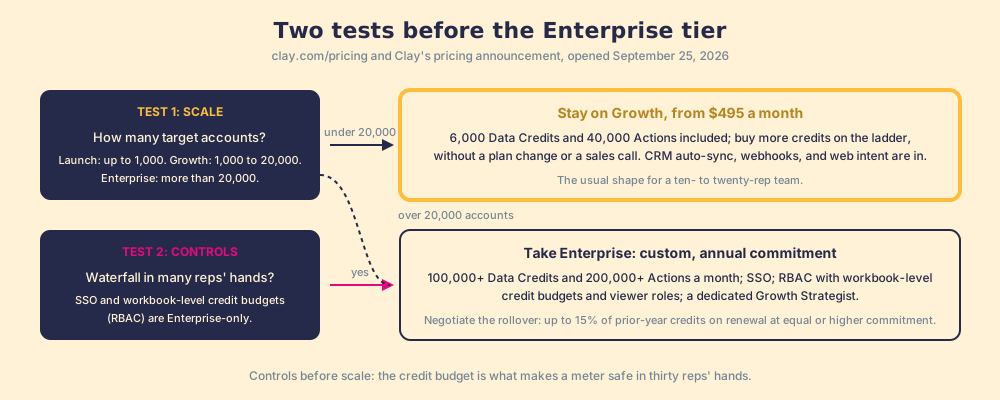
The Enterprise tier is quoted, annual, and starts at 100,000+ Data Credits and 200,000+ Actions a month. Clay’s own sizing note says who it is for: “Launch customers typically target up to 1,000 accounts,” Growth “between 1,000 and 20,000,” and Enterprise “more than 20,000 accounts.” For a mid-market sales team that is the first test, and a Growth account at $495 with credits added on the ladder covers the target list of a ten- or twenty-rep team without a sales call.
The second test is controls, and it is the one a sales leader should read closely, because it is where rep-run enrichment lives. Enterprise adds SSO and role-based access control, and the pricing page specifies that RBAC “includes workbook-level credit budget and viewer roles.” A workbook-level budget is a cap on what a single table, and so a single team’s tool, can spend. If the plan is to put Clay’s waterfall in the hands of thirty reps, that cap is the difference between a meter and a leak. Enterprise also rolls over up to 15% of the prior year’s purchased credits on renewal at an equal or higher commitment, ships a dedicated Growth Strategist, and carries the badges the page shows for every tier: SOC 2 Type II, GDPR, CCPA, ISO 27001, ISO 42001.
One transitional note for readers on a legacy plan. Clay let Starter, Explorer, and Pro customers stay where they were; the window to switch between legacy plans closed April 10, 2026, and moving to Launch or Growth is open any time. Clay was candid about who might pay more: “Customers who predominantly use their own API keys or are on Pro plans may see a price increase,” adding that the old Pro price was mispriced in 2022 and had run at a loss. If your team is on legacy Pro at $800 and uses the marketplace, Growth at $495 with CRM sync included is the comparison to run, and Clay says it expected the update to cost it roughly 10% of revenue.
What does the Clay bill still not tell a sales leader?
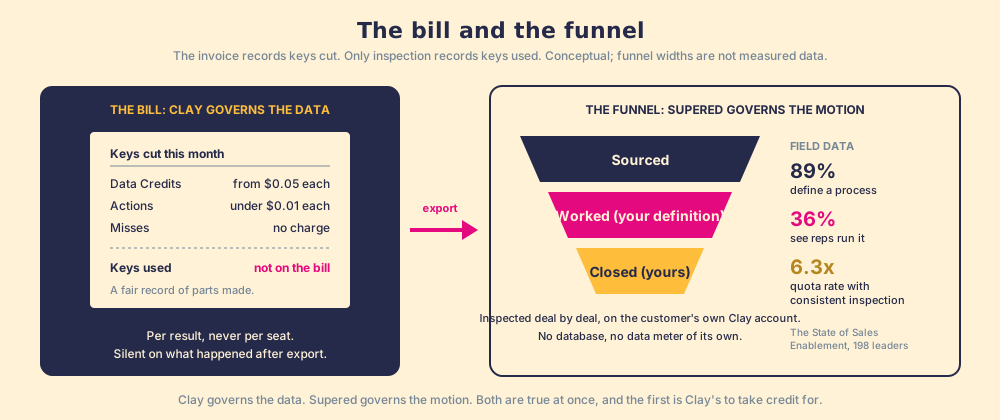
All of the above is what the bill can say, and it says it well. Clay charges per result and never for a miss, so the invoice is a fair record of keys cut, at a unit price you can look up. What the invoice cannot record is whether anyone used the key.
Clay governs the data, and does it better than any single database can; the gap sits downstream, in the sales process, and our field research measures its size. Across 198 sales leaders, 89% have a defined sales process and 36% see reps run it, a 53-point gap between built and followed; teams that inspect deals against the process consistently hit quota at 6.3x the rate of teams that rarely do; and reps who get the next step in the flow of work report 49% quota attainment against 15% for reps who have to go somewhere else for it (The State of Sales Enablement). A contact enriched for six credits, about $0.30 at the entry rate, and never called is the same loss as a playbook written and never opened, and the credit meter cannot see it.
This is the one place Supered belongs on a page about Clay pricing, so state it as a customer would. Supered brings no database and no data meter of its own; it runs on the customer’s own Clay account, so when a rep on a LinkedIn profile, a Sales Navigator list, a company site, or a HubSpot or Salesforce record runs Clay’s waterfall in one click, with no Clay login, the Data Credits are the customer’s, at Clay’s price, on the ladder above. Supered’s job starts at the export. The sourced contact enters a motion the Behavior Layer guides and inspects: was it worked, by your definition of worked, did it advance, did it close, by your definition of closed, deal by deal, with the manager coaching off the signal instead of chasing it. Clay governs the data. Supered governs the motion.
What we recommend
Three shapes a Clay bill takes for a sales team, and our view on each.
- Free, while a builder learns. Unlimited seats, 100 credits, 500 Actions, 200 rows a table. Right for one RevOps person proving a waterfall on a small list; wrong the day a rep needs a phone number, since Free excludes phone enrichment.
- Launch or Growth, sized by the calculator. For a team under 20,000 target accounts this is the shape, and the choice between the two is what you pay for platform: Growth’s $495 carries 6,000 credits at the same $290 the ladder charges on Launch, and $205 of platform (CRM auto-sync, webhooks, web intent) in place of Launch’s $60. Run the calculator on your real contact volume, expect roughly six credits a contact for email plus phone, and buy credits on the ladder rather than upgrading plans for them.
- Enterprise, for controls before scale. Take the annual commitment when you need SSO and workbook-level credit budgets to put the waterfall in thirty reps’ hands safely, or when the target list passes 20,000 accounts, and negotiate the 15% rollover into the renewal.
Our recommendation, with the arithmetic behind it: a mid-market team with Clay should stop paying a per-seat database vendor for prospecting data and let the counter meter carry it, because 40% attrition and 3.0 months of ramp mean the chair meter is spinning on a ramping seat one month in ten, and the credits Clay does not charge for a miss are credits a seat contract would have sold you anyway. Then spend the money you did not spend on seats on what the bill cannot measure, a rep-side door on the Clay account and a standard on what happens after the export. The argument for that door, and for why reps never open the workshop on their own, is in what is Clay; the process the sourced contact should enter is laid out in the sales prospecting guide; and if you would rather see the funnel on your own Clay account, book a demo and bring the renewal.
Frequently asked questions
How much does Clay cost in 2026?+
What is the difference between Clay Data Credits and Actions?+
What changed in Clay Pricing 3.0?+
How many Clay credits does a rep-run enrichment use?+
Do unused Clay credits roll over?+
Does Supered add to the Clay bill?+
Your process, running itself.