HubSpot sales enablement is the guidance, rules and checks that help reps run your sales process while they work in HubSpot. HubSpot gives you the record, the pipeline, and playbooks on Sales Hub Professional and Enterprise. Supered adds the part a manager does by hand today: your expectations written as Process Rules, a flag in the record when a deal breaks one, a Process Board that shows who followed the process, and a fix the rep can make in HubSpot or hand to Claude.
HubSpot App Marketplace: 5.0 stars from 122 reviews, 6,000 installs. G2: 4.9 stars from 81 reviews. Both checked 2026-10-01. Supered is a HubSpot Premier Tech Partner.
Credit where it is due. On Sales Hub Professional and Enterprise, HubSpot puts playbooks in the right panel of contact, company, deal, ticket and custom object records, and reports who used them (HubSpot Knowledge Base, updated 2026-05-01). Pipeline rules stop a rep from skipping a stage or dragging a deal backwards, and conditional stage logic can demand an amount before a deal enters Proposal (HubSpot Knowledge Base, updated 2026-09-09). For a small team with a simple motion, that may be enough.
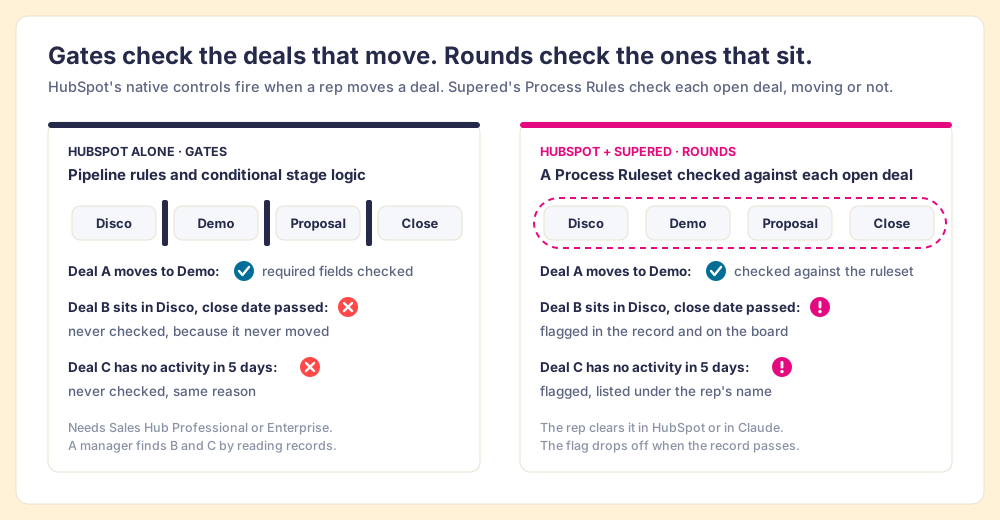
Look at when those controls fire. A gate checks the deal that walks through it. It has nothing to say about the deal that never stood up: the one in Discovery with a close date three weeks gone, or the one with no activity in five days. Those are the deals that drift, and in a HubSpot portal with only gates, a manager finds them by opening records.
Because writing the process down and seeing it run are two different jobs. In The State of Sales Enablement 2026, 89% of teams have a defined sales process and 36% see reps follow it as designed.
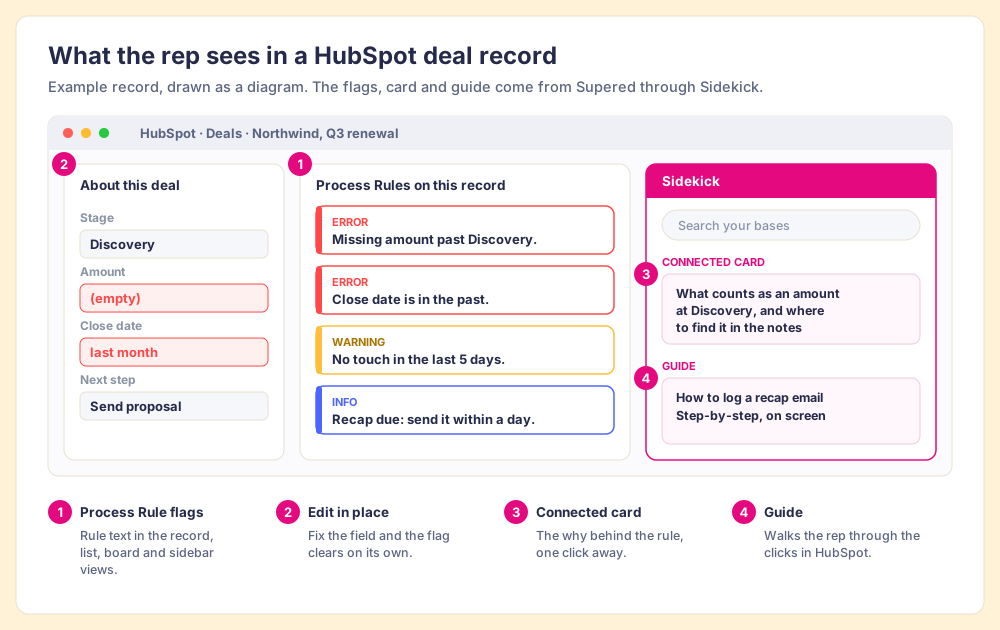
The same deal record they had open a minute ago, with your process written on it. Nothing new to log into: reps sign in to Supered once, to install Sidekick in Chrome or Edge, and from then on it appears inside HubSpot when a rule or a card applies.
The reason this placement matters is in the SOSE data: quota attainment is 49% on teams whose guidance is embedded in the workflow, 24% where it lives in CRM fields or stages, and 15% where it lives in docs or wikis (The State of Sales Enablement 2026, a survey, so read it as association). A required stage property counts as guidance in a field; a flag that names the missing step and opens the card explaining it sits inside the work. For how Supered compares with the other extensions that sit on top of HubSpot, see the graded list of HubSpot Chrome extensions.
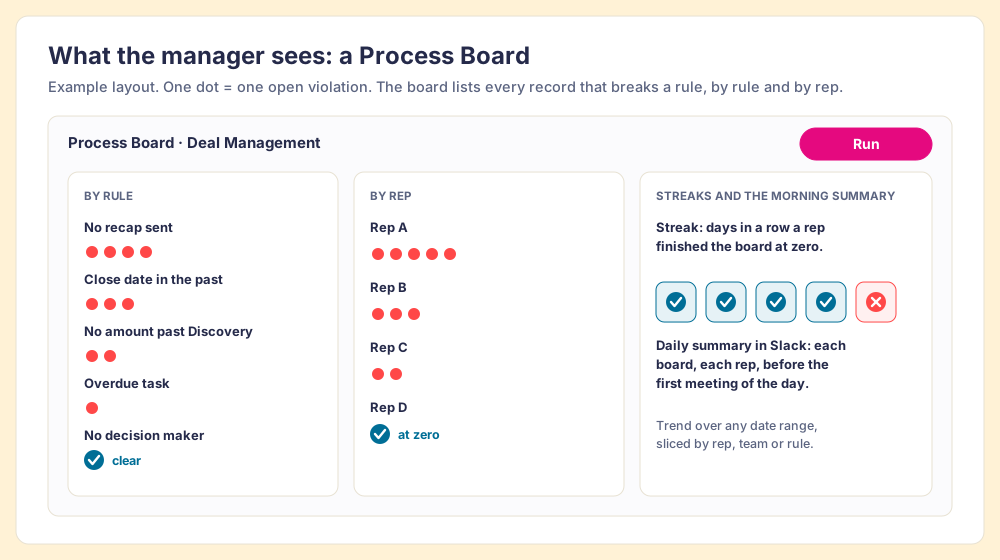
A Process Board: every open record that breaks a rule, by rule and by rep, checked without anyone opening a record. You can only expect what you inspect. In The State of Sales Enablement 2026, teams that inspect deals against a defined process at the highest frequency hit quota at 6.3x the rate of the lowest band. The board makes that inspection the default instead of a Friday chore.
The manager opens records to find what slipped. Fewer records checked with each rep you add.
Each open record checked against the ruleset. The manager's hour goes to coaching.
Yes. HubSpot's connector for Claude can update records, log notes and create tasks, as the signed-in user and within their HubSpot permissions, and it cannot delete data (HubSpot Knowledge Base). What it does not know is your rules. The Supered MCP server hands Claude the Process Ruleset and the open violations, so one sentence of prompt is enough.
Close dates in the past, no amount past Discovery, overdue tasks, no pre-call email within 24 hours, no recap sent, no decision maker.
Claude loaded his Supered rules, filled the amount from the discovery notes, matched close dates to the next meetings on his calendar, and saved recap and pre-call emails to Gmail drafts.
The rep reads and sends the drafts. HubSpot's record history shows each field change.
HubSpot's connector needs a paid Claude plan (Pro, Max, Team or Enterprise). Setup and permissions: Supered for Claude. What HubSpot's own server reads and writes: the HubSpot MCP guide. The rules behind the example: sales expectations, checked every night.
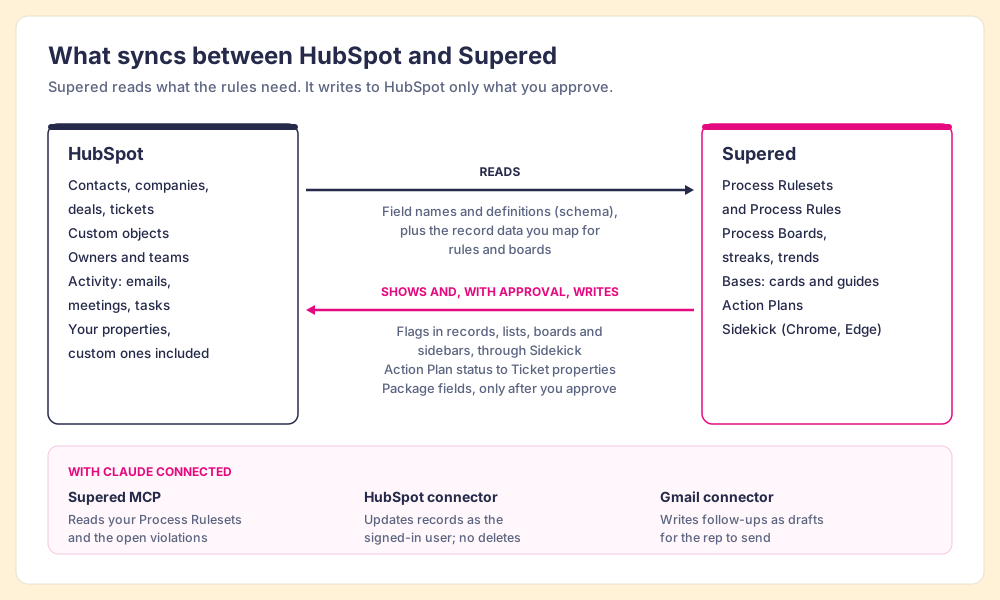
Supered reads more than it writes, and writes nothing you have not approved. You log in to Supered with HubSpot and pick the hub. Supered imports your field names and definitions so rules can use them, then syncs the record data you map for rules and boards. It shows flags through Sidekick. It writes to HubSpot only what you approve.
| Direction | What moves | When |
|---|---|---|
| HubSpot to Supered | Field names and definitions, custom properties included | When you connect the hub |
| HubSpot to Supered | Contact, company, deal and ticket properties you map; activity data; owners; optional teams; custom objects | Synced for the rules and boards that use it |
| Supered to the rep's screen | Process Rule flags, connected cards, guides, the Run queue | Through Sidekick, in the HubSpot page; no HubSpot data changes |
| Supered to HubSpot | Action Plan status to Ticket properties (36 properties, created when you click Create All Properties) | Opt-in; about one minute after a change, plus a nightly full sync |
| Supered to HubSpot | Fields, views and workflows from a package | Only after you approve them |
Two things worth knowing before your admin clicks Install. HubSpot grants one permission set for all of Supered's features, so the screen may ask for more access than your setup uses. And flags appear in records only after the Process Enforcement permission is turned on in account settings. Sources: Supered help center, HubSpot Integration, Process Rulesets & Rules 101, Sync Action Plans to HubSpot.
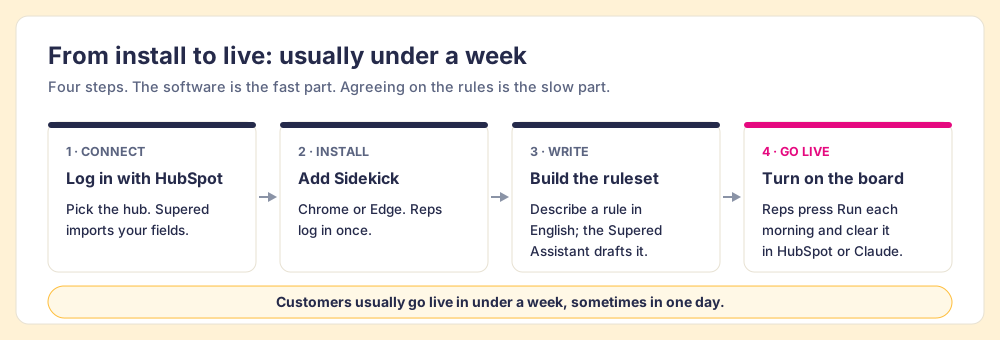
Customers usually go live in under a week, sometimes in one day. The software part is short. Agreeing which expectations matter takes longer, so that is where the first call starts.
On a 30-minute demo we look at your HubSpot pipeline and choose the six to ten expectations that cost you most when skipped. Your best reps already meet most of them. Their habits become the standard, so the rules describe what already works on your team.
Log in with HubSpot, install Sidekick, and build a Process Ruleset with shared entry and exit criteria (which pipelines, which teams, no test records). Describe a rule in English and the Supered Assistant drafts it for your approval, or build it by hand with AND/OR logic, date and number comparisons, and cross-object checks.
Reps press Run each morning and clear their violations in HubSpot or with Claude. Managers read the board and spend the one-on-one on the buyer. Add rules once the team reaches zero on a normal day.
Supered does not sell implementation services. Two ways in: a preferred HubSpot partner adds Supered to the scope of your HubSpot project and implements it (partners are certified on Supered), or our team supports your in-house admin directly. If your pipelines and properties need rebuilding first, do that first; read the HubSpot implementation guide, or find a partner on the Supered partner page.
Per user, per month, on an annual commitment you can pay monthly or yearly. Prices from supered.io/pricing, checked 2026-10-01. Digital Adoption and Process Compliance have a free trial with no card; Prospector starts with a demo.
| Plan | What it does in HubSpot | Paid yearly | Paid monthly | Minimum |
|---|---|---|---|---|
| Process Compliance (Process Enforcement) | Process Rulesets, Process Rules, Process Boards, streaks, plus everything in Digital Adoption | $40/user/mo | $45/user/mo | 5 users |
| Digital Adoption | Bases, cards, Card Triggers, guides, action plans, announcements, Sidekick | $13.50/user/mo | $15/user/mo | None listed |
| Prospector | Rep-built lead lists enriched through your Clay account, synced to HubSpot in one click | $45/user/mo, billed annually | Not offered | 1 user |
Worked example: 10 reps on Process Compliance, paid yearly, is $40 × 10 × 12 = $4,800 a year. The 5-user minimum puts the smallest Process Compliance account at $2,400 a year.
The core product and everything above: your expectations as rules in HubSpot, checked on each open record, cleared by the rep in HubSpot or Claude, and visible to the manager on a Process Board.
Book a demo →Reps build lists from a Sales Navigator lead, a company website, or a HubSpot record. Clay's waterfall across 200+ data vendors fills in emails and phones, and the contacts land in HubSpot in one click. It runs on your own Clay account, and reps never need a Clay login. If you have Clay, you have Supered.
See Prospector →Supered started inside RevPartners, the HubSpot partner co-founder Matt Bolian built, which sold roughly twice as much Sales Hub as any other partner and reached Elite tier in 13 months. Today Supered is the #1 sales enablement app on the HubSpot App Marketplace and a HubSpot Premier Tech Partner, with 6,000+ installs and 200+ reviews across G2 and HubSpot.
"Supered allows me to set up process rules that align with our sales team's expectations, making it visible to reps when expectations are not being met so they can quickly take action."
"It's great to have embedded rules in HubSpot, but Supered takes it a step further with these boards. For managers, having everything visible in one place is huge."
"I use Supered to organize HubSpot activities and updates, keeping my CRM clean and up-to-date. It solves messy CRM, overdue tasks, out-of-date forecasting."
"With process rules, I can see if there are zero issues with each of our sales reps or not. It makes the nonvisible visible."
More reviews, unedited, on the wall of love.
Supered fits teams of 10 or more users who work at a computer and run a sales process they want followed. Outside that, spend your money elsewhere.
Reps open a record and see what it needs. They clear the board before the first call, by hand or with Claude doing the typing. The pipeline review starts with the buyer, because the fields are already right, and a new rep sees the expectations in their first deal instead of in a deck from their first week.
What HubSpot admins and sales leaders ask before they install.
Direct answers.
HubSpot sales enablement is the guidance, rules, and checks that help reps run your sales process while they work in HubSpot: the playbook in the record, the flag when a deal is missing an amount, and the board that tells a manager who followed the process. HubSpot ships part of it natively on Sales Hub Professional and Enterprise. Supered adds the rest as a HubSpot app.
Yes, in part. On Sales Hub Professional and Enterprise, HubSpot playbooks appear in the right panel of contact, company, deal, ticket and custom object records, with usage analytics and required answer fields. Pipeline rules can stop reps from skipping stages or moving deals backwards, and conditional stage logic can require properties before a deal enters a stage (HubSpot Knowledge Base, checked 2026-10-01). Those controls fire when a rep opens a playbook or moves a deal. Supered checks the open deals that are not moving.
No. Keep them if your team uses them. Playbooks hold talk tracks and call notes. Supered holds your expectations as Process Rules, flags the records that break them, and shows the manager the result on a Process Board. On Sales Hub Starter, which has no playbooks, Supered cards and guides can carry the content side as well.
Yes. Supered works in HubSpot Sales Hub and Service Hub, and Process Rules run on native and custom HubSpot objects, including tickets. It also runs on Salesforce and Pipedrive.
In the record they already have open. Process Rule flags appear in record pages, list views, board views and record sidebars, color-coded as error, warning, positive or information. A floating button lists every violation on the record. Sidekick, Supered's Chrome and Edge extension, opens beside HubSpot with the connected card, guides, action plans and search. Reps log in to Supered once, to install Sidekick.
A Process Board: every open record that breaks a rule in the Process Ruleset, sliced by rep, by rule, or by team, with trends over any date range and streaks that count the days a rep finished at zero. Reps press Run to work through their own violations, so the manager reads the board instead of opening records one by one.
Yes. Connect the Supered MCP server, HubSpot's connector for Claude, and Gmail, and a rep can ask Claude to clear their Process Board. Claude reads the rules from Supered, updates HubSpot records as the signed-in user, and saves follow-up emails as Gmail drafts for the rep to send. HubSpot's connector requires a paid Claude plan and cannot delete HubSpot data.
Supered imports your HubSpot fields and field definitions, custom properties included, so rules can use them. For Process Rules and Process Boards it syncs the data you map: contact, company, deal and ticket properties, activity data, owners, optional team data, and custom objects. HubSpot grants one permission set for all Supered features, so the install screen may ask for more access than your setup uses.
Not without your approval. Rules read HubSpot data and display flags; they do not edit records. If you install a package that creates fields, you approve those fields first. If you sync Action Plans to HubSpot tickets, you choose that mapping, and Supered creates the 36 action plan properties when you click Create All Properties. Changes a rep makes, by hand or through Claude, are the rep's changes, in the record history.
Supered states SOC 2 Type II and GDPR compliance. Rule visibility can be limited to specific users or groups, and Supered changes no HubSpot data without your approval. Security details are at supered.io/legal/security, and the full package is available on request during your demo.
Process Compliance, which includes Process Rules, Process Boards and everything in Digital Adoption, is $40 per user per month paid yearly ($45 paid monthly), with a 5-user minimum. Digital Adoption alone (cards, guides, action plans, Sidekick) is $13.50 per user per month paid yearly ($15 monthly). Prospector is a separate plan at $45 per user per month billed annually. Prices from supered.io/pricing, checked 2026-10-01.
Customers usually go live in under a week, sometimes in one day. Log in to Supered with HubSpot and pick the hub, install Sidekick, build the Process Ruleset, and turn on the board. The slow part is your team agreeing which expectations matter, which is why the first call starts there.
No, but you can use one. Supered does not sell implementation services. Preferred HubSpot partners add Supered to their scope and are certified to implement it, or Supered's team supports your in-house admin directly.
When your reps work mostly on phones or in the field: Supered has no mobile product. When a team of a few reps on Sales Hub Professional is already covered by HubSpot playbooks and stage requirements. And when the problem is the HubSpot build itself (pipelines, properties, data model), fix that first with an implementation partner; rules on a broken pipeline flag the wrong things.
Yes, for Digital Adoption and Process Compliance: start at app.supered.io with no card, and wire up rules in your own HubSpot before talking to anyone. Prospector starts with a demo.
Sources: The State of Sales Enablement 2026 (Supered); HubSpot Knowledge Base, Use playbooks, Set up rules for object pipelines and the HubSpot connector for Claude; Supered on the HubSpot App Marketplace; Supered on G2; Supered help center articles on Process Boards for reps and the Supered glossary. Outside sources checked 2026-10-01.
A 30-minute demo in your own portal: we pick the expectations your reps skip most, turn them into Process Rules, and show you the board your team would see tomorrow morning.