Clay Use Cases That Pay Off for Sales Teams: Six Builds, Who Runs Each, and a Template to Start From
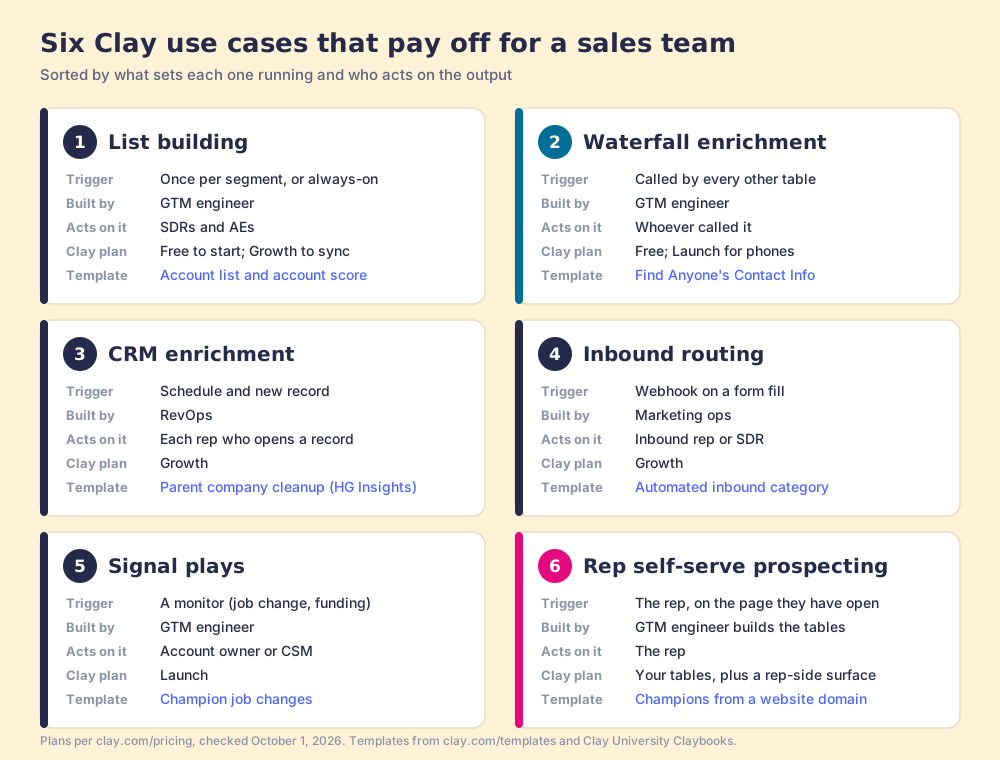
Six Clay use cases that pay off for a sales team, sorted by what sets each one running and who acts on the output: how each is built, who runs it, the Clay template to start from, and the order to build them in.
Clay use cases are the jobs a sales team builds in Clay tables, such as list building, waterfall enrichment, CRM enrichment, inbound routing, and signal plays, each set off by a trigger and delivered to the person who acts on it.
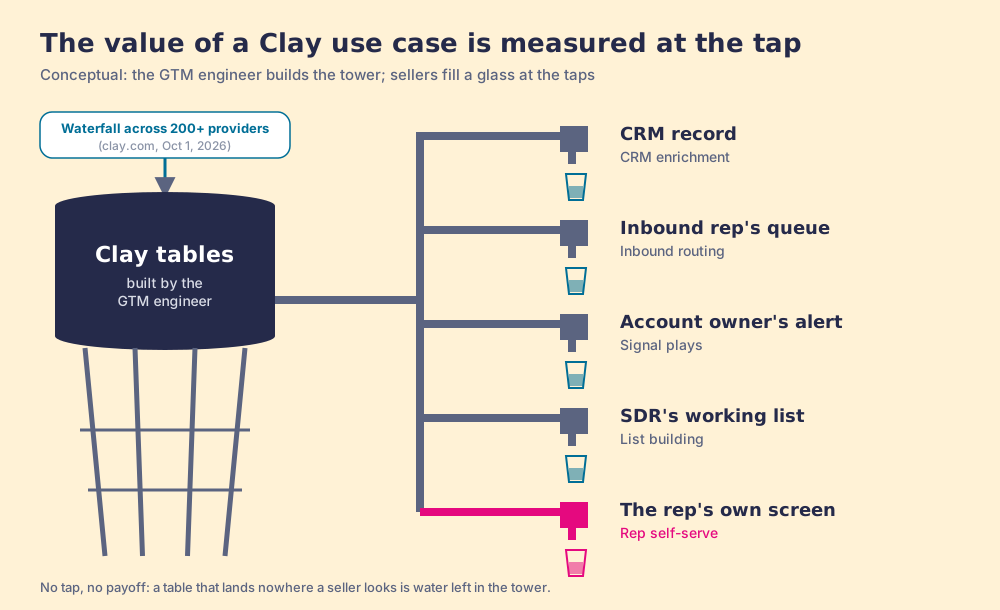
A water tower is a curious piece of engineering. Somebody spends a year building it, pumps it full, and from the road it is the tallest thing in town. It does nothing for anybody until a person in a kitchen two miles away turns a tap. The value of the tower is measured at the taps, and the plumber who builds the tower is rarely the person who drinks from it.
Clay use cases work the same way. A Clay use case is a job a sales team builds in Clay tables, such as list building, waterfall enrichment, CRM enrichment, inbound routing, or a signal play, set off by a trigger and delivered to the person who acts on the result. Clay (what Clay is, in plain words) sells the tower, and sells it well: “Buy data from 200+ providers in one place,” for a customer base it describes as “more than 500,000 leading GTM teams” (clay.com, checked October 1, 2026). The menus that rank for this search then count the pipes. This one sorts them by the tap: what sets each build running, and who is standing there when the data comes out.
Six earn their keep for a sales team:
- List building. One table finds the accounts and people that fit your ICP. Run by the GTM engineer, worked by SDRs and AEs.
- Waterfall enrichment. The pump inside every other use case: providers asked in turn until one returns a verified email or phone.
- CRM enrichment. A schedule or a new-record trigger keeps HubSpot or Salesforce filled. Run by RevOps, felt by every rep who opens a record.
- Inbound routing. A form fill is enriched, scored, and sent to the right rep in minutes. Run by a webhook, worked by the inbound team.
- Signal plays. A champion changes jobs or an account raises money, and the owner gets the alert. Run by a monitor, worked by the account owner.
- Rep self-serve prospecting. The rep runs the GTM engineer’s tables from the page they are on. Run by the rep, which is why it is the hardest tap to plumb.
Which Clay use cases pay off for a sales team?
Clay answers this question itself, at length. Its FAQ lists outbound lead generation, CRM enrichment, inbound lead scoring and outreach, account research, rep prospecting, territory planning, ABM, PLG assist, and Reverse ETL, and says you can “Build lists from CSVs or 10+ prospecting sources” (Clay FAQ, checked October 1, 2026). Matthew Iovanni’s menu at FullFunnel goes further: six motions with four or five workflows under each, from outbound to lifecycle marketing to RevOps orchestration (FullFunnel, April 24, 2025). Both are good maps of the tower. Neither says much about the taps.
We sort by a different test. A Clay use case pays off for a sales team when three things are true at once: a trigger runs it without anyone remembering to, the output lands in a tool a seller already has open, and a named person acts on it. The table itself is seldom the hard part anymore. Clay’s founders, Kareem Amin and Varun Anand, wrote that the company “started with the goal to democratize the power of programming” (Clay, December 8, 2025), and the tables are now easy enough to build that the scarce part is the last foot of pipe.
That test leaves things out, and we leave them out on purpose. AI copywriting has a whole template category in Clay, and Clay does it well; we skip it because a first draft is rarely what stands between a rep and a meeting. Reverse ETL and PLG assist are real and valuable, and they belong to data and product teams before they belong to sales. Territory planning and ABM are mostly list building with a different owner, so they live inside the first use case below.
1. List building: how does a team build a target list in Clay?
The first pipe a new Clay account usually lays. Clay’s TAM sourcing page promises to “Find millions of enterprise and SMB leads across Clay’s database and 200+ data providers,” to “Consolidate multiple data sources” (Clay’s company database, Openmart, Google Maps, technographic sources), and to run “Always-on sourcing to your CRM” that adds new accounts as they match the ICP (Clay, TAM sourcing, checked October 1, 2026). Clay’s own customer claims on that page set the scale: Intercom sourced 4,000+ accounts and enriched 21,000 contacts in one month, and Mistral built a 25,000-account starter TAM in two weeks that it says would normally have taken two months. Those are vendor-hosted results, so read them as what is possible, not what is typical.
- The build. A company search filtered by firmographics and technographics, a scoring column, a people search at each scored account for the titles you sell to, then the waterfall for emails and phones. Clay University’s teaching frame for this is FETE: “Find your target audience, Enrich with relevant data, Transform that data into actionable insights and Export to your operational tools” (Clay University).
- The runner. The GTM engineer, once per segment, then on a schedule if the list is always-on. SDRs and AEs work what lands.
- The template. Start from Clay’s “Build account list and account score based on technographic and firmographic data” in the template gallery. Add one column the template lacks: the named rep who owns each account, written before export.
The failure mode sits at the end of the pipe. A list of 4,000 accounts dropped into a CRM with no owner is a reservoir with no taps. The owner column is the cheapest line in the table and the one that decides whether anybody drinks.
2. Waterfall enrichment: why does every other use case depend on it?
A waterfall is a list of instructions the GTM engineer writes down once: ask this provider, then that one, and stop when one answers. Clay University explains the order: “you’ll be querying providers in a specific order,” usually starting with the most cost-effective, and “Once Clay finds what it needs from one provider, it won’t check the others. This helps save your credits” (Clay University, lesson 9). For emails, the waterfall also validates: “By default, we use ZeroBounce,” catch-all addresses count as valid unless you toggle “Only mark Safe to Send emails as valid,” and “if a provider doesn’t return an email, you get your data credits refunded automatically” (Clay University, lesson 10).
Clay’s waterfall page names the cast. Work email providers include Prospeo, DropContact, Datagma, Hunter, PeopleDataLabs, Apollo, Lusha, and Snov; mobile providers include People Data Labs, ContactOut, and Selligence. Clay claims the approach “routinely triples our customers’ data coverage and quality” (Clay, waterfall enrichment). Treat that as Clay’s claim. The mechanism behind it needs no claim at all: each database covers different people, so asking several finds people none of them covers alone.
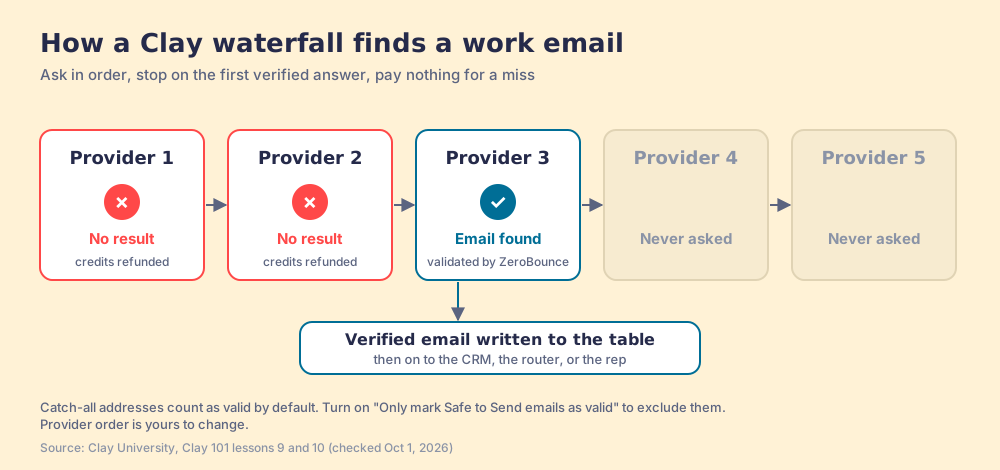
- The build. One email waterfall and one phone waterfall, built once as reusable steps, with the provider order tuned to your market. Clay ships pre-ordered defaults “optimized for cost and coverage,” and you can reorder when “you know a certain provider has better coverage for your ICP.”
- The runner. Every other table. List building calls it, inbound routing calls it, signal plays call it, and so does a rep looking up one person.
- The template. The Claybook “Find Anyone’s Contact Info” in Clay’s GTM use case templates. Test it on ten rows first, as Clay’s own lesson advises with “Save & Run (10 Rows).”
So the waterfall is the pump. No one drinks from a pump, which is why it is easy to forget that a bad one makes every tap run dry. The deeper mechanics, provider order and what a miss costs, live in our waterfall enrichment explainer.
3. CRM enrichment: how does Clay keep HubSpot and Salesforce records full?
A CRM record starts going stale the day it is saved. People change titles and companies, and the phone that worked in March rings a stranger’s desk by June. Clay’s CRM enrichment page describes both repairs: “Trigger enrichments automatically when new leads enter your CRM, ensuring new records are complete before routing,” and “Schedule regular refreshes to catch job changes and company growth” (Clay, CRM enrichment). Vanta’s line on the same page explains the draw: “We’re no longer limited by the accuracy of any single provider.”
Two details make this one worth building with care. HubSpot’s own enrichment fills job title, seniority, and LinkedIn URL on contacts, and its documented contact property list carries no email or phone (HubSpot Knowledge Base, updated July 20, 2026), so the contact fields a rep dials from are the ones Clay’s waterfall supplies. And Clay’s HubSpot update action, per Clay University’s integration docs, ships with “Ignore blank values: On by default, so blank values coming from Clay are left alone in HubSpot.” Turn it off carelessly and an empty enrichment can overwrite a good number. A garden hose left running fills the pool; pointed the wrong way, it empties the one you already filled.
- The build. An import from HubSpot or Salesforce (a list, a view, or a report), the waterfall for the missing fields, then an update action with written rules for which fields Clay may overwrite. CRM integrations are a Growth-plan feature on clay.com/pricing (from $446 a month billed annually, $495 billed monthly; checked October 1, 2026; the plan math is in our Clay pricing breakdown).
- The runner. A schedule and a new-record trigger. RevOps owns the rules; reps feel the result each time they open a record that already has a direct dial.
- The template. “Clean up parent company data in your CRM with HG Insights” from Clay’s templates, then add the overwrite rules as a written column note before the first run. The CRM-side setup is in our Clay integrations guide.
4. Inbound routing: how fast does a Clay inbound workflow need to be?
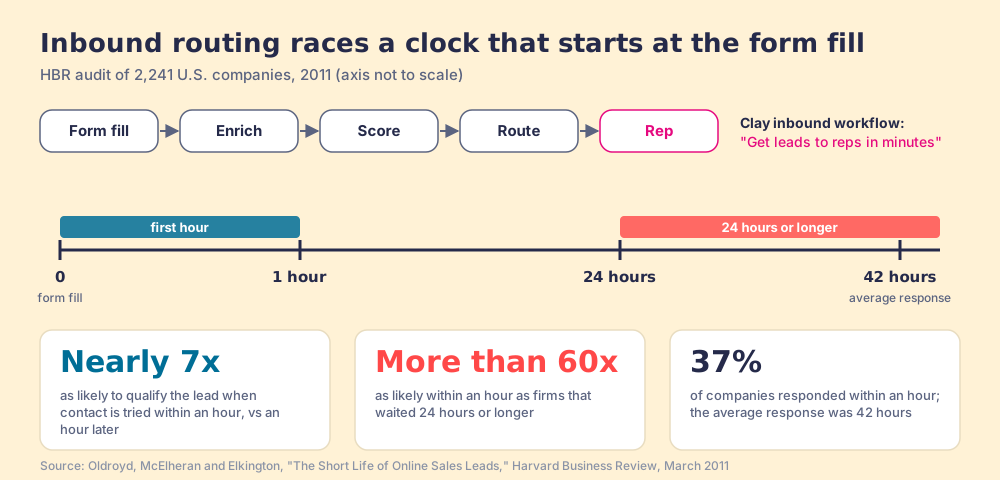
Fast enough that a person answers before the lead goes cold, and the evidence on how fast that is has been public for fifteen years. In 2011, James Oldroyd, Kristina McElheran, and David Elkington audited 2,241 U.S. companies and published the results in Harvard Business Review. Firms that tried to reach a lead within an hour “were nearly seven times as likely to qualify the lead” as firms that waited an hour longer, and “more than 60 times as likely as companies that waited 24 hours or longer.” Only 37% responded within an hour, and “The average response time, among companies that responded within 30 days, was 42 hours” (HBR, March 2011).
Clay’s inbound page is built for exactly this clock: “Enrich every inbound lead and take action instantly,” “Get leads to reps in minutes,” and “Eliminate manual routing” with “custom territory and ICP logic to route qualified leads or sequence instant action.” It cites a “5 min lead response SLA for select customers at Aptean” and “2x lead to opportunity conversion at Rippling” (Clay, inbound enrichment, checked October 1, 2026), both Clay’s claims.
- The build. A webhook from your form tool into a Clay table, the waterfall plus company size and tech stack, a score column, a routing column that maps territory and ICP fit to an owner, then a CRM create and a notification. Webhooks and CRM sync both sit on Clay’s Growth plan.
- The runner. The webhook, the moment a form is submitted. The inbound rep or SDR works the lead; marketing ops owns the scoring.
- The template. Clay’s template gallery has an “Automated inbound” category to start from. Our recipe for the table: form fields, domain, waterfall, employee count, ICP score, owner, SLA timestamp. The last column is the one that tells a manager whether the first hour happened.
5. Signal plays: what Clay signals should a sales team watch?
A smoke detector is cheap, dull, and worth everything on the one night it goes off. Clay’s signals are the same kind of device: “automated tracking systems that notify you of important changes related to your contacts and target companies,” covering new hires, promotions, job changes, news and fundraising, and custom signals, with “Most Signals are available on any paid plan” (Clay University, Signals, checked October 1, 2026). Clay’s outbound page lists the buying signals teams watch: job changes, hiring activity, funding announcements, web visits, and social mentions (Clay, outbound).
The signal we would build first is the champion who moves. A buyer who loved your product at one company and now sits at another is the warmest cold account you will ever have. Clay’s job change signal needs “the contact’s LinkedIn URL as an identifier,” and “Each check consumes 1 action plus 0.2 data credits” (Clay University, job change signal). At Clay’s entry rates, data credits “start at $0.05 each” and actions “start at less than $0.01 each,” so one check costs under two cents by our arithmetic. Watching 500 champions at one check each a month would use 500 actions and 100 data credits, inside the 15,000 actions and 2,500 data credits Launch includes each month (the frequency is a supposition; Clay lets you set it).
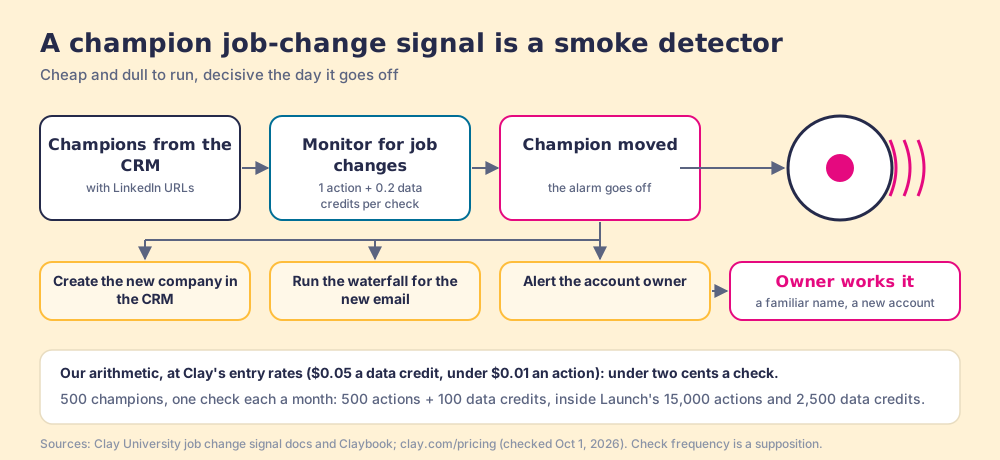
- The build. Clay’s Claybook spells it out in four steps: copy the template, “Import champions from your CRM,” use the “Monitor for job changes” action, then customize the table “to update CRM records, create new company entries, send alerts.”
- The runner. The monitor. The account owner or CSM who knew the champion works the alert, because a familiar name in the first email is what makes the signal worth paying for.
- The template. “Signals: Track job changes for champions at existing customers,” in Clay’s Claybooks. Add a column for the relationship owner before you turn it on; an alert with no name on it rings in an empty house.
6. Rep self-serve prospecting: how do reps use Clay without opening Clay?
The first five pipes end at taps somebody else plumbed. This one asks the rep to turn the tap, which makes it the use case with the most upside and the most ways to fail. Clay names the goal on its homepage: “Reps can self-serve the best prospecting data,” and “Build centralized workflows for any rep to run” (clay.com). Its rep-prospecting page promises “the best contact data for prospects anywhere on the web” and quotes Ben Hope, SVP of Sales and GTM Ops at EF: “We’re giving sales reps the power of Clay data, but in a structured, simple way.” EF scaled Clay prospecting to 110 reps through a Chrome-extension partner, with “No Clay login required” (Clay, rep prospecting).
The reason this tap matters is where reps spend their day. The Bridge Group’s 2025 SDR report puts the median at 112 activities a day, 19 of them on LinkedIn, and $3.78 million in raw pipeline sourced per SDR a year (Bridge Group, 2025). A rep looking at a LinkedIn profile has a prospect in front of them and a question about a phone number. If the answer lives in a Clay tab they never open, the tower was not built for anyone at that desk.
There are three ways to put the tap there. Clay for Chrome pulls leads from web pages into the builder’s tables, which serves the GTM engineer. Clay’s MCP brings Clay data into ChatGPT, Claude, and Codex, which serves a rep who prospects from an AI chat (Clay MCP). And a rep-side extension runs the team’s tables from the page the rep already has open; our Clay Chrome extension guide lays out what to hold any of them to.
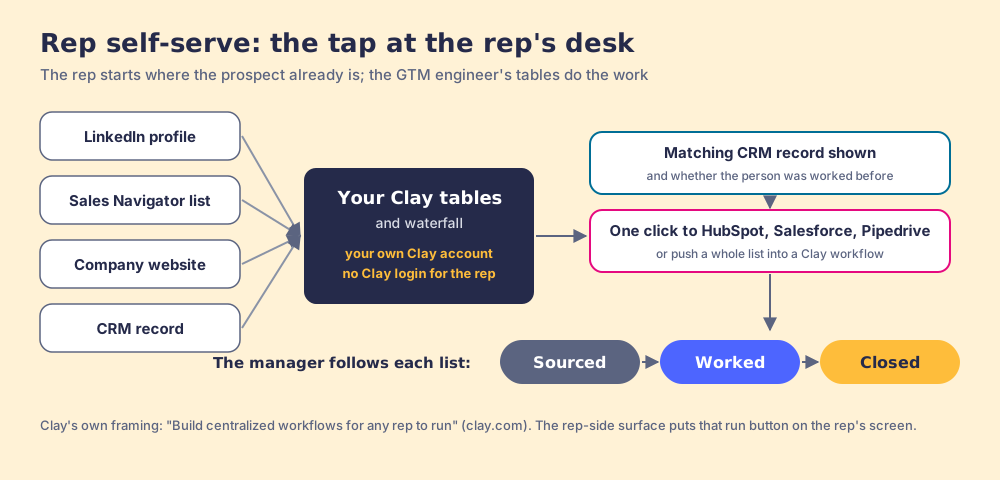
Supered Prospector is the third kind, built for teams that already have Clay. It runs on your own Clay account, so the credits and the waterfall across 200+ providers are yours, and reps need no Clay login. A rep starts from a LinkedIn profile, a Sales Navigator list, a company website (with company research alongside), or a HubSpot, Salesforce or Pipedrive record. On a profile they see the matching CRM record and whether the person was worked before. They build their own list with a buying-committee lookup tuned to your titles and seniority, add contacts to HubSpot, Salesforce, or Pipedrive in one click with field mapping set once, or push a whole list into any custom Clay workflow your GTM engineer built. Then your process applies to the prospects they work, and the manager sees which lists get worked and which close, and coaches from what converts. It costs $45 per rep per month, billed annually, from one user.
Choose something else if you do not have Clay: Prospector does nothing without a Clay account, and a team without anyone to build tables gets more from a single-database extension until it hires that person. The broader sourcing play is on the sourcing use case page, and how teams moved off the old Clay extension partner is covered in the Exportly alternatives post.
Where do Clay templates come from, and how should you use one?
Clay publishes templates in two places. The gallery at clay.com/templates describes itself as “our community’s most popular Clay templates to jumpstart your outbound motion,” filterable by use case (account research, enrichment, list building, scoring and signals, automated outbound, and more), by provider, and by role (Clay templates). Clay University’s Claybooks carry the label “GTM use case templates,” each one a step-by-step build you copy into your workspace (Claybooks).
A Clay template is a recipe card, and a recipe card assumes your kitchen. It does not know your ICP, your CRM field names, or which rep owns which territory. Three columns turn a copied template into a use case that pays off, and all three answer the tap question:
- An owner column. The named person who acts on each row, filled before export.
- A trigger note. What runs the table (a schedule, a webhook, a signal, a rep) written at the top so the next builder knows why it exists.
- A landing column. The CRM field or list the output writes to, matched to a field a rep already sees.
| Use case | Template to start from | Trigger | Who acts on it | Clay plan (Oct 1, 2026) |
|---|---|---|---|---|
| List building | Build account list and account score (technographic and firmographic) | Once per segment, or always-on | SDRs and AEs | Free to start; Growth to sync to CRM |
| Waterfall enrichment | Find Anyone’s Contact Info | Called by other tables | Whoever called it | Free (waterfalls); Launch for phones |
| CRM enrichment | Clean up parent company data with HG Insights | Schedule and new record | Every rep who opens a record | Growth |
| Inbound routing | Automated inbound category | Webhook on form fill | Inbound rep or SDR | Growth |
| Signal plays | Track job changes for champions at existing customers | Monitor | Account owner or CSM | Launch |
| Rep self-serve | Find champions at target accounts with only a website domain | The rep | The rep | Plan your tables need; plus a rep-side surface |
Which Clay use case should you build first?
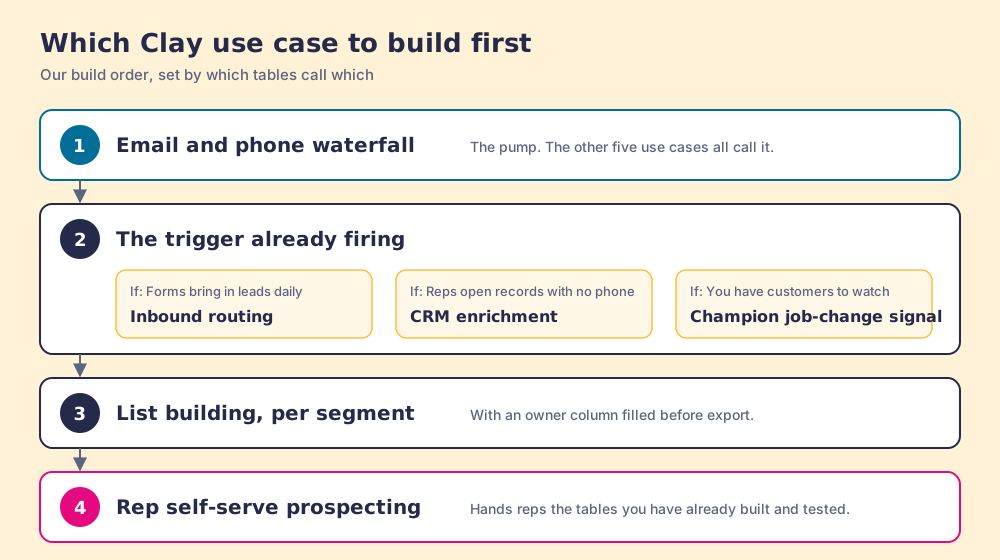
Build in the order the plumbing demands. The waterfall comes first, because the other five all call it, and a pump that leaks makes every tap disappoint. Then build the use case whose trigger already fires every day without you: inbound routing if forms bring in leads daily (the HBR clock makes that hour expensive), CRM enrichment if reps keep opening records with no phone, a champion signal if you have a customer base worth watching. Lists come next, built once per segment with an owner column. Rep self-serve comes last, and not because it matters least. It hands reps the tables the GTM engineer has already built and tested, so it pays off in proportion to how good the first five are.
What we recommend, then. If your Clay account has one table that a GTM engineer runs by hand, you own a water tower with a single tap in the plumber’s office. Build the waterfall properly, attach it to the trigger you already have, and give each output a named owner and a field a rep can see. When the first five pipes run without anyone remembering to turn them on, put the last tap at the rep’s desk, because that is where a seller sits with a prospect on screen and a question in mind. For how reps work that last tap day to day, read our guide to Clay prospecting, and if the question is whether LinkedIn itself can do the job, the HubSpot LinkedIn integration breakdown shows where the native options stop.
Frequently asked questions
What are the most common Clay use cases?+
What are Clay templates?+
Which Clay plan do I need for these use cases?+
Who should own Clay on a sales team?+
Can sales reps use Clay without learning Clay?+
Which Clay use case should a sales team build first?+
Your process, running itself.