- Needs your own Clay account; the Clay credits are yours
- Sales Navigator, LinkedIn, company sites, CRM records
- One-click sync to HubSpot, Salesforce or Pipedrive
- Custom Clay workflows and buying-committee lookup
- See which lists get worked and closed
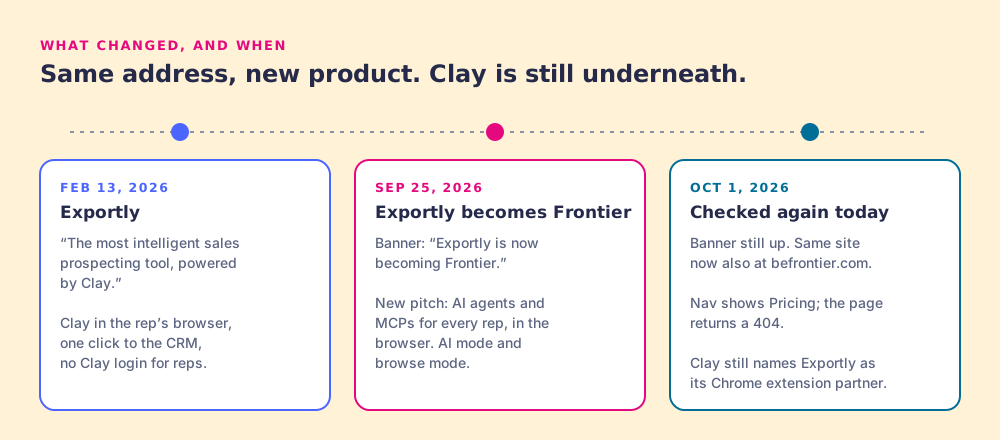
Exportly is becoming Frontier, a product for reps running AI agents in the browser. If you bought Exportly so reps could run your Clay tables from LinkedIn and push clean contacts to the CRM, Prospector does that job on the Clay account you already pay for. Then it shows you which of those lists your reps worked and which ones closed.
In February 2026, exportly.ai sold "the most intelligent sales prospecting tool, powered by Clay" (Wayback capture, February 13, 2026). It was a Chrome extension that let a rep enrich a contact with Clay and sync it to the CRM without ever opening Clay.
By September 25, 2026, a banner at the top of the same site read "Exportly is now becoming Frontier," and the headline under it read "Give every rep AI that works where they do." The new product is an AI layer for reps: an AI chat mode and a browse mode, Clay MCP and Salesforce MCP "+16 more," a library of workflows, SSO and usage caps.
We opened the site again on October 1, 2026. The banner is still up. The same site now also serves at befrontier.com. The Pricing link in the nav leads to a 404 page, so there is still no public price. The Clay connection remains: Frontier's FAQ says "With one click, Frontier links to your Clay workspace." And Clay's own rep-prospecting page still names Exportly as "Clay's chrome extension partner" (clay.com, checked October 1, 2026).
Frontier is a real product for a team that wants reps running agents on live pages. If that is your plan, Frontier fits it. This page is for the buyer whose job stayed the same: Clay's data in the rep's hands, one click to the CRM.
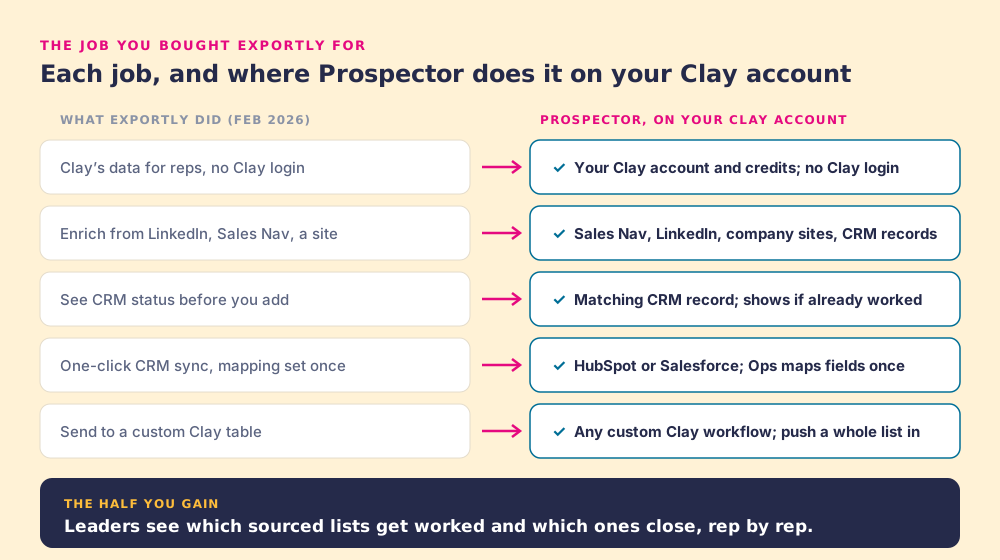
Your GTM engineer built the tables and the waterfall in Clay. Reps live in LinkedIn and the CRM. Exportly closed that distance, and Clay's case study shows the shape of it: Education First gave a 120-person sales team access to Clay's data with "No Clay login required." As a checklist, the February product did five things.
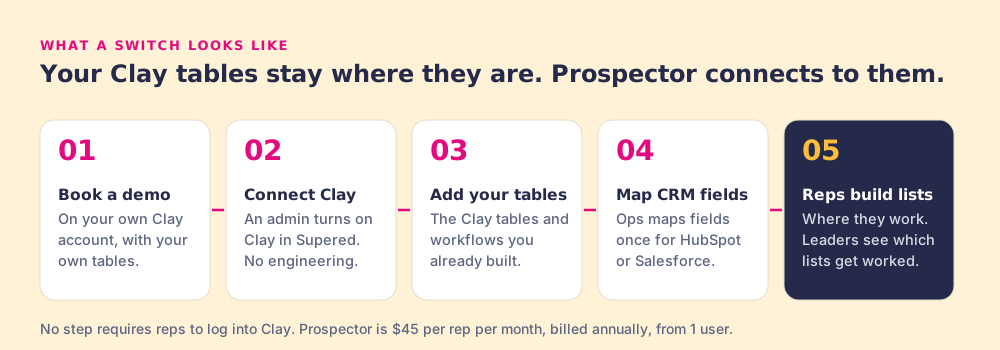
Prospector turns your Clay tables into a button reps press in Sales Navigator, on company sites and inside the CRM record. An admin turns on Clay inside Supered with no engineering, connects the tables you already built, and the rep runs them from the page they are on. Prospector brings no database of its own. Clay is its only data provider, because the waterfall asks every source a single database cannot.
| The job | Exportly, February 2026 | Prospector today |
|---|---|---|
| Clay for reps | Reps enrich with Clay, no Clay login | Runs on your Clay account and credits; reps never log into Clay |
| Where reps start | LinkedIn, Sales Navigator, company sites | Sales Navigator, LinkedIn, company websites (with company research), and HubSpot, Salesforce or Pipedrive records |
| Before the add | CRM status in the extension | The matching CRM record on a LinkedIn profile, plus whether the prospect was already worked |
| CRM sync | One click, mapping configured once | One click to HubSpot, Salesforce or Pipedrive; Ops maps fields once |
| Custom tables | Send to a custom Clay table | Any custom Clay workflow; push a whole list into one; a buying-committee lookup tuned by titles, departments and seniority |
| After the sync | Hands the contact to the CRM or sequencer | Your process applies to worked prospects; leaders see which lists get worked and closed |
In February, Exportly's pitch ended at the sync. The contact landed in the CRM or the sequencer, and what happened next lived somewhere else. Prospector keeps going, because it is built by the team that runs sales process inside HubSpot and Salesforce. Your process applies to the prospects reps work, so a sourced contact gets the same next steps as any other record.
Reps see the matching CRM record and any past touch before they add a name, so two reps stop working the same buyer.
A leader sees which reps are working the lists they built, and which lists are sitting.
Sourced, worked, closed, by list and by rep, so you coach from the plays that convert and spend Clay credits on the tables that make pipeline.
One thing only you can check: your Frontier renewal date and notice terms. We have no view into them, so look before you plan the cutover.
Supered started inside RevPartners, the HubSpot partner that sold roughly twice as much Sales Hub as any other partner and reached Elite tier in 13 months. Today Supered is the #1 sales enablement app on the HubSpot marketplace, with a 5.0 rating from 122 reviews, and holds SOC 2 Type II and GDPR compliance. Prospector is the same team's answer to list building on Clay.
Yes. Prospector runs on your own Clay account, and any custom Clay workflow runs from it. You connect a Clay table with its webhook, with no code. The tables your GTM engineer built for Exportly live in your Clay workspace, so they stay where they are and keep working.
No. Reps run your Clay tables from Sales Navigator, LinkedIn, a company website, or a HubSpot, Salesforce or Pipedrive record, and never log into Clay. The enrichment uses your Clay account and your Clay credits.
Ops sets the field mapping once in Prospector for HubSpot, Salesforce or Pipedrive, and every sync after that is one click for the rep. Bring your current Exportly mapping to the demo and use it as the spec, so the fields land where your team already expects them.
Prospector has no free trial yet. The evaluation is a demo on your own Clay account with your own tables, so you see Prospector run your actual workflows before you buy. If you want to keep Frontier connected while you roll Prospector out, raise it on the demo and we will walk through how that fits your Clay setup.
No. Prospector runs on Clay, and Clay is its only data provider: the waterfall across 200+ data and AI vendors. If your team leaves Clay, Prospector has nothing to run on.
No. Prospector builds lists from Clay, syncs them to the CRM, and shows leaders which lists get worked and closed. If your team wants reps running AI agents and MCPs in the browser, Frontier is built for that job.
HubSpot and Salesforce. On a LinkedIn profile, the rep sees the matching CRM record and whether the prospect was already worked, before adding anyone.
$45 per rep per month, billed annually ($540 per rep per year), and you can buy from 1 user. It needs your own Clay account; the Clay credits are yours.
30 minutes, on your own Clay account, with the tables your reps already run.