HubSpot Partner Portability is a public beta that copies six asset types from your partner account into a client portal.
Supered copies 75+ HubSpot asset types from any portal, including the pipelines, sequences, dashboards and lead scoring a sales build runs on, then shows whether reps follow the build.
01SuperedPartners installing a full sales build into client after client: pipelines, properties, sequences, dashboards, lead scoring and the process reps follow. Included in the partner program.
02HubSpot Partner Portability (beta)A quick copy of a workflow, form, segment, automated email, agent template or custom object from your partner account into one client in the same data region.
03Supered next to the betaKeep HubSpot's beta for quick copies of its six types. Package and install the rest of the build with Supered.
HubSpot knowledge base. Supered: 5.0 from 122 reviews on the HubSpot marketplace and 4.9 from 81 on G2 (1 October 2026).
What HubSpot shipped
What is HubSpot Partner Portability?A beta that names the category.
HubSpot announced Partner Portability at UNBOUND 2026 Partner Day under the line "build once, deploy everywhere" (HubSpot UNBOUND recap). It is a public beta. A Super Admin opts the partner account in, and partners copy assets from Client Access Manager, with a conflict check before each copy and a copy history per client (HubSpot knowledge base).
HubSpot shipping it is good news for partners. Implementation teams have rebuilt the same workflows and forms in each new client portal for years. Now six of those asset types have a native button.
Six is the catch. A sales build is a pipeline with required properties, the sequences reps run, the dashboard a manager opens each morning and the scoring that decides who gets called. None of those are on HubSpot's supported list.
The decision table
Supered vs HubSpot Portability at a glanceEight lines that decide it.
HubSpot Partner Portability (beta)
Supered
Asset types
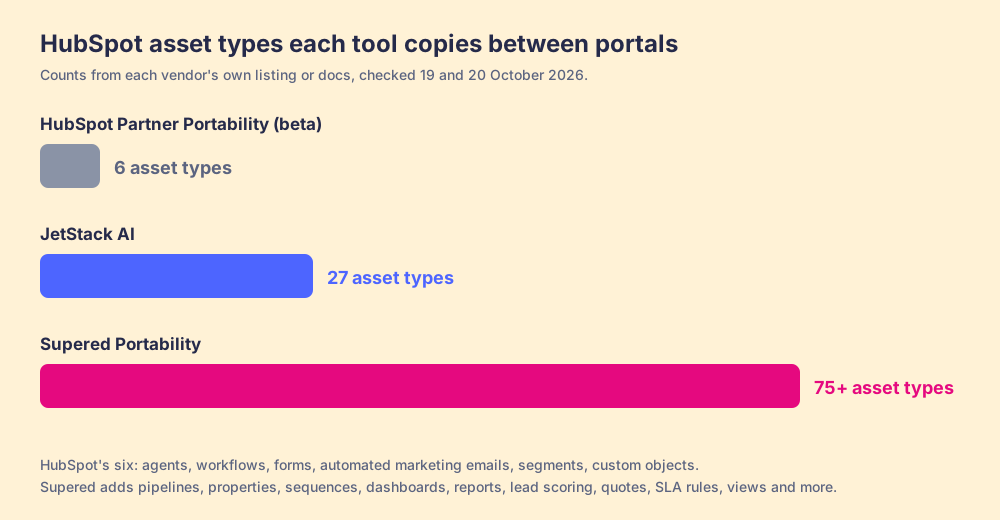
Six: agents (objective, actions and input only), workflows (not workflows built in Agent Hub), forms (names and fields), automated marketing emails, segments (names and filters), custom objects with their properties.
75+, plus fields and field groups across 24 object types: pipelines, properties, sequences, dashboards, reports, lead scoring, quote templates, SLA rules, record views, permission sets, playbooks, AI agents (beta) and more.
Deal pipelines
Not on the supported list.
Installed. If the client already has the pipeline, missing stages are added inside it with stage properties attached, and stage IDs are preserved so filters keep working.
Where assets come from
Your partner account.
Any portal. One package can hold assets from several portals.
Dependencies
HubSpot: "For each asset, all dependencies must be copied in order for the copying to succeed." You find and select them.
The dependency resolver suggests them and never adds one twice. If one cannot be resolved, the install stops instead of shipping a broken asset.
Sending a change
A copy becomes independent of the original. To send a change, you copy it again.
Update the package and install the changed resource on its own.
Requirements
Partner Admin in the client account, not a contractor in your partner account, partner and client in the same data region.
A Supered partner account and access to the client portal.
After the install
The beta copies assets and stops there.
Process rules define a good deal at each stage, reps follow them in HubSpot or in Claude, and Process Boards show who is in and out of your definition of good.
Price
Comes with a HubSpot partner account during the beta.
Included in the Supered partner program. Customer plans from $13.50 per user per month, published.
How we graded: for the job most partners mean when they compare the two, installing a standard sales build into a new client portal. Weights: coverage of the asset types a sales build needs (40%), dependency handling and installs into portals that already have a setup (25%), reuse across clients and source portals (15%), what happens after the install (20%).
Tool
Lane
Grade
Rank
Why it ranks here
Supered
Full sales build into a client portal
A
1
75+ asset types, pipelines merged into the ones a client already has, dependencies resolved, adherence measured after install.
HubSpot Partner Portability
Full sales build into a client portal
C-
2
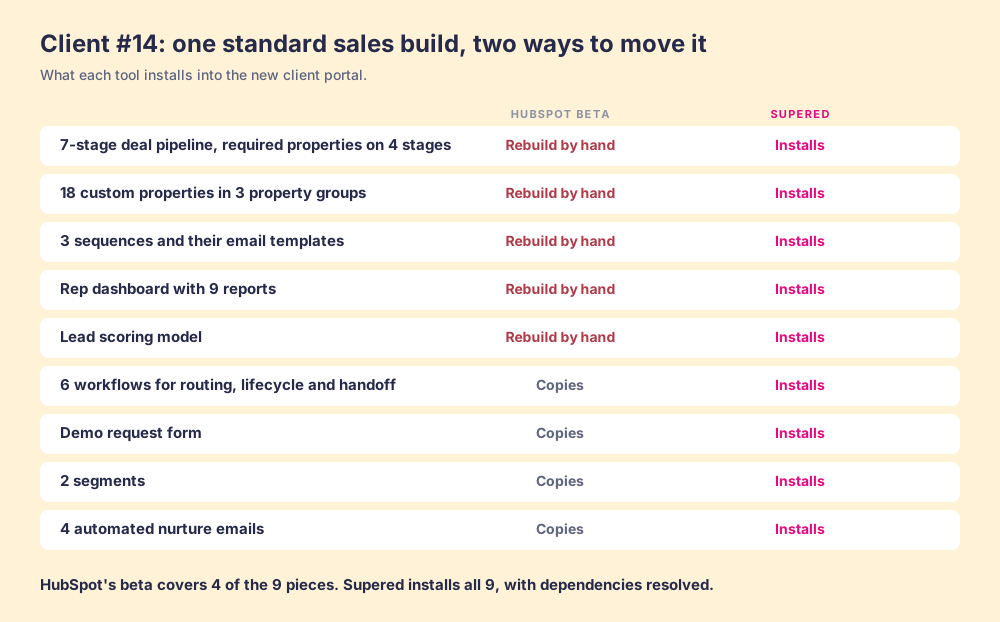
Copies 4 of the 9 pieces in the client #14 build below. The pipeline, properties, sequences, dashboard and scoring get rebuilt by hand.
Supered
Quick copy of one supported asset
A-
1
Install a single resource from any package into any portal.
HubSpot Partner Portability
Quick copy of one supported asset
B
2
Native for its six types, inside the partner account, Partner Admin and same-region rules.
Client #14 runs the same build as clients 1 to 13. HubSpot's beta copies the 6 workflows, the demo form, 2 segments and 4 automated emails. The 7-stage pipeline, 18 properties, 3 sequences, the 9-report dashboard and the scoring model get rebuilt by hand. Supered installs all 9 pieces.
What HubSpot got right
What does HubSpot's beta do well?Native, with a conflict check.
The beta lives inside HubSpot, so a partner has nothing to install. It flags conflicts before a copy runs, such as a client account without access to workflows, and keeps a copy history per client (HubSpot knowledge base).
Its six types are a sensible first six. Workflows, forms, segments and automated emails are the assets partners rebuild most, and agent templates point at where HubSpot is heading with Agent Hub.
Where the beta stops
Why do partners compare HubSpot Portability with Supered?The sales build is missing from the list.
Run a real client build through the beta and the gaps show up early. They fall into five groups.
The assets reps open daily.Deal pipelines, standalone properties, lifecycle stages, sequences, sales email templates, snippets, dashboards, reports and lead scoring are not on HubSpot's supported list.
Dependencies sit with you.HubSpot requires every dependency to be copied for a copy to succeed. A workflow that moves deals between stages of your pipeline, or branches on your custom deal properties, needs those in the client first, and the beta cannot copy them.
One source.Copies start from your partner account. A pipeline you perfected in a client portal last year stays there.
No second pass.A copy becomes independent of the original. Improve the build and each client needs a fresh copy.
Role and region rules.You need Partner Admin in the client account, and partner and client must share a data region.
Supered for the full build
What does Supered do that HubSpot's beta does not?It moves the whole build, then measures it.
Supered Portability packages a HubSpot build once and installs it into client after client. In the app it is called Package Builder. A package holds 75+ HubSpot asset types, plus fields and field groups across 24 object types, and it can pull them from more than one portal (Supported HubSpot resources).
Installs are built for portals that already have a setup. Add a dashboard and its reports come with it. Add a sequence and its email templates follow. If the client already has the deal pipeline, Supered adds the missing stages inside it instead of creating a second pipeline. Same-name assets are detected and skipped or prompted, and an unresolved dependency stops the install before anything broken lands (install docs).
Then the part a copy tool leaves behind. Supered is the business logic for your deals: what a good deal looks like at each stage. The package installs that logic with the build, as process rules, knowledge cards, announcements and action plans. Reps follow it in HubSpot or in Claude, AI agents follow the same rules, and Process Boards show which deals are in and out of your definition of good. In The State of Sales Enablement 2026, 89% of 198 sales teams had a defined process and 36% saw it followed.
Supered Portability is included in the Supered partner program. Customer plans are published: Digital Adoption at $13.50 per user per month yearly, Process Compliance at $40 per user per month yearly with a 5-user minimum (Supered pricing).
Asset types each tool copies, from each vendor's own listing or docs, checked 19 and 20 October 2026: HubSpot Partner Portability 6, JetStack AI 27, Supered 75+.
Where Supered stops
Records.Supered moves the build: configuration, sales assets and the process layer. Contacts, companies and deals need a records tool alongside it.
Drafts first.Workflows and emails install as drafts, so a partner reviews them and turns them on.
Complex templates.Design manager templates and custom modules go through HubSpot's native copy to another account.
See your build installed in a client portal.
A 30-minute demo: bring a client build and we package and install it with Supered, pipeline included.
Supered vs HubSpot Portability: which should partners use?Supered, for the whole build.
Supered. HubSpot's beta copies six asset types from your partner account. Supered installs 75+ from any portal, merges into the pipeline a client already has, and measures whether reps follow the build afterwards.
HubSpot's beta covers
Six asset types. Workflows, forms, segments, automated emails, agent templates and custom objects.
One direction. Partner account to a client in the same data region.
One copy at a time. A change needs a fresh copy.
Supered covers
The whole sales build. 75+ asset types, including pipelines, sequences, dashboards and lead scoring.
Any portal, any client. Pull from several portals into one package and install it in each client.
What happens next. Process rules and Process Boards show whether reps follow the build.
Already using the beta? Keep it for quick copies of its six types. Package the rest of the build in Supered, and book a demo to see your own build installed.
Why trust this page
Why trust a comparison written by Supered?Check the sources, then the demo.
We sell one of the two products on this page, so weigh it that way. Each HubSpot detail links to HubSpot's own knowledge base. If HubSpot adds pipelines, dashboards or sequences to the beta, this page changes.
Supered started inside a fractional CRO and CRM implementation firm founded by Matt Bolian, which sold roughly twice as much HubSpot Sales Hub as any other partner. Supered is the #1 sales enablement app on the HubSpot marketplace and a HubSpot Premier Tech Partner, with 6,000+ installs, 5.0 from 122 reviews on the HubSpot marketplace and 4.9 from 81 on G2.
"Instead of asking people to hunt through docs or a separate LMS, Supered puts the right guidance directly inside our CRM at the moment it's needed; deal stage, workflow step, record type, you name it."
"I used to miss steps - forget to update a field, skip a follow-up, use an outdated template. That cost me deals and got me flagged in reviews. Supered removed all of that."
Reviews quoted verbatim from our wall of love, which links each one to its source.
The questions
Supered vs HubSpot Portability, asked plainly.
What is HubSpot Portability?
HubSpot Partner Portability is a public beta, announced at UNBOUND 2026 Partner Day, that lets HubSpot partners copy assets from their partner account into client accounts from Client Access Manager. It supports six asset types: agents, workflows, forms, automated marketing emails, segments and custom objects.
Does HubSpot Portability copy deal pipelines?
No. Deal and ticket pipelines are not on HubSpot's supported list, and neither are standalone properties, sequences, dashboards, reports or lead scoring. Supered installs deal pipelines, adds missing stages inside a pipeline the client already has, and preserves stage IDs.
What is the best HubSpot Portability alternative?
Supered. It installs 75+ HubSpot asset types from any portal, resolves dependencies, merges into existing pipelines and carries the process layer, and Supered Portability is included in the Supered partner program.
Can HubSpot's beta copy from one client portal to another?
HubSpot's documentation describes copying from your partner account to client accounts. With Supered, one package can hold assets from several portals, including a client portal where you built something worth reusing.
Do changes sync after a HubSpot Portability copy?
No. HubSpot says a copied asset becomes independent from the original, so you copy it again to send a change. In Supered you update the package and install the changed resource on its own.
Does Supered move contacts and deals?
No. Supered moves the build: configuration, the sales assets and the process layer. If records have to move too, pair Supered with a records migration tool.
Keep reading
More on HubSpot Partner Portability and the fieldRelated comparisons.