What Happened to Exportly? The Frontier Rebrand, and What It Means for a Team on Clay
Exportly, the Chrome extension that put Clay in a rep's hands, is now Frontier and sells AI agents and MCPs. A dated account of the rebrand, why a front end on a platform moves up a layer, and the three paths for a team that bought the simple version.
Exportly is the Chrome extension that let sales reps run Clay enrichment from a LinkedIn profile and push the contact to the CRM with no Clay login; in 2026 it renamed itself Frontier, an AI agent platform that puts RevOps-built Clay workflows, agents, and MCPs in the browser.
Exportly is now Frontier. The Chrome extension that let a rep run Clay from a LinkedIn profile and push the contact to the CRM, with no Clay login, renamed itself in 2026 and now sells AI agents and MCPs in the browser. If your team bought the simple version, there are three sensible paths. Stay on Frontier if you are a larger team that wants agents, SSO, and usage caps. Go direct to Clay’s own rep tools if your reps already work inside ChatGPT or Claude. Or move to a plain front end on your own Clay account, such as Supered Prospector, if your reps live in Sales Navigator and the CRM and you want to see which lists get worked.
Exportly is the Chrome extension that let sales reps run Clay enrichment from a LinkedIn profile and push the contact to the CRM with no Clay login; in 2026 it renamed itself Frontier, an AI agent platform that puts RevOps-built Clay workflows, agents, and MCPs in the browser. Nothing on this page says Frontier is a worse product. It is a different product, sold to a different buyer, and that difference is what a team on Clay needs to understand before its next renewal.
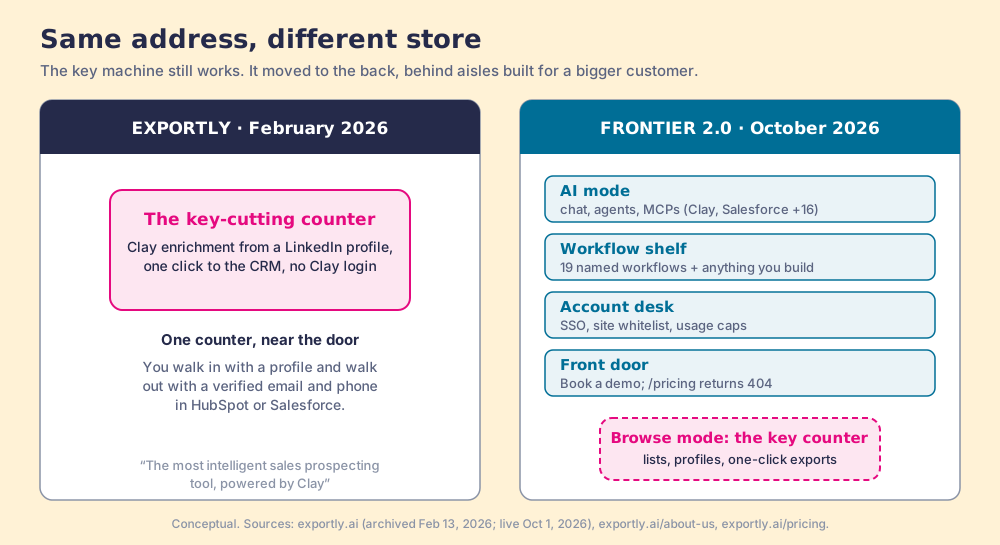
Same address, different store
Suppose the hardware store on your corner was where you got keys cut. You handed one over, and four minutes later you walked out with two copies. Then one spring the sign changes. The building now sells to contractors: power tools on the end caps, an account desk by the door, a salesperson who asks about your project before you reach the back. The key machine still works. It sits behind aisles built for a bigger customer, and the price list has gone behind the account desk.
The Exportly rebrand fits that sketch closely, up to one point the sketch gets wrong if you push it: a contractor supply house is not a worse store. For a builder with forty jobs a month it is a far better one. The question for the person who came in for a key is whether the store still wants their business, and on what terms.
What happened to Exportly, and when?
The record, page by page, with the date each was opened. Where a source is ours from an earlier visit, I say so.
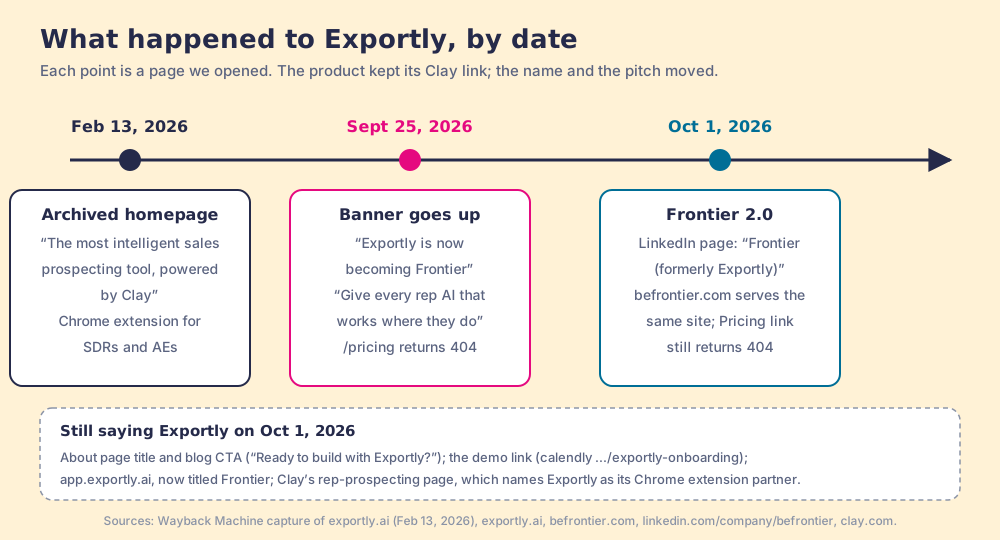
- The February 2026 homepage. The Wayback Machine’s capture of exportly.ai from February 13, 2026, which we read on September 24, sold “The most intelligent sales prospecting tool, powered by Clay”: a Chrome extension for SDRs and account executives that ran Clay’s waterfall from a profile and pushed the result to the CRM, with field mapping set once and no Clay login for reps. (The Internet Archive was offline when we re-checked on October 1. The same line still sits in the title of exportly.ai/about-us today.)
- The banner, September 25, 2026. The homepage title read “Frontier, AI Agents for Every Rep, In the Browser,” under a banner: “Exportly is now becoming Frontier.” The hero: “Give every rep AI that works where they do.” The pricing page returned a 404, as it had the day before.
- Frontier 2.0, October 1, 2026. The hero now carries the label “Frontier 2.0.” The company’s LinkedIn page is titled “Frontier (formerly Exportly)” with 15,397 followers. befrontier.com serves the same site. The navigation adds a Pricing link captioned “Affordable by Design,” and the page behind it still returns a 404.
- The old name, still in the walls. On the same day, the blog’s closing button reads “Ready to build with Exportly?”, the demo link points to a calendar named exportly-onboarding, and app.exportly.ai loads with the title “Frontier” over a meta description that still calls it a Chrome extension “to prospect LinkedIn leads into Clay tables.”
- Clay’s page, unchanged. Clay’s rep-prospecting page still says “Clay’s chrome extension partner, Exportly, lets reps enrich with Clay and sync prospects to your CRM anywhere on the web,” above the Education First case study: 110 reps on Clay prospecting, “No Clay login required.”
Two things the record does not show. There is no announcement post: the Frontier blog’s newest entries are customer stories and podcast episodes, with nothing dated about the name. And there is no sign of a shutdown. The product is live, the Clay link is intact, and the people who sold Exportly now list Frontier on their profiles. The sign went up before the paperwork caught up.
What does Frontier sell now?
Frontier describes itself as an “Execution Layer for Rep-Initiated Workflows,” and the homepage, opened October 1, 2026, fills that phrase in.
- Two modes. “AI Mode is Google Maps. The Browser Copilot is Street View.” AI mode is a chat that scans a territory and runs Clay MCP, Salesforce MCP, and “+16 more.” Browse mode works LinkedIn, CRM records, event lists, and company websites, and sends leads “straight to CRM and sequencer.” Browse mode is the February product.
- A workflow shelf. Nineteen named workflows across four groups (seven for research and targeting, five for CRM hygiene, five for signals and scoring, two for outreach, including AI response drafting), plus “Anything you build.”
- Admin controls. “Whitelist sites, cap usage, manage access with full SSO,” and a “Measure & control” panel: “See who’s using what and what’s actually driving pipeline.” A SOC 2 Type II badge reads “Independently audited · 2026.”
- Vendor-reported results. The product page shows a Klue connect rate moving from 4% to 7.5% in four weeks and a Torq rate from 2.2% to 6.4% in two weeks. These are Frontier’s own figures, with no method published, and I print them as claims.
- A demo-only door. No public price; every button books a demo.
The logos are real and impressive: rep quotes from Zoom, Greenhouse, Pendo, Tines, and others, and a GTM engineer who says he has used “pretty much all of the Chrome extension tools out there for reps” and rates Frontier “far and away the best.” A team of a hundred reps with an operations group that builds in Clay every week is the customer this store was rebuilt for.
Why do vendors move upmarket after a platform partnership?
Frontier has not said why it moved, so what follows is a mechanism, offered as a reading. The pattern behind it is old and well studied.
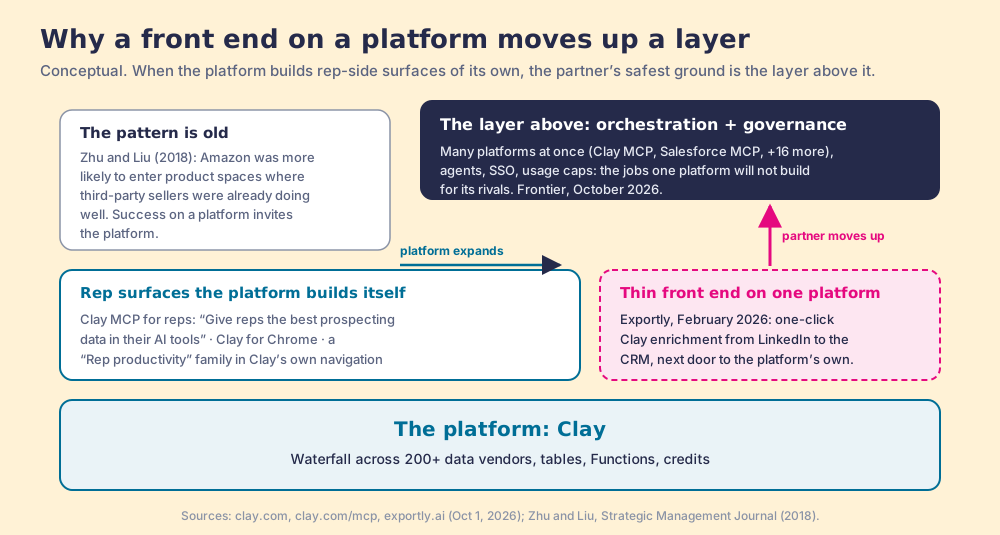
A company that builds a front end on someone else’s platform lives in a peculiar house. The platform is the landlord, the plumbing, and the reason customers show up. When the front end does well, it shows the landlord exactly which room customers want. Feng Zhu and Qihong Liu studied this on Amazon and found the platform was more likely to enter product spaces where third-party sellers were already succeeding (Strategic Management Journal, 2018). Mac developers have a verb for the same experience, “Sherlocked”, after Apple’s Sherlock 3 absorbed what the independent app Watson did in 2002.
Clay’s own navigation tells the other half of the story. Look at it on October 1, 2026. It carries a “Rep productivity” family with pages for rep prospecting and rep assist. Its MCP page is headlined “Give reps the best prospecting data in their AI tools” and promises “Reps get the right data faster while Ops keeps control” (clay.com/mcp). Clay also ships its own browser extension for pulling leads off web pages. None of this is hostile. Clay still names Exportly as its partner on the same site. But a platform that serves reps directly leaves a thin, single-platform front end standing next door to the platform’s own product.
The defensible move in that position is to climb to work the platform will not do for itself. A platform builds for its own tools; it does not build the layer that runs its tools beside a rival’s. So the partner moves up to orchestration across many platforms at once (Frontier’s AI mode lists Clay MCP, Salesforce MCP, and sixteen more) and to the enterprise governance a large buyer requires before it lets agents loose on a hundred browsers (SSO, site whitelists, usage caps). Those are real needs, held by real buyers. The move follows the logic of the position. It also changes who the store is for.
”Prompting isn’t Prospecting”: where Frontier is right
Frontier’s sub-headline is the best line on its site: “Prompting isn’t Prospecting.” It deserves to be met at full strength, because it is mostly true.
A blank chat box is a poor instrument for a rep. The rep with three tabs open and a buyer to call does not want to compose a paragraph asking an AI to find the VP of operations at a logistics company, check the CRM, and enrich the mobile number. In the most cited choice experiment of the last quarter century, shoppers who saw 24 jams on a tasting table bought 3% of the time, and shoppers who saw 6 bought 30% of the time (Iyengar and Lepper, Journal of Personality and Social Psychology, 2000). An empty prompt is a table with infinite jams. Frontier’s FAQ answers the “why not just give reps ChatGPT or Claude?” objection the same way: “No blank prompt, no prompt engineering,” with plays “pre-loaded” one click away.
I part company with Frontier on what counts as a short menu. Nineteen workflows, two modes, and an agent chat is a much better shelf than a blank box. It is still a shelf. It is a shelf because of whose job the product was hired to do.
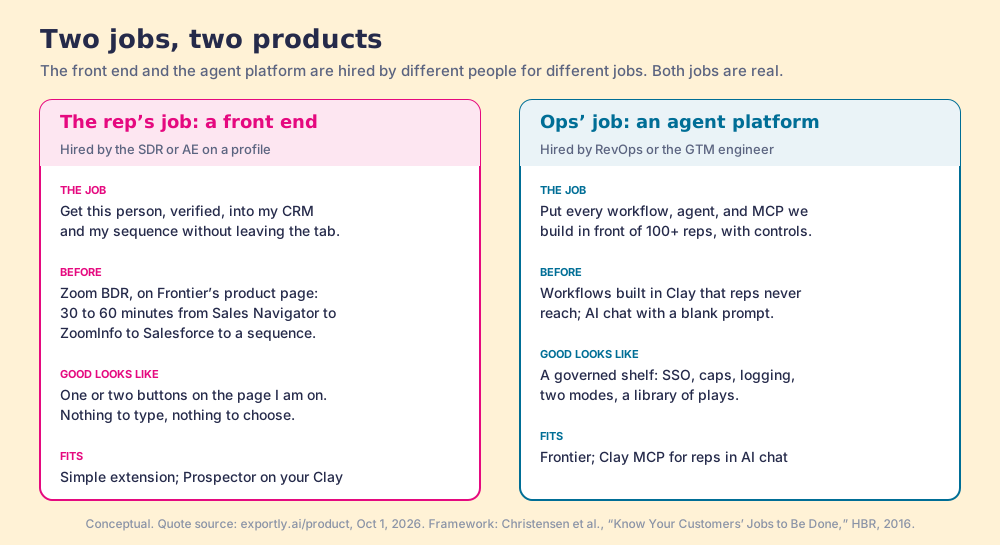
Clayton Christensen’s jobs-to-be-done idea says customers hire a product to make progress in a particular situation, and the same category can hold two products hired for different jobs (Harvard Business Review, 2016). Prospecting tools on Clay are hired for two:
- The rep’s job. “Get this person, verified, into my CRM and my sequence without leaving the tab.” A Zoom BDR quoted on Frontier’s own product page describes the before: “It used to take us 30 to 60 minutes to move contacts from Sales Navigator to ZoomInfo to Salesforce and then into a sequence.” The rep who hired Exportly hired it to turn that hour into a click.
- The operations job. “Put every workflow, agent, and MCP we build in front of a hundred reps, with controls we can show the security team.” RevOps or the GTM engineer hires for this, and success is a governed shelf: SSO, usage caps, logging, a library of plays.
A front end is hired for the first job. An agent platform is hired for the second. Frontier 2.0 is built for the second job and keeps the first one inside it as browse mode. For a large team, buying both in one product is sensible. For a twenty-rep team that only ever had the first job, it means paying for a store to get to a counter.
What does the rebrand mean for a team that bought Exportly as a simple Clay front end?
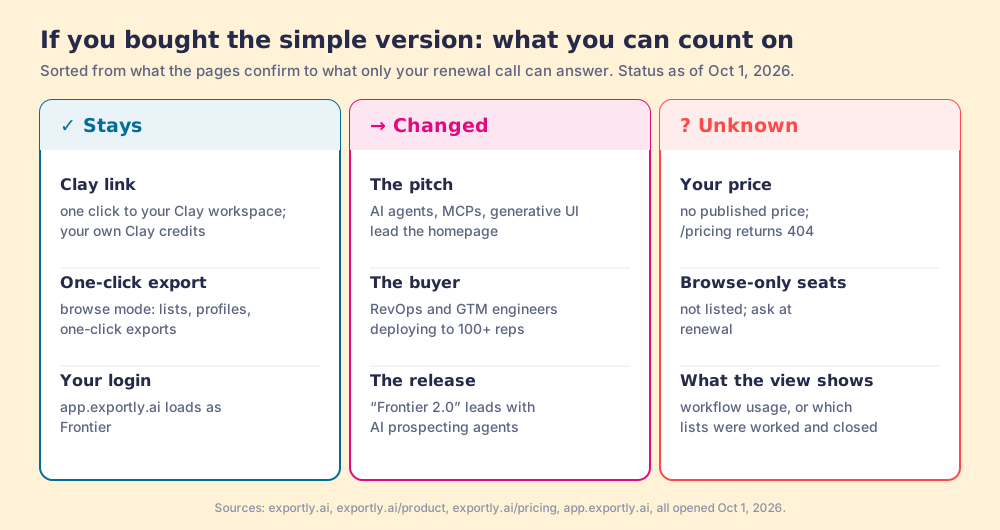
Less than the banner suggests on day one, and more at renewal. Sorted by what you can count on:
- The Clay link. Unchanged. “With one click, Frontier links to your Clay workspace,” and reps still enrich with your own Clay credits.
- The one-click export. Still there, in browse mode: “classic extension prospecting (lists, profiles, one-click exports).”
- Your logins. app.exportly.ai loads under the Frontier name, so an Exportly login lands in the same app.
- The roadmap. The headline product is now “AI Prospecting Agents,” and the release that carries the label “Frontier 2.0” leads with them. The counter you use is a mode inside a larger product, and new work will follow the larger product’s buyer.
- The price. Unknown from the outside. A search for Exportly pricing ends at a 404, and the Exportly AI site, now Frontier’s, publishes no number. Expect the renewal to be a sales conversation about agents and seats.
None of this is a reason to leave. It is a reason to walk into the renewal with questions. The ones I would ask, as the buyer of the simple version:
- A browse-only price. Whether there is a plan for reps who only use profiles, lists, and one-click export, and what it costs per rep.
- The roadmap for browse mode. What shipped for the classic workflow in the last six months, and what is planned.
- The Clay terms. Whether enrichment still runs only on your Clay credits, or whether any agent or MCP use carries its own meter.
- The view of what happened next. Whether “Measure & control” shows which reps’ lists were worked and closed, or which workflows were used.
Stay on Frontier, go direct to Clay, or switch to Prospector?
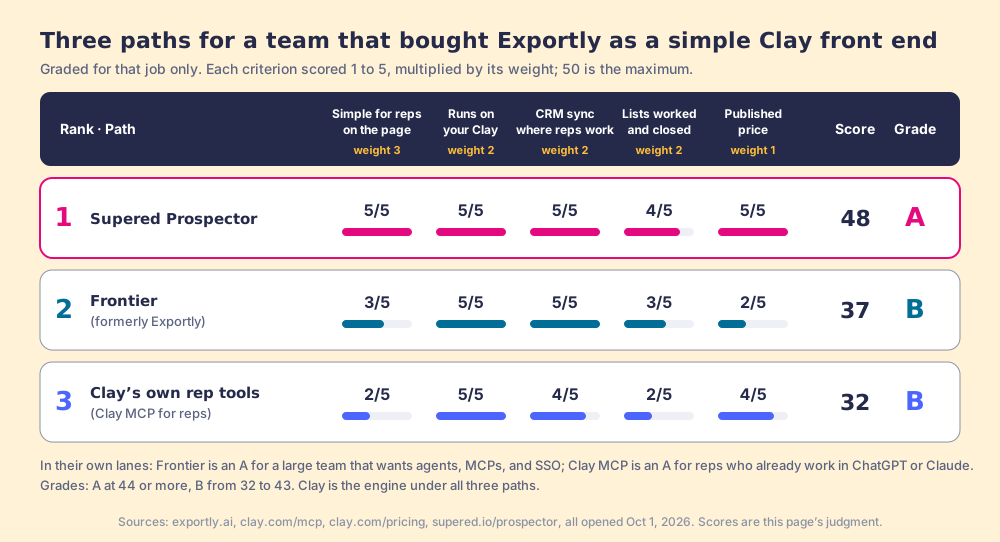
The grades above weight one job, the one Exportly was bought for, and say so. Five criteria, scored 1 to 5 and multiplied by weight, for a maximum of 50: simple for reps on the page they are on (weight 3), runs on your own Clay (2), CRM sync from where reps work (2), a view of which lists were worked and closed (2), and a published price (1). A at 44 or more, B from 32 to 43. Flip the weights toward agents and governance and the order flips with them.
| Rank | Path | Best fit | CRM integration | Setup effort | Pricing (October 1, 2026) | Reason to switch | Grade |
|---|---|---|---|---|---|---|---|
| 1 | Supered Prospector | Mid-market team on Clay; reps in Sales Navigator and HubSpot, Salesforce or Pipedrive | Native sync to HubSpot, Salesforce and Pipedrive, field mapping set once | Connect Clay inside Supered; no code | $45 per rep per month, billed annually, from 1 rep; your Clay plan on top | You bought the counter and want it kept simple, plus a view of lists worked and closed | A (48) |
| 2 | Frontier (formerly Exportly) | Large team with RevOps building agents and MCPs; needs SSO and usage caps | CRM and sequencer sync (Salesforce, HubSpot, Outreach, Salesloft named) | Demo, then admin setup of workflows, permissions, and guardrails | Not published; /pricing returns 404 | You are staying; renewal is the moment to price browse-only use | B (37) |
| 3 | Clay’s own rep tools (Clay MCP for reps) | Reps who already work in ChatGPT, Claude, or Codex | Push to CRM and sequences from the chat | Ops sets up Functions and guardrails in Clay | Clay Launch from $185 a month, Growth from $495 a month | You want the platform’s own rep surface and your reps live in AI chat | B (32) |
Clay is the engine under all three rows. Each path runs on a Clay account and Clay’s waterfall across 200+ data vendors (clay.com, October 1, 2026); the grade is for the surface a rep touches. If your team is not on Clay yet, start with what Clay is before any of this.
Why trust this ranking
I sell the product ranked first, so read the method before the order. Supered started inside RevPartners, the HubSpot partner I founded, which reached HubSpot’s Elite tier in 13 months selling only sales implementations. Supered is rated 4.9 out of 5 from 81 reviews on G2 and 5.0 from 122 reviews on the HubSpot App Marketplace, with 6,000 installs (both checked October 1, 2026). Prospector runs on Clay, the same platform Frontier runs on, so this is a comparison between two front ends on one engine.
Supered Prospector, the simple front end on your Clay
Prospector does the job Exportly did in February and stays on it. Your GTM engineer builds the tables in Clay. Reps get those tables as a button in Sales Navigator, on a company’s website, or inside a HubSpot, Salesforce or Pipedrive record, and one click runs Clay’s waterfall and syncs the contact to the CRM. Your reps never log into Clay.
- The rep’s own starting point. LinkedIn and Sales Navigator, a company site (with company research and a buying-committee lookup tuned to your titles and seniority), or the CRM record that needs the missing phone.
- Your workflows, as buttons. Any custom Clay workflow runs from Prospector, and a rep can push a whole list into one.
- No duplicate work. On a profile, the rep sees the matching CRM record and whether the person was worked before.
- Lists that end the way your process says. Your sales process applies to the prospects reps work, and the manager sees which lists got worked and which closed, and coaches from what is converting.
- A price you can read. $45 per rep per month, billed annually, buyable from one rep. With Clay’s Growth plan at $495 a month, ten reps come to $11,340 a year for both.
Prospector does not draft emails, run agents, or bring its own contact database. Your contacts come from Clay’s waterfall, on your account, at Clay’s prices.
Other tools fit better in three cases: if you need agents and MCPs across many platforms with SSO and usage caps (stay on Frontier), if your reps already do their prospecting inside ChatGPT or Claude (Clay MCP for reps), or if you do not want Clay at all, in which case a single database is simpler and the Apollo alternatives page grades them.
If the counter is what you came for, book a Prospector demo. It runs on your own Clay account, so you see your own tables as buttons in the first half hour. Teams mid-renewal can read the switch-from-Exportly plan and the side-by-side Prospector vs Exportly comparison.
Frontier, if you need the bigger store
Stay if the second job is yours. A team with a GTM engineer shipping new Clay workflows every week, a security review that asks about SSO, and a hundred reps across several regions will use the shelf Frontier built, and its customer list (Zoom, Greenhouse, Pendo, Webflow) says it serves that buyer well. Use the renewal to price browse-only seats and to ask what the “Measure & control” view shows.
Clay’s own rep tools, if your reps live in AI chat
Clay MCP brings Clay into ChatGPT, Claude, or Codex: reps run Clay Functions, search for people, and push validated contacts to sequences in natural language, while Ops governs “the logic, compliance and spend.” For reps who already work in an AI chat, it removes a vendor. For reps who work on LinkedIn tabs, it asks them to change rooms. The Clay Chrome extension guide sorts Clay’s own surfaces from the partner extensions in more detail.
What I recommend
Name the job you bought Exportly for, then buy for that job. The evidence on this page points one way for each case. If your team’s need has grown into agents, many platforms, and enterprise controls, Frontier grew with you, and staying is the sensible call. If your reps already work in AI chat, the platform’s own rep surface is the shortest path. If you bought a key counter, for a mid-market team whose reps live in Sales Navigator and the CRM, keep the counter: a simple front end on your own Clay, with a published price and a view of which lists turn into pipeline. Prospector is built for that case, and the Exportly alternatives page lays out the wider field for anyone still weighing it.
Frequently asked questions
What happened to Exportly?+
Is Exportly shutting down?+
Does the Exportly Chrome extension still work the same way?+
How much does Exportly (now Frontier) cost?+
Is Frontier still a Clay partner?+
How is Supered Prospector different from Exportly?+
Your process, running itself.