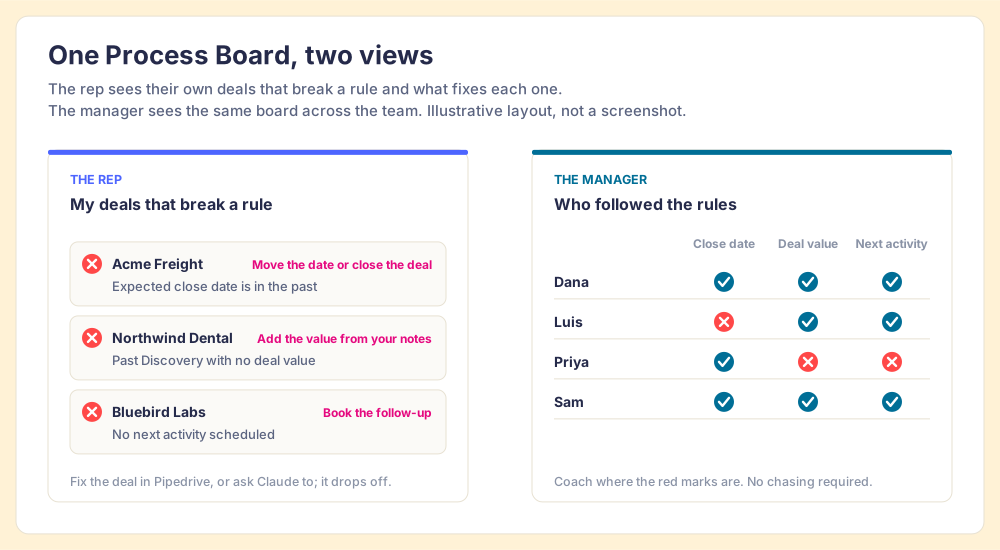
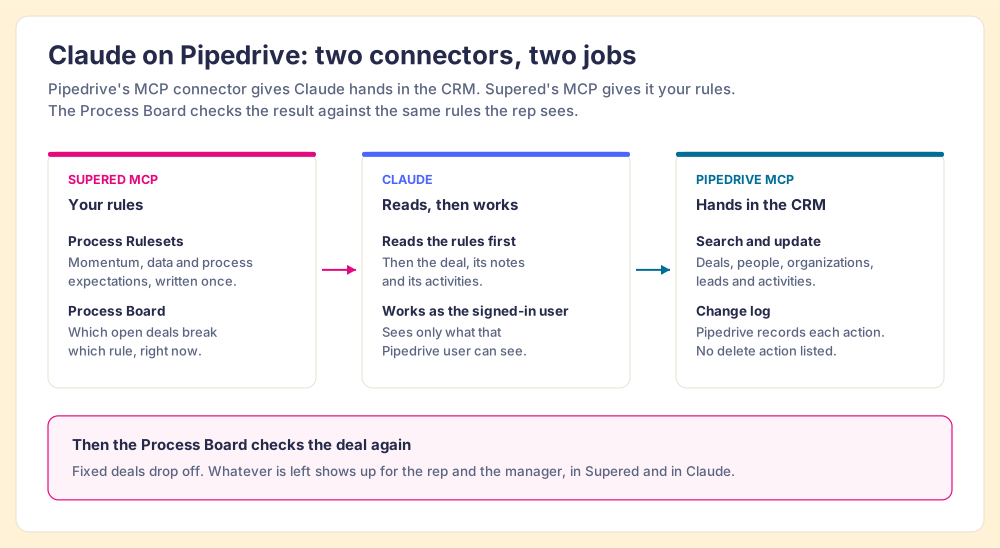
Supered for Pipedrive turns the expectations in your head into Process Rules, checks your open Pipedrive deals against them on a Process Board, and shows each rep and manager which deals break which rule. The same rules reach Claude through Supered's MCP server, so when a rep asks Claude to tidy their pipeline through Pipedrive's own MCP connector, Claude works to your standard instead of guessing at one.
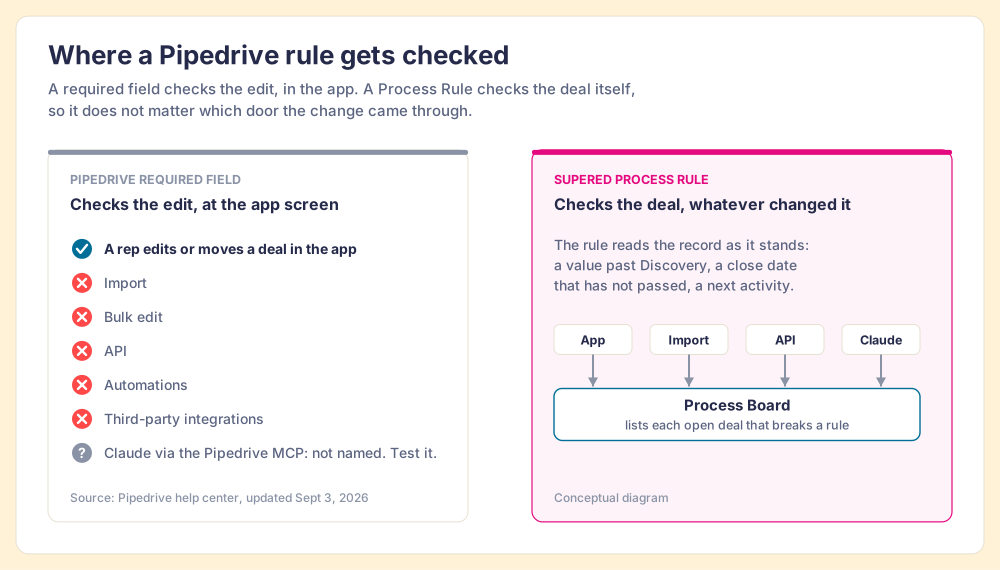
A shop can put a good lock on its front door and still lose stock through the loading dock out back. Pipedrive's required fields are that lock. On the Premium plan and above (Pipedrive pricing, checked October 1, 2026), they stop a person from saving a deal, person or organization, or moving a deal to a new stage, until the right fields are filled. Pipedrive is plain about the dock: "the required fields feature won't stop deals from progressing if the fields are updated via import, bulk-editing, API, automations, or third-party integrations" (Pipedrive help center, updated September 3, 2026).
For years little came through the dock: an import once a month, a Zapier step or two. Then Pipedrive launched its own MCP server on June 30, 2026, on every plan, and AI assistants started writing to deals through it. Pipedrive's article does not say whether its own MCP server counts as an integration for this purpose, so test it on a sample deal before you rely on either answer.
Pipedrive calls itself "the easy and effective CRM for small and medium-sized companies," used by more than 100,000 companies (Pipedrive). On teams that size, the process lives in one person's habits, and habits do not scale past the person who has them. The State of Sales Enablement 2026 shows where it breaks.
89% of teams have a defined sales process. 36% see reps run it. The 53-point gap is the distance between what you expect and what the pipeline shows.
SOSE 2026Against 47% at 1 to 5. The top reason reps skip the process is that managers do not enforce it (29%), and leaders cite capacity more often than indifference. A founder who sells and manages has no spare hours to inspect.
SOSE 2026Against 24% when it lives in CRM fields or stages and 15% in docs or wikis. Required fields are the 24% row. When reps work in Claude, Claude is part of the workflow, and the guidance has to reach it there.
SOSE 2026The rules live in one head, and the pipeline drifts whenever that head is busy.
The rules live in Supered and get checked against open deals. Teams that inspect deals against a defined process at the highest frequency hit quota at 6.3x the rate of the lowest band.
Supered started inside RevPartners, the HubSpot partner our co-founder Matt Bolian built, which sold roughly twice as much Sales Hub as any other partner and reached Elite tier in 13 months. We wrote Supered because the clients we implemented kept the same problem after go-live: a well-built CRM, a defined process, and reps who drifted from it. Pipedrive teams have the same problem with a smaller staff to catch it.
One Process Board, read two ways. The rep gets a short list of their own deals to fix. The manager gets the same list across the team, sorted by rule and by rep, so the one-on-one starts with what is open.
Pipedrive's built-in controls are good, and on a small team they may be all you need. The table sorts each option by the job it does. Pipedrive's plan names changed in 2026, and its help center still uses older names, so we cite the pricing page for plans.
| Option | Best at | Stops or flags | Checks changes from the API and AI? | Price |
|---|---|---|---|---|
| Pipedrive required fields | Making a rep fill a field before saving or moving a deal in the app | Stops the edit | No, per Pipedrive's help center | Included on Premium and above |
| Pipedrive Important fields | Reminding a rep that a field is empty | Flags it in the deal view | Shows the flag; blocks nothing | Included on higher plans |
| Supered Process Rules on a Process Board | Checking open deals against your written expectations and showing who followed them | Lists each deal that breaks a rule, for the rep and the manager | Yes: it checks the deal itself, whatever changed it | $40/user/mo paid yearly, 5-user minimum |
Choose Pipedrive's required fields alone if you have a handful of sellers, the founder still sees each deal, and your main worry is a blank field at the moment of a stage change. Choose Supered if more than one person needs to know whether the process ran, or if Claude and other integrations now write to your deals.
Pipedrive's MCP server comes with every Pipedrive plan. It lets Claude search deals, people, organizations and leads, create and update records, and convert leads, acting only on what the connected user can already view or edit, with each action recorded in the change log (Pipedrive, checked October 1, 2026). It became available in Claude's connector directory on August 18, 2026, and Pipedrive reported that over 93% of its MCP usage happens on Anthropic surfaces. Joe Futty, Pipedrive's Chief Product and Technology Officer, said "Customers increasingly expect to work with their CRM data wherever their work happens."
The connector is a ring of keys. It opens the records. It says nothing about the house rules: which deals need a value, which close dates are wishful, which meetings still owe the buyer a recap. Supered's MCP server carries those rules. Claude reads them first, then uses Pipedrive's keys to do the work, and the Process Board checks the result. For the full setup, read the Pipedrive MCP guide; for what Claude reads and changes across CRMs, see the Claude integration page.
Pipedrive gives Claude the keys. Supered tells it which rooms need work.
Customers go live in under a week, and some in a day. Four steps; the first three are one-time setup.
Your admin connects your Pipedrive account inside Supered. Process Rules run on your Pipedrive deals, so this comes first. Our team supports your admin directly; there is no implementation project to buy.
Start with the things that bother you when they slip. Momentum: no open deal without a next activity, no expected close date in the past. Data: a deal past Discovery carries a value. Process: a recap within a day of each meeting. Describe a rule in English and Supered's MCP creates the Process Rule for you to review. The sales expectations use case has a starter set.
The board checks your open Pipedrive deals against the Ruleset and lists each one that breaks a rule, rep by rep. If reps use Claude, connect Pipedrive's MCP connector and Supered's MCP server in Claude so both read from the same rules.
Reps fix their deals in Pipedrive or ask Claude to: "Check my open Pipedrive deals against my Supered rules and fix what the notes support." Managers open the one-on-one with what is still on the board.
Process Rules and Process Boards come with the Process Compliance plan, which includes everything in Digital Adoption. Prices from our pricing page, October 1, 2026.
$45 per user per month paid monthly. A 10-user team paying yearly comes to $4,800 a year.
The smallest yearly plan is 5 users at $40, or $2,400 a year. Supered fits best at 10 or more users who work at a computer.
Customers go live in under a week, some in a day. No implementation fee, because we do not sell implementation projects.
Your sellers work from the Pipedrive mobile app in the field. Supered has no mobile product. Or you have three sellers and one founder who sees each deal: Pipedrive's required fields will carry you for now.
More than one person needs to know whether the process ran, and Claude or other tools now write to your deals.
Both teams pay for the same Pipedrive seats and the same Claude seats. The difference is whether the rules are written where software can check them.
The founder fixes stale close dates when there is time. Claude fills blank values with a reasonable stranger's guess. New reps learn the standard by getting corrected, one deal at a time.
The expectations are Process Rules. The board shows each rep their list and each manager the team's. Claude reads the same rules before it writes, and the board checks its work.
Reps start the day with a short list or none. Claude does the admin to your standard. The manager walks into one-on-ones knowing which deals need judgment, because the fields are already done.
What Pipedrive sales leaders and admins ask before they connect Supered.
Pipedrive facts cite Pipedrive.
Supered for Pipedrive holds your sales expectations as Process Rules, checks your open Pipedrive deals against them on a Process Board, and shows reps and managers which deals break which rule. The same rules reach Claude through Supered's MCP server, so a rep who works in Claude follows the standard they would follow in Pipedrive. We announced the Pipedrive launch at the Pipedrive Partner Summit in Orlando in October 2026.
Required fields do a good job at one moment: a person saving or moving a deal in the Pipedrive app. Pipedrive's help center says they will not stop deals from progressing when fields change through import, bulk editing, the API, automations or third-party integrations (Pipedrive, updated September 3, 2026). A Process Rule checks the deal as it stands, whatever changed it, and it can check things a field cannot, such as whether a deal has a next activity booked.
Yes. Everything Supered does on HubSpot and Salesforce works on Pipedrive: Process Rules, Process Boards and process compliance, the cards, guides and action plans reps see in the Supered Chrome extension, and Prospector for building lists on Clay.
Sales teams of 10 or more users who work mostly at a computer. Supered has no mobile product, so a field team that lives in the Pipedrive mobile app will get less from it. Teams of three or four sellers where the founder still sees each deal can often get by on Pipedrive's own required fields for now.
In Claude, open Customize, then Connectors, and find Pipedrive in the directory, or add a custom connector with the URL https://mcp.pipedrive.ai/mcp as Pipedrive's help article describes. Sign in to Pipedrive, approve the permissions, and turn on the setting that loads all available tools. The Pipedrive MCP guide walks through each screen.
Pipedrive's connector lets Claude search and update deals, people, organizations, leads and activities. It does not carry your expectations: that a deal past Discovery has a value, or that an open deal always has a next activity. Supered's MCP server gives Claude your Process Rulesets and the Process Board's list of deals that break them, so Claude knows which work to do before it writes anything.
Do not count on it. Pipedrive's required-fields article lists API and third-party integrations among the routes required fields do not stop, and it does not name MCP either way. Test it on a sample deal. A Process Rule checks the deal afterward regardless of the route, so a change Claude makes still has to pass your rules on the Process Board.
Pipedrive's MCP server page lists searching, creating and updating records, with each action recorded in the change log, and lists no delete action (Pipedrive, checked October 1, 2026). The Supered MCP server cannot delete content, and it asks for confirmation before it creates or updates anything.
Process Compliance, the plan that includes Process Rules and Process Boards, is $40 per user per month paid yearly or $45 paid monthly, with a 5-user minimum. It includes everything in our Digital Adoption plan. Full details are on the pricing page.
Customers go live in under a week, and some go live in a day. Most of that time goes into deciding which expectations to write down first. Connecting Pipedrive and turning a written expectation into a Process Rule is the quick part.
Your Pipedrive admin or sales ops lead, with our team supporting them directly. Supered does not sell implementation projects. A sales leader can write the first rules in plain sentences, and Supered's MCP turns each one into a Process Rule for review.
Supered is SOC 2 Type II and GDPR compliant. Each person who connects Claude signs in with their own Supered account, and Pipedrive's MCP connector acts only on what that person's Pipedrive user can already view or edit.
Building lists is a separate product. Prospector puts Clay's enrichment in front of every rep and is priced on its own: $45 per user per month billed annually, from one user, running on your own Clay account. Clay itself connects to Pipedrive to create, update and look up people and organizations. Book a Prospector demo to see how it fits your Pipedrive setup.
How to connect Pipedrive to Claude, what it can write, and the rules to give it first.
→ USE CASEMomentum, data and process expectations as Process Rules, and a board that goes to zero.
→ INTEGRATIONWhat Claude reads, what it can change, and the permission gates every change has to clear.
→ PRICINGDigital Adoption, Process Compliance and Prospector, side by side.
→A 30-minute demo: we write three of your expectations as Process Rules, run them against a Pipedrive pipeline, and show you the board a rep and a manager would see.