Clay Chrome Extension: What Exists Today, and the Five Moves a Rep-Side Extension Should Be Held To
Three things answer to the name. Clay for Chrome pulls leads off web pages into the builder's tables; Clay MCP puts Clay in an AI chat; a rep-side extension hands Clay's waterfall to the rep on the profile they have open. Which is which, and the spec to hold the third to.
A Clay Chrome extension is a browser add-on that connects a rep's screen to a Clay account: Clay for Chrome pulls leads from web pages into Clay tables, and a rep-side extension runs Clay's waterfall from the profile, site, or CRM record the rep has open, with no Clay login.
The question arrives in the sales channel as one line: “is there a Clay Chrome extension?” RevOps answers “yes, sort of,” and the rep who asked, who is looking at a VP’s LinkedIn profile with no mobile number on it, closes the thread none the wiser. Both of them are right, because three different things answer to the name. A Clay Chrome extension is a browser add-on that connects a rep’s screen to a Clay account: Clay’s own Clay for Chrome pulls leads from web pages into Clay tables, and a rep-side extension runs Clay’s waterfall from the profile, site, or CRM record the rep has open, with no Clay login. The rep wanted the second thing. RevOps was thinking of the first. This page sorts the three, then sets out the five moves any rep-side extension should be held to before a team pays for one.
What is a Clay Chrome extension, and which one do people mean?
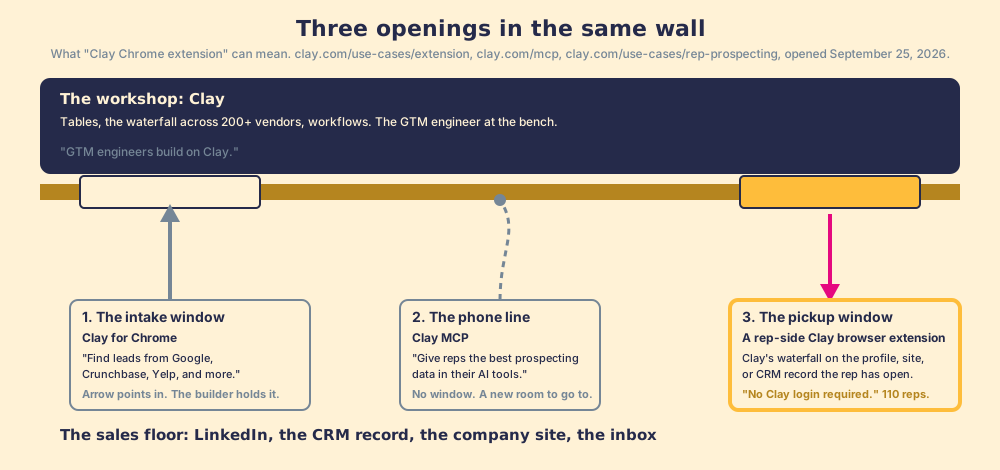
Keep the picture from what is Clay: Clay is the workshop in the back of the building, the GTM engineer works at the bench, and the reps work out front. A Chrome extension is a window cut into the wall between the two rooms. The question is which way things pass through it.
- Clay for Chrome, the intake window. Clay’s own extension, on its own page: “Find leads from Google, Crunchbase, Yelp, and more,” and “Pull in leads from any website with Clay’s Chrome Extension” (clay.com/use-cases/extension, opened September 25, 2026). A builder on a directory page hands a list through the window into a Clay table, where the waterfall and the workflows run. The arrow points into the workshop, and the person holding the list is the builder.
- Clay MCP, the phone line. Clay’s page headlines it as “Give reps the best prospecting data in their AI tools”: a rep prompts ChatGPT, Claude, or Codex to run Clay Functions, search People, or push validated contacts to the CRM, while Ops governs “the logic, compliance and spend” (clay.com/mcp). No window at all; the rep calls the workshop from a different room.
- The rep-side extension, the pickup window. Clay’s rep-prospecting page describes a Chrome-extension partner that “lets reps enrich with Clay and sync prospects to your CRM anywhere on the web,” pushes to Salesforce, HubSpot, Outreach, or Salesloft, shows CRM status so the rep knows if the record already exists, and cites a sales team that put 110 reps on Clay prospecting, “No Clay login required” (clay.com/use-cases/rep-prospecting). The arrow points out of the workshop, to the rep, on the page the rep already has open.
One more fact belongs in this section because a buyer will meet it in a forum. A July 2025 thread in Clay’s community opens with a member saying Clay’s Chrome extension for LinkedIn was discontinued, so he built a free one; the first reply warns that LinkedIn detects extensions which interact with the page and that scraping belongs in the cloud, and the builder answers that his extension only pushes the page URL to Clay (community.clay.com). Two members disagreeing in a forum is not a policy, but the distinction they argue over is real and belongs on your list of questions: does the extension scrape the profile in the tab, or does it read the URL and let Clay’s waterfall do the lookup on Clay’s side? The pickup window should take a ticket and leave the customer’s pockets alone.
What should a rep-side Clay extension do? The five-move spec
The category is young enough that vendors describe it by feature list, and a feature list is the wrong instrument for a buyer. A sales leader needs a spec: the sequence a contact travels from the rep’s screen to a closed deal, and what the extension is responsible for at each step. Here is the one we hold ourselves to, in order, and each move is a question to ask in the demo.
- Start anywhere the rep already is. A LinkedIn profile. A Sales Navigator list. A company’s website, when the rep is on acme.com and wants the buying committee. A CRM record in HubSpot or Salesforce that needs the missing phone or the fresh title. A premade or custom enrichment table for the segment. Ask: which of these does the extension open from, and which send the rep somewhere else?
- Build their own list. The rep, not Ops, assembles the list from those sources, with Clay’s waterfall filling emails and phones across 200+ providers (clay.com, September 25, 2026). Ask: is it the customer’s Clay account and the customer’s tables, or a vendor’s private data?
- Take action from the list. One click into the CRM, with field mapping set once by Ops, and into the sequencer if the team runs one. Ask: does the rep see whether the person is already in the CRM, who owns them, and where the deal stands, before adding a duplicate?
- Work it in the CRM, to the standard. The next expected action reaches the rep in the flow of the work, the process rules apply, and adherence is measured deal by deal. Ask: what does the extension know about the contact the day after the export?
- The manager sees sourced, worked, closed, and sets the standard. A funnel: how many were sourced, how many were worked (the customer defines worked), how many closed (the customer defines closed), against the expectation the manager set. Ask: what does the manager’s view show besides credits used?
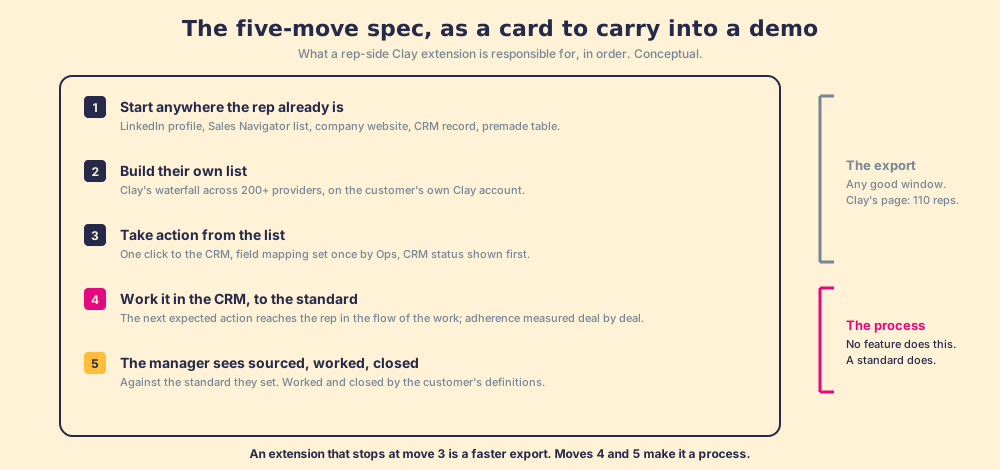
Moves 1 through 3 are what the pickup window has always done. An extension that stops there is a faster export, and a faster export into a CRM where no one works the contact is a faster way to fill the CRM. Moves 4 and 5 are what turn a window into a process, and no feature list mentions them because no feature does them; a standard does.
Why does “no Clay login” matter more than it sounds?
Start with the rep’s day, because the whole argument rests on it. The Bridge Group’s 2025 SDR report, 351 B2B companies, puts the median rep at 112 activities a day: 44 phone, 41 email, 19 LinkedIn, 8 text or other (Bridge Group, 2025). Those 112 happen in four places, and Clay is a fifth. The same report puts the median share of SDRs at quota at 60%, the lowest in its history, and median tenure at 1.9 years, so the rep asked to learn a fifth tool is behind on the four and may be gone before the lesson pays back.
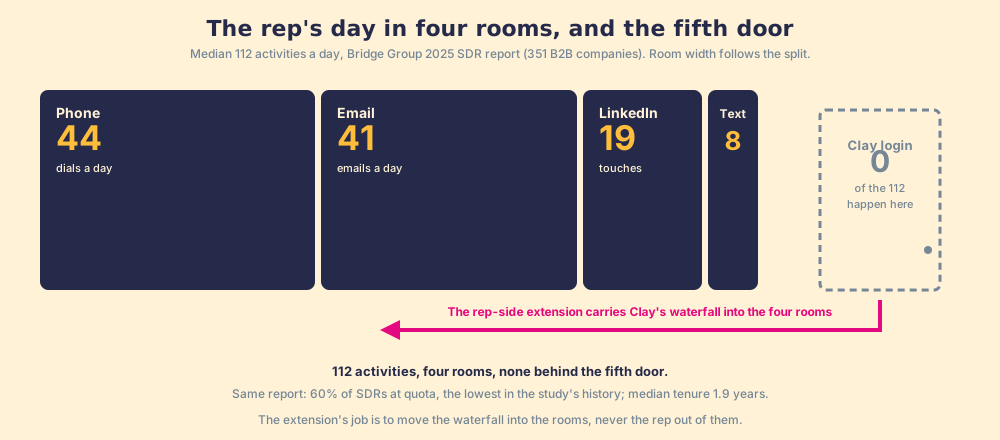
Two convictions we hold explain the rest, and both fit in a breath. The answer has to reach the rep in the moment of the work; any time they must go somewhere else for it, that is a failure. And a tool that asks reps to add a tab, a login, or a lesson has already lost, because reps adopt what sits in the path they already walk. Our field data puts numbers on the second one. Across 198 sales leaders, reps who get the next step in the flow of work report 49% quota attainment against 15% for reps who have to go somewhere else for it (The State of Sales Enablement). Clay’s own case study reads the same way from the customer’s side: the sales team that scaled to 110 reps did it with “No Clay login required,” and its SVP of sales says the team “prefers performing enrichment actions” in the extension over the same functions in Salesforce.
You might say the login is a small thing, that a rep who can learn Sales Navigator can learn Clay. Fair, and some will. But when reps do not run what was built for them, the cause is the system, friction and distance and no one inspecting whether it was run, and a Clay lesson treats the rep as the cause. The pickup window treats the wall as the cause and cuts through it. That is also the difference between a Clay browser extension and Clay MCP, stated as a fact: MCP brings Clay into your AI chat; the extension brings Clay into the LinkedIn tab, the CRM record, and the company site the rep is already on. For a team that sells by phone and email, the second is the better bet.
What happens after the export, and who can see it?
Each version of “Clay for reps” on Clay’s own site ends at the same place. The contact lands in Salesforce, and the window closes. Clay’s MCP page says its governance covers “the logic, compliance and spend,” which is data governance and good data governance; it does not say whether the rep called the number. The credit meter counts contacts bought. It cannot count contacts worked.
Our field research measures the size of that gap for the sales process as a whole, and the shape transfers. Across the same 198 sales leaders, 89% have a defined sales process and 36% see reps run it, a 53-point gap between built and run, and teams that inspect deals against the process consistently hit quota at 6.3x the rate of teams that rarely do. A contact pulled through the pickup window and never called sits in the same gap as a playbook written and never opened, and the export log cannot see it.
This is the one place Supered belongs on a page about a Clay extension, so state it plainly. Supered is a rep-side layer on the customer’s own Clay account: a rep on a LinkedIn profile, a Sales Navigator list, a company site, or a HubSpot or Salesforce record runs Clay’s waterfall in one click, with no Clay login, and syncs to the CRM with field mapping Ops set once. Then the part no extension has had: the sourced contact enters a motion the Behavior Layer guides and inspects, sourced, worked, closed, by the customer’s own definitions, deal by deal, with the manager coaching off the signal instead of chasing it. Clay governs the data. Supered governs the motion.
What we recommend
Three ways to get Clay to a rep, sorted by who they suit.
- Clay for Chrome. For the builder. It feeds lists off directory pages into the tables where the waterfall runs, and it is the right tool for that job. Do not hand it to a rep and call the rep enabled.
- Clay MCP. For a rep who lives in an AI chat and a RevOps team that wants Ops-side governance of logic and spend. It opens a new room, and the contact still ends at the export.
- A rep-side extension with a standard. For a sales team that has Clay, reps on LinkedIn and in the CRM, and a manager who wants to see sourced, worked, and closed. This is the category Clay itself points reps to, and the one we build in.
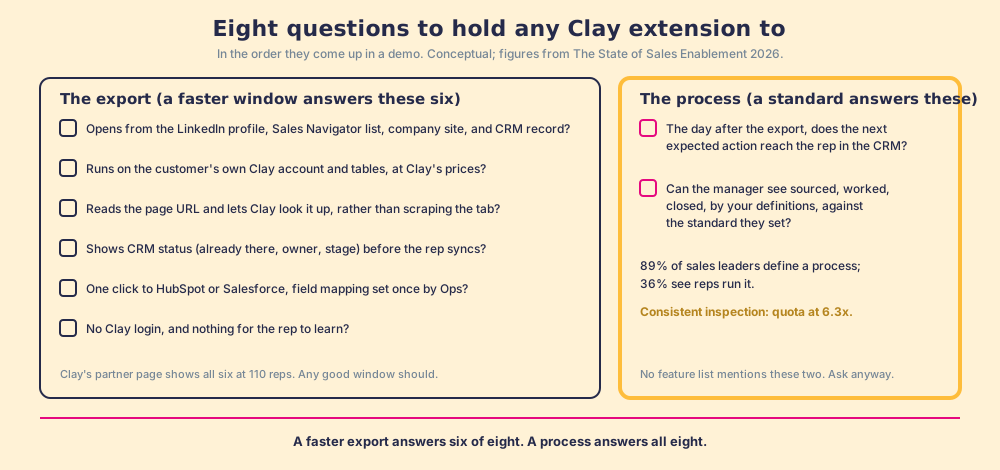
Our recommendation, and the evidence for it: if your reps are asking for a Clay Chrome extension, they are asking for the pickup window, and the case for giving it to them is 49% against 15%. Then insist on moves four and five, because 6.3x is the difference between an export log and an inspected process, and no window on its own can supply it. Whether you want a front end on Clay at all, or one of the tools the wider market means by the term, is sorted in Clay alternatives; what the rep’s enrichment costs on the customer’s own account is in Clay pricing; and the extensions reps already run beside their CRM are ranked in best HubSpot Chrome extensions and best Salesforce Chrome extensions. The process the sourced contact should enter, from list to first conversation, is laid out in the sales prospecting guide.
Frequently asked questions
Does Clay have a Chrome extension?+
Can a rep use Clay from a LinkedIn profile without logging into Clay?+
What is the difference between a Clay extension and Clay MCP?+
What should a Clay Chrome extension for reps be able to do?+
Do Clay Chrome extensions put a LinkedIn account at risk?+
Does Supered replace Clay?+
Your process, running itself.