Clay Alternatives: What the Question Usually Means, and Why a Sales Team Often Wants a Front End on Clay Instead
Four buyers type the same two words: one wants a single database, one a lighter waterfall service, one enrichment inside the CRM, one already pays for Clay and wants reps to use it. A sourced, graded survey of the Clay alternatives each one means.
Clay alternatives are the tools a buyer reaches for when Clay's waterfall and workflow layer feels like more than the team can run: a single database, a lighter waterfall service, CRM-native enrichment, or a rep-side front end on the Clay account you already have.
The renewal for Clay comes across the desk with the note “reps aren’t in it” attached, and the sales leader types the two words a buyer types when a tool feels bigger than the team using it. The results page is a row of listicles, each with a different set of tools, because four different people search for Clay alternatives and mean four different things. Clay alternatives are the tools a buyer reaches for when Clay’s waterfall and workflow layer feels like more than the team can run: a single database, a lighter waterfall service, CRM-native enrichment, or a rep-side front end on the Clay account you already have. For a sales team that already pays for Clay, that last one is usually the better buy, and this page says so before it surveys the alternatives to Clay that the other three buyers mean.
What does “Clay alternative” mean when a sales team searches it?
Clay is a workshop, and the what is Clay post draws it: parts bins along one wall (200+ data vendors on one contract, per clay.com on September 25, 2026), a jig on the bench (the waterfall, which asks vendor after vendor until one returns a verified email or phone), and a conveyor out the door (orchestration into the CRM). Clay’s own waterfall page states the payoff in a line: searching providers in sequence “routinely triples our customers’ data coverage and quality” (clay.com/waterfall-enrichment). Listen to the four people at the counter asking for an alternative, and each wants something smaller, closer, or simpler than the room in back.
- A single shelf. The buyer who wants one database, one contract, one login, and a Chrome extension for reps: ZoomInfo, Apollo, Cognism, Lusha. What they give up is the jig; when the one shelf is empty, the rep is stuck.
- A smaller workshop. The buyer who likes the waterfall idea and wants it without a platform to build on: a service that asks 20 or 25 providers on the buyer’s behalf, charges per verified result, and hands back a spreadsheet or a CRM push.
- A drawer in their own desk. The buyer whose need is enrichment inside the CRM they already run: fill the job title, the revenue range, the employee count on records that exist, automatically, with no third tool.
- A service counter at the front. The buyer who has the workshop, has a builder in it, and has reps on the floor who never walk back. What this buyer wants is a window in the wall: Clay’s output handed to the rep where the rep already stands.
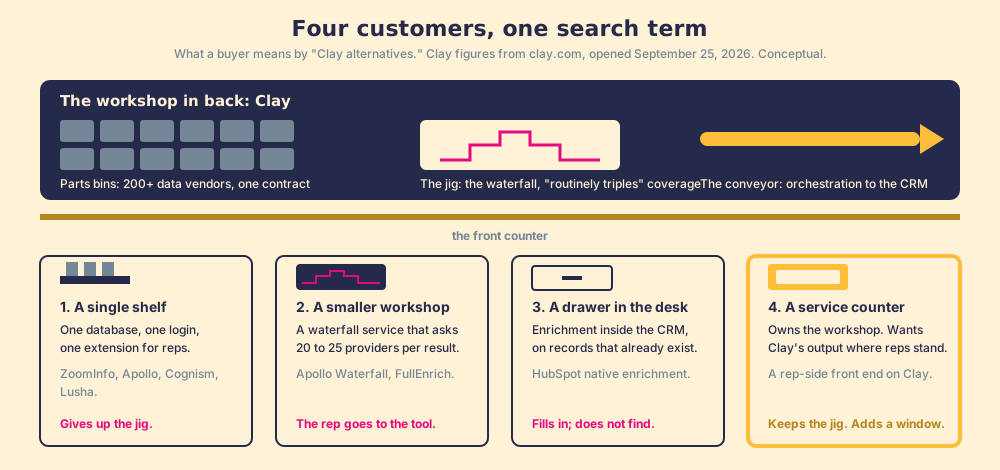
The picture has an edge. A service counter is only an alternative for the buyer who already owns the workshop; for the other three it is the wrong aisle, and the rest of this page treats their options as the real Clay competitors they are.
Which tools compete with Clay’s waterfall layer, and how do they grade?
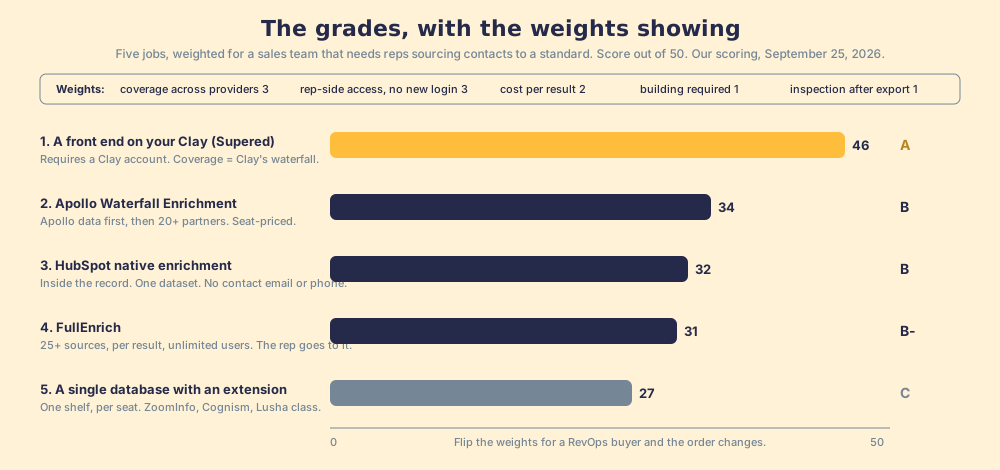
A ranking has to show its work, so here is the lens before the table. We graded each option on five jobs and weighted them for one buyer: a mid-market sales team that needs reps sourcing verified contacts and working them to a standard. A RevOps lead building inbound enrichment would weight the same rows differently, and should.
| Job | Weight | What a 5 looks like |
|---|---|---|
| Coverage across providers | 3 | Many databases asked in sequence, paid per result |
| Rep-side access, no new login | 3 | The result arrives on the record the rep has open |
| Cost per result | 2 | The bill tracks contacts found, not seats |
| Building required | 1 | Usable the day it is switched on |
| Inspection after the export | 1 | Was the contact worked and closed, by your definitions |
Each row is scored 1 to 5 per job, times the weight, out of 50. Sources: the vendors’ own pages and Vendr, opened September 25, 2026.
| Rank | Option | Grade | Score | Best lane | Why it ranks here |
|---|---|---|---|---|---|
| 1 | A front end on your Clay (Supered) | A | 46 | A team that has Clay and reps who never open it | Coverage is Clay’s waterfall across 200+ vendors; runs on the rep’s LinkedIn tab, company site, or CRM record with no Clay login; the sourced contact enters an inspected process. Requires a Clay account, so it is not a Clay replacement. |
| 2 | Apollo Waterfall Enrichment | B | 34 | A team with no builder that wants the most coverage from one login | Fills each record “with Apollo data first, then lets 20+ partners fill in the rest,” emails and phones only (apollo.io/product/waterfall); seat-priced, Vendr median $19,000 a year on 101 purchases. |
| 3 | HubSpot native enrichment | B | 32 | A HubSpot team whose need is firmographics on existing records | Enriches title, seniority, LinkedIn URL, revenue range, employee count inside the record, automatically or in bulk; one dataset; no contact email or phone in the property list; contact needs a business email first. |
| 4 | FullEnrich | B- | 31 | A small team that wants waterfall coverage per result, no platform | 25+ sources, $55 a month for 1,000 credits ($0.055 each), work email 1 credit, mobile 10, unlimited users, no charge on a miss (fullenrich.com/pricing); a web app and API, so the rep goes to it. |
| 5 | A single database with an extension (ZoomInfo, Cognism, Lusha class) | C | 27 | A team that wants one vendor and will accept one vendor’s coverage | One shelf; Vendr medians $33,500 (ZoomInfo, 1,573 purchases) and $32,750 (Cognism, 94), Lusha Premium $299.95 a month; per seat; buyers on Vendr describe running two of them in tandem. |
Two footnotes carry the table. Supered’s coverage score is Clay’s coverage, because Supered brings no database of its own; it brings Clay’s waterfall, which is every database, routed, and that is the reason we chose Clay as our only data provider. And Clay is not a row, because Clay is the reference the rows are measured against, and three of them (Apollo, Lusha, FullEnrich) are also providers inside Clay’s own marketplace (clay.com/integrations/data-provider/apollo-io). The smaller workshops are often shelves in the big one.
When does a team truly need something other than Clay?
Three cases, and in each of them a Clay alternative is the right answer, stated plainly.
- No builder, and none coming. Clay is built for the person who builds: “GTM engineers build on Clay,” and Clay says it coined the role in 2023 and sees about 100 GTM engineer job listings go live each month (clay.com/blog/gtm-engineering). If no one owns tables and waterfalls, Apollo’s version asks its partners in the order you set from a screen a rep already uses, the closest a team gets to the jig without hiring for it.
- A team of two or three. Clay’s Free plan excludes phone number enrichment, and Launch starts at $185 a month (clay.com/pricing; the arithmetic is in Clay pricing). FullEnrich’s $55 Pro tier buys 1,000 credits, which is 100 mobile numbers at 10 credits each or 1,000 work emails at one, with unlimited users. For a founder and two reps who need forty mobiles a week, the smaller workshop is the right size.
- One CRM-native need. If the job is keeping revenue range, employee count, and title current on records that already exist, HubSpot’s enrichment does it inside the record, automatically for new records and in bulk from an index page, segment, import, or workflow (knowledge.hubspot.com, updated July 20, 2026). Read the property list first: contacts get city, title, seniority, and LinkedIn URL; companies get a phone number; no contact email or direct dial appears, and a contact needs a business email before enrichment runs. A drawer holds what a drawer holds.
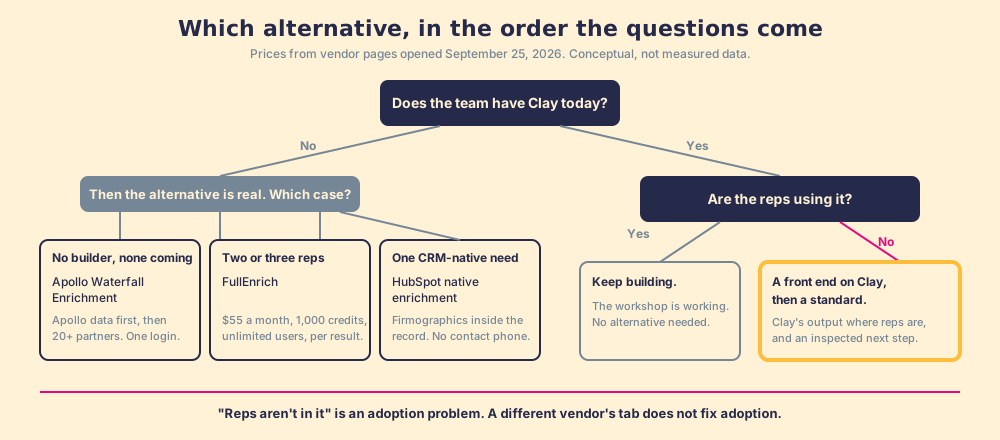
You might say a fourth case belongs here: Clay costs too much. Fair, and sometimes true. But run the number first. Clay’s Growth plan is $495 a month, $5,940 a year, against Vendr’s median of $19,000 for Apollo and $33,500 for ZoomInfo, and Clay does not charge when a lookup returns nothing. A team that leaves Clay for a single database on cost usually pays more for less coverage. Fit is what moves the three teams above.
When is the “alternative” a front end on Clay?
Now the fourth customer, the one with the workshop and the empty floor. Start with where a rep’s day goes. The Bridge Group’s 2025 SDR report, 351 B2B companies, puts the median rep at 112 activities a day: 44 phone, 41 email, 19 LinkedIn, 8 text or other (Bridge Group, 2025). None of the 112 happens in a Clay tab, and the same report has a median of 60% of SDRs hitting quota, the lowest in its history. A rep that busy does not walk to a room in the back, however well stocked. So the Clay investment is capped by rep adoption, and no one is measuring it.
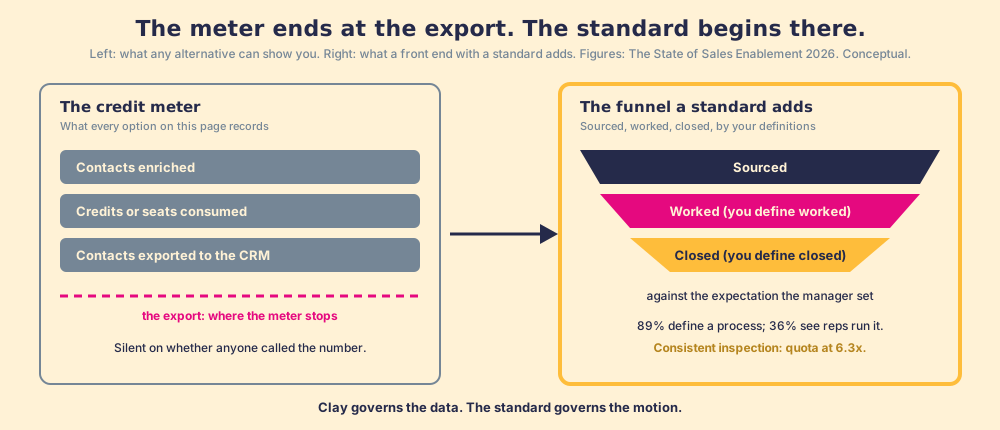
Our field data measures that gap for the sales process as a whole, and the shape transfers. Across 198 sales leaders, 89% have a defined sales process and 36% see reps run it, a 53-point gap between built and run; reps who get the next step in the flow of work report 49% quota attainment against 15% for reps who have to go somewhere else for it; and teams that inspect deals against the process consistently hit quota at 6.3x the rate of teams that rarely do (The State of Sales Enablement). A Clay table no rep runs sits in the same gap as a playbook no rep opens, and switching vendors does not close it.
Clay says the same thing in its own words. Its homepage promises to “build centralized workflows for any rep to run,” and its rep-prospecting page describes a Chrome-extension partner that “lets reps enrich with Clay and sync prospects to your CRM anywhere on the web,” with a case study of a sales team that put 110 reps on Clay prospecting, “No Clay login required” (clay.com/use-cases/rep-prospecting). The category exists, Clay endorses it, and it is the service counter in the workshop wall. A counter without a standard behind it is a faster way to fill the CRM with contacts no one works. The one we built is Supered: it runs on the customer’s own Clay account, so a rep on a LinkedIn profile, a Sales Navigator list, a company site, or a HubSpot or Salesforce record gets Clay’s waterfall in one click with no Clay login, and the contact then enters a motion the Behavior Layer guides and measures, sourced, worked, closed, by the customer’s own definitions, with the manager coaching off the signal. Clay governs the data. Supered governs the motion.
What we recommend
Five options, sorted by the buyer, with our verdict on each.
- Apollo Waterfall Enrichment. The pick for a team with no builder and no Clay that still wants providers asked in sequence. Seat-priced, emails and phones only; the Apollo alternatives page runs the credit arithmetic.
- FullEnrich. The pick for a team of two or three that wants per-result pricing and unlimited users without a platform. The rep goes to the tool, and on a team that small, that is fine.
- HubSpot native enrichment. The pick when the need is firmographics on existing HubSpot records and nothing else. It will not find a mobile number.
- A single database with an extension. The pick only when the team wants one vendor and has priced the coverage gap against a second contract; the ZoomInfo competitors page does that sum.
- A front end on your Clay, with a standard. The pick for a team that has Clay and reps who never open it. This is the ally case, and it is where we sit.
Our recommendation, with the evidence behind it: if the reason you searched for Clay alternatives is the note “reps aren’t in it,” keep the workshop. Clay’s waterfall triples coverage by its own account and costs a fraction of a seat-priced database. Open the service counter, then set the standard behind it: 49% against 15% is the difference the counter makes, and 6.3x is the difference the standard makes. What a rep-side extension should be held to, move by move, is the subject of Clay Chrome extension, and the process the sourced contact enters is laid out in the sales prospecting guide.
Frequently asked questions
What are the best Clay alternatives for a sales team?+
Is Clay worth it, or should I switch to a Clay competitor?+
Which Clay competitors offer waterfall enrichment?+
Can HubSpot replace Clay for enrichment?+
What is a rep-side front end on Clay?+
Do I still need a Clay account if I use Supered?+
Your process, running itself.