Sales prospecting, for teams that have Clay · Built on Clay's waterfall

Sales prospecting, built on the Clay account your team already has. The power of the GTM engineer, in every rep's hands.
Build the list in a click. Work it to closed.

Sales prospecting on Clay gets simple when every rep can build a list from wherever they already are and work it in the CRM the same afternoon. Your GTM engineer already built the waterfall and the tables in Clay. Supered puts all of it one click from the LinkedIn profile, the Sales Navigator list, the company website, or the CRM record the rep is looking at. The rep builds their own list, sends it to HubSpot, Salesforce or Pipedrive, and works it with the next step in view. The manager watches the list turn into pipeline: sourced, worked, closed.

Supered Prospector: $45 per rep per month, billed annually, on your own Clay account. See Prospector

200+ data and AI vendors
Behind every click. Clay's waterfall asks provider after provider until one returns a verified email or phone.
Supered puts that waterfall one click from every rep,
on the profile, the site, or the record they already have open. Source: Clay's own vendor count, clay.com, September 2026 ↗
Build a list from wherever reps already are Clay LinkedIn Sales Navigator Company websites HubSpot Salesforce Any URL
6 min read What you'll learn: why a list the rep builds gets worked, why a waterfall finds more than any one database, the eighteen capabilities a rep gets, and the five moves from a LinkedIn profile to a closed deal
Chapter 01 · Who builds the list

Who should build a sales prospecting list? The rep who is going to work it.

A name on a list the rep built comes with a reason. They saw the post. They own the account. They were on the company's site and spotted the new VP. That reason is the first line of the opener and the reason the rep follows up a third time. A list handed down carries the rows without the reasons. Clay solved the data side: your GTM engineer already built the waterfall and the tables. What is left is to put that power in the hands of the person with the reason.

The usual way
Ops builds the list. The rep inherits it.
A rep asks for a list. Someone who knows Clay pulls and enriches it. It arrives a few days later with good data and none of the rep's context, so the rep starts from row one and works down. The best rows and the rest get the same treatment.
→
The Clay-powered way
The rep builds it from what they see, with Clay behind every click.
The rep is on a LinkedIn profile, a company site, or a CRM record. One click runs the enrichment the GTM engineer built in Clay. The contact comes back with a verified email and phone, goes to the CRM in one more click, and the rep works it while the reason is fresh. Clay governs the data. Supered governs the motion.
Chapter 02 · The opportunity

Why is building a list still the slowest part of a rep's prospecting week?

The data is ready. Clay made sure of that. What slows the rep down is the distance between the data and the tab they are working in.

What you can see
Lists come from somewhere else.
A request to Ops, a spreadsheet, a copy and paste between LinkedIn and the CRM. The rep spends prospecting time moving names between tabs.
What it feels like
Prospecting feels like admin.
The part of prospecting that books meetings is spotting the right person and opening the conversation. Typing and duplicate checks crowd it out.
Why it can change now
Your team already owns the engine.
Clay is the tool GTM engineers build on, and the account is already paid for. Reps get the benefit the day it sits where they already work.
Today

Verified data in Clay, and reps who reach it through a request.

With Supered

Clay one click from every rep. The list they build is the list they work.

Chapter 03 · What the rep gets

What does a rep get when Clay is one click away?

Eighteen capabilities, in the order a rep meets them. Each card says whose benefit it is. Where it comes from Clay, we say so. Where it comes from Supered, we say that too.

01 Find the right people, from wherever the rep is
Supered
Prospect from any LinkedIn profile or Navigator list.

The rep is already on the profile. One click, and the person is enriched and ready to add. Sales Navigator lists work the same way.

Supered + Clay
Research the company while you are on its website.

On acme.com, the rep pulls the company research your Clay tables return, right beside the site. No second tab, no copy and paste.

Supered + Clay
The buying committee, tuned to your team.

One click pulls the people who decide at that account. Ops sets the parameters for the titles and seniority that count, so reps pull your definition of the committee.

Supered + Clay
Prospect from inside the CRM record.

On a HubSpot, Salesforce or Pipedrive record, fill the missing mobile or find the new champion. The update lands where the work happens.

Clay
Verified emails and phones from 200+ vendors.

Clay's waterfall asks provider after provider until one returns a verified result: lower bounce rates on email, higher connect rates on phone, in Clay's words.

Clay
One contract instead of three.

Every vendor in Clay's marketplace comes through the Clay account you already have, so the extra single-source seats can go.

02 Build the list, cleanly
Supered
See the CRM match before you add.

On a LinkedIn profile, Supered shows the matching HubSpot, Salesforce or Pipedrive record if one exists. No duplicates, and no stepping on a teammate's contact.

Supered
Know if they were already worked.

Before the rep reaches out, they see whether this prospect was worked in the past. The opener picks up where the last conversation stopped.

Supered + Clay
Run any custom Clay workflow.

A workflow your GTM engineer builds in Clay can become a one-click action for reps. Build it once, and the whole team runs it.

Supered + Clay
Push a whole list into a Clay workflow.

The rep builds a list, then sends all of it through the Clay workflow that fits, whether that is enrichment or account scoring. One action, the whole list.

Supered
No Clay login. Nothing to learn.

Reps get what Clay does without a Clay seat or a tutorial. The builder keeps the workshop. The rep gets the finished tool.

Supered
A list that stays readable.

Saved prospects keep their profile photos, even after LinkedIn's image links expire, so a list from last month still looks like people.

03 Work the list, and watch it become pipeline
Supered
One click to HubSpot, Salesforce or Pipedrive.

Ops sets the field mapping once. After that, a sync is one click for the rep, and the record lands with the fields your team uses.

Supered
Your process, applied to every prospect.

Prospecting that follows your sales motion. The process rules you already run apply to sourced prospects, so the first touch and the follow-up show up on the record.

Supered
Your best rep's motion, run by every rep.

How your top rep finds and opens a prospect becomes the buttons and next steps the whole team sees on day one.

Supered
Nothing to roll out.

No training program. Reps see new one-click actions where they already work, and the next step shows up on the record.

Supered
RevOps turns Clay on inside Supered.

Connecting Clay happens in the Supered admin, with no engineering project. RevOps picks the workflows reps can run.

Supered
The manager sees the list become pipeline.

Sourced, worked, closed, per rep, against the standard the manager set. The one-on-one starts with what is converting.

How the pieces fit
Clay builds. Reps run.

You bought Clay to find and enrich the right people. Your GTM engineer turned it into tables and a waterfall that fit your market. Supered hands that work to the reps, in the places they already prospect, and keeps the list moving once it reaches the CRM. Clay stays the engine; the rep does the driving.

PRINCIPLE 01
Clay builds the engine.
The GTM engineer owns the waterfall, the tables, and the write-back rules. Clay governs the data. Supered runs on your own Clay account and never brings a database of its own.
PRINCIPLE 02
Every rep drives it, from where they are.
On the profile, the Navigator list, the company site, or the CRM record. One click, no Clay login, nothing to learn. The power of the GTM engineer, in the rep's hands.
PRINCIPLE 03
Supered keeps the list moving.
The new contact lands in the CRM with the next step attached. Supered governs the motion: sourced, worked, closed, by your definitions, so the manager can see the list turn into pipeline.
Chapter 05 · The plan

What does sales prospecting look like when Clay lives in the rep's tab?

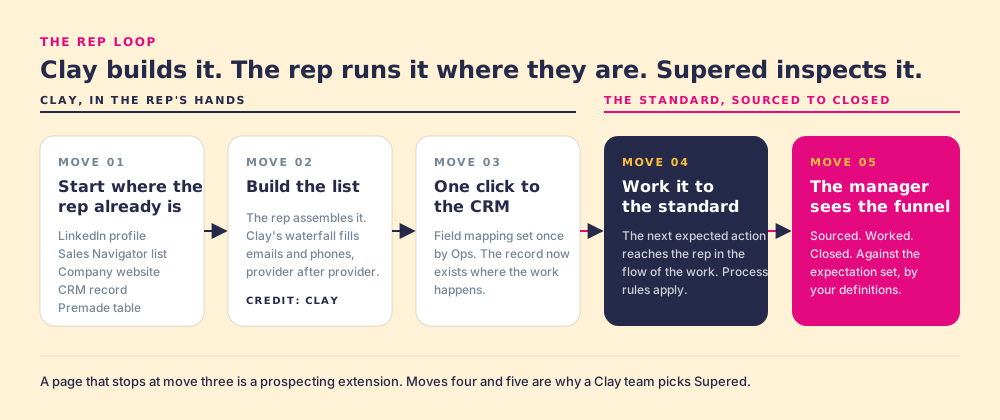
Five moves, from a LinkedIn profile to a closed deal. The first three build the list. The last two work it.

The five-move rep loop: start where the rep already is, build the list with Clay's waterfall, one click to the CRM, work it with the next step in view, and the manager sees sourced, worked, and closed against the standard they set.
01.

Start anywhere the rep already is.

A LinkedIn profile. A Sales Navigator list. A company's website, when the rep is on acme.com and wants the buying committee. A CRM record, when an account or contact already in HubSpot, Salesforce or Pipedrive needs the missing phone, the missing champion, or the fresh title. On the company's site, the rep can also pull the company research your Clay tables return. Enrichment is one click from wherever the rep is looking.

Where: the profile, the list, the site, the record Who: the rep
02.

Build their own list.

The rep assembles the list from those sources, one person or one account at a time, each with a reason. Clay's waterfall fills emails and phones across 200+ data and AI vendors (Clay's own count on clay.com, September 2026): if one source misses, the next is tried, and the rep gets the best verified email and phone available. Any custom Clay workflow the GTM engineer builds becomes a one-click action for every rep, and the rep can push a whole list through one in a single step.

Data: Clay's waterfall, credited to Clay Output: a list the rep built, with a reason on every row
03.

One click to the CRM.

Ops sets the field mapping once. After that, a sync is one click for the rep: into HubSpot, Salesforce or Pipedrive, and on to the sequencer if the team runs one. Before adding, the rep sees the matching CRM record if one exists and whether the prospect was worked in the past, so the database stays clean and two reps never chase the same buyer.

Setup: field mapping, once, by Ops Output: a clean record, where the work happens
04.

Work it in the CRM, with the next step in view.

From here Supered applies your process to the prospects the rep is working, the same way it does across the whole sales process. The next expected action reaches the rep in the flow of work: the first touch inside your window, then the qualification questions once the conversation starts. A rep who added a stack of contacts in one sitting does not have to remember what comes next for each one. It sits on the record.

Inputs: your process rules Output: every sourced contact, worked
05.

The manager watches the list become pipeline.

A funnel with your definitions in it: how many contacts each rep sourced, how many were worked (you define worked), how many closed (you define closed), against the standard the manager set. The one-on-one starts with the rep whose list is converting and what they did, and the rep who could use a hand gets it early.

Inputs: your definitions of worked and closed Output: a funnel the manager can coach from
What it looks like

Clay's enrichment, on the profile the rep is already looking at.

This is moves one through three, running live. The rep is on a LinkedIn profile. Supered sits beside it. One click runs the waterfall the GTM engineer built in Clay, the email and phone come back verified, the rep sees the contact is not yet in HubSpot, and one more click puts it there with the fields mapped and the first step queued.

Starts on the profile. Or the company site, the Navigator list, or the CRM record.
Runs Clay's waterfall. Every vendor in Clay's marketplace, through the Clay account you already have.
Checks the CRM first. Shows the matching CRM record, if there is one, before the rep adds it.
Knows the history. Flags a prospect who was already worked, so the opener picks up the history.
Set up by Ops. RevOps connects Clay inside Supered and picks the workflows. Reps get the finished buttons.
See how Supered works →
linkedin.com / in / priya-natarajan-vp-ops
Priya Natarajan
VP Revenue Operations · Northwind Logistics
Not in HubSpot
Enrich
Sync
Work
Closed
Work email
Verified · via Clay waterfall
Mobile
Verified · via Clay waterfall
CRM match
No match · never worked
Table
Ops-leader buying committee
Enriched. Add Priya to HubSpot?
Fields are mapped. Your first step for a new ops-leader contact is a discovery touch this week, and it will be waiting on her record.
Add to HubSpot Pull her buying committee
Chapter 07 · Every database, routed

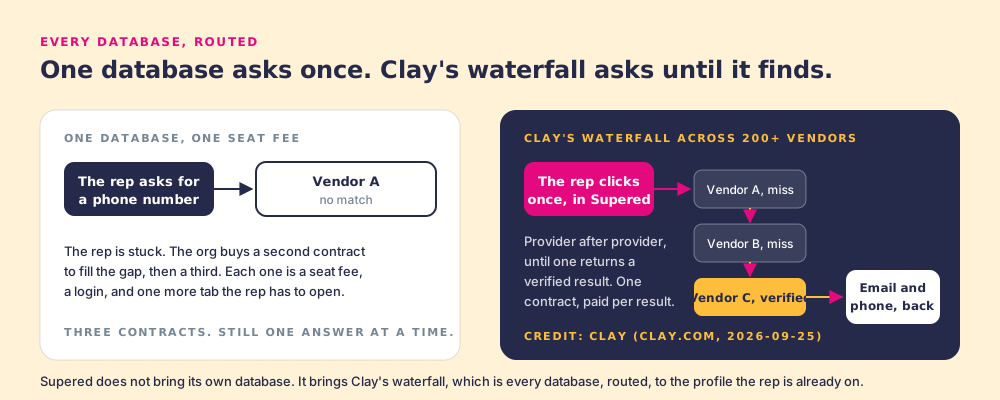
Why does a waterfall find more than any one database? Because it asks every source.

Every data vendor is strong somewhere: one in North America, one in EMEA, one on mobile numbers, one on small companies. No single database is strongest everywhere, so any one of them misses a slice of your market. Clay is an aggregation and routing layer across 200+ data and AI vendors (clay.com, September 2026). Its waterfall asks them in order until one returns a verified email or phone. That is why Supered runs on Clay, and only Clay, for data.

One database asks once and can miss, so teams add a second and third contract. Clay's waterfall across 200+ vendors asks provider after provider until one returns a verified email or phone, through one contract. Supered brings that waterfall to every rep.
Clay's benefit, credited to Clay
One contract, every vendor.
Every vendor in Clay's marketplace, through the Clay account you already have. One contract can stand in for the two or three single-source seats many teams stack up.
Clay's benefit, credited to Clay
Verified means Clay verified it.
Clay's waterfalls check multiple providers to return verified emails and phones. Supered shows the rep that result exactly as Clay returns it.
The half that is ours
Then, the work.
Verified data starts the prospecting. Supered carries the enriched contact into the CRM with its next step attached, and shows the manager how the list is converting. Clay governs the data. Supered governs the motion.
Chapter 08 · From list to pipeline

How does a manager see a rep's list turn into pipeline?

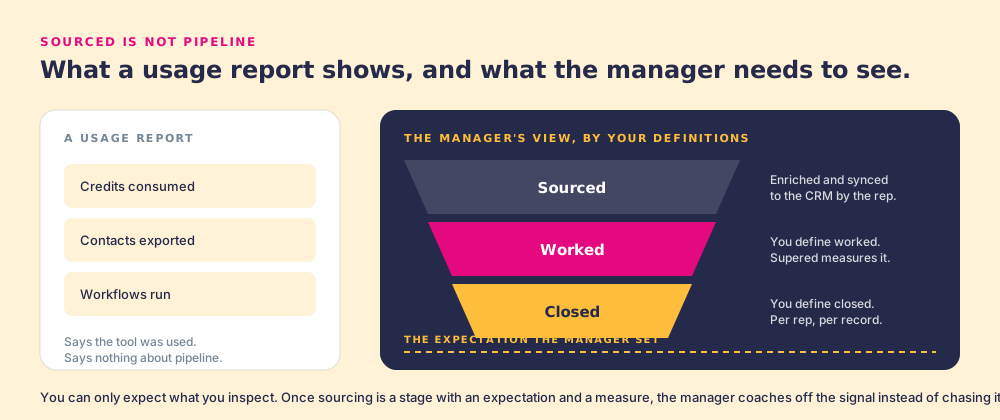
Clay's usage view tells RevOps the engine is running: credits, enrichments, workflows. The manager's question is one step further down the road. Of the contacts each rep sourced, how many got worked, and how many closed? Supered answers it with a funnel that uses your team's own definitions.

Clay's usage view shows credits, enrichments, and workflows, which tells RevOps the engine is running. The manager's view is a three-stage funnel, sourced, worked, and closed, with the team's own definitions, measured against the standard the manager set.

You define worked. You define closed. Supered shows both, per rep, per list,
and the manager coaches from what is converting.

Chapter 09 · Two versions of next year

A year from now, prospecting is still a request to Ops.
Or it is something every rep does in a click.

Both run on the same Clay account. The difference is how many reps it reaches.

Clay stays with the builders
The list stays a ticket.

The GTM engineer keeps building good tables. Reps who know Clay use them. The rest of the team asks for a list and copies names between tabs while they wait. The manager sees activity and has to ask where it came from.

  • Clay's reach limited to the people who open it
  • Lists that arrive without the rep's reasons
  • Extra single-source seats to cover the gaps
  • Sourcing that is hard to see in the funnel
Clay in every rep's hands
Every rep is a list builder.

Reps run what the GTM engineer built, from the profile they are already on. Each sourced contact lands in the CRM with its next step. The manager sees sourced, worked, closed, and spends the one-on-one on what is converting.

  • Same Clay account, every rep using it
  • One contract instead of three
  • Sourced, worked, closed, by your definitions
  • A clear answer to "is prospecting working"
The success state

Ninety days in, your reps build their own lists,
and you can watch those lists
turn into pipeline.

Your reps prospect from the profile, the site, and the record, with Clay's waterfall behind every click. Your GTM engineer builds a table once and sees the whole team run it. Your managers open the one-on-one with sourced, worked, closed, per rep, and coach from what is converting.

Clay
In every rep's hands, no login, nothing to learn
One click
From the profile to the CRM, fields mapped once
One contract
Every vendor in Clay's marketplace, through one account
One funnel
Sourced, worked, closed, by your definitions, per rep
Chapter 12 · The questions

Sales prospecting on Clay, asked plainly.

What sales leaders with a Clay account ask before they hand it to every rep.
Direct answers.

Clay and the data
What is sales prospecting with Clay and Supered?

Sales prospecting with Clay and Supered is the motion where the GTM engineer builds the enrichment tables and waterfall in Clay, every rep runs them in one click from a LinkedIn profile, a Sales Navigator list, a company website, or a CRM record, the contact goes to HubSpot, Salesforce or Pipedrive in one more click, and Supered keeps the next step in view until the contact is worked and closed.

Clay governs the data. Supered governs the motion.

Does Supered have its own contact database?

No, on purpose. Supered runs on Clay's waterfall, which asks provider after provider across 200+ data and AI vendors until one returns a verified email or phone. We credit Clay for each data benefit on this page. Supered's half is putting it in every rep's hands and carrying the contact through the CRM.

Our reps already have Apollo. Why add this?

Apollo is one database. Clay's waterfall asks 200+ data and AI vendors (Clay's count, September 2026), so it finds contacts any single source misses. If your team already has Clay, Supered puts that coverage in every rep's hands, where they already prospect. Many teams find one Clay account can replace the two or three single-source seats they were stacking.

We are not a Clay customer yet. Does this work for us?

Supered's sourcing runs on Clay, on the customer's own Clay account, because Clay's waterfall reaches 200+ vendors through one account. If you are not on Clay yet, the rest of Supered (the process rules, the next expected action, and the adherence view inside HubSpot and Salesforce) works on its own today.

Building the list
Where can a rep build a list from?

A LinkedIn profile, a Sales Navigator list, a company's website, a CRM record that needs the missing phone or the fresh title, or a premade or custom enrichment table for the segment. The starting point is whatever the rep already has open.

Can a rep find the buying committee from a company's website?

Yes. The rep is on the company's site, clicks once, and Supered runs the buying-committee table your GTM engineer built in Clay for that account. The people come back enriched and ready to add to the CRM.

Do reps need a Clay login or Clay training?

No Clay login, and nothing to learn. Reps get what the GTM engineer built as one-click actions, where they already work: the profile, the list, the company site, the CRM record. The power of the GTM engineer, in the rep's hands.

How does a sourced contact get into HubSpot, Salesforce or Pipedrive?

One click. Ops sets the field mapping once, and every sync after that is one click for the rep, into the CRM and on to the sequencer if the team runs one. Before adding, the rep sees the matching CRM record if one exists.

Will a rep reach out to someone who was already worked?

Supered tells the rep before they reach out. On a LinkedIn profile, the rep sees the matching CRM record if one exists and whether the prospect was worked in the past, so the opener picks up the history and teammates never double up.

Can reps run our custom Clay workflows?

Yes. Any custom Clay workflow your GTM engineer builds can be a one-click action in Supered, and a rep can push a whole prospect list through a Clay workflow in one step.

Working the list and the rollout
What happens after the contact lands in the CRM?

The contact gets the same treatment as any record Supered guides. The next expected action reaches the rep in the flow of work: the first touch inside your window, then the qualification questions once the conversation starts. The rep works the list they built while the reason for each name is still fresh.

What do "sourced," "worked," and "closed" mean in the funnel?

Sourced is a contact the rep enriched and synced to the CRM. Worked and closed are defined by you: the activities that count as working a contact in your process, and the stage or outcome that counts as closed. Supered shows both per rep, against the standard the manager set, so the manager can coach from what is converting.

How does RevOps turn this on, and choose what reps can run?

RevOps connects Clay inside the Supered admin, with no engineering project. They build the workflows in Clay, tune the buying-committee lookup to the titles and seniority that count, and set the process rules in Supered. Reps get the finished set of one-click actions.

How is Supered Prospector priced, and whose Clay credits does it use?

Prospector is its own plan: $45 per rep per month, billed annually, with no seat minimum. It runs on your own Clay account, so enrichment draws on the Clay credits you already have, and Clay only charges when an enrichment returns a result. For a 10-rep team on Clay's Growth plan, Clay plus Prospector comes to $11,340 a year at list prices. Prospector starts with a demo, so book one and bring your Clay account.

Your Clay work,
in every rep's hands.

A 30-minute demo: we look at what your GTM engineer already built in Clay, turn it into one-click actions for your reps, and show you the list-to-pipeline funnel with your definitions in it.