Clay LinkedIn: What Crosses From LinkedIn to Clay, and What Should Never Cross
How teams use Clay with LinkedIn and Sales Navigator, checked October 2, 2026: what the Clay LinkedIn integration does, three ways Navigator leads reach a Clay table, what LinkedIn says about scrapers, and how reps run Clay from LinkedIn.
Clay LinkedIn means using Clay with LinkedIn and Sales Navigator: LinkedIn tells you who to reach, Clay's waterfall across 200+ data providers finds a verified email and phone, and the LinkedIn profile URL is the key that joins the two.
A rep in a Clay shop has a VP of Sales open on LinkedIn. She can see the title, the company, the two years at the last job, the mutual connection. She cannot see a phone number, because LinkedIn does not put one there. So she copies the profile URL into the RevOps Slack channel and waits, and the GTM engineer who built a beautiful waterfall in Clay spends the afternoon as the list desk.
Clay LinkedIn means using Clay with LinkedIn and Sales Navigator: LinkedIn tells you who to reach, Clay’s waterfall across 200+ data providers finds a verified email and phone, and the LinkedIn profile URL is the key that joins the two. Get that division right and the rest of this page follows from it. Get it wrong, by trying to carry LinkedIn’s pages into Clay instead of the key, and you end up where Proxycurl ended up: sued by LinkedIn in January 2025 and shut down that July.
The short answer, by who you are:
- Clay’s own LinkedIn features. For the builder: brand mentions, post engagers, and LinkedIn URLs as the lookup key, all feeding tables inside Clay.
- Clay’s Sales Navigator workflow (Sculptor). For the builder with a Navigator search: paste the filters, and Clay finds matching people in its own database.
- Supered Prospector. For teams already on Clay whose reps live in LinkedIn and Sales Navigator: the builder’s tables as a button on the page the rep has open, no Clay login, $45 per user per month billed annually.
What does Clay do with LinkedIn?
Start with the shape of the two products, because it decides everything after. LinkedIn is where you find people. Clay is where you find how to reach them. Clay’s homepage, opened October 2, 2026, says it plainly: “Buy data from 200+ providers in one place,” and “One contract to buy data from 200+ data and AI vendors in Clay’s marketplace” (clay.com). None of those 200+ is LinkedIn.
Think of LinkedIn as a conference hall. You can walk the floor and read every name badge: name, title, company, who knows whom. No badge carries a phone number, and the organizers have security at the doors who take a dim view of anyone photographing badges by the hundred. Clay is the front desk out in the lobby, with a stack of directories two hundred deep. You do not carry the hall to the desk. You carry one badge, and the desk works through its directories, one after another, until one of them has the number.
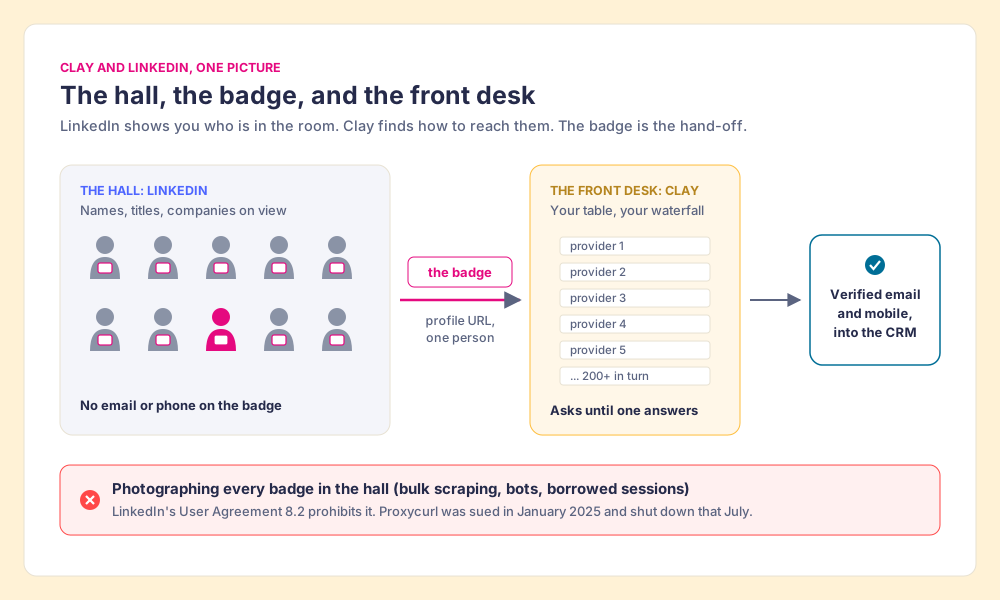
Clay’s own documentation follows this picture closely. Its lesson on finding people asks for an identifier and says “Ideally, this should be LinkedIn profile URLs, but if unavailable, you can use company domains instead” (Clay University). Providers in the marketplace take the same key: Snov.io’s “Enrich Person from LinkedIn URL” action takes a profile URL and returns a work email, its validity, title and location (clay.com). The badge goes to the desk. The hall stays where it is.
The comparison stops in one place. A real badge carries only a name, and names repeat. A profile URL is LinkedIn’s own address for one person, so it carries her cleanly to the desk even when three people in the hall share her name. Clay prefers it for that reason.
What is the Clay LinkedIn integration, exactly?
Clay does have a LinkedIn integration, and it is narrower than the name suggests. Checked on October 2, 2026, Clay’s docs describe it this way (Clay docs):
- The connection. You add your own LinkedIn account inside Clay (”+ Add account”) and authenticate.
- Two sources. “Find brand mentions on LinkedIn,” which locates posts and reposts that mention your brand, and a source that finds the LinkedIn users who engaged with those posts.
- Two actions. “Enrich Social Metadata,” and “Find Post Audience,” which finds who reacted to or commented on a LinkedIn post, keyed on the post’s URN (LinkedIn’s unique ID for a post), with a reaction type and a maximum number of results.
So the Clay LinkedIn integration is a marketing and signal tool. It answers “who engaged with posts about us?” and drops the answer into a builder’s table. It says nothing about Sales Navigator, nothing about profiles a rep is reading, and nothing about scraping. Clay’s other LinkedIn touchpoints sit around it: LinkedIn URLs as the lookup key, Clay for Chrome (which pulls data from web pages into Clay and does not mention LinkedIn in its store listing), and ad-audience pushes to LinkedIn on the Growth plan. Clay prospecting sorts those four by direction, and the Clay Chrome extension guide covers the extension question in full.
How do Sales Navigator leads get into a Clay table?
Sales Navigator is where reps find people, and it guards its lists. LinkedIn’s help center says it “currently doesn’t offer the option to export account and lead information from Sales Navigator into a CSV or XLS file” (LinkedIn Help, checked October 1, 2026). So the “clay sales navigator” question is a question about what crosses the wall. There are three answers in use.
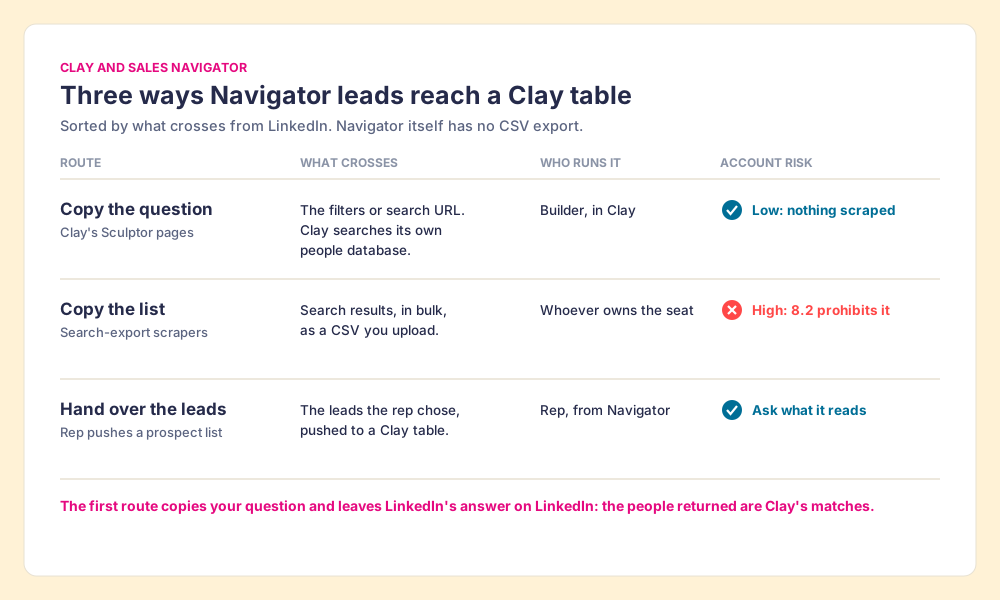
- Copying the question. Clay’s Sculptor pages describe the cleanest route, and it is the finding the top results on this search leave out. You “Drop in your Sales Navigator search URL or describe your ICP filters, like job title, industry, and headcount,” and “Sculptor searches Clay’s people database for contacts matching your Sales Navigator filters, then waterfalls through 150+ providers to find a verified work email” (clay.com, Sales Nav workflow, October 2, 2026). Read that slowly. Clay does not lift the people out of Navigator. It copies your description of them and asks its own directories. You get Clay’s matches, which will overlap your Navigator results without matching them row for row.
- Copying the list. Third-party scrapers export a Navigator search to a CSV, and the CSV goes into Clay. It is popular because it hands Clay exactly the people the rep saw. It is also the route LinkedIn’s terms are written against, which the next section covers. The LinkedIn Sales Navigator scraper guide grades those tools one by one.
- Handing over the leads. The rep adds the leads she chose to a prospect list in Navigator and pushes that list into a Clay table. Nothing is copied from a search page in bulk; the rep picks the people, and the table does the finding. The guide to exporting Sales Navigator leads recommends this route for teams on Clay, and Supered Prospector works this way.
One fairness note on Clay’s pages: a sibling Sculptor page says it “imports every result as a row” from a pasted search URL (clay.com, October 2, 2026), while its numbered steps describe searching “Clay’s B2B contact data against your Sales Navigator criteria.” The second reading matches the workflow page and the compliance warning both pages carry. If the difference matters to you, ask Clay which one your workspace runs.
Is there a Clay LinkedIn scraper, and is it safe?
Clay does not sell one, and its own pages argue against needing one. Both Sculptor pages carry the same FAQ answer: “The platform’s Terms of Service prohibit direct scraping or automated data extraction,” and “Using enrichment providers that resolve contact details from external databases, rather than scraping profile pages, is the compliant path most B2B teams follow” (clay.com, October 2, 2026). When people search for a “Clay LinkedIn scraper,” they usually mean a third-party scraper that feeds Clay. The risk travels with that tool, and it lands on the LinkedIn seat that ran it.
LinkedIn’s position is written down in three places:
- The User Agreement. Section 8.2, effective November 3, 2025, bars members from using “bots or other unauthorized automated methods to access the Services, add or download contacts” and from using another’s account, “such as sharing log-in credentials or copying cookies” (LinkedIn User Agreement).
- The prohibited-software page. LinkedIn does not permit “browser plug-ins, or browser extensions that scrape, modify the appearance of, or automate activity on LinkedIn’s website,” and says members who use them “risk having their accounts restricted or shut down” (LinkedIn Help).
- The account-restrictions page. “Automated inauthentic activity violates the LinkedIn User Agreement and can result in temporary or permanent restriction of your account” (LinkedIn Help, checked October 2, 2026).
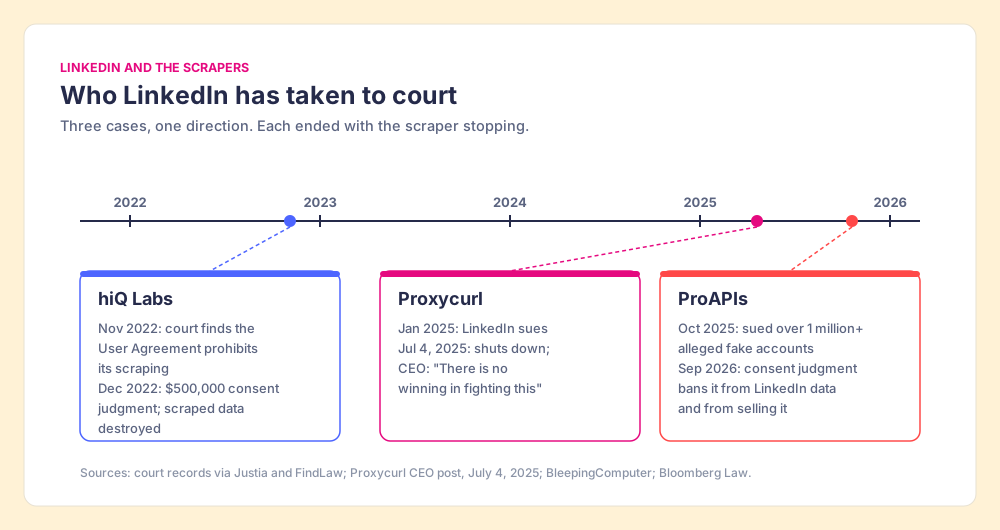
You might say the hiQ case settled all this in the scrapers’ favor. It settled one narrow question. The Ninth Circuit held in April 2022 that scraping public profiles was unlikely to break the federal anti-hacking law, but it noted other remedies “may also lie,” including “breach of contract” (Justia). In November 2022 the district court found that “the relevant language of the User Agreement unambiguously prohibits hiQ’s scraping” (FindLaw), and hiQ accepted a $500,000 consent judgment and an order to destroy its scraped data (Privacy World).
The cases since then point one way. LinkedIn sued Proxycurl, a LinkedIn data API, in January 2025; on July 4, 2025 its CEO, Steven Goh, announced the shutdown and wrote “There is no winning in fighting this” (Proxycurl). In October 2025 LinkedIn sued ProAPIs over more than 1 million alleged fake accounts (BleepingComputer), and a September 2026 consent judgment banned it from accessing LinkedIn data through fake accounts or bots and from selling that data (Bloomberg Law).
Back to the hall. Security does not mind you reading badges; that is what the conference is for. It minds the person with a camera working the room, and it minds even more the person who printed a hundred fake badges to get in. The badge you carry to the front desk was never the problem.
What about Clay LinkedIn automation?
“Clay LinkedIn automation” gets searched as if Clay sends connection requests or messages. It does not. Clay automates the work behind LinkedIn: tables that run when a row arrives, waterfalls that try the next provider when one misses, job-change signals on the Launch plan. The tools that automate activity on LinkedIn itself (auto-connect, auto-message, auto-visit) sit in the category LinkedIn’s prohibited-software page names, and they put the same seat at risk as a scraper does. The safe division of labor follows the picture: a person works the hall, and the automation lives at the desk.
Who does what when Clay meets LinkedIn?
A Clay and LinkedIn setup has three people in it, and most trouble starts when one of them is asked to work in another’s room.
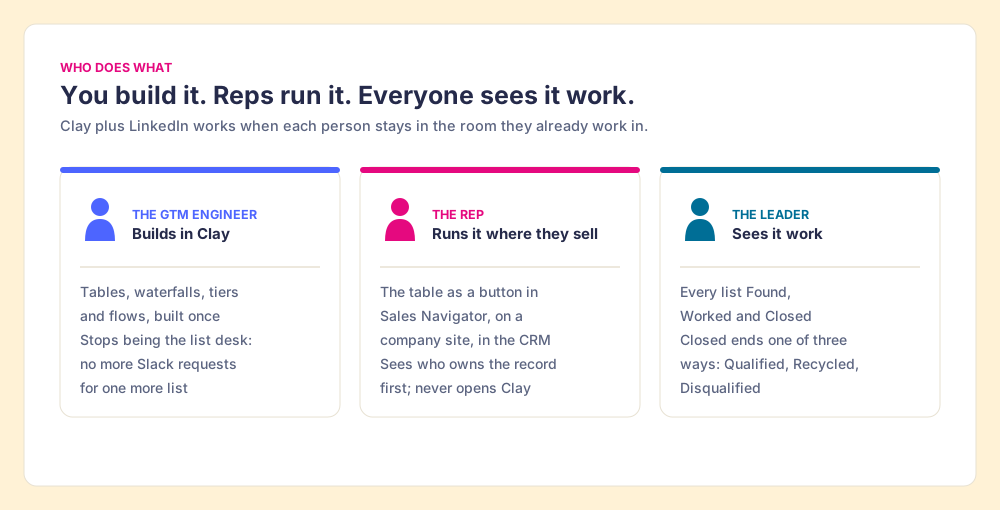
- The GTM engineer. Clay’s homepage says it outright: “GTM engineers build on Clay.” The builder writes the tables, the waterfall order, the tiers and the tags. The failure mode is the opening scene: great Clay tables, and reps still asking in Slack for every list. Prospector for GTM engineers is written for this seat.
- The rep. The rep finds people on LinkedIn and in Sales Navigator and works them in the CRM. She does not want a Clay seat, and she should not need one. She needs the builder’s table to run on the person she is looking at, and she needs to know whether a teammate already owns that person before she reaches out.
- The leader. The leader pays for Clay and wants to know which lists turned into conversations. Without that view, the Clay budget is a line item defended by anecdote.
Clay’s own Clay for Sales page asks teams to “Keep reps selling instead of switching tools to find contacts, fix data, or research accounts” (clay.com).
Where does Supered Prospector fit?
Clay plus Supered is the best way for a sales team to prospect: GTM engineers build in Clay, reps never open Clay. Prospector runs inside the Supered Chrome extension on your team’s own Clay account. It has no database of its own; it brings Clay’s waterfall, which is every provider in Clay’s marketplace, routed. We chose Clay as our only data provider for that reason. On the LinkedIn question, our statement is this: Prospector works within LinkedIn’s terms and does not copy search results in bulk; the contact data comes from Clay’s waterfall on the customer’s Clay account. We do not claim LinkedIn approval, and no tool in this category should.
What the three people get:
- Flows the builder makes once. The GTM engineer names flows (person enrichment, buying committee, a campaign) and maps each to a Clay table or function and a destination. Your logic stays yours: waterfalls, tiers, tags, and sequence variables. Start from the Supered Clay template or bring your own tables.
- A button where the rep already is. On a LinkedIn profile, a Sales Navigator list, a company website, or a HubSpot, Salesforce, or Pipedrive record, the rep picks a flow from a Push menu and the table runs. From Navigator, the rep adds leads to a prospect list and pushes the list to a Clay table.
- Ownership before the push. On a LinkedIn profile the rep sees the matching CRM record, who owns it, and a flag when the person was prospected before, so no rep steps on a teammate.
- One click to the CRM. Field mapping is set once; the contact lands in HubSpot, Salesforce, or Pipedrive, and into your sales engagement tool if the flow sends it there.
- Found, Worked, Closed. The leader sees every list the reps found, who is working theirs and who is not, and how each lead ended: Qualified, Recycled, or Disqualified, the way your process says. That view is how the Clay budget grows.
Prospector is $45 per user per month, billed annually, from one user, and it needs your Clay account (Prospector). Supered holds 4.9 from 81 reviews on G2 and 5.0 from 122 on the HubSpot App Marketplace (both checked October 1, 2026). Supered came out of RevPartners, the HubSpot partner I founded, which reached Elite tier in 13 months; RevPartners is now a Clay Elite Studio Partner that builds tables for teams not yet on Clay, which is a disclosure as much as a recommendation. For reps who keep asking for Apollo seats to build their own lists: skip the extra seats, and get more out of the Clay you already pay for.
Choose something else if you do not have Clay: Prospector does nothing without a Clay account and a builder to write the tables, and a single database with its own extension is simpler for that team (Lusha’s Chrome extension and Kaspr alternatives cover those). Choose something else, too, if your reps work all day in an AI chat (Clay MCP is the closer fit), or if you want a tool that sends LinkedIn messages for you, which Prospector does not do.
What should you ask any Clay LinkedIn tool?
Six questions, in the order they come up in a demo. They apply to us as much as to anyone.
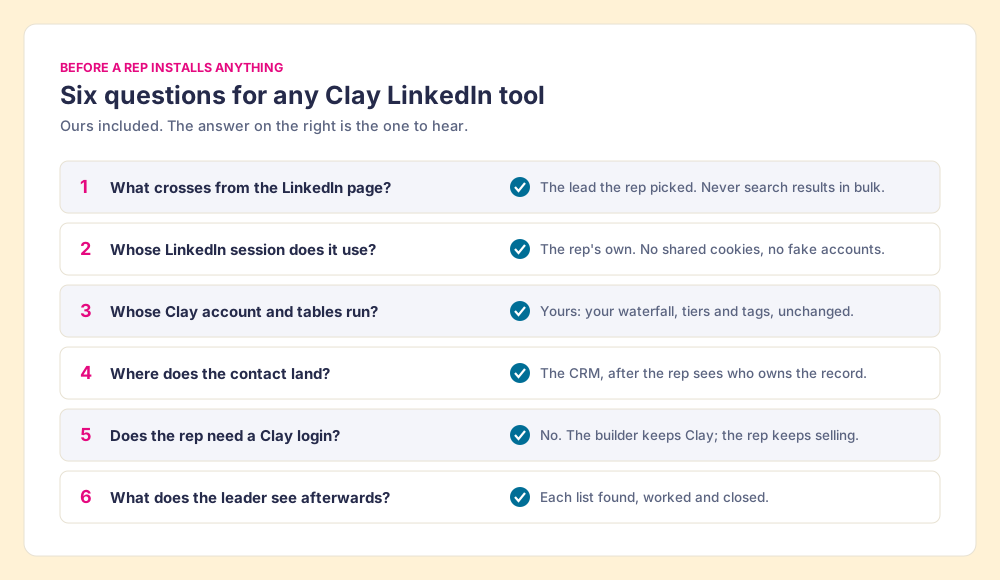
| Question | The answer to hear | Why it matters |
|---|---|---|
| What crosses from the LinkedIn page? | The lead the rep picked, never search results in bulk | User Agreement 8.2 and the prohibited-software page |
| Whose LinkedIn session does it use? | The rep’s own; no shared cookies or fake accounts | 8.2 bars “copying cookies”; ProAPIs was sued over fake accounts |
| Whose Clay account and tables run? | Yours, unchanged | The builder’s waterfall and tiers are the asset |
| Where does the contact land? | The CRM, after the rep sees who owns it | Duplicates and stepped-on accounts cost more than credits |
| Does the rep need a Clay login? | No | Clay itself asks to keep reps from switching tools |
| What does the leader see? | Each list found, worked and closed | The view that justifies the Clay spend |
What should a team on Clay set up first?
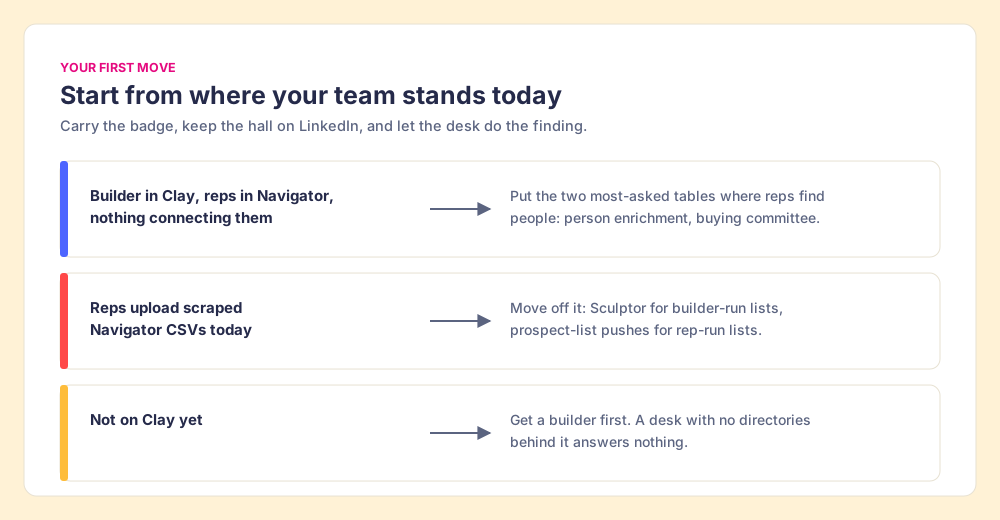
Three situations, three first moves.
- A builder and a Navigator team, nothing connecting them. Stop the Slack requests first. Put the builder’s two most-asked tables (person enrichment and the buying committee) where the reps find people, and let reps push prospect lists into them.
- A team already uploading scraped Navigator CSVs. Move off that route before LinkedIn moves you off it. Copy the question with Sculptor for builder-run lists, and hand over the leads from Navigator for rep-run lists.
- A team not on Clay. Get a builder before you buy anything rep-side. A front desk with no directories behind it answers nothing.
Our recommendation, grounded in what Clay and LinkedIn each publish: keep LinkedIn for finding people and Clay for finding how to reach them, and carry only the badge between the two rooms. Clay’s own pages call that the compliant path; LinkedIn’s terms and three court cases show what happens to the other one. Then put the builder’s tables in the rep’s hands on the page she already has open, and watch which lists close. For the step-by-step on the Navigator side, read how to export Sales Navigator leads; for the full set of Clay routes into a rep’s day, Clay prospecting; for the wider tool set, LinkedIn prospecting tools; and for how a sourced list moves from the first lookup to closed, sourcing with Supered.
Frequently asked questions
Does Clay integrate with LinkedIn?+
Does Clay scrape LinkedIn?+
How do I get Sales Navigator leads into Clay?+
Is Clay LinkedIn automation safe for my account?+
Do reps need a Clay login to use Clay on LinkedIn?+
Is Supered Prospector approved by LinkedIn?+
Everything we have written on Clay
More on Clay
Supered Prospector: your Clay waterfall, inside LinkedIn and your CRM- Clay Alternatives: What the Question Usually Means, and Why a Sales Team Often Wants a Front End on Clay Instead
- Clay Pricing 3.0, Explained for the Sales Leader Who Is Not the GTM Engineer
- Clay Chrome Extension: What Exists Today, and the Five Moves a Rep-Side Extension Should Be Held To
- Clay HubSpot Integration: What It Writes, Which Plan Turns It On, and the Step After the Sync That Nobody Owns
- Clay Salesforce Integration: Two Doors In, One Tag Out, and the Step After the Sync That Nobody Owns
- Clay Pipedrive Integration (2026): The Six Actions, the Plan It Needs, and How Reps Run It Without Opening Clay
- Clay Agency: How to Pick One, and Who Runs the Tables After It Leaves
- Clay Email Finder: How the Waterfall Finds Work Emails, What a Found Email Costs, and Why the Last Tenth Is Hard
- Clay Integrations, Explained for the Sales Leader: The Mail Runs Both Ways, and Nobody Checks Whether It Was Answered
- Clay MCP: How Reps Run Clay From Claude and ChatGPT, and the Walk Back to the CRM
Your Clay waterfall, where reps already work.