Clay Integrations, Explained for the Sales Leader: The Mail Runs Both Ways, and Nobody Checks Whether It Was Answered
Clay's CRM integrations move records in two directions, HubSpot or Salesforce out to the waterfall and back, or a sourced contact into the CRM. What each direction writes, which plan includes it, and the step after the sync that nobody inspects.
Clay integrations are the connectors that move records between Clay and the tools around it: a HubSpot or Salesforce record goes out to be enriched across 200+ vendors and comes back, or a contact sourced in Clay is created in the CRM, on Clay's Growth plan and above.
The RevOps engineer posts a screenshot in the ops channel: HubSpot connected, the first table pulling contacts with no phone number, the waterfall filling them, the sync writing them back. The sales leader types “amazing,” then asks the question the screenshot cannot answer: are the reps calling the numbers? The reps did not see the sync, because reps do not open Clay, and a phone number that arrived in the CRM overnight looks the same to them as one that was always there.
Clay integrations are the connectors that move records between Clay and the tools around it: a HubSpot or Salesforce record goes out to be enriched across Clay’s waterfall of 200+ vendors and comes back, or a contact sourced in Clay is created in the CRM, on Clay’s Growth plan and above (clay.com/integrations, opened September 25, 2026). Clay’s value is a waterfall and a workflow built by one person and meant, in Clay’s own words, for “any rep to run,” and the CRM integration is Clay’s answer to the running problem: put the output where the rep already lives. We run on our customers’ own Clay accounts, so we read the same pages you do. The integration solves delivery. It leaves the second half, whether the delivered contact was worked, open.
What are Clay integrations, in kitchen words?
Picture a town and its sorting office. The town is your CRM: each household is a record, and the reps are the postal carriers walking the routes. The sorting office is Clay, out on the edge of town, where the GTM engineer works. A Clay integration is the mail truck between them, and it runs both ways. Outbound, it carries letters the town could not address on its own, a contact with no phone, an account with no headcount, to the office, where the waterfall tries 200-odd directories until one returns the missing line. Inbound, it brings the finished mail back to the right mailbox, along with new mail the office originated: the contact a table found last night.
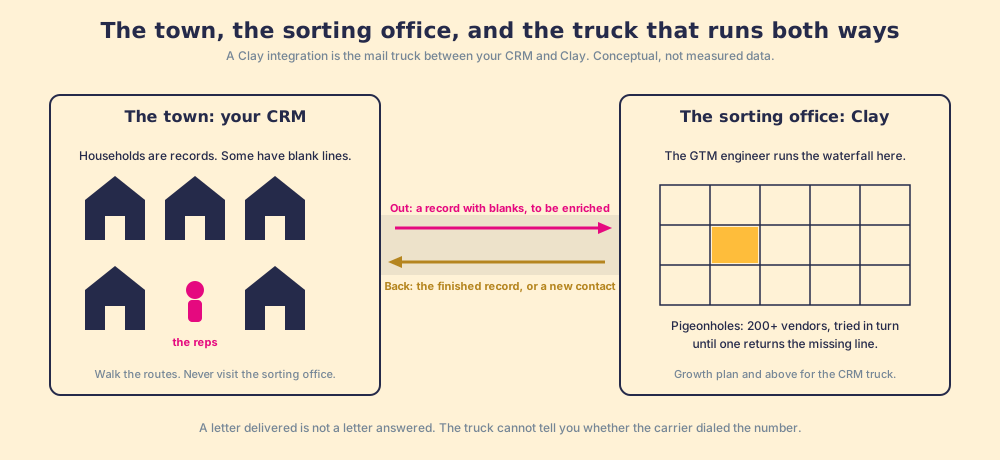
Clay’s directory tags each connector with a small vocabulary, and the tags tell you what a given integration can do for a sales team.
- Source (Native). The integration pulls records into a Clay table on its own, no CSV. HubSpot, Salesforce, Pipedrive, and Dynamics 365 all carry it.
- Billable Action. The integration writes or fetches something for a row, and the run counts against your Actions meter (under $0.01 each per clay.com/pricing).
- API Key. You connect your own account. On the CRM listings each action carries the label “Bring Your Own Account Required”: Clay writes into your HubSpot or Salesforce as you, with your permissions.
The data providers are integrations too, which is why “Clay is a data source” misdescribes it. Apollo, ZoomInfo, LeadIQ, People Data Labs, Hunter, and ContactOut each appear in the same directory as HubSpot does, and Clay’s rep-prospecting page says what it does with them: “One click runs Clay’s waterfall enrichment. If one source misses, it tries the next.” Supered does not bring its own database. It brings Clay’s waterfall, which is every database, routed. We chose Clay as our only data provider for that reason alone, and it is why “Clay data integrations” is a slightly odd phrase: the data comes from the integrations, and Clay is the router.
Which Clay integration does a sales team need, and what plan is it on?
Strip the directory down to the connectors that touch a rep’s day, and it is a short list: the CRM, and whatever sequencer the team runs. Clay lists Salesforce, HubSpot, Pipedrive, Dynamics 365, and Marketo under CRMs; Outreach, Salesloft, HubSpot Sequencer, and Gong Engage under outreach tools. The rest of the directory reaches the rep only as a column that got filled.
The plan question comes before the screenshot above can happen, and Clay’s pricing page answers it in a compare table. The row labelled CRM integrations reads “Not included” for Free, “Not included” for Launch, and “Included” for Growth and Enterprise. The Growth card lists “Auto-sync & enrich CRM” first under “Everything in Launch, plus.” Growth starts at $495 a month, or $446 a month on annual billing; Launch, at $185 a month, carries the email-campaign integrations but not the CRM connectors (clay.com/pricing, opened September 25, 2026). For a team on Launch, the price of a Clay CRM integration is the step up to Growth.
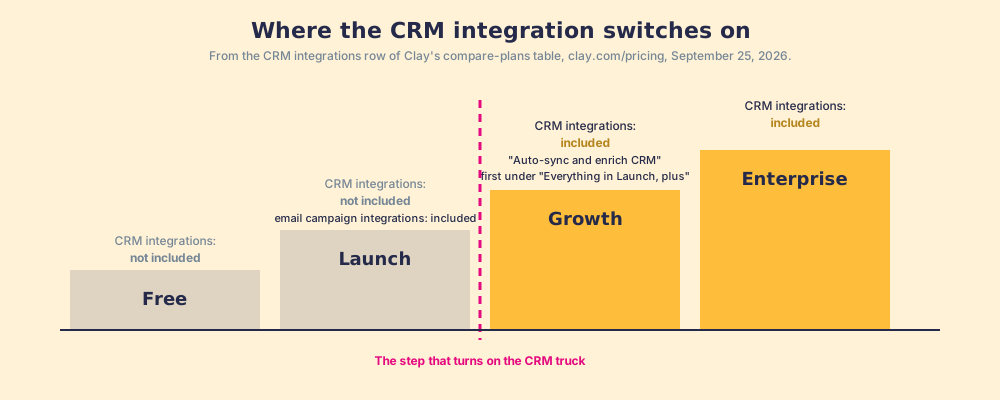
The Clay pricing page walks the rest of the meter for the buyer who signs the renewal.
How does a Clay CRM integration run in both directions?
The two directions are built from the same handful of actions, the same in shape whether the CRM is HubSpot or Salesforce, so learn them once. Each is written up for its own CRM, with the exact inputs and the dedupe switches, in the Clay HubSpot integration and Clay Salesforce integration pages.
Direction one, CRM to Clay, is enrichment. A Source pulls records into a table: in HubSpot, any object type, with a list as an optional filter; in Salesforce, a list view or a tabular report. The waterfall fills the blanks. An Update action writes the result back to the same record by its ID, with “Ignore blank values” on by default, so a lookup that returned nothing does not erase what the record already had. Clay’s CRM enrichment page describes the scheduled version, “Trigger enrichments automatically when new leads enter your CRM,” which is the auto-sync the Growth card advertises.
Direction two, Clay to CRM, is the sourced contact. A table found the person; the question is whether the CRM already has them. Clay’s answer is a Look up action before a Create action: in HubSpot the lookup filters on any property, with the HubSpot Object ID “at the top of the list, since matching on the record ID is the most precise option available”; in Salesforce the docs say “Use the free Lookup records action first to check for duplicates.” Then Create, or Upsert, which in Salesforce requires an external ID on the object. An owner can be found by ID or email, the contact associated to its company, and in HubSpot enrolled in a sequence if the sequence permissions were switched on at connection (Clay University, HubSpot integration, opened September 25, 2026).
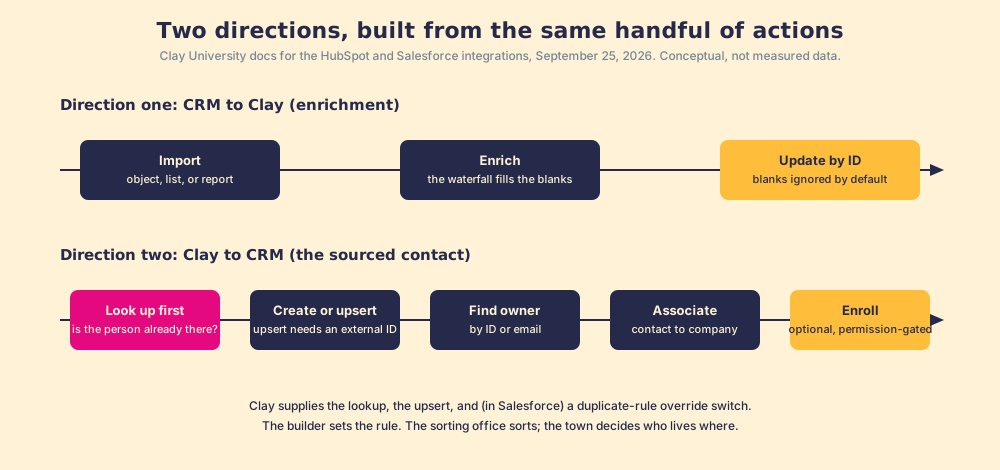
Two rules fall out of the docs, and both belong to the builder rather than to Clay. Clay does not dedupe for you; it hands you a lookup, an upsert, and, in Salesforce, a switch called “Duplicate rule override” that bypasses your own duplicate rule when enabled. And Clay does not decide what a blank means; it ships the safe default and lets you turn it off. The sorting office sorts. Who lives where is still the town’s rule.
Where do reps fall out of the loop?
The mail is delivered. Watch what happens next in the town, because that is where a Clay integration stops and a sales leader’s problem starts. The rep’s day, by the Bridge Group’s 2025 count across 351 B2B companies, is a median of 112 activities: 44 phone, 41 email, 19 LinkedIn, 8 text or other (Bridge Group, 2025). None of the 112 is “open Clay.” The same report puts the median share of SDRs at quota at 60%, the lowest in the study’s history. So the rep is busy, behind, and in the CRM, the inbox, and LinkedIn, which is where the integration correctly delivered the record. The delivery is right. What is missing is an expectation attached to it.
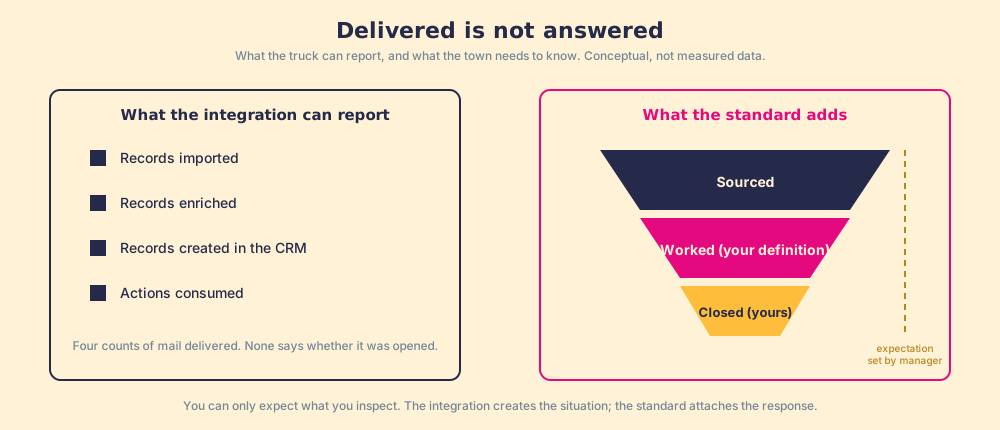
Two of our convictions say why that matters. The answer has to reach the rep in the moment of the work; any time they must go somewhere else to get it, that is a failure. And a tool that adds a tab, a login, or a lesson has already lost. The integration honors both. But a letter delivered is not a letter answered. The number sits on the record beside forty others, and the rep who did not see it arrive has no reason to treat it differently from the number that has been wrong since 2023.
Our field data measures this gap for the sales process as a whole. Across 198 sales leaders, 89% have a defined process and 36% see reps run it, a 53-point gap between built and run (The State of Sales Enablement). The same survey found 49% quota attainment where reps get guidance in the flow of work against 15% where they must go elsewhere for it, and a 6.3x quota rate for teams that inspect deals against the process consistently.
You might say the fix is a HubSpot workflow: new phone number arrives, create a task, done. Fair, and many teams do it. It creates the task. It does not tell you, three weeks on, how many of the contacts Clay sourced were worked, advanced, and closed against the number you expected. The mechanism underneath is the one Peter Gollwitzer named in 1999: an intention attached to a situation, “Whenever situation x arises, I will initiate the goal-directed response y,” moves people from knowing to doing, d = 0.65 across 94 studies (Gollwitzer and Sheeran). The integration creates the situation. Somebody has to attach the response, and then inspect it.
What closes the loop after the sync?
Reason it through in order. The GTM engineer built the tables. The integration delivers their output to the CRM, both directions, on Growth and above. The rep now has a record with a phone number and no idea it is new. So the Clay investment is capped by whether that record gets worked, and no dashboard in the stack measures it: RevOps sees Actions consumed, the sales leader sees the invoice, and “sourced” is not a stage anyone inspects. The missing layer sits on the rep’s side of the CRM, and it has two jobs.
The first job is the entry point: a rep on a CRM record with a missing phone, or on a LinkedIn profile, or on a company site, runs the GTM engineer’s table from there, one click, no Clay login, field mapping set once by Ops, the CRM status visible before they add a duplicate or step on a teammate. The second job is the standard: the next expected action reaches the rep in the flow of the work, the process rules apply, and the manager sees sourced, worked, and closed, with “worked” and “closed” defined by the customer, against the expectation the manager set. This is where Supered sits: no database on purpose, the customer’s own Clay account, and the sourced contact treated as the first step of a process it guides and inspects. Clay governs the data. Supered governs the motion.
What we recommend
Three paths sit in front of a sales leader whose RevOps team has, or is about to have, a Clay CRM integration.
- The integration alone. Connect HubSpot or Salesforce on Growth and let the records improve in place. Whether the new numbers were dialed stays unknown.
- The integration plus a workflow. A CRM task on each synced record. The manager gets a task-completion count, which records boxes checked while the buyer’s position stays unrecorded.
- The integration plus a rep-side front end and a standard. The rep runs the table from where they already are, the contact enters a process with an expectation attached, and the manager reads sourced, worked, closed against it.
We recommend the third, and the evidence on this page is why. Clay’s own copy says one person builds and any rep runs. The Bridge Group says the rep’s 112 daily activities happen in the CRM, the inbox, and LinkedIn. Our data says in-flow guidance runs at 49% quota attainment against 15%, and consistent inspection multiplies the quota rate by 6.3x. The integration fixes delivery. Only the standard touches the second number. Start with the CRM you run, the Clay HubSpot integration or the Clay Salesforce integration, each taken apart action by action; what is Clay draws the workshop before the truck.
Frequently asked questions
What integrations does Clay have?+
Which Clay plan includes CRM integrations?+
Does the Clay CRM integration work in both directions?+
How does Clay avoid creating duplicates in the CRM?+
Do reps need a Clay login to use a Clay integration?+
Is Clay a data source, or an integration layer?+
Your process, running itself.