Clay Pipedrive Integration (2026): The Six Actions, the Plan It Needs, and How Reps Run It Without Opening Clay
The Clay Pipedrive integration, checked October 2, 2026: six native actions for persons and organizations, no import source and no deal actions, the Growth-plan gate, a setup that works around the gaps, and how reps run Clay from Pipedrive.
The Clay Pipedrive integration is Clay's native Pipedrive connector: six actions that look up, create and update Pipedrive persons and organizations from a Clay table, on Clay's Growth plan or above, with no deal actions and no import source.
How to set up the Clay Pipedrive integration
- 1
Connect Pipedrive to Clay
In Clay, open Settings, Connections, click Add Connection, pick Pipedrive and sign in, or add the account the first time you run a Pipedrive action from the enrichment panel. Connect as an admin or integration user, because Clay writes to Pipedrive as whoever connected it.
- 2
Get Pipedrive records into a Clay table
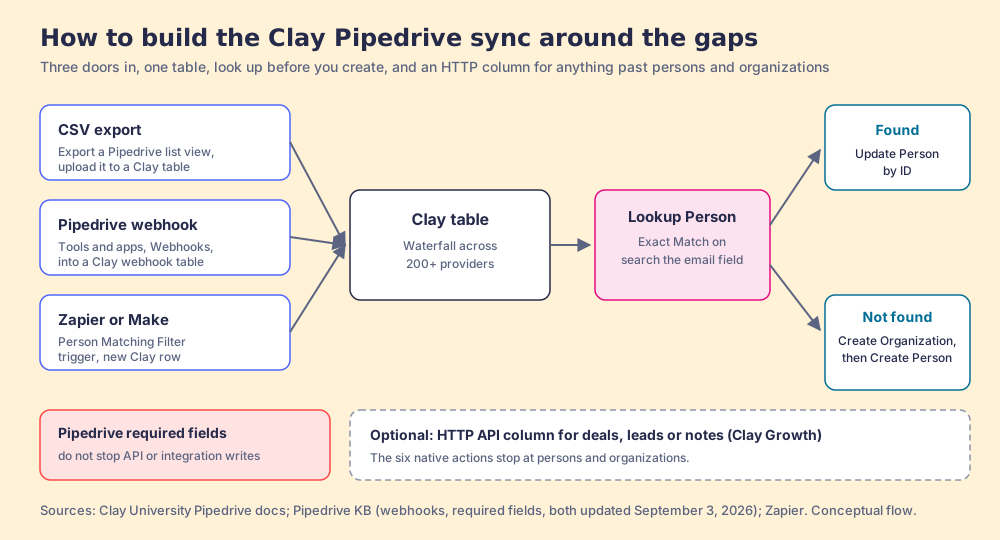
Clay's Pipedrive listing has no import source, so pick a door: export a Pipedrive list view to CSV and upload it, point a Pipedrive webhook (Tools and apps, Webhooks) at a Clay webhook table, or use Zapier or Make with a Pipedrive trigger such as Person Matching Filter.
- 3
Add the enrichment waterfall
Add the email and phone waterfall to the table. Clay does not charge Data Credits or Actions when an enrichment returns no result.
- 4
Look up before you create
Add Lookup Person with Pipedrive, turn Exact Match on (it defaults to off) and search the email field only (it defaults to all fields). Run Update Person by ID when the lookup finds someone, and Create Organization then Create Person when it does not.
- 5
Handle deals and leads separately
The six native actions stop at persons and organizations. For deals, leads or notes, add an HTTP API column that calls Pipedrive's API, which Clay includes on Growth.
- 6
Test on ten rows
Run ten rows, open each new person in Pipedrive, and check every mapped field. Pipedrive's required fields do not stop records written through the API or third-party integrations, so the table's mapping is the only standard they meet.
A restaurant kitchen and its dining room are joined by a hatch. Plates go out through it, waiters carry them, and the cooks never walk the floor. The arrangement works as long as two things are true: the hatch is wide enough for what the kitchen makes, and someone carries the orders back in. The Clay Pipedrive integration is a hatch of that kind, and it is narrower than the ones Clay built for HubSpot and Salesforce.
The Clay Pipedrive integration is Clay’s native Pipedrive connector: six actions that look up, create and update Pipedrive persons and organizations from a Clay table, connected by OAuth on Clay’s Growth plan or above, with no action for deals, leads or activities and no source that imports Pipedrive records into Clay (clay.com/integrations, Pipedrive, opened October 2, 2026). Clay’s HubSpot listing has eleven entries and its Salesforce listing nine. A Pipedrive clay setup gets the full waterfall and has to build its own way in, its own deals and its own data standard.
The quick answer for a Pipedrive team in October 2026:
- Supered Prospector on Clay, for reps who find people every day. Reps run the GTM engineer’s Clay tables from Sales Navigator, LinkedIn, a company site or the Pipedrive record, and never open Clay. $45 per rep per month, billed annually, plus Clay.
- Clay’s connector plus a webhook and HTTP build, for enrichment Ops owns. Fills the records already in Pipedrive and adds deals through the API. Clay Growth, from $495 a month.
- Pipedrive’s own Prospector in LeadBooster, for teams without Clay. One database, powered by Cognism, searched inside Pipedrive, included on Premium and up.
We make the first one, so open each price link.
Which Clay Pipedrive integration route fits your team?
The table grades four routes on one job: a person your team wants to sell to lands in Pipedrive with an email and a phone, and someone works them.
| Route | Best fit | Pipedrive connection | Setup effort | Pricing (plan that includes it) | Email and phone in Pipedrive | Grade | Rank |
|---|---|---|---|---|---|---|---|
| Supered Prospector on Clay | Teams with Clay whose reps source on LinkedIn, Sales Navigator and company sites | One click to Pipedrive from the Supered Chrome extension, fields mapped once | Medium: Clay flows built once | $45 per rep per month, billed annually, plus your Clay plan | Yes, from Clay’s waterfall | A (42/50) | 1 |
| Clay table plus webhook and HTTP API | RevOps enriching existing Pipedrive data and creating deals | Native connector, Pipedrive webhook, HTTP API column | High | Clay Growth, from $495 a month | Yes, run by Ops | B (34/50) | 2 |
| Pipedrive’s Prospector (LeadBooster) | Pipedrive teams without Clay | Built into Pipedrive | Low | Included on Premium ($59 per seat per month, annual) and up; add-on from $32.50 a month | When the Cognism profile has them | B (33/50) | 3 |
| Clay native connector alone | A one-off cleanup of persons and organizations | Six native actions, OAuth | Medium | Clay Growth, from $495 a month | Yes, run by Ops | B (31/50) | 4 |
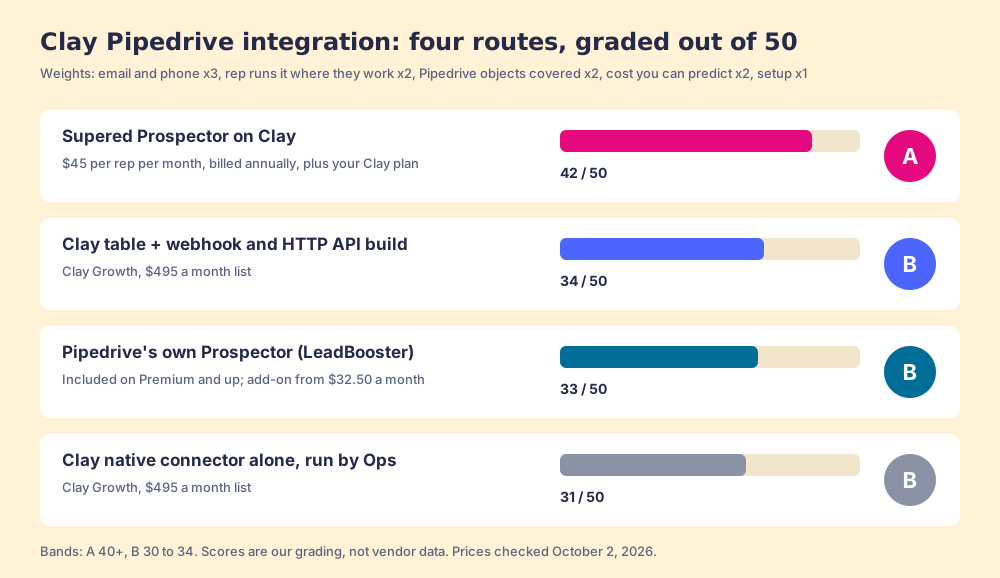
How we graded. Five criteria out of 50, weighted for a 10 to 50 rep Pipedrive team that sources new people: email and phone coverage (x3), the rep runs it from where they already work (x2), the Pipedrive objects the route can write (x2), cost you can predict (x2), and setup effort (x1). Prospector scores 5, 5, 3, 4, 3. The webhook and HTTP build scores 5, 1, 5, 3, 1. Pipedrive’s Prospector scores 2, 3, 5, 3, 5. The native connector alone scores 5, 1, 2, 3, 4. Bands: A from 40, B from 30. Flip the weights for a team that never sources new people and only wants its existing Pipedrive records filled (rep x1, objects x3) and the webhook and HTTP build moves to first. That flip is the decision on this page.
Why trust this guide?
Supered started inside RevPartners, the HubSpot partner I founded, which sold roughly twice as much Sales Hub as any other partner and reached Elite tier in 13 months. Supered holds 4.9 stars on G2 from 81 reviews and 5.0 on the HubSpot Marketplace from 122 (checked October 1, 2026), and it runs on Pipedrive as it does on HubSpot and Salesforce. We sell one of the routes in the table, which is a good reason to open every link below.
What does the Clay Pipedrive integration do?
It moves two kinds of record across the hatch. Clay’s listing describes the whole connector in one line, “create, update, and lookup people and organizations using identifying fields,” and Clay University documents the six actions behind it (Clay University, Pipedrive integration, opened October 2, 2026):
- Lookup Person. Searches Pipedrive persons by name, email, phone or custom fields. Exact Match “defaults to false” and the fields searched default to all of them.
- Create Person. Writes a new person with name, email, phone and organization.
- Update Person. Changes an existing person by Pipedrive ID.
- Lookup Organization. The same search, for organizations.
- Create Organization. Writes a new organization with name, address and custom fields.
- Update Organization. Changes an existing organization by ID.
Each action is tagged “Bring Your Own Account Required,” so Clay writes to Pipedrive as the user who connected it, and Clay’s docs add that “your custom fields in Pipedrive are all accessible within the platform.”
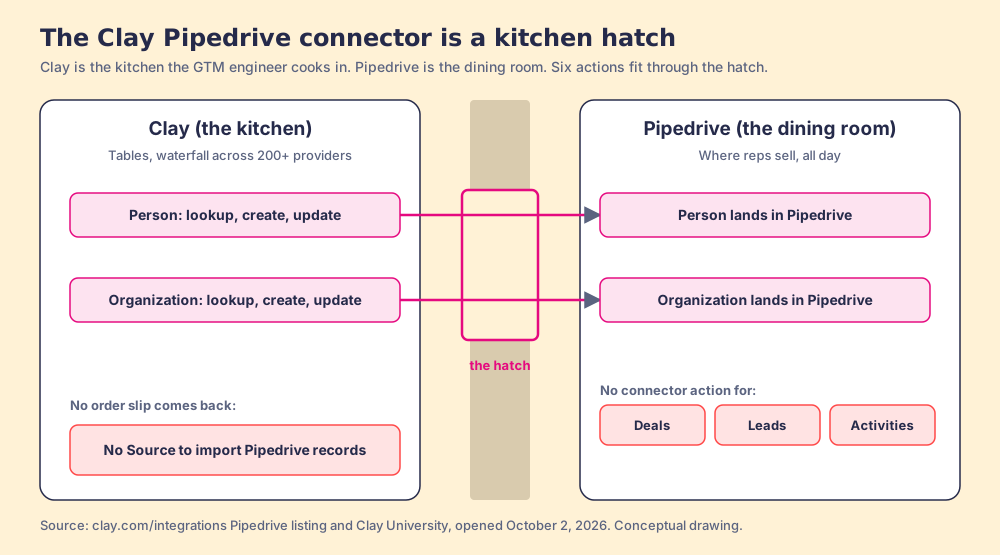
The kitchen picture holds for most of the way. It breaks at one point: a kitchen cooks only when an order arrives, while a Clay table can run on its own as rows land. A Pipedrive team uses that to get orders into the kitchen without a source, and the setup section below builds it.
How does Clay’s Pipedrive connector compare with HubSpot and Salesforce?
It is the smallest of the three, and the missing pieces are the ones a sales team feels.
| Native connector | Entries on clay.com | Import source | Lookup, create, update | Deal records | Sequence enrollment |
|---|---|---|---|---|---|
| HubSpot | 11 | Yes, any object or list | Yes | Yes, with pipelines and stages | Yes, HubSpot Sequences |
| Salesforce | 9 | Yes, records and reports | Yes, plus upsert | Yes, any object and Convert Lead | No |
| Pipedrive | 6 | No | Persons and organizations | No | No |
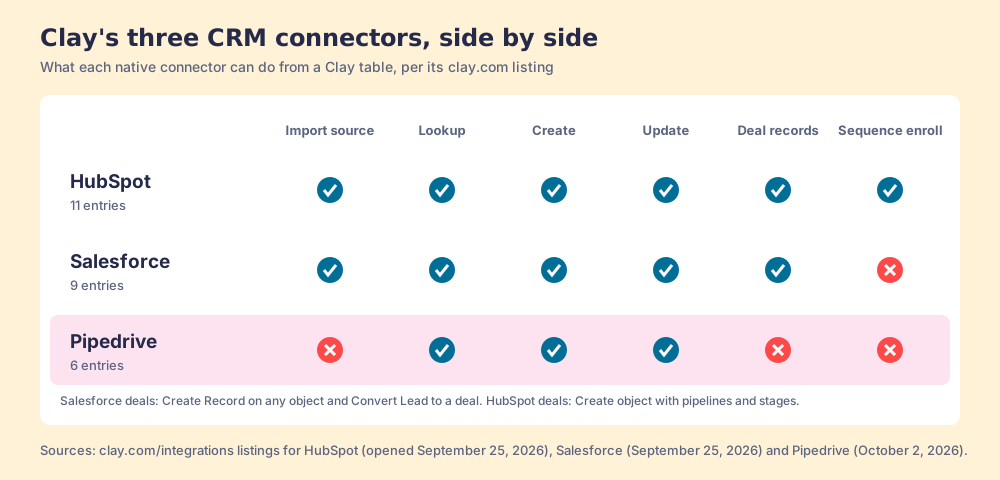
The missing import source matters most. On HubSpot a Clay table points at a list and fills itself (Clay HubSpot integration); on Salesforce a report does the same (Clay Salesforce integration). On Pipedrive the builder supplies the door. The missing deal actions come second: a Pipedrive team lives in its deal pipeline, and the connector cannot open the deal a new person belongs to.
Which Clay plan do you need for Pipedrive?
Growth. Clay’s pricing page marks CRM integrations “Not included” on Free and Launch and included on Growth and Enterprise. Growth is listed at “starting at $495/mo,” $446 a month on annual billing, with 6,000 Data Credits a month, and the same page says “If an enrichment returns no result, you’re not charged Data Credits or Actions” (clay.com/pricing, October 2, 2026). Launch, at $185 a month, has the waterfall and no Pipedrive connector.
One trap in the search results. The most detailed third-party Clay Pipedrive guide we found budgets a “Clay Starter plan: ~$149/month.” Clay retired Starter, Explorer and Pro when it moved to Data Credits and Actions on March 11, 2026, and new buyers cannot get it (Clay, Introducing Clay’s new pricing). Budget from Growth. Our Clay pricing breakdown covers the meter, and waterfall enrichment explains why Clay data enrichment for Pipedrive finds more than one database: the table asks provider after provider until one returns a verified email or phone.
How do you set up the Clay Pipedrive integration?
Six steps, three of them about the gaps.
Connect Pipedrive to Clay
In Clay, open Settings, Connections, click Add Connection and pick Pipedrive, or add the account the first time a Pipedrive action asks for one in the enrichment panel. Connect as an admin or a named integration user. Clay writes as whoever connected, and a rep’s personal login leaves with the rep.
Get Pipedrive records into a Clay table
With no source, pick one of three doors:
- A CSV export. Export a Pipedrive list view and upload it. Fine once; stale the next morning.
- A Pipedrive webhook. Pipedrive pushes a notification “every time an event occurs,” set up under Tools and apps, Webhooks (Pipedrive Knowledge Base, updated September 3, 2026). Point it at a Clay webhook table and new persons arrive as rows.
- Zapier or Make. Zapier’s Pipedrive page lists triggers such as Person Matching Filter and New Person, and a Clay action that creates a record in a table (Zapier).
Look up before you create
Add the email and phone waterfall, then Lookup Person, and change the two defaults. With Exact Match off and every field searched, a lookup can return a person who merely resembles the row. Turn Exact Match on and search the email field. Branch on the result: Update Person by ID when it finds someone, Create Organization then Create Person when it does not.
Write deals and leads through the API
The six native actions stop at persons and organizations. Clay includes HTTP API integrations on Growth, so a builder adds a column that calls Pipedrive’s API to open a deal or a lead for the new person.
Set the data standard in the table
Pipedrive’s required fields will not do it. Pipedrive’s knowledge base says the feature “won’t stop deals from progressing if the fields are updated via import, bulk-editing, API, automations, or third-party integrations,” and the rule covers persons and organizations too (Pipedrive Knowledge Base, required fields, updated September 3, 2026). Clay writes through the API. So the mapping in the table, with email, phone, owner and a lead source, is the only standard a Clay-written person meets. Run ten rows and open each one.
Where does the rep fit in the Clay Pipedrive sync?
Nowhere, in the build above. The GTM engineer cooks and the hatch delivers. The Bridge Group’s 2025 SDR report, 351 B2B companies, puts the median rep’s day at 112 activities: 44 phone, 41 email, 19 LinkedIn, 8 text or other (Bridge Group, 2025). None of the 112 happens in Clay. They happen in Pipedrive, the inbox and LinkedIn.
So the rep messages the GTM engineer for a list. Clay’s founders wrote in December 2025 that GTM engineering “has now spawned thousands of open jobs” (Clay, $100M ARR), and many of those engineers spend their week as the list desk, taking orders by Slack and plating them one at a time. The tables are excellent. The orders come in the slow way.
The fix has two halves: a way for the rep to order from the table they already sit at, and a way for the leader to see which lists got worked and how each lead ended. A person in Pipedrive with a phone number has only been found.
How do reps run Clay tables from Pipedrive without opening Clay?
Supered Prospector on Clay
Clay plus Supered is the best way for a sales team to prospect: GTM engineers build in Clay, reps never open Clay. Prospector runs inside the Supered Chrome extension on your team’s own Clay account and brings no database of its own. It brings Clay’s waterfall across 200+ data and AI vendors (clay.com), which is every database, routed, and the reason we chose Clay as our only data provider.
The three people it serves:
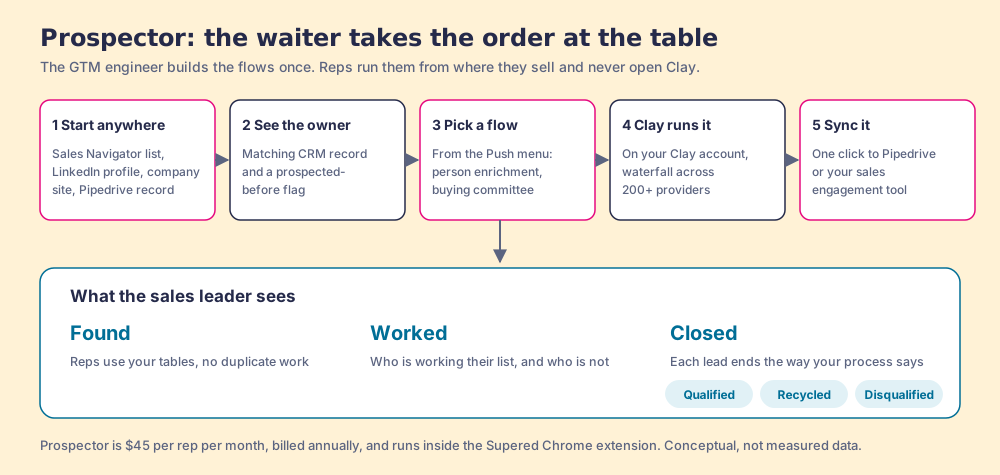
- The GTM engineer. Builds named flows once, each tied to a Clay table or function (person enrichment, a buying committee with the titles, departments and seniority your team sets) and a destination: the CRM, or a sequence in your sales engagement tool. Waterfalls, tiers, tags and sequence variables stay theirs. Start from the Supered Clay template or bring your own tables. The list desk closes (Prospector for GTM engineers).
- The rep. Gets the GTM engineer’s table as a button in Sales Navigator, on a company’s website and on the Pipedrive record. On a profile they see the matching CRM record, who owns it, and whether the person was prospected before, so no two reps work the same lead. They add Navigator leads to a prospect list and push the list to a Clay table, or pick a flow from the Push menu on one person, and the result lands in Pipedrive in one click with fields mapped once by your admin. That mapping is also the lock on the side door that required fields leave open.
- The sales leader. Sees every list Found, Worked and Closed: which reps used the tables, who is working their list and who is not, and how each lead ended, Qualified, Recycled or Disqualified, the way your process says. That view is how a Clay budget grows.
The plays a Pipedrive team runs with it: research an account and pull the people who sign off; push new logos from any lead into the right sequence; find the rest of the team at a customer for expansion; catch a past champion who changed jobs, covered in our job change tracking guide; and add the economic buyer and two peers to a stalled deal before the forecast call. On LinkedIn, Prospector works within LinkedIn’s terms and does not copy search results in bulk; the contact data comes from Clay’s waterfall on the customer’s Clay account.
Prospector costs $45 per rep per month, billed annually ($540 a year), from one user, as its own plan (Prospector). Add Clay Growth at its $495 monthly list price and ten reps come to $11,340 a year. Skip the extra seats and get more out of the Clay you already pay for. The sourcing use case shows the full rep loop, and the Clay Chrome extension guide explains running Clay from a profile.
Choose something else in two cases:
- No Clay account. Prospector runs only on Clay. Pipedrive’s own Prospector, below, is the shorter path.
- Batch hygiene as the whole job. If your reps do not source new people and the task is filling phones on 20,000 existing persons, the webhook and HTTP build is the better fit, and reps need no button.
The Clay webhook and HTTP build, for Ops
The strongest route when the work is the database itself: a webhook feeds the table, the lookup guards against duplicates, and an HTTP column opens deals. It covers every Pipedrive object and costs only Clay. The tradeoff is upkeep: a builder owns the webhook, the API column and the mapping, and reps still place their orders by message. If you want help building it, RevPartners, the company I founded and now a Clay Elite Studio Partner, builds and tunes Clay tables with teams; any good Clay agency can, and our guide to picking a Clay agency covers how to choose one.
Pipedrive’s own Prospector, for teams without Clay
Same word, different machine. Pipedrive’s LeadBooster add-on includes a feature called Prospector, “an outbound lead generation tool powered by Cognism” that searches “over 400 million profiles and 10 million companies” from inside Pipedrive. “Every prospect costs one credit,” email and phone fill in only when the profile has them, and the add-on includes “10 Prospector lead credits each month,” with extra credits tiered from $0.85 down to $0.25 (Pipedrive Knowledge Base, updated September 3, 2026). LeadBooster is included on Premium ($59 per seat per month, billed annually) and higher, or added from $32.50 a month (Pipedrive pricing, October 2, 2026). It lives inside Pipedrive. Its limit is one database: when Cognism lacks the phone, there is nowhere else to ask. Our Pipedrive Chrome extension guide sets the two Prospectors side by side.
The native connector alone
Connect, upload a CSV, look up, create, update. Enough for a one-time cleanup.
Which Clay Pipedrive integration should you choose?
Our recommendation, on this page’s weights: if you have Clay on Growth, build the webhook and lookup once for the records you already hold, and put Prospector in front of the reps for the people they find. The six actions carry both, once orders can reach the kitchen and the leader can see what happened to each plate. If you do not have Clay, start with Pipedrive’s Prospector and watch how often the phone field comes back empty; that number tells you when a waterfall pays for itself.
Pipedrive teams finding people on LinkedIn should read the Pipedrive LinkedIn integration guide next, since LinkedIn’s Sales Navigator CRM features do not cover Pipedrive. If the Clay tables are the bottleneck, our Clay workflows guide and Clay templates cover what to build first, and Supered for Pipedrive shows the process side once the person is in.
Frequently asked questions
Does Clay integrate with Pipedrive?+
Which Clay plan includes the Pipedrive integration?+
Can Clay create deals in Pipedrive?+
How do I stop Clay from creating duplicate people in Pipedrive?+
Is Clay a CRM like Pipedrive?+
Do reps need a Clay login to use Clay with Pipedrive?+
Your process, running itself.