Clay Email Finder: How the Waterfall Finds Work Emails, What a Found Email Costs, and Why the Last Tenth Is Hard
How the Clay email finder works, what Clay's own tests say each provider finds, what a found email costs in credits, why a waterfall halves misses instead of ending them, and how reps run it without opening Clay.
The Clay email finder is Clay's work-email waterfall: it asks providers such as Findymail, Prospeo, Hunter and Dropcontact one at a time for a person's work email, stops at the first valid result, validates it, and charges nothing when a provider comes back empty.
A GTM engineer at a 30-rep company opens her Clay table on a list of 400 VPs. She adds the work-email waterfall, runs ten rows the way Clay suggests, and nine come back with an address. The tenth comes back blank after three providers have looked. Down the hall a rep has the same problem one person at a time: a VP of Sales open in Sales Navigator, no email, and a Slack message to the engineer that starts “can you run this one?”
The Clay email finder is Clay’s work-email waterfall: it asks providers such as Findymail, Prospeo, Hunter and Dropcontact one at a time for a person’s work email, stops at the first valid result, validates it, and charges nothing when a provider comes back empty. Three facts decide whether it is worth running, and the pages that rank for this search mostly skip them:
- The finding rate. Clay publishes its own provider tests. In North America the best single provider found 90.26% of work emails (Clay data tests, last run October 22, 2025).
- The last tenth. Adding providers halves the misses rather than ending them, because the people one finder cannot find are mostly the people the others cannot find either.
- The price of a found email. A miss is free, so a found email costs whatever the provider that found it charges: 2.5 cents for a Findymail hit at Clay’s $0.05 entry rate, by our arithmetic below.
We build Prospector, which runs Clay tables for reps on the customer’s own Clay account, so we read Clay’s docs the way a customer does. What follows credits Clay for Clay’s work and marks where our arithmetic starts.
How does the Clay email finder work?
A good county library runs an inter-library loan desk. You hand the librarian a slip with a title and an author. She checks her own shelves first, and if the book is not there she phones the next branch, then the next, in an order she has learned over years: cheap and well-stocked branches first, the specialist collection last. You pay a fee only when a book arrives. A branch that does not have it costs you nothing.
Clay’s email finder is that desk, and its own lesson describes the same steps. The slip needs a company domain at minimum: “The primary input required is the Company Domain. Ideally, you should also include Personal Social Profile URLs” for accuracy, with “Full Name + Company Name or Full Name + Personal Email” as fallbacks (Clay University, Enriching People Data, opened October 2, 2026). The branches are the providers Clay lists on its waterfall page: “Get the highest coverage on your work email search by checking Prospeo, DropContact, Datagma, Hunter, PeopleDataLabs, Nimbler, Apollo, Lusha, Snov, & more” (clay.com/waterfall-enrichment, October 2, 2026). Clay arrives with a pre-arranged order “optimized for coverage,” and the builder can add or reorder providers.
Then the fee rule, in Clay’s words: “If a provider finds a valid email, the process stops for that contact. If no email is found, data credits are refunded and Clay moves to the next provider until an email is found or all providers are exhausted.” The pricing page says the same thing as policy: “If an enrichment returns no result, you’re not charged Data Credits or Actions” (clay.com/pricing, October 2, 2026).
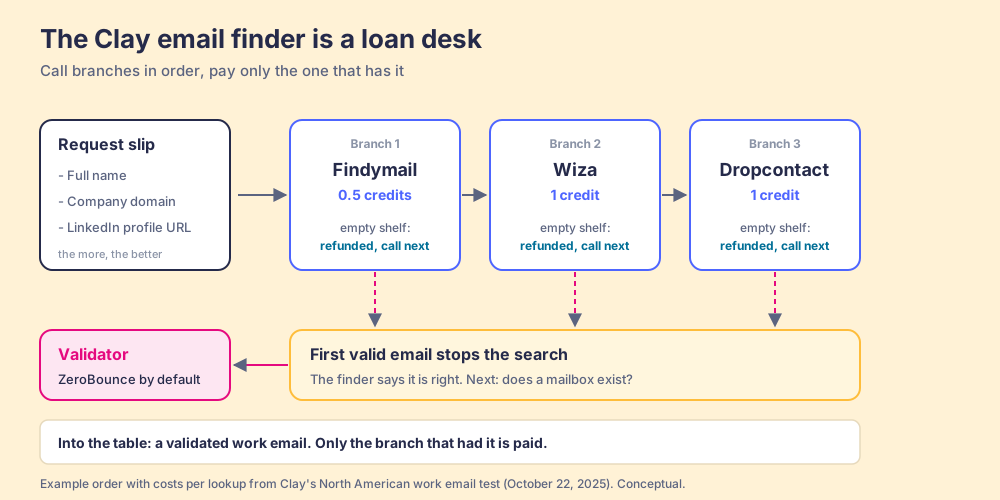
The desk does one more job before it hands over the book. “Clay defaults to ZeroBounce for validation, but you can select another validator if preferred,” the lesson says. Finding and checking are two steps. The finder returns an address that a provider believes is right; the validator asks the mail server whether a mailbox is there. Most of what goes wrong with a Clay email enrichment, as later sections show, goes wrong in the gap between those two.
The library picture has an edge worth marking. A library book is the same book at every branch. An email address is not: two providers can return two different addresses for the same person, which is why the order and the validator matter more than the number of branches.
How many emails does Clay find? What Clay’s own tests show
Clay runs public tests of the providers in its marketplace, and they are the best evidence a buyer has, because the same contacts go through every provider. The North American work-email test, last run October 22, 2025, scored 13 providers on coverage (the share of contacts with an email returned), quality (a score built from how many verifiers confirm the returned emails), and Clay credit cost per lookup. Clay’s methodology picked five verifiers from a separate test on 9,500 campaign emails, counts an email as valid when two or more confirm it and as ultra valid when four or more do, and scores quality as 70% ultra valid plus 30% valid (Clay, work email verification methodology), and one of those verifiers, Findymail, is also a provider in the test, which a careful reader will weigh.
| Provider | Coverage | Quality | Credits per lookup |
|---|---|---|---|
| Findymail | 90.26% | 96.26% | 0.5 |
| Zeliq | 85.56% | 86.10% | 2 |
| Wiza | 85.02% | 94.72% | 1 |
| FullEnrich | 83.17% | 87.98% | 1.5 |
| BetterContact | 81.66% | 95.05% | 1.5 |
| Dropcontact | 75.45% | 91.81% | 1 |
| Kitt AI | 72.49% | 95.22% | 1 |
| Enrow | 70.94% | 94.10% | 0.2 |
| LeadMagic | 68.02% | 81.95% | 0.3 |
| SMARTe | 63.18% | 86.53% | 6 |
| Datagma | 62.01% | 91.33% | 0.4 |
| Hunter | 52.87% | 97.15% | 0.4 |
| Icypeas | 51.90% | 93.83% | 0.2 |
Source: Clay data tests, best work email provider by region, North America, last tested October 22, 2025, read October 2, 2026.
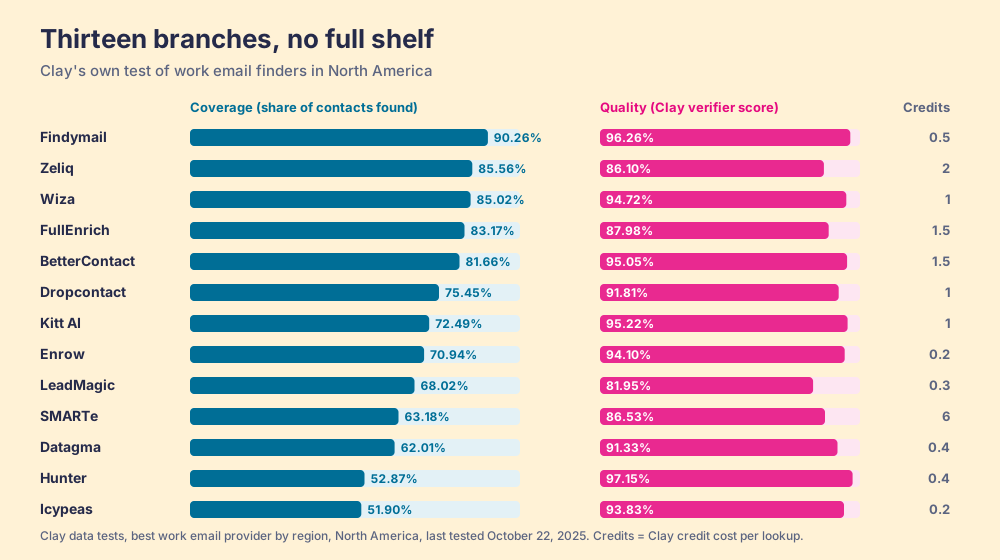
Two things in the table matter to the person building the waterfall. First, coverage and quality pull apart: Hunter finds about half the list with the top quality score, 97.15; Zeliq finds 85.56% with a quality score of 86.10. A provider high in coverage and low in quality sends the waterfall home early with an address the validator may reject. Second, the leader changes with geography. In the same test’s European table, Zeliq covers 85.15% and Findymail 83.73% at 2.5 credits a lookup, so a team selling into Europe should not copy a North American order.
Why doesn’t a three-step waterfall find every email?
Arithmetic makes a tempting promise here. If one finder misses 12 people in 100 and a second, unrelated finder also misses 12 in 100, the two together should miss about 1.4 in 100, because a person would have to slip past both. Add a third and the misses all but vanish.
That promise rests on one word, unrelated, and it fails. The people a finder misses are not a random draw. They are the ones with a new job and no footprint yet, the ones whose company mail server accepts everything, the senior executives whose addresses are guarded. The benchmark below found enterprise executives the hardest segment: “Every tool performed worst on this segment.” Ask three neighbors on the same street for directions to a house with no number on it and all three shrug at the same door.
The best public measurement we found puts a size on the shrug. A June 2026 benchmark by b2b-email-finder.com, an anonymous review site whose About page names no people and which ranks Findymail first, ran 500 contacts with known emails through eight finders (b2b-email-finder.com, opened October 1, 2026). Its coverage figures included Apollo 88.2%, Findymail 83.2% and Hunter 72.6%, and two lines stand out: “No single tool exceeded 89% coverage,” and “a three-tool waterfall (Findymail -> Apollo -> Hunter) achieved 94.2% coverage while maintaining an accuracy rate above 87%.”
Now the arithmetic, which is ours. If those three tools missed independently, the waterfall would miss 16.8% times 11.8% times 27.4% of contacts: about 0.54%, roughly 1 person in 184. The benchmark measured 5.8% missed, about 1 in 17. That is roughly ten times more misses than independence predicts. Against the best single tool, Apollo’s 11.8 misses per 100, the waterfall cut misses to 5.8, about half.
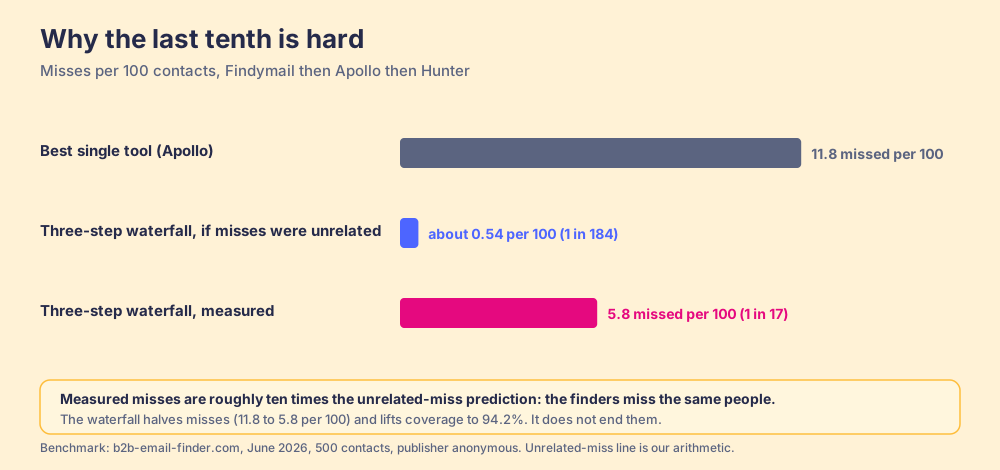
Halving the misses is worth a great deal, and Clay’s own claims point the same way: its waterfall page says the approach “routinely triples our customers’ data coverage and quality,” and its AI email finder post describes coverage going “from 30% to 80%+” (clay.com/blog/ai-email-finder). Both are Clay’s claims about Clay’s customers, and the low starting points explain the big multiples. The teach for the builder is narrower and more useful:
- Order for diversity. The second provider earns its slot by finding different people from the first, so pick it by the segment it covers, not by its headline coverage.
- Diminishing returns. Past the third or fourth step, each new provider is mostly re-asking about the same hard cases, and the right next move is a different kind of input (a LinkedIn URL, a personal email for the fallback) rather than another branch.
- Region tables. The order that leads in North America is the wrong order in Europe, by Clay’s own test.
What does a found email cost in Clay?
The published answers to this question go stale fast. Prospeo’s Clay email finder guide, which ranks for this search, still quotes Clay’s legacy plans, Starter at $149 and Explorer at $349, which Clay retired for new customers in its Pricing 3.0 change of March 11, 2026; legacy customers could switch between old plans only until April 10, 2026 (Clay, Introducing Clay’s new pricing). Clay’s own AI email finder post says it “integrates with over 50 data providers” while its pricing page nav on October 2, 2026 reads “Buy data from 200+ providers in one place.” Date every Clay number you read.
The current meter has two lines. Data Credits buy data and “start at $0.05 each”; Actions pay for platform work and “start at less than $0.01 each.” Launch starts at $185 a month and Growth at $495 a month, or $167 and $446 a month billed yearly (clay.com/pricing, October 2, 2026).
Two Clay sources give the credit price of a single email lookup, and they disagree. Clay University’s integration docs list “2 credits per enriched cell” with the Clay-managed account for Findymail, Prospeo, Hunter and Dropcontact, and 1 credit for LeadMagic and Icypeas (Clay docs, Findymail integration, and the matching pages for the others, opened October 2, 2026). Clay’s data-test page lists lower numbers for the same providers: Findymail 0.5, Hunter 0.4, Icypeas 0.2. Pricing 3.0 says Clay cut data costs by 50 to 90% on most providers, which would explain docs written for the old meter. The authority is your own workspace: Clay’s lesson says to test on small batches, and ten rows will show the real charge.
| Provider (email find) | Clay docs, credits per cell | Clay data test, credits per lookup | Data test cost at $0.05 |
|---|---|---|---|
| Findymail | 2 | 0.5 | 2.5 cents |
| Hunter | 2 | 0.4 | 2 cents |
| Dropcontact | 2 | 1 | 5 cents |
| Prospeo | 2 | 0.5 (Europe table) | 2.5 cents |
| LeadMagic | 1 | 0.3 | 1.5 cents |
| Icypeas | 1 | 0.2 | 1 cent |
Now the rule that makes the arithmetic short. Because a miss is refunded, a found email costs the price of the provider that found it, plus validation. Lead the waterfall with Findymail and 90.26% of North American contacts would be found at the first step for 0.5 credits, 2.5 cents at the entry rate. A contact that falls through to Dropcontact costs 1 credit, 5 cents, and the two empty lookups before it cost nothing. If validation runs as its own paid step at the 1 credit Clay’s ZeroBounce docs list for the Clay-managed account, add 5 cents as a ceiling. Our estimate for a found, validated North American work email: 2.5 to 10 cents on the entry rate, with most of them near the low end.
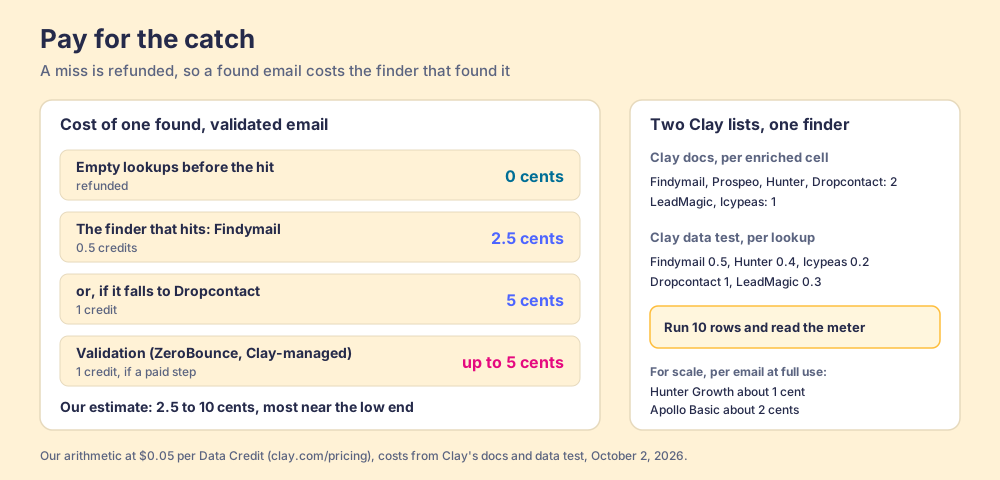
Set that against the single-database meters. Per found email, Clay is not where a team saves money. Hunter’s Growth plan, used to the last credit, works out to about 1 cent per email, and Apollo Basic to about 2 cents for an email at its published credit rates (our arithmetic from hunter.io/pricing and apollo.io/pricing, checked October 1, 2026). What Clay buys is the person Hunter or Apollo could not find, the validation, the refund on every empty lookup, and one contract instead of a drawer of them. For a list where the last tenth is the CFO you need, that is the trade worth making. For a list of mid-level managers at US software companies, a single good finder covers most of it.
Is a found email a safe email? The catch-all problem
Some company mail servers are built like an apartment lobby with a doorman who signs for every letter. Write to any name at that building and the doorman says “delivered.” Whether the person lives there, he will not tell you. That is a catch-all domain: the server accepts mail for any address, so a standard check cannot confirm the mailbox exists.
Clay’s default treats the doorman’s signature as good enough. “Clay considers catch-all emails valid by default,” the people-data lesson says, “but you can toggle on the ‘Only mark ‘Safe to Send’ emails as valid’ setting to exclude catch-all emails if you’re concerned about deliverability.” In the 500-contact benchmark above, 18.7% of Apollo’s returned emails were catch-alls. On a list of 1,000 that would be about 187 letters signed for by a doorman.
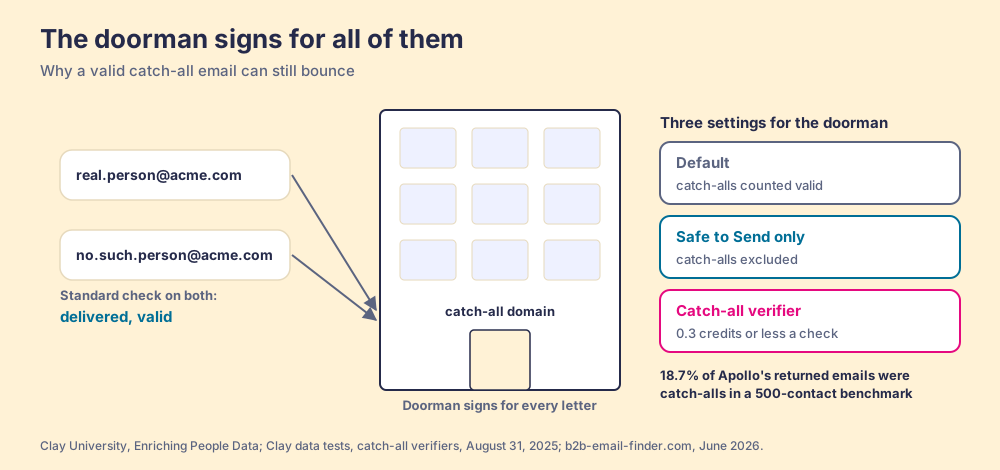
There are three settings for the doorman, and the right one depends on what your sending domain can bear:
- Default, catch-alls in. Highest coverage. Right for a team that sends at low volume from well-warmed domains and wants to reach the CFO even at some bounce risk.
- Safe to Send only. Catch-alls out. Right for a team running cold sequences at volume, where bounces count against the sending domain.
- A catch-all verifier in between. Clay’s catch-all test, last run August 31, 2025, scored verifiers that rule on catch-all addresses: Findymail, Enrow and Listmint returned a verdict on 100% of them, Hunter on 30.62 to 43.89% depending on the mode, at 0.3 credits or less per check (Clay data tests, catch-all verifiers). The verifier walks past the doorman and knocks.
How to set up a Clay email finder waterfall
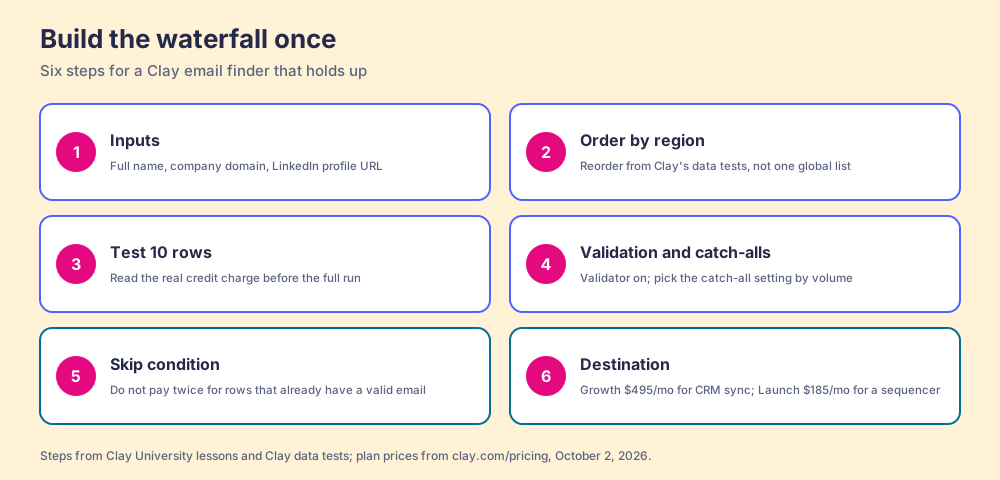
For the builder, in the order Clay’s docs and tests support:
- Inputs. Full name and company domain at minimum; add the LinkedIn profile URL, which Clay says improves accuracy. Clean the domain first, since a wrong domain sends every branch to the wrong building.
- Provider order. Start from Clay’s pre-arranged order, then reorder by your region using Clay’s data tests: high coverage and high quality first, cheap specialists after, expensive providers last.
- Ten rows. Run “Save & Run (10 Rows)” and read the credits charged against what you budgeted, since Clay’s docs and its tests list different per-lookup prices.
- Validation and the catch-all setting. Keep validation on, then choose the doorman setting by your sending volume, or add a catch-all verifier step.
- A condition before the waterfall. Clay supports conditional runs “so enrichments only run when needed” (Clay University, Enriching Company Data); skip rows that already have a valid email in the CRM so you do not pay twice.
- Destination. Write results to the CRM on Growth, where Clay’s CRM auto-sync lives, or to the sequencer on Launch.
The waterfall itself is a solved build, and waterfall enrichment covers the mechanism behind any field, phones included. The open question at most Clay companies is the one in the first paragraph: the table works, and the rep is still asking someone to run it.
How do reps run the Clay email finder without opening Clay?
Clay says plainly who the table is for. Its homepage reads “GTM engineers build on Clay,” and its Clay for Sales page asks teams to “Keep reps selling instead of switching tools to find contacts, fix data, or research accounts” (clay.com/clay-for-sales, October 1, 2026). So when a rep searches “clay find email,” the useful answer is that the email finder belongs in the builder’s table and the button belongs where the rep is. Four routes exist:
- Clay’s CRM auto-sync. On Growth, a table fills emails on records Ops sends through it. Good for lists Ops builds; the rep with one VP on screen still waits for the next run.
- Clay for Chrome. Clay’s own extension pulls data from web pages into a Clay table. It feeds the builder, and its arrow points into Clay (the Clay Chrome extension guide sorts the options).
- Clay MCP. Reps run Clay Functions from ChatGPT, Claude or Codex, and Clay says “Every email and phone number is validated across Clay’s 200+ vendors” (clay.com/mcp). Right for a rep who already works in an AI chat all day.
- Supered Prospector. The team’s Clay tables as a button where reps sell, on the team’s own Clay account.
Prospector is ours, so the disclosure first: I started RevPartners, a HubSpot partner that did only sales implementations, and Supered came out of that work; Supered holds 4.9 out of 5 from 81 reviews on G2 and 5.0 from 122 on the HubSpot App Marketplace (checked October 1, 2026).
Clay plus Supered is the best way we know for a sales team to prospect: GTM engineers build in Clay, and reps never open Clay. The engineer builds named flows once, for example “find work email” or “buying committee,” each mapped to a Clay table and a destination, and stops being the list desk (Prospector for GTM engineers; the Clay workflows page covers what a flow can run). Prospector runs inside the Supered Chrome extension, so the rep gets the table as a button on a LinkedIn profile, on a company’s website, or in the HubSpot, Salesforce or Pipedrive record, picks the flow from a Push menu, and the waterfall runs on the team’s Clay account. From Sales Navigator, reps add leads to a prospect list and push the list to a Clay table (the Sales Navigator Chrome extension page covers the options there). Prospector works within LinkedIn’s terms and does not copy search results in bulk; the contact data comes from Clay’s waterfall on the customer’s Clay account. Before pushing, the rep sees who owns the record and whether a teammate already prospected the person, so two reps do not work the same VP. Your logic stays yours: waterfalls, tiers, tags and sequence variables. Start with the Supered Clay template, or bring your own tables.
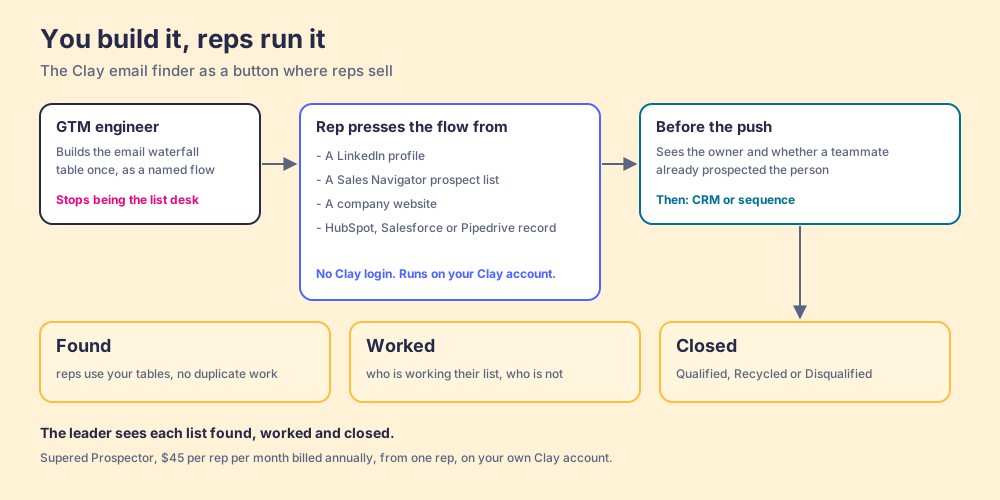
The leader’s half matters to the Clay budget. Prospector shows each list as found (reps used your tables, no duplicate work), worked (who is working their list and who is not), and closed, where every lead ends the way your process says: Qualified, Recycled or Disqualified. When the VP can see Clay-found emails turn into worked lists, the Clay budget has an argument behind it.
The price: Prospector is $45 per rep per month, billed annually, from one rep, and it needs your Clay account; Clay credits stay yours. Ten reps on Prospector plus Clay Growth at its monthly list price come to $11,340 a year, $5,940 for Clay and $5,400 for Prospector. If reps keep asking for extra database seats to build their own lists, skip the extra seats and get more out of the Clay you already pay for.
Choose something else if you do not run Clay: Prospector does nothing without a Clay account, and for emails alone a single finder is simpler (the Hunter alternatives and Findymail alternatives pages grade them). Choose Clay MCP if your reps live in an AI chat, and choose something else too if you want a tool that writes and sends the emails, which Prospector does not do.
What we recommend
Run the Clay email finder, and build it for the last tenth. Clay’s own test says the best single provider finds about nine in ten North American work emails; the benchmark says a waterfall halves the rest; and because a miss is refunded, the extra branches cost little. Order providers by region from Clay’s data tests, test ten rows to read the real meter, and decide the catch-all setting by how much bounce your sending domain can take. Then put the table where the rep is, so the VP on the rep’s screen, as a profile, a prospect list or a CRM record, gets an email from the team’s own waterfall instead of a Slack thread to the list desk.
For the wider field of finders, sorted by job, see email finder tools; for the single-person version of this job on LinkedIn, how to find someone’s email on LinkedIn; for the whole sourcing motion with Clay, Clay prospecting and the sourcing use case; and for what the credits cost by plan, Clay pricing.
Frequently asked questions
Does Clay have an email finder?+
How many credits does Clay charge to find an email?+
How accurate is the Clay email finder?+
Does Clay count catch-all emails as valid?+
Can a sales rep find an email with Clay without logging in?+
Is Clay cheaper than Hunter or Apollo per email?+
Your process, running itself.