What Is Clay? The GTM Tool Explained for the Sales Leader Who Is Not the GTM Engineer
Clay is the workshop your GTM engineer builds in, and your reps have never walked through the door. What the Clay GTM platform is in kitchen words, who builds on it, what it costs after Pricing 3.0, and how a sales leader turns it into pipeline.
Clay (clay.com) is a GTM data and workflow platform: one contract to 200+ data vendors, a waterfall that asks them in turn until one returns a verified email or phone, and orchestration that pushes the result into the CRM, built for the GTM engineer.
The message lands in the sales channel from RevOps, with a link and a small flourish: the new Clay table is live, it finds mobiles for the whole mid-market segment, and the whole team has access. A few reps react with an emoji. Two weeks later the credit meter shows the table has run a handful of times, and the person who ran it is the RevOps engineer who built it. This is the ordinary life of a Clay account inside a sales org, and it is why a sales leader ends up searching “what is Clay” a year after approving the renewal.
Clay (clay.com) is the platform GTM engineers build on: one contract to buy data from 200+ data and AI vendors, a waterfall that asks those vendors in turn until one returns a verified email or phone, and an orchestration layer that carries the result into your CRM, your sequencer, or your ads (clay.com, opened September 25, 2026). Whether you searched “what is Clay software” or “Clay sales tool,” the shortest true description of the Clay GTM platform is a workshop. It is a well-stocked, well-lit workshop in the back of the building, and the reps work out front on the floor. The two rooms are not connected, and that gap, rather than anything about the tool, is the sales leader’s problem.
What is Clay, in kitchen words?
Strip the product nav (Clay lists four pillars: data infrastructure, agents, orchestration, execution) down to what a sales leader needs, and Clay is three things bolted together.
- The marketplace. Instead of a ZoomInfo contract and an Apollo contract and a Cognism contract, one contract. Clay’s homepage puts it as “One contract to buy data from 200+ data and AI vendors in Clay’s marketplace.” You pay per result, in a currency Clay calls Data Credits.
- The waterfall. Clay’s word for asking those vendors one after another. Its rep-prospecting page says it plainly: “One click runs Clay’s waterfall enrichment. If one source misses, it tries the next” (clay.com/use-cases/rep-prospecting). Vendor A has the email and vendor F has the mobile; the record gets both. The pricing page adds the part a buyer cares about: “If an enrichment returns no result, you’re not charged.”
- The orchestration. Tables, workflows, and reusable Functions that take the enriched record and do something with it: score it, research it, write it back to HubSpot or Salesforce, drop it into Outreach or Salesloft, push it to an ads audience. A customer quoted on Clay’s homepage calls it “the orchestration layer for everything GTM. Salesforce for record-keeping, Snowflake for product data, and Clay for turning it all into automated action.”
Now the picture, because the three parts are easier to hold as a room than as a list. Clay is the GTM engineer’s workshop. Along one wall are the parts bins, 200 of them and more, each a data vendor, and you no longer buy the bins one at a time; you pay for the parts you pull. On the bench sits the jig, the waterfall, which tries part after part until one fits the record in hand. And running out of the room is a conveyor, the orchestration, that carries the finished record to wherever it needs to go. The builder stands at the bench. The reps are on the floor out front, on a LinkedIn profile, in a CRM record, in the inbox, on a prospect’s website, and the workshop door is behind them.
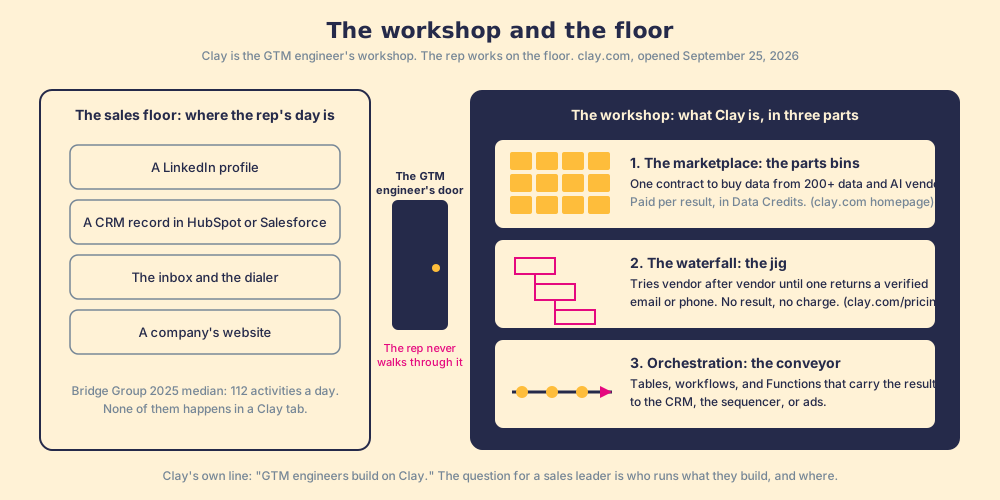
The picture has an edge, and it is fair to mark it. A workshop makes a thing once; a Clay table runs again for each new account that enters it, and the conveyor never stops. That difference is the reason the workshop can pay for itself many times over, and also the reason a sales leader can watch the credit meter climb without a matching rise in pipeline. The parts get made. Whether anyone on the floor picks them up is a separate question, and it is the question.
Who builds on Clay GTM, and who was supposed to run it?
Clay is explicit about who it is for. The headline over its product tour reads “GTM engineers build on Clay,” and the company says it coined that title: “GTM engineers build revenue engines using AI and automation,” and “Clay coined the term in 2023 and about 100 GTME job listings go live every month” (clay.com/blog/gtm-engineering). The role is real and growing, and Clay’s own numbers say the workshop is a good business. It crossed $100M in annual recurring revenue in December 2025, went from $1M to $100M in two years, has “never churned an enterprise customer,” and reports enterprise net revenue retention over 200% (clay.com/blog/100m-arr). When it rewrote its pricing in March 2026 it stated the goal in one line: “to have Clay be your default tool for GTM Engineering.”
So the builder is the customer. Read a little further, though, and Clay describes a second person, the one the builder builds for. Its homepage, under “Build systems that make reps more productive,” says “Reps can self-serve the best prospecting data” and “Build centralized workflows for any rep to run.” Its MCP page goes further: “Turn your best reps’ playbooks into Functions the whole team can run.” Clay’s own copy splits the job in two. One person builds. Many people run. That split is the hinge, because Clay wrote it, and because the second half is where a sales team’s money goes to die.
Why do reps never open Clay?
Start with where a rep’s day is. The Bridge Group’s 2025 SDR report, 351 B2B companies, gives a median of 112 activities a day: 44 phone, 41 email, 19 LinkedIn, 8 text or other (Bridge Group, 2025). Not one of those 112 happens inside a Clay tab. The same report puts the median share of SDRs hitting quota at 60%, “the lowest reported in study history.” The rep is busy, behind, and living in four surfaces, and the workshop is a fifth.
Two convictions we hold explain the rest, and both are plain enough to say in one breath. The answer has to reach the rep in the moment of the work; any time they must go somewhere else to get it, that is a failure. And a tool that asks reps to add a tab, a login, or a lesson has already lost, because reps do not adopt destinations; they adopt whatever sits in the path they already walk. A Clay table is a destination. However good it is, it is behind a door on the far side of the building, and the rep with a buyer on the line does not walk to it.
You might say the reps should walk to it, and that a team paying for a 200-vendor waterfall has earned the right to expect a login. Fair. But when reps do not run what was built for them, the cause is the system: friction, distance, and no one inspecting whether it was run. Blaming the rep for staying on the floor produces a training deck, and the training deck produces the same emoji.
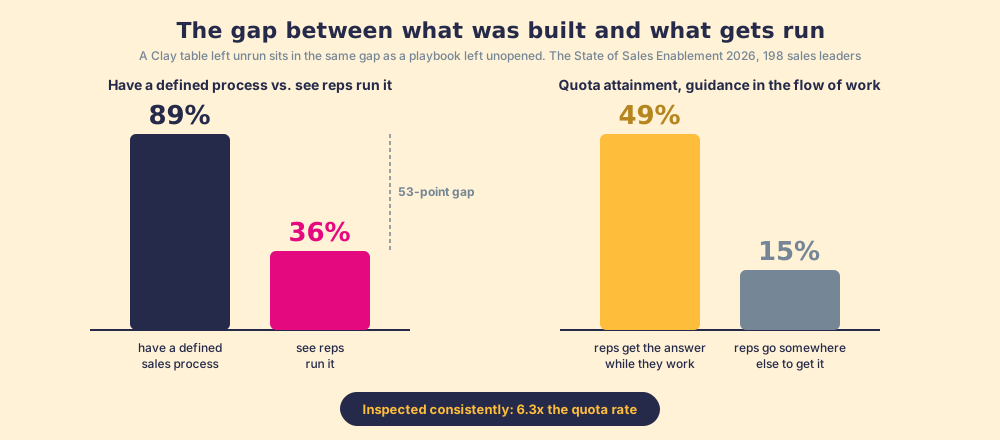
Our own field data measures the size of this gap for the sales process as a whole, and the shape transfers. Across 198 sales leaders, 89% have a defined sales process and 36% see their reps run it, a 53-point gap between built and run (The State of Sales Enablement). The same survey found that teams whose reps get guidance in the flow of work report 49% quota attainment against 15% for teams whose reps have to go somewhere else for it, and that teams which inspect deals against the process consistently hit quota at 6.3x the rate of teams that rarely do. A Clay table left unrun sits in the same gap as a playbook left unopened.
What does “Clay for reps” mean today?
Clay knows the door problem, and its site now describes three doors into the workshop for a rep. Take them one at a time, as market structure, because a sales leader will be offered all three in the next twelve months.
- The workshop door. Log into Clay and learn it. Clay University now runs a course for reps alongside the one for Ops. This works for the rep who likes building, and it is the door the builder already uses.
- The AI chat door. Clay MCP, which Clay headlines as “Give reps the best prospecting data in their AI tools.” A rep prompts ChatGPT, Claude, or Codex to run Clay Functions, reason across Audiences, or return up to 1,000 People Search results, while Ops keeps “the logic, compliance and spend” under control (clay.com/mcp). A marketing-ops director at Saviynt is quoted on the page finding and enriching contacts and pushing them into Salesforce “all from inside Claude.”
- The browser door. Clay’s rep-prospecting page points to a Chrome-extension partner that “lets reps enrich with Clay and sync prospects to your CRM anywhere on the web,” and runs a case study of an education company that put 110 sales reps on Clay prospecting from the browser, syncing verified contacts straight to Salesforce, “No Clay login required.” The SVP of sales there describes it as “the power of Clay data, but in a structured, simple way.”
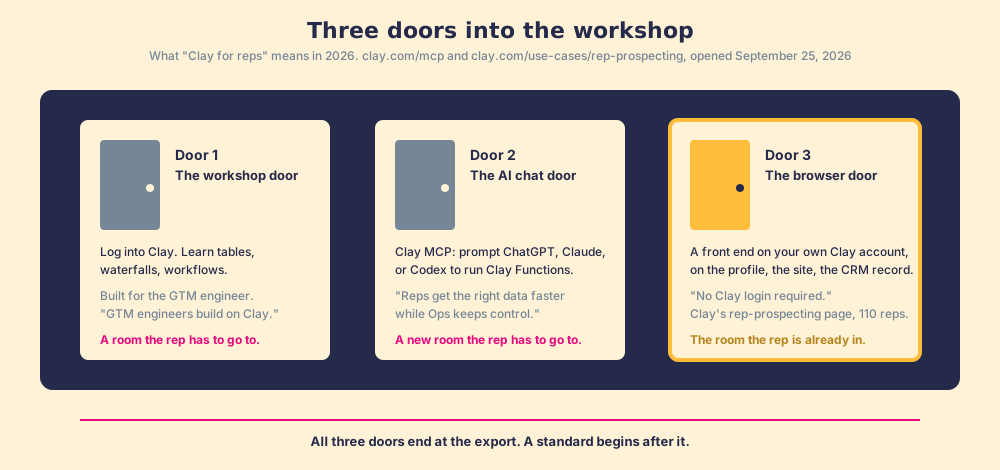
The third door is a category now, and it is the one we build in. State the difference as a fact rather than a preference: Clay MCP brings Clay into your AI chat. A browser front end brings Clay into the LinkedIn tab, the CRM record, and the company site the rep is already on. One is a new room; the other is the room the rep never left, and for a team that sells by phone and email the second is the better bet.
Notice, though, what all three doors have in common. Each one ends at the export. The contact lands in Salesforce, and the door closes behind it. Clay’s MCP page says its governance is over “the logic, compliance and spend,” which is data governance, and it is good data governance. It does not say whether the rep called the number.
How should a sales leader think about Clay, a rep-side layer, and a standard?
Reason it through in steps, the way you would with a colleague over lunch. Clay’s value is the waterfall and the workflow, built by one person and meant, on Clay’s own copy, to be run by any rep. The running does not happen on its own, because a workflow that needs a Clay tab goes unrun for the same reason a playbook in a folder goes unread. So the investment is capped by adoption, and no one is measuring it: RevOps sees credits consumed, the sales leader sees the invoice, and “sourced” is not a stage anyone inspects. A rep-side layer removes the tab, which is the door, and Clay’s partner page shows the door working at 110 reps. A standard adds the inspection: sourcing a contact is the first step of a process, a process exists only to the degree adherence to it is inspected, so the sourced contact needs an expectation attached (worked within a set time, advanced or not, closed or not, by your definition of closed) and a manager who can see it.
Put the door and the standard together and you get a loop with five moves. The GTM engineer built the tables and the waterfall. The rep-side layer opens them, in this order.
- Start anywhere the rep already is. A LinkedIn profile, a Sales Navigator list, a company website, a CRM record that needs the missing phone, a premade or custom enrichment table for the segment. The enrichment lives one click from wherever the rep is looking.
- Build their own list. The rep, not Ops, assembles the list from those sources, with Clay’s waterfall filling emails and phones across 200+ providers. The power of the GTM engineer, in the rep’s hands.
- Take action from the list. One click into the CRM (field mapping set once by Ops) and, if the team uses one, into the sequencer. The record now exists where the work happens.
- Work it in the CRM, to the standard. The next expected action reaches the rep in the flow of the work, the process rules apply, adherence is measured deal by deal.
- The manager sees sourced, worked, closed, and sets the standard. A funnel with the customer’s own definitions, against the expectation the manager set. You can only expect what you inspect, and now sourcing is inspectable.
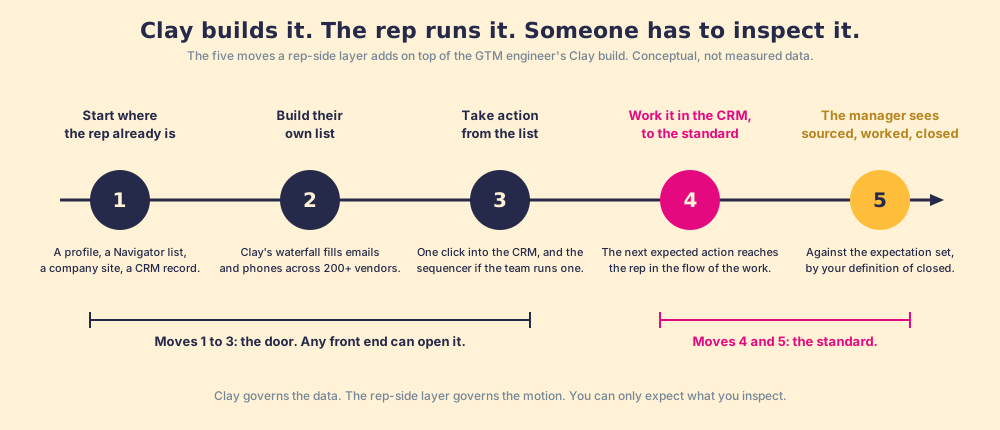
Moves 1 to 3 are what the browser door already delivers, and Clay’s case study shows it at 110 reps. Moves 4 and 5 are the reason we built Supered the way we did: it has no contact database on purpose, it runs on the customer’s own Clay account, so a rep on a LinkedIn profile, a Sales Navigator list, a company site, or a HubSpot or Salesforce record gets Clay’s waterfall in one click with no Clay login, and then the contact enters a motion the Behavior Layer guides and measures, sourced, worked, closed, by the customer’s definitions. Clay governs the data. Supered governs the motion. Both halves are true at once, and the first is Clay’s to take credit for.
What does Clay cost now?
Clay rewrote its pricing on March 11, 2026, and the change matters to a sales leader because it changed what the meter measures. Before, one credit bundled the cost of data and the cost of using the platform. Clay’s own post says why that was a problem: “If you were focused on acquiring data, Clay felt expensive; if you were orchestrating complex workflows, Clay didn’t share in the value of that work” (clay.com/blog/introducing-clays-new-pricing). The fix split the credit in two. Data Credits buy data from the marketplace. Actions measure platform work: running a table, calling a model, sending data to another tool.
| Plan | Price | Data Credits a month | Actions a month | What it adds |
|---|---|---|---|---|
| Free | $0 | 100 | 500 | Unlimited seats and tables, waterfalls, 200 rows per table |
| Launch | from $185 a month | 2,500 | 15,000 | Phone enrichment, signals, sequencer integrations, 50,000 rows |
| Growth | from $495 a month | 6,000 | 40,000 | CRM auto-sync, HTTP API, webhooks, web intent, ads, priority support |
| Enterprise | custom, annual | 100,000+ | 200,000+ | SSO, RBAC, data warehouse syncs, a dedicated growth strategist |
Source: clay.com/pricing, opened September 25, 2026. Data Credits start at $0.05 each and roll over up to 2x the monthly amount on Launch and Growth; Actions start under $0.01 and reset each cycle.
Three lines from Clay’s announcement do the rest of the work. Data got cheaper: Clay says it cut the cost of data in its marketplace by 50 to 90%, with the most-used enrichments costing 50% fewer credits on average. The top features moved down a tier: CRM integrations and web intent now sit on Growth at $495, which Clay says is “$305 less than the old Pro plan” at $800. And the plans were sized so that “90% of customers will never hit a limit on Actions.” One detail to date carefully: the pricing page says “150+ data partners” while the homepage, opened the same day, says “200+ vendors.” Cite whichever page you are reading, with the date.
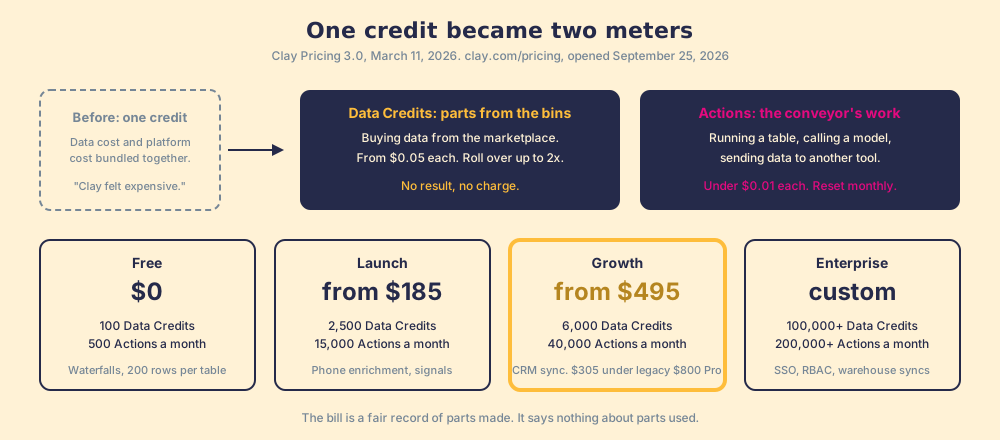
For a sales leader the arithmetic has one consequence. Clay charges per result, and it does not charge for a miss, so the bill is a fair record of parts made. It is silent on parts used, which is the measurement you have to add yourself. If you are weighing Clay against a single database, the ZoomInfo competitors and Apollo alternatives pages do that arithmetic contract by contract.
What we recommend
Three paths sit in front of a sales leader who has, or is about to have, a Clay account.
- Leave the workshop to the builder. RevOps runs Clay for marketing, inbound, and CRM hygiene, and the reps get a seat in a single database. This is the default, and it is why teams pay for a 200-vendor waterfall and a ZoomInfo contract at the same time.
- Open a door. Give reps Clay through MCP in their AI chat, or through a browser front end on the profile and the CRM record. Adoption rises, the second contract becomes negotiable, and the door still ends at the export.
- Open the door and set the standard. The front end where the rep already is, plus an expectation on the sourced contact, plus a manager who can see sourced, worked, and closed against it.
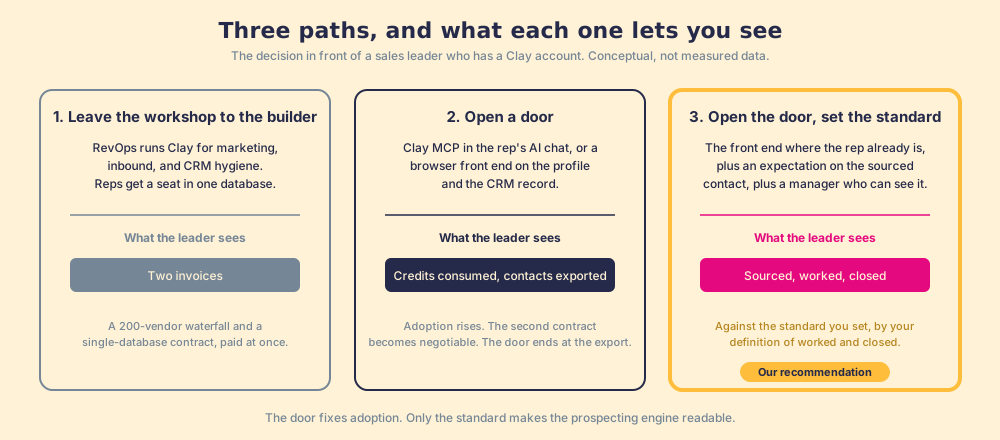
We recommend the third, and the evidence is why. Clay’s own copy says one person builds and any rep can run. The Bridge Group says the rep’s 112 daily activities happen on the floor, none in the workshop. Our field data says guidance in the flow of work runs at 49% quota attainment against 15% for guidance somewhere else, and that consistent inspection of the process multiplies quota rate by 6.3x. The door fixes the first number. Only the standard touches the second. A workshop that makes parts no one picks up is a cost; a workshop with a floor that runs its output to a standard you can inspect is a prospecting engine you can finally read.
The rest of the engine, from the list to the first conversation to the handoff, is laid out step by step in the sales prospecting guide, and the mechanism that makes any of it stick, in-the-moment guidance over documents, is the subject of sales process adoption.
Frequently asked questions
What is Clay used for in sales?+
What is the difference between Clay and a database like ZoomInfo or Apollo?+
Who is a GTM engineer, and do we need one to use Clay?+
Can sales reps use Clay without logging in?+
How much does Clay cost in 2026?+
Is Clay a CRM, and does it replace HubSpot or Salesforce?+
Your process, running itself.