Clay HubSpot Integration: What It Writes, Which Plan Turns It On, and the Step After the Sync That Nobody Owns
Clay's HubSpot integration imports any object or list, enriches it across the waterfall, and writes back by ID with a lookup in front. What each of its eleven entries does, the OAuth scopes it asks for, the Growth-plan gate, and the moment after the sync where reps drop out.
The Clay HubSpot integration is Clay's native HubSpot connector: a Source that imports any HubSpot object or list into a Clay table, and Actions that look up, create, update, associate, and enroll records, on Clay's Growth plan and above, through your own HubSpot account.
The HubSpot admin has a list called “Contacts, no phone,” and no rep has dialed a row of it because there is nothing to dial. RevOps connects Clay, points a table at the list, runs the waterfall, and the next morning the list is shorter. That is the Clay HubSpot integration working as designed. What the admin cannot see, and what the sales leader will ask about in the pipeline review, is whether any of the newly complete records got a call.
The Clay HubSpot integration is Clay’s native connector to HubSpot: a Source that imports any HubSpot object or list into a Clay table, and Actions that look up, create, update, and associate records, find owners, and enroll contacts in sequences, on Clay’s Growth plan and above, through the customer’s own HubSpot account (clay.com/integrations/data-provider/hubspot, opened September 25, 2026). Clay’s copy says the GTM engineer builds and “any rep” runs, and the HubSpot sync is how the build reaches the rep: the record they already have open. We run on our customers’ own Clay accounts and read these docs as customers do. The integration does the delivery well. The step after delivery has no owner, and that step decides whether the Clay bill turns into pipeline.
What does the Clay HubSpot integration do, entry by entry?
Clay’s directory lists eleven entries under HubSpot, each tagged “Bring Your Own Account Required”: Clay reads and writes your portal as the user who connected it. Take the entries in the order a sourced contact meets them, and picture a conference registration desk, because that is what the integration is: the desk where a new arrival is checked against the list, given a badge, pinned with the company ribbon, and handed an agenda. The reps are out on the show floor. They never stand behind the desk.
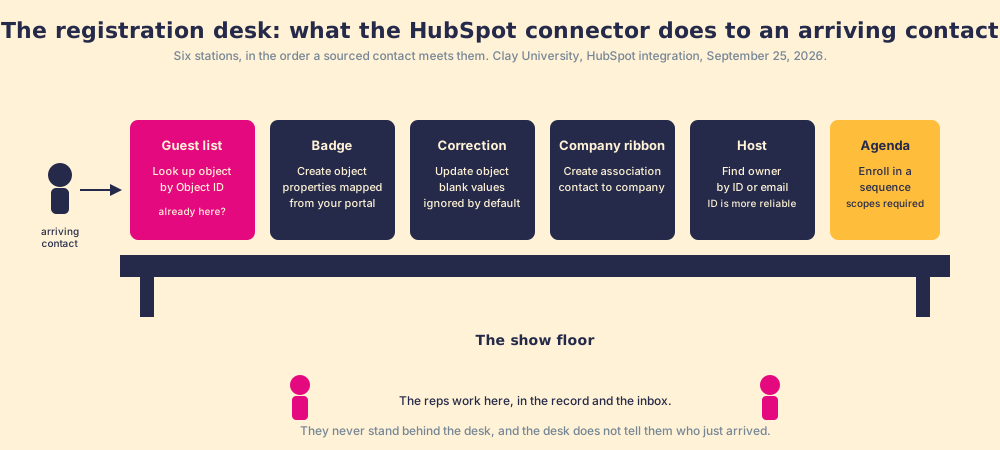
- Import objects (the Source). Pulls any HubSpot object type into a Clay table; the list “is pulled from your own portal, so it includes your custom objects as well as the standard ones.” An optional list filter narrows the pull; a switch includes HubSpot’s calculated read-only properties.
- Look up object. Checks the guest list. Filters on any properties you pick, “HubSpot Object ID sits at the top of the list, since matching on the record ID is the most precise option available”; AND or OR across filters; returns 10 by default, 200 at most.
- Create object. Prints the badge. Once you pick the object type, “the writable properties for that type appear below, ready to map to your Clay columns,” pipelines and stages included for deals.
- Update object. Corrects a badge by its Object ID. “Ignore blank values” is on by default, so a lookup that returned nothing leaves the HubSpot value alone.
- Create association and Get associated objects. Pins the company ribbon: contact to company, lead to contact, with the association type depending on the two object types.
- Find owner. By owner ID or email; the docs say the ID “is the more reliable of the two,” because an email column coming out of an enrichment often is not a HubSpot owner at all.
- Enroll a contact in a sequence, and Get enrollment status. Hands over the agenda, from a dropdown of your sequences, with a sender email, and only if the sequence scopes were switched on at connection.
The desk picture has an edge. A registration desk handles one arrival at a time; a Clay table handles a thousand rows in a run, and “Run settings” let the builder set a table to auto-update and to run an action “Only run if” a condition holds (Clay University, HubSpot integration, opened September 25, 2026). That conditional is where the dedupe rule lives: look up, and only create if the lookup came back empty.
Which plan and permissions does the Clay to HubSpot sync need?
Two gates sit in front of the desk, and both are easy to miss on a first read of Clay’s site.
The first is the plan. In the compare table on Clay’s pricing page, the row labelled CRM integrations reads “Not included” on Free, “Not included” on Launch, and “Included” on Growth and Enterprise. The Growth card lists “Auto-sync & enrich CRM” first under “Everything in Launch, plus,” and starts at $495 a month, or $446 on annual billing (clay.com/pricing, opened September 25, 2026). A team on Launch at $185 has the email-campaign integrations without the HubSpot connector. The Clay pricing page covers the rest of the meter.
The second gate is permissions, in three tiers. Seven scopes are required and cannot be disabled, all read: lists, contacts, companies, leads, owners, and the contact and company schemas. A second tier is on by default but can be switched off: write access to contacts, companies, leads, and deals, plus “crm.export” for bulk Audiences import. A third tier is off by default: the three custom-object scopes and the two sequence scopes. The custom-object scopes carry a trap the docs name plainly: they “are available on HubSpot Enterprise portals. On other HubSpot plans they can’t be granted, and authorization stops there rather than continuing without them.” So they ship off, and a Professional-tier portal that switches them on before connecting gets an error instead of a connection.
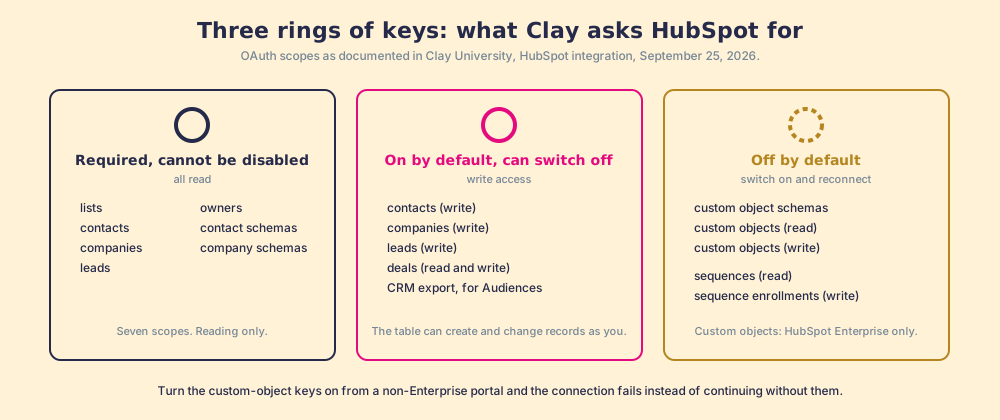
Read the tiers as a sales leader and one line stands out: the write scopes are on by default. Whoever connects Clay to HubSpot hands a table the power to create and change contacts, companies, leads, and deals as themselves. That is the right default for a builder, and a reason to connect as a named integration user rather than a rep’s login, the same argument the HubSpot implementation guide makes about any connected app.
How does the HubSpot Clay integration run in both directions?
The connector is one set of actions, and the two directions are two orders of running them.
HubSpot to Clay is enrichment, and it starts from the list the admin already has. Import the object, filter to “Contacts, no phone,” add the waterfall as an enrichment, and update by Object ID. Two defaults protect the record on the way back. “Ignore blank values” means a provider that found nothing does not blank the field. “Keep subdomains in Company domain,” off by default, reduces shop.example.com to example.com before it is written, which matters because domain is the key HubSpot matches companies on. Clay’s CRM enrichment page describes the automated version, “Trigger enrichments automatically when new leads enter your CRM,” and that is the “Auto-sync & enrich CRM” line on the Growth card.
Clay to HubSpot is the sourced contact, and it starts from a table that found someone. The order is look up, branch, create, associate, owner, enroll. The lookup on Object ID is the dedupe; where there is no ID yet, the builder filters on email, and the docs’ warning about owner emails applies to contact emails too: a column out of an enrichment is a guess until HubSpot confirms it. Clay’s own MCP page describes the same order, “Check against your CRM for duplicates, keep only net-new and validated contacts, then draft outreach and push straight to your sequencer and CRM” (clay.com/mcp), and the sequencer step here is HubSpot’s own, through the enroll action.
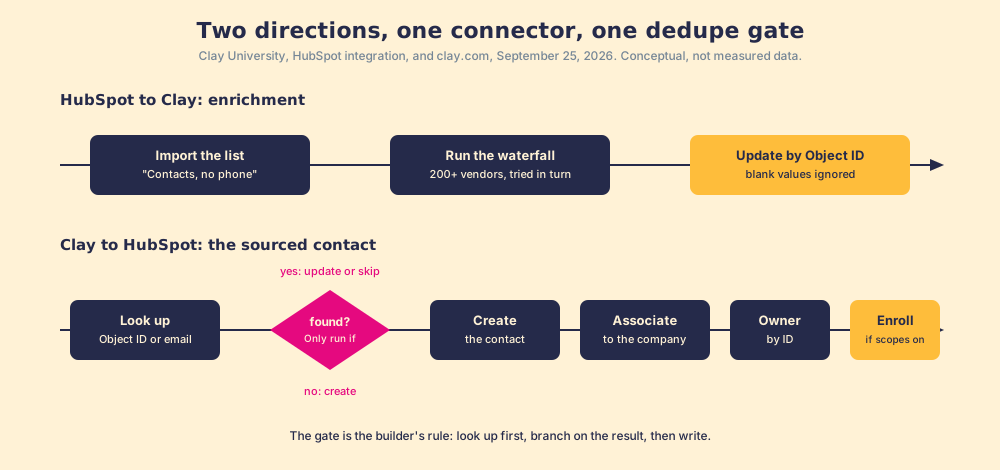
One more mechanic matters for a sales team: the sequence actions need a contact ID, a sequence, and a sender email, so the enrollment runs as a named HubSpot user. The rep on the sender line sees the sequence in their HubSpot sequences queue and its replies in their inbox, which is the one place in this loop where a rep notices that something was synced.
Where does the rep fall out of the Clay HubSpot sync?
Everywhere else. The Bridge Group’s 2025 SDR report, 351 B2B companies, puts the median rep’s day at 112 activities: 44 phone, 41 email, 19 LinkedIn, 8 text or other (Bridge Group, 2025). For a HubSpot team those activities happen on the contact record, in Gmail with the HubSpot Gmail integration logging the thread, and in the notification HubSpot email tracking fires when a prospect opens. Not one of the 112 is “open Clay.” The integration delivers to the right place. It does not announce itself when it gets there.
Two of our convictions explain why that gap is the sales leader’s problem rather than RevOps’s. The answer has to reach the rep in the moment of the work; any detour to get it is a failure. And enablement that asks reps to add a tab or a login has already lost. A HubSpot record with a fresh mobile number honors both, and still nothing happens, because the number arrived without an expectation attached. The rep did not source it, was not told it is new, and has a page of other records that look identical.
Our field data measures the gap. Across 198 sales leaders, 89% have a defined process and 36% see reps run it (The State of Sales Enablement). Teams whose reps get guidance in the flow of work report 49% quota attainment against 15% for teams whose reps have to go somewhere else for it, and teams that inspect deals against the process consistently hit quota at 6.3x the rate of teams that rarely do.
You might say a HubSpot workflow closes this: property changes, task created, done. Fair, and it is the first thing a good admin builds. It creates the task. It cannot tell the manager, a month later, how many of the contacts Clay sourced were worked, advanced, and closed against the number the manager expected, and it says nothing about the rep who is on a LinkedIn profile right now and wants the number before the record exists at all.
What closes the loop after the Clay HubSpot sync?
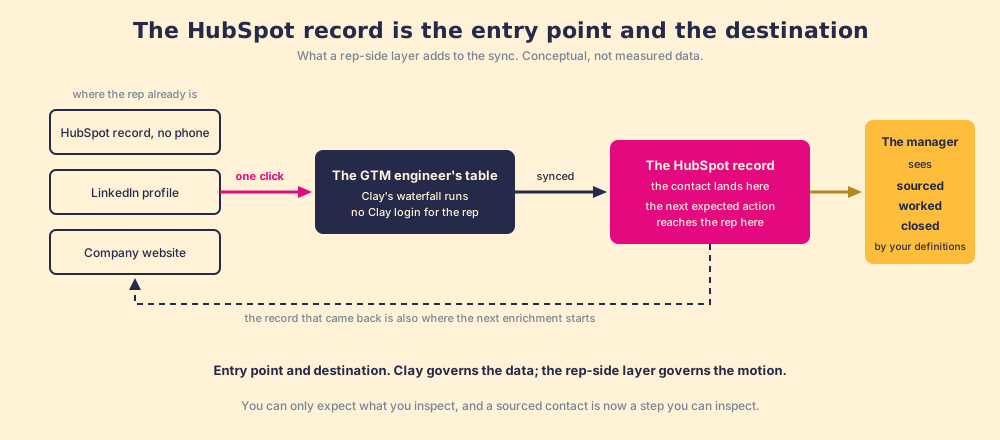
Reason it through. The GTM engineer built the table. The integration puts its output on the HubSpot record, and it can also pull a record out to be completed. So the HubSpot record is both an entry point and a destination, and the rep-side layer has to treat it as both. Entry point: a rep on a contact with a missing phone, or on a LinkedIn profile, or on a company website, runs the GTM engineer’s table from there, one click, no Clay login, field mapping set once by Ops, the CRM status visible before they add a duplicate or step on a teammate. Destination: the sourced contact lands in HubSpot as the first step of a process, the next expected action reaches the rep on the record, and the manager sees sourced, worked, closed, with “worked” and “closed” defined by the customer, against the expectation the manager set.
That second half is where Supered sits. No database on purpose, the customer’s own Clay account, and the surfaces a HubSpot rep already works in, the record, Gmail, LinkedIn, the same ground the HubSpot Chrome extension guide maps. Clay governs the data. Supered governs the motion.
What we recommend
Three ways to run this, for a HubSpot team with a Clay account on Growth.
- The sync alone. Connect, enrich the no-phone list, write back by ID. The list gets shorter. Whether the numbers were dialed stays unknown.
- The sync plus a workflow. A task on each updated record. The manager gets a task-completion count, which records boxes checked while the buyer’s position stays unrecorded.
- The sync plus a rep-side front end and a standard. The rep runs the table from the record or the profile, the contact enters a process with an expectation attached, and the manager reads sourced, worked, closed against it.
We recommend the third, on the evidence above: Clay says one builds and any rep runs; the Bridge Group says the running happens on the record and in the inbox; our data says in-flow guidance runs at 49% against 15% and consistent inspection at 6.3x. The sync fixes delivery. Only the standard touches the second number. The Clay integrations hub sets this connector beside the rest of the directory, and the Clay Salesforce integration page does the same walk for a Salesforce org, where the duplicate-rule switch and the picklists change the story.
Frequently asked questions
What does the Clay HubSpot integration do?+
Which Clay plan do you need for the HubSpot integration?+
How does Clay avoid creating duplicate contacts in HubSpot?+
What HubSpot permissions does Clay ask for?+
Can Clay enroll a HubSpot contact in a sequence?+
Do reps need to log into Clay to use the HubSpot sync?+
Your process, running itself.