Supered for Salesforce · Powered by your Process Rulesets

Your sales process is already written down somewhere near Salesforce. Salesforce sales enablement
your reps follow.

Salesforce sales enablement is the set of tools that helps reps run your sales process inside Salesforce: guidance on the record while they work, rules that flag a record that is off-process, and a view that shows a manager who followed them. The short list: Salesforce's built-in tools (Path, in-app guidance, validation rules) if every rule can fire at the moment of a save; Salesforce Sales Programs if you want coaching programs inside Sales Cloud; Supered if you need every open record checked against your rules, in Salesforce, in the browser, and in Claude.

36% of revenue teams
See reps follow the sales process they wrote down.
89% have one defined.
The 53 points between those numbers are the part of sales enablement a Salesforce field cannot fix by itself. Source: The State of Sales Enablement 2026
Same rules, any screen Salesforce Gmail Outlook LinkedIn Gong Salesloft Claude Any URL
9 min read What you'll learn: what Salesforce already gives you, what validation rules and flows cannot see, what the rep and the manager see with Supered, and what it costs
Chapter 01 · The quick answer

Which Salesforce sales enablement option fits your team?

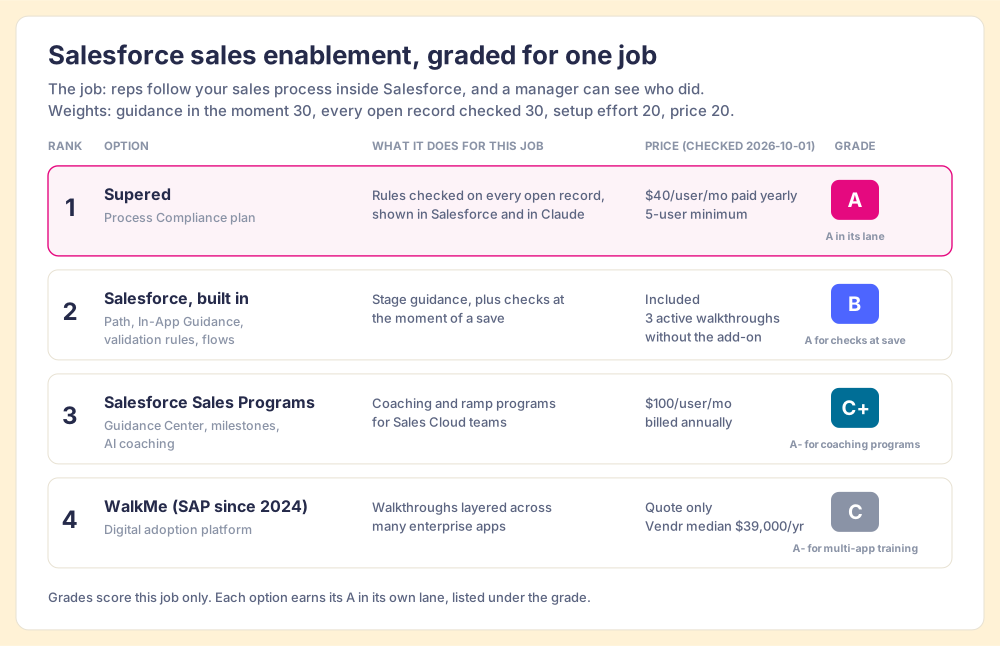
Four options, graded on one job: reps follow your sales process inside Salesforce, and a manager can see who did. The weights: guidance in the moment of work (30), every open record checked against the rules (30), setup effort (20), and price for a team of 10 to 50 reps (20). Flip the weights and the order flips, which is why each option also carries the grade it earns in its own lane.

Rank and grade Option Best fit Salesforce integration Setup effort Pricing (checked 2026-10-01) Why it ranks here
1 · A Supered (Process Compliance) Teams of 10+ who need the process followed and checked Native connector for Process Rules and Process Boards, plus the Sidekick extension in Chrome or Edge Under a week, sometimes one day $40/user/mo paid yearly ($45 monthly), 5-user minimum The only option that checks every open record, shows the manager who followed which rule, and hands the same rules to Claude
2 · B Salesforce, built in (Path, In-App Guidance, validation rules, flows) Rules that can fire at the moment of a save Native Admin hours per rule and per walkthrough Included; 3 active walkthroughs without the Enablement add-on A for checks at save; blind to records that go stale between edits
3 · C+ Salesforce Sales Programs Structured coaching and ramp programs Native; needs Sales Cloud, Service Cloud or Platform Program builder with templates $100/user/mo billed annually A- for coaching programs; built for programs, not for a rule check on each open record
4 · C WalkMe (owned by SAP since 2024) Walkthroughs across many enterprise apps Overlay on the Salesforce UI Content built flow by flow Quote only; Vendr reports a $39,000/yr median across 45 deals A- for multi-app training; no rule check on records and the highest entry cost here
Salesforce sales enablement options graded for getting reps to follow the sales process: 1 Supered, A, $40 per user per month paid yearly; 2 Salesforce built-in tools, B, included; 3 Salesforce Sales Programs, C plus, $100 per user per month; 4 WalkMe, C, quote only with a $39,000 Vendr median.
One job, four options. Supered A at $40/user/mo paid yearly; Salesforce's built-in tools B, included, with 3 active walkthroughs before the Enablement add-on; Sales Programs C+ at $100/user/mo; WalkMe C, quote only, with a $39,000/yr Vendr median.

Sources: Salesforce Sales Programs pricing (salesforce.com), In-App Guidance limits (Salesforce Help), WalkMe contracts (Vendr; more in our WalkMe pricing breakdown), SAP's acquisition of WalkMe closed September 12, 2024 (SAP), Supered pricing (our pricing page). All checked October 1, 2026.
Chapter 02 · Why trust this ranking

We ranked ourselves first, so here is what that rests on. A sales-process background, and proof we can show you.

Supered started inside RevPartners, the CRM partner our co-founder Matt Bolian founded, which sold roughly twice as much HubSpot Sales Hub as any other partner and reached Elite tier in 13 months. That work was sales process, deal after deal. Our strongest marketplace proof is HubSpot's, and we say so plainly: Supered is the #1 sales enablement app on the HubSpot marketplace, with a 5.0 rating from 122 reviews and 6,000 installs. We print no Salesforce AppExchange ranking on this page because we have none to show. On G2, which reviews both CRMs, Supered holds a 4.9 out of 5 from 81 reviews (G2, checked October 1, 2026).

G2 review · Founder and CEO, small business
"The browser plugin allows me to work inside Salesforce without having to go elsewhere."
"It saves me a lot of time building documentation since I can add it almost directly inside Salesforce by just highlighting a bit of text and writing documentation in real time." Scott R., on G2.
·
G2 review
"Supered solves enablement issues with Hubspot and Salesforce."
"The Processes, Rules, and Cards are super valuable, making them standout features for me. Also, the initial setup of Supered was super easy, which I appreciated." Gabriel A., on G2.
Chapter 03 · What Salesforce already gives you

What does Salesforce include for sales enablement and in-app guidance?

More than a buyer usually credits, and it deserves a fair hearing before anyone sells you anything. If your process fits inside these tools, use them.

Path
Stage-by-stage notes on the record.
For each stage you pick up to five key fields and write up to 1,000 characters of "Guidance for Success" (Trailhead). It is free, built in, and the right place for a two-line reminder of what a stage means.
Salesforce in-app guidance
Prompts and walkthroughs in Lightning.
Floating, docked and targeted prompts, plus walkthroughs of up to 10 steps. Without the Enablement add-on an org runs 3 active walkthroughs, and the guidance shows only inside Lightning Experience (Salesforce Help). Good for teaching a new screen.
Validation rules and flows
Hard checks at the moment of a save.
Salesforce's order of execution runs validation rules and record-triggered flows whenever a record is inserted or updated (Apex Developer Guide). If a stage must not advance without an amount, a validation rule is the strongest tool you have.

Then there is the paid layer. Salesforce sells Sales Programs, with a Guidance Center that surfaces resources in the seller's workflow, revenue milestones, AI pitch coaching and a no-code program builder, at $100 per user per month billed annually on top of a Sales Cloud, Service Cloud or Platform license (Salesforce). Its predecessor, Sales Enablement (Enablement Sites and myTrailhead), is on the way out: a Salesforce Help notice dated March 17, 2026 tells customers to export their data 90 days before their term ends and talk to their account executive about Sales Programs (Salesforce Help). If you bought myTrailhead to train reps, the renewal conversation is already coming.

Chapter 04 · The gap

What do Salesforce validation rules and flows not cover?

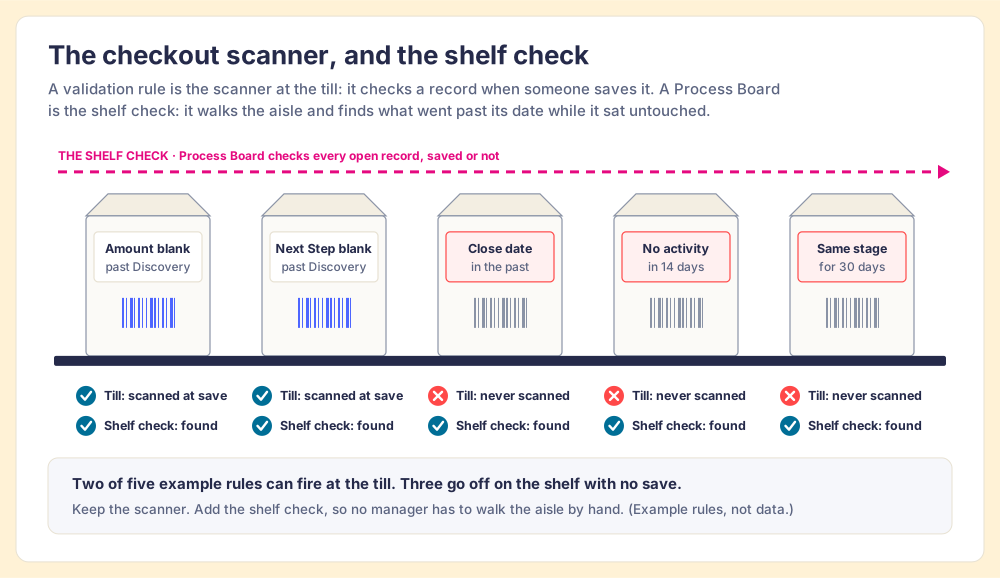
A grocery store runs on two checks. The scanner at the till checks each item that passes over it, every time, without fail, and a shop without one would not last a week. A validation rule is that scanner: it inspects a record at the moment someone saves it. But milk does not go off at the till. It goes off on the shelf, at the back of aisle nine, while the scanner sits idle. So a grocer sends someone along the shelves with a date gun.

A pipeline spoils the same way. A close date slides into the past at midnight with no edit. A deal goes two weeks with no logged activity. A stage sits unchanged for a month. None of those is a save, so none of them passes the scanner. Our Salesforce MCP guide makes the same point from the AI side: when Claude writes to Salesforce, validation rules run on the save, and the decay between saves still goes unseen.

What Salesforce validation rules and flows do not cover, drawn as a checkout scanner and a shelf check: amount blank past Discovery and next step blank past Discovery can be caught at save; a close date in the past, no activity in 14 days and the same stage for 30 days go stale with no save and are found only by a Process Board checking every open record.
Five example rules. Two can fire at the till: amount blank past Discovery, next step blank past Discovery. Three go stale on the shelf with no save: close date in the past, no activity in 14 days, the same stage for 30 days.

For most sales teams the person walking the shelves is the frontline manager, opening deals one at a time. The State of Sales Enablement 2026 shows how far that stretches. Adherence to the process is 47% on teams with one to five reps per manager and 23% at six to eight, and the top reason reps give for skipping the process (29%) is that managers do not enforce it. Teams that inspect deals against a defined process at the highest frequency hit quota at 6.3x the rate of the lowest band (SOSE 2026). Managers run out of hours long before they run out of deals, and a rep who skips a step under that load is pointing at a gap in the system.

Keep the scanner at the till. Add the shelf check, and stop asking managers to walk every aisle by hand.

How Supered fits a Salesforce org
The rules live in Supered. Reps meet them in Salesforce.

We built Supered so a sales leader writes an expectation once and it reaches the rep wherever they work. Supered's Salesforce integration runs Process Rules and Process Boards on Salesforce objects, and the Sidekick extension carries the same rules into the other tabs a rep keeps open. Nothing in Salesforce gets replaced or migrated.

PART 01
Process Rulesets hold the expectations.
Momentum, data and process expectations, written as Process Rules and grouped under shared entry and exit criteria. Describe a rule in plain words and the Supered Assistant drafts it for you to approve.
PART 02
The rep meets the rule in Salesforce.
A flag in the record, a floating list of what is wrong, and a card that explains the fix. The guidance arrives while the rep is in the record, without a trip to a wiki.
PART 03
The Process Board does the shelf check.
The board checks each open record against the same rules, saved or not. The manager sees who is clean and who is not, and spends the one-on-one coaching instead of hunting.
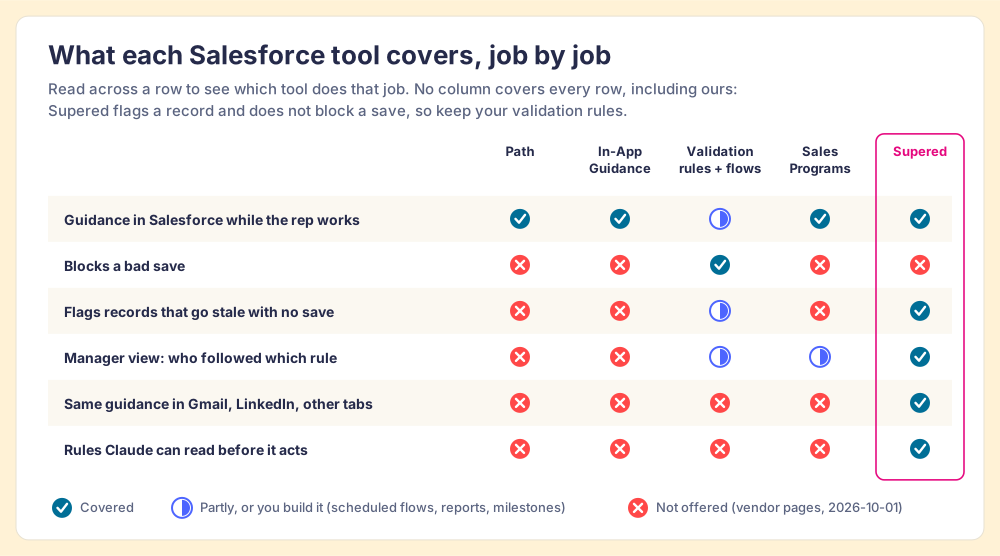
Salesforce sales enablement coverage by job: Path and In-App Guidance give guidance in Salesforce; validation rules and flows block a bad save; Sales Programs adds guidance and partial manager milestones; Supered covers guidance in Salesforce, records that go stale with no save, the manager view, guidance in Gmail and LinkedIn, and rules Claude can read, and does not block saves.
Six jobs, five tools. Supered covers five of the six and leaves blocking a bad save to your validation rules, which is where that job belongs.
What the rep sees

What does a rep see inside Salesforce with Supered?

The rep opens an opportunity the way they did yesterday. If it breaks a Process Rule, a colored flag sits in the record with the rule's text, and the floating window lists every violation on that record. Supered's help center says the window works on all primary records, leads included, in Salesforce and HubSpot. Click a violation and its card opens beside the record in Sidekick: the how-to, the talk track, or the step-by-step Guide.

Rule flags. Red for an error, yellow for a warning, green for positive, blue for information, or a custom type your admin defines.
Connected cards. A rule can carry a card, so the fix and the reason travel together.
Guides. Step-by-step walkthroughs that open in Sidekick, in Salesforce or any approved site.
Card triggers. A keyword on a page shows an icon that opens the matching card.
How a Salesforce Chrome extension works →
yourcompany.lightning.force.com / Opportunity
Northwind Freight · Expansion
Opportunity owner · Sam Carter · Stage · Proposal
2 violations
Discovery
Demo
Proposal
Negotiation
Closed
Close Date
In the past
Last Activity
Over 14 days ago
Next Step
Pricing call booked
Amount
Entered
Close date is in the past.
Move it to match the next meeting on the calendar, or mark the deal lost. Open the card for how we forecast slipped deals.
Open the card See all violations
Chapter 07 · The manager and Claude

What does the manager see, and how does Claude fit in?

One rule reaches three screens. The guidance has to be where the work is: in The State of Sales Enablement 2026, quota attainment was 49% where guidance is embedded in the workflow, 24% where it lives in CRM fields or stages, and 15% where it lives in docs or wikis. For a growing share of reps, the workflow now includes an AI assistant.

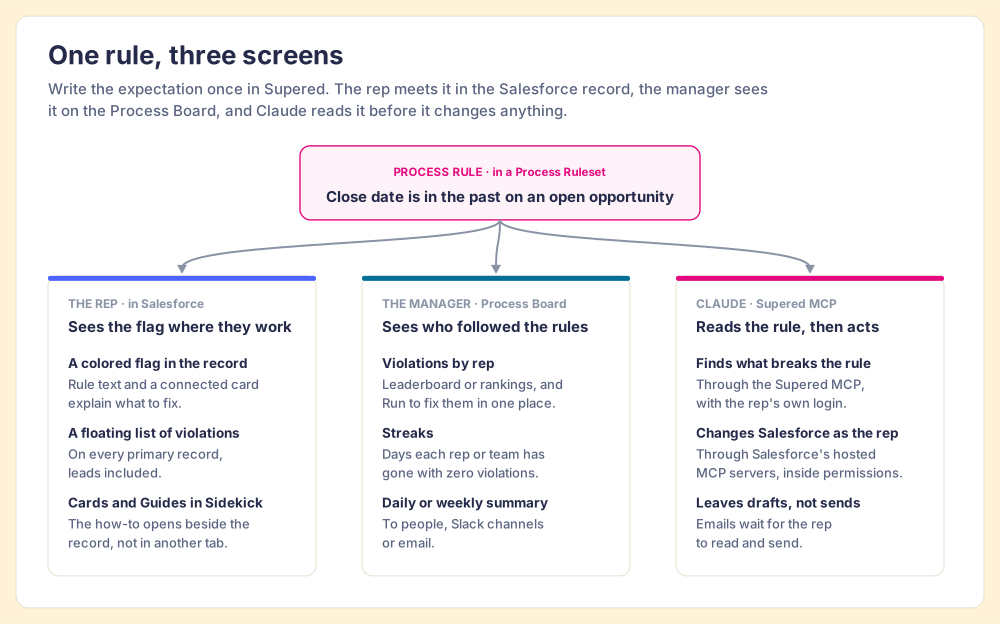
One Supered Process Rule in Salesforce, close date in the past on an open opportunity, reaches the rep as a flag in the Salesforce record with cards and guides in Sidekick, the manager on the Process Board with violations by rep, streaks and a daily summary, and Claude through the Supered MCP and Salesforce's hosted MCP servers.
Write the rule once. The rep sees it in Salesforce, the manager sees it on the Process Board, and Claude reads it before it changes a record.
The manager
A Process Board, opened from Salesforce.
The board lists every active violation for one object type, with a leaderboard or rankings by rep and a Run button to fix records in one place. Streaks count the days a rep or team has gone with zero violations. A daily or weekly summary goes to people, Slack channels or email (Supered help center).
The rep, in Claude
Same rules, read by the model.
The Supered MCP server gives Claude your Process Rulesets and the records that break them. Salesforce's hosted MCP servers, generally available since April 29, 2026 for Enterprise Edition and above, let Claude update records as the signed-in rep, with object permissions, field-level security and sharing rules applied (Salesforce Developers).
One night, one board
11 violations to zero, from one prompt.
Matt ran this on his own board, Sales Expectations, with 22 rules and 11 violations. One prompt in Claude cleared it: fields updated from context, recaps saved as drafts. About 45 minutes by hand, about 10 with Supered and Claude. His board runs on HubSpot; on Salesforce, the hosted MCP servers carry the record changes. One example, not an average.

The order matters. Teams with strong process adherence rate AI's impact as high 40% of the time, against 21% for teams with weak adherence (SOSE 2026). Claude amplifies whatever process it finds, so hand it the written one. The Claude integration page shows what Claude reads and changes, and the Claude Salesforce integration walkthrough covers each way to connect the two.

Chapter 08 · The plan

How do you set up Supered on Salesforce?

Four steps. Most customers are live in under a week, some in a single day.

01.

Connect Salesforce in Supered.

An admin connects the org in Supered's settings. Supered reads the schema, so standard and custom fields on your Salesforce objects are available to rules. No data moves out of Salesforce into a new system of record, and nothing gets migrated.

Who: a Salesforce admin Where: Supered settings
02.

Install Sidekick.

Reps add the Sidekick extension in Chrome or Edge (or another Chromium browser) and approve the sites it should appear on: Salesforce first, then Gmail, Outlook, LinkedIn or any other tab where they sell. Our ranking of Salesforce Chrome extensions covers what else belongs in that browser.

Who: each rep Time: a few minutes
03.

Write the first Process Ruleset.

Start with the expectations that already make you angry when they slip: close dates in the past, no activity in two weeks, an empty Next Step past Discovery. Set the entry and exit criteria once, then add the rules under it. Leave the save-time checks in your validation rules where they belong.

Inputs: your expectations, in plain words Output: rules flagging records in Salesforce
04.

Turn on the Process Board.

Pick the object and the rules, add the team, and schedule the daily summary to the manager and a Slack channel. The board becomes the first screen of the rep's day and the agenda for the one-on-one. Connect Claude when you are ready; the rules are already written.

Who: the sales manager Output: a board that shows who followed which rule
Chapter 09 · What it costs

How much does Supered cost for a Salesforce team?

Two plans, both priced per user, both on a 12-month term you can pay monthly or yearly. Prices from our pricing page, October 1, 2026.

$13.50
Digital Adoption, per user per month, paid yearly

$15 paid monthly. Cards, Guides, Action Plans, card triggers, in-app pop-ups, the Sidekick extension and the Salesforce connector. The enablement layer, without Process Rules.

$40
Process Compliance, per user per month, paid yearly

$45 paid monthly, 5-user minimum, and everything in Digital Adoption. Adds Process Rules, Process Rulesets, Process Boards and Streaks. Two features are HubSpot-only today: inline editing and cross-object validation.

$4,800
A year for 10 reps on Process Compliance

10 × $40 × 12 months. The same 10 seats on Salesforce Sales Programs come to $12,000 a year at $100 per user per month. The two do different jobs, so compare them on the job, then on the price.

Choose something else if

your reps sell from a phone or in the field (we have no mobile product), every rule you need can fire at a save, or you want coaching programs more than a rule check.

Choose Supered when

you have 10 or more reps at a computer, a process that is written down and skipped, and a manager who needs to see who followed it without opening every record.

Chapter 10 · Two versions of next year

A year from now, the process is still a slide from kickoff.
Or it is checked on every open record.

Both teams pay for the same Salesforce licenses. The difference is whether anything checks the records that went stale without a save.

Salesforce with save-time checks only
The till works. The shelves spoil.

Validation rules stop the bad saves. Close dates slide, deals sit for weeks with no logged activity, and the forecast call turns into a hunt through stale records. Managers find the gaps when they have time to look.

  • Expectations kept in a doc reps rarely open
  • Stale records found by hand, deal by deal
  • Reps using Claude with no rules to follow
  • No record of who followed which rule
Salesforce with Supered
One rulebook, checked every day.

The expectations live in Process Rulesets. Reps see the flag in Salesforce and fix it, or ask Claude to. The manager opens the board, sees who is at zero, and coaches the deals that need a person.

  • Validation rules kept for the save-time checks
  • Every open record checked against the same rules
  • The same rules in Salesforce, the browser and Claude
  • Streaks that show which reps stay clean
The success state

Your reps open Salesforce, see what the process asks,
and the board shows who followed it.

The buyer gets the recap the day after the call and a forecast date that means something. The manager walks into the one-on-one with the three deals that need help, and the field-chasing already done.

In the record
Guidance where the rep already works
Every record
Checked against the rules, saved or not
Under a week
From connection to rules live
Same rules
In Salesforce and in Claude
Chapter 12 · The questions

Salesforce sales enablement questions, answered directly.

What Salesforce admins and sales leaders ask before they add a tool to the org.
Each answer cites the vendor that owns the fact.

The category
What is Salesforce sales enablement?

Salesforce sales enablement is the set of tools that helps reps run your sales process inside Salesforce: guidance shown on a record while they work, rules that flag a record that is off-process, and a view that shows a manager who followed the rules. Salesforce ships some of it (Path, In-App Guidance, validation rules, flows, and the paid Sales Programs product), and tools such as Supered add the rest.

Does Salesforce have a built-in sales enablement product?

Yes, and it changed this year. Salesforce sells Sales Programs, with a Guidance Center, revenue milestones and AI coaching, at $100 per user per month billed annually, and it requires a Sales Cloud, Service Cloud or Salesforce Platform license (Salesforce, checked 2026-10-01). Its older Sales Enablement product, also called Enablement Sites and myTrailhead, is being retired: a Salesforce Help notice dated March 17, 2026 says existing subscriptions run to their end date and points customers to Sales Programs (Salesforce Help).

What is Salesforce in-app guidance, and what are its limits?

Salesforce in-app guidance is Salesforce's own feature for showing prompts and step-by-step walkthroughs inside Lightning Experience. Without the Enablement add-on license, an org can run 3 active walkthroughs, and each walkthrough holds up to 10 steps (Salesforce Help, Limits for In-App Guidance). It shows inside Salesforce only, so it does not follow the rep into Gmail or LinkedIn.

What you get in Salesforce
What does a rep see in Salesforce once Supered is connected?

A colored flag in the Salesforce record when a Process Rule is broken, with rule text and an optional connected card explaining the fix. A floating window lists every violation on the record, and Supered's help center says it works on all primary records, leads included, in HubSpot and Salesforce. The Sidekick browser extension opens Cards, Guides and the rep's Process Board beside the record.

Does Supered replace Salesforce validation rules or flows?

No. Keep them. A validation rule stops a bad save, and Supered does not block saves. Supered checks every open record against your Process Rules whether or not anyone saved it, so it catches the close date that slid into the past or the deal with no activity in two weeks. The two work side by side.

Can reps use Claude with Supered on Salesforce?

Yes. The Supered MCP server hands Claude your Process Rulesets and the list of records that break them. Salesforce's hosted MCP servers, generally available since April 29, 2026 for Enterprise Edition and above, let Claude update records as the signed-in rep, inside that rep's permissions. The Salesforce MCP guide covers the server setup.

Buying and setup
How much does Supered cost for a Salesforce team?

Process Compliance, the plan with Process Rules, Process Rulesets and Process Boards, is $40 per user per month paid yearly ($45 paid monthly) with a 5-user minimum, and it includes everything in Digital Adoption. Digital Adoption alone (Cards, Guides, the Sidekick extension and the Salesforce connector) is $13.50 per user per month paid yearly ($15 monthly). Two Process Compliance features, inline editing and cross-object validation, are HubSpot-only today. Full details are on the pricing page.

How long does it take to go live on Salesforce?

Under a week for most customers, and sometimes one day. The order is: connect Salesforce in Supered, install Sidekick, write the first Process Ruleset, and turn on the Process Board with a daily summary.

Is Supered secure enough for our Salesforce org?

Supered holds SOC 2 Type II and is GDPR compliant. In Claude, every Salesforce change runs as the signed-in rep, so Salesforce object permissions, field-level security and sharing rules decide what can change.

When is Supered the wrong choice?

If your reps work mainly from a phone or in the field, since Supered has no mobile product. If every rule you care about can fire at the moment of a save, validation rules already cover you. If you want structured coaching programs with pitch practice inside Sales Cloud, Sales Programs is built for that. If you need walkthroughs across dozens of enterprise apps, a digital adoption platform fits better.

Keep the scanner at the till.
Add the shelf check.

A 30-minute demo: we connect a Salesforce sandbox, load a Process Ruleset built from your expectations, show you the flags a rep sees and the board a manager sees, and tell you which plan fits.