Exportly Alternatives (2026): Exportly Became Frontier. What a Clay Team Looks For Now
Exportly, the Chrome extension that put Clay in a rep's hands, is now Frontier and sells AI agents and MCPs. Here is what a Clay customer who bought the February version should look for, and a fair table of the three paths.
Exportly alternatives are the tools a Clay customer weighs now that Exportly, the Chrome extension that put Clay in a rep's hands, became Frontier and moved to AI agents and MCPs: Frontier itself, Clay MCP for reps, or a rep-side extension with a process standard such as Supered.
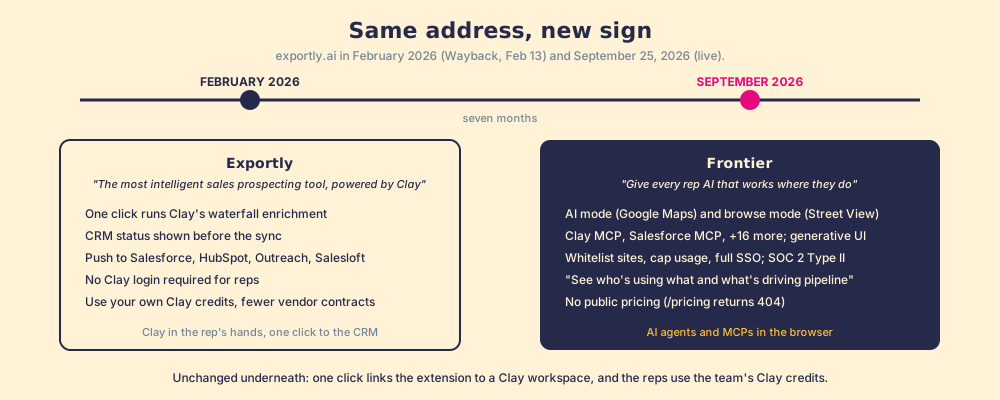
A shop can change its sign without changing its street. On exportly.ai, opened September 25, 2026, the banner at the top of the page reads “Exportly is now becoming Frontier,” and the headline under it reads “Give every rep AI that works where they do.” Seven months earlier the same address sold “The most intelligent sales prospecting tool, powered by Clay” (Wayback, February 13, 2026). The street is the same: a Chrome extension, connected to a Clay workspace, used by SDRs and account executives, and still the Clay Chrome extension partner named on Clay’s own rep-prospecting page. The sign now says agents: a Frontier AI sales extension rather than an Exportly export button.
Exportly alternatives are the tools a Clay customer weighs now that Exportly, the Chrome extension that put Clay in a rep’s hands, became Frontier and moved to AI agents and MCPs: Frontier itself, Clay MCP for reps, or a rep-side extension with a process standard, such as Supered. This page is dated on purpose. It describes what the February product did for a Clay team, what the September product does instead, and how to choose among the three paths without pretending any of them is a bad product. None of them is.
What did Exportly do for a Clay team, and what changed?
Clay’s own rep-prospecting page, opened the same day, states the job in one line: its Chrome extension partner “lets reps enrich with Clay and sync prospects to your CRM anywhere on the web,” and the case study beneath it describes Education First giving a 120-person sales team access to Clay’s data with “No Clay login required” (clay.com/use-cases/rep-prospecting). Credit where it is due: these are Clay’s benefits, delivered through a partner. As a checklist, the February product did this:
- Verified emails and phones for the person on the screen. “One click runs Clay’s waterfall enrichment. If one source misses, it tries the next,” across what Clay’s homepage now counts as 200+ data and AI vendors (150+ on the older page).
- CRM status before the sync. “Reps see CRM status in the extension so they know if the record already exists.”
- One click to the CRM or the sequencer. “Push enriched contacts to Salesforce, HubSpot, Outreach, or Salesloft instantly,” with field mapping set once by Ops.
- No Clay login for reps. The GTM engineer builds the tables; the rep runs them from LinkedIn, Sales Navigator, or a company site.
- One contract instead of three. Frontier’s FAQ still makes the point: plug into Clay, “enrich with your own Clay credits, and avoid juggling multiple expensive vendor contracts.”
The September product keeps all of that and puts something else in front. The homepage describes two modes: “AI Mode is Google Maps. The Browser Copilot is Street View.” It lists Clay MCP and Salesforce MCP “+16 more,” generative UI that turns workflow logic into widgets, a library of 20-plus workflows (buyer committee, lookalike accounts, pre-call research, CRM dedupe, intent signals, send to SEP, AI response drafting), admin guardrails (“Whitelist sites, cap usage, manage access with full SSO”), and a measurement claim: “See who’s using what and what’s actually driving pipeline.” A SOC 2 Type II badge is dated 2026. There is no pricing page; /pricing returns a 404.
What should a Clay customer look for now?
Start from what the GTM engineer already built, because that is the asset. Clay says it plainly: “GTM engineers build on Clay” and “Build centralized workflows for any rep to run” (clay.com, September 25, 2026). The tables and the waterfall exist. The question is how the rep reaches them, and what happens after.
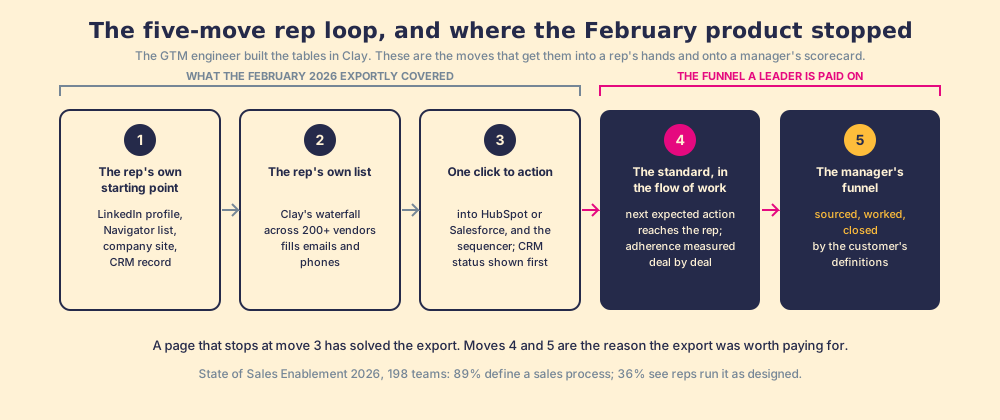
The rep loop has five moves, and the February product covered the first three.
- The rep’s own starting point. A LinkedIn profile, a Sales Navigator list, a company’s website, or a CRM record that needs the missing phone. The enrichment is one click from wherever the rep is looking, in no new tab.
- The rep’s own list. The rep, not Ops, assembles it, with Clay’s waterfall filling emails and phones across 200+ providers. The power of the GTM engineer, in the rep’s hands.
- One click to action. Into HubSpot or Salesforce, and into the sequencer if the team runs one.
- The standard, in the flow of work. The next expected action reaches the rep while the work is in motion, and adherence is measured deal by deal.
- The manager’s funnel. Sourced, worked, closed: how many were sourced, how many were worked (the customer defines worked), how many closed (the customer defines closed), against the expectation the manager set.
Moves four and five are where the three paths part company, and they are the moves a revenue leader is paid on. Across 198 sales teams in The State of Sales Enablement, 89% had a defined sales process and 36% saw reps run it as designed, and the teams that inspected adherence consistently hit quota at 6.3 times the rate of those that did not. Sourcing a contact is step one of that process. An export counter, however good, measures step one.
Frontier, Clay MCP, or a rep-side extension with a standard?
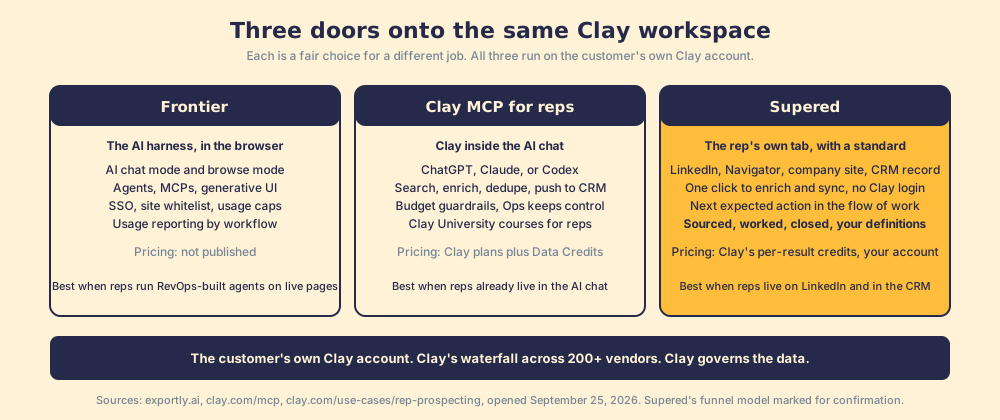
Three fair paths, and the table shows where each stops.
| Path | Where the rep works | What it adds after the export | Governance | Pricing (Sept 25, 2026) |
|---|---|---|---|---|
| Frontier (the Exportly successor) | Any site in the browser, in AI chat or browse mode | Agents, MCPs, generative UI, a 20-plus workflow library, usage reporting by workflow | SSO, site whitelist, usage caps, SOC 2 Type II | Not published; demo request |
| Clay MCP for reps | ChatGPT, Claude, or Codex | Natural-language search, enrichment, CRM dedupe, push to sequencer and CRM from the chat | Budget guardrails and admin controls; “Ops keeps control” | Clay plans from $185 a month plus Data Credits |
| Supered | LinkedIn, Sales Navigator, the company site, the HubSpot or Salesforce record | The process: next expected action in the flow of work, sourced-worked-closed by the customer’s definitions | RevOps builds the tables and the process rules | Clay’s per-result credits on the customer’s own Clay account |
Frontier’s path is the AI harness. Its FAQ answers the obvious objection (“Why not just give reps ChatGPT or Claude connected to MCPs?”) with a fair claim: it “lives in the browser and sees what you see,” comes “pre-loaded with sales agents,” and is connected to “your CRM, your data sources and your guardrails.” For an enterprise team that wants reps running agents on live pages with SSO and caps, that is a real product, and its customer quotes (Zoom, Greenhouse, Pendo, EF) say reps like it.
Clay MCP is the Clay-native path. “Reps get the right data faster while Ops keeps control,” and a marketing-ops director at Saviynt describes finding and enriching contacts across providers and pushing them “into Salesforce for SDR follow-up, all from inside Claude” (clay.com/mcp). It brings Clay into the AI chat. It does not bring Clay onto the LinkedIn tab.
The third path is the one this site builds, and it is named once because the teaching stands without it. Supered is the rep-side extension for a team that has Clay and reps who never open it: Clay’s waterfall on the profile, the Navigator list, the company site, or the CRM record, one click to sync, no Clay login, and then the part neither of the other paths claims, the sourced contact entering a process that is guided in the moment and inspected afterward. Clay governs the data. Supered governs the motion. Supered runs on the customer’s own Clay account, brings no database of its own, and drafts no outreach, because drafting is cheap and whether the rep runs the motion is the unsolved part. If your team is not on Clay, none of the three paths is for you yet; read what Clay is first and price it on the Clay pricing page.
Which Exportly alternative should you choose?
The choice resolves once you name the job. Here are the paths, then what we recommend.
- Frontier itself. The pick when the job is reps running RevOps-built agents and MCPs on live pages, with enterprise controls, and you are comfortable buying without a public price.
- Clay MCP. The pick when your reps already live in ChatGPT or Claude and the sequencer, and Ops wants budget guardrails inside Clay’s own product.
- Supered. The pick when your reps live on LinkedIn and in the CRM, never open Clay, and you want to know whether the contacts they pull were worked and closed, by your own definitions.
What we recommend follows from the data on this page. Move three, the export, has been solved three ways, and all three run on the same Clay account. Move five has been solved once. If the number you answer for is pipeline that closes, choose the path that can see past the export, and confirm with a demo that it measures worked and closed the way your team defines them, on your own Clay account, before you sign. The full argument for why inspection decides the number sits in the sales process guide, the graded field of single-database tools is on the Apollo alternatives page, and the demo is where you can watch the funnel run.
Frequently asked questions
What happened to Exportly?+
Is Frontier still a Clay Chrome extension partner?+
What should a Clay customer look for in an Exportly alternative?+
Does Frontier publish pricing?+
Why is Supered only for teams that already have Clay?+
Your process, running itself.