Prospector vs Hublead: a Hublead alternative for Clay teamsA LinkedIn bridge, or the whole Clay market.
Hublead is a Chrome extension that connects LinkedIn to HubSpot, and since August 2026 to Salesforce: it adds a profile to the CRM in one click, syncs LinkedIn messages and finds emails and phones on monthly credits. Supered Prospector is the Hublead alternative for teams that already run Clay: reps run your Clay tables from Sales Navigator, a company site or the CRM record, Clay's waterfall asks 200+ vendors, and contacts land in HubSpot, Salesforce or Pipedrive, for $45 per rep per month, billed annually, plus your Clay plan. If you have no Clay account, or the job is LinkedIn conversations logged in HubSpot, Hublead is the better buy.
01Supered ProspectorTeams on Clay, on HubSpot, Salesforce or Pipedrive, who want reps building lists from Sales Navigator, company sites and the CRM record. $45 per rep per month, billed annually, from 1 rep, plus your Clay plan.
02HubleadHubSpot teams with no Clay account who want LinkedIn contacts, messages and invitations logged in the CRM. Free plan; Professional from $32 per seat per month, billed yearly.
03HubSpot's LinkedIn integrationSales Hub Professional or Enterprise teams on Sales Navigator Advanced Plus who want LinkedIn context on the record. It cannot import contacts.
G2 on 2 October 2026: Hublead 4.9 out of 5 from 67 reviews; Supered 4.9 out of 5 from 81 reviews. Chrome Web Store: Hublead 4.8 from 151 ratings, 6,000 users. HubSpot marketplace: Supered 5.0 from 122 reviews (1 October 2026).
Status check
Is Hublead still HubSpot-only?HubSpot first, Salesforce since August.
For most of its life Hublead sold one bridge, LinkedIn to HubSpot. On 2 October 2026 its homepage reads "Built for HubSpot first, live on Salesforce since August," and goes on: "HubSpot is the deepest integration we ship: invitations, messages, activity properties and workflow triggers. Salesforce went live in August 2026 with Contacts and Leads, account creation, enrichment, notes, campaigns and message sync." LinkedIn Recruiter "is not supported on the Salesforce integration yet" (hublead.io).
The pricing page has not caught up. Its FAQ still answers "Do you integrate with other CRMs than HubSpot?" with "We only integrate with HubSpot for now, and we prefer to stick to that!" (hublead.io/pricing, checked 2 October 2026). The Chrome Web Store listing, updated the same day, says it "Works with HubSpot and Salesforce" and shows 6,000 users and 4.8 from 151 ratings.
Pipedrive is not on the list: the homepage FAQ says "Hublead integrates HubSpot and Salesforce." A 2 October 2026 news search found no acquisition or funding news for Hublead. For a buyer, the differences now sit in Pipedrive support, the source of the contact data and the places a rep can start.
The decision table
Hublead vs Prospector at a glanceEight lines that decide it.
Hublead
Supered Prospector
Job it is built for
Bridge LinkedIn and the CRM: add or link a profile, edit the record beside it, sync LinkedIn messages and invitations, enrich emails and phones.
Run your team's Clay table from where the rep already prospects, sync the contact, then follow each list rep by rep.
Where the data comes from
A waterfall across 5 providers, by Hublead's count (its plan table names Hunter, Apollo and RocketReach), labelled Verified, Recommended or Unverified; or plug in your own Hunter, RocketReach, Apollo, Kaspr or Lusha account.
Clay's waterfall across 200+ data and AI vendors on your own Clay account, in the order your GTM engineer set, with no charge on a miss.
CRMs
HubSpot, the deepest integration, and Salesforce since August 2026. No Pipedrive.
HubSpot, Salesforce and Pipedrive, as a place to start and as the sync target.
Where reps use it
LinkedIn, Sales Navigator and Recruiter (Recruiter on HubSpot only), plus a lead search over 200M+ contacts and bulk enrichment of HubSpot lists.
Sales Navigator and LinkedIn profiles, a company's website, and inside a HubSpot, Salesforce or Pipedrive record.
LinkedIn activity in the CRM
The core: invitations sent and accepted, messages sent and replies written as CRM properties; message sync on click, on view or in the background by plan; workflow triggers such as a sequence when an invitation is accepted.
Not on Prospector's feature list. Prospector checks the CRM match and whether the person was worked before, then syncs the contact.
Pricing
Starter free; Professional $32 per seat per month billed yearly ($40 monthly); Business $64 ($80); Scale $112 ($140); Enterprise custom, with SSO.
$45 per rep per month, billed annually ($540 a year), from 1 rep, plus your Clay plan. Demo first, no free trial yet.
Credits
50, 500 or 2,000 credits a month per user on Professional, Business and Scale. An email export costs 1 credit and a phone 8, so about 6, 62 or 250 phones a month.
Your Clay plan's credits. Growth includes 6,000 Data Credits a month for the team.
G2
4.9 out of 5 from 67 reviews.
Supered: 4.9 out of 5 from 81 reviews. Prospector is new and has no reviews of its own yet.
How we graded: for a sales team of 5 to 50 reps that already pays for Clay. Weights: contact coverage on the people reps target (35%), building lists where reps already prospect (25%), CRM check and one-click sync (20%), cost for the team at list price (20%). We grade the other lane too, a HubSpot team with no Clay account whose job is LinkedIn conversations in the CRM, so you can flip the lens.
Tool
Lane
Grade
Rank
Why it ranks here
Supered Prospector
Clay team, 5+ reps
A
1
Waterfall coverage on the Clay account you already pay for, lists from Sales Navigator, company sites and the CRM record, and HubSpot, Salesforce or Pipedrive as the target.
Hublead
Clay team, 5+ reps
B
2
Clean capture and a careful duplicate check, but a five-provider waterfall on a monthly credit allowance beside the Clay you already pay for, and no Pipedrive.
Hublead
HubSpot, no Clay, LinkedIn conversations
A
1
Free to start, message and invitation sync, LinkedIn activity as HubSpot properties and workflow triggers, from $32 a seat.
Supered Prospector
HubSpot, no Clay, LinkedIn conversations
C
2
Needs a Clay account, and LinkedIn message sync is not on its feature list.
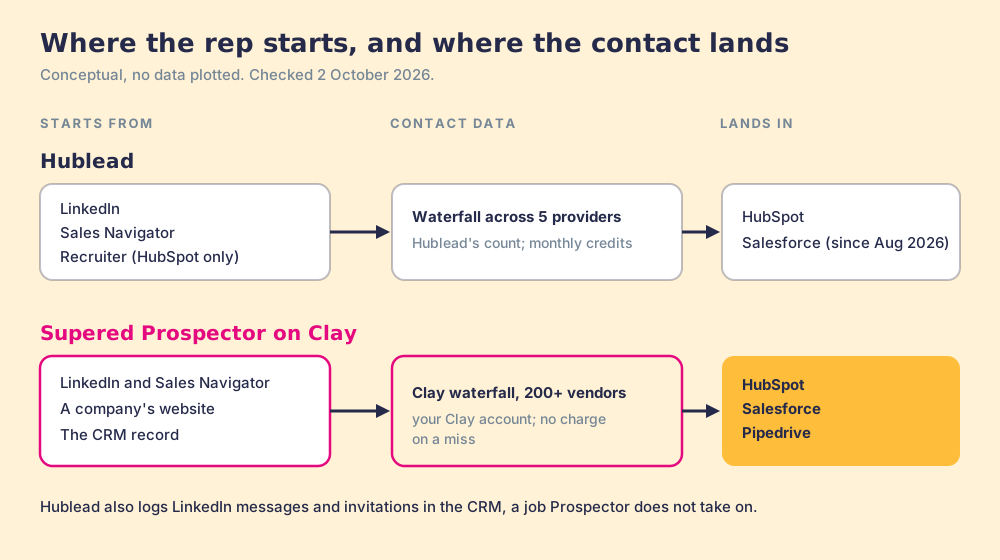
Conceptual, no data plotted. Hublead: starts on LinkedIn, Sales Navigator or Recruiter, enriches through 5 providers by its own count, lands in HubSpot or Salesforce, and logs LinkedIn messages and invitations. Prospector: starts on LinkedIn or Sales Navigator, a company website or the CRM record, enriches through Clay's waterfall across 200+ vendors, lands in HubSpot, Salesforce or Pipedrive. Checked 2 October 2026.
Fair to them first
What is Hublead best at?LinkedIn conversations inside HubSpot.
Hublead does the LinkedIn-to-HubSpot job carefully. When a rep opens a profile it looks for a match in the CRM, "first on the LinkedIn URL stored on the record, then on first name, last name and company," and offers to link the profile to that record instead of creating a second one. Owner, properties, notes and tasks sit beside the profile, and the rep can enroll the contact in a sequence without opening HubSpot. Nothing from enrichment is written to the CRM until the rep accepts it.
Its deepest feature is one Prospector does not attempt. Hublead writes LinkedIn activity as CRM properties ("Profile visits, invitations sent, invitations accepted, messages sent, replies received," per its Chrome Web Store listing), so a manager can report on LinkedIn outbound and trigger a workflow, such as enrolling a contact in a sequence the moment they accept an invitation. Message sync runs on click on Professional, on view on Business and in the background on Scale. Users rate it highly: 4.9 out of 5 from 67 reviews on G2 and 4.8 from 151 ratings on the Chrome Web Store, both checked 2 October 2026.
Hublead is a footbridge between two buildings, LinkedIn and your CRM, with a small stall on it that sells emails and phones from five suppliers. Clay is a market hall with 200+ suppliers under one roof. Prospector brings that market to wherever the rep is standing: a LinkedIn profile, a company website or the CRM record itself. If what you need is foot traffic across the bridge, conversations and invitations logged in HubSpot, Hublead is the better build.
Why buyers compare
Why do Hublead customers look for an alternative?Thin phone credits and two CRMs.
Hublead's ratings are high. The reasons to look around come from contact data, phone numbers and CRM coverage.
Phones on a credit allowance.A phone costs 8 credits, so Professional's 50 credits a month buys about 6 phones, Business about 62 and Scale 250. On G2, Allie H. wrote in May 2026: "I think that if it could pull phone numbers, that'd be helpful."
Five providers.Hublead's waterfall covers 5 providers by its own count. A team that already pays for Clay has 200+ vendors in its account and would run a second, smaller waterfall beside it.
HubSpot at the center.Antony R. wrote on G2 in August 2026: "The tool is heavily focused on HubSpot." Salesforce arrived in August 2026 without Recruiter support, and Pipedrive teams have no Hublead option.
LinkedIn as the starting point.Hublead works on LinkedIn, Sales Navigator and Recruiter and enriches HubSpot lists in bulk. It lists no mode for a rep standing on a company's website looking for the buying committee.
Prospector, for the Hublead job
What does Prospector do for a team on Hublead?Clay in the rep's hands, on three CRMs.
A rep on a Sales Navigator lead, a company's website or a HubSpot, Salesforce or Pipedrive record presses one button and your Clay table runs. Clay's waterfall asks provider after provider across 200+ data and AI vendors (Clay's count on clay.com, checked 2 October 2026) until one returns a verified email or phone, and "If an enrichment returns no result, you're not charged Data Credits or Actions" (clay.com/pricing). Before anything syncs, the rep sees whether the person already has a CRM record and whether they were worked before. One more click sends the contact to the CRM with the field mapping Ops set once. Reps never log into Clay.
On a company's website, the buying-committee lookup takes your own titles, departments and seniority and pulls the people your team sells to. A rep can add leads to a prospect list and push the whole list into a Clay workflow your GTM engineer built, so the logic in your tables carries straight to the rep.
A sales leader then sees each rep-built list as sourced, worked and closed, and who added what, with no duplicate work across reps. Your process applies to the prospects reps work. The full loop is on the sourcing use case.
The money, for ten reps. Hublead Business is $7,680 a year ($64 a seat a month, billed yearly, with about 62 phones per rep a month), and Scale is $13,440 (about 250 phones). Prospector is $5,400 a year, and with Clay Growth at $446 a month on annual billing ($5,352, clay.com/pricing, 2 October 2026) the stack is $10,752. For a HubSpot team without Clay, Hublead Business is the cheaper bill. For a team already paying for Clay, Prospector adds $5,400 and uses the credits you already buy. There is no free trial yet. It starts with a 30-minute demo on your own Clay account, implementation is included and takes under a week, and the details are on the Prospector page.
Choose something else when the job looks like this
No Clay account.Prospector runs only on Clay. For LinkedIn capture into HubSpot without Clay, Hublead is a strong pick, and the best HubSpot Chrome extensions grades the rest.
LinkedIn conversations in the CRM.If the job is logging LinkedIn messages and invitations and triggering HubSpot workflows from them, Hublead does it and Prospector does not try to.
A free start.Hublead's Starter plan is free with no user limit and shows HubSpot data on LinkedIn. HubSpot's own route is on the HubSpot LinkedIn integration.
Run your Clay table from Sales Navigator.
A 30-minute demo on your own Clay account, on HubSpot, Salesforce or Pipedrive. Bring the table your reps ask Ops to run most often.
Prospector vs Hublead: which Hublead alternative should you choose?Decide by Clay, then by CRM.
If you run HubSpot without Clay and want LinkedIn contacts, conversations and invitations in the CRM, Hublead is the best pick. If your team already runs Clay, or runs Pipedrive, and wants every provider behind one button in Sales Navigator, on company sites and in the CRM record, Prospector is the best pick.
Choose Hublead for
LinkedIn activity in HubSpot. Messages, invitations and replies as properties you can report and trigger on.
A free plan. HubSpot data on LinkedIn for any number of users.
A low seat price. Professional at $32 a seat a month, billed yearly.
Choose Prospector for
Coverage from 200+ vendors. Clay's waterfall on your own account, with no charge on a miss.
Pipedrive as well. HubSpot, Salesforce and Pipedrive, as a place to start and as the sync target.
Lists you can follow. Sourced, worked and closed for each list, rep by rep.
The two can sit side by side on a HubSpot team: Hublead for LinkedIn conversation sync, Prospector for building and enriching lists on Clay. They do different jobs on the same profile.
Why trust this page
Why trust a comparison written by Supered?Weigh it, then check the sources.
We sell one of the two products on this page, so weigh what follows. Each Hublead fact links to its source and carries the date we checked it, 2 October 2026. Where Hublead's own pages disagree, as they do on Salesforce, we quote both. When Hublead changes its plans, this page changes with it.
Supered started inside RevPartners, the HubSpot partner Matt Bolian founded, which sold roughly twice as much Sales Hub as any other partner and reached HubSpot's Elite tier in 13 months. Supered is the #1 sales enablement app on the HubSpot marketplace and a HubSpot Premier Tech Partner, with 6,000+ installs. It holds 5.0 from 122 reviews on the HubSpot marketplace (checked 1 October 2026) and 4.9 out of 5 from 81 reviews on G2 (checked 2 October 2026). Those reviews cover Supered as a whole. Prospector is the newest product, so judge it in a demo on your own Clay account.
Switching
How do you switch from Hublead to Prospector?Your CRM records stay where they are.
Contacts, companies and LinkedIn properties Hublead wrote to HubSpot or Salesforce stay in the CRM, so the move is about the next list.
Clay connection.An admin connects Clay inside Supered, with no engineering, and each Clay table or custom workflow becomes a button for reps.
CRM field mapping.Ops sets it once for HubSpot, Salesforce or Pipedrive, and each sync after that is one click.
Cancellation.Hublead says you may cancel at any time and receive a prorated credit for the rest of that month's billing cycle.
Time to live.Implementation is included and takes under a week.
What is the best Hublead alternative for a team on Clay?
Supered Prospector. It runs your Clay tables from Sales Navigator, company websites and the HubSpot, Salesforce or Pipedrive record, so reps get Clay's waterfall across 200+ vendors, check the CRM before a sync and push in one click. It costs $45 per rep per month, billed annually, plus your Clay plan.
Does Hublead work with Salesforce or Pipedrive?
Salesforce, yes: Hublead's homepage says Salesforce went live in August 2026 with Contacts and Leads, account creation, enrichment, notes, campaigns and message sync, though Recruiter is not supported there yet. Pipedrive, no: Hublead says it "integrates HubSpot and Salesforce." Its pricing-page FAQ still said HubSpot only on 2 October 2026.
How much does Hublead cost compared with Prospector?
On 2 October 2026 Hublead listed a free Starter plan, Professional at $32, Business at $64 and Scale at $112 per seat per month on yearly billing ($40, $80 and $140 monthly), and custom Enterprise. Prospector is $45 per rep per month, billed annually, plus your Clay plan. For ten reps, Hublead Business is $7,680 a year and Prospector with Clay Growth at $446 a month is $10,752.
How many phone numbers do Hublead credits buy?
A phone costs 8 credits and an email export 1. Professional includes 50 credits a month per user (about 6 phones), Business 500 (about 62) and Scale 2,000 (250).
Does Prospector sync LinkedIn messages to the CRM?
LinkedIn message sync is not on Prospector's feature list. Prospector runs your Clay tables, checks the CRM match and prior work, and syncs the contact to HubSpot, Salesforce or Pipedrive. If message sync is the job, Hublead is the better fit.
What does each tool read from LinkedIn?
Ask every vendor what it reads from LinkedIn, ours included. Hublead says its Add to CRM button imports first name, last name, LinkedIn URL, job title, website URL, city, country or region and language from the profile. In Prospector, the contact data comes from Clay's waterfall on your own Clay account.