LinkedIn Sales Navigator Chrome Extension: Pick It by the Screen It Touches
There is no official LinkedIn Sales Navigator Chrome extension. The third-party ones split by the Navigator screen they work on, and that decides what you get and what you risk. Seven graded, prices checked October 2, 2026.
A LinkedIn Sales Navigator Chrome extension is a third-party browser add-on that works inside Sales Navigator, on a lead page, a search results page, or a saved lead list, to find the lead's email and phone or move the lead into a CRM or workflow.
A LinkedIn Sales Navigator Chrome extension is a third-party browser add-on that works inside Sales Navigator, on a lead page, a search results page, or a saved lead list, to find the lead’s email and phone or move the lead into a CRM or workflow. LinkedIn makes none. The short answer, graded below:
- Supered Prospector. For teams that already run Clay: reps add Navigator leads to a prospect list and push the list to the team’s Clay table, $45 per rep per month billed annually.
- Apollo. For a team without Clay that wants data and sequences in one seat, Basic $49 billed annually, with limits on Navigator’s search results page.
- Kaspr. For email-first reps who live in Navigator lead pages, Starter $49 billed annually, the first plan with Sales Navigator support.
Search Google for a LinkedIn Sales Navigator Chrome extension and the first result, on October 2, 2026, was a Chrome Web Store listing called “LinkedIn Sales Navigator Scraper”: 2,000 users, 3.1 stars from 7 ratings, version 1.0, last updated September 2, 2024, built by an individual developer, and described as a tool that will “scrape detailed lead information” and “download the collected data as a CSV file” (Chrome Web Store). Google hands that listing to a seller who types the obvious question, and it is the kind of tool LinkedIn’s User Agreement prohibits.
The useful way to choose is by the screen. Sales Navigator has three that matter: the lead page, the search results, and the saved lead list. The extensions sold for Navigator differ less by brand than by which of those screens they act on, and the vendors draw that line in different places, in their own help docs. This page maps where each one works, grades seven of them for a 10 to 50 rep team, prices the plan behind each, and shows what a team with Clay can do instead of buying another database.
Is there an official LinkedIn Sales Navigator Chrome extension?
No. LinkedIn had one, and retired it. “As a result of low adoption, we have decided to sunset the Sales Navigator for Gmail feature on March 18, 2020” (Social Media Today, February 19, 2020). LinkedIn’s one live Chrome extension today is a notification counter with 200,000 users that finds no contact data, as the LinkedIn Chrome extension guide covers.
Sales Navigator itself stops at the name. LinkedIn’s help center says it “currently doesn’t offer the option to export account and lead information from Sales Navigator into a CSV or XLS file,” and keeps CRM Sync for the Advanced Plus plan (Sales Navigator Help, checked October 2, 2026). Core lists at $119.99 a month and Advanced at $159.99; Advanced Plus is priced by quote (LinkedIn, compare plans, October 2, 2026). Reviewers feel the wall: “I don’t like the inability to download lead lists to CSV or to CRMs without a third-party add-on,” an owner and CEO wrote on G2 in February 2026. So every sales navigator extension a rep installs fills one of two gaps: the missing email and phone, or the missing road out to the CRM. What it costs per lead is on the Sales Navigator pricing page.
What does a Sales Navigator Chrome extension work on?
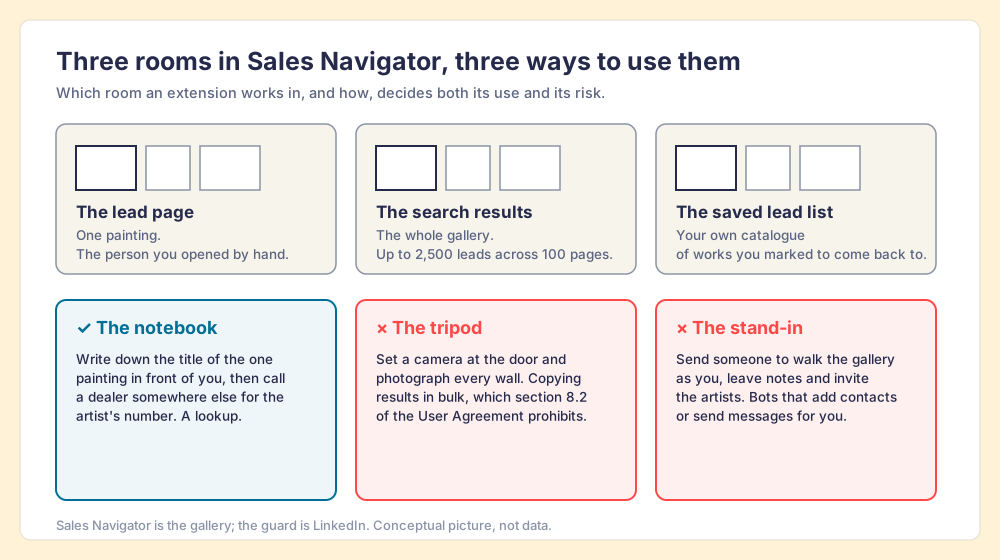
Think of Sales Navigator as a gallery with a guard at the door. You paid for the ticket, and inside you can do three things.
You can stand in front of one painting: the lead page, the one person you opened by hand. You can walk the whole gallery, room after room: the search results, “up to 2,500 lead results across 100 pages” per search (Sales Navigator Help). And you can keep your own catalogue of the works you marked to come back to: the saved lead list.
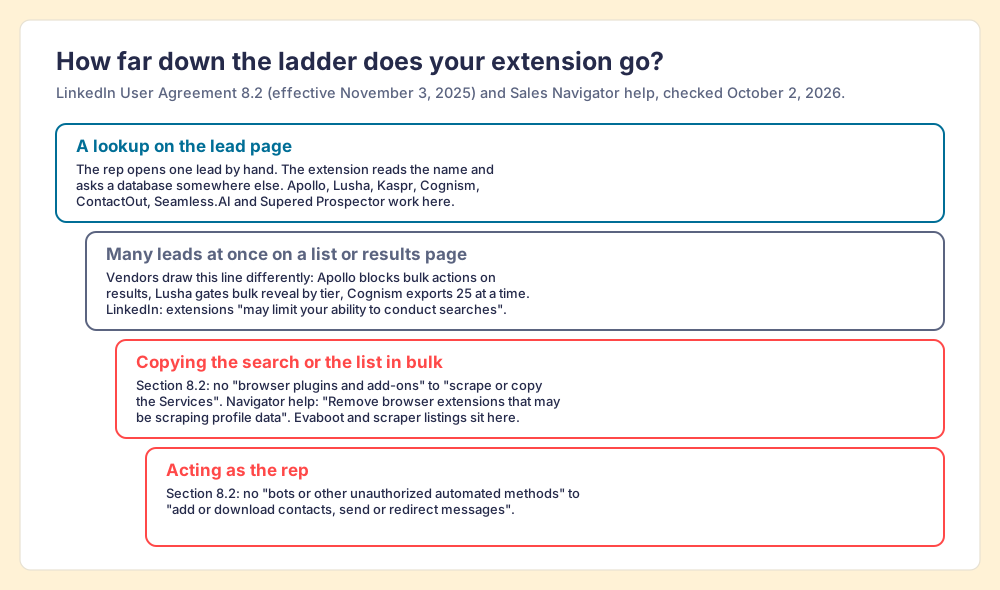
An extension can use those rooms in three ways. It can carry a notebook: write down the title of the painting in front of you, then phone a dealer somewhere else for the artist’s number. That is a lookup. It can set a tripod at the door and photograph every wall, which is copying results in bulk. Or it can send a stand-in to walk the gallery as you, leaving notes and inviting the artists, which is automation. The guard has written rules about the second and third. The picture stops being exact at the dealer: some extensions keep their own phone book, and some, like Prospector, ring many dealers in turn.
Which Sales Navigator screens do the big extensions work on?
Here the vendors part ways, and they say so in their own documentation. Read the search results column first, because that is where the risk sits.
| Extension | Lead page | Search results page | Saved lead list | Contact data from | Source, checked |
|---|---|---|---|---|---|
| Supered Prospector | Add the lead to a prospect list | No bulk copy, by design | Push the list to a Clay table | Clay’s waterfall, 200+ providers | Prospector, October 2, 2026 |
| Apollo | ”May appear on some” profiles | ”Suggested, Not Selectable” | Not documented | Apollo, plus 20+ waterfall partners | Apollo help center, September 25, 2026 |
| Lusha | Reveal on the lead | ”Bulk reveal on Sales Navigator” varies “by plan tier” | Not documented | Lusha, with a waterfall on paid plans | Lusha docs, October 1, 2026 |
| Kaspr | Starter plan and up | Not documented | Not documented | Kaspr’s own data | kaspr.io/pricing, October 2, 2026 |
| Cognism | Lead and account pages | Not documented | Loads contacts visible on screen; exports 25 at a time | Cognism’s own data | Cognism help, April 10, 2026 |
| ContactOut | Sales Navigator listed | Not documented | Not documented | ContactOut’s own data | Chrome Web Store, October 1, 2026 |
| Evaboot | Not its job | Exports the whole search | Exports the whole list | One email per lead, no phones | evaboot.com/pricing, October 2, 2026 |
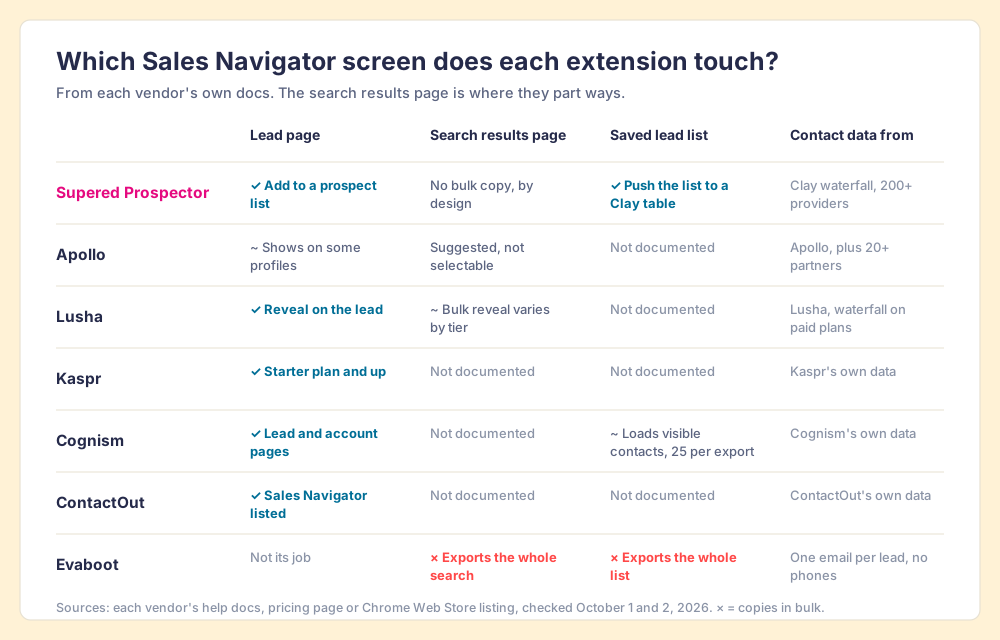
The table teaches three things.
- Apollo’s own line. Apollo, the most installed extension in this table at 1,000,000 users, writes: “You can’t select leads or take bulk prospecting actions from the extension on the search results page,” and adds that its “LinkedIn task automation works on standard LinkedIn profiles, not Sales Navigator” (Apollo help center, updated September 25 and 26, 2026).
- Plan tiers as the gate. Lusha says “Some features, such as bulk reveal on Sales Navigator, vary by plan tier,” and Kaspr leaves Sales Navigator off its Free plan entirely. The cheapest tier often reaches only the lead page.
- The scraper’s honesty. Evaboot calls itself “The Smartest LinkedIn Sales Navigator Scraper” and promises that “Every export stays under the limits LinkedIn sets” (evaboot.com). LinkedIn’s rules carve out no polite scraping.
Can a Sales Navigator extension get your LinkedIn account restricted?
It can, and LinkedIn says which kind. The User Agreement, section 8.2, effective November 3, 2025, has members agree not to use “browser plugins and add-ons or any other technology” to “scrape or copy the Services, including profiles and other data,” and not to “Use bots or other unauthorized automated methods to access the Services, add or download contacts, send or redirect messages” (LinkedIn User Agreement). LinkedIn’s prohibited-software page adds that members using such tools “risk having their accounts restricted or shut down” (LinkedIn Help).
Sales Navigator’s own help goes further, and is specific to the product you pay for. “Using browser plugins and extensions may limit your ability to conduct searches in Sales Navigator and may result in limitations and restrictions to usage” (Sales Navigator Help, search). Its usage-restrictions page tells members to “Remove browser extensions that may be scraping profile data or causing a high number of profile views” (Sales Navigator Help, restrictions). The seat at risk is a $1,079.88-a-year Core license, at minimum.
We do not certify any vendor here as compliant, ours included. Supered’s own statement is that Prospector works within LinkedIn’s terms and does not copy search results in bulk; the contact data comes from Clay’s waterfall on the customer’s Clay account. Put the same question to any vendor before it reaches 30 browsers: which screen does your extension act on, and does it copy or act, or look the person up elsewhere? The Sales Navigator scraper page covers who LinkedIn has acted against.
Why trust this ranking?
I started RevPartners, a HubSpot partner that did only sales implementations, sold roughly twice as much Sales Hub as any other partner, and reached Elite tier in 13 months. Supered came out of that work and is the #1 sales enablement app on the HubSpot marketplace, rated 5.0 from 122 reviews there and 4.9 from 81 reviews on G2 (both checked October 1, 2026). That is also the disclosure: we make Supered Prospector, and it ranks first below for teams that already run Clay. The weights are printed so you can flip them. Flip them for a team without Clay and Apollo takes the top spot.
The Sales Navigator Chrome extensions, graded
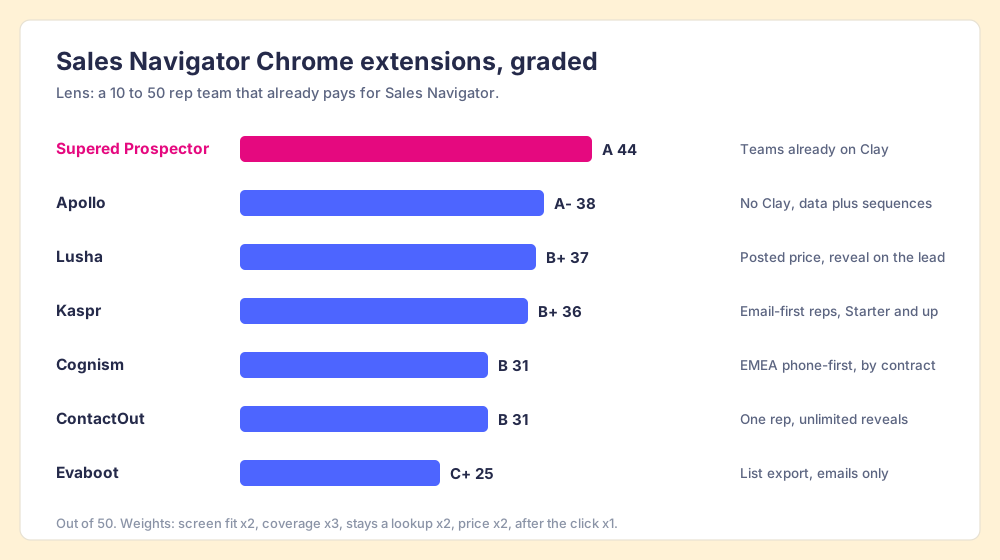
The lens is a team of 10 to 50 reps that already pays for Sales Navigator and wants reps to get contact data without leaving it, plus a leader who can see what happens to the lists. Each criterion is scored 1 to 5 and multiplied by its weight, for a maximum of 50. Bands: A 42 and up, A- 38 to 41, B+ 35 to 37, B 30 to 34, C+ 25 to 29.
| Criterion | Weight | What it rewards |
|---|---|---|
| Screen fit | x2 | Works on the lead page and the saved list, where reps work |
| Coverage | x3 | A verified email and mobile when the first source misses |
| Stays a lookup | x2 | Per the vendor’s own docs, no bulk copy and no automation on Navigator |
| Price for a team | x2 | Posted, per seat or per result, sized for 10 to 50 reps |
| After the click | x1 | CRM sync, duplicate check, and what the leader sees |
| Rank | Extension | Grade | Score | Best fit | CRM integration | Setup effort | Pricing (plan that works on Navigator) | Why it ranks here |
|---|---|---|---|---|---|---|---|---|
| 1 | Supered Prospector | A | 44 | Teams already on Clay | Native (HubSpot, Salesforce, Pipedrive) | Under a week on an existing Clay account | $45 per rep per month, billed annually, plus your Clay plan | 200+ providers per lookup; lists followed to closed |
| 2 | Apollo | A- | 38 | No Clay, data plus sequences | Native (HubSpot, Salesforce) | A day | Basic $49 per seat per month, billed annually | Best price and bundle; thin on Navigator screens |
| 3 | Lusha | B+ | 37 | A posted price, reveal on the lead | Native (HubSpot, Salesforce, Pipedrive) | Minutes | Free 40 credits a month; Starter $449.10 a year | Waterfall fallback on paid plans; bulk reveal by tier |
| 4 | Kaspr | B+ | 36 | Email-first reps | Native (HubSpot, Salesforce, Pipedrive, Zoho) | Minutes | Starter $49 per user per month, billed annually | Unlimited B2B emails, 100 phones a month |
| 5 | Cognism | B | 31 | EMEA, phone-first teams | Native | Weeks | Contract; Vendr median $32,750 a year | Strong mobiles, quote-only, 25 per export |
| 6 | ContactOut | B | 31 | One rep, unlimited reveals | Salesforce on the Team plan | Minutes | Email + Phone $79 a month, billed annually | Plain price, one user per company on self-serve |
| 7 | Evaboot | C+ | 25 | A one-off list export | None; CSV | Minutes | $29 a month for 400 credits | Exports whole searches; no phones; a scraper by its own name |
The scores, criterion by criterion: Prospector 5, 5, 4, 3, 5. Apollo 2, 4, 4, 5, 4. Lusha 4, 4, 3, 4, 3. Kaspr 4, 3, 4, 4, 3. Cognism 4, 4, 3, 1, 3. ContactOut 3, 3, 4, 3, 2. Evaboot 4, 2, 1, 4, 1. Prospector’s price score is the lowest of its five because it needs a Clay account under it. Apollo’s screen score is low because Apollo’s own help center says its extension shows on only some Navigator profiles and cannot act on results.
Supered Prospector: your Clay table as a button in Sales Navigator
Clay plus Supered is the best way for a sales team to prospect: GTM engineers build in Clay, reps never open Clay. Prospector runs inside the Supered Chrome extension, on the team’s own Clay account, and it does not bring a database of its own. It brings Clay’s waterfall, which is every database, routed: Clay sells “data from 200+ providers in one place” (clay.com, October 2, 2026), and “If an enrichment returns no result, you’re not charged Data Credits or Actions” (clay.com/pricing). In the gallery picture, Prospector is the notebook with a switchboard behind it: one name written down, and every dealer rung in turn until one answers.
On Sales Navigator, the loop looks like this. A rep adds Navigator leads to a prospect list. The rep pushes the list and picks a flow from the Push menu, a flow the GTM engineer built once, mapped to a Clay table or function and a destination. The team’s table runs with its own logic (“waterfalls, tiers, tags, and sequence variables”), and the contacts go to HubSpot, Salesforce, or Pipedrive, or to your sales engagement tool, after the rep sees who owns them.
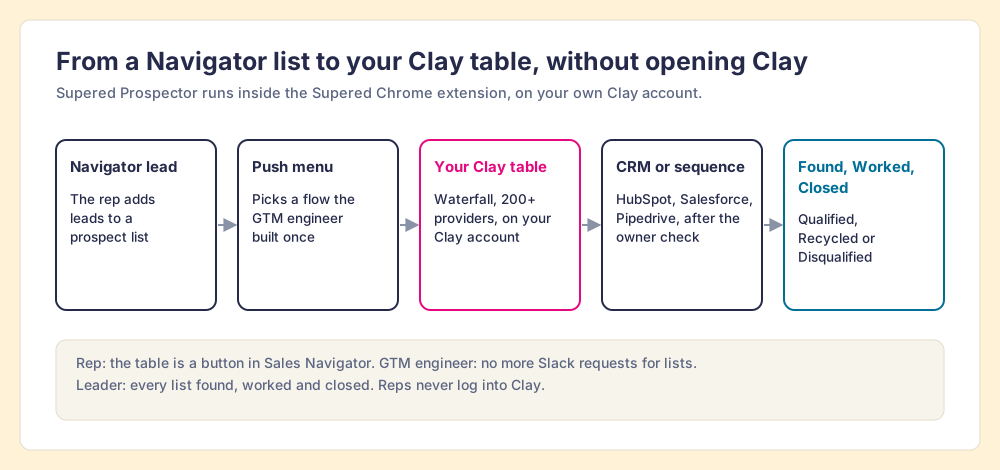
What each person on the team gets:
- The rep. The team’s table as a button in Sales Navigator, on a company site, and in the CRM record. A flag shows when a prospect was worked before and which CRM record matches, so the rep does not step on a teammate.
- The GTM engineer. No longer the list desk. You built great Clay tables; reps stop sending Slack requests for every list and run the tables themselves.
- The leader. Every list found, worked, and closed. Found: reps use your tables, with no duplicate work. Worked: who is working their list, and who is not. Closed: each lead ends the way your process says, as Qualified, Recycled, or Disqualified. Your VP sees it too, and the Clay budget grows on that view.
Prospector costs $45 per rep per month billed annually, from one rep, and starts with a demo. Start with the Supered Clay template, or bring your own tables. If your team is not on Clay yet, RevPartners, a Clay Elite Studio Partner, builds and tunes the tables with you; I founded RevPartners, so weigh that recommendation accordingly. The Clay Chrome extension page explains how Prospector differs from Clay’s own builder extension, and the sourcing use case walks the loop end to end, and Prospector for reps shows the rep’s side.
Choose something else if you do not run Clay: Prospector does nothing without a Clay account. Choose something else, too, if you want a tool that copies a whole Navigator search to a CSV, because Prospector does not do that, by design.
The other Sales Navigator extensions, one at a time
Apollo: the biggest install base, thinnest on Navigator
Apollo’s extension had 1,000,000 users and a 4.7 rating from 2.2K ratings on October 1, 2026 (Chrome Web Store). Basic is $49 a seat a month billed annually, and the seat carries sequences and a dialer. On Navigator, its own help center tells you to “continue from the prospect’s standard LinkedIn profile” when the panel does not load. The Apollo Chrome extension page covers install and limits, and Apollo vs LinkedIn Sales Navigator asks whether you need both.
Lusha: a posted price on the lead page
Lusha’s extension reveals contact details “directly from LinkedIn profiles, Sales Navigator, company websites, and your CRM,” on all plans (Lusha docs). An email costs 1 credit and a phone 5, and the free plan gives 40 credits a month (lusha.com/pricing). Bulk reveal on Navigator depends on the tier. Lusha is also a step inside Clay’s waterfall, on a Bring Your Own Account basis, so a Clay team can reach Lusha’s data through Prospector. More on the Lusha Chrome extension page.
Kaspr: built for Navigator lead pages
Kaspr sells itself to Navigator users: “Use Kaspr on top of Sales Navigator to enrich contacts with verified data” (kaspr.io/pricing, October 2, 2026). That starts on Starter, $49 a user a month billed annually ($65 monthly), with unlimited B2B emails and 100 phone credits a month; the Free plan does not include Sales Navigator. Kaspr has been part of Cognism since April 2022. Kaspr pricing prices it to the phone.
Cognism: mobiles, by contract, 25 at a time
Cognism’s extension opens on Navigator lead and account pages and exports to the CRM; its lead-list play auto-loads “all contacts that are visible on your screen.” Its fair-usage terms cap exports at “25 individual records at a time” and 2,000 a month per user (Cognism help). Price is by contract, with a Vendr median of $32,750 a year. (Cognism’s web app is also called “Prospector”; it is unrelated to Supered Prospector.) The Cognism Chrome extension page sorts out its two listings.
ContactOut: unlimited, for one seat
ContactOut’s listing names “LinkedIn Standard, Sales Navigator & Recruiter” and had 600,000 users and a 4.4 rating from 796 ratings. Email + Phone is $79 a month billed annually with unlimited reveals, and the self-serve plans carry a one-user-per-company limit (contactout.com/pricing). For a team, that limit decides it. Details on the ContactOut Chrome extension page.
Evaboot: the exporter, in its own words
Evaboot exports whole Navigator searches and lists to a CSV with a verified email per lead. It charges 1 credit per lead exported, and “A lead we find no email for still costs 1 credit”; plans start at $29 a month for 400 credits, and it does not find phone numbers (evaboot.com/pricing). Its own export guide advises, “Use a dedicated prospecting seat, not the profile your network lives on,” which tells you where the risk lands. Evaboot pricing has the full table.
What does a Sales Navigator extension cost for 10 reps?
The extension is rarely the big line. The Navigator seats under it are. At list prices checked October 2, 2026, ten Core seats cost $10,798.80 a year ($1,079.88 each).
| Ten reps, one year | Navigator Core | Extension or data layer | Total |
|---|---|---|---|
| Sales Navigator Core alone | $10,798.80 | none | $10,798.80 |
| Core + Supered Prospector, Clay already paid | $10,798.80 | $5,400 | $16,198.80 |
| Core + Apollo Basic | $10,798.80 | $5,880 | $16,678.80 |
| Core + Kaspr Starter | $10,798.80 | $5,880 | $16,678.80 |
| Core + Clay Growth + Supered Prospector | $10,798.80 | $5,940 + $5,400 | $22,138.80 |
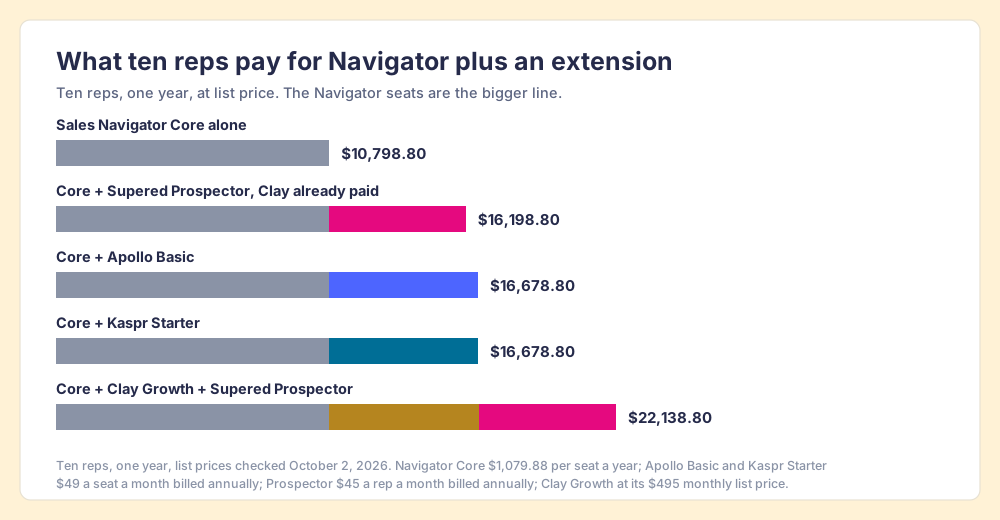
The arithmetic says two things. For a team that already pays for Clay, Prospector is the cheapest way to put contact data on top of Navigator, because the credits are already bought and an enrichment that finds nothing costs nothing. For a team without Clay, Apollo or Kaspr is $5,460 a year cheaper than starting Clay for this alone, and the saving is the reason to pick one of them. The Bridge Group’s 2025 survey of 351 companies puts a median SDR at 112 activities a day, 44 of them calls (Bridge Group), so a phone-heavy team should size Kaspr’s 100 phones a month before the seats.
How do you install a Sales Navigator Chrome extension safely?
- The listing. Install from the vendor’s own Chrome Web Store page and confirm it reads “Created by the owner of the listed website.”
- The plan. Check which plan unlocks Navigator before rolling out; on Kaspr it is Starter, on Lusha bulk reveal depends on the tier.
- The screen question. Ask the vendor what the extension does on the search results page. Copying a search in bulk is the rung section 8.2 rules out.
- The test lead. Pin the extension, sign in, open one Navigator lead page by hand, and confirm the panel loads there. Apollo, for one, shows on only some Navigator profiles.
- The CRM side. Connect the CRM, set field mapping once, and turn on the owner and duplicate check before reps start.
Which LinkedIn Sales Navigator Chrome extension should you choose?
Two facts about your stack decide most of it.
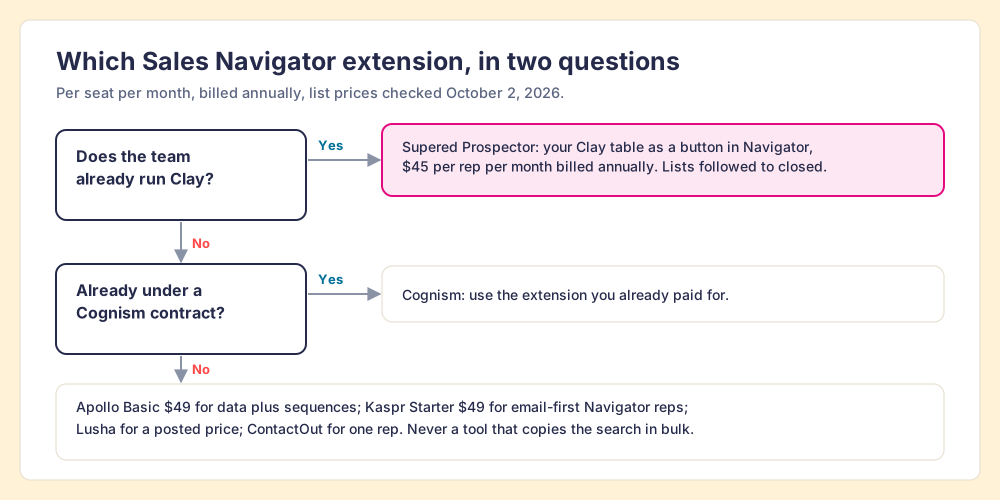
- Supered Prospector. The pick when the team already runs Clay: reps get the GTM engineer’s tables as a button in Sales Navigator, never open Clay, and the leader sees each list found, worked, and closed.
- Apollo. The pick without Clay, when one seat should carry data, sequences, and a dialer and reps can finish on the standard profile.
- Kaspr. The pick for email-first reps who work Navigator lead pages, from the Starter plan.
- Lusha, Cognism, or ContactOut. The pick for a posted price on the lead page, a Cognism contract you already hold, or one rep who wants unlimited reveals.
What we recommend: keep the extension on the lead page and the saved list, and keep it off the search results. A lookup on the lead you opened is the notebook; a tool that copies the gallery is the tripod, and LinkedIn has written down what it thinks of tripods. If you have Clay, do not buy another phone book to sit on Navigator; put your own tables there, so reps prospect where they already work and you can watch each list close. If you do not have Clay, Apollo is the safe team default and Kaspr the better Navigator fit for email. Exporting Sales Navigator leads goes step by step from a saved list to the CRM, the Sales Navigator CRM integration page shows what Advanced Plus syncs and what it leaves out, and a Prospector demo on your own Clay tables shows the button in Navigator.
Frequently asked questions
Is there an official LinkedIn Sales Navigator Chrome extension?+
What is the best Sales Navigator Chrome extension?+
Can LinkedIn restrict my account for using a Sales Navigator extension?+
Does the Apollo Chrome extension work on Sales Navigator?+
Which Kaspr plan works with Sales Navigator?+
Do reps need a Clay login to use Supered Prospector on Sales Navigator?+
Your process, running itself.