LinkedIn Chrome Extension for Sales: 9 Graded, and the Kind to Avoid
The LinkedIn Chrome extensions sales reps use to get emails and phones from a profile or a Sales Navigator list, graded for a 10 to 50 rep team, with store ratings, plan prices, and the kind LinkedIn's terms ban.
A LinkedIn Chrome extension for sales is a browser add-on that sits on a LinkedIn profile or Sales Navigator list and returns the person's work email and phone, then sends the contact to your CRM or sequencer.
A LinkedIn Chrome extension decides two things for a sales team: how often the rep on a profile finds a working email and phone, and where that contact goes next. The short answer, graded in full below:
- Supered Prospector. For teams that already have Clay: Clay’s waterfall across 200+ vendors, run from a LinkedIn profile, a Sales Navigator list, a company site, or the CRM record, at $45 per rep per month billed annually.
- Apollo. For a team without Clay that wants data and sequences in one tool: 1,000,000 Chrome Web Store users, seats from $49 a month billed annually.
- ContactOut. For one rep who wants unlimited emails and phones at a posted price: $79 a month billed annually.
A rep on a LinkedIn profile is standing in a stranger’s front hall. The photographs are on the wall, the job title is over the mantel, the company is printed on the coat by the door, and there is no telephone number anywhere in the house. LinkedIn shows a member’s email only to the connections that member allows (LinkedIn Help, email visibility), so the rep who wants to call has to find the number somewhere else. A LinkedIn Chrome extension for sales is a browser add-on that sits on a LinkedIn profile or Sales Navigator list and returns the person’s work email and phone, then sends the contact to your CRM or sequencer. LinkedIn extensions serve two crowds: people who want LinkedIn notifications in the toolbar, and sellers who want the number. This page serves the sellers. It grades nine sales extensions on the jobs a 10 to 50 rep team hires them for, prices the plan behind each one as of October 1, 2026, and makes one point the other lists skip. The extensions differ less by brand than by what they do once you click them, and one kind can cost you the LinkedIn account.
Does LinkedIn have its own Chrome extension?
It does. The LinkedIn Extension, published by LinkedIn, “lights up with a new notification count whenever you have new activity waiting for you at LinkedIn,” and clicking the icon opens the site. On October 1, 2026 its Chrome Web Store listing showed 200,000 users, a 4.3 rating from 376 ratings, version 2.3, last updated July 28, 2026 (Chrome Web Store, LinkedIn Extension). It is 14.35 KiB of doorbell. It finds no emails and no phones, and it is the right install for someone who wants to know when a recruiter replied.
For sellers, LinkedIn has been out of the browser-extension business since 2020. It retired Sales Navigator for Gmail on March 18 of that year: “As a result of low adoption, we have decided to sunset the Sales Navigator for Gmail feature” (Social Media Today, February 19, 2020). So every LinkedIn extension a sales rep installs to get contact data is a third-party tool, which is why the choice deserves more than a glance at the install count.
What kinds of LinkedIn Chrome extensions are there?
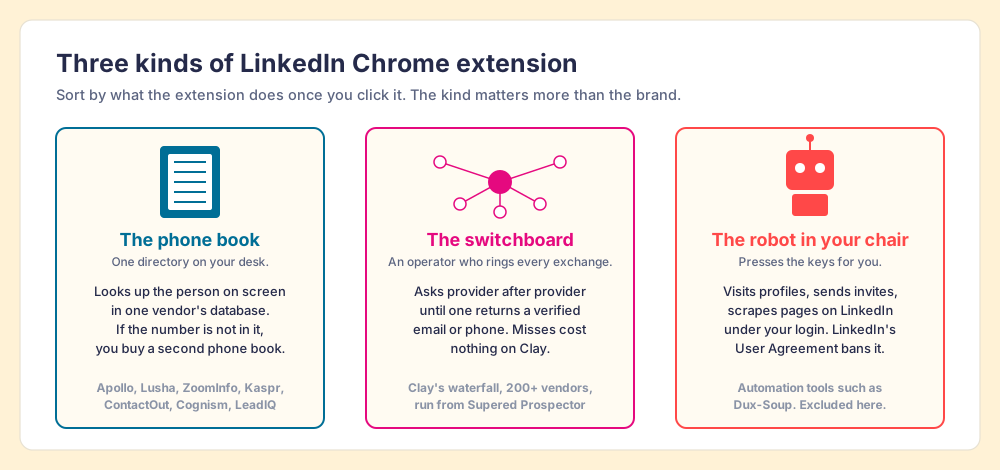
Sort them by what happens after the click, and three kinds fall out. They look alike in the toolbar. They are as different as a phone book, a switchboard, and a robot in your chair.
- The phone book. A single vendor’s database behind a button. The extension reads the profile the rep opened, looks the person up in one directory, and shows what it has. Apollo, Lusha, ZoomInfo, Kaspr, ContactOut, Cognism, and LeadIQ work this way. When the number is not in the book, the rep is stuck, and the company buys a second phone book.
- The switchboard. An operator who rings exchange after exchange until someone answers. Clay calls this a waterfall: “Clay’s signature data waterfalls check multiple providers to return the most verified emails (lower bounce rate) and phone numbers (higher connect rate)” (Clay, rep prospecting, checked September 25, 2026), across 200+ providers in one place (clay.com, October 1, 2026). Supered Prospector puts that switchboard on the rep’s screen.
- The robot in your chair. A tool that visits profiles, sends invitations, and messages prospects on LinkedIn under the rep’s login. Dux-Soup, the best-known example, had 50,000 users and a 4.4 rating from 443 ratings on October 1, 2026 (Chrome Web Store, Dux-Soup). LinkedIn’s own rules ban this kind, which is why none of them is graded below.
The comparison stops being exact in one place. Some phone books now have a small switchboard inside: Lusha added a Data Waterfall that falls back to third-party providers to every paid plan on September 23, 2026 (Lusha changelog), and Apollo sells waterfall enrichment with 20+ partners behind its own data (Apollo, waterfall). The difference is who owns the order of the calls. In Clay, the team’s GTM engineer writes it; in a vendor’s waterfall, the vendor’s own book is always the first call.
Can a LinkedIn Chrome extension get your account restricted?
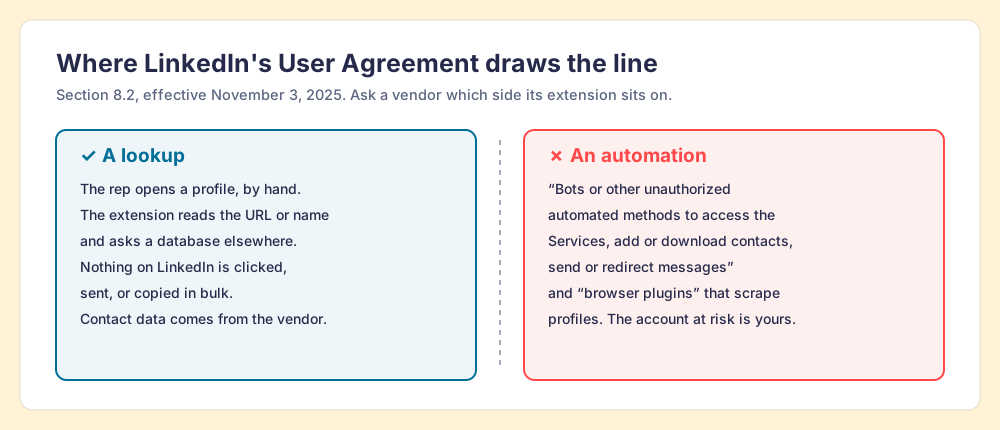
The rule is in writing. LinkedIn’s User Agreement, section 8.2, effective November 3, 2025, lists what members agree they will not do, including: “Develop, support or use software, devices, scripts, robots or any other means or processes (such as crawlers, browser plugins and add-ons or any other technology) to scrape or copy the Services, including profiles and other data from the Services,” and “Use bots or other unauthorized automated methods to access the Services, add or download contacts, send or redirect messages” (LinkedIn User Agreement).
Read with care, that draws a line between two mechanisms. On one side, the rep opens a profile by hand, and the extension reads the URL or name and asks a database somewhere else. On the other, software clicks, visits, copies pages in bulk, or sends messages on LinkedIn on the rep’s behalf. A Clay community thread from July 2025 shows practitioners arguing over exactly this line; one member said of his extension, “all it does is push the URL of your page to Clay, it doesn’t scrape,” while another warned that “these extensions are how multiple companies and individuals got banned from LinkedIn” (Clay community). That is two users talking, not LinkedIn’s ruling, and we do not certify any vendor below as compliant. The useful move is a question you can put to any vendor before it reaches 30 reps’ browsers: does your extension act on LinkedIn, or does it look the person up elsewhere?
Why trust this ranking?
I started RevPartners, a HubSpot partner that did only sales implementations, sold roughly twice as much Sales Hub as any other partner, and reached Elite tier in 13 months. Supered came out of that work and is the #1 sales enablement app on the HubSpot marketplace, rated 5.0 from 122 reviews there and 4.9 from 81 reviews on G2 (both checked October 1, 2026). That is also the disclosure. We make Supered Prospector, and it sits first on this page for teams that have Clay. The weights are printed so you can flip them, and the flip for a team without Clay puts Apollo on top.
The LinkedIn Chrome extensions for sales, graded
A ranking that hides its math is an advertisement. The lens is a mid-market or SMB team of ten to fifty reps that needs contact data reps will use where they already work, and a leader who can see which lists turn into pipeline. Each criterion is scored 1 to 5 and multiplied by its weight, for a maximum of 50. The scores for Apollo, Lusha, ZoomInfo, LeadIQ, Cognism, and Kaspr are the same ones used on the Kaspr alternatives page and its siblings, so the pages read together.
| Criterion | Weight | What it rewards |
|---|---|---|
| Coverage of the contact you need | 30% (x3) | Verified emails and mobiles when the first source misses |
| Rep-side delivery | 20% (x2) | Works on the profile, the Navigator list, the company site, the CRM record |
| Price structure for mid-market | 20% (x2) | Published, per-seat or per-result, no platform fee |
| What the leader sees after the export | 20% (x2) | Which sourced lists were worked and which closed |
| Bundled outreach | 10% (x1) | Sequencing, dialer, drafting in the same plan |
| Rank | Extension | Grade | Score | Best fit | CRM integration | Setup effort | Pricing (plan with the extension) | Why it ranks here |
|---|---|---|---|---|---|---|---|---|
| 1 | Supered Prospector | A | 44 | Teams that already have Clay | Native (HubSpot, Salesforce, Pipedrive) | Under a week on an existing Clay account | $45 per rep per month, billed annually, plus your Clay plan | 200+ vendors per lookup from any page the rep is on; lists followed to closed |
| 2 | Apollo | A- | 36 | Data plus sequences in one tool | Native (HubSpot, Salesforce) | A day | Free; Basic $49, Professional $79 per seat per month, billed annually | Largest install base, sequencer and dialer in the plan |
| 3 | Frontier (formerly Exportly) | B+ | 32 | Teams buying AI prospecting agents | HubSpot, Salesforce (per its early-2026 site) | Demo-led | Not published | Clay-style multi-vendor coverage, no public price |
| 4 | Lusha | B+ | 29 | Posted price on LinkedIn and Gmail | Native (HubSpot, Salesforce) | Minutes | Free; Starter $449.10 a year | Waterfall fallback now on every paid plan |
| 5 | ZoomInfo | B | 28 | Existing ZoomInfo customers | Native (HubSpot, Salesforce, Dynamics) | Weeks | Free for ZoomInfo customers; Vendr median $33,500 a year | Deep US data, lowest store rating here |
| 6 | ContactOut | B | 27 | One rep, unlimited emails and phones | Salesforce on the Team plan | Minutes | Email + Phone $79 a month, billed annually | Unlimited reveals, but one user per company on self-serve |
| 7 | LeadIQ | B | 27 | SDRs capturing into Outreach or Salesloft | CRM and sales engagement sync | A day | Free 50 credits a month; Pro $200 a month for up to 5 users | Capture-to-sequencer workflow |
| 8 | Cognism | B | 26 | EMEA, phone-first teams | Native | Weeks | Included with a contract; Vendr median $32,750 a year | Phone-verified mobiles, quote only |
| 9 | Kaspr | B- | 25 | Email-first reps on LinkedIn and Sales Navigator | Native (HubSpot, Salesforce, Pipedrive, Zoho) | Minutes | Free; Starter $49 per user per month, billed annually | Unlimited emails, 100 phones a month |
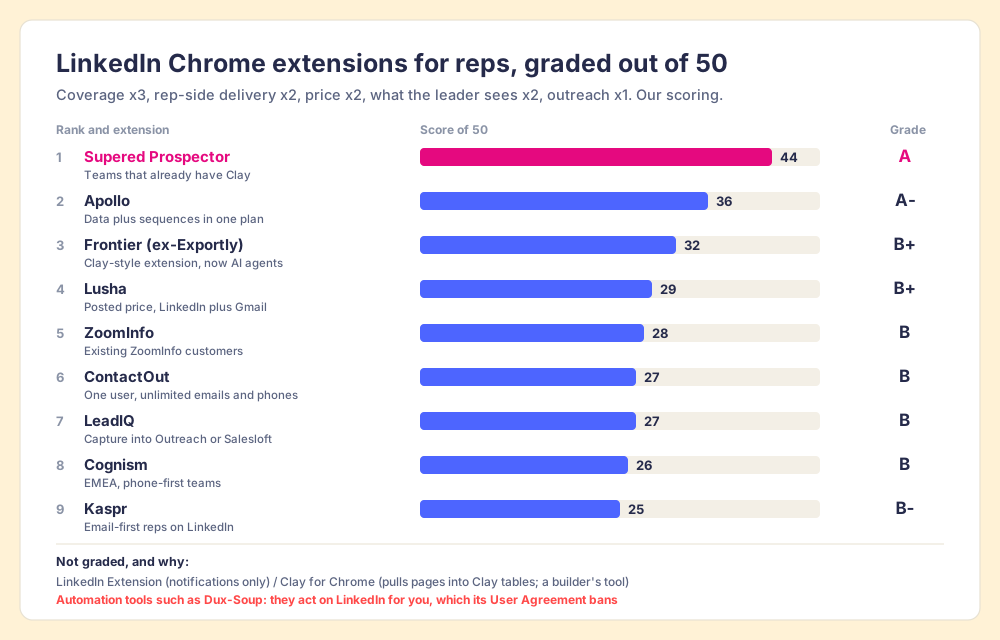
The two new rows earn their scores this way. Frontier scores 5 on coverage because it built its name as a Clay-powered extension and its product page claims “150+ data vendors,” 4 on rep-side delivery, 1 on price because there is none to read (its pricing page returned a 404 on October 1, 2026), 2 on what the leader sees, and 3 on outreach, for 32. ContactOut scores 3, 3, 4, 1, and 2, for 27: its price is the plainest in the category, and its self-serve plans stop at one user per company. Prospector’s outreach score is the lowest on the card on purpose, since it has no sequencer, dialer, or drafting. If outreach in the same plan decides it for you, Apollo wins this page.
Corporate status, checked October 1, 2026, because a ranking that does not say who owns whom is wrong the day a deal closes. Kaspr has been part of Cognism since April 2022. Apollo is independent and acquired Pocus in March 2026 (TNW). ZoomInfo is public (Nasdaq: GTM) and in May 2026 approved a restructuring aimed at “accelerating our move upmarket” (SEC Form 8-K). Lusha, LeadIQ, and ContactOut are independent, with no 2026 acquisition found. Exportly now trades as Frontier and sells “AI agents” for reps; Exportly to Frontier covers the change.
Why do Chrome Web Store installs mislead?
The store number is the first thing a buyer sees, and it measures how far a vendor’s free plan has traveled, not how often the extension finds the person on screen. On October 1, 2026, Apollo’s extension showed 1,000,000 users and Frontier’s showed 3,000. Both figures are true. Neither says which one returns a working mobile for a VP of finance in Leeds.
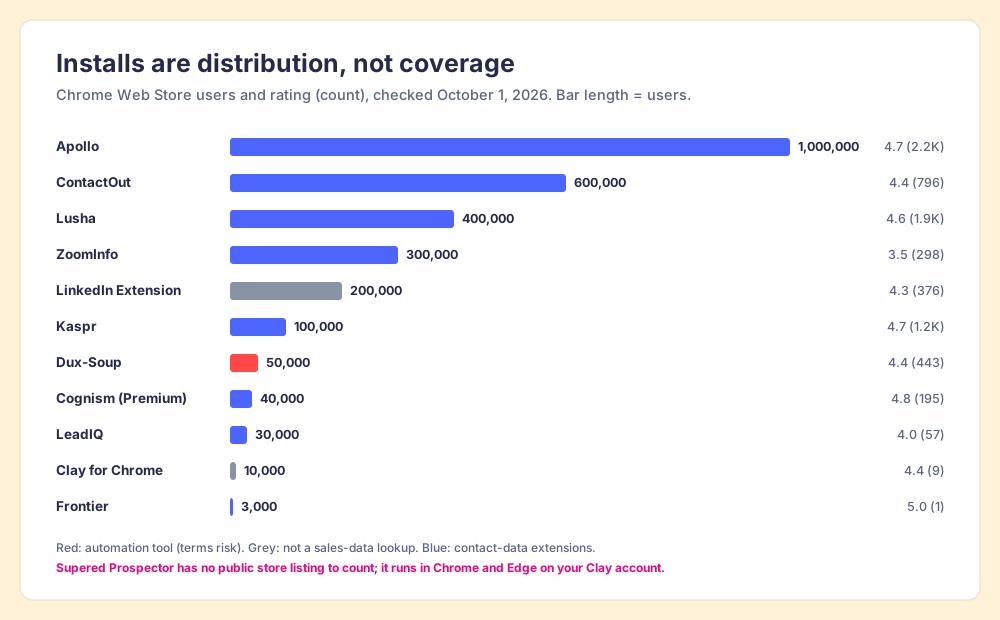
Three readings of the chart teach more than the order of the bars.
- Free plans inflate installs. Apollo, Lusha, Kaspr, ContactOut, and LeadIQ all let anyone install and reveal a few contacts at no cost, so their counts include students, recruiters, and job seekers. ZoomInfo’s 300,000 is “Free for ZoomInfo customers,” so each of those installs sits behind a contract.
- The rating count matters more than the rating. Frontier’s 5.0 rests on 1 rating; Kaspr’s 4.7 rests on 1.2K. A five-star average from one person is an anecdote.
- The low score is a signal. ZoomInfo’s 3.5 from 298 ratings is the lowest of the contact-data extensions on the chart, and it belongs to a company that counts 500M+ contacts behind it. A buyer should read those reviews before the demo, since the extension is the part of ZoomInfo the reps touch.
Supered Prospector is not on the chart because it has no listing of its own: it is a product inside the Supered Chrome extension, the one reps already use for Supered’s cards and process rules, and it runs on the team’s own Clay account. The proof is the demo on your Clay tables rather than an install number.
Is there an official Sales Navigator Chrome extension?
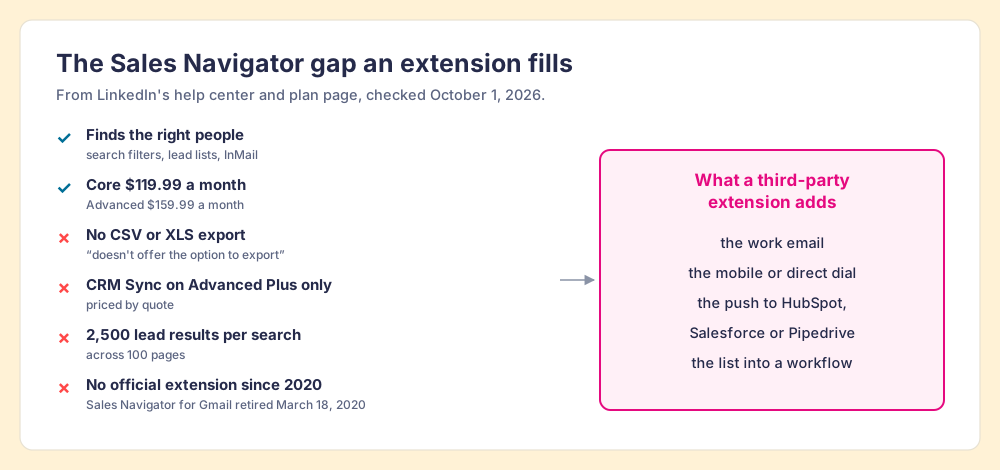
No, and that gap is why “sales navigator chrome extension” is its own search. LinkedIn’s help center states it plainly: “LinkedIn currently doesn’t offer the option to export account and lead information from Sales Navigator into a CSV or XLS file.” CRM Sync with Salesforce, Dynamics, and HubSpot, and adding a lead “directly to your CRM from a Sales Navigator lead page,” are reserved for Advanced Plus (Sales Navigator Help). Advanced Plus is priced by quote; Core lists at $119.99 a month and Advanced at $159.99 a month (LinkedIn, compare plans, October 1, 2026). A Sales Navigator search shows at most 2,500 lead results across 100 pages (Sales Navigator Help).
Sales Navigator users feel the wall. “I don’t like the inability to download lead lists to CSV or to CRMs without a third-party add-on,” an owner and CEO wrote on G2 in February 2026; another reviewer titled his review “The Walled Garden Problem” (G2, Sales Navigator reviews). So a sales navigator extension does one of two jobs: it finds the contact data Sales Navigator does not show, or it moves a Navigator list into the CRM. Kaspr’s listing says it works “through LinkedIn and Sales Navigator,” with Navigator support on the Starter plan. Prospector starts from a Sales Navigator list and can push the whole list into a Clay workflow. The step-by-step version lives on the Sales Navigator export guide, and the native CRM options are on the HubSpot LinkedIn integration page and the Salesforce LinkedIn integration page.
What does each LinkedIn extension cost?
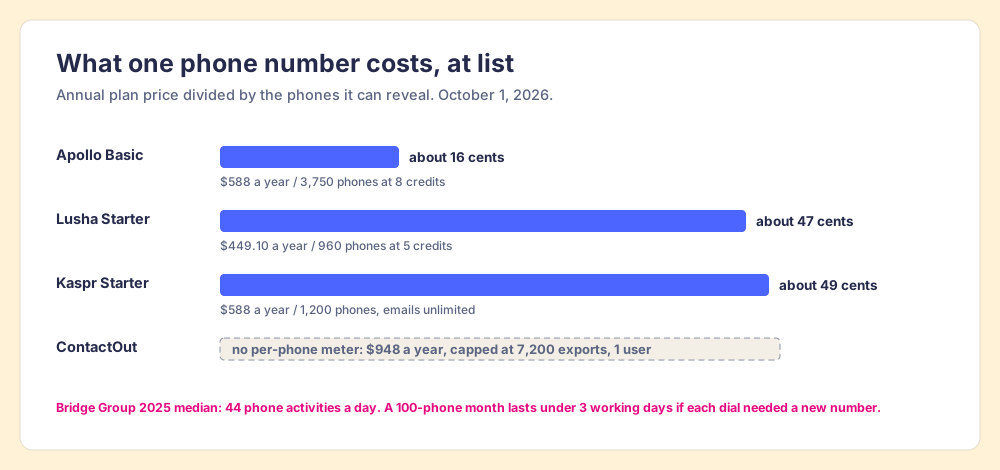
The extension is free to install. The plan behind it is the price, and the meter that matters is what one phone number costs.
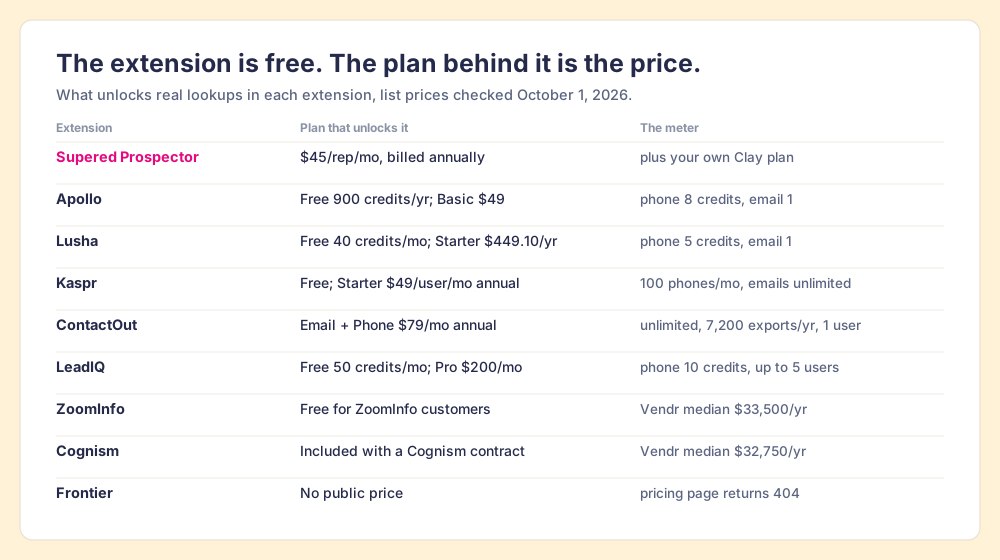
| Extension | Free plan | Paid plan that includes it | How a phone is metered | Source, checked |
|---|---|---|---|---|
| Supered Prospector | No | $45 per rep per month, billed annually, from 1 rep | Your Clay credits | Prospector, October 1, 2026 |
| Apollo | 900 credits a year | Basic $49, Professional $79 per seat per month, billed annually | 8 credits; email 1 | apollo.io pricing API, October 1, 2026 |
| Lusha | 40 credits a month | Starter $449.10 a year for 4,800 credits | 5 credits; email 1 | lusha.com/pricing, October 1, 2026 |
| Kaspr | 5 phones, 15 emails a month | Starter $49 per user per month annually ($65 monthly) | 100 phone credits a month; B2B emails unlimited | kaspr.io/pricing, October 1, 2026 |
| ContactOut | 5 emails, 5 phones a day | Email + Phone $79 a month annually ($948 a year), $99 monthly | Unlimited; 7,200 exports a year; 1 user per company | contactout.com/pricing, October 1, 2026 |
| LeadIQ | 50 credits a month | Pro $200 a month, up to 5 users | 10 credits; email 1 | leadiq.com/pricing, October 1, 2026 |
| ZoomInfo | No | Any ZoomInfo contract | Contract credits | Vendr: median $33,500 |
| Cognism | No | Any Cognism contract | Contract credits | Vendr: median $32,750 |
| Frontier | No | Not published | Not published | befrontier.com, October 1, 2026 |
The arithmetic for one phone number, at list. An Apollo Basic seat is $588 a year for 30,000 credits, which is 3,750 phones at 8 credits, about 16 cents each. A Lusha Starter year is $449.10 for 4,800 credits, which is 960 phones at 5 credits, about 47 cents each. A Kaspr Starter seat is $588 for 1,200 phones, about 49 cents each, with emails thrown in. ContactOut’s $948 has no meter at all, capped by 7,200 exports a year. These are prices for reveals, which is the right unit for a rep who makes calls. The Bridge Group’s 2025 report of 351 companies puts the median SDR at 112 activities a day, 44 of them phone (Bridge Group, 2025), so a team that dials for a living outruns a 100-phone month in under three working days if every dial needed a fresh number. Reps redial, so the real burn is slower.
The extensions, one at a time
Each entry starts with what the extension is best at, because a ranking for one lens is a mistake in another.
1. Supered Prospector: the switchboard, for teams with Clay
Prospector does not bring its own database. It brings Clay’s waterfall, which is every database, routed. We chose Clay as our only data provider for that reason, and it is why Clay is not a row in the tables above; Clay is the row that contains the other rows. The waterfall is a list of instructions the team’s GTM engineer writes: ask this provider first, then that one, stop when a verified email or phone comes back. On Clay, “If an enrichment returns no result, you’re not charged Data Credits or Actions” (clay.com/pricing), so the exchange that does not answer costs nothing.
What a rep gets, on the team’s own Clay account and with no Clay login:
- Lookups from the page they are on. A LinkedIn profile, a Sales Navigator list, a company’s website with company research alongside, or a HubSpot, Salesforce, or Pipedrive record.
- Context before the first touch. On a LinkedIn profile, the rep sees the matching CRM record and whether the prospect was worked in the past, before adding a duplicate or stepping on a teammate.
- A buying committee on request. The committee lookup returns the titles, departments, and seniority the team set.
- One click to the CRM, or into a workflow. Field mapping is set once; a contact syncs in one click, and a whole list can go into any custom Clay workflow the GTM engineer built.
- Lists the leader can follow. The team’s process applies to worked prospects, so the manager sees which sourced lists were worked and which closed, and coaches from what is converting.
Clay governs the data. Supered governs the motion. Clay’s own Chrome extension, Clay for Chrome (10,000 users, 4.4 from 9 ratings on October 1, 2026), is a different tool for a different person: its listing says it lets you “pull specific data points from any website straight into Clay,” which is a builder’s job. The Clay Chrome extension page sorts the two out, and the sourcing use case shows the rep’s loop end to end.
Choose something else if you do not have Clay. Prospector runs on the customer’s Clay account and does nothing without one. Choose something else, too, if you are one rep with no CRM process to speak of, because ContactOut or Kaspr will cost less and do the lookup.
2. Apollo: the biggest phone book, with a sequencer attached
Apollo’s extension is the most installed sales extension on LinkedIn: 1,000,000 users, 4.7 from 2.2K ratings, version 17.1.0 updated September 29, 2026 (Chrome Web Store, Apollo). The free plan includes 900 credits a year; Basic is $49 a seat a month billed annually with 30,000 credits a year, and a phone costs 8 credits against an email’s 1. The strength is the bundle, since the same seat carries sequences, a dialer, and email tracking. The tradeoff is the meter, because credits reset each billing cycle and “do not roll over if unused,” per Apollo’s pricing FAQ. The Apollo Chrome extension page covers plans, install, and limits.
3. Frontier (formerly Exportly): the switchboard that became an agent
Frontier is the closest thing on this list to Prospector. As Exportly it built its name as a Clay-powered extension for reps; its product page now claims “150+ data vendors” and sells “AI Prospecting Agents.” The store listing, renamed “Frontier,” showed 3,000 users and a 5.0 rating from 1 rating on October 1, 2026, and its description no longer mentions Clay (Chrome Web Store, Frontier). Pick it if AI agents for reps are what you are shopping for. There is no public price to compare, so budget for a demo. The Exportly alternatives page covers teams that bought the old product.
4. Lusha: the posted price on LinkedIn and Gmail
Lusha’s extension reveals “verified emails and direct-dial phone numbers on social networks, Gmail, and any company website you’re browsing,” and had 400,000 users and a 4.6 rating from 1.9K ratings (Chrome Web Store, Lusha). Free is 40 credits a month; Starter is $449.10 a year for 4,800 credits. The newest point in its favor is the Data Waterfall, now on every paid plan. Since March 2026 Lusha has also been a step inside Clay’s waterfall (Clay changelog), so a Clay team can reach Lusha’s data through Prospector. Details on the Lusha Chrome extension page.
5. ZoomInfo: the extension you already paid for
ZoomInfo’s extension is “Free for ZoomInfo customers” and puts its data on “company sites, LinkedIn, your CRM, and your inbox,” with 500M+ contacts and 100M+ companies by its own count; it had 300,000 users and a 3.5 rating from 298 ratings (Chrome Web Store, ZoomInfo). If you hold a ZoomInfo contract, install it; the data is paid for. Do not buy ZoomInfo for the extension, since the contract behind it has a Vendr median of $33,500 a year across 1,573 purchases. The ZoomInfo Chrome extension page has the setup.
6. ContactOut: unlimited, for one
ContactOut publishes the plainest deal in the category. Email + Phone is $79 a month billed annually ($948 a year) or $99 monthly, with unlimited emails and phones and 7,200 exports a year; the Email plan is $39 a month billed annually with 3,600 exports. Both self-serve plans carry a “1 user per company limit,” and the Salesforce integration sits on the quote-only Team plan (contactout.com/pricing, October 1, 2026). The extension had 600,000 users and a 4.4 rating from 796 ratings (Chrome Web Store, ContactOut). For a founder or a lone AE, it is hard to argue with. For a team, the one-user limit is the deciding line. ContactOut alternatives grades it against the field.
7. LeadIQ: capture into the sequencer
LeadIQ’s extension is built for the SDR who captures a contact on LinkedIn and wants it in Outreach or Salesloft in the same motion: “Capture and sync that data directly to your CRM and Sales Engagement tools.” It had 30,000 users and a 4.0 rating from 57 ratings, updated October 1, 2026 (Chrome Web Store, LeadIQ). Free is 50 credits a month; Pro is $200 a month for up to 5 users and 200 credits a month, with a phone at 10 credits (leadiq.com/pricing). At that rate, a Pro month is 20 phones for the whole team, so LeadIQ fits teams that live on email.
8. Cognism: phone-verified mobiles, by contract
Cognism runs two listings: “Cognism, Premium Sales Intelligence,” with 40,000 users and a 4.8 rating from 195 ratings, and a newer “Sales Intelligence Extension” with 4,000 users, updated September 24, 2026 (Chrome Web Store, Cognism). Its strength is phone-verified mobiles for European markets; its price is quote-only, with a Vendr median of $32,750 a year. The Cognism Chrome extension page covers which listing to install.
9. Kaspr: the email-first LinkedIn tool
Kaspr’s extension works “through LinkedIn and Sales Navigator” and had 100,000 users and a 4.7 rating from 1.2K ratings (Chrome Web Store, Kaspr). Starter at $49 a user a month billed annually gives unlimited B2B emails and 100 phone credits a month, with Sales Navigator support. For an email-first rep it is the best value here, and Kaspr alternatives prices it to the phone.
What happens to the contact after the extension finds it?
Look at where the job ends for each phone book. Apollo charges at the reveal, Lusha at the reveal, Kaspr at the reveal, and the extension’s work is done when the number appears and the record lands in the CRM. That is fair to the vendors. A sales leader’s work starts there. The Bridge Group’s 2025 report counts a median of $3.78 million in raw pipeline sourced per SDR a year, which the report itself describes as “not forecast or closed-won revenue.” A list of 200 contacts revealed in a month is a promise of work, and whether the work happened is the question the renewal meeting asks.
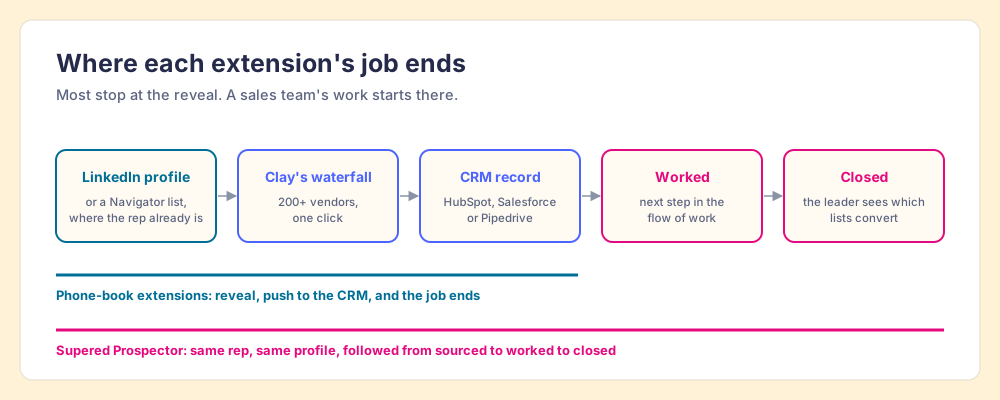
A rep-built list that lands in the CRM with the team’s process attached does more work than a CSV of revealed numbers. The rep gets the next step in the flow of the work, and the manager sees the list become pipeline and coaches from what is converting. The LinkedIn prospecting guide covers the motion around the extension, and waterfall enrichment explains why asking many sources finds more.
How do you install a LinkedIn Chrome extension safely?
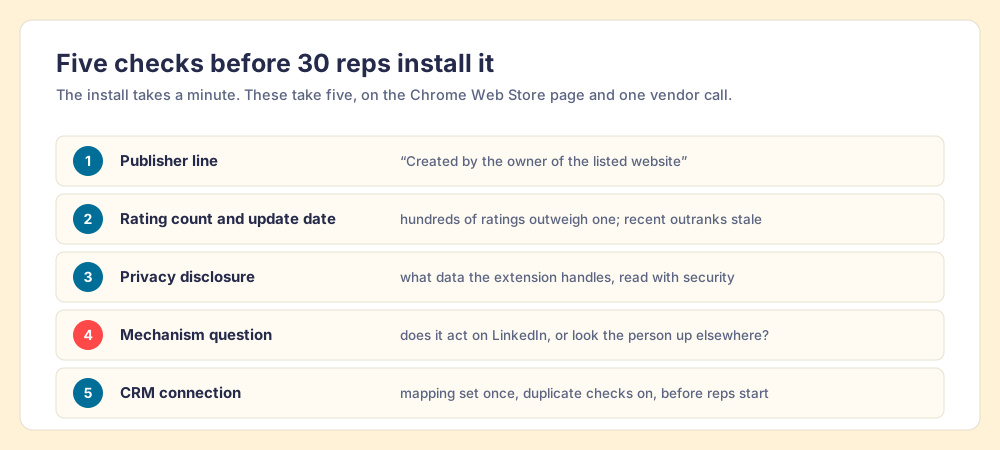
The install takes a minute. The checks before it take five, and they are the part a team rollout depends on.
- The publisher line. Open the extension’s Chrome Web Store page and confirm it reads “Created by the owner of the listed website.” Apollo, Lusha, Kaspr, LeadIQ, and Frontier all showed that line on October 1, 2026.
- The rating count and the update date. A rating from hundreds of people outweighs a perfect score from one, and a recent update date shows the vendor is still maintaining it. Clay for Chrome, for comparison, was last updated April 10, 2025.
- The privacy disclosure. Each listing has a “Privacy” section that says what data the extension handles. Read it with whoever owns security.
- The mechanism question. Ask the vendor whether the extension acts on LinkedIn or looks the person up elsewhere, per section 8.2 of the User Agreement.
- The CRM connection. Connect the CRM before the reps start, set the field mapping once, and turn on duplicate checks, so the first week does not fill the CRM with copies.
Which LinkedIn Chrome extension should you choose?
The choice resolves on two questions: what you already pay for, and what your reps reveal most.
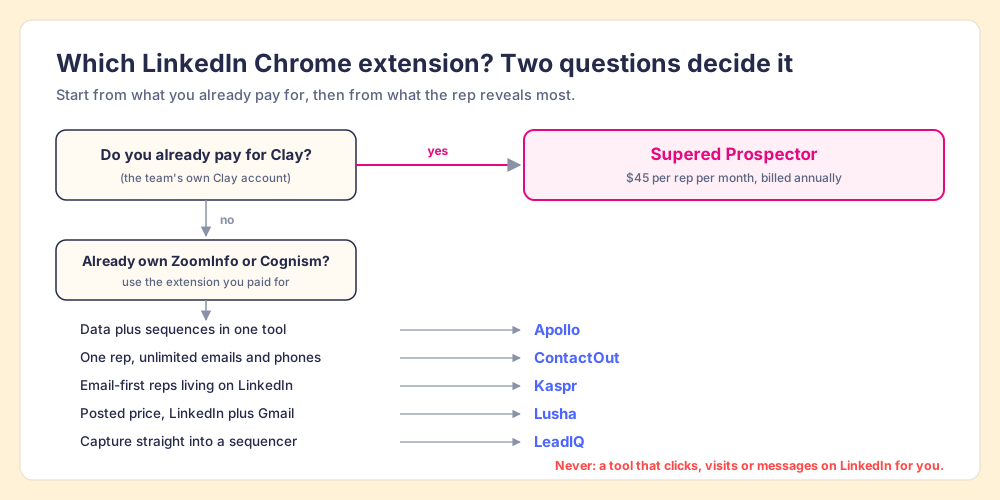
- Supered Prospector. The pick when the team already has Clay and you want its waterfall in every rep’s hands on LinkedIn, Sales Navigator, the company site, and the CRM record, and want to see which lists get worked and closed.
- Apollo. The pick for a team without Clay that wants data, sequences, and a dialer in one tool with a posted price. Size the credits before the seats: a phone costs 8.
- ContactOut. The pick for one rep who wants unlimited emails and phones for $79 a month.
- Kaspr. The pick for email-first reps on LinkedIn and Sales Navigator, at $49 a seat billed annually.
- Lusha. The pick for a posted price on LinkedIn and Gmail, with a waterfall fallback on every paid plan.
- ZoomInfo or Cognism. The pick only if the contract already exists.
- LinkedIn’s own extension. The pick for notifications, and nothing else.
What we recommend depends on one fact about your stack. If you do not have Clay, buy the phone book that matches the job, and Apollo is the safest default for a team. If you have Clay, do not buy another phone book. Put the switchboard on your reps’ screens where they already work, pay nothing for the exchanges that do not answer, and follow every list they build to closed. Whatever you choose, keep the robot out of the chair. The LinkedIn email finder Chrome extension page goes one layer down, on which of these finds the email most often, and a Prospector demo on your own Clay account is where you can watch the switchboard ring.
Frequently asked questions
What is the best LinkedIn Chrome extension for sales reps?+
Does LinkedIn have its own Chrome extension?+
Is there an official Sales Navigator Chrome extension?+
Can LinkedIn ban you for using a Chrome extension?+
Are LinkedIn Chrome extensions free?+
Do I need a Clay account to use Supered Prospector?+
Your process, running itself.