Is LinkedIn Sales Navigator Worth It? A 2026 Review With the Payback Math
LinkedIn's own ROI study says a Sales Navigator seat pays for itself in under six months, and four-fifths of that return is time saved finding people. A 2026 review with the payback math per seat and a verdict for each kind of sales team.
LinkedIn Sales Navigator is worth it for teams that find new buyers on LinkedIn, because a Core seat at US$1,079.88 a year pays for itself once it saves a rep about 20 minutes a week, provided the email and phone it does not supply arrive as fast as the name does.
Is LinkedIn Sales Navigator worth it? For B2B teams that find new buyers on LinkedIn every week, yes, and LinkedIn’s own math says why. The short verdict by team:
- SDR and new-logo teams. Worth it on Core. A seat at US$1,079.88 a year pays back in minutes a week, as long as contact data arrives as fast as the name.
- Teams on Clay. Worth it, paired with Supered Prospector to turn the Navigator lead into an email, a phone, and a CRM record in one click.
- Solo sellers and AEs on named accounts. Often not worth a seat; LinkedIn’s free search and the CRM record cover most of the job.
LinkedIn Sales Navigator is worth it for teams that find new buyers on LinkedIn, because a Core seat at US$1,079.88 a year pays for itself once it saves a rep about 20 minutes a week, provided the email and phone it does not supply arrive as fast as the name does. That proviso decides more Navigator renewals than any feature on the plan page, and the rest of this review shows why with LinkedIn’s numbers rather than ours.
Is LinkedIn Sales Navigator worth it? The verdict by team
The question has a different answer for a five-person SDR pod and a founder selling to forty accounts, so the table sorts by team. Prices are LinkedIn’s list prices from the compare-plans page, checked October 2, 2026; LinkedIn calls them estimates that may exclude tax and promotions.
| Team | Verdict | Plan to buy | CRM path | Setup effort | Cost per seat | Why |
|---|---|---|---|---|---|---|
| SDR / BDR team building net-new lists | Worth it (A) | Core | None native; add a contact-data tool | Low | US$1,079.88/yr | Search and alerts save the hours the seat costs |
| Team that already has Clay | Worth it (A) | Core + Supered Prospector | Native: HubSpot, Salesforce, Pipedrive | Medium | US$1,079.88 + $540/yr, plus your Clay plan | Navigator finds the person; Clay’s waterfall finds the email and phone |
| Enterprise RevOps on Salesforce or Dynamics | Worth it if you need writeback (B+) | Advanced Plus | Native CRM Sync | High | Quote only | Activity writeback and data validation; still no contact data |
| Account team using warm intros | Worth it on Advanced (B) | Advanced | None native | Low | US$1,799.88/yr | TeamLink and buyer intent justify the US$720 step |
| AE team working named accounts | Partly (C+) | A few Core seats | None native | Low | US$1,079.88/yr | The account list exists already; the work starts in the CRM |
| Solo founder or consultant | Only if daily (C) | Core, monthly | None | Low | US$119.99/mo | Light users pay for search they rarely run |
| High-volume phone and email shop | Not as the main tool (C) | None or Core | Via a database tool | Low | n/a | A database with contact data does both jobs in one seat |
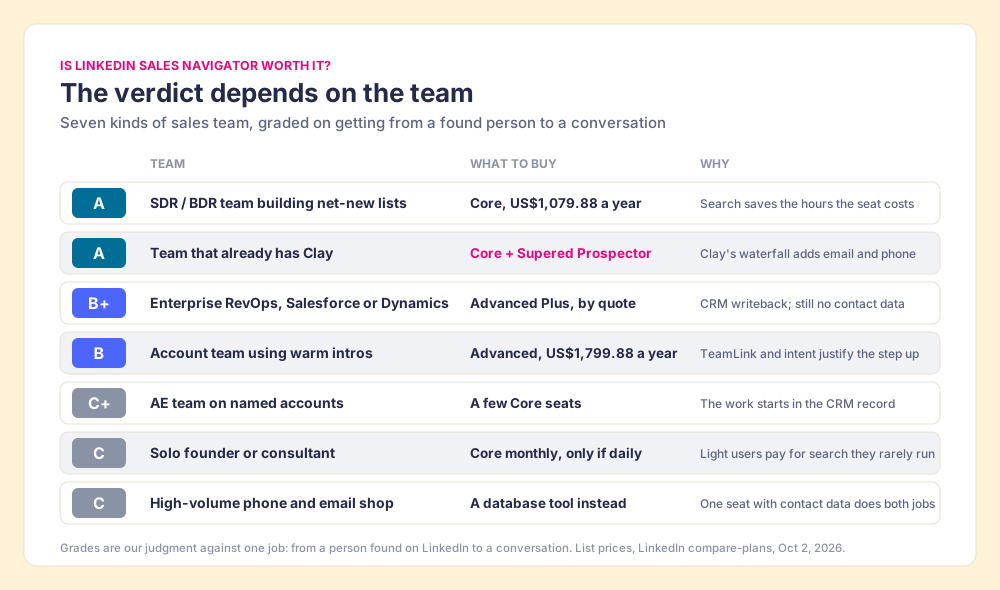
The grades are ours, set against one job: getting from a person found on LinkedIn to a conversation with them. Weight the job toward search alone and Navigator earns an A for nearly every team, because its search is the part reviewers praise most.
What are the real LinkedIn Sales Navigator benefits?
Sales Navigator works like a fishfinder. A good one shows you, with uncanny precision, where the fish are, how deep, and which ones moved since yesterday. It does not come with a rod. A fisherman who returns one because it never put a fish in the boat has misread the box, and plenty of buyers do, because they bought it expecting dinner.
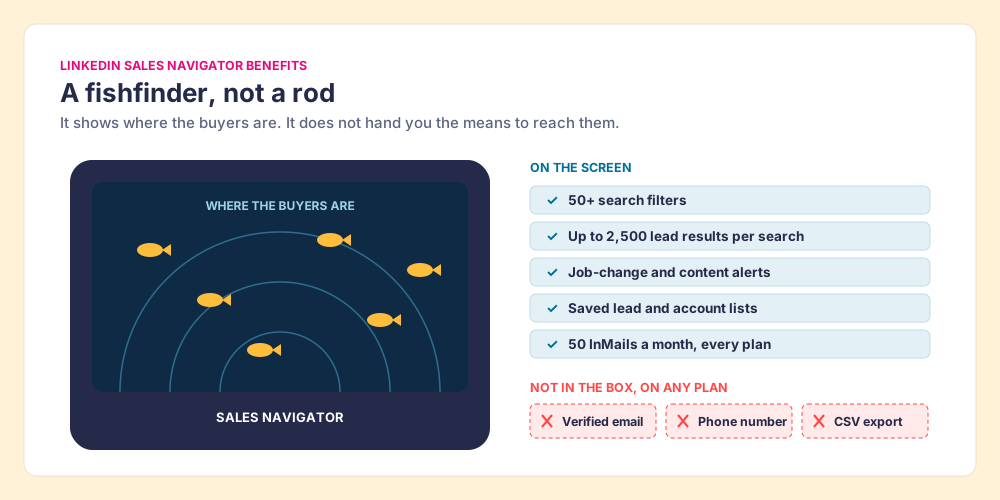
What the fishfinder shows is excellent. LinkedIn’s plan page lists 50+ advanced search filters, saved lead and account lists, alerts on job changes and new content, 50 InMails a month on every plan, and, on Advanced, TeamLink warm introductions through your colleagues’ networks. LinkedIn says it is “trusted by 1.5M+ sellers.” The profiles underneath are written by the members themselves, so a title comes from the person who holds the job rather than from a vendor’s crawl.
The reviewers agree on this half. G2 rates Sales Navigator 4.4 out of 5 from 2,211 reviews (G2, checked October 2, 2026). Matthew W., a sales admin, wrote in May 2026 that “it makes it easy to target specific companies and sort by role to find decision makers.” Brian N., a research planning lead at a mid-market company, called the filters “well-structured, convenient, and easy to use.”
- Search depth. 50+ filters across role, seniority, company size, geography, and change signals.
- Timing. Alerts when a lead changes jobs or posts, so the rep hears about it the week it happens.
- Warm paths. TeamLink on Advanced shows which colleague already knows the buyer.
- Fresh titles. Self-reported profiles, updated by the person who holds the job.
What does LinkedIn’s own ROI study say?
The strongest case for Navigator comes from LinkedIn, and it is worth reading closely because it tells you where the value sits. In 2023 LinkedIn commissioned Forrester Consulting to run a Total Economic Impact study. Forrester interviewed nine customers and built one composite company from them: a SaaS vendor with US$250 million in revenue and 250 Navigator users. Its headline is a 312% return over three years and a payback in under six months (LinkedIn’s study page; LinkedIn’s summary post, September 27, 2023). LinkedIn’s page adds the standard disclosure that it paid for the study and that Forrester keeps editorial control.
Read the benefit lines, though, and a pattern shows. Over three years the composite spent US$1.5 million and booked US$6.25 million in quantified benefits, split three ways:
- Research efficiency, US$2.6 million. Interviewees said time spent on sales research fell from 25% of the week to 10%.
- Productivity, US$2.4 million. Each user saved 65 hours a year, about 15 minutes a day, valued at a fully burdened account executive cost of US$66 an hour, plus one retired legacy tool.
- Net operating profit, US$1.3 million. The profit on extra revenue, at a 12% margin.
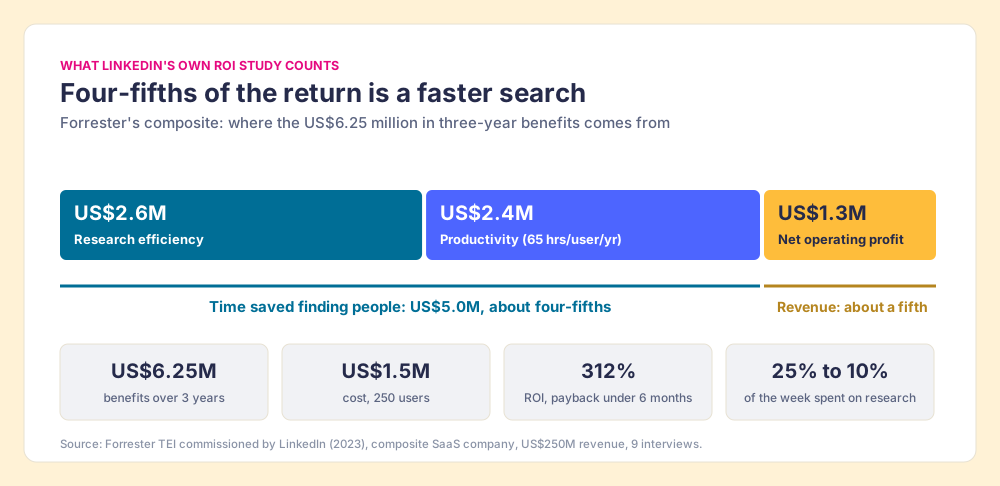
Add the two time lines and they come to US$5.0 million of US$6.25 million, about four-fifths of the return. LinkedIn’s own best case for Sales Navigator is a case for a faster search. That is a fair thing to buy, and it tells you exactly how to judge it: by whether your reps get the hours back and spend them selling.
Two cautions travel with the study. The composite paid about US$2,000 per user per year (US$1.5 million across 250 users and three years), above Advanced list price, so it describes a large enterprise agreement more than a ten-seat team on Core. And the hours only turn into money if they move to selling, which brings us to the arithmetic.
How long does a Sales Navigator seat take to pay back?
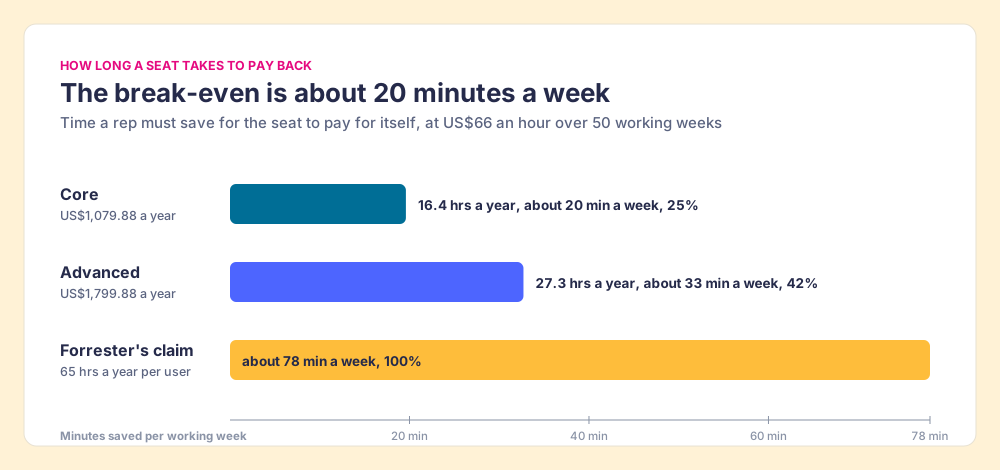
Use Forrester’s own rate and the question becomes simple division. A Core seat costs US$1,079.88 a year. At US$66 an hour, it pays for itself once it saves a rep 16.4 hours a year. Spread across 50 working weeks, that is about 20 minutes a week.
| Plan | Seat per year (list) | Hours to break even at US$66 | Minutes per working week | Share of Forrester’s 65 hours |
|---|---|---|---|---|
| Core | US$1,079.88 | 16.4 | about 20 | 25% |
| Advanced | US$1,799.88 | 27.3 | about 33 | 42% |
| Forrester’s claimed saving | n/a | 65 | about 78 | 100% |
So Core breaks even at 25% of the time saving LinkedIn’s study claims, and Advanced at 42%. Those are generous margins. A rep who uses Navigator’s filters to build a morning list instead of clicking through company pages one at a time will clear 20 minutes a week before lunch on Monday.
The revenue side is even easier. The Bridge Group’s 2025 SDR report, 351 B2B companies, puts the median average selling price of its respondents at US$50,000 and the median SDR’s sourced pipeline at US$3.78 million a year (Bridge Group, 2025). A Core seat is about 2% of one median deal. If Navigator helps a rep start one extra deal that closes in a year, the seat has paid for itself many times over.
On paper, then, Sales Navigator is worth it for almost anyone who prospects on LinkedIn every week. The trouble starts after the search.
Where does Sales Navigator fall short?
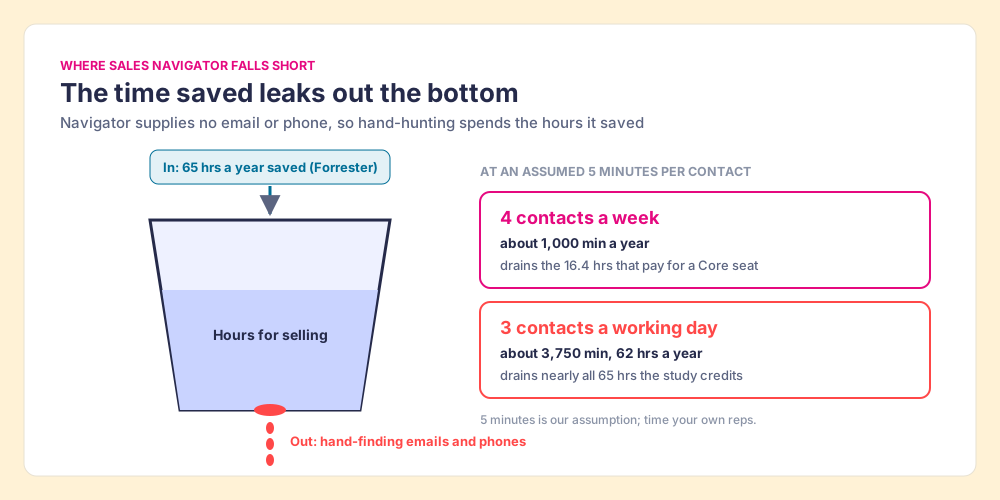
The time Navigator saves is carried in a bucket, and the bucket has a hole in the bottom. The hole is contact data.
Sales Navigator finds the person and stops there. It sells no emails or phone numbers on any plan, and LinkedIn’s help center says it “currently doesn’t offer the option to export account and lead information from Sales Navigator into a CSV or XLS file” (LinkedIn Help, checked October 2, 2026). CRM Sync and lead creation in the CRM belong to Advanced Plus, which has no list price, and even there the CRM record arrives with a name, a title, and blank lines where the email and phone should be. Our Sales Navigator CRM sync walkthrough shows what writes back and what does not.
So a rep finds a VP of operations in 40 seconds, then goes hunting for her email. Suppose the hunt takes five minutes per contact, guessing the format, checking a company site, testing a finder’s free credits (our assumption; time your own reps). Then:
- Four contacts a week. By hand, that spends 1,000 minutes a year, about the 16.4 hours that pay for a Core seat. The break-even is gone.
- Three contacts a working day. By hand, that spends 3,750 minutes a year, about 62 hours, nearly all 65 hours LinkedIn’s study says the seat saves.
Three a day is a small number next to an SDR’s day. The Bridge Group’s median SDR makes 112 activities a day, 44 of them phone calls and 41 emails, and Navigator holds none of the numbers or addresses those touches need.
The G2 complaints line up with the hole. Tim P., an owner and CEO, wrote in February 2026: “I don’t like the inability to download lead lists to CSV or to CRMs without a third-party add-on.” A mid-market reviewer titled a review “The Walled Garden Problem”: “LinkedIn makes it notoriously difficult to move your data off their platform.” Price is the other theme. Luca B., a co-founder, in May 2026: “It is priced way too high, especially now that tons of other alternatives are on the market.” Sebastian P., a general manager, in April: “The price was the main indicator to migrate to other solutions.”
Two smaller limits round out the LinkedIn Sales Navigator review. Searches show “up to 2,500 lead results across 100 pages,” per LinkedIn’s help center, which matters for a team mapping a big territory. And 50 InMails a month is a ceiling for a rep who would rather email.
None of this makes the seat a bad buy. It means the price on the plan page is half the cost. The other half is whatever your team does to plug the hole, and that choice decides whether the payback math above survives contact with a real Monday.
Why trust this review?
Before Supered I started RevPartners, a HubSpot partner that did only sales implementations and reached HubSpot’s Elite tier in 13 months, so I have watched a lot of reps copy names out of LinkedIn and into a CRM by hand. Supered grew out of that work. It is the #1 sales enablement app on the HubSpot marketplace, rated 5.0 from 122 reviews there, and 4.9 out of 5 from 81 reviews on G2 (checked October 2, 2026).
The disclosure: we make Prospector, which runs on top of Sales Navigator, so we gain nothing from talking you out of a seat. We do gain from telling you where the seat stops, and every figure above comes from LinkedIn, Forrester, G2, or the Bridge Group, so you can check the work without trusting us.
How do teams with Clay close the Sales Navigator gap?
A rep on a Navigator lead wants three things before dialing: the right number, a check that no teammate already owns this person, and the lead sitting in the CRM where the follow-up happens. Supered Prospector does those three from the Navigator page. It runs inside the Supered Chrome extension, on your team’s own Clay account.
- One click to Clay’s waterfall. The rep runs the team’s Clay table on the Navigator lead or a whole saved list. Clay’s waterfall checks “multiple providers to return the most verified emails (lower bounce rate) and phone numbers (higher connect rate)” (Clay), across what Clay’s homepage calls “200+ providers in one place.” If one source misses, the next one is tried.
- The CRM check first. On the profile, the rep sees the matching HubSpot, Salesforce or Pipedrive record and whether the person was already worked in the past.
- Custom workflows and buying committees. Any custom Clay workflow your GTM engineer built becomes a button, and the buying-committee lookup follows your titles and seniority.
- One click to the CRM. Ops sets the field mapping once; reps sync to HubSpot, Salesforce or Pipedrive in one click and never log into Clay.
- Lists you can follow. A leader sees which lists got worked and which closed, and coaches from what is converting.
Supered does not bring its own database. It brings Clay’s waterfall, which is every database, routed, and that is why Clay is our only data provider. Clay governs the data. Supered governs the motion.
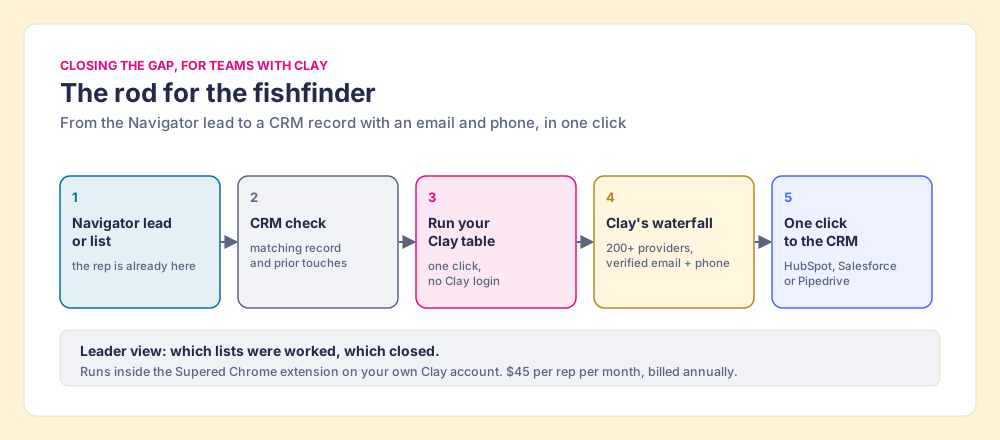
The cost: Prospector is $45 per rep per month, billed annually, from one user (Prospector), so $540 a rep a year. Clay is your own plan; Clay Growth is US$495 a month on monthly billing (clay.com/pricing), and Clay says “if an enrichment returns no result, you’re not charged Data Credits or Actions.” For ten reps on list prices, Navigator Core (US$10,798.80) plus Clay Growth (US$5,940) plus Prospector (US$5,400) comes to US$22,138.80 a year. That buys LinkedIn’s search, every provider Clay can reach, and the CRM record, with no hand-hunting left to drain the bucket.
Prospector also starts from a plain LinkedIn profile, a company website, and a HubSpot, Salesforce or Pipedrive record. That matters for the seat count. An AE working a named-account list can start from the account record or the company’s site and may not need a Navigator seat at all. More on the full workflow in the sourcing use case and Clay’s Chrome extension options.
Choose something else if:
- No Clay account. Prospector needs one. Kaspr is the simplest fair alternative: its pricing page says “Use Kaspr on top of Sales Navigator” and Starter begins at $49 a user a month with 100 phone credits a month (kaspr.io/pricing, October 1, 2026). Kaspr is owned by Cognism.
- One tool, one bill. Apollo’s Basic seat at $49 a month on annual billing bundles search, contact data and sequences, and replaces Navigator rather than sitting on it. See the Sales Navigator alternatives grading.
- AI-drafted outreach. Prospector does not write or send emails. It hands the lead to your CRM.
Is it safe to add a tool on top of Sales Navigator?
Ask it of every vendor, ours included. Our answer for Prospector: it works within LinkedIn’s terms and does not copy search results in bulk, and the contact data comes from Clay’s waterfall on your own Clay account. LinkedIn’s User Agreement, section 8.2, says members agree not to “develop, support or use software, devices, scripts, robots or any other means or processes (such as crawlers, browser plugins and add-ons or any other technology) to scrape or copy the Services, including profiles and other data from the Services” (LinkedIn User Agreement, effective November 3, 2025). LinkedIn’s prohibited software page adds that members who use such tools “risk having their accounts restricted or shut down.”
So skip the scrapers that copy a whole Navigator search into a spreadsheet and the bots that send connection requests for you; the account they put at risk is the one your network lives on. For any tool you keep, ask three questions: what it reads from the page, where its contact data comes from, and whether anything is copied in bulk. Prospector’s contact data comes from the providers in your Clay account through Clay’s waterfall. The step-by-step routes are in how to export Sales Navigator leads and how to get emails from LinkedIn Sales Navigator.
Is Sales Navigator worth it for your team? Our recommendation
Three ways forward, named plainly.
- Core, with the hole plugged. The right call for a team that builds new lists on LinkedIn every week. The seat pays back at 25% of the time saving LinkedIn’s own study claims, as long as the email and phone arrive in one click.
- Advanced or Advanced Plus, for a named reason. Advanced for TeamLink and buyer intent, at a US$720 step per seat. Advanced Plus for CRM writeback on Salesforce or Dynamics, by quote, knowing it still sells no contact data.
- No seat at all. The call for a founder who searches twice a month, an AE team that works from the account record, or a dialing shop better served by one database.
We would buy the seat, and LinkedIn’s own math is the reason. Four-fifths of the return Forrester found for Sales Navigator is time saved finding people, and the seat pays for itself at a fraction of that saving. So Sales Navigator is worth it for any team that prospects on LinkedIn weekly, on Core unless you can name the Advanced feature you will use. What decides the payback is the hand-off after the search. If you have Clay, close the gap with Prospector, because then the person Navigator found becomes a CRM record with an email and phone in the same minute. If you do not, add Kaspr for one or two reps, or move to Apollo if you want one bill.
The next decision is which plan, and what each one costs once tax, seats and billing terms are in: LinkedIn Sales Navigator pricing breaks it down. To get more from the seat you buy, Sales Navigator search filters covers the list-building side and how to use LinkedIn Sales Navigator the daily routine. If your CRM is the question, start with the HubSpot LinkedIn integration, the Salesforce version, or the Pipedrive one. Teams that left Exportly for this job can compare routes in Exportly alternatives, or see the fishfinder get its rod on your own Clay account in a Prospector demo.
Frequently asked questions
Is LinkedIn Sales Navigator worth it in 2026?+
Is Sales Navigator worth it for a solo founder or consultant?+
What are the main LinkedIn Sales Navigator benefits?+
What are the biggest downsides of Sales Navigator?+
Is Advanced worth the upgrade from Core?+
How do teams get emails and phone numbers for Sales Navigator leads?+
Your process, running itself.