LinkedIn Sales Navigator Pricing in 2026: Good Binoculars, No Boat
LinkedIn Sales Navigator pricing checked live on October 2, 2026: Core, Advanced and Advanced Plus, monthly against annual, what each tier adds, Premium vs Sales Navigator, ten-rep team math, and the contact data no plan includes.
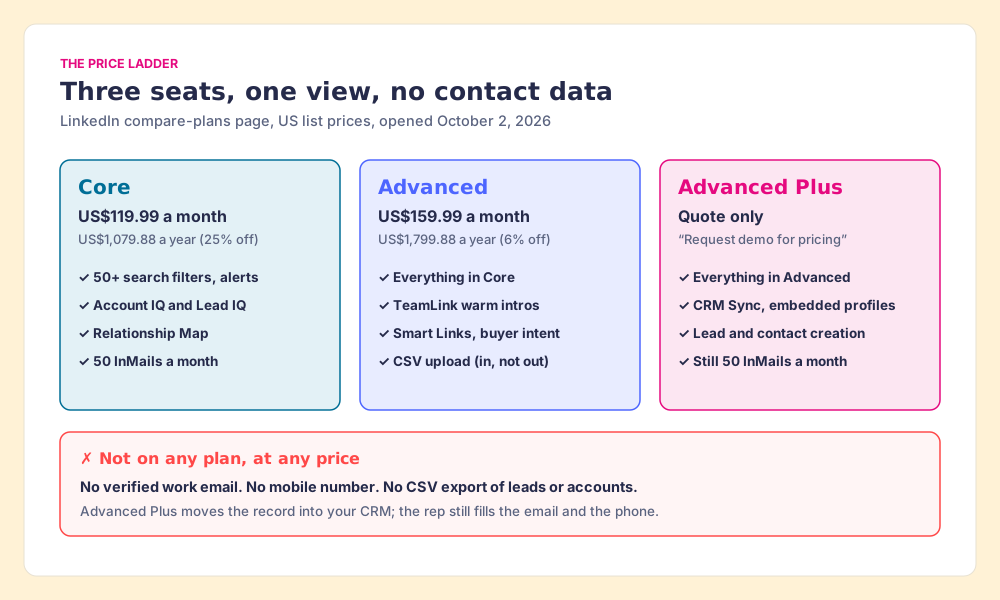
LinkedIn Sales Navigator pricing in 2026 is three plans per seat: Core at US$119.99 a month or US$1,079.88 a year, Advanced at US$159.99 a month or US$1,799.88 a year, and Advanced Plus at a custom quote, and no plan includes email addresses, phone numbers, or a CSV export.
A good pair of binoculars at a lake will show you a man on the far shore well enough to read the logo on his cap. You can see that he is fishing, that he has two friends with him, and that one of them went to your college. What the binoculars will not do is get you across the water, and no shop that sells binoculars has ever claimed they would.
LinkedIn Sales Navigator pricing in 2026 is three plans per seat: Core at US$119.99 a month or US$1,079.88 a year, Advanced at US$159.99 a month or US$1,799.88 a year, and Advanced Plus at a custom quote, and no plan includes email addresses, phone numbers, or a CSV export (LinkedIn, compare plans, opened October 2, 2026). Each step up the ladder buys a better lens. None of them buys the boat.
The quick answer, three ways:
- Sales Navigator Core, annual, US$1,079.88 a seat. The right plan for a rep who searches and sends InMail. It carries the same 50 InMails a month as the plans above it and the biggest annual discount LinkedIn offers on Navigator.
- Core plus Supered Prospector, for teams with Clay. Keep Core for the search, and let reps run your Clay tables from the Navigator lead to get the verified email and phone, then sync to HubSpot, Salesforce or Pipedrive in one click. Prospector is $45 a rep a month, billed annually.
- Core plus Kaspr, for teams without Clay. Kaspr’s Starter plan, from $49 a user a month on annual billing, works on top of Sales Navigator and adds unlimited B2B emails and 100 phone credits a month.
How much is LinkedIn Sales Navigator in 2026?
The prices below are LinkedIn’s own, from the FAQ on its compare-plans page, which carries the line “Updated: September 27, 2026.” LinkedIn adds that the prices “are estimates and may exclude Value-Added Tax (VAT), Goods & Services Tax (GST), and/or promotional discounts,” and that the checkout shows the final figure.
| Sales Navigator pricing (Oct 2, 2026) | Core | Advanced | Advanced Plus |
|---|---|---|---|
| Monthly billing, per seat | US$119.99 | US$159.99 | Quote |
| Annual billing, per seat per year | US$1,079.88 | US$1,799.88 | Quote |
| Annual, as a monthly figure | US$89.99 | US$149.99 | Quote |
| Annual saving, LinkedIn’s figure | 25% | 6% | n/a |
| LinkedIn’s “best for” | Individual sellers | Sales teams | Sales teams using integrated CRM |
| InMail credits | 50 a month | 50 a month | 50 a month |
| Free trial | Yes | Yes | No (demo) |
Outside the US, the same page lists Core at £94.99 a month or £959.88 a year and Advanced at £130.00 or £1,499.88; in euros, €120.99 or €1,088.88 for Core and €148.21 or €1,693.88 for Advanced.
Three things about these numbers trip buyers up.
- Advanced Plus has no price anywhere LinkedIn publishes one. The FAQ says its pricing “is customized based on your sales team’s size, CRM integration, and onboarding/training needs.” Two of the guides ranking for this search, Salesmotion’s and Factors.ai’s, put Advanced Plus at about $1,600 a seat a year (“typically starts around $1,600 per seat per year,” in Salesmotion’s words), which is less than Advanced’s own list price of US$1,799.88. A plan that contains everything in Advanced cannot list below it, so any Advanced Plus figure in a third-party guide is somebody’s old quote, and a quote is not a list price. The one printed number we found is a field on Salesforce’s marketplace listing for LinkedIn’s app, “Starting at $125/User/Month,” which LinkedIn’s own page does not confirm.
- Older figures still circulate. A Reddit thread on page one of this search asks whether Navigator is “still worth the $100/mo price tag,” and Salesmotion’s guide notes that “plenty of 2025 guides still list Core at $99.99/month.” The live page says US$119.99.
- The free trial has a fence. Core and Advanced trials are open to members “not currently on any paid LinkedIn subscription (including Premium or Sales Navigator)” who have not used a LinkedIn trial “in the past 365 days.” LinkedIn emails a reminder seven days before the trial ends, and a cancellation takes effect “at the end of your current Sales Navigator subscription period.”
What does LinkedIn Sales Navigator pricing buy on each plan?
The plan grid on the same page, read cell by cell on October 2, 2026, sorts the features like this.
- Core, the lens. 50+ advanced search filters, Account IQ and Lead IQ (LinkedIn’s AI summaries of an account or a lead), Relationship Explorer, Relationship Map, alerts on job changes and new posts, Message Assist for drafting, and 50 InMails a month. For one person finding buyers, this is the whole product.
- Advanced, the team kit. Everything in Core, plus TeamLink (warm introductions through your colleagues’ connections), Smart Links (trackable content links that show who opened what), buyer intent signals, team reporting, team seat management with central billing, and a “CSV upload” to load your book of business. That CSV goes in, not out. It is the only CSV on the grid.
- Advanced Plus, the tripod bolted to your CRM. Everything in Advanced, plus Advanced CRM Integrations (“Salesforce, HubSpot, Microsoft Dynamics, Oracle, and more”), Lead/Contact Creation, CRM embedded experiences and profiles, custom ROI reporting, “CSV upload and CRM import,” and Sales Navigator for Microsoft Teams.
Two lines on that grid matter more to a buyer than the rest. InMail stays at 50 a month on all three plans, so climbing the ladder buys you no extra reach on LinkedIn itself. And CRM Sync, the feature a buyer usually means by “integration,” lives only on the quote-only plan. LinkedIn’s help center says it plainly: “Integration between Sales Navigator and your CRM is only available for Sales Navigator Advanced Plus users” (LinkedIn Help). The setup for each CRM is in our guides to the HubSpot LinkedIn integration, the Salesforce LinkedIn integration, and Sales Navigator CRM sync.
HubSpot adds its own toll on that road. Its knowledge base says the Sales Navigator integration needs “an assigned Sales Hub Professional or Enterprise seat,” and Sales Hub Professional starts at $90 a seat a month on annual billing (HubSpot pricing, opened October 1, 2026). So a HubSpot team on the native route pays at least US$1,080 a rep a year for HubSpot plus the Advanced Plus quote, before a single phone number.
Is monthly or annual billing cheaper for Sales Navigator?
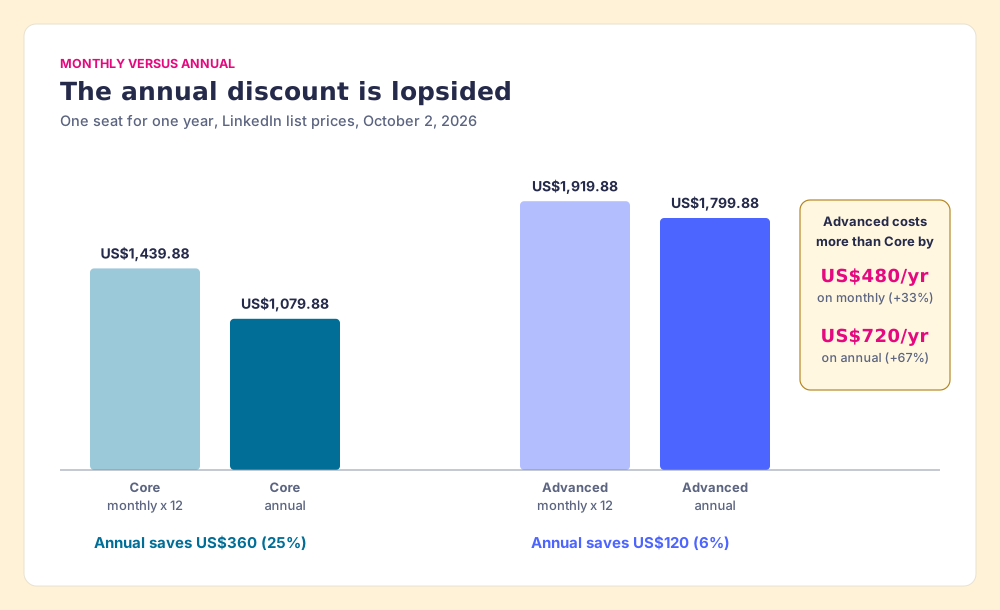
Annual is always cheaper, by two unequal amounts. LinkedIn’s FAQ prints the savings itself: “a 25% savings with annual billing” on Core and “a 6% savings” on Advanced. Run twelve monthly payments against one annual payment and the dollars look like this:
| One seat, one year | Twelve monthly payments | Annual billing | Saving |
|---|---|---|---|
| Core | US$1,439.88 | US$1,079.88 | US$360 (25%) |
| Advanced | US$1,919.88 | US$1,799.88 | US$120 (6%) |
Walk that forward and two practical rules fall out of it.
The first is about the upgrade. On monthly billing, Advanced costs US$40 a month more than Core, a third more. On annual billing the gap widens to US$720 a seat a year, two-thirds more, because Core gets the big discount and Advanced barely gets one. So the question “is TeamLink worth it” has two prices depending on how you pay, and the annual buyer pays the higher one.
The second is about commitment. On Advanced, staying month to month costs US$120 a seat a year, which is cheap insurance for a team that is still deciding whether reps use TeamLink and Smart Links. On Core, month to month costs US$360 a seat, and a rep who searches every day should be on the annual plan by the second month.
LinkedIn Premium vs Sales Navigator: which do you need?
They are different products that share a checkout. LinkedIn Premium Business costs US$69.99 a month or US$539.88 a year (a 36% saving on annual), and LinkedIn describes it as “unlimited access to view profiles beyond your immediate network, advanced search filters,” and “15 InMail credits monthly” (LinkedIn Premium Business, pricing updated April 20, 2026, opened October 2, 2026). Premium All-in-One, aimed at small business owners, costs US$89.99 a month or US$899.88 a year with 30 InMail credits a month, plus post-boosting and hiring credits. Factors.ai’s ranking guide lists Premium Business at $59.99; LinkedIn’s page says US$69.99.
Sales Navigator Core costs twice what Premium Business costs on annual billing, US$1,079.88 against US$539.88, and the extra buys the seller’s tools: lead and account lists, alerts, Account IQ and Lead IQ, the Relationship Map, and more than three times the InMail.
The cleanest way to compare them is the price of one InMail credit, the one thing both plans meter.
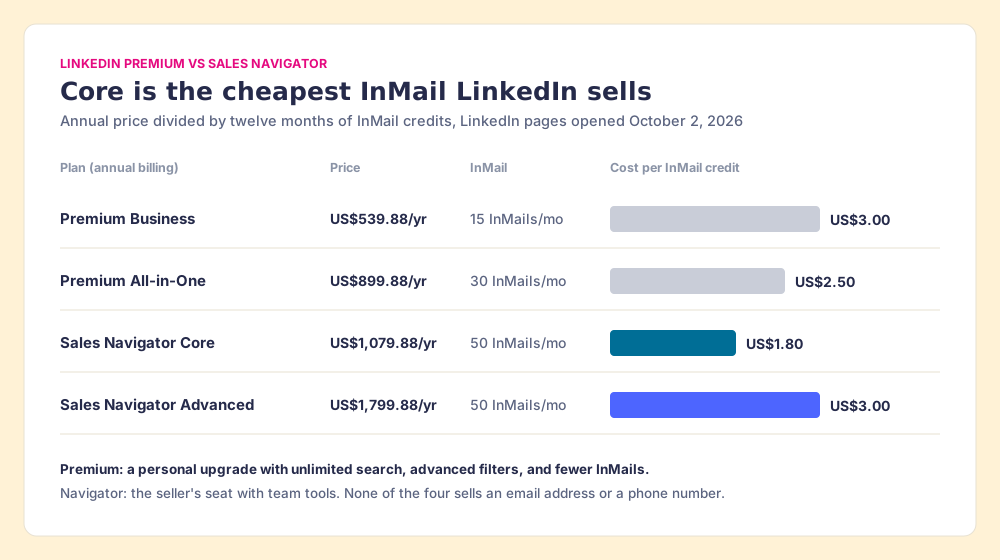
So the answer to LinkedIn Premium vs Sales Navigator depends on who is buying. A founder who searches a few times a week and sends a handful of InMails is well served by Premium Business at half the price. A rep whose job is prospecting gets more InMail per dollar from Core than from any Premium plan, and gets the lists and alerts that make the search repeatable. Advanced is the odd one: per InMail it costs the same as Premium Business, so you buy it for TeamLink, Smart Links and buyer intent, or you do not buy it.
What does Sales Navigator not include?
Back to the lake. Core gives you binoculars, Advanced gives you better binoculars and a friend who knows the man on the far shore, and Advanced Plus mounts the binoculars on a tripod bolted to your CRM. The water is still there.
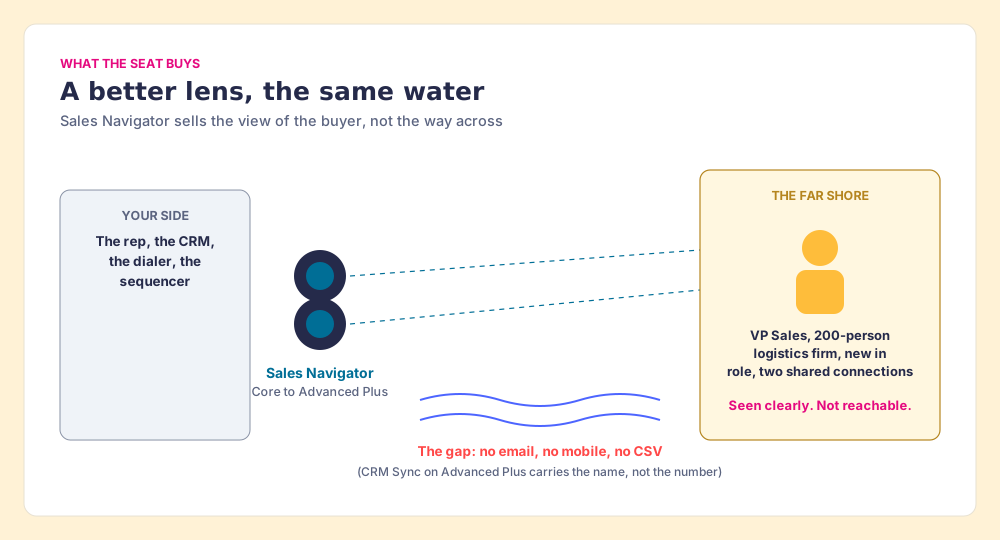
The water is three specific things, each in LinkedIn’s own words.
- No CSV export. “LinkedIn currently doesn’t offer the option to export account and lead information from Sales Navigator into a CSV or XLS file. However, alternative solutions are available if you’re using the Sales Navigator Advanced Plus plan” (LinkedIn Help). The full set of routes is in how to export Sales Navigator leads.
- No email. Navigator’s way to reach a person is InMail. LinkedIn’s CRM Sync guide for HubSpot says contact creation works only if “you will need to provide an email address” (LinkedIn CRM Sync for HubSpot), and HubSpot’s own article says “it is not possible to import contacts from LinkedIn using the integration.”
- No phone. LinkedIn’s lead-creation form for Salesforce and Dynamics lists first and last name as required and email and phone as optional fields the rep fills in (LinkedIn Help). The form has a box for the number. It does not have the number.
Why this matters is a matter of arithmetic about a rep’s day. The Bridge Group’s 2025 SDR report, 351 B2B companies, puts the median SDR at 112 activities a day: 44 phone, 41 email, 19 LinkedIn, and 8 text or other (Bridge Group, 2025). Navigator serves the 19 LinkedIn touches directly. The 85 calls and emails each need a number or an address the seat does not supply.
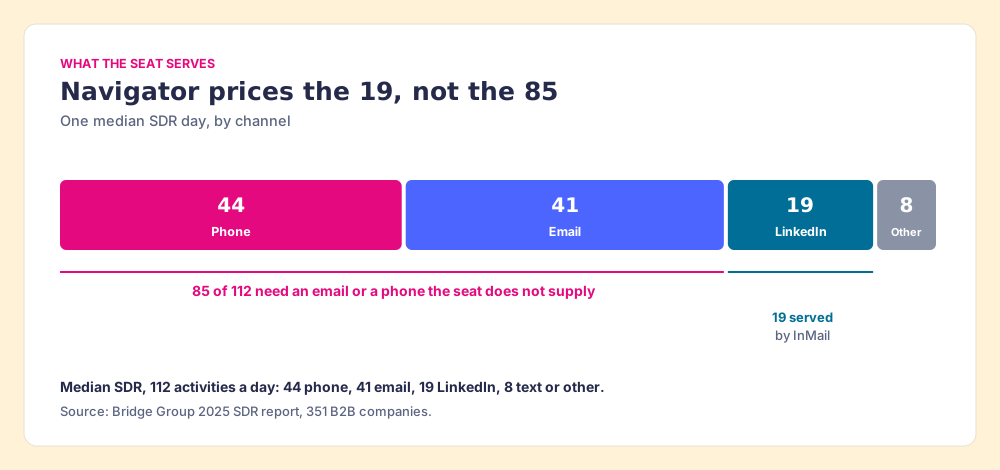
Reviewers say the same thing in their own words. Tim P., an owner and CEO, on G2 in February 2026: “I don’t like the inability to download lead lists to CSV or to CRMs without a third-party add-on.” Luca B., a co-founder, in May 2026: “It is priced way too high, especially now that tons of other alternatives are on the market” (G2, Sales Navigator reviews, 4.4 out of 5 from 2,211 reviews on October 1, 2026).
None of that makes Navigator a bad buy. LinkedIn says it is “trusted by 1.5M+ sellers,” and the profiles in it are written by the people themselves, which no bought database can claim. It is the best lens on the market. It is priced as a lens.
Why trust this breakdown?
Before Supered I started RevPartners, a HubSpot partner that did only sales implementations, sold roughly twice as much Sales Hub as any other partner, and reached HubSpot’s Elite tier in 13 months. A large share of that work was reps carrying people from LinkedIn into a CRM by hand. Supered grew out of it and is the #1 sales enablement app on the HubSpot marketplace, with a 5.0 rating from 122 reviews there and 4.9 out of 5 from 81 reviews on G2 (October 1, 2026).
The disclosure: we make Prospector, which works on top of Sales Navigator, so we have no reason to talk you out of a Navigator seat. The LinkedIn prices on this page come from LinkedIn’s own pages, opened on October 2, 2026, and every competitor price links to the page it came from.
What does Sales Navigator cost for a team of 10?
LinkedIn Sales Navigator cost for a team is a seat price times heads, then whatever the team adds to reach the people it finds. Ten reps for a year, at list:
| Option, 10 reps, one year | Cost | What it buys |
|---|---|---|
| Premium Business, annual | US$5,398.80 | Search, 15 InMails a month each |
| Navigator Core, annual | US$10,798.80 | Search, lists, alerts, 50 InMails a month each; no contact data |
| Navigator Core, monthly | US$14,398.80 | The same seat, month to month |
| Core + Kaspr Starter, annual | US$16,678.80 | Core plus unlimited B2B emails and 100 phone credits a month per seat |
| Navigator Advanced, annual | US$17,998.80 | Core plus TeamLink, Smart Links, intent; no contact data |
| Navigator Advanced, monthly | US$19,198.80 | The same seat, month to month |
| Core + Clay Growth + Prospector | US$22,138.80 | Core plus Clay’s waterfall across 200+ providers and one-click CRM sync |
| Advanced Plus | Quote | CRM Sync and lead creation; reps still supply email and phone |
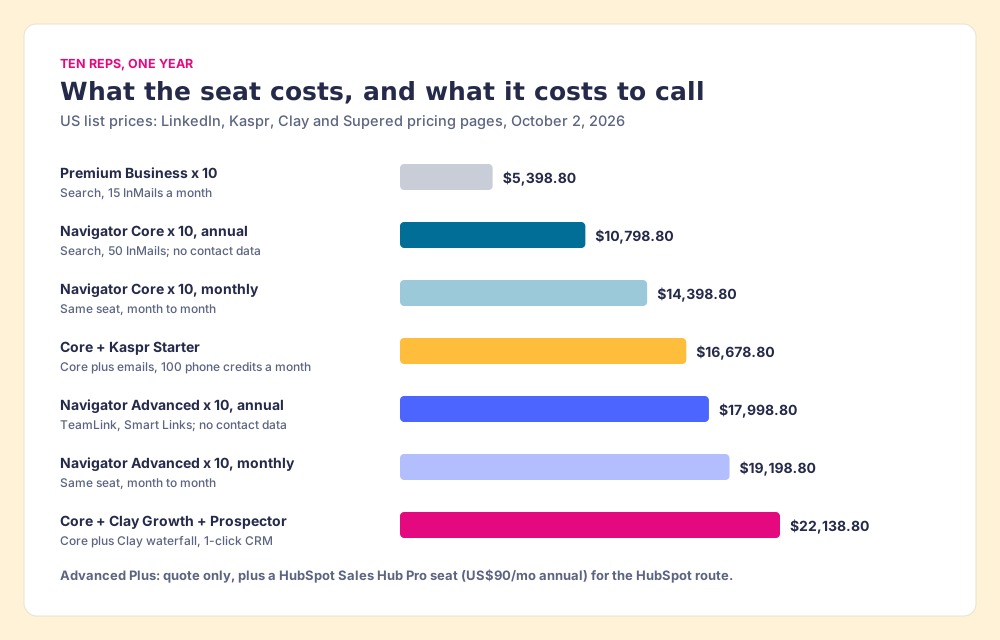
The math behind the two stacks. Kaspr’s Starter plan is $49 a user a month on annual billing ($65 monthly), so ten seats run $5,880 a year (kaspr.io/pricing, opened October 2, 2026). The Clay stack is Clay Growth at its list price of $495 a month, $5,940 a year (clay.com/pricing, opened October 2, 2026; Clay also shows $446 a month on annual billing), plus Prospector at $540 a rep a year, $5,400 for ten.
Read the table with one comparison in mind. Ten Advanced seats cost US$7,200 a year more than ten Core seats, and that money buys warm introductions and content tracking, still with no phone numbers. Spent on top of Core instead, roughly the same amount buys a contact-data layer. Which of those two purchases moves your reps is the decision, and the next section grades it.
Which Sales Navigator plan, or which stack, should you buy?
The grades below serve one job: a team of five to fifty reps that finds people on LinkedIn and then calls and emails them from HubSpot, Salesforce or Pipedrive. The weights are contact data (x3), path into the CRM (x2), LinkedIn search (x2), price for a mid-market team (x2), and whether a leader can see which sourced lists get worked (x1), out of 50. Weight LinkedIn search alone and Advanced wins outright, which is the fair way to read its grade below.
| Rank | Option | Grade | Best fit | CRM integration | Setup effort | Pricing (plan with the feature) | Reason to choose |
|---|---|---|---|---|---|---|---|
| 1 | Core + Supered Prospector | A (46) | Teams that already have Clay | Native: HubSpot, Salesforce, Pipedrive | Medium (Clay tables first) | Core US$1,079.88/yr + Prospector $540/rep/yr + your Clay plan | LinkedIn’s search plus Clay’s 200+ providers, one click to the CRM |
| 2 | Core + Kaspr | B (34) | Teams without Clay | Export to HubSpot, Salesforce, Pipedrive | Low | Core + Kaspr Starter from $49/user/mo annual | One database on top of Navigator, simple setup |
| 3 | Advanced Plus alone | C+ (27) | Salesforce or HubSpot shops that want activity writeback | Native, LinkedIn’s own | High (admin, CRM edition) | Quote | LinkedIn data and InMail logging inside the CRM |
| 4 | Core alone | C (22) | Individual sellers who live in InMail | None | Minutes | US$1,079.88/yr | Cheapest InMail on LinkedIn |
| 5 | Advanced alone | C (20) | Teams that use TeamLink and Smart Links daily | None | Minutes | US$1,799.88/yr | Warm intros and content tracking |
| 6 | Premium Business | C (20) | A founder who needs search, not a team seat | None | Minutes | US$539.88/yr | Half the price of Core |
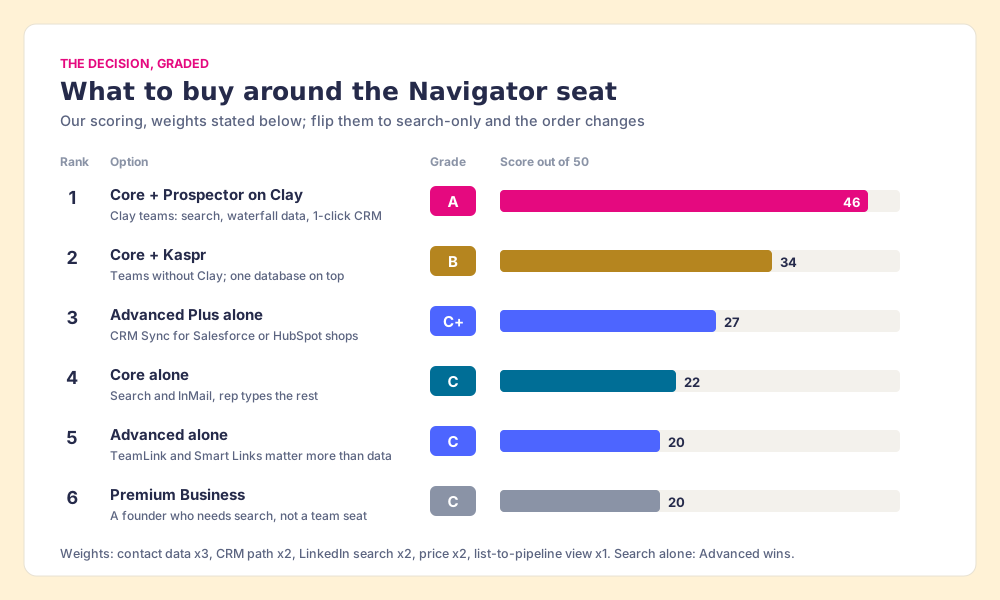
The scores, so you can argue with them:
| Option | Contact data (x3) | CRM path (x2) | Search (x2) | Price (x2) | List view (x1) | Total |
|---|---|---|---|---|---|---|
| Core + Prospector | 5 | 5 | 5 | 3 | 5 | 46 |
| Core + Kaspr | 3 | 3 | 5 | 4 | 1 | 34 |
| Advanced Plus alone | 1 | 5 | 5 | 1 | 2 | 27 |
| Core alone | 1 | 1 | 5 | 3 | 1 | 22 |
| Advanced alone | 1 | 1 | 5 | 2 | 1 | 20 |
| Premium Business | 1 | 1 | 2 | 5 | 1 | 20 |
Two scores need defending. Prospector’s contact-data 5 is Clay’s waterfall coverage, credited to Clay, and applies only to a team with a Clay account. Advanced Plus scores 5 on the CRM path because LinkedIn’s own sync is the cleanest pipe into Salesforce or HubSpot there is; it scores 1 on contact data because the pipe carries the name and not the number.
How do teams add emails and phones to Sales Navigator?
Two routes are fair to name: Prospector for a team with Clay, and one simpler tool for a team without it. A third family, tools that copy a whole Navigator search into a spreadsheet, is covered in the safety section below and is not recommended here.
Supered Prospector: Clay’s waterfall from the Navigator lead
A rep on a Navigator list wants three things before dialing: the right number, a check that no teammate already owns this person, and the lead sitting in the CRM where the follow-up happens. Prospector runs inside the Supered Chrome extension and does those three from the Navigator page.
- The CRM check first. On the profile, the rep sees the matching HubSpot, Salesforce or Pipedrive record and whether the prospect was already worked in the past, before adding a duplicate or stepping on a colleague.
- One click to your Clay table. The rep presses one button on the Navigator lead and the team’s Clay table runs. Clay’s waterfall checks “multiple providers to return the most verified emails (lower bounce rate) and phone numbers (higher connect rate)” (Clay), across what Clay’s site calls “200+ providers in one place.” Reps never log in to Clay.
- Whole lists and custom workflows. A rep can push a saved list into a Clay workflow, run any custom Clay workflow your GTM engineer built, and pull a buying committee tuned to your titles, departments and seniority.
- One click to the CRM. Ops sets the field mapping once; after that each sync is one click to HubSpot, Salesforce or Pipedrive.
- Lists a leader can follow. The team’s process applies to the prospects reps work, and a leader sees which sourced lists get worked and which ones close, then coaches from what converts.
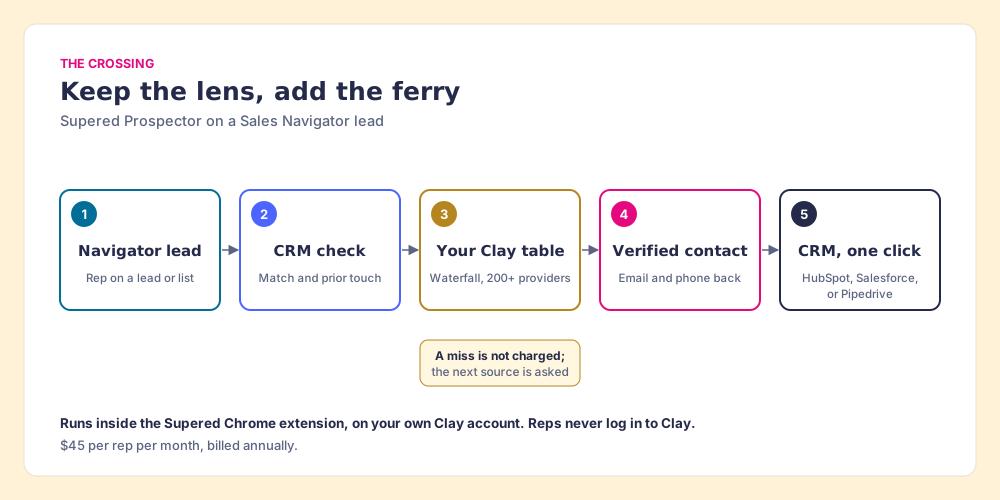
Supered does not bring its own database. It brings Clay’s waterfall, which is every database, routed, and that is why Clay is the only data provider we use. Clay’s pricing page adds the rule that matters to a buyer: “If an enrichment returns no result, you’re not charged Data Credits or Actions.” In the lake’s terms, Clay is a ferry service that tries one boat after another and charges only for the crossing that lands. Prospector puts the ticket in the rep’s hand on the shore they are already standing on.
Prospector also starts from a plain LinkedIn profile, a company’s website, and a CRM record, which matters for the seat count. A rep who builds lists from scratch needs Navigator’s search. A rep working a named account list may start from the company’s site or the CRM record and need no Navigator seat at all. The sourcing use case shows the rep’s side of that.
The price is $45 per rep per month, billed annually, from one user, on its own plan (Prospector, Supered pricing). It runs on your Clay account and your Clay credits. Clay governs the data. Supered governs the motion.
Choose something else if:
- No Clay account. Prospector needs one. Kaspr, below, adds contact data to Navigator with less setup.
- One rep, mostly InMail. Core alone, on annual billing, is the cheapest way to reach people on LinkedIn.
- AI-drafted outreach. Prospector does not write or send email. It hands the contact to your CRM and your sequencer.
Kaspr: one database on top of Navigator, for teams without Clay
Kaspr is the fair pick for a rep or a small team with no Clay account. Its pricing page says the Starter plan lets you “Use Kaspr on top of Sales Navigator to enrich contacts with verified data,” with unlimited B2B email credits, 100 phone credits a month (1,200 a year), and up to 12,000 exports a year, at $49 a user a month on annual billing or $65 monthly (kaspr.io/pricing, opened October 2, 2026). It integrates with HubSpot, Salesforce and Pipedrive. Kaspr has been owned by Cognism since 2022, so its data comes from one company’s infrastructure. When that database misses a mobile, the rep has nowhere else to look, which is the trade a single source makes. More options are graded in Kaspr alternatives and Sales Navigator alternatives.
Is it safe to use a Chrome extension on Sales Navigator?
Ask it of any tool, ours included. Our answer for Prospector: it works within LinkedIn’s terms and does not copy search results in bulk, and the contact data comes from Clay’s waterfall on your own Clay account. LinkedIn’s User Agreement, section 8.2, says members agree not to “develop, support or use software, devices, scripts, robots or any other means or processes (such as crawlers, browser plugins and add-ons or any other technology) to scrape or copy the Services, including profiles and other data from the Services” (LinkedIn User Agreement, effective November 3, 2025). LinkedIn’s prohibited-software page adds that members who use such tools “risk having their accounts restricted or shut down” (LinkedIn Help).
This page does not rule on any vendor’s compliance, and we make no compliance claim for Prospector. The practical step: read section 8.2, then ask each vendor three questions. What does the extension read from the LinkedIn page? Where does the email and phone come from? Is anything copied in bulk? Prospector’s contact data comes from the providers in your Clay account, through Clay’s waterfall. Skip any tool whose answer to the third question is “the whole search, into a CSV.” The routes that stay inside LinkedIn’s rules are in how to get emails from LinkedIn Sales Navigator, and the extension field is graded in LinkedIn Chrome extensions.
What we recommend
Three ways forward, and our view on each.
- One rep, InMail-first. Buy Core on annual billing. US$1,079.88 a year buys the cheapest InMail LinkedIn sells and the full search; skip Advanced unless TeamLink pays for itself in introductions you can name.
- A team without Clay. Buy Core, not Advanced, and spend the US$720-a-seat difference on contact data. Kaspr on top of Core is the simple version at about $16,678.80 a year for ten reps.
- A team with Clay. Buy Core for the reps who build lists from scratch, add Supered Prospector for every rep, and let Clay’s waterfall fill the email and the phone. Ten reps on that stack cost $22,138.80 a year at list, and the leader can see which lists turned into pipeline.
The binoculars were never the problem. The mistake is paying for a stronger lens when the thing between your rep and the buyer is water. Price the crossing, then the lens. The next question, once a lead is in hand, is how to get its email without breaking LinkedIn’s rules, and how to export Sales Navigator leads walks every route that stays on the right side of them. Teams on Pipedrive will find their setup in the Pipedrive LinkedIn integration guide.
Frequently asked questions
How much is LinkedIn Sales Navigator in 2026?+
What is the difference between LinkedIn Premium and Sales Navigator?+
Is Sales Navigator cheaper on monthly or annual billing?+
Does any Sales Navigator plan include emails or phone numbers?+
What does Sales Navigator cost for a team of 10?+
How do teams with Clay add emails and phones to Sales Navigator leads?+
Your process, running itself.