Evaboot Pricing in 2026: You Bring the Book, the Meter Counts Pages
Evaboot pricing checked on October 2, 2026: $29, $49 or $99 a month for 400, 1,000 or 3,000 credits, one credit per lead whether or not an email is found, no phones, the Sales Navigator seat it needs, Evaboot vs Wiza, and the alternatives for teams on Clay.
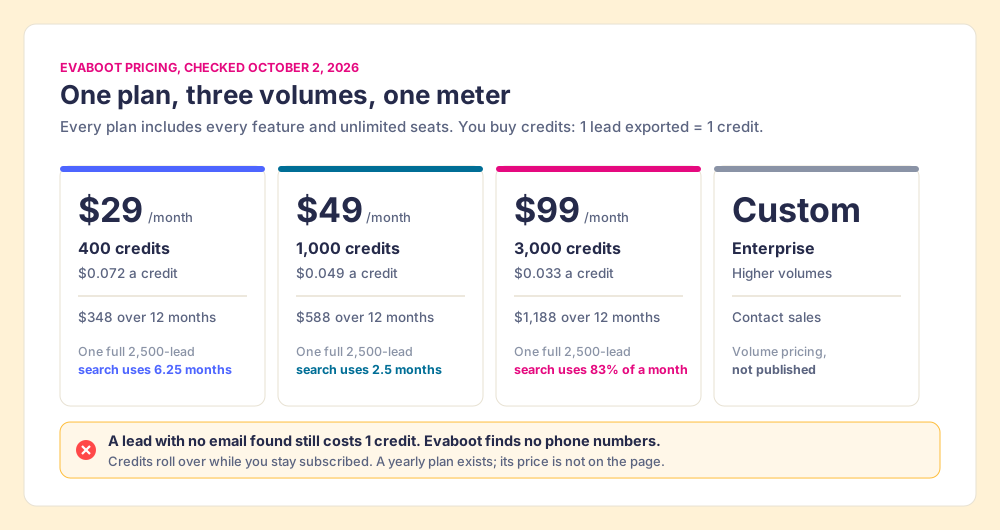
Evaboot pricing in 2026 is one plan at three monthly volumes, $29 for 400 credits, $49 for 1,000 and $99 for 3,000, where each Sales Navigator lead exported costs one credit, email found or not, shared across unlimited seats.
A copy shop does not sell books. You bring your own, you feed it to the machine, and the counter on the side ticks once for every sheet that comes out the other end. A sheet that comes out smudged still ticks. The clerk does not argue about it, because the sign by the door says so.
Evaboot pricing in 2026 is one plan at three monthly volumes, $29 for 400 credits, $49 for 1,000 and $99 for 3,000, where each Sales Navigator lead exported costs one credit, email found or not, shared across unlimited seats (evaboot.com/pricing, opened October 2, 2026). The book is your own Sales Navigator search. The sheet is a lead. The sign by the door is Evaboot’s FAQ, and it is plainer than most in this category.
The quick answer, three ways:
- Evaboot, $29 to $99 a month. A founder or a small outbound team that exports Navigator searches to a cold-email tool and never dials. The cheapest clean export we found, shared across every seat.
- Wiza, $990 a year per user for email. A rep who wants the same Navigator export with phone numbers and a native Salesforce push, priced per seat.
- Supered Prospector, $45 a rep a month on your own Clay account. A team already paying for Clay, whose reps need emails and phones from 200+ providers, a check on who owns the lead, and a CRM where the list gets worked.
How much does Evaboot cost in 2026?
The table below is the pricing page as it rendered today, in static HTML, with nothing hidden behind a toggle. The plans differ only in volume. Each card lists the same ten items: Sales Navigator export, email finder, email verifier, LinkedIn URL enrichment, CRM and webhooks, API and MCP, data cleaning, lead filtering, unlimited seats, and unlimited Sales Navigator accounts.
| Evaboot pricing (Oct 2, 2026) | Starter volume | Middle volume | Top volume | Enterprise |
|---|---|---|---|---|
| Price | $29 a month | $49 a month | $99 a month | Custom |
| Credits a month | 400 | 1,000 | 3,000 | ”For higher volumes” |
| Price per credit (Evaboot’s figure) | $0.072 | $0.049 | $0.033 | n/a |
| Twelve monthly payments | $348 | $588 | $1,188 | n/a |
| Seats | Unlimited, one shared balance | Unlimited | Unlimited | Unlimited |
| Phone numbers | None | None | None | None |
| Unused credits | Roll over while subscribed | Same | Same | Same |
Three lines in the FAQ change how you should read the cards.
- The yearly plan. It exists and has no published price. The FAQ says “A yearly subscription cannot be cancelled or downgraded before the end of contract,” so ask for the yearly number before you commit to it, and compare it with twelve monthly payments.
- The rollover. “Unused credits will roll over to the next billing period as long as you have an active subscription.” Monthly plans can be paused for one, two or three months without losing them. That is better than Prospeo, whose credits “reset on renewal and do not roll over” (prospeo.io/pricing, opened October 2, 2026).
- The one-off purchase. “Can I buy credits just once? Yes, just subscribe to any plan and cancel right away. You will have 1 month to use your credits.” Two public reviews, one on Capterra and one on Trustpilot, complain about charges the reviewer did not expect. If you want a single batch, cancel the day you subscribe, as the FAQ says.
The biggest number on the page sits in a different FAQ answer. A Sales Navigator search shows at most 2,500 leads, “LinkedIn’s own” ceiling, as Evaboot puts it. Export one search to the end and you spend 2,500 credits, six months of the $29 plan.
What does an Evaboot credit buy, and what does it not?
Go back to the copy shop, because it maps onto the FAQ line for line. “1 lead exported = 1 credit, and its verified email is included: every export finds emails for every lead. A lead we find no email for still costs 1 credit, and so does an account.” The sheet ticks the counter whether or not the email printed. The standalone Email Finder runs the other way: “1 email found = 1 credit (nothing is charged when none is found).”
You also bring the book. The FAQ answers “Do I need a Sales Navigator account?” with “Yes. Evaboot exports the results of your own Sales Navigator searches.” Sales Navigator Core lists at US$119.99 a month or US$1,079.88 a year per seat (LinkedIn, compare plans, checked October 2, 2026), and Evaboot’s price sits on top of it.
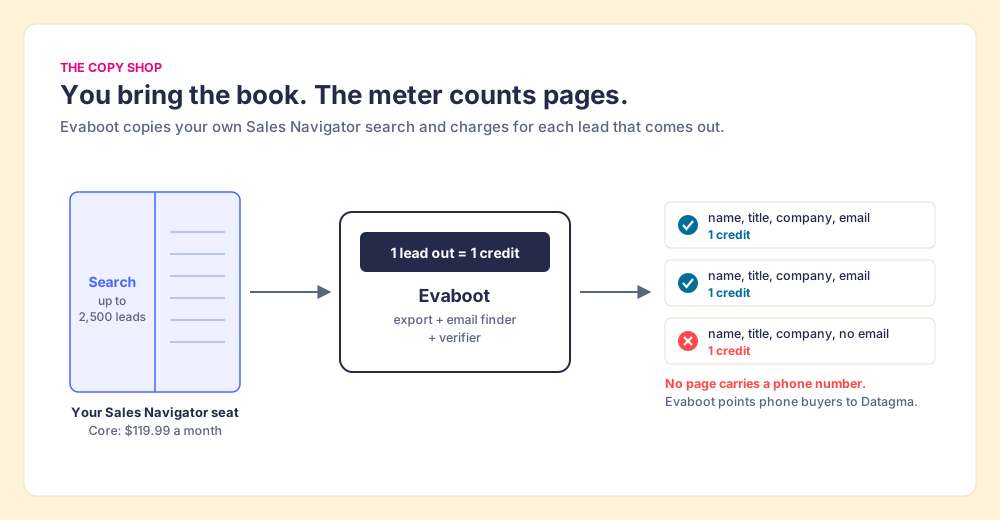
And the copy prints no phone numbers. “Does Evaboot find phone numbers? No. If you want phone numbers you can combine Evaboot with Datagma,” with a 15% discount code on the first purchase. For a team that only emails, that is no loss. For a team that dials, it is half the job: the Bridge Group’s 2025 SDR report, 351 companies, counts 44 phone activities and 41 email activities in a median SDR’s 112 daily activities (Bridge Group, 2025). An Evaboot export covers the 41.
Where the analogy stops: a copy shop prints exactly what is in the book. Evaboot does more. Its export arrives with “39 columns of profile and company data,” cleaned names and a lead filter that checks each row against your search filters, and one reviewer on its own testimonial page credits that filter with catching lists that were badly off-target. The meter is simple; the copy is better than a photocopy.
What does Evaboot cost per usable email?
Price per credit is a sticker. Price per email you can send to is the number that pays the bills, and Evaboot’s homepage supplies the example itself. Its demo export, a list of UK fintech heads of sales, shows 412 leads exported, 398 that match every filter, 287 emails found and 241 emails rated safe. It is an illustration on a marketing page, not a measured average, and your lists will differ. But the arithmetic it implies is the one to run on your own first export.
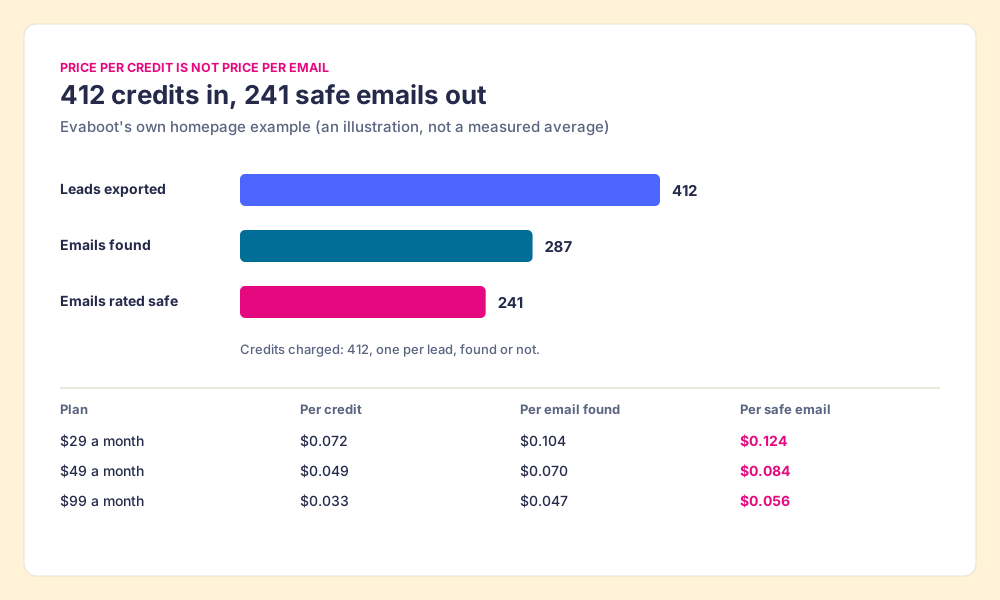
| Plan | Per credit | Per email found (287 of 412) | Per safe email (241 of 412) |
|---|---|---|---|
| $29 a month | $0.072 | $0.104 | $0.124 |
| $49 a month | $0.049 | $0.070 | $0.084 |
| $99 a month | $0.033 | $0.047 | $0.056 |
Even at $0.124, that is a cheap email by the standards of the category. Prospeo charges “1 credit per email found (0 if no email is found)” and its Starter plan is $37 a month on yearly billing for 24,000 credits a year, about 1.5 cents per found email. Prospeo is cheaper per email on paper; Evaboot reads the search you already built in Navigator, cleans it, and shares one balance across the team. Different machines for different books.
How good are the safe emails? Evaboot’s comparison page claims “97% email deliverability.” One G2 reviewer, Tegar A., wrote in September 2023 that “Evaboot has 20-30% email bounce rate” (via G2). Both are single sources pointing in opposite directions. Send your first export through your own bounce check before you buy the large plan.
Is Evaboot worth it? What reviewers and LinkedIn say
Fair first. On October 2, 2026, Evaboot held 4.6 out of 5 from 82 reviews on G2 and 4.4 from 15 on Capterra; Trustpilot shows a single review, too few to weigh. The site claims “200,000+ users” and “+3,500 companies,” and we found no 2026 acquisition or rebrand. The praise is specific: the export is fast, the CSV is clean, the support answers. The complaints are specific too.
- Speed and limits on big lists. “With large amounts of data, it becomes slow or the limit is reached beforehand” (Rafael A., Sales Manager, G2, April 2026).
- Depth of the data. “I have to use Dropcontact to get more data” (Richard J., G2, April 2024). The export is Navigator’s fields plus an email, and teams who want more stack a second tool.
- Bounces. The 2023 review above, against the vendor’s 97% claim.
The larger question for an Evaboot review is method, not price. Evaboot calls itself “The Smartest LinkedIn Sales Navigator Scraper” and says “Every export stays under the limits LinkedIn sets, so your Sales Navigator account never gets flagged.” LinkedIn’s help center says it does not permit “third party software, including “crawlers”, bots, browser plug-ins, or browser extensions that scrape, modify the appearance of, or automate activity on LinkedIn’s website” (LinkedIn Help, checked October 1, 2026). Evaboot’s own export guide advises: “Use a dedicated prospecting seat, not the profile your network lives on.” Take that advice seriously and price it: a second Core seat is another US$1,079.88 a year. Our LinkedIn Sales Navigator scraper page walks through what the User Agreement says and how the hiQ case ended.
Why should you trust this breakdown?
We sell no contact data and no Sales Navigator export. Supered has no database of its own, on purpose; Prospector runs on Clay, the only data provider we use, so the vendors on this page are priced here as you would price them.
Supered started inside RevPartners, the HubSpot partner I founded, which sold roughly twice as much Sales Hub as any other partner and reached HubSpot’s Elite tier in 13 months. Supered is the #1 sales enablement app on the HubSpot marketplace, with 6,000+ installs and a 5.0 rating from 122 reviews there, and held a 4.9 out of 5 from 81 reviews on G2 on October 1, 2026 (G2, Supered reviews). Every Evaboot number here links to the page it came from, opened today.
Which Evaboot plan, or which Evaboot alternative, fits your team?
The grades weigh five things for one job: a team of reps building lists from Sales Navigator and working them in a CRM. Coverage of the contact the rep needs, emails and phones (x3); where the list lands, natively in the CRM with ownership visible (x2); price structure for a five-to-fifty-rep team (x2); exposure of the rep’s LinkedIn account (x2); setup (x1). Out of 50. Flip the lens to “one founder, emails only, lowest price” and Evaboot wins it outright.
| Rank | Option | Grade | Best fit | CRM integration | Setup effort | Pricing (plan with the feature) | Reason to switch |
|---|---|---|---|---|---|---|---|
| 1 | Supered Prospector | A (44) | Teams already paying for Clay | Native: HubSpot, Salesforce, Pipedrive | Demo, then live on your own Clay account | $45 a rep a month, billed annually, plus your Clay plan | Emails and phones from Clay’s waterfall across 200+ providers; owner check before the push; see which lists get worked and closed |
| 2 | Prospeo | B+ (37) | Teams wanting emails and mobiles from one database | HubSpot and Salesforce from Growth | Self-serve | Starter $37 a month per user, yearly, 24,000 credits a year | Charges nothing for a missed email; mobiles at 10 credits |
| 3 | Wiza | B+ (35) | Reps who want a Navigator export with phones | Salesforce, HubSpot and others | Self-serve | Email $990 a year per user; Email + Phone $1,990 | Phones and a native Salesforce push |
| 4 | Kaspr | B (32) | Phone-first reps working Navigator profiles | Native on Business | Self-serve | Starter $49 a month per user, annual, 1,200 phone credits a year | Phones on the profile, unlimited B2B emails |
| ref | Evaboot | B (33) | Founders and small email-only outbound teams | HubSpot, Pipedrive, Attio, Apollo, Clay; no native Salesforce | Self-serve, minutes | $29, $49 or $99 a month, shared by all seats | The reference: cheapest clean export, no phones |
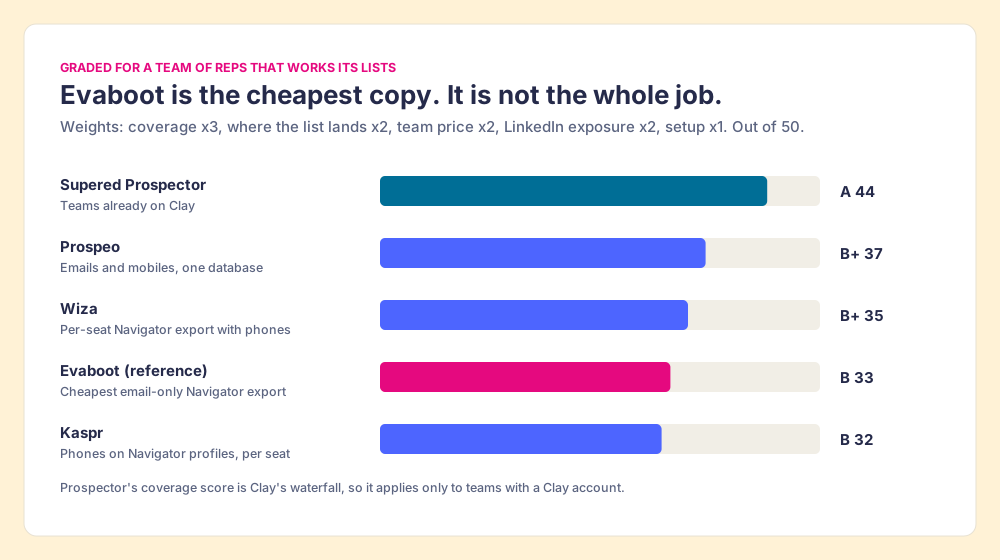
Evaboot loses its points in two places: it carries no phones, and its CRM list skips Salesforce. Its integrations page lists HubSpot, Pipedrive, Attio and Apollo as CRMs, lemlist and Instantly as outreach tools, Clay (“Send exports to a Clay table for extra enrichment”), Google Sheets, a webhook, and Zapier, Make and n8n. A Salesforce team gets there through Zapier or a CSV.
Evaboot vs Wiza: which should you pick?
The two do the same core job, a Sales Navigator export with verified emails, and they price it from opposite ends.
- Evaboot, the shared pool. One balance for the whole team, unlimited seats, from $29 a month, credits that roll over. No phones. Its own comparison page argues it wins “on price and clean data,” and on price the arithmetic agrees.
- Wiza, the per-seat plan. On wiza.co/pricing, opened October 2, 2026, yearly billing shows Email at $83 a month per user ($990 a year) with unlimited email reveals and 2,500 exports a month, and Email + Phone at $166 ($1,990 a year) with unlimited phone reveals. Monthly billing runs $49 (100 valid emails and 100 phones), $99 (500 emails) and $199 (500 emails and 500 phones) per user, with extras at $0.15 an email and $0.35 a phone. A free account gets 20 valid emails and 5 phones; team plans for three or more users are custom.
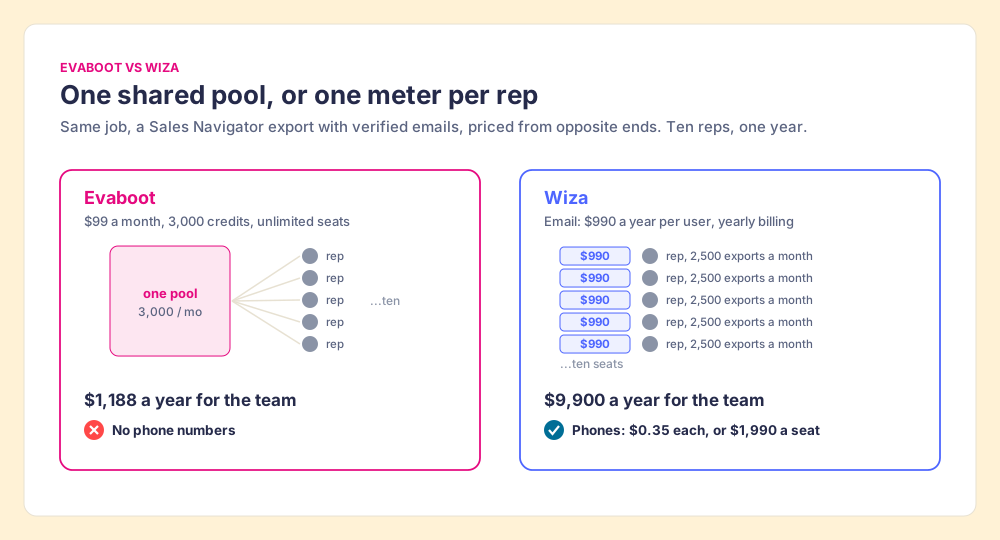
Choose Evaboot when the job is email and the team is small or shares one person who exports. Choose Wiza when a rep dials or the CRM is Salesforce. Our Wiza pricing page and Wiza alternatives go further on the per-seat side.
What does Evaboot cost for a team of ten?
The export tool is the small line on the invoice. Ten Sales Navigator Core seats on annual billing cost US$10,798.80, and every route below starts there.
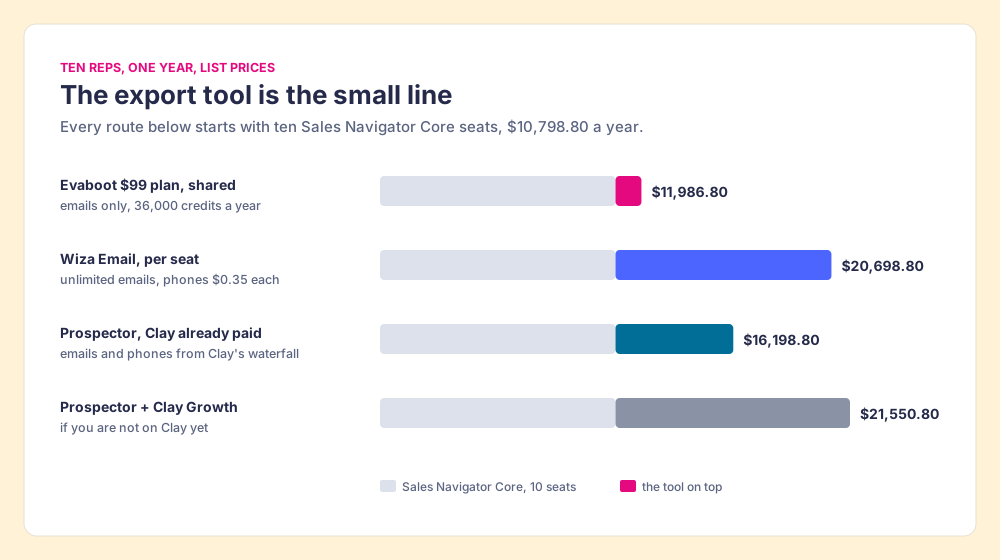
Read the bars both ways. Evaboot is far the cheapest route: $1,188 a year on top of Navigator for the whole team. Spread across ten reps, its 36,000 credits come to about 14 leads per rep per working day, enough for careful email outbound, with no phones in any of them. Wiza adds phones for $9,900 a year in email seats, more with the phone plan. If the team already pays for Clay, Prospector’s $5,400 buys emails and phones from Clay’s waterfall and a CRM push with the owner check; if it does not, adding Clay Growth at $446 a month ($5,352 a year, clay.com/pricing, opened October 2, 2026) makes Prospector the most expensive route here, and Evaboot the sensible buy.
Which Evaboot alternatives fit a team on Clay?
Prospector does not bring its own database. It brings Clay’s waterfall, which is every database, routed. Clay’s marketplace counts “200+ data and AI vendors” (clay.com, checked October 2, 2026), and its waterfall asks provider after provider until one returns a verified email or phone. Clay’s pricing page states the rule that matters next to Evaboot’s: “If an enrichment returns no result, you’re not charged Data Credits or Actions.” In copy-shop terms, the smudged sheet is free, and if one library lacks the page, the desk asks the next of 200.
Clay plus Supered is the best way for a sales team to prospect: GTM engineers build in Clay, and reps never open Clay. On Sales Navigator it works like this.
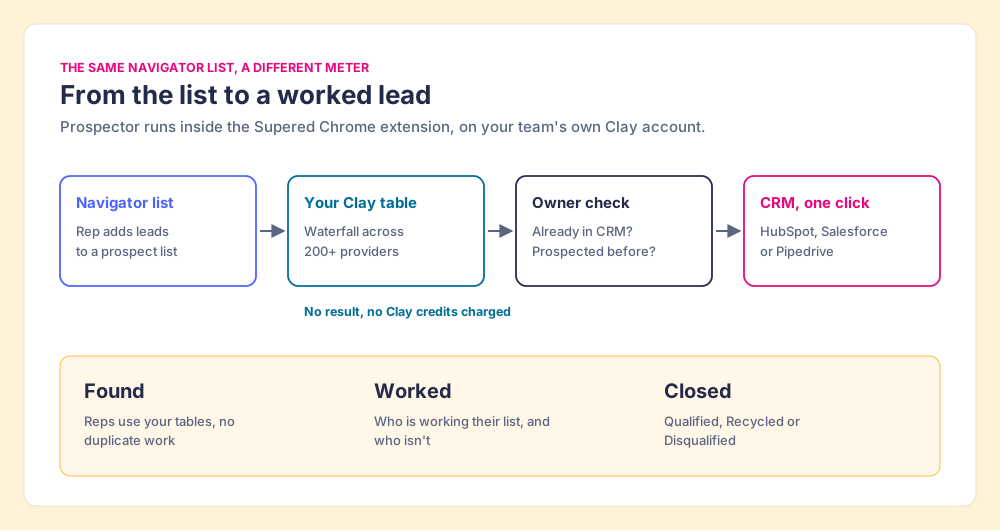
- The list, pushed to your table. A rep adds Navigator leads to a prospect list and pushes the list to the team’s Clay table. The GTM engineer built the flow once: which waterfall, which tiers, which tags, which destination. Reps pick it from a menu. Your logic stays yours.
- Emails and phones. Clay’s waterfall fills both, so the 44 dials in the SDR’s day have numbers behind them.
- The owner check. Before the push, the rep sees whether the person already has a matching CRM record and whether a teammate prospected them before. No duplicate work across reps.
- Found, Worked, Closed. The leader sees which lists were found, who is working theirs and who isn’t, and how each lead ended: Qualified, Recycled or Disqualified, the way your process says. A Clay budget grows when someone can show what it produced.
On LinkedIn, our statement is plain: Prospector works within LinkedIn’s terms and does not copy search results in bulk; the contact data comes from Clay’s waterfall on the customer’s own Clay account. We claim no LinkedIn approval, for ours or anyone’s. Ask any vendor, us included, what it reads from the page. Prospector also starts from places Evaboot does not: a LinkedIn profile, a company’s website, and a HubSpot, Salesforce or Pipedrive record. It runs inside the Supered Chrome extension, costs $45 per rep per month, billed annually, from one user, and needs your own Clay account (Prospector, Supered pricing). The GTM engineer stops being the list desk, and the rep gets the table as one button where they already sell.
Choose something else if any of these is true:
- No Clay account. Prospector needs one. Evaboot at $29 to $99 a month is the cheaper, simpler buy for email-only outbound.
- One founder, one cold-email tool. Evaboot pushes straight to lemlist and Instantly and costs less than a single Prospector seat at the smallest volume.
- An AI agent driving the search. Evaboot ships an MCP server and an API for that job; Prospector is built for reps working in the browser and the CRM.
How does Evaboot pricing compare with the other Navigator tools?
- Prospeo. A database with a Chrome extension on every plan. Starter $37 a month per user on yearly billing for 24,000 credits a year, Growth $74 for 60,000 with HubSpot and Salesforce, Pro $187 for 180,000; one credit per email found, ten per mobile, no rollover. Cheaper per email than Evaboot and it sells phones; it prices per seat. Prospeo pricing has the ladder.
- Kaspr. Built to sit on top of Navigator profiles. Starter $49 a month per user on annual billing ($65 monthly) with unlimited B2B emails and 1,200 phone credits a year, Business $79 ($99) with 2,400 (kaspr.io/pricing, opened October 2, 2026). Kaspr pricing covers the credit types.
- Clay with Evaboot in front. Evaboot can send an export into a Clay table, and some teams use it as Clay’s front door. That pays Evaboot per lead to copy the search and Clay per result to fill it. If reps already work in Navigator, pushing the prospect list to the Clay table directly removes one meter.
- No tool at all. LinkedIn sells no CSV export on any plan; its help center says it “currently doesn’t offer the option to export account and lead information from Sales Navigator into a CSV or XLS file.” Export Sales Navigator leads lays out every route, the scrapers included.
What we recommend
Three ways forward, and our view on each.
- A founder or a two-person outbound team, email only. Buy Evaboot’s $49 plan monthly, run your first export through a bounce check, and divide the bill by safe emails, not credits. Move to $99 when a full 2,500-lead search no longer fits in a month. Ask for the yearly price only once you know you will export all year, because a yearly plan cannot be cancelled.
- A team that dials or runs Salesforce. Evaboot leaves both jobs to someone else. Price Wiza’s Email + Phone seat or Kaspr against Evaboot plus a phone vendor, and count the second Navigator seat Evaboot’s own guide recommends.
- A team already on Clay. Skip the copy. Push the Navigator list to the Clay table your GTM engineer already built, with Supered Prospector, at $540 a rep a year, and see which lists turn into qualified leads. The sourcing use case shows the rep’s side, and our Clay Chrome extension guide shows what changes when reps run Clay without opening it.
The copy shop’s sign was never the problem; it tells you the price per page. The question a sales team has to answer is what happens to the page after it leaves the shop: whether it has a phone number on it, whether it lands in the CRM under the right owner, and whether anyone works it. Evaboot answers the first part well and cheaply. Sales Navigator alternatives takes up the rest, one route at a time.
Frequently asked questions
How much does Evaboot cost in 2026?+
Does Evaboot charge for leads with no email?+
Is there a free version of Evaboot?+
Evaboot vs Wiza: which is cheaper?+
Is Evaboot legit?+
What is the best Evaboot alternative for a team that already has Clay?+
Your process, running itself.