The Lusha Chrome Extension in 2026: A Coin-Operated Viewer With One Lens
The Lusha Chrome extension is free to install and paid for at the reveal: 1 credit an email, 5 a phone. What it does, what each plan buys per phone, how to install it, what reviewers complain about, and what changed when Lusha joined Clay's waterfall.
The Lusha Chrome extension is Lusha's free browser add-on that reveals verified emails and phone numbers from Lusha's own database on LinkedIn, Sales Navigator, company websites, Gmail, and the CRM, charging 1 credit per email and 5 per phone.
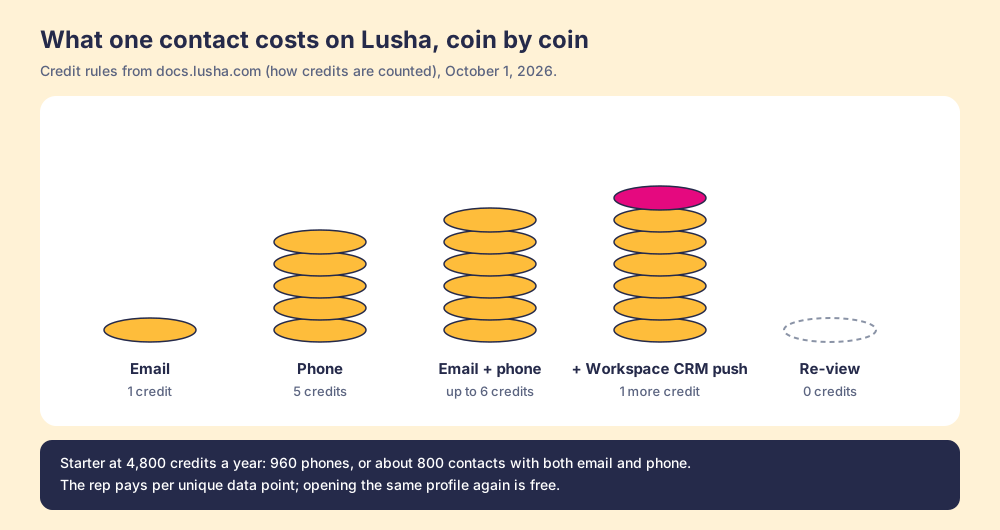
The Lusha Chrome extension is free, and the free part is the least interesting thing about it. The extension is the slot; the credit is the coin. One email costs 1 credit, one phone number costs 5, and a plan that sounds like 4,800 of something is 960 phone numbers once you divide (lusha.com/pricing, October 1, 2026). The short version of what follows:
- Lusha’s extension. The right buy for one or two reps who reveal a few contacts a day from LinkedIn on a posted price, from a Free plan of 40 credits a month.
- Supered Prospector. The right buy for a team that already pays for Clay: one extension, Clay’s waterfall across 200+ vendors behind it, Lusha’s data included as a step if you want it, at $45 per rep per month billed annually.
- Kaspr or Apollo. The non-Clay alternatives: Kaspr for email-first reps on LinkedIn, Apollo when the dialer and sequences should live in the same plan.
The Lusha Chrome extension is Lusha’s free browser add-on that reveals verified emails and phone numbers from Lusha’s own database on LinkedIn, Sales Navigator, company websites, Gmail, and the CRM, charging 1 credit per email and 5 per phone. Its Chrome Web Store listing, “Lusha - Easily find B2B contact information,” showed 400,000 users and a 4.6 rating from 1.9K ratings on October 1, 2026, version 10.11.6, updated September 2 (Chrome Web Store). Those are good numbers, and the people who left them are mostly right to.
What does the Lusha Chrome extension do?
At a lookout over a harbor there is usually a pair of coin-operated binoculars on a post. You can stand next to it for free. You can read the little plate that says what you will see. The moment you want to look, you drop a coin, the shutter opens, and you see whatever that one lens is pointed at. If the ship you came to watch is behind the headland, the coin is gone and the view is water.
The Lusha extension is that viewer, bolted to the side of a LinkedIn profile. Lusha’s own docs describe the job plainly: “The Lusha extension lets you reveal verified contact details directly from LinkedIn profiles, Sales Navigator, company websites, and your CRM, without leaving the page” (Lusha, getting started). The Chrome Web Store copy adds Gmail and Google Calendar, firmographics on every profile (revenue, headcount, industry, tech stack), CRM sync to Salesforce, HubSpot, and monday CRM, and push into Lusha’s own sequences.
The plate on the post is free to read. Lusha’s credit page lists 0 credits for searching and filtering, for viewing company information, and for re-viewing a contact already revealed, “even across sessions” (Lusha, how credits work). The coin goes in at one moment only, the reveal.
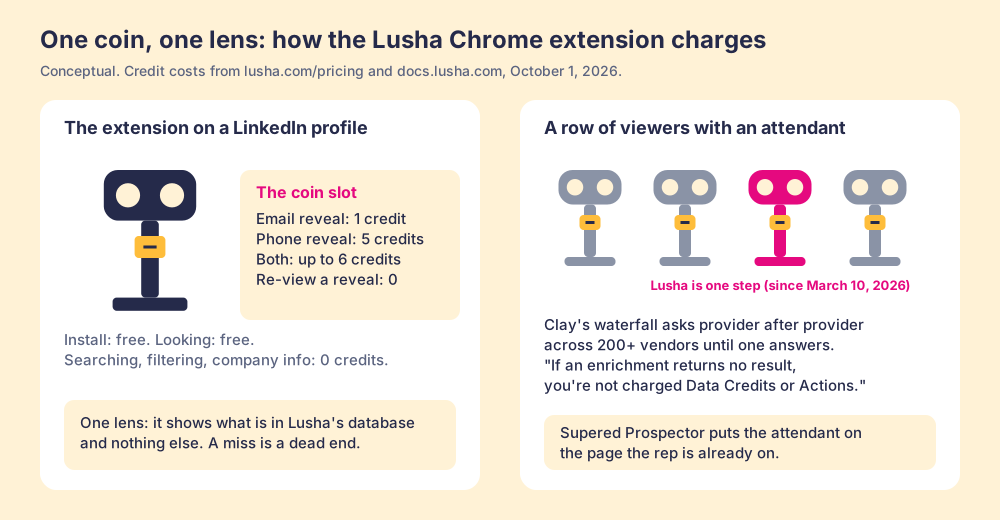
The picture has one edge worth marking. Binoculars at a lookout show a view that is there whether or not you pay; Lusha’s lens shows only what Lusha has, and a miss means the contact is outside its database. One lens, one database. Hold onto it, because it explains most of what the reviewers say below.
Which Lusha plan does the extension need, and what does it cost?
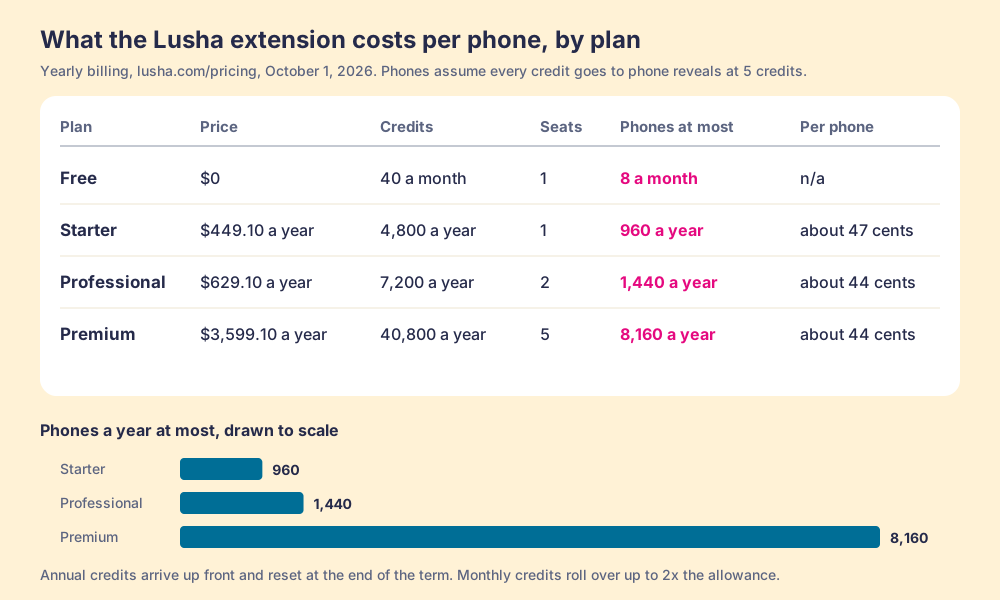
All five plans include the extension, Free included. The Free plan’s FAQ entry reads: “The Free plan provides you with up to 40 credits per month. You’ll also have access to basic prospecting features as listed above, our browser extension and CRM integrations.” What changes by plan is the number of coins in your pocket and a handful of features, such as bulk reveal on Sales Navigator, which Lusha’s docs say “vary by plan tier” (Lusha extension docs).
The prices below come from the plan data Lusha embeds in its pricing page, read on October 1, 2026. Yearly billing is the page default and is 25% under the monthly rate.
| Plan | Yearly billing | Monthly billing | Credits | Seats | Phones at most | Per phone (yearly) |
|---|---|---|---|---|---|---|
| Free | $0 | $0 | 40 a month | 1 | 8 a month | n/a |
| Starter | $449.10 a year | $49.90 a month | 4,800 a year (400 a month) | 1 | 960 a year | about 47 cents |
| Professional | $629.10 a year | $69.90 a month | 7,200 a year (600 a month) | 2 | 1,440 a year | about 44 cents |
| Premium | $3,599.10 a year | $399.90 a month | 40,800 a year (3,400 a month) | 5 | 8,160 a year | about 44 cents |
| Scale | Custom | Custom | Custom | Custom | n/a | n/a |
“Phones at most” assumes every credit goes to a phone reveal at 5 credits. An email drawn from the same pool costs 1, so a rep who reveals both for each contact gets about 800 full contacts a year from Starter (4,800 divided by 6). The Lusha pricing page walks the whole ladder, including the Scale tier’s credit caps per user.
Four lines in the fine print change the arithmetic, and the first two are in the rep’s favor.
- The free re-view. Lusha’s counting rule is that “the same contact’s data point is only ever charged once,” so a rep who opens the same profile five times pays once (Lusha, how credits are counted). The real unit of cost is the unique phone number.
- The rolling pocket. On monthly plans, unused credits “roll over and accumulate up to twice the credit limit,” so a 400-credit month can hold 800.
- The yearly reset. On annual plans, “you will get all your credits up front. Any unused credits will be reset at the end of the annual cycle.” The 25% yearly discount is real on the credits you spend.
- The export line. The same counting page lists a Workspace CRM export, “push to Salesforce / HubSpot,” at 1 credit per export and a CSV export at 1 credit per 25 rows, “separate from reveal credits.” A team that reveals in the extension and pushes from Lusha’s Workspace pays a seventh credit for a phone-and-email contact. Lusha’s docs do not list a separate export charge for the extension itself, so check your own usage dashboard before you budget it.
One more point that cuts in both directions. Lusha’s credits sit in a pool: the usage dashboard “reflects credits at the account level, across all users and all channels,” and on Premium and Scale an admin chooses between a shared pool and an allocation per user. A shared pool lets a light user’s coins fund a heavy user’s calls. It also lets one heavy user empty the jar for the team.
How do you install the Lusha Chrome extension?
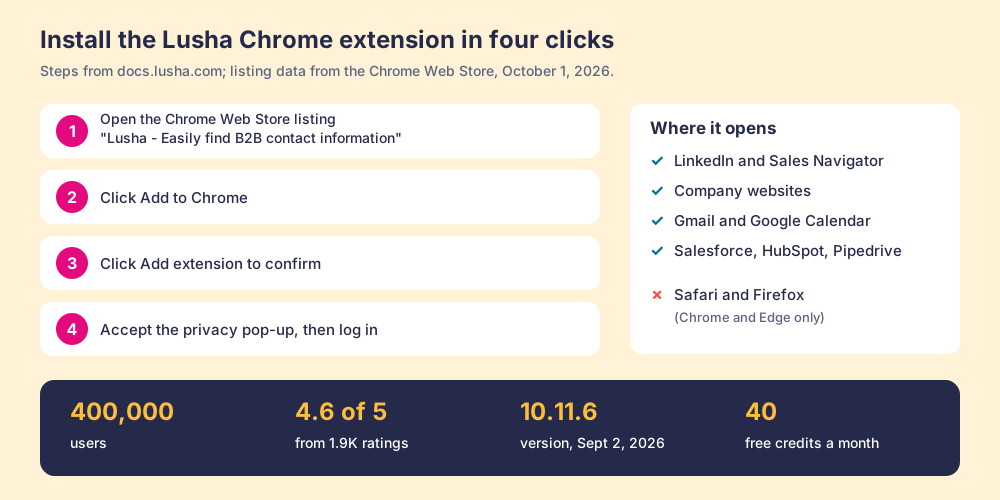
Lusha’s install guide lists four steps for Chrome and three for Edge (Lusha, install the extension):
- Open the Chrome Web Store and search for “Lusha Extension,” or follow Lusha’s direct link to the listing.
- Click Add to Chrome.
- Click Add extension to confirm.
- Click “Got it, let’s go” on the privacy pop-up, then log in to your Lusha account.
On Edge, the listing is in the Microsoft Edge Add-ons store: click Get, then Add extension, then confirm the privacy pop-up. If no results appear on a profile, Lusha’s guide says to set the browser to “Allow all cookies.” Once installed, the blue Lusha icon opens the panel on a supported page.
What are the Lusha extension’s limits?
The limits are written down in Lusha’s own docs, which is to its credit. Read them before you roll it out to a team.
- Two browsers. Chrome and Edge are supported; “full functionality is not supported on Safari or Firefox.”
- Plan-gated bulk. Bulk reveal on Sales Navigator varies by plan tier, and bulk enrichment starts on Starter.
- Sequence caps. Up to 150 contacts can go into a Lusha sequence at once, and “contacts without email addresses (Wishlist contacts) cannot be added to sequences.”
- A retired convenience. The auto-open panel “has been discontinued,” so the rep clicks the icon on each page.
- The LinkedIn question. Lusha says the extension “doesn’t automate any browsing activity on LinkedIn and doesn’t break any terms of service.” The claim is Lusha’s, and it matches how a reveal works: the rep is on the page anyway, and the extension does not click through profiles on its own.
- One database. The extension shows Lusha’s data. Since September 23, 2026, Lusha’s own Data Waterfall, which falls back to third-party providers when Lusha cannot match a field, is on every paid plan, after being limited to Pro and above (Lusha changelog, v2.16.0). The providers behind that fallback are Lusha’s choice, and Lusha does not list them on its pricing page.
What do reviewers complain about?
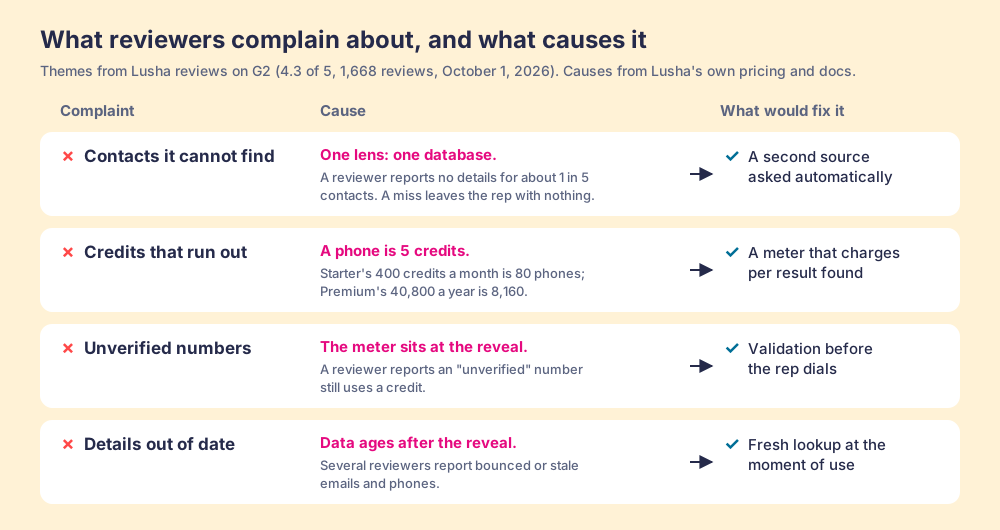
Lusha held 4.3 out of 5 from 1,668 reviews on its G2 page on October 1, 2026 (G2, Lusha reviews). The praise is for ease of use, and G2’s head-to-head with Apollo scores Lusha 9.2 on ease of use against Apollo’s 9.0 (G2 compare). The complaints repeat, and each one traces back to the coin or the lens.
- Contacts it cannot find. A founder wrote in May 2026, “Sometimes, I am not able to find contact details for about 20% of the contacts.” A single lens has a blind spot by construction, and a rep who hits it has a profile and no number.
- Credits that run out. “The credit limits can be restrictive for frequent users,” an engineer wrote in June 2026. The cause is the 5-credit phone. The Bridge Group’s 2025 SDR report, 351 companies, puts the median SDR at 44 dials a day (Bridge Group, 2025). Suppose, for the arithmetic only, that each dial needed a freshly revealed number. Starter’s 80 phones a month would last under two working days. Reps redial, so the real burn is slower, and the direction holds.
- Numbers that do not connect. A customer success manager wrote in December 2025 that the credit system “can sometimes feel limiting for high-volume outbound teams, particularly when an ‘unverified’ number still uses up a credit.” The meter sits at the reveal, so the coin is spent before anyone dials.
- Details out of date. Several reviewers report bounced emails and stale numbers, the normal decay of any database between the day a record was verified and the day a rep uses it.
None of this makes the extension bad. For a founder who reveals ten contacts a week, a blind spot of one in five and a posted price of $449.10 a year is a fine trade. It becomes the wrong tool at the point where the team’s dials outrun its coins, or where the missing fifth is the account the quarter depends on.
Why trust this page?
I started RevPartners, a HubSpot partner that did only sales implementations, sold roughly twice as much Sales Hub as any other partner, and reached Elite tier in 13 months. Supered came out of that work and is the #1 sales enablement app on the HubSpot marketplace, with 5.0 from 122 reviews there and 4.9 out of 5 from 81 reviews on G2 (both checked October 1, 2026). That is also the disclosure: we make Supered Prospector, and it sits first among the alternatives below for teams that have Clay. The grading shows its weights so you can flip them, and the flip for a solo founder puts Lusha near the top.
How does the Lusha extension compare with the alternatives?
The lens is a mid-market or SMB team, ten to fifty reps, that wants contact data reps will use where they already work and a leader who can see which lists turn into pipeline. Each criterion is scored 1 to 5 and weighted: coverage of the contact you need (x3), rep-side delivery (x2), price structure for mid-market (x2), what the leader sees after the export (x2), bundled outreach (x1), for a maximum of 50. The scores match the ones on the Lusha alternatives page and the Kaspr alternatives page, so the pages read together.
| Rank | Tool | Grade | Score | Best fit | CRM integration | Setup effort | Pricing (plan with the extension) | Reason to switch from Lusha |
|---|---|---|---|---|---|---|---|---|
| ref | Lusha extension | B+ | 29 | One to five reps revealing from LinkedIn on a posted price | Native (Salesforce, HubSpot, Pipedrive, monday CRM) | Minutes | Free to $3,599.10 a year (Premium, 5 seats) | Stay if the blind spot and the 5-credit phone are tolerable |
| 1 | Supered Prospector | A | 44 | Teams that already pay for Clay | Native (HubSpot, Salesforce, Pipedrive) | Under a week on an existing Clay account | $45 per rep per month, billed annually, plus your Clay plan | 200+ vendors per lookup, no charge for a miss, lists followed to closed |
| 2 | Apollo | A- | 36 | Small teams wanting data, dialer, and sequences in one plan | Native (HubSpot, Salesforce) | A day | $49 per seat per month, billed annually | Cheaper phones per credit dollar, outreach in the plan |
| 3 | Kaspr | B- | 25 | Email-first reps on LinkedIn | Native (HubSpot, Salesforce, Pipedrive, Zoho) | Minutes | $49 per seat per month, billed annually | Unlimited B2B emails under fair use |
Lusha’s 29 is coverage 2, rep-side delivery 5, price 5, what the leader sees 1, outreach 1 (with a light sequencer, rounded down). The rep-side 5 and the price 5 are earned: the extension opens wherever a rep reads about a prospect, and the price is posted, cancellable, and starts at zero. The coverage 2 is the single lens. Prospector’s coverage score is Clay’s waterfall, credited to Clay, and its outreach score is the lowest on the card on purpose, since it has no dialer or sequencer.
Corporate status, checked October 1, 2026: Lusha is independent, trading as Lusha Systems Inc. from a Boston address, cut about 8% of staff in December 2025 (Calcalist), and acquired the sales-conversation startup Novacy in January 2025 (Calcalist). Apollo acquired Pocus in March 2026 (TNW). Kaspr has been part of Cognism since April 2022.
What changed when Lusha joined Clay’s waterfall?
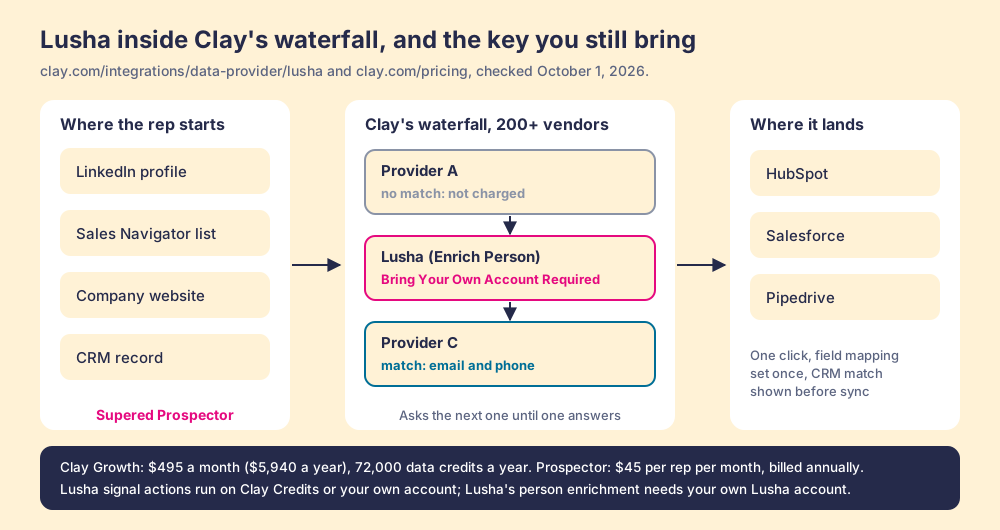
On March 10, 2026, Clay’s changelog announced the Lusha integration with this line: “Add Lusha as a step in your existing contact enrichment waterfall for better EMEA match rates” (Clay changelog). Since then, a team running Clay can ask Lusha’s database for a person as one rung of a ladder, and ask the next provider when Lusha comes back empty.
Go back to the lookout. Clay’s waterfall is a row of viewers along the rail, each pointed a little differently, and an attendant who walks the row for you. A waterfall is a list of instructions a GTM engineer writes once: ask this provider first, then that one, stop when a verified email or phone comes back. Clay describes its waterfalls as checking “multiple providers to return the most verified emails (lower bounce rate) and phone numbers (higher connect rate)” across 200+ data and AI vendors (clay.com, October 1, 2026). And the attendant has a rule the single viewer does not: “If an enrichment returns no result, you’re not charged Data Credits or Actions” (clay.com/pricing). The empty viewer costs nothing.
There is a catch in Clay’s fine print. Clay’s Lusha integration page marks “Enrich Person with Lusha” and “Enrich Company with Lusha” as “Bring Your Own Account Required,” while Lusha’s signal actions, such as headcount growth, run on “Clay Credits or Bring Your Own Account” (Clay, Lusha integration, checked October 1, 2026). So Lusha inside Clay is a key you bring, not a free pass. A team that wants Lusha’s EMEA contacts in its waterfall keeps a Lusha account and plugs it in; a team that does not can leave that viewer out and let the other providers answer.
The waterfall has one problem of its own, and it is the reason Clay’s own pages talk about extensions at all. A waterfall lives in a Clay table, and reps do not live in Clay tables. Clay’s homepage says it plainly: “Build centralized workflows for any rep to run.” Somebody has to put the attendant at the rail where the rep is standing, and the Clay Chrome extension page explains why that job has been harder than it sounds, including the discontinued LinkedIn extension and the partner that filled the gap, now covered on the Exportly alternatives page.
Where does Supered Prospector fit?
Prospector is the attendant. It brings no database of its own; it brings Clay’s waterfall, on the team’s own Clay account, to the page the rep is already on. We chose Clay as our only data provider for that reason, which is why Clay is not a row in the table above: the other rows can sit inside it as steps.
What a rep gets, with no Clay login:
- Lookups from four starting points. A LinkedIn profile, a Sales Navigator list, a company website with company research alongside, or the HubSpot, Salesforce, or Pipedrive record. The Lusha extension opens on most of the same pages; the difference is what stands behind the panel.
- Context before the first touch. On a LinkedIn profile the rep sees the matching CRM record and whether the prospect was already worked in the past, before creating a duplicate or stepping on a teammate.
- A buying committee, by your definition. The lookup returns the titles, departments, and seniority the team set, and a whole list can be pushed into any custom Clay workflow the GTM engineer built.
- One click to the CRM. Field mapping is set once; the contact lands in HubSpot, Salesforce, or Pipedrive.
- Lists the leader can follow. The team’s process applies to worked prospects, so a manager sees which sourced lists got worked and which closed, and coaches from what is converting.
The arithmetic, since a promise of “every source” needs a number next to it. Clay’s Growth plan lists at $495 a month, or $5,940 a year, with 72,000 data credits a year and CRM sync built in (Clay pricing). Prospector is $45 per rep per month, billed annually, from one rep (Prospector). Ten reps on Prospector plus Clay Growth come to $11,340 a year. Ten reps on Lusha would be two Premium plans at $7,198.20 a year for 81,600 credits, so on list price Lusha is cheaper for the same headcount. On our reading of Clay’s pricing calculator, a work email plus a phone costs roughly six data credits, which puts Growth’s 72,000 at roughly 12,000 fully enriched contacts, a supposition labelled as one (the Clay pricing page shows the working). Two Lusha Premium plans revealing both for each contact buy 13,600. The volumes are close. The difference is what stands behind each lookup: one database on one side, 200+ vendors on the other, with Lusha among them if you bring its key.
Choose something else if you do not have Clay. Prospector runs on the customer’s Clay account and does nothing without one, and a team that has never built a waterfall needs someone to build it; Clay’s own copy says “GTM engineers build on Clay.” Choose something else, too, if you are one rep revealing a handful of contacts a week, because Lusha’s Free plan and $449.10 Starter are hard to undercut for that job. The sourcing use case shows how a team sets Prospector up when Clay is already in place.
What are the non-Clay alternatives to the Lusha extension?
Two are worth a rep’s install, and both meter the coin differently from Lusha.
- Kaspr. The like-for-like LinkedIn extension for email-first reps. Kaspr’s pricing page on October 1, 2026 listed Starter at $49 per user per month billed annually ($65 monthly) with unlimited B2B emails and 100 phone credits a month, and Business at $79 with 200 (kaspr.io/pricing). Its terms cap “unlimited” at 10,000 credits per account per month. Kaspr is part of Cognism, which matters if you plan to name it in a Cognism negotiation. The Kaspr alternatives page prices it per phone.
- Apollo. The pick when the extension should come with a dialer and sequences in the same plan. Apollo’s plan data on October 1, 2026 listed Basic at $49 per seat per month billed annually ($65 monthly) with 30,000 credits per seat per year, and Professional at $79 with 48,000; a phone costs 8 credits and an email 1 (apollo.io/pricing). That works out to about 16 cents a phone on Basic, against about 44 to 47 cents on Lusha, and the per-phone gap is the case the Apollo vs Lusha page makes in full. The Apollo Chrome extension page covers its install and limits.
The same questions about the other big vendors’ extensions are answered on the ZoomInfo Chrome extension page and the Cognism Chrome extension page, and the LinkedIn Chrome extension roundup sorts the whole category by the job.
Which should you choose?
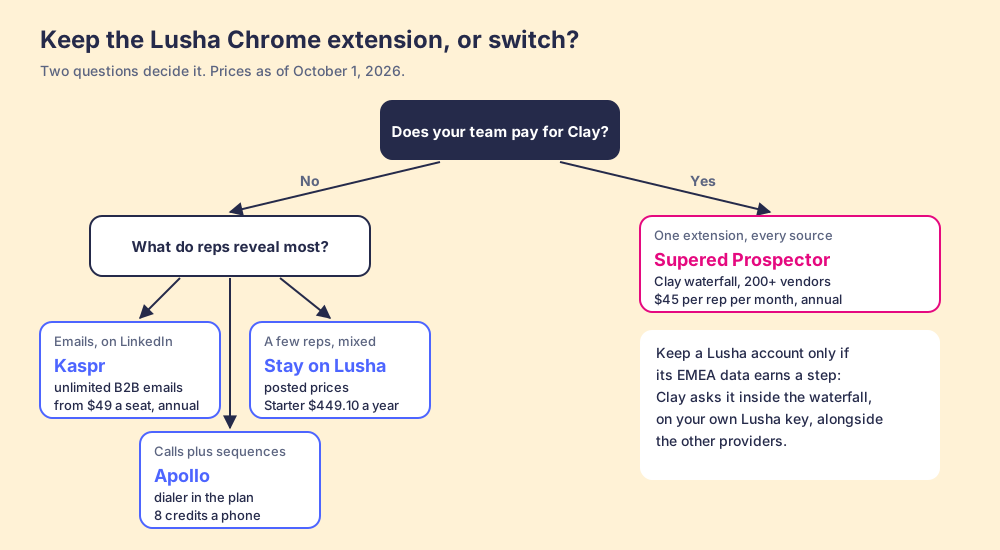
The choice resolves on two questions: does your team pay for Clay, and what do your reps reveal most.
- Lusha’s extension, kept. The pick for one to five reps revealing a mix of emails and phones from LinkedIn, who value a posted, cancellable price and can live with a blind spot. Buy yearly only if you will spend the credits, because the remainder resets.
- Kaspr. The pick when the reps are email-first and the phone allowance of 100 or 200 a month covers the dials.
- Apollo. The pick when the reps call at volume and want the dialer and sequences in the same seat. Size the credits before the seats: a phone costs 8.
- Supered Prospector. The pick when the team already pays for Clay and you want one extension, every source behind it, and a view of which sourced lists got worked and closed. Keep a Lusha account only if its EMEA data earns a rung in the waterfall.
What we recommend depends on one fact about your stack. Without Clay, the Lusha extension is a good viewer at a fair posted price, and the right move is to count your reps’ phone reveals before you renew: if the phone is most of the coin, Apollo’s meter is about a third of Lusha’s per number. With Clay, stop paying for a second lens your reps have to carry. Put the attendant at the rail where they already stand, pay nothing for the viewers that come back empty, and watch each list they build go from sourced to closed. A Prospector demo on your own Clay account is where you can see the row of viewers work from a LinkedIn profile.
Frequently asked questions
Is the Lusha Chrome extension free?+
How many credits does the Lusha extension use per contact?+
Which browsers and sites does the Lusha extension work on?+
Can I use Lusha's data inside Clay instead of the extension?+
What is the best alternative to the Lusha Chrome extension?+
Does the Lusha extension get my LinkedIn account restricted?+
Your process, running itself.