Sales Navigator Alternatives in 2026: A Walled Garden Needs a Gate
Sales Navigator shows you every lead and lets you carry none of them out. Here are the Sales Navigator alternatives graded for a mid-market team, split by the job you are replacing: the search, or the gate.
Sales Navigator alternatives are the tools teams weigh against LinkedIn Sales Navigator, and they split into two kinds: databases that replace its search, and tools that work on top of it to turn a saved lead into a verified email, a phone number, and a CRM record.
Sales Navigator is a walled garden with excellent glass. You can see every lead in it, filter them, save them to lists, and LinkedIn’s own help center says you cannot carry them out: it “currently doesn’t offer the option to export account and lead information from Sales Navigator into a CSV or XLS file” (LinkedIn Help).
Sales Navigator alternatives are the tools teams weigh against LinkedIn Sales Navigator, and they split into two kinds: databases that replace its search, and tools that work on top of it to turn a saved lead into a verified email, a phone number, and a CRM record. The short list:
- Supered Prospector. For teams on Clay whose reps already prospect in Navigator. Keep the search and add the gate: one click runs Clay’s waterfall across 200+ providers and sends the lead to HubSpot, Salesforce or Pipedrive. $45 per rep per month, billed annually.
- Apollo. For a small team that wants to drop Navigator and get search, contact data, and sequences in one seat from $49 a month.
- ZoomInfo or Cognism. For larger teams buying one deep database with mobiles (Cognism for EMEA), at Vendr medians of $33,500 and $32,750 a year.
The top-ranking lists of alternatives to LinkedIn Sales Navigator (G2, Capterra, Cognism’s own blog) rank databases against it, which answers a gate problem with another garden. This one sorts the tools by which of the two jobs they do, because the reviews quoted below praise the view and complain about the wall.
Why do teams look for Sales Navigator alternatives?
Start with what Navigator does well, because it does a lot. LinkedIn says it is “trusted by 1.5M+ sellers,” and the compare-plans page lists 50+ advanced search filters, lead and account alerts, TeamLink warm introductions, a Relationship Map, and buyer-intent signals (LinkedIn, compare plans, opened October 1, 2026). G2 rates it 4.4 out of 5 from 2,211 reviews (G2, October 1, 2026). And the profiles in it are written by the people themselves, which no bought database can say. As a place to find out who works where, it earns an A.
The complaints are about four other things.
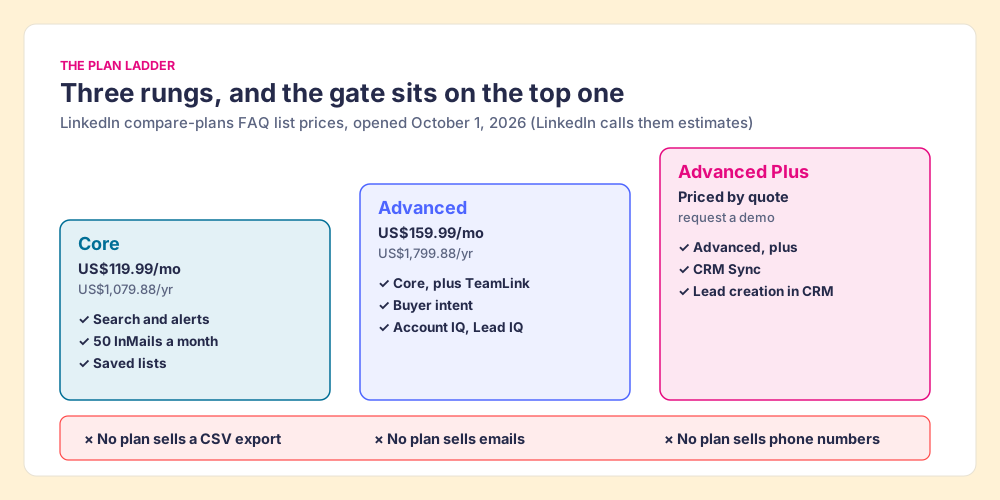
- The seat price. Core is US$119.99 a month or US$1,079.88 a year per license; Advanced is US$159.99 a month or US$1,799.88 a year, figures LinkedIn’s FAQ calls estimates that may exclude tax and promotions. A consulting co-founder on G2, Luca B., put it flatly in May 2026: “It is priced way too high, especially now that tons of other alternatives are on the market.”
- The missing gate. No CSV export on any plan. CRM Sync with Salesforce, Microsoft Dynamics, or HubSpot, and creating a lead in the CRM from a Navigator lead page, belong to Advanced Plus, which has no list price; the page says to “request demo for pricing.” Tim P., an owner and CEO, on G2 in February 2026: “I don’t like the inability to download lead lists to CSV or to CRMs without a third-party add-on.”
- The missing phone number. Navigator’s way to reach someone is InMail, 50 a month on every plan. It does not sell emails or mobiles.
- The 2,500 ceiling. A search shows “up to 2,500 lead results across 100 pages or 1,000 account results across 40 pages,” and the limit applies “both in Sales Navigator as well as LinkedIn.com” (LinkedIn Help).
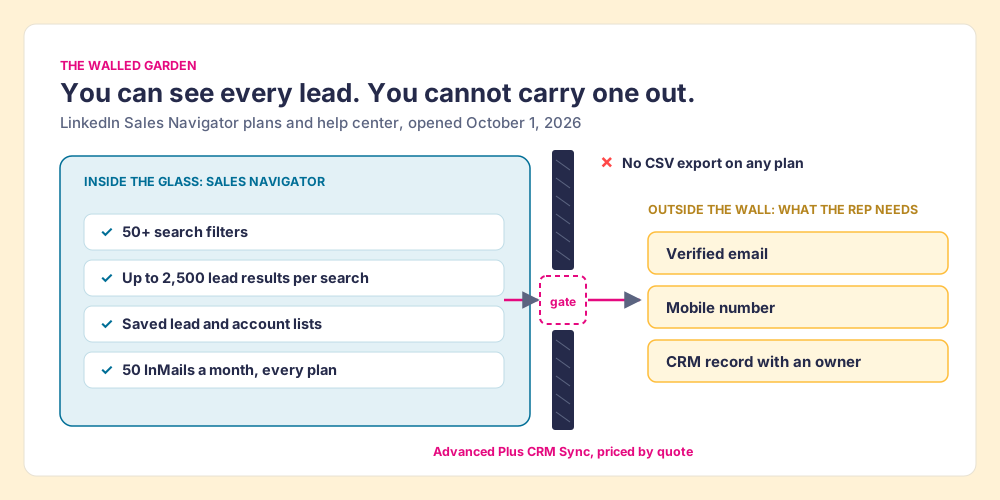
One of those four complaints is about the price, one about the size of the view, and two about the wall. Which one is yours decides which half of the market you should be shopping in.
Why trust this comparison?
Before Supered I started RevPartners, a HubSpot partner that did only sales implementations and reached HubSpot’s Elite tier in 13 months, so I have spent years watching reps carry contacts from LinkedIn into a CRM by hand. Supered grew out of that work and is the #1 sales enablement app on the HubSpot marketplace, with a 5.0 rating from 122 reviews and 6,000 installs; on G2 it holds 4.9 out of 5 from 81 reviews (October 1, 2026).
The disclosure: we make Prospector, it ranks first below, and it runs on top of Sales Navigator. We have no reason to talk you out of a Navigator seat, and a fair amount of reason to tell you when you should keep one. The weights are stated so you can flip them.
How we graded the Sales Navigator alternatives
The lens for these LinkedIn Sales Navigator alternatives is a mid-market or SMB team, ten to fifty reps, that prospects on LinkedIn and works in HubSpot or Salesforce. The weights serve that job: getting from a person you found to a contact your rep can call, in the CRM, and seeing which lists turn into pipeline.
| Criterion | Weight | What it rewards |
|---|---|---|
| Contact coverage | x3 | A verified email and mobile when the first source misses |
| Path to the CRM | x2 | One click into HubSpot or Salesforce, native or via a maintained integration |
| Search and list building | x2 | Finding the right people from scratch |
| Price for mid-market | x2 | Published prices, no platform fee, no quote-only floor |
| List-to-pipeline view | x1 | A leader can see which sourced lists got worked and closed |
Each criterion is scored 1 to 5 and multiplied by its weight, for a maximum of 50. Sales Navigator itself is the reference row. Weight search alone and it grades an A, which is the fair way to read its C+ below.
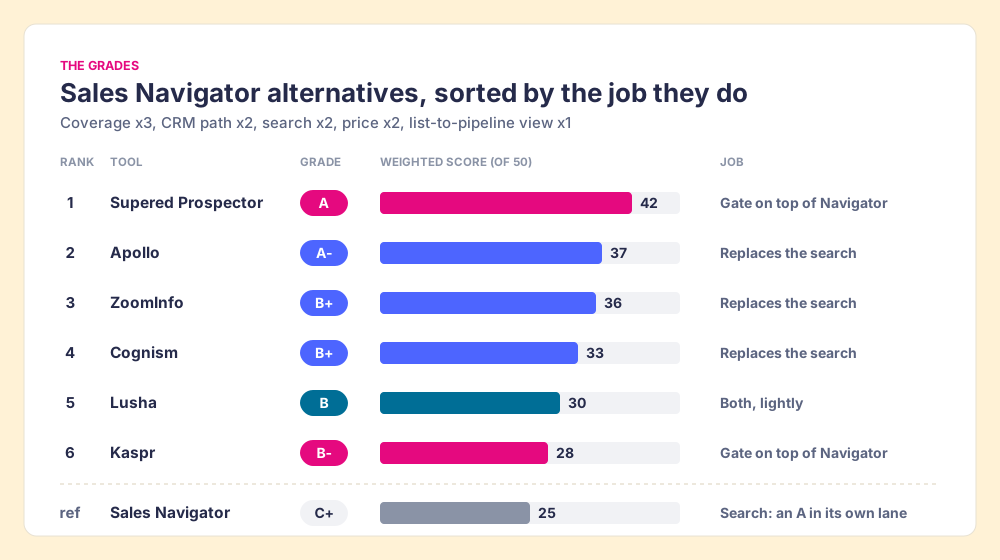
| Rank | Tool | Grade | Job | Best fit | CRM integration | Setup effort | Pricing (plan with the feature) | Reason to switch |
|---|---|---|---|---|---|---|---|---|
| ref | Sales Navigator | C+ | Search | Finding who works where | Native only on Advanced Plus | Low | Core $1,079.88/yr; Advanced Plus by quote | You keep it for search; the gate is the gap |
| 1 | Supered Prospector | A | Gate on top of Navigator | Teams that already have Clay | Native: HubSpot, Salesforce, Pipedrive | Medium (Clay tables first) | $45/rep/mo annual, plus your Clay plan | Clay’s 200+ providers on the Navigator lead, one click to CRM, lists you can follow to closed |
| 2 | Apollo | A- | Replaces the search | Small teams wanting data plus sequences | Native: HubSpot, Salesforce, Pipedrive | Low | Basic $49/user/mo annual | One seat for search, contact data, and outreach |
| 3 | ZoomInfo | B+ | Replaces the search | Enterprise, one-vendor depth | Native | High (contract, admin) | Quote; Vendr median $33,500/yr | Deepest single database, intent data |
| 4 | Cognism | B+ | Replaces the search | EMEA, phone-first teams | Native | Medium | Quote; Vendr median $32,750/yr | Phone-verified mobiles, GDPR posture |
| 5 | Lusha | B | Both, lightly | Small LinkedIn-first teams | Native | Low | Pro $52.45/mo billed yearly | Cheap phone credits, a free tier |
| 6 | Kaspr | B- | Gate on top of Navigator | Individuals and small teams | Export to HubSpot, Salesforce | Low | Starter from $49/user/mo | Runs on Navigator pages, unlimited B2B emails |
The scoring behind the grades, so you can argue with it:
| Tool | Coverage (x3) | CRM path (x2) | Search (x2) | Price (x2) | List view (x1) | Total |
|---|---|---|---|---|---|---|
| Sales Navigator (reference) | 1 | 2 | 5 | 3 | 2 | 25 |
| Supered Prospector | 5 | 5 | 3 | 3 | 5 | 42 |
| Apollo | 3 | 4 | 4 | 5 | 2 | 37 |
| ZoomInfo | 5 | 4 | 5 | 1 | 1 | 36 |
| Cognism | 4 | 4 | 4 | 2 | 1 | 33 |
| Lusha | 3 | 3 | 3 | 4 | 1 | 30 |
| Kaspr | 3 | 3 | 2 | 4 | 1 | 28 |
Two scores need defending. Prospector’s coverage of 5 is Clay’s waterfall coverage, credited to Clay, and its search score of 3 is low on purpose: it has no index of its own and relies on Navigator, LinkedIn, the company’s site, or Clay tables your GTM engineer builds. Navigator’s coverage of 1 says nothing about the quality of its profiles; it scores the email and the mobile, which are not for sale inside it.
Current corporate status, checked between September 25 and October 1, 2026: LinkedIn is owned by Microsoft. Apollo is independent. ZoomInfo is public (Nasdaq: GTM) and on October 1, 2026 announced Agent Teams, built on its acquisition of DoubleO.ai (ZoomInfo press release). Cognism is independent and has owned Kaspr since April 2022, so the two share data infrastructure. Lusha is independent. Surfe is not scored here.
Which job are you replacing: the search or the gate?
The sorting question is simple once you see a rep’s morning as two walks. The first walk is inside the garden: who runs RevOps at a 200-person logistics company in Ohio, who changed jobs last month, who knows someone on my team. Navigator is excellent at that walk. The second walk is from the garden to the desk: the verified email, the mobile, the record in HubSpot with the right owner. Navigator barely does that walk at all below Advanced Plus.
The Bridge Group’s 2025 SDR report, 351 B2B companies, puts the median SDR at 112 activities a day: 44 phone, 41 email, 19 LinkedIn, and 8 text or other (Bridge Group, 2025). Navigator serves the 19 directly. The 85 calls and emails each need a number or an address that Navigator does not hand over.
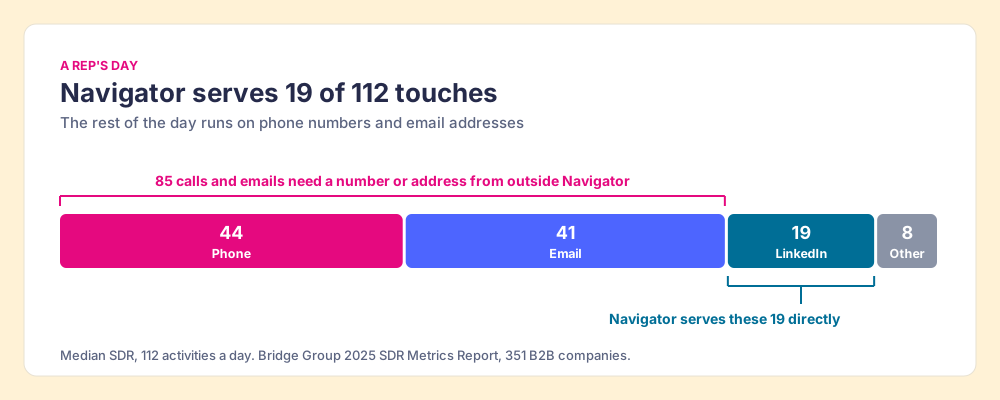
So the market splits cleanly.
- A different garden. Apollo, ZoomInfo, and Cognism replace the search with their own database and sell the contact data inside it. You trade LinkedIn’s member-written profiles for a vendor’s index, and you get an export button.
- A gate in the wall. Kaspr, Lusha’s extension, and Prospector work on the Navigator page you already have open and fetch the email and phone from outside. You keep the view and add the walk to the desk.
- LinkedIn’s own gate. Advanced Plus adds CRM Sync and lead creation. It is the cleanest gate, priced by quote, and it still sells no phone numbers.
If your complaint is the price of the seat, shop the first group. If your complaint is the wall, shop the second, and keep the garden.
Supered Prospector: a gate with Clay’s waterfall behind it
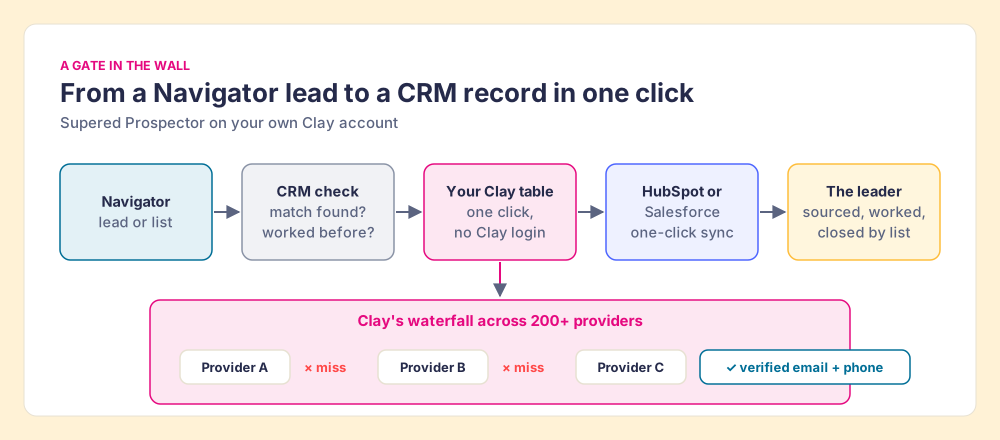
A rep working a Navigator list wants three things before they dial: the right number, a check that no teammate already owns this person, and the lead sitting in the CRM where the follow-up will happen. Prospector does those three from the Navigator page.
- One click to Clay’s waterfall. The rep presses a button on the lead, and your Clay table runs. Clay’s waterfall “check[s] multiple providers to return the most verified emails (lower bounce rate) and phone numbers (higher connect rate)” (Clay), across what Clay’s homepage calls “200+ providers in one place” (opened October 1, 2026). Leads go from Sales Navigator straight into your Clay table.
- The CRM check first. On the profile, the rep sees the matching HubSpot, Salesforce or Pipedrive record and whether the person was already worked in the past, before they add a duplicate or step on a teammate.
- Whole lists, and custom workflows. A rep can push a saved list into a Clay workflow, run any custom Clay workflow your GTM engineer built, and pull a buying committee tuned to your titles and seniority.
- One click to the CRM. Ops sets the field mapping once; every sync after that is one click to HubSpot or Salesforce. Reps never log into Clay.
- Lists you can follow. A leader sees who sourced which list, which lists got worked, and which ones closed, so coaching starts from what is converting.
Supered does not bring its own database. It brings Clay’s waterfall, which is every database, routed. We chose Clay as our only data provider for that reason, and it is why Clay is not a row in the tables above: Clay is the row that contains the other rows. Clay governs the data. Supered governs the motion.
Prospector also runs from a plain LinkedIn profile, a company’s website, and a HubSpot, Salesforce or Pipedrive record. That matters for the seat count. A rep who builds lists from scratch needs Navigator’s search. A rep who works a named account list starts from the company’s site or the CRM record and may not need a Navigator seat at all.
The price is $45 per rep per month, billed annually, from one user, on its own plan (Prospector pricing). It runs on your Clay account and your Clay credits. On list prices, Clay Growth ($5,940 a year) plus Prospector for 10 reps ($5,400) is $11,340 a year. Keep Navigator Core for the same ten reps ($10,798.80) and the whole stack is $22,138.80, which is the full cost of keeping the garden and adding the gate.
Choose something else if:
- No Clay account. Prospector needs one. Without Clay, Kaspr or Lusha adds contact data to Navigator with less setup, and Apollo replaces the stack outright.
- One seat, mostly email. Apollo’s $49 Basic seat or Kaspr’s free plan covers a founder for less.
- Outreach drafted by AI. Prospector does not write or send emails. It hands the lead to your CRM and your sequencer.
The other Sales Navigator alternatives, one at a time
- Apollo. The best pick for a team that wants to leave Navigator entirely. Its own index claims “240M contacts & 30M companies,” and Basic, Professional, and Organization run $49, $79, and $119 per seat per month on annual billing, with 30,000 credits a year on Basic at 1 credit per email and 8 per phone (apollo.io/pricing, opened September 25, 2026). G2 shows 4.7 from 9,690 reviews on Apollo’s page. Search, data, sequences, and a dialer in one seat. The tradeoff is the index: Apollo’s profiles are assembled by Apollo rather than written by the members, and Apollo’s own company page disappeared from LinkedIn in March 2025. More in the Apollo alternatives grading.
- ZoomInfo. The deepest single database on the list, “more than 100 million companies, 500 million contacts” by its own August 2026 earnings release (SEC 8-K exhibit), with intent data and a search that stands without Navigator. Quote-only, with a Vendr median of $33,500 a year across 1,573 purchases (Vendr). On October 1, 2026 it launched Agent Teams on the DoubleO.ai acquisition, so its direction is AI agents running GTM plays. A real Sales Navigator replacement for a 200-seat team; a heavy one for ten reps.
- Cognism. If your reps dial Europe, Cognism’s phone-verified mobiles are the reason to pick it, and its search stands on its own. Quote-based, with a Vendr median of $32,750 on 94 purchases. Flip this page’s weights from price to EMEA mobiles and Cognism moves to second. Detail in the Cognism alternatives page.
- Lusha. The lowest-friction start, with a light search and a Chrome extension that works on LinkedIn. The free plan gives 40 credits a month at 1 credit per email and 5 per phone (lusha.com/pricing, confirmed October 1, 2026); Pro is $52.45 a month billed yearly for 7,200 credits a year (September 25, 2026 capture). One database, and its reporting stops at the reveal.
- Kaspr. The closest thing to a pure gate on this list. Its pricing page says “Use Kaspr on top of Sales Navigator” on the Starter plan, which starts at $49 per user per month on the dollar toggle with unlimited B2B email credits, 100 phone credits a month, and up to 12,000 exports a year (kaspr.io/pricing, opened October 1, 2026). Owned by Cognism, with which it shares data infrastructure. It is the right pick for one rep without Clay. More on Kaspr alternatives.
Three options sit outside the grading. The first is Navigator Core itself: if a team on Advanced uses neither TeamLink nor buyer intent, dropping to Core saves US$720 a seat a year at list (US$1,799.88 against US$1,079.88). The second is Clay on its own, for a team with a GTM engineer. Clay’s homepage lists “Find people data” and “Find company data” as starting points, with examples such as “Find companies with 30+ sales reps, $10M+ in revenue, and a free trial button on their website.” That builds lists from scratch without Navigator, though it is built by the GTM engineer, and the reps run what they built. The third is the LinkedIn Sales Navigator free alternative a founder can assemble: LinkedIn’s ordinary search (the same 2,500-result limit applies there), plus Kaspr’s free plan (15 B2B email credits, 5 phone credits, and 5 direct email credits a month) or Lusha’s (40 credits a month). It covers one person’s week. A team dialing 44 times a day per rep empties it before lunch on day one.
What does Sales Navigator cost against its alternatives for a 10-rep team?
List prices for ten seats for a year, from the pages above. They do not buy the same things, so the right-hand column says what you get.
| Option | 10 reps, per year | What it buys |
|---|---|---|
| Apollo Basic | $5,880 | Search, 30,000 credits per seat, sequences |
| Sales Navigator Core | $10,798.80 | Search, 50 InMails a month per seat; no emails, phones, or export |
| Clay Growth + Prospector | $11,340 | Contact data across 200+ providers via Clay, one-click CRM sync; no search index |
| Sales Navigator Advanced | $17,998.80 | Core plus TeamLink, buyer intent, Account IQ and Lead IQ |
| Navigator Core + Clay Growth + Prospector | $22,138.80 | LinkedIn’s search plus the gate |
| Cognism (Vendr median contract) | $32,750 | Database with phone-verified mobiles |
| ZoomInfo (Vendr median contract) | $33,500 | Database, intent, the enterprise contract |
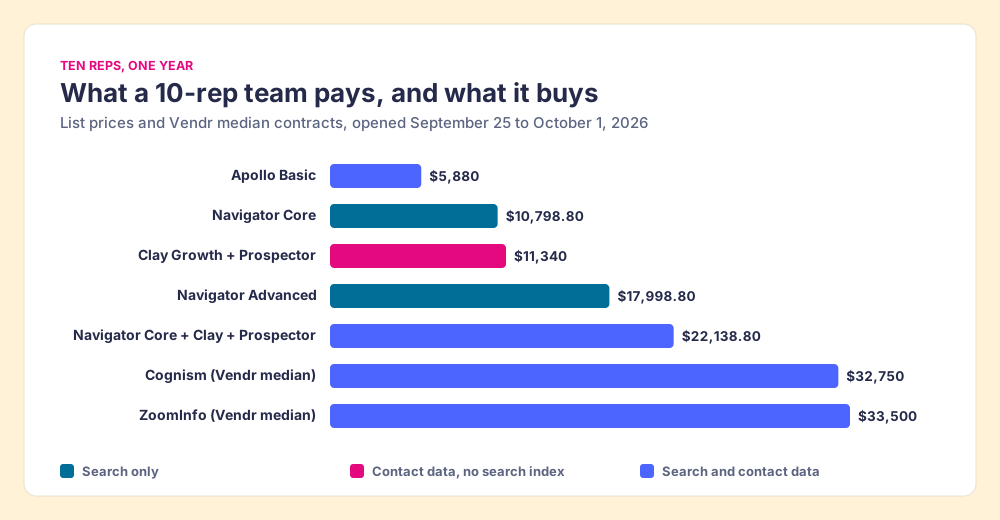
Two readings of that table matter. Apollo is the cheapest way to get both jobs in one seat, and that is why it ranks second. And a Navigator Core seat plus the gate costs less than either quote-based database at the median, while keeping the profiles your reps already trust. A ten-rep team chooses between those two answers.
Is it safe to use a Chrome extension on Sales Navigator?
Ask it of any tool on this page, ours included. Our answer for Prospector: it works within LinkedIn’s terms and does not copy search results in bulk, and the contact data comes from Clay’s waterfall on your own Clay account. LinkedIn’s User Agreement, section 8.2, says members agree not to “develop, support or use software, devices, scripts, robots or any other means or processes (such as crawlers, browser plugins and add-ons or any other technology) to scrape or copy the Services, including profiles and other data from the Services” (LinkedIn User Agreement, effective November 3, 2025). In March 2025, Apollo’s and Seamless.AI’s company pages disappeared from LinkedIn, and MarTech reported that both sold Chrome extensions salespeople used to pull LinkedIn data (MarTech, May 8, 2025).
This page does not rule on any vendor’s compliance. The practical step is to read section 8.2 yourself and ask each vendor how a lookup works: what it reads from the page, where the contact data comes from, and whether anything is copied in bulk. Prospector’s contact data comes from the providers in your Clay account, through Clay’s waterfall. The full mechanics of each route are in how to find someone’s email on LinkedIn.
Which Sales Navigator alternative should you choose?
Name the job, and the choice resolves.
- Sales Navigator itself. The pick when the complaint is not the wall and the team uses TeamLink, intent, and alerts. Drop Advanced to Core if those go unused.
- Apollo. The pick when the complaint is the price and the team wants search, data, and sequences in one seat.
- ZoomInfo or Cognism. The pick for a large team buying one deep database, or one that dials Europe.
- Kaspr or Lusha. The pick for one or two reps who want a gate on Navigator without Clay.
- Supered Prospector. The pick for a team that already has Clay and prospects in Navigator: keep the garden, add a gate with 200+ providers behind it, and follow every list to closed.
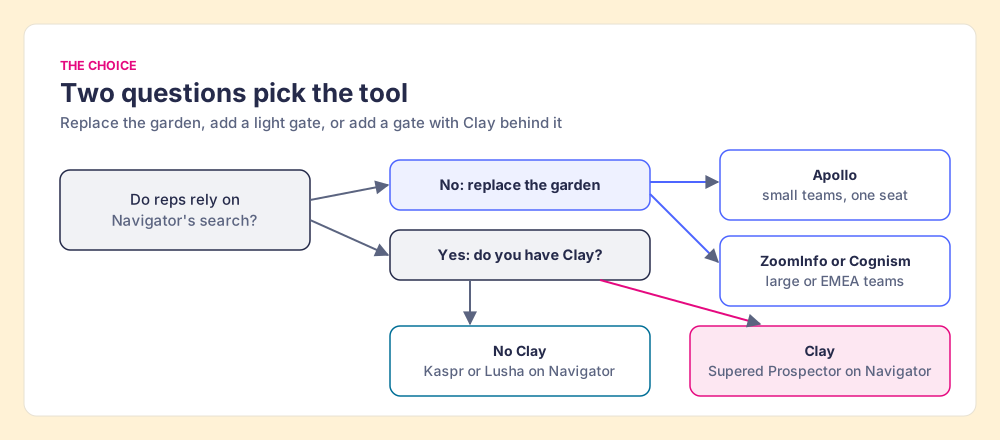
Our recommendation follows from the reviews more than from our product. Two of the four reasons buyers give for leaving sit at the wall, one is the seat price, and the search behind the glass is the part that holds a 4.4 on G2. So if your reps like the view, do not buy a different garden. Keep Navigator, drop to Core if Advanced features go unused, and put a gate in the wall. If you have Clay, make that gate Prospector, because then the gate leads to every provider Clay can reach and the list stays visible all the way to closed. If you do not have Clay and want one tool and one bill, Apollo is the LinkedIn Sales Navigator alternative we would buy.
Still deciding whether to keep the seat at all? Is Sales Navigator worth it runs the math by role, and the head-to-heads go deeper on Apollo vs LinkedIn Sales Navigator, ZoomInfo vs LinkedIn Sales Navigator and LinkedIn Sales Navigator vs Cognism.
The next problem after the gate is getting the rest of LinkedIn out cleanly, your own connections included. How to export LinkedIn contacts walks through what LinkedIn lets you take and what it holds back, and the LinkedIn prospecting guide covers what to do with the lead once it is in your CRM. Or watch the gate open on your own Clay account in a Prospector demo.
Frequently asked questions
What are the best Sales Navigator alternatives in 2026?+
How much does LinkedIn Sales Navigator cost in 2026?+
Can you export leads from Sales Navigator to a CSV or a CRM?+
Is there a free LinkedIn Sales Navigator alternative?+
Does Supered Prospector replace Sales Navigator?+
Do I need Clay to use Supered Prospector?+
Your process, running itself.