The Cognism Chrome Extension in 2026: A Free Key Card to a Quote-Only Room
What the Cognism Chrome extension does on LinkedIn, company sites, and the CRM, which Cognism plan it needs, what that plan costs, how to install it, the limits reviewers hit, how Kaspr fits, and the alternatives for teams that already have Clay.
The Cognism Chrome extension is Cognism's free browser add-on that shows a seat holder's Cognism emails, mobiles, and company data on LinkedIn, Sales Navigator, company websites, and CRM records; it shows nothing without a paid Cognism seat.
The Cognism Chrome extension is Cognism’s free browser add-on that shows a seat holder’s Cognism emails, mobile numbers, and company data on LinkedIn, Sales Navigator, company websites, and HubSpot or Salesforce records, and exports them to the CRM. It shows nothing without a paid Cognism seat, and the seat is quote-only. The short answer, depending on what you already pay for:
- The Cognism extension itself. The right install if your company already has Cognism seats, especially for reps dialing Europe.
- Supered Prospector. For teams that already have Clay: Clay’s waterfall across 200+ providers on the same pages, at $45 per rep per month billed annually.
- Kaspr. Cognism’s own LinkedIn extension for small teams, with published prices from $49 a seat.
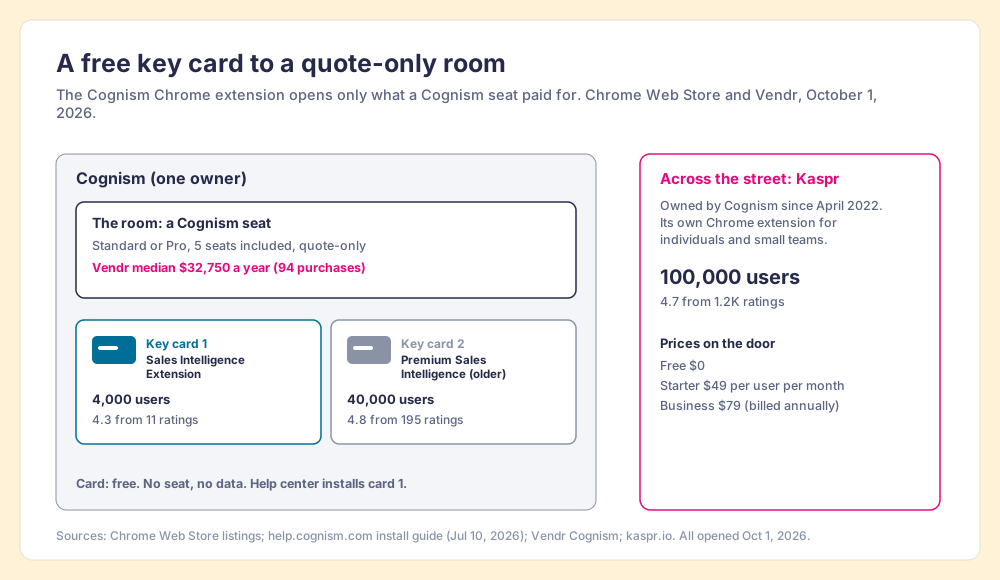
A hotel key card costs the hotel almost nothing and the guest nothing at the desk. A guest shops for the room, and the card is how the room lets you in. The Cognism Chrome extension is a key card. It installs for free in under a minute, and then it opens exactly the floors your Cognism contract paid for: the emails, the phone-verified mobiles, the intent signals on Pro. A rep without a seat who installs it has a card that opens nothing.
Most questions about the Cognism extension are questions about the room. So this page answers both, from Cognism’s own help center, its pricing page, the Chrome Web Store, and Vendr’s contract data, all opened on October 1, 2026. It also covers a fact the store makes plain and Cognism’s pages do not: there are two Cognism extensions in the lobby, and a sister hotel across the street with prices on the door.
| Cognism Chrome extension at a glance (October 1, 2026) | What the sources say |
|---|---|
| Listing to install | Cognism - Sales Intelligence Extension (4,000 users, 4.3 from 11 ratings, v2.0.237, updated September 24, 2026) |
| Older listing still live | Cognism - Premium Sales Intelligence (40,000 users, 4.8 from 195 ratings, v4.0.34, updated September 4, 2026) |
| Works on | LinkedIn, Sales Navigator, LinkedIn Recruiter, company websites, Salesforce, HubSpot, Outreach |
| Plan needed | Any Cognism Sales Prospecting seat (Standard or Pro, 5 seats included) |
| Price | Extension free; seats quote-only; Vendr median $32,750 a year across 94 purchases |
| Meter | 1 credit = 1 revealed contact; viewing a contact you already revealed is free |
| Same owner, cheaper door | Kaspr (Cognism since April 2022), from $49 per user per month billed annually |
What does the Cognism Chrome extension do?
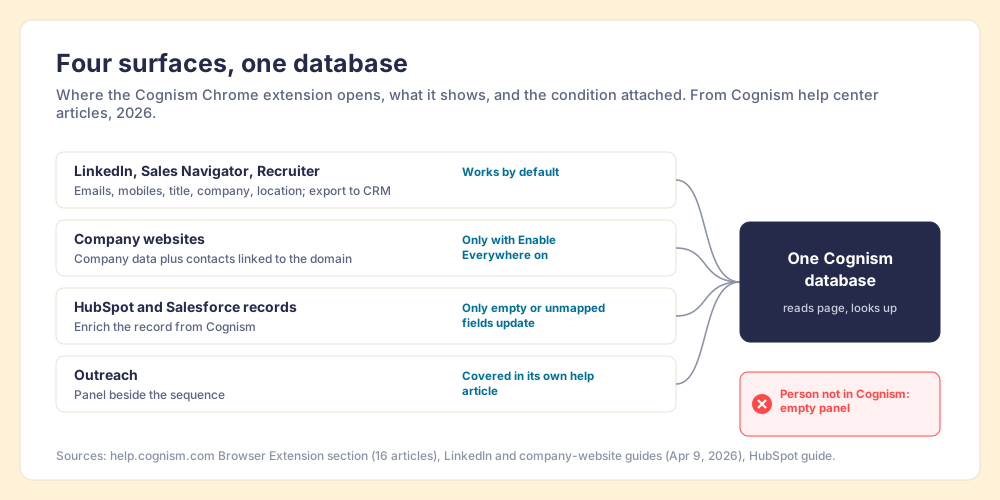
It puts a side panel next to the page a rep is already on and fills it with what Cognism knows about the person or company on that page. Cognism’s help center has sixteen articles on the browser extension, and they describe four surfaces (Cognism help center, Browser Extension).
- LinkedIn and Sales Navigator. On a profile, the panel shows email addresses, mobile numbers, job title, company, and location. On a company page it shows headcount, industry, headquarters, revenue range, and technologies. The rep can export a contact or company straight to the CRM after picking the fields (help article updated April 9, 2026). LinkedIn Recruiter gets its own article, so recruiting teams use it too.
- Company websites. With the Enable Everywhere setting on, the extension reads the domain and shows company-level data plus the associated contacts with names, titles, departments, and seniority. Without that setting it appears only on LinkedIn and Sales Navigator. It shows contacts only if Cognism has people linked to the domain.
- HubSpot and Salesforce records. The panel sits beside the record and lets the rep “enrich existing HubSpot records with Cognism data.” The rule on overwrites is conservative: “Only empty or unmapped fields are updated, depending on your CRM configuration.”
- Outreach. A separate article covers the panel inside Outreach, which matches the store listing’s claim of integrations with “Salesforce, HubSpot, Outreach, Salesloft and more.”
The current store listing adds what the panel layers on top of contact data: “intent signals, technographics, hiring trends and funding events,” “AI-driven recommendations” on who to target next, and data “cross-referenced against 15 international Do Not Call (DNC) lists.” Cognism’s security article says the extension “reads page content to identify companies and people” and “displays data already available in your Cognism account,” and does not store website content on the device (published May 7, 2026). In plain terms, the extension does not scrape a number off LinkedIn. It recognises who is on the screen and looks them up in Cognism’s database.
That matters for what it can and cannot find. The panel is a window onto one database. When Cognism has the person, the rep gets the number in one click. When Cognism does not, the panel is empty, and the help center’s troubleshooting page says so in five words: “Some profiles lack available data” (updated March 20, 2026).
Which Cognism plan includes the Chrome extension?
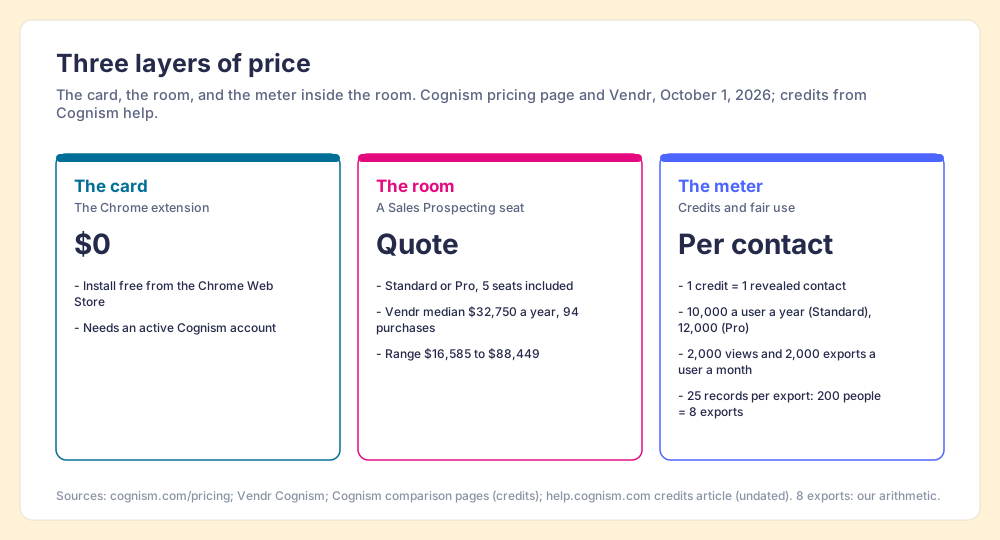
Any Cognism Sales Prospecting seat. Cognism’s install guide lists three requirements: Chrome (or Edge), “an active Cognism account,” and permission to install extensions on the device (How to install the Cognism Chrome extension, updated July 10, 2026). The pricing page does not sell the extension as a line item. It sells two packages, Standard (“For teams that need core prospecting workflows · 5 seats included”) and Pro (“advanced prospecting workflows · 5 seats included”), plus CRM Enrichment as an add-on (cognism.com/pricing, opened October 1, 2026).
The package decides what the key card opens. Pro adds “higher-quality, accurate mobile data,” on-demand mobile verification, and intent data from Bombora’s Company Surge, where “administrators can select up to 12 intent topics from a library of over 11,000 options.” A Standard seat sees emails, mobiles, job history, technology usage, and the hiring, funding, and job-change signals. Cognism’s own comparison pages put the credit allowance at 10,000 credits per user a year on Standard and 12,000 on Pro, and the pricing page says the same credits work “across the prospecting platform, Enrich, and API.”
One naming note, because it confuses buyers in this exact search. Cognism’s help center calls its web app “Prospector,” and Vendr’s Cognism listing shows a product called “Prospector” too. Supered also makes a product called Prospector, covered further down. They are different products from different companies; on this page, “Supered Prospector” always means ours.
How much does the Cognism Chrome extension cost?
The extension is $0. The seat it unlocks has no published price. Vendr’s Cognism page, opened October 1, 2026, shows a median buyer paying $32,750 a year across 94 purchases, a range from $16,585 to $88,449, and 26% average savings off the first quote (Vendr, Cognism). Two of Vendr’s buyer notes show where the discounts come from: “We secured a 44% discount for a 1yr agreement because we made it competitive with our ZoomInfo renewal,” and “We secured a 28% discount by leveraging Cognism’s end-of-quarter.”
The meter inside the seat is the credit. Cognism’s pricing FAQ: “one credit is used each time a contact record is revealed. Once a contact has been redeemed, your team can continue using that record throughout the contract. A credit is only used again if that contact changes jobs.” So a rep who reveals a prospect from the extension on LinkedIn and opens the same person later in Salesforce pays once.
There is a second set of limits most pricing pages leave out. A Cognism help article on credits, which carried no date when we opened it, sets fair-usage limits per user: “Monthly contact view limit per End User: 2,000 individual records,” “Export view limit per End User: 25 individual records at a time,” and “Monthly export limit per End User: 2,000 individual records” (Cognism help, Prospector, Chrome Extension, Enrich, and Credits). The monthly ceilings are generous for one rep’s dialing. The Bridge Group’s 2025 SDR report puts the median SDR at 44 dials a day (Bridge Group, 2025), about 920 a month on our arithmetic, under half the 2,000 export ceiling even if each dial were a fresh contact. The batch size is the limit reps feel: a 200-person account list leaves in eight exports of 25. A mid-market SDR wrote on G2 in July 2026 that the dislike was the “restriction on saving and downloading contacts in smaller batches, such as the 25-contact limit.”
The Cognism pricing page decodes the quote in full: the platform fee, the seat meter, and the tier renames from Platinum and Diamond to Grow and Elevate to Standard and Pro.
How do you install the Cognism Chrome extension?
Cognism’s install and setup guides (updated July 10 and May 7, 2026) give the steps. In order:
- The right listing. Search the Chrome Web Store for “Cognism - Sales Intelligence Extension,” the one the install guide names, and click Add to Chrome, then Add extension. On Microsoft Edge, allow extensions from other stores the first time.
- The pin. Open the Extensions menu and pin Cognism so the icon stays in the toolbar.
- The sign-in. Click the icon and log in with your Cognism credentials. No seat, no data.
- The settings. Open Settings in the panel. Switch on Enable Everywhere if you want it on company websites, choose Auto-open, and pick the left or right side of the screen.
- The CRM link. CRM configuration lives in the Cognism platform, set by whoever administers it. The troubleshooting guide’s first fix for failed exports is to “verify CRM integration setup in Sales Companion.”
- The test. Open a LinkedIn profile, click the icon, and confirm data appears.
The setup takes minutes. The CRM link is the part that takes a conversation with an admin, and it decides whether the export button works.
What are the limits of the Cognism extension?
Five, and each comes from Cognism’s own pages or its reviewers.
- One database behind the panel. The extension can only show what Cognism holds. A mid-market reviewer on G2 in July 2026: “Coverage also thins out noticeably outside Europe; searching for contacts in APAC or more niche industries yields way fewer verified phone numbers” (G2, Cognism reviews). Vendr’s listing records the workaround buyers use, “using ZoomInfo in tandem with Cognism,” which is a second contract.
- Batch exports of 25. The fair-usage line above, felt most when building an account list.
- The credit pace. A mid-market SDR wrote in May 2026 that “credits run out fast if you’re doing high-volume outreach.”
- Load time. An account executive wrote on G2 that “the extension sometimes takes a while to load on my LinkedIn.”
- Two listings. The store showed both Cognism extensions on October 1, 2026, the older one with ten times the users. Cognism’s help center installs the newer one and, on the pages we opened, says nothing about the older one. A rep who searches the store and picks the bigger number may install the listing the help center no longer documents.
None of these are reasons to drop Cognism if Cognism is the right room. Its G2 page held 4.5 out of 5 from 1,371 reviews on October 1, 2026, and the extension draws praise in the same reviews; one SDR wrote in September 2026 that “the Chrome plugin is really fast.” The limits describe the shape of the product. One database, one meter, a panel that opens on the pages Cognism supports.
How does Kaspr relate to the Cognism Chrome extension?
Kaspr is the sister hotel across the street. Cognism bought it in April 2022, and Kaspr’s about page says “Kaspr is part of Cognism” and calls Kaspr “a prospecting tool for individual contributors and SMBs” (kaspr.io/about-us). It is its own Chrome extension, with its own listing: 100,000 users and 4.7 from 1.2K ratings on October 1, 2026, last updated June 15, 2026.
The difference is the door. Kaspr prints its prices. Starter is $49 per user per month billed annually ($65 monthly) with unlimited B2B emails under fair use and 100 phone credits a month; Business is $79 ($99 monthly) with 200 phone credits; Free is $0 with 5 phone credits a month (kaspr.io/pricing, opened October 1, 2026). Cognism’s door has a doorman and no price list, and five seats are the smallest room.
So the choice between the two extensions is a choice of hotel, inside one company. A team of three reps working LinkedIn by email is Kaspr’s guest. A team of twenty dialing EMEA with a compliance officer reading the contract is Cognism’s. And a buyer comparing the two is negotiating with one owner on both sides; the Kaspr alternatives page works Kaspr’s pricing out to the cost of one phone number.
Why trust this comparison?
I started RevPartners, a HubSpot partner that did only sales implementations, sold roughly twice as much Sales Hub as any other partner, and reached Elite tier in 13 months. Supered came out of that work and is the #1 sales enablement app on the HubSpot marketplace, at 5.0 from 122 reviews there and 4.9 from 81 on G2 (both checked October 1, 2026). That is also the disclosure. We make Supered Prospector, and it sits first among the alternatives below for teams that already have Clay. The grades state their weights, so you can flip them.
What are the alternatives to the Cognism Chrome extension?
The lens: a mid-market or SMB team, ten to fifty reps, that wants contact data reps use on the page they are already on, and a leader who can see which lists turn into pipeline. Each criterion is scored 1 to 5 and weighted, out of 50, with the same per-vendor scores as the Cognism alternatives page, so the two read together. Weights: coverage of the contact you need x3, rep-side delivery x2, price structure for mid-market x2, what the leader sees after the export x2, bundled outreach x1.
| Rank | Tool | Grade | Score | Best fit | CRM integration | Setup effort | Pricing (plan with the extension) | Reason to switch from Cognism’s extension |
|---|---|---|---|---|---|---|---|---|
| 1 | Supered Prospector | A | 44 | Teams that already have Clay | Native (HubSpot, Salesforce, Pipedrive) | Under a week on an existing Clay account | $45 per rep per month, billed annually, plus your Clay plan | 200+ providers per lookup, no charge for a miss, lists you can follow to closed |
| 2 | Apollo | A- | 36 | Small teams wanting data, sequences, and a dialer in one | Native (HubSpot, Salesforce) | A day | $49 per seat per month, billed annually | Posted price and outreach in the same plan |
| 3 | Lusha | B+ | 29 | A like-for-like LinkedIn extension outside the Cognism group | Native (HubSpot, Salesforce) | Minutes | Posted plans | A second database from another owner |
| ref | Cognism extension | B | 26 | EMEA, phone-first, compliance-led teams | Native (Salesforce, HubSpot, Outreach) | Minutes for the extension, weeks for the contract | Any seat; Vendr median $32,750 a year | Stay if phone-verified EMEA mobiles are the job |
| 4 | Kaspr | B- | 25 | Individuals and small teams on LinkedIn, email-first | Native (HubSpot, Salesforce, Pipedrive, Zoho) | Minutes | $49 or $79 per user per month, billed annually | Same owner, published prices, no 5-seat floor |
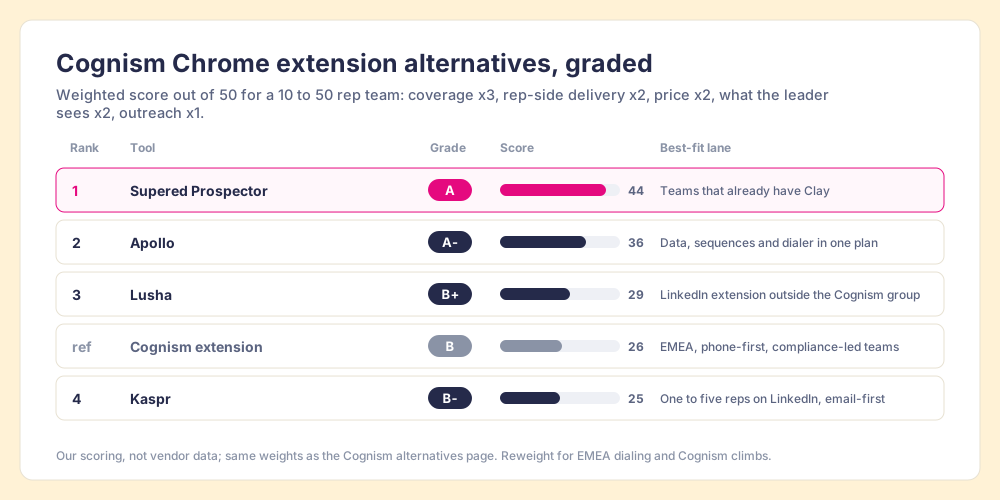
Cognism’s 26 breaks down as coverage 4, rep-side delivery 3, price 2, what the leader sees 1, outreach 2. The coverage 4 is earned, with phone-verified mobiles and DNC screening that a European dialing team pays for on purpose. The price 2 is the quote with a 5-seat floor. Prospector’s coverage score is Clay’s waterfall coverage, credited to Clay, and its outreach score is the lowest on the card on purpose: it has no sequencer, dialer, or drafting.
Supered Prospector, for teams that already have Clay
A key card on this page opens one building. When the room is full, meaning the database has no mobile for the person on screen, the rep’s options are to give up or to buy a second contract with another hotel. Clay works like a booking desk that phones the hotels in order until one has the room. “Clay’s signature data waterfalls check multiple providers to return the most verified emails (lower bounce rate) and phone numbers (higher connect rate)” (Clay, rep prospecting), across “200+ providers” under one contract, and “if an enrichment returns no result, you’re not charged Data Credits or Actions” (clay.com/pricing, opened October 1, 2026). A full hotel costs nothing; the desk moves on to the next one.
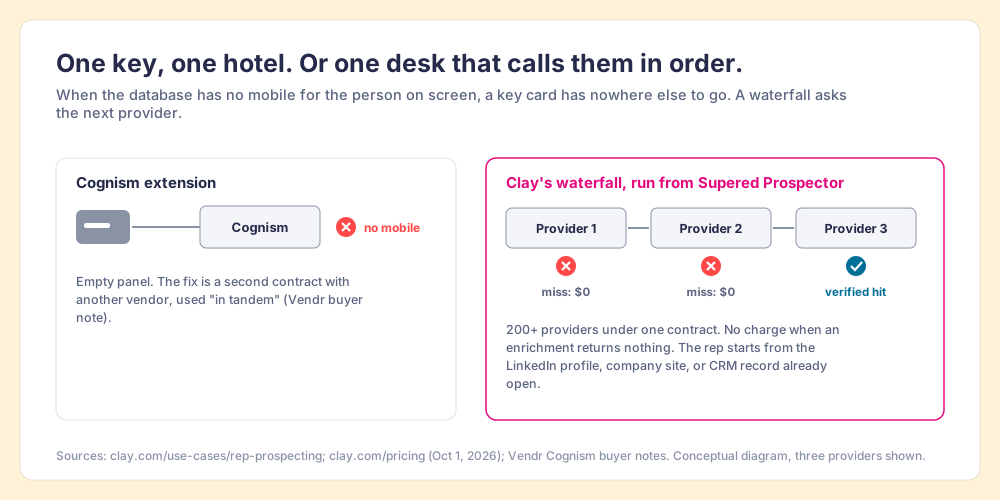
The hotel comparison stops working at one point. A booking desk in the GTM engineer’s office does a rep no good while the rep is on a LinkedIn profile with a buyer’s name on the screen. Prospector fills that gap. It does not bring its own database. It brings Clay’s waterfall, which is every database, routed, into the rep’s browser, on the team’s own Clay account and with no Clay login for reps. Clay governs the data. Supered governs the motion.
- Lookups from the page they are on. A LinkedIn profile, a Sales Navigator list, a company website with company research alongside, or a HubSpot, Salesforce, or Pipedrive record. The same pages the Cognism panel covers, minus Outreach and Recruiter.
- A list the rep builds. The rep assembles it from those sources, the waterfall fills emails and phones, and a buying-committee lookup returns the titles, departments, and seniority the team set.
- Context before the first touch. On a LinkedIn profile, the rep sees the matching CRM record and whether the prospect was already worked in the past.
- One click to the CRM, or into a workflow. Field mapping is set once; a whole list can be pushed into any custom Clay workflow the GTM engineer built.
- Lists the leader can follow. The team’s process applies to worked prospects, so the manager sees which sourced lists were worked and which closed, and coaches from what is converting.
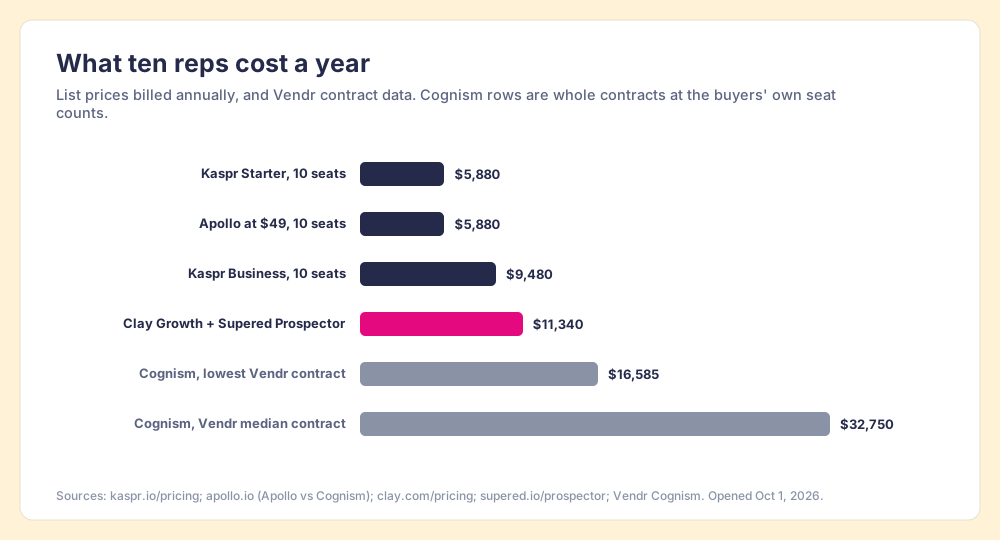
The arithmetic, since a booking desk is not free either. Clay’s Growth plan lists at $495 a month, $5,940 a year, with CRM sync built in. Prospector is $45 per rep per month billed annually, from one rep (Prospector). Ten reps on both come to $11,340 a year. Ten Kaspr Starter seats are $5,880 and ten Apollo seats at $49 are the same. A Cognism contract at Vendr’s median is $32,750, and the cheapest Vendr recorded was $16,585, for whatever seat count those buyers held.
Choose something else if you do not have Clay. Prospector runs on the customer’s Clay account and does nothing without one, and someone has to build the waterfall; Clay itself says “GTM engineers build on Clay.” Choose something else, too, if your reps dial Europe all day and your counsel wants a notified, DNC-screened database in the contract. Cognism earned that lane, and Cognism vs ZoomInfo covers it. The Clay Chrome extension page sorts Clay’s own intake extension from the rep-side kind, and the sourcing use case shows the loop from profile to closed.
Apollo, Kaspr, and Lusha, for teams without Clay
- Apollo. The pick when the job is data plus sequences and a dialer in one tool with a published price: $49 per user per month on annual billing, from Apollo’s own comparison page (Apollo vs Cognism, October 1, 2026). Its extension held 4.7 in the Chrome Web Store the same day. Size the credits before the seats. Cognism vs Apollo puts the two side by side, and the Apollo Chrome extension page covers its panel.
- Kaspr. The pick for one to five reps who work LinkedIn by email, from $49 a seat, with the same owner as Cognism and no 5-seat floor.
- Lusha. The pick when you want a LinkedIn extension from an owner outside the Cognism group. The Lusha Chrome extension page has its plans and limits.
ZoomInfo’s extension is the enterprise option, and the ZoomInfo Chrome extension page covers it. Teams leaving Exportly, which now calls itself Frontier, will find the Clay-based options compared in the Exportly alternatives page.
Should you install the Cognism Chrome extension?
Install it if your company already pays for Cognism. The key card is free, it opens the room you bought on the pages your reps live on, and skipping it means reps copy numbers out of a web app by hand. Install the Sales Intelligence Extension, the listing Cognism’s help center documents, switch on Enable Everywhere, and have your admin link the CRM before anyone tries to export.
If you are shopping, the extension is not the purchase. The seat is, and the useful questions are about the seat: how many, which package, how many credits, and whether one database covers the regions your reps call. The ways forward:
- A Cognism contract. For an EMEA team that dials for a living and wants phone-verified mobiles with DNC screening built into the vendor’s process. Negotiate with a competing quote on the table; Vendr’s buyers report 28% to 44% that way.
- Kaspr. For a small team that wants the Cognism family’s LinkedIn workflow at a printed price.
- Apollo. For a small team that wants the outreach in the same plan.
- Supered Prospector. For a team that already has Clay.
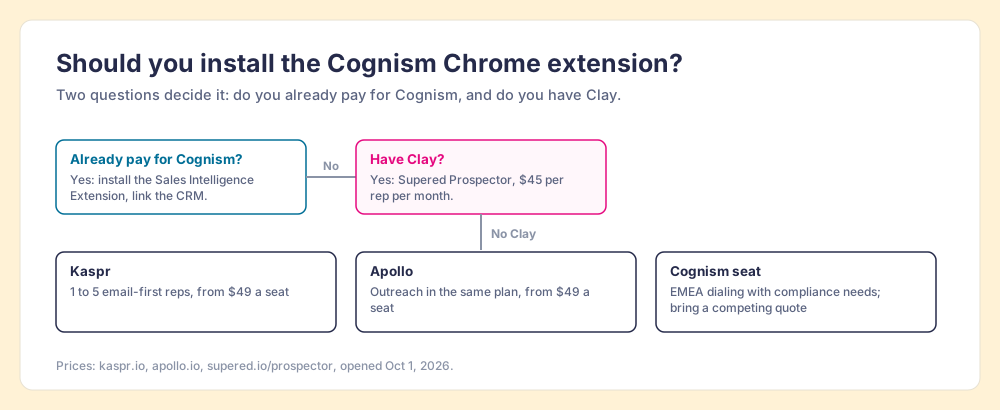
What we recommend follows from one fact about your stack. If you have Cognism, use its extension; it is the right key for a room you already rented. If you have neither Cognism nor Clay, start at the door with prices on it, Kaspr or Apollo, and take the Cognism meeting only when Europe-by-phone is the job. If you have Clay, do not rent a second room. Put the booking desk in your reps’ browsers, pay nothing when a provider comes back empty, and follow each list they build from sourced to closed. The key card was always free. What it opens, and whether anyone walks through the door, is what you are paying for, and a Prospector demo on your own Clay account shows both.
Frequently asked questions
Is the Cognism Chrome extension free?+
Which Cognism plan includes the Chrome extension?+
Where does the Cognism extension work?+
Why are there two Cognism extensions in the Chrome Web Store?+
Is Kaspr the same as the Cognism Chrome extension?+
What is the best Cognism Chrome extension alternative if we already have Clay?+
Your process, running itself.