LinkedIn Sales Navigator Scraper Tools in 2026: What They Copy, and Whose Account Pays
A LinkedIn Sales Navigator scraper copies your search into a spreadsheet while logged in as you. What Evaboot and PhantomBuster do, what User Agreement 8.2 says, how hiQ ended, what the CSV lacks, and a route that does not scrape the search page.
A LinkedIn Sales Navigator scraper is a browser extension or cloud tool that copies your Sales Navigator search results or lead lists into a spreadsheet while logged in as you, which Sales Navigator does not offer on any plan and LinkedIn's User Agreement section 8.2 prohibits.
A LinkedIn Sales Navigator scraper is a browser extension or cloud tool that copies your Sales Navigator search results or lead lists into a spreadsheet while logged in as you, which Sales Navigator does not offer on any plan and LinkedIn’s User Agreement section 8.2 prohibits. The vendors who rank for this search sell the copy. This page describes what they do, what LinkedIn says, and what the file still lacks, with the routes that get a Navigator list worked:
- Supered Prospector on Clay. For teams with Clay. A rep on a Navigator lead or list runs the team’s Clay table, gets a verified email and phone from Clay’s waterfall, and sends the lead to HubSpot, Salesforce, or Pipedrive in one click.
- LinkedIn CRM Sync. For teams already on Sales Navigator Advanced Plus. LinkedIn’s own sync, without the email or phone.
- A contact-data extension. For one or two reps without Clay: Kaspr or Lusha on top of Navigator.
The scraper is not on the list. The reasons are LinkedIn’s words, and one court case that ended differently from how it is usually quoted.
What does a LinkedIn Sales Navigator scraper do?
Start with why reps go looking for one, because the reasons are fair. Sales Navigator finds people well and lets them out badly. LinkedIn’s help center says it “currently doesn’t offer the option to export account and lead information from Sales Navigator into a CSV or XLS file” (LinkedIn Help, checked October 2, 2026). A search shows “up to 2,500 lead results across 100 pages” (LinkedIn Help). The one sync LinkedIn sells, CRM Sync, sits on Advanced Plus, which has no list price; Core is US$119.99 a month and Advanced US$159.99 (LinkedIn, compare plans, checked October 2, 2026). And Navigator sells no emails or phones at all. Tim P., an owner and CEO, put the complaint on G2 in February 2026: “I don’t like the inability to download lead lists to CSV or to CRMs without a third-party add-on” (G2).
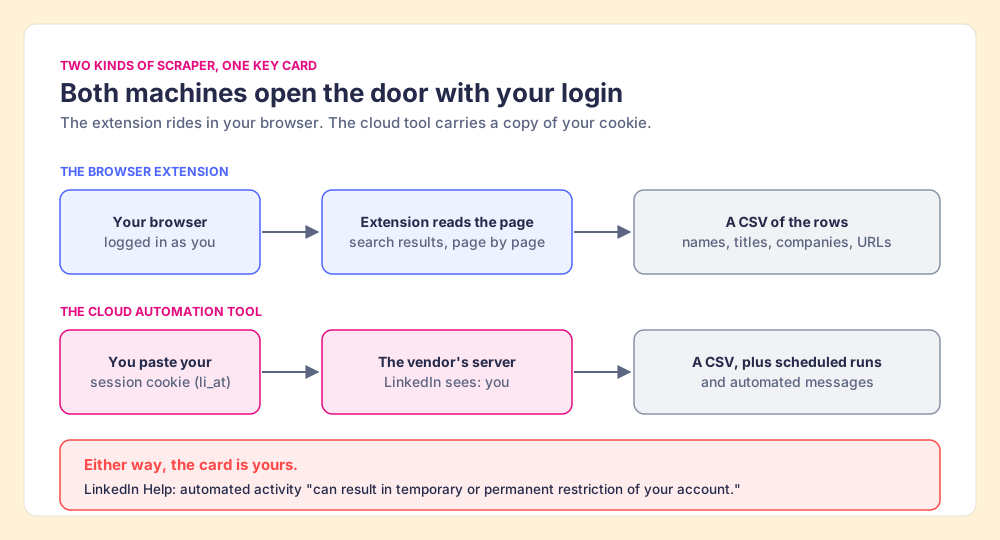
The scraper answers that complaint with a machine. Two kinds sell under the name, and they work differently.
- The search-export extension. It rides in your logged-in browser and reads the results page by page. Evaboot, the #1 result for this search, calls itself “The Smartest LinkedIn Sales Navigator Scraper,” claims “200,000+ users,” and sells from $29 a month for 400 credits, where “1 lead exported = 1 credit” and an email finder is included (Evaboot pricing, checked October 2, 2026). Smaller ones live in the Chrome Web Store, such as a listing named LinkedIn Sales Navigator Scraper with 2,000 users and 3.1 stars from 7 ratings, last updated September 2024.
- The cloud automation tool. It runs on the vendor’s servers, logged in as you. PhantomBuster’s Sales Navigator Search Export asks for two inputs besides the search URL: “Your LinkedIn session cookie” and “Your browser’s user agent,” collected by its browser extension or pasted by hand (PhantomBuster Help, updated September 1, 2026). Apify’s store, the #2 result for this search, lists a Sales Navigator search scraper of the same kind.
A Sales Navigator seat works like a hotel key card. It opens your floor, it is issued in your name, and the hotel’s rules came with it at check-in. The extension is you walking the halls with a notepad. The cloud tool is you handing a copy of the card to a stranger who walks the halls at night. Both open the same doors with your card, so if the hotel objects, it is your card that stops working.
Is sales navigator automation different from scraping?
It is the same card doing more. Sales navigator automation usually means the tool acts as well as reads: it sends connection requests, follows up with messages, views profiles, or likes posts on a schedule. PhantomBuster’s guide ends by suggesting the next step after an export, a “LinkedIn Outreach Phantom” to “Send personalized connection requests and automated follow-up messages.” LinkedIn’s contract names that activity in the same section as scraping. Section 8.2 bars using “bots or other unauthorized automated methods to access the Services, add or download contacts, send or redirect messages, create, comment on, like, share, or re-share posts, or otherwise drive inauthentic engagement” (LinkedIn User Agreement, effective November 3, 2025, checked October 2, 2026).
So for LinkedIn Sales Navigator automation the reading is shorter than for scraping. Copying the page is one prohibited act. Sending messages from a bot is another, and it is the one a prospect sees.
What does LinkedIn’s User Agreement 8.2 say about scrapers?
The contract is short and plain, and three lines in it bear on this search. Section 8.2 opens “You agree that you will not:” and then lists, among other things:
- The scraping clause. “Develop, support or use software, devices, scripts, robots or any other means or processes (such as crawlers, browser plugins and add-ons or any other technology) to scrape or copy the Services, including profiles and other data from the Services.”
- The use-limits clause. “Override any security feature or bypass or circumvent any access controls or use limits of the Services (such as search results, profiles, or videos).”
- The account clause. “Create a false identity on LinkedIn, misrepresent your identity, create a Member profile for anyone other than yourself (a real person), or use or attempt to use another’s account (such as sharing log-in credentials or copying cookies).”
LinkedIn’s help page on prohibited software turns the clauses into a rule for members: “we don’t permit the use of any third party software, including ‘crawlers’, bots, browser plug-ins, or browser extensions that scrape, modify the appearance of, or automate activity on LinkedIn’s website,” and members who use them “risk having their accounts restricted or shut down” (LinkedIn Help, checked October 2, 2026). The contract also reserves the right “to restrict, suspend, or terminate your account if you breach this Contract,” and lists section 8.2 among the terms that survive after an account is closed.
Two of those clauses meet the vendors’ own advice head on. Evaboot’s homepage promises “Every export stays under the limits LinkedIn sets, so your Sales Navigator account never gets flagged.” LinkedIn’s export limit, per its own help center, is no export at all; the 2,500 figure is a cap on what a search page will show. PhantomBuster’s guide recommends “a maximum of 2,500 results per day” and, to reach more leads, splitting searches by filter or connecting several Sales Navigator accounts to “Safely extract more results per day (e.g., 3 accounts = 3,000 results).” Set beside the use-limits clause, which names “search results” as a limit not to circumvent, that advice describes the act the contract lists. The cookie line is the second meeting point. Section 8.2 gives “sharing log-in credentials or copying cookies” as its examples of account misuse, and a cloud tool that runs on a pasted session cookie works by exactly that copy.
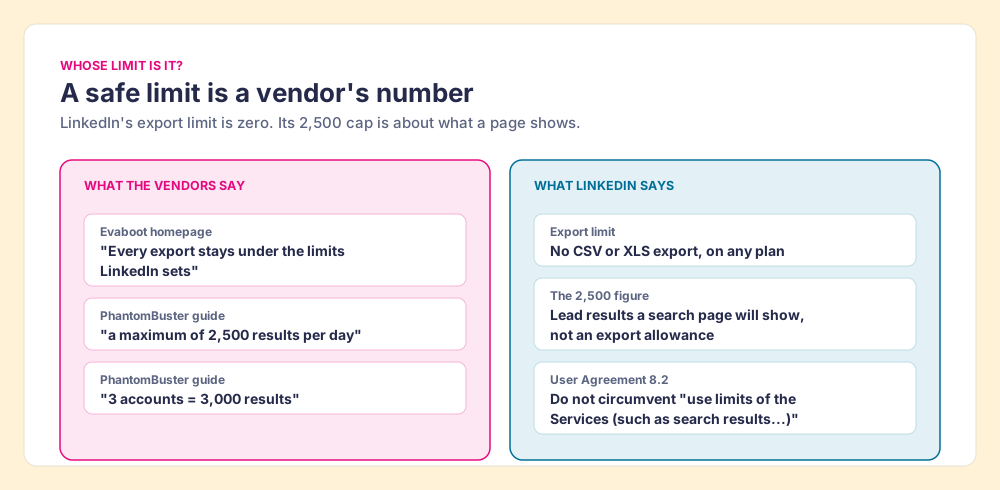
This page does not rule on any vendor. It sets the vendor’s sentence beside LinkedIn’s and leaves the reading to you.
Isn’t scraping LinkedIn legal after the hiQ case?
The scraper vendors’ readers raise this objection first, and it deserves its full weight. hiQ Labs scraped public LinkedIn profiles, LinkedIn tried to stop it, and in April 2022 the Ninth Circuit held, for the second time, that hiQ’s scraping likely did not violate the Computer Fraud and Abuse Act, the federal hacking law. The court described the data as “public LinkedIn profiles, available to anyone with a web browser,” and called that information “presumptively open to all comers” (Ninth Circuit opinion, via Justia). Headlines read it as “scraping is legal,” and many vendor pages still do.
Go back to the hotel. That ruling covered the lobby, the part anyone can walk into from the street. The same opinion drew the line itself, contrasting public pages with “websites that are password-protected” or that “require the user to purchase access by entering a credit card number,” and it listed the remedies still open to LinkedIn, including “breach of contract.” Sales Navigator is upstairs, past the card reader, and you paid at the desk to get there.
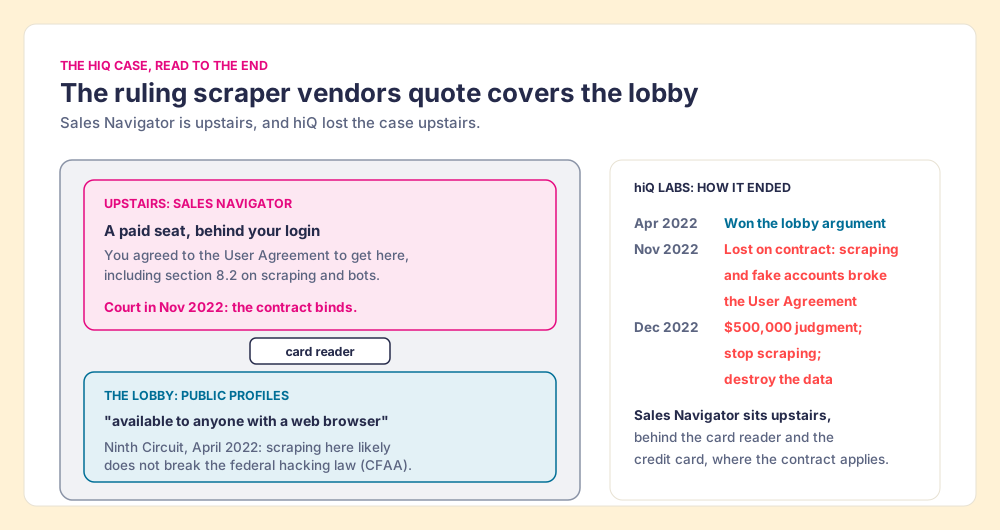
And the case did not end in the lobby. On November 4, 2022, the district court ruled for LinkedIn on its breach-of-contract claim at summary judgment, holding that “the relevant language of the User Agreement unambiguously prohibits hiQ’s scraping and unauthorized use of the scraped data” (HIQ Labs v. LinkedIn, N.D. Cal., via FindLaw). The court also quoted hiQ’s own training document for its contract workers: “It is a good idea to make a fake account with a fake email, to deal with the possibility of being banned on LinkedIn.” In December 2022 the parties proposed a consent judgment of $500,000, with a permanent injunction requiring hiQ to “cease all data scraping on LinkedIn’s websites and destroy all source code, data, and algorithms created from hiQ’s scraped profile data” (Privacy World, December 2022).
The company that won the most famous scraping ruling lost its case, paid, and deleted its data. The “scraping is legal” pages stop the story two chapters early. This is a reading of public court records and the contract, not legal advice; a lawyer reads your facts.
Who has LinkedIn acted against?
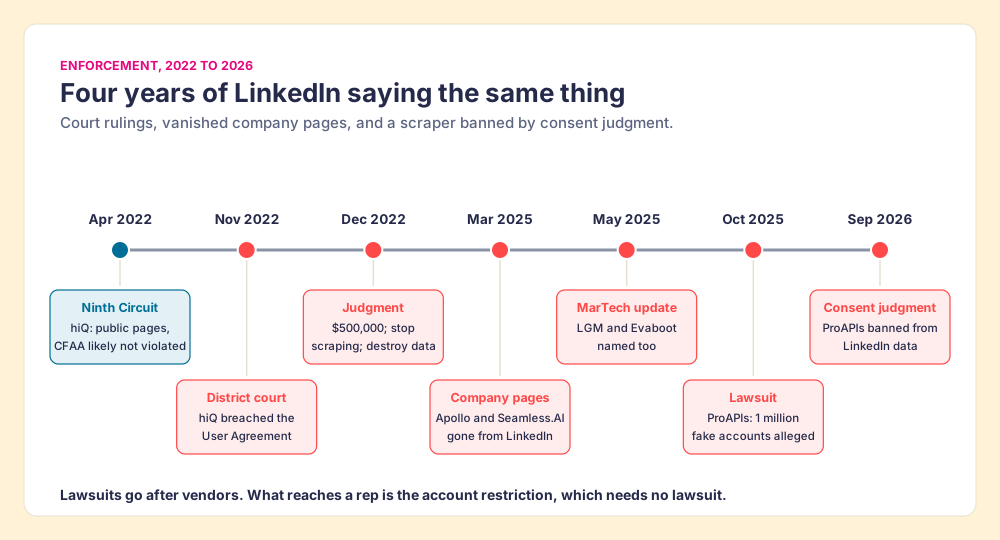
The record since hiQ runs in one direction. Lawsuits and page removals aim at vendors; the account restriction is what reaches the person whose card was used.
- Apollo and Seamless.AI. On March 6, 2025, both companies’ pages vanished from LinkedIn. Apollo said it was “actively working with LinkedIn to understand the nature of our brand page restriction,” and MarTech noted that grabbing data from LinkedIn through Chrome extensions “appears to be against LinkedIn’s terms of service” (MarTech, May 8, 2025). An update to the same article, citing a LinkedIn member’s post, named LGM and Evaboot as well.
- ProAPIs. In October 2025 LinkedIn sued ProAPIs, alleging it ran over 1 million fake accounts to scrape member data and sold an “iScraper API” for up to $15,000 a month. LinkedIn’s statement: “when necessary, we take aggressive legal action to prevent misuse of member information” (BleepingComputer, October 6, 2025). In September 2026 a consent judgment banned ProAPIs from accessing LinkedIn data “through fake accounts, bots or other automated technologies” (Bloomberg Law, September 17, 2026).
- Individual members. No court is needed here. LinkedIn’s account-restrictions page lists “Automated tools violations” as its own category and says automated activity “can result in temporary or permanent restriction of your account” (LinkedIn Help, checked October 2, 2026).
The vendors know where the risk sits. Evaboot’s own export guide advises “Use a dedicated prospecting seat, not the profile your network lives on” (Evaboot), which is advice to risk a spare card instead of your own. A rep’s LinkedIn account holds the network a sales team partly hires them for. The spare-seat advice admits what the “never gets flagged” line denies.
What does a scraped Sales Navigator CSV still lack?
Suppose the scrape runs and nothing happens to the account. Open the file.
PhantomBuster lists its 16 output fields plainly: url, currentJob, fullName, firstName, lastName, companyName, title, industry, summary, duration, location, degree, query, linkedInProfileUrl, defaultProfileUrl, and isPremium. There is no email column and no phone column, because the search page never showed either. Evaboot adds an email finder to its export, and charges for misses: “A lead we find no email for still costs 1 credit.” On phones its pricing FAQ is one word. “Does Evaboot find phone numbers? No.” It points readers to a separate phone vendor instead.
That gap is most of a rep’s day. The Bridge Group’s 2025 SDR report, across 351 B2B companies, puts the median SDR at 112 activities a day: 44 phone, 41 email, 19 LinkedIn, and 8 text or other (Bridge Group). A scraped file serves the 19 LinkedIn touches, which Navigator already served in place. The 44 calls need a number the scraper never had.
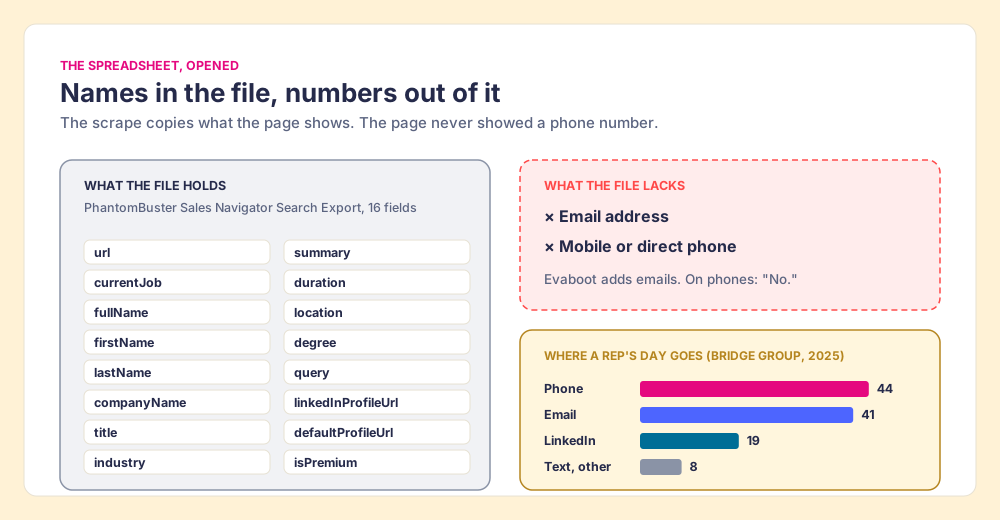
So the scraper’s trade, set out in full, is the account your network lives on, in exchange for a list Navigator already showed you, which still needs a second tool before anyone can dial it. Back to the hotel one last time: the guest register lists names and room numbers. It never listed home phone numbers, and no amount of copying the register will add them.
How do you build lists from Sales Navigator without a scraper?
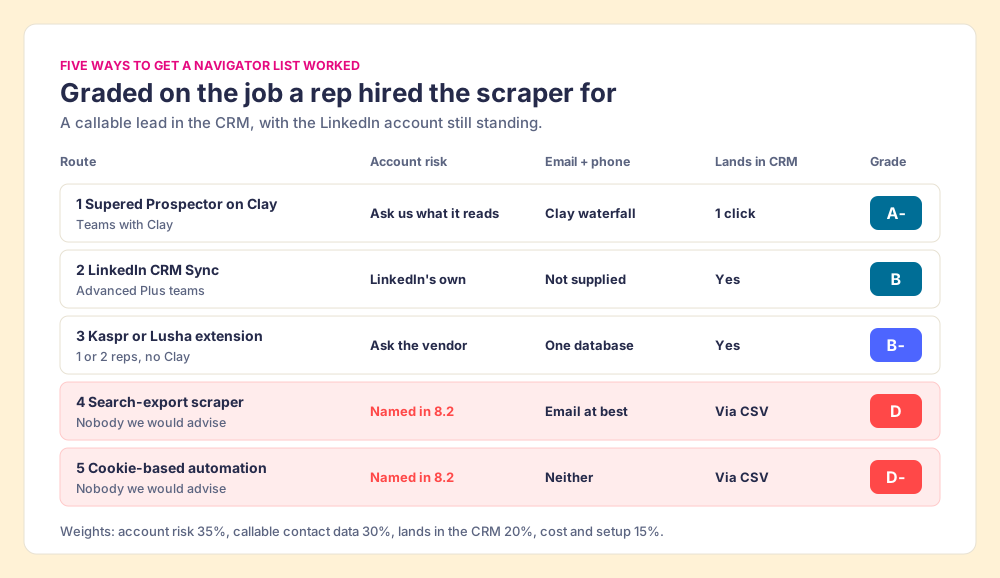
Keep what Navigator does well and stop asking it for what it does not hold. Building and saving lists inside Sales Navigator is the product working as sold, on every plan. The open question is how a saved lead becomes a CRM record with an email and phone. Five routes do that job, graded below.
Methodology: account risk under LinkedIn’s terms, 35%; a callable email and phone, 30%; the lead landing in the CRM, 20%; cost and setup, 15%. The weights serve a team that wants reps calling and emailing Navigator leads without betting the LinkedIn account. A team that only needs identity sync would weight CRM landing higher, and CRM Sync would climb.
| Rank | Route | Best fit | CRM integration | Setup effort | Pricing (checked October 2, 2026) | Account risk | Grade |
|---|---|---|---|---|---|---|---|
| 1 | Supered Prospector on Clay | Teams with Clay whose reps work Navigator | Native: HubSpot, Salesforce, Pipedrive | Admin connects Clay once; field mapping once | $45 per rep per month, billed annually, plus your Clay plan | Ask us what it reads, as you would any vendor | A- |
| 2 | LinkedIn CRM Sync | Teams already on Advanced Plus | Native: Salesforce, HubSpot, Dynamics | Admin enables; each rep authenticates | Advanced Plus, “Request demo for pricing” | LinkedIn’s own feature | B |
| 3 | Kaspr or Lusha extension | One or two reps without Clay | Native integrations | Install and go | Kaspr from $49 per user per month; Lusha free up to 40 credits a month | Ask the vendor | B- |
| 4 | Search-export scraper (Evaboot and similar) | Not a route we advise | CSV import | Low | Evaboot from $29 a month for 400 credits | Scraping named in 8.2 | D |
| 5 | Cookie-based cloud automation (PhantomBuster and similar) | Not a route we advise | CSV import | Medium | Free plan exports 10 rows; paid plans vary | Scraping, bots, and cookie copying named in 8.2 | D- |
Route 1: Supered Prospector on Clay
For a team that already pays for Clay, the email and phone are not a scraping problem. They are a lookup problem, and Clay was built for lookups. Clay’s homepage lists “Buy data from 200+ providers in one place” and a waterfall that will “Combine multiple data providers for the best coverage” (checked October 2, 2026), and Clay’s pricing page says “If an enrichment returns no result, you’re not charged Data Credits or Actions” (Clay pricing). Compare that with the scraper charging a credit for a lead with no email.
Supered Prospector puts that waterfall one click from the Navigator lead the rep is already looking at, on the team’s own Clay account and with no Clay login for reps:
- The CRM match first. On the profile, the rep sees the matching HubSpot, Salesforce, or Pipedrive record and whether the person was already worked in the past, before adding a duplicate.
- One button on the lead or list. The rep runs the team’s Clay table from a Sales Navigator lead or saved list, and Clay’s waterfall returns the verified email and phone.
- Custom workflows and buying committees. A rep can push a list into a Clay workflow, run any custom workflow the GTM engineer built, and pull a buying committee tuned to the team’s titles and seniority.
- One click to the CRM. Ops sets the field mapping once; after that the lead lands in HubSpot, Salesforce, or Pipedrive with the email and phone attached.
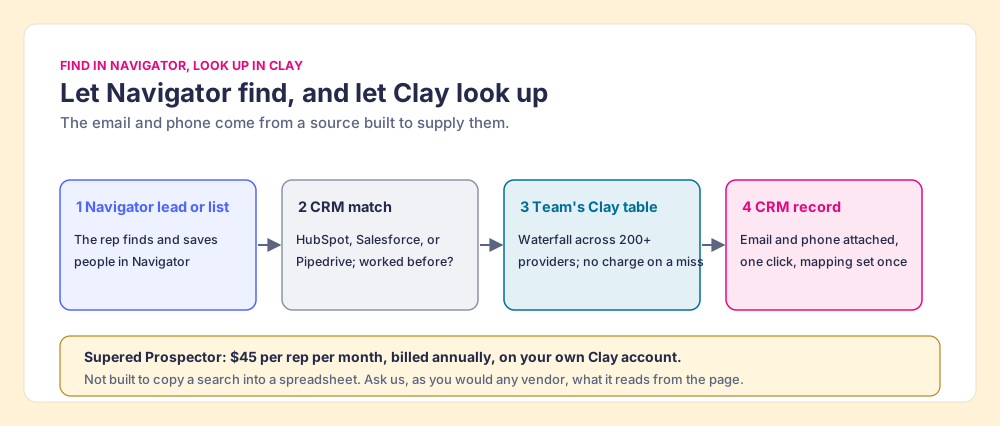
Supered does not bring its own database. It brings Clay’s waterfall, which is every database, routed, and that is why we chose Clay as our only data provider. Clay governs the data. Supered governs the motion. Prospector runs inside the Supered Chrome extension and works the same way on a plain LinkedIn profile, a company’s website, and a CRM record, so a rep working named accounts can start from the account instead of the search. It costs $45 per rep per month, billed annually, from one rep (Prospector). Once the leads are in the CRM, the team’s process applies to the prospects reps work, and a leader sees which sourced lists were worked and which closed, and coaches from the lists that convert. The full loop is on the sourcing use case.
We make no claim that Prospector, or any tool on this page, is approved by LinkedIn. The fair test for anything that touches a Navigator page, ours included, is three questions: what does it read from the page, where does the contact data come from, and does anything get copied in bulk.
Choose something else if:
- No Clay account. Prospector needs one. Kaspr or Lusha is less setup.
- Advanced Plus already paid for, identity only. CRM Sync may be all the sync you need.
- AI-written outreach. Prospector does not draft or send emails; it hands the lead to your CRM and sequencer.
Route 2: LinkedIn CRM Sync on Advanced Plus
LinkedIn’s own door to the CRM. On Advanced Plus, CRM Sync links leads and accounts with Salesforce, Microsoft Dynamics, and HubSpot, and a rep can create a CRM lead from a Navigator lead page. The lead form lists email and phone as optional fields the rep fills, because LinkedIn does not sell them. The setup for each CRM is in Sales Navigator CRM sync, the HubSpot LinkedIn integration guide, and the Salesforce LinkedIn integration guide.
Route 3: Kaspr or Lusha on top of Navigator
For a rep or two without Clay. Kaspr’s pricing page offers “Use Kaspr on top of Sales Navigator” on its Starter plan, from $49 per user per month (Kaspr pricing, checked October 2, 2026). Lusha charges 1 credit to reveal a verified email and 5 for a phone, with a free plan of up to 40 credits a month (Lusha pricing, checked October 2, 2026). Each is one database: when it misses, the rep has no next source. The same three questions apply to them as to us. Sales Navigator alternatives grades the wider field.
Why trust this page?
Before Supered I started RevPartners, a HubSpot partner that did only sales implementations and reached HubSpot’s Elite tier in 13 months, which meant years of watching reps carry contacts from LinkedIn into a CRM by hand. Supered is the #1 sales enablement app on the HubSpot marketplace, rated 5.0 from 122 reviews there and 4.9 out of 5 from 81 reviews on G2 (checked October 1, 2026). The disclosure: we make Prospector, it ranks first above, and the table says exactly what we cannot claim about it.
Which route should you pick?
The contract, the case law, and the file all point the same way. LinkedIn sells no export, its terms name scrapers, bots, and copied cookies, the company that won the famous ruling lost its case, and the CSV that comes out has no phone numbers anyway.
- Supered Prospector on Clay. The pick for a team with Clay: email, phone, and CRM record from one click on the Navigator lead, across 200+ providers.
- LinkedIn CRM Sync. The pick when Advanced Plus is already in the contract, with a contact-data step added.
- Kaspr or Lusha. The pick for one or two reps without Clay.
- Sales Navigator scrapers and automation tools. Not recommended. The account at risk is the rep’s, the advice to use a spare seat says so, and the file still needs a second tool.
Our recommendation: let Navigator do the finding, never ask it for the copying, and get the email and phone from a source built to supply them. If you have Clay, that is Prospector. If the file export is what you were after, how to export Sales Navigator leads walks through every route LinkedIn allows, and how to get emails from LinkedIn Sales Navigator covers the email step on its own. Teams already on Clay can read the Clay Chrome extension guide and our take on Exportly alternatives for the other ways reps reach Clay from the browser.
Frequently asked questions
Is it legal to scrape LinkedIn Sales Navigator?+
Can LinkedIn restrict my account for using a Sales Navigator scraper?+
Is Sales Navigator automation allowed?+
Is there a free LinkedIn Sales Navigator scraper?+
What does a scraped Sales Navigator CSV include?+
Is Supered Prospector a Sales Navigator scraper?+
Your process, running itself.