Apollo Chrome Extension in 2026: The Nozzle Is Free, the Pump Is Metered
What the Apollo Chrome extension does on LinkedIn, Sales Navigator, Gmail and company websites, what each lookup costs in credits, how to install it, what reviewers complain about, and the alternatives, checked October 1, 2026.
The Apollo Chrome extension is Apollo.io's free browser add-on that reveals emails and phone numbers and pushes prospects to lists, sequences and the CRM from LinkedIn, Gmail, Salesforce, HubSpot and company websites, billed in Apollo credits: 1 per email, 8 per phone.
The Apollo Chrome extension costs nothing to install and Apollo credits to use, and it has more Chrome users than Lusha’s and Kaspr’s extensions combined. If you are weighing it, the shortlist we land on below:
- Apollo’s own extension. The pick for a small team that wants data, sequences and a dialer in one tool, from $49 a seat on annual billing.
- Supered Prospector. For teams that already have Clay: Clay’s waterfall across 200+ vendors, run from LinkedIn, Sales Navigator, the company website or the CRM record, at $45 per rep per month billed annually.
- Lusha. The lighter like-for-like extension, where a phone costs 5 credits instead of 8.
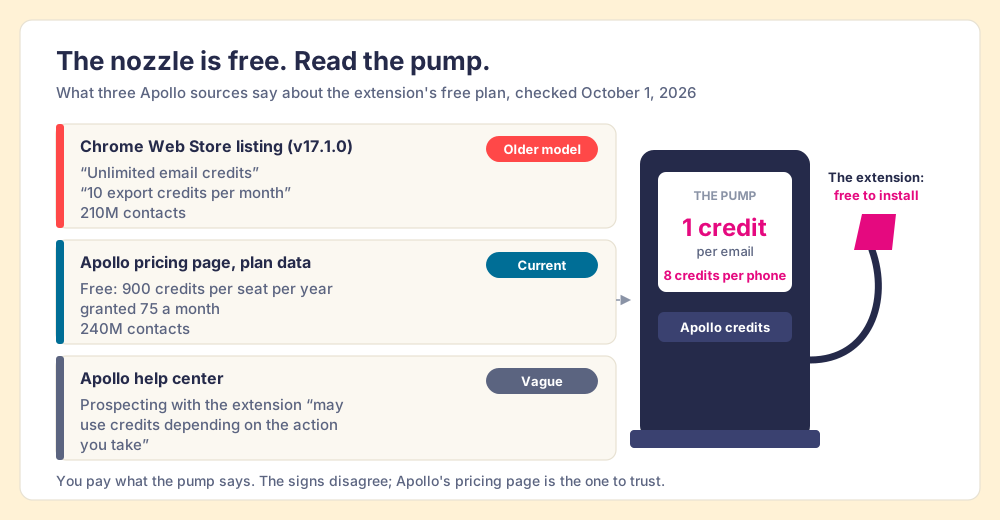
A gas station does not charge you for the nozzle. The hose hangs there for anyone to pick up, and the price lives on the pump, in the little window that spins while you hold the trigger. The Apollo extension is a nozzle. The store lists it as “Apollo.io: Free B2B Phone Number & Email Finder,” which is where searches for the Apollo io Chrome extension and the plain Apollo extension both land, and the listing, opened on October 1, 2026, shows 1,000,000 users, a 4.7 rating from 2.2K ratings, a “Featured” badge, and version 17.1.0 updated September 29, 2026 (Chrome Web Store). Apollo’s own product page says the extension “is free to download and works across all Apollo plans, including the free tier” (apollo.io). Both statements are true, and neither is the price.
The Apollo Chrome extension is Apollo.io’s free browser add-on that reveals emails and phone numbers and pushes prospects to lists, sequences and the CRM from LinkedIn, Gmail, Salesforce, HubSpot and company websites, billed in Apollo credits. On October 1, 2026, Apollo’s live plan data charged 1 credit per email and 8 per phone (apollo.io/pricing). The odd part, and the reason this page exists, is that the road sign, the forecourt sign and the pump disagree.
What does the Apollo Chrome extension do?
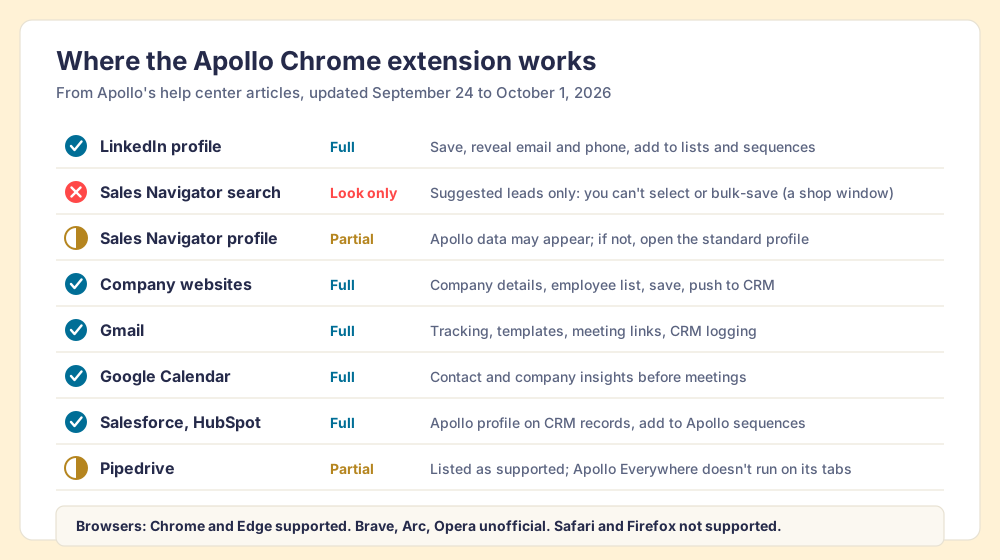
It brings the Apollo web app into the tabs a rep already has open. Apollo’s help center, updated September 30, 2026, lists the surfaces as “Gmail, Google Calendar, LinkedIn, Salesforce, HubSpot, Pipedrive, Salesloft, and company websites,” and says “the available actions may vary depending on the website, platform, and integrations connected” (Apollo Chrome Extension Overview). What a rep can do in each place, per Apollo’s own articles:
| Where the rep is | What the Apollo extension does there | Catch |
|---|---|---|
| A LinkedIn profile | Save the contact, “Access email & phone,” add to a list or sequence, view colleagues | Saving costs credits |
| A Sales Navigator search | Shows suggested leads based on the search | ”You can’t select leads or take bulk prospecting actions” |
| A Sales Navigator profile | Apollo data “may appear on some” profiles | Otherwise, open the standard LinkedIn profile |
| A company website | Employee count, revenue, a list of employees to save, push to CRM | None stated |
| Gmail | Tracking, templates, snippets, meeting links, reminders, logging to Salesforce or HubSpot | Tracking depends on settings |
| Google Calendar | Contact and company insights before meetings | None stated |
| Salesforce, HubSpot | Apollo profile on top of CRM records, add CRM contacts to Apollo sequences | Needs the CRM integration |
| Pipedrive | Listed as supported | ”Apollo Everywhere doesn’t run on Pipedrive tabs” |
From any saved contact, the standard actions are the same: add to list, add to sequence, compose email, log activity, view colleagues, and push to HubSpot, Salesforce, or an Outreach or Salesloft sequence (Use the Apollo Chrome Extension). For a rep who runs outbound from Apollo, that list covers most of a day.
Does the Apollo extension still work on LinkedIn and Sales Navigator?
Yes on LinkedIn, and only partly on Sales Navigator, which is where a lot of reps build their lists. Apollo’s Sales Navigator article, updated September 25, 2026, has a heading that says it plainly: “Suggested, Not Selectable.” On a search page, “the Apollo Chrome Extension shows suggested leads based on your Sales Navigator search. You can’t select leads or take bulk prospecting actions from the extension on the search results page” (Prospect On LinkedIn Sales Navigator). On a profile, the rep clicks ”… > View LinkedIn profile” and continues from the standard page, one person at a time. The troubleshooting article adds that “LinkedIn task automation works on standard LinkedIn profiles, not Sales Navigator” (Troubleshoot the Apollo Chrome Extension).
So on Sales Navigator, the extension is a shop window. You can see the goods through the glass, and the door is around the corner. A rep with a forty-person account list built in Navigator walks around the corner forty times.
There is history behind the caution. In March 2025, Apollo’s and Seamless.AI’s company pages “vanished from LinkedIn,” and Apollo said it was “actively working with LinkedIn to understand the nature of our brand page restriction” (MarTech, May 8, 2025). The page came back in April 2026. “Behind the scenes, our communication with LinkedIn over time was direct, consistent, and focused on getting to the right long-term outcome,” wrote Apollo CEO Matt Curl (Michael R Levy, April 23, 2026). The Chrome Web Store copy still advertises “Automate end-to-end Linkedin prospecting.” Apollo’s product page for the extension, opened the same day, describes using it “on a target account’s website, in your CRM, or in Gmail,” and leaves LinkedIn to a customer quote.
The lesson applies to any extension that reads LinkedIn pages, ours included. Our answer for Prospector: it works within LinkedIn’s terms and does not copy search results in bulk, and the contact data comes from Clay’s waterfall on your own Clay account. Its LinkedIn features exist at LinkedIn’s pleasure. An extension that also works from the company website and the CRM record keeps working when the profile page changes its rules.
Which Apollo plan do you need, and what does each lookup cost?
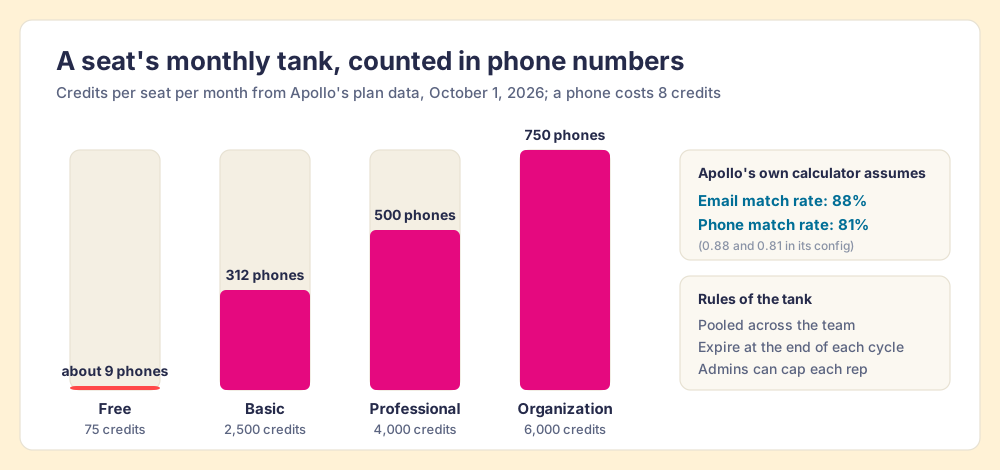
Any plan runs the extension; the plan sets how many lookups a rep gets. Apollo’s pricing page renders its plan cards from a public data feed, and we read it on October 1, 2026 (apollo.io/pricing):
| Plan | Price per seat per month | Credits per seat | Phones a month if every credit bought a phone (8 each) |
|---|---|---|---|
| Free | $0 | 900 a year, granted 75 a month | About 9 |
| Basic | $49 billed annually, $65 monthly | 30,000 a year, 2,500 a month | 312 |
| Professional | $79 billed annually, $99 monthly | 48,000 a year, 4,000 a month | 500 |
| Organization | $119, annual only, 3-seat minimum | 72,000 a year, 6,000 a month | 750 |
All four plans list “Prospecting, Gmail & Salesforce Extensions.” “CRM Integrations” and Waterfall Enrichment start at Basic. The 14-day trials on Basic and Professional are “limited to 50 lead credits per user,” and the Professional trial does “not include mobile numbers.” Extra credits run from $0.025 each in the smallest pack down to $0.015 at 250,000.
Three lines of fine print decide how the meter behaves. “Credits are pooled across your entire team and granted upfront at the start of each billing cycle.” “Unused credits expire at the end of each billing cycle and do not carry over,” add-on credits included. And “admins can set per-user credit caps from the team management settings.” All seats on an account sit on the same plan.
At Basic’s list price a credit costs about two cents ($588 a year for 30,000), so an email is two cents, a phone about 16 cents, and a full contact with both about 18 cents. None of the other extensions on this page sells a cheaper phone, which goes a long way to explaining the 1,000,000 users. The same data feed carries the assumptions behind Apollo’s own credit calculator: an email match rate of 0.88 and a phone match rate of 0.81. Read plainly, Apollo plans for 12 of every 100 email lookups and 19 of every 100 phone lookups to come back empty from its own data, which is the gap its paid-plan Waterfall Enrichment exists to fill. Apollo’s calculator copy adds that “credits are only used when a phone number is found.” The Apollo pricing page works the seat-by-seat arithmetic in full.
How do you install the Apollo Chrome extension?
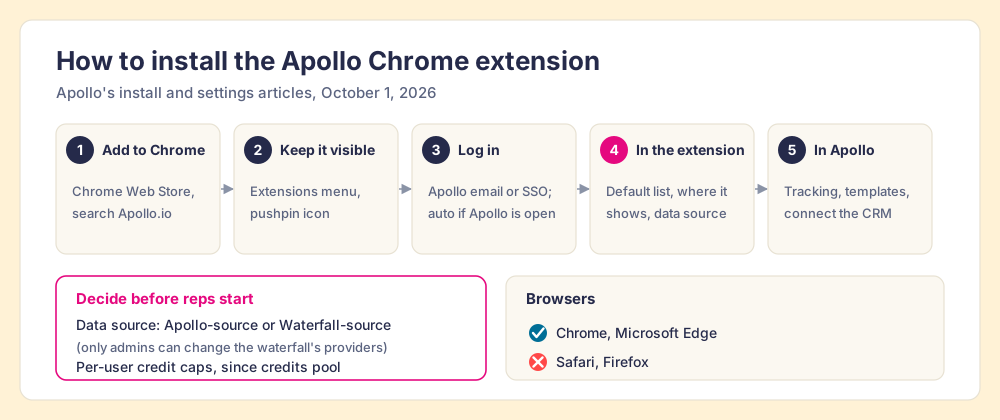
A handful of clicks, if your Apollo account already exists. Apollo’s install article was updated October 1, 2026 (Install the Apollo Chrome Extension), and its settings article covers the choices worth making on day one (Configure Chrome Extension Settings).
- Open the Chrome Web Store, search “Apollo.io,” and click Add to Chrome, then Add extension. Edge users install from the Microsoft Edge store; Apollo ships Chrome updates first.
- Keep it in the toolbar: click Extensions, then the pushpin icon beside Apollo.
- Log in with your Apollo email and password or SSO. If Apollo is open in another tab, the extension logs you in automatically.
- Open the extension’s Settings. Set a default list, choose where the extension appears (Gmail, Calendar, your CRM, or everywhere) and exclude any sites, and pick the data source for emails and phones: Apollo-source, or Waterfall-source. Only admins can change the waterfall’s providers.
- In Apollo, go to Settings, then Chrome extension, to turn on tracking, templates and reminders, and connect your CRM under integrations if you want Push to HubSpot or Push to Salesforce.
If it misbehaves, Apollo’s own order of operations is reload the extension, sign out and back in, update it, then check the browser: allow [*.]apollo.io to use third-party cookies, hard-refresh, and clear the data for app.apollo.io, extension.apollo.io and assets.apollo.io. One setting belongs in your rollout note rather than the troubleshooting page. “Apollo doesn’t remove EU-based or UK-based contacts from the Apollo Chrome Extension,” the help center says, and it asks reps to check a prospect’s location before enrolling them (Prospect on LinkedIn).
What do reviewers complain about?
The rating is high and earned. G2 showed Apollo at 4.7 out of 5 from 9,839 reviews on October 1, 2026 (G2), and the most recent Chrome Web Store reviews are mostly the five-star kind: “It saves me tons of time by letting me grab verified contact details directly on LinkedIn and company websites without constantly switching tabs” (Ari Woolf, September 17, 2026). The complaints, where they come, fall into four piles.
- The meter. The “credit limit on lower-tier plans can run out quickly,” a small-business reviewer wrote on G2 on September 30, 2026. The 312-phones-a-month arithmetic above, felt from the rep’s chair.
- The freshness of the data. G2 reviewers through August and September 2026 repeat the same phrase in different words: outdated job titles, old email addresses, numbers from a previous employer. Apollo’s own calculator plans for a phone match rate of 0.81, so some misses are expected by design.
- The extension itself. The “browser extension frequently lags or crashes when trying to pull data directly from LinkedIn profiles,” an enterprise reviewer wrote on G2 in August 2026. On the Chrome Web Store, one September review reads, in full, “lots of error.”
- Support. “24 messages later. Still no straight answer,” a Chrome Web Store reviewer titled a September 29, 2026 review about recovering full surnames and emails for contacts already processed.
None of these is unusual for a database sold by the credit. They are worth knowing before you put the extension in front of fifty reps and a fixed annual pool.
Why trust this page?
The third-party pages in the top ten for “apollo chrome extension” on October 1, 2026 come from companies selling their own prospecting tools, and one still tells readers the Basic plan comes “with 5,000 email credits” (Salesforge), a figure Apollo’s pricing data does not show. We are a vendor too, so the disclosure comes first. I started RevPartners, a HubSpot partner that did only sales implementations, sold roughly twice as much Sales Hub as any other partner, and reached Elite tier in 13 months. Supered came out of that work and is the #1 sales enablement app on the HubSpot marketplace, with 4.9 out of 5 from 81 reviews on G2 and 5.0 from 122 on the HubSpot App Marketplace (October 1, 2026). We make Supered Prospector, and it sits first in the alternatives below for teams that have Clay. The Apollo numbers on this page were read from Apollo’s own pricing data and help center on October 1, 2026, and the grading states its weights so you can flip them.
Apollo Chrome extension alternatives, graded
The lens is a mid-market or SMB team, ten to fifty reps, that wants contact data where reps already work and a leader who can see which lists turn into pipeline. Each criterion is scored 1 to 5 and multiplied by its weight, for a maximum of 50. The weights and per-vendor scores are the ones used on the Apollo alternatives page and the Kaspr alternatives page, so the pages read together. Our scoring, not vendor data.
| Criterion | Weight | What it rewards |
|---|---|---|
| Coverage of the contact you need | x3 | Verified emails and mobiles when the first source misses |
| Rep-side delivery | x2 | Works on the profile, the Navigator list, the company site, the CRM record |
| Price structure for mid-market | x2 | Published, per seat or per result, no platform fee |
| What the leader sees after the export | x2 | Which sourced lists were worked and which closed |
| Bundled outreach | x1 | Sequencer, dialer, drafting in the same plan |
| Rank | Extension | Grade | Score | Best fit | CRM integration | Setup effort | Pricing (plan with the extension) | Reason to switch from Apollo |
|---|---|---|---|---|---|---|---|---|
| ref | Apollo | A- | 36 | Small teams wanting data and outreach in one | Native (HubSpot, Salesforce, Pipedrive; Outreach and Salesloft push) | Minutes | Free to install; seats from $49 per month billed annually | Stay if sequences and a dialer in one plan decide it |
| 1 | Supered Prospector | A | 44 | Teams that already have Clay | Native (HubSpot, Salesforce, Pipedrive) | Under a week on an existing Clay account | $45 per rep per month billed annually, plus your Clay plan | 200+ vendors per lookup, Sales Navigator lists, the CRM record |
| 2 | Lusha | B+ | 29 | A lighter extension for phone-light reps | Native (HubSpot, Salesforce) | Minutes | Starter $449.10 a year for 4,800 credits | A phone at 5 credits instead of 8 |
| 3 | ZoomInfo | B | 28 | North American enterprise depth | Native (HubSpot, Salesforce, Dynamics) | Weeks | Quote only; Vendr median $33,500 a year | Depth, if a platform contract already exists |
| 4 | Kaspr | B- | 25 | Email-first reps living on LinkedIn | Native (HubSpot, Salesforce, Pipedrive, Zoho) | Minutes | From $49 per user per month | Unlimited B2B emails on paid plans |
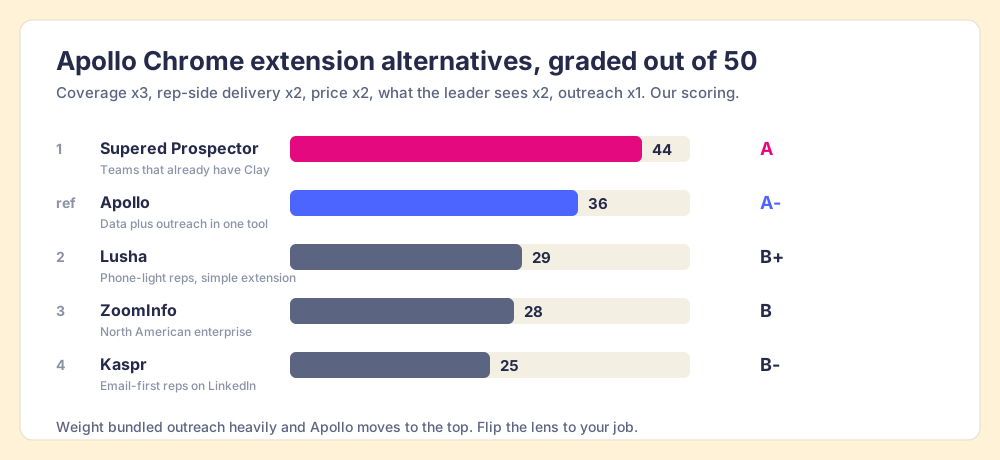
Apollo’s 36 breaks down as coverage 4, rep-side delivery 4, price 4, what the leader sees 2, outreach 4. The coverage 4 is Apollo’s 240M contacts plus its own Waterfall Enrichment, which on paid plans fills each record “with Apollo data first, then lets 20+ partners fill in the rest” (Apollo Waterfall Enrichment, September 25, 2026). Rep-side delivery loses a point on Sales Navigator. Price keeps a 4 because the per-phone cost is the lowest here. Corporate status, checked October 1, 2026: Apollo is independent, has been led by CEO Matt Curl since February 2026, and bought the revenue-intelligence startup Pocus in March 2026 (TNW). Lusha and Kaspr are independent of Apollo; Kaspr has belonged to Cognism since April 2022.
Supered Prospector, for teams that already have Clay
A single database is a station with one tank. When the tank has the number, the pump is fast and cheap, and Apollo’s tank is large. When it does not, the rep drives to a second station, and the company signs a second contract. Apollo’s own waterfall is a good answer to that: twenty-odd partner tanks behind the same pump, in an order an admin sets.
Clay runs a bigger forecourt. “Clay’s signature data waterfalls check multiple providers to return the most verified emails (lower bounce rate) and phone numbers (higher connect rate),” across 200+ data and AI vendors under one contract (Clay, rep prospecting, September 25, 2026). Apollo itself is one of those providers, connected with your own Apollo account (Clay integrations). And Clay’s pricing page carries the rule a fuel station never prints: “If an enrichment returns no result, you’re not charged Data Credits or Actions” (clay.com/pricing, October 1, 2026).
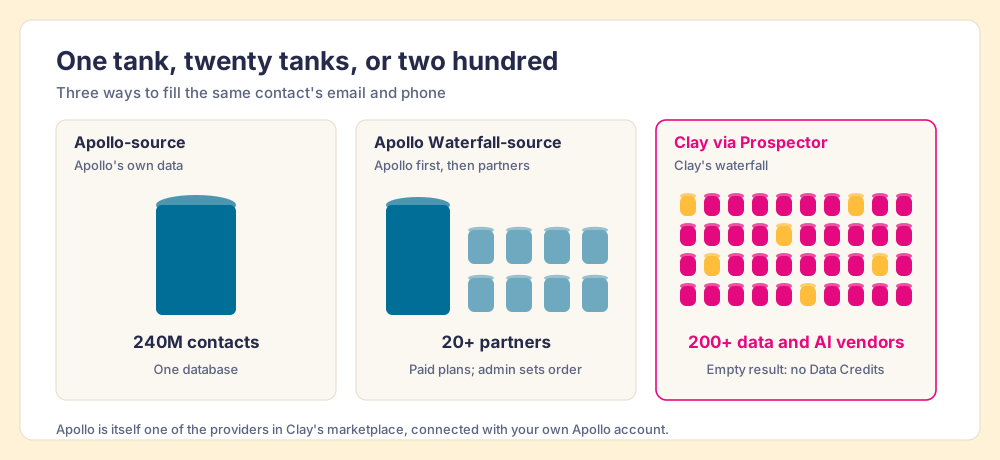
Prospector does not bring its own database. It brings Clay’s waterfall, which is every database, routed. We chose Clay as our only data provider for that reason, and it is why Clay is not a row in the table above: Clay is the row that contains the other rows. Clay governs the data. Supered governs the motion.
What a rep gets from Prospector, on the team’s own Clay account and with no Clay login:
- Lookups from the page they are on. A LinkedIn profile, a Sales Navigator list, a company website with company research beside it, or the HubSpot, Salesforce or Pipedrive record. The Navigator list is where Apollo’s extension stops at the shop window.
- A list the rep builds. Clay’s waterfall fills the emails and phones, and a buying-committee lookup returns the titles, departments and seniority the team set.
- Context before the first touch. On a LinkedIn profile, the rep sees the matching CRM record and whether the prospect was already worked in the past.
- One click to the CRM, or into a workflow. Field mapping is set once; a contact syncs in one click, and a whole list can go into any custom Clay workflow the GTM engineer built.
- Lists the leader can follow. The team’s process applies to worked prospects, so the manager sees which sourced lists were worked and which closed, and coaches from what is converting.
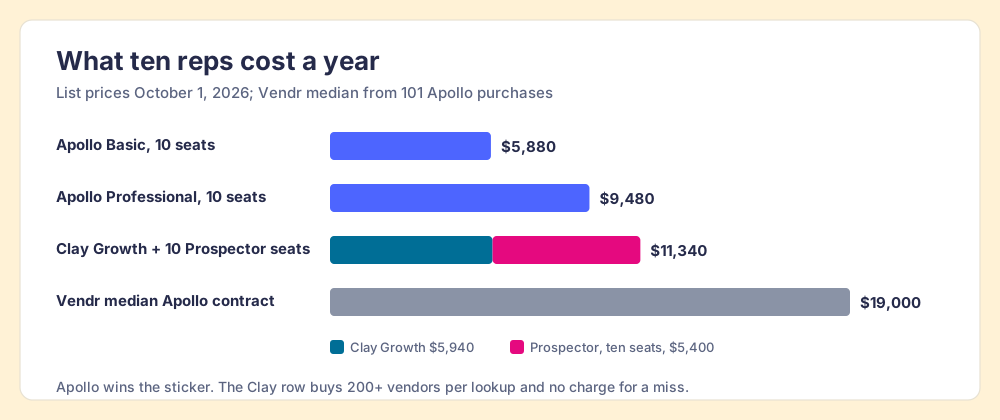
The arithmetic, because Apollo is cheaper on a cold start and you should see by how much. Ten Apollo Basic seats list at $5,880 a year and ten Professional seats at $9,480. Clay’s Growth plan is $495 a month, $5,940 a year, with 72,000 data credits (Clay pricing), and Prospector is $45 per rep per month billed annually, so Clay plus ten Prospector seats is $11,340. Vendr’s median Apollo contract, across 101 purchases, is $19,000 a year (Vendr, Apollo, September 25, 2026). On list price Apollo wins. The case for Prospector rests on the contact Apollo’s tank does not have, the Navigator list worked as a list, and the leader who can follow it to closed.
Choose something else if you do not have Clay. Prospector runs on the customer’s Clay account and does nothing without one, and somebody has to build the waterfall; Clay itself says “GTM engineers build on Clay.” Choose something else, too, if your reps run outbound inside Apollo all day, since the sequencer, dialer and extension in one plan is the reason Apollo grades A- here. The sourcing use case shows the full Prospector loop, and the Clay Chrome extension page covers what Clay itself ships for the browser.
Lusha, the lighter extension
Lusha’s extension has 400,000 users and a 4.6 rating from 1.9K ratings on the Chrome Web Store (October 1, 2026). Its meter charges 1 credit per email and 5 per phone, and its Starter plan is $449.10 a year for 4,800 credits, billed yearly (lusha.com/pricing, October 1, 2026). Per phone that is about 47 cents against Apollo’s 16, so Lusha wins on the reveal count and loses on the unit price. It fits a rep who mostly needs emails and the occasional mobile, from a vendor whose extension does one job. The Lusha Chrome extension page and Apollo vs Lusha carry the detail.
Kaspr, for email-first reps on LinkedIn
Kaspr’s extension has 100,000 users and a 4.7 rating from 1.2K ratings on the Chrome Web Store (October 1, 2026). Its paid plans start at $49 per user per month, with unlimited B2B email credits and 100 phone credits a month on Starter (kaspr.io/pricing, October 1, 2026). For a rep who sends email off LinkedIn all day, that unmetered email is the better deal than Apollo’s 1-credit meter. Kaspr has been part of Cognism since April 2022.
ZoomInfo’s extension rated 3.5 in the same store on the same day; Apollo vs ZoomInfo and the ZoomInfo Chrome extension page cover that choice.
What happens to the contact after the extension finds it?
Look at where the meter sits. Apollo charges at the reveal: 1 credit for the email, 8 for the phone. Lusha charges 5 for the phone, Kaspr 1. A pump records gallons. It has no idea where the car went.
Fair enough for the vendors, whose job ends when the number appears. A sales leader’s job starts there. The Bridge Group’s 2025 report on 351 companies puts the median SDR at 112 activities a day, 44 of them dials (Bridge Group, 2025). Apollo’s credit-usage page can break a team’s spend down by rep and by surface, Extension included (Review Credit Usage). It records what was revealed. Which revealed lists became meetings is a question for the CRM, and the answer depends on whether the list landed there with the team’s next step attached. Prospector adds that part on top of Clay: the rep-built list arrives in HubSpot, Salesforce or Pipedrive with the team’s process applied, and the manager watches it become pipeline. Exporting Sales Navigator leads walks the list-building side, and the sales prospecting guide covers why lists built where reps work get worked.
Which should you choose?
Name the job and the choice resolves.
- Apollo’s extension. The pick when reps run outbound inside Apollo, want sequences and a dialer beside the data, and prospect mostly from standard LinkedIn profiles and company sites. Set per-user credit caps on day one, and read the pricing page, not the store listing.
- Lusha. The pick for a phone-light rep who wants a simple extension and a posted price.
- Kaspr. The pick for an email-first rep on LinkedIn, since its paid plans leave B2B email unmetered.
- ZoomInfo. The pick when a platform contract already exists and the reps sell into North American enterprise.
- Supered Prospector. The pick when the team already pays for Clay and wants its waterfall in every rep’s hands on LinkedIn, Sales Navigator lists, the company site and the CRM record.
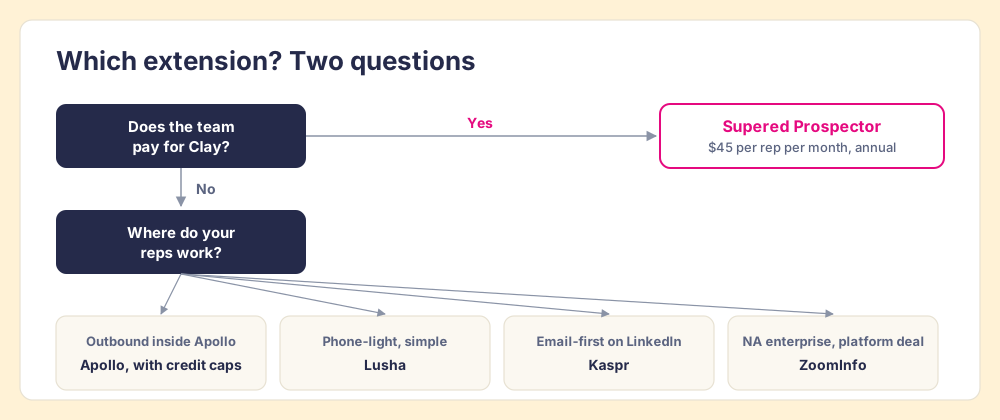
Our recommendation follows from one fact about your stack. If you do not have Clay, the Apollo Chrome extension is a good nozzle on a fairly priced pump: install it, cap each rep’s credits, and teach the team that Sales Navigator search pages are for looking. If you have Clay, you already pay for two hundred tanks. Put them behind one nozzle in your reps’ hands, on the Navigator list and the CRM record as well as the profile, and follow every list they build to closed. A Prospector demo runs on your own Clay account, and the Exportly alternatives page covers the other Clay-powered extensions teams compare it with.
Frequently asked questions
Is the Apollo Chrome extension free?+
How many credits does the Apollo Chrome extension use?+
Does the Apollo Chrome extension work on LinkedIn Sales Navigator?+
Why is my Apollo extension not working?+
Is the Apollo Chrome extension safe to use for EU and UK prospects?+
What is the best Apollo Chrome extension alternative if we already have Clay?+
Your process, running itself.