The ContactOut Chrome Extension in 2026: A Barcode Scanner and One Price File
The ContactOut Chrome extension reads a LinkedIn profile three ways and looks the person up in ContactOut's own data. What it does, which plan unlocks Sales Navigator, how to install it, why reviewers see 'refused to connect', and what changes when ContactOut runs inside Clay.
The ContactOut Chrome extension is ContactOut's free browser add-on that reveals personal emails, work emails, and phones from ContactOut's own data on LinkedIn, Sales Navigator, Recruiter, and company websites, then saves the contact to a list, CRM, or ATS.
The ContactOut Chrome extension is a barcode scanner. ContactOut says so itself, nearly: its help center explains the extension as “like a QR code scanner, it doesn’t change the QR code, but is able to turn the QR image into useful information” (ContactOut help). The useful part of the picture is the part ContactOut leaves out. A scanner is only as good as the price file behind it. The short version of what follows:
- ContactOut’s extension. The right buy for one recruiter or one rep who wants personal and work emails from LinkedIn on a posted price, $948 a year for the Email + Phone plan.
- Supered Prospector. The right buy for a sales team that already pays for Clay: the GTM engineer’s Clay tables as a button in the rep’s browser, ContactOut kept as one step in the waterfall if it earns the place, at $45 per rep per month billed annually.
- Lusha or Apollo. The non-Clay alternatives: Lusha for a small team that wants the same extension workflow on a posted team ladder, Apollo when the dialer and sequences belong in the same seat.
The ContactOut Chrome extension is ContactOut’s free browser add-on that reveals personal emails, work emails, and phone numbers from ContactOut’s own data on LinkedIn, Sales Navigator, Recruiter, and company websites, then saves the contact to a ContactOut list, a CRM, or an ATS. Its Chrome Web Store listing, “Email Finder by ContactOut”, showed 600,000 users and 4.4 out of 5 from 796 ratings on October 2, 2026, version 5.18.3, last updated May 17, 2026 (Chrome Web Store). The store also marks it Featured and says the publisher has “a good record with no history of violations.” That is a strong listing. The rest of this page is about the price file.
What does the ContactOut Chrome extension do?
At a supermarket till, the scanner does one job. It reads the stripes on the tin and asks the store’s price file what the tin is. When the tin is in the file, the price pops up and the queue moves. When it is not, the scanner beeps, and no amount of re-scanning will produce a price the file does not hold.
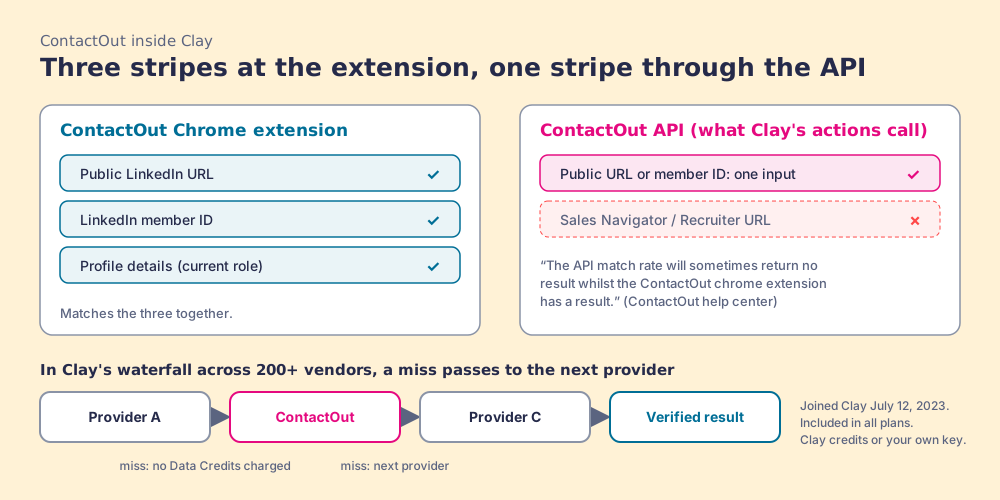
The ContactOut extension reads the stripes on a LinkedIn profile. ContactOut’s own help article on the extension and its API says the extension “looks at multiple pieces of data including: Linkedin public URL, Linkedin Member ID, Profile details (such as current role),” and uses them “collectively to match ContactOut’s internal data to provide contact information” (ContactOut help, extension vs API). Three readings of one tin, one price file. Hold onto the three; they matter again when ContactOut runs inside Clay.
What the extension does once it has a match, from the store listing, ContactOut’s extension page, and its help center:
- Reveal on LinkedIn. A ContactOut LinkedIn reveal takes two clicks. Open a profile, click the toolbar icon or the sidebar, and click “show” on the masked details. The listing covers “LinkedIn Standard, Sales Navigator, & Recruiter,” and the extension page claims “emails and phone numbers for 75% of people on LinkedIn” (contactout.com/chrome-extension).
- ContactOut Anywhere. On a company’s own website the panel lists decision-makers, and since October 27, 2023 it also shows similar competitor companies (ContactOut product updates).
- Bulk on search pages. ContactOut’s welcome article says to “use the ContactOut chrome extension on a Linkedin search page to find the contact information of all the profiles,” and the extension menu has a “Save open profiles” action that saves every profile open in a tab (ContactOut help, saving leads).
- Saves to a CRM or ATS. HubSpot, Salesforce, Greenhouse, Lever, and Bullhorn are documented. A Salesforce save creates the person “as a Lead in Salesforce,” with a duplicate check (ContactOut help, saving to Salesforce). The listing adds “over 5,000 other apps with Zapier.”
- Campaigns and AI writing. One click adds a prospect to ContactOut’s own multi-step email campaigns, and the AI Personalizer drafts the opener.
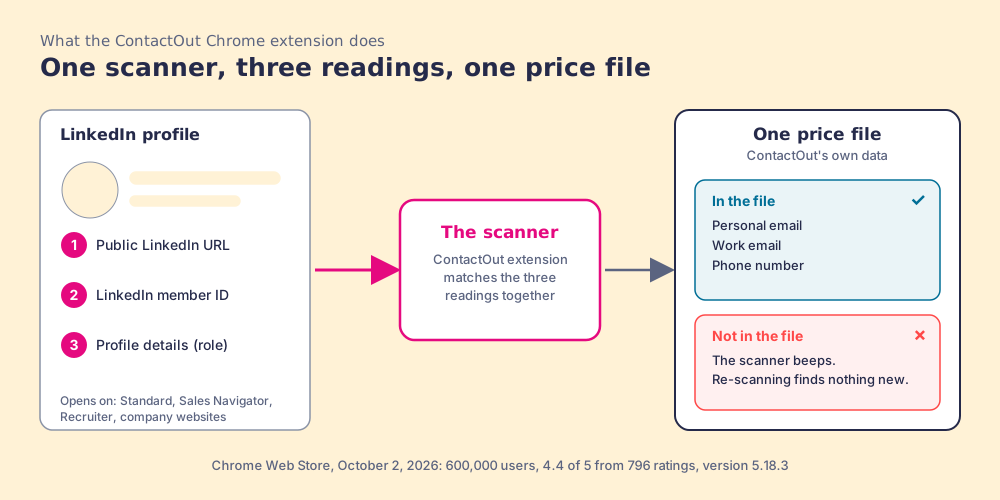
The price file has a particular shape, and the extension page states it: 800M people profiles, 150M personal emails, 200M work emails, 100M direct dials. The same page also says “350M professionals” further up, so treat the counts as ContactOut’s claims, not a measurement. The mix is the interesting part. Personal addresses are what a recruiter needs to reach a passive candidate, and the testimonial wall on the extension page is mostly recruiters (Google, Robert Half, executive search). For a sales rep writing to a buyer at work, the work email and the direct dial are the fields that matter, and a personal Gmail on a cold sales email is a choice your legal team will want to make on purpose.
Which ContactOut plan does the ContactOut extension need?
The extension installs on any plan, Free included. What changes is where it opens and how much it will hand over. Two lines in ContactOut’s help center set the first part. The reveal article says “a premium account is required for the extension to work on LinkedIn recruiter, LinkedIn Sales Navigator and other paid LinkedIn services” (ContactOut help, revealing contacts). That article was last modified in September 2021, so confirm it on a trial before you plan around it; nothing newer contradicts it. And the September 28, 2023 update added the Sales Navigator Leads page, where a rep can “reveal email/phone, save profiles in bulk to a ContactOut list or Export directly to an ATS/CRM.”
The prices come from the plan data ContactOut embeds in its pricing page, read for a US visitor on October 2, 2026 and unchanged from the day before (contactout.com/pricing):
| Plan | Billed monthly | Billed annually | Reveals | Exports | Where the extension opens |
|---|---|---|---|---|---|
| Free | $0 | $0 | 5 emails and 5 phones a day | 5 a day | LinkedIn Standard, company websites |
| $49 a month | $39 a month ($468 a year) | Unlimited emails (fair use) | 300 a month, 3,600 a year | Adds Sales Navigator and Recruiter | |
| Email + Phone | $99 a month | $79 a month ($948 a year) | Unlimited emails and phones (fair use) | 600 a month, 7,200 a year | Adds Sales Navigator and Recruiter |
| Team / API | Contact us | Contact us | Pooled credits, admin limits per member | Custom | Adds team management, Salesforce + ATS integrations on the card |
Free, Email, and Email + Phone each carry “1 user per company limit” on the card. The Team plan is where a company with more than one rep ends up, and its help articles describe a shared credit pool in which an admin can cap each member’s email and phone credits (ContactOut help, credit limits). The ContactOut pricing page works the ladder through, and the ContactOut alternatives page prices a ten-rep team against the field.
The second part, how much the extension hands over, has two meters, and they behave like a library. The reading room is open: on a paid plan a rep can reveal as many emails and phones as they like, up to the fair-use line in section 10 of ContactOut’s terms, “2,000 email credits per account per month and 1,000 phone credits per account per month” (contactout.com/terms). The checkout desk counts. Taking a contact out of the building, as an export, draws on a separate allowance of 300 or 600 a month.
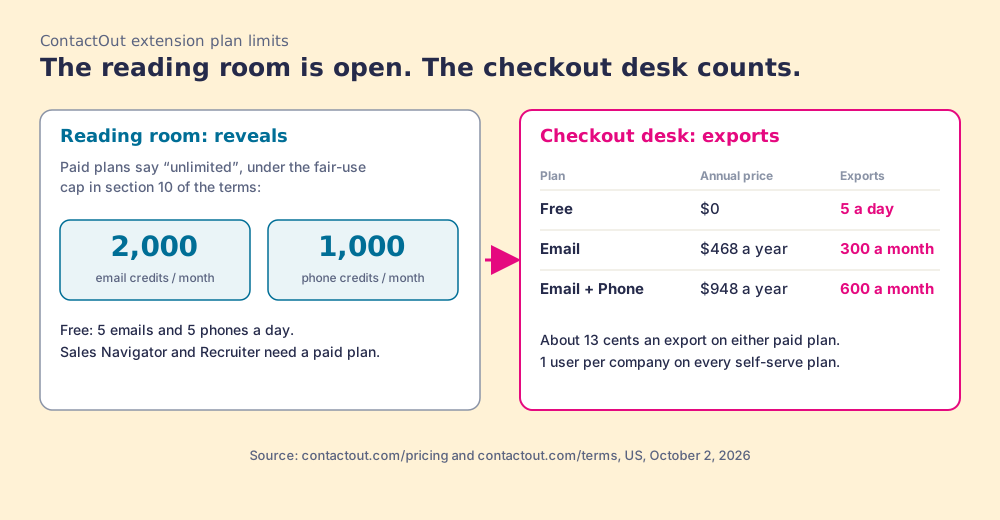
The arithmetic, with the picture’s edge marked. Divide $948 by 7,200 exports and the Email + Phone plan costs about 13 cents an export; $468 over 3,600 lands at the same 13 cents. A rep who reveals 1,000 phones in a month can take 600 records out. Whether a save to HubSpot or Salesforce from the extension counts against the export desk, ContactOut’s help center does not say. Its CRM article does show an “Export leads” step from the dashboard. Check your usage page in the first week before you assume either way.
How do you install the ContactOut Chrome extension?
ContactOut’s help center spreads the steps across three articles; here they are in order.
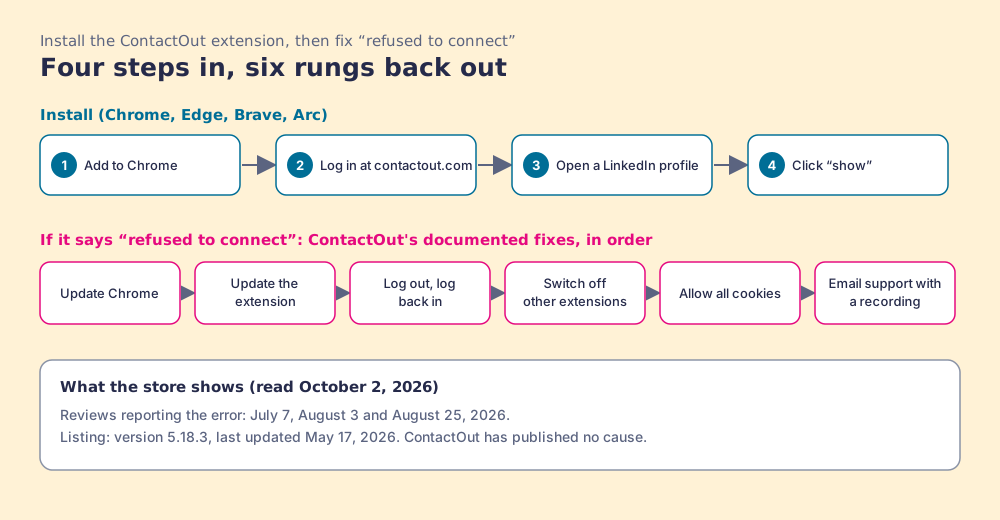
- Open the Chrome Web Store listing “Email Finder by ContactOut” and click Add to Chrome, then Add extension. It works in Chrome, Edge, Brave, and Arc, the Chromium browsers ContactOut lists (ContactOut help, browsers).
- Sign up or log in at contactout.com. The login sets a cookie that tells the extension you are a user.
- Open a LinkedIn profile. The ContactOut tab appears on the right side of the page, or pin the extension to the toolbar and click it.
- Click “show” to reveal the email or phone.
- Connect the CRM. For HubSpot, open the HubSpot dropdown in the extension or your account page, click Connect, and log in to HubSpot (ContactOut help, connecting HubSpot). For Salesforce, click Connect under the Salesforce logo on the account page; if it fails, a Salesforce admin unblocks ContactOut under Connected Apps OAuth Usage.
Why does the ContactOut extension say “refused to connect”?
The listing’s recent reviews say it in capitals. “WHY IS IT SAYING REFUSED TO CONNECT,” one user wrote on July 7, 2026. “Why is the extension saying refuse to connect, it is not working at all,” wrote another on August 3. On August 25 a user who had “used for several months” reported the same message “whenever I toggle on the prospect’s emails” (Chrome Web Store reviews, read October 2, 2026). Google’s own results page lists “Why is ContactOut refused to connect?” among the questions people ask about the extension (Ahrefs SERP data for “contactout chrome extension”, US, October 2, 2026).
ContactOut has not published a cause, and we will not guess one. Two facts sit next to each other. The listing’s last update is May 17, 2026, version 5.18.3. For comparison, Apollo’s extension was updated September 29, 2026, and Lusha’s September 2, on the same store. And ContactOut’s troubleshooting article gives the fixes to try, in this order (ContactOut help, troubleshooting):
- An up-to-date browser. Update Chrome first.
- An up-to-date extension. Check the store listing for a newer version.
- A fresh session. Log out at contactout.com/logout and log back in.
- No competing extensions. Open chrome://extensions, switch the others off, and test again.
- Cookies allowed. If the toolbar works and the sidebar keeps logging out, set Chrome to “Allow all cookies,” because the login cookie is how the extension knows you (ContactOut help, sidebar logout).
- A ticket with evidence. If nothing works, email support@contactout.com with a screen recording, your Chrome version, and the extension version.
Does LinkedIn detect the ContactOut extension?
ContactOut answers this one directly: “Short answer: No.” Its reasoning is that the extension reads the page you are on and “does not provide automation, which is typically how Linkedin identifies abnormal activity,” and it lists the usual reasons a user gets flagged anyway: running several tools at once, a sudden jump in time on LinkedIn, and LinkedIn’s own caps on profile views (ContactOut help).
Set that beside the other document. LinkedIn’s User Agreement, section 8.2, says members agree not to “develop, support or use software, devices, scripts, robots or any other means or processes (such as crawlers, browser plugins and add-ons or any other technology) to scrape or copy the Services, including profiles and other data from the Services” (LinkedIn User Agreement, effective November 3, 2025). Detection and permission are separate questions. ContactOut’s help center addresses the first. Its own welcome article, which tells users to run the extension “on a Linkedin search page to find the contact information of all the profiles,” is the passage a careful reader will hold up against the second.
We are not LinkedIn’s lawyers and will not tell you any tool is or is not within its terms. The useful habit is to ask every vendor what its extension reads from the page and what it sends home, ours included. Our answer for Prospector: Prospector works within LinkedIn’s terms and does not copy search results in bulk; the contact data comes from Clay’s waterfall on the customer’s Clay account.
What do reviewers say about the ContactOut extension?
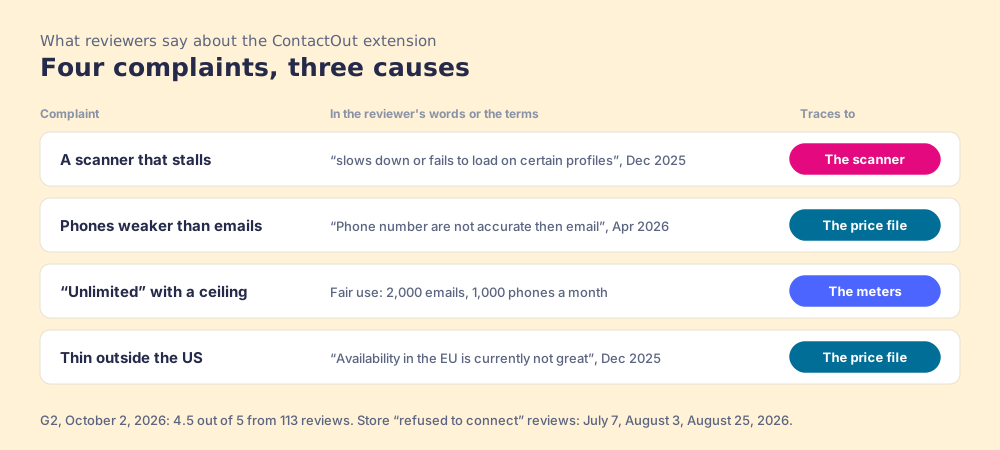
ContactOut held 4.5 out of 5 from 113 reviews on G2 on October 2, 2026 (G2, ContactOut reviews). The extension is the part reviewers praise most. “The Chrome extension has streamlined my workflow by allowing me to find and verify contacts directly on LinkedIn,” a small-business IT reviewer wrote in April 2026. The complaints are specific, and most trace back to the price file or the meters.
- A scanner that stalls. A mid-market recruitment manager wrote in December 2025 that “the Chrome extension sometimes slows down or fails to load on certain profiles, which disrupts the workflow.” The store’s “refused to connect” reviews are the sharper version.
- Phones weaker than emails. “Phone number are not accurate then email,” a mid-market business development manager wrote in April 2026.
- “Unlimited” with a ceiling. A one-star review from April 2025 set the plan’s “unlimited” against the fair-use cap in the terms. A senior associate wrote in October 2025, “I’ve hit the usage limit a few times faster than I expected.”
- Thin outside the US. “Availability in the EU is currently not great,” a mid-market product manager wrote in December 2025.
None of this makes the extension a bad buy. For one recruiter hunting personal emails, a 4.5 on G2 and a $948 seat is a good trade. It becomes the wrong tool when a sales team needs ten seats, phones it can dial, or a view of which saved lists ever turned into meetings.
Why trust this page?
I started RevPartners, a HubSpot partner that did only sales implementations, sold roughly twice as much Sales Hub as any other partner, and reached Elite tier in 13 months. Supered came out of that work and is the #1 sales enablement app on the HubSpot marketplace, with 5.0 from 122 reviews there and 4.9 out of 5 from 81 reviews on G2 (checked October 1, 2026). That is also the disclosure: we make Supered Prospector, and it sits first among the alternatives below for teams that have Clay. The grades show their weights, and the reweight for one recruiter puts ContactOut near the top.
How does the ContactOut extension compare with the alternatives?
The lens is a mid-market or SMB sales team, ten to fifty reps, that wants contact data reps use where they already work and a leader who can see which lists turn into pipeline. Each criterion is scored 1 to 5 and weighted: coverage of the contact you need (x3), rep-side delivery (x2), price structure for a team (x2), what the leader sees after the export (x2), bundled outreach (x1), for a maximum of 50. The scores match the ContactOut alternatives page and the Lusha Chrome extension page, so the pages read together. Prices were checked October 1 and 2, 2026.
| Rank | Tool | Grade | Score | Best fit | CRM integration | Setup effort | Pricing (plan with the extension) | Reason to switch from ContactOut |
|---|---|---|---|---|---|---|---|---|
| ref | ContactOut extension | B | 28 | One recruiter or rep who wants personal and work emails from LinkedIn | Native (HubSpot, Salesforce, ATS), Zapier | Minutes | $948 a year (Email + Phone), 1 user; Team quote | Stay if one seat is the job |
| 1 | Supered Prospector | A | 44 | Teams that already pay for Clay | Native (HubSpot, Salesforce, Pipedrive) | Under a week on an existing Clay account | $45 per rep per month, billed annually, plus your Clay plan | The team’s own Clay tables from the page the rep is on, ContactOut kept as a step if it earns it |
| 2 | Apollo | A- | 36 | Small teams wanting data, dialer, and sequences in one seat | Native (HubSpot, Salesforce) | A day | $49 per seat per month, billed annually | Seats for the whole team, outreach in the plan |
| 3 | Lusha | B+ | 29 | Like-for-like extension for a team of up to 5 | Native (HubSpot, Salesforce, Pipedrive) | Minutes | Premium $3,599.10 a year, 5 seats | A posted team ladder |
| 4 | Kaspr | B- | 25 | Email-first reps on LinkedIn, European data | Native (HubSpot, Salesforce, Pipedrive, Zoho) | Minutes | $49 per user per month, billed annually | Seats a team can buy without a quote |
ContactOut’s 28 is coverage 3, rep-side delivery 4, price structure 3, what the leader sees 1, outreach 3. The rep-side 4 is earned: LinkedIn, Sales Navigator, Recruiter, and any company website, with saves to the CRM. The outreach 3 is earned too, with campaigns, an AI writer, and a dialer in the product. The price 3 is the single line; a $948 seat is good value and a team cannot buy ten of them. Prospector’s coverage score is Clay’s waterfall, credited to Clay, and its outreach score is the lowest on the card on purpose: no sequencer, no dialer.
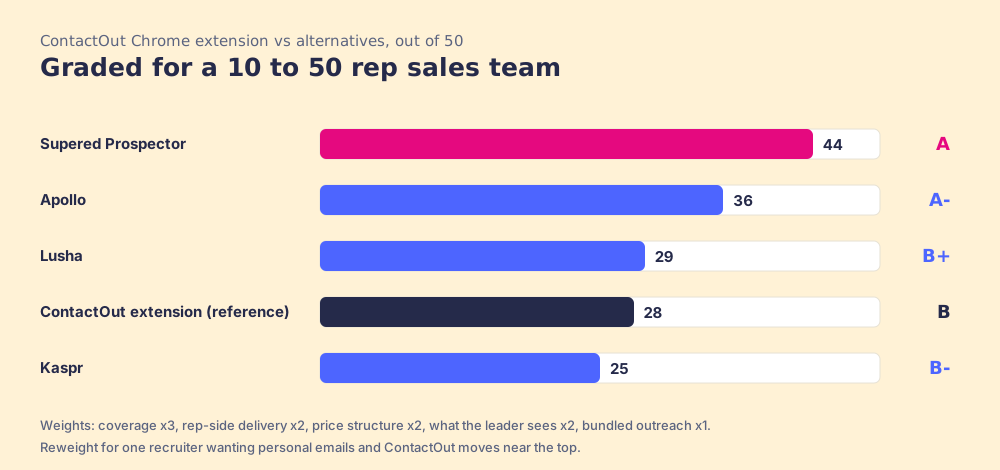
Corporate status, checked October 1 and 2, 2026: ContactOut is independent and privately held, founded by Rob Liu, with no 2026 acquisition or funding round found in a news search. It appears in California’s 2026 Data Broker Registry as “ContactOut Limited” (CPPA registry), as do Apollo, Lusha, and Clay. Apollo acquired Pocus in March 2026 (TNW). Kaspr has been part of Cognism since April 2022.
What happens to ContactOut’s data inside Clay?
Clay already stocks ContactOut. Clay’s integration page lists it as a Clay-built integration that joined on July 12, 2023, “Included in All Plans,” with two actions, “Find Mobile Number from LinkedIn with ContactOut” and “Find Personal Email from LinkedIn with ContactOut,” each paid with “Clay Credits or Bring Your Own Account” (Clay, ContactOut integration, checked October 2, 2026). Clay’s waterfall page names ContactOut among its mobile-number providers (clay.com/waterfall-enrichment).
Here the scanner comes back. Clay’s page says the personal-email action works “using ContactOut’s API,” and ContactOut’s own help article explains how its API differs from its extension. “The API typically only accepts a single input, whether that is the linkedin_public_url or member_id,” so “the API match rate will sometimes return no result whilst the ContactOut chrome extension has a result.” It adds that “the API does not support URLs from salesNav or Recruiter” (ContactOut help, extension vs API). Inside a Clay table, the scanner reads one stripe instead of three.
We did not expect this finding, and it cuts against the easy story for Clay teams, ours included. The same price file, asked through the API with one input, can come back empty where the extension would have matched. Two things follow. First, a Clay table that feeds ContactOut should carry the public LinkedIn URL, not a Sales Navigator link. Second, a single-source miss costs less inside a waterfall than at the till: when ContactOut beeps, Clay asks the next provider, and “if an enrichment returns no result, you’re not charged Data Credits or Actions” (clay.com/pricing, checked October 2, 2026). Whether ContactOut earns a step, and where it sits in the order, is a test your GTM engineer can run on a few hundred known contacts.
Where does Supered Prospector fit?
Prospector is the till that phones the next store. It brings no price file of its own; it runs inside the Supered Chrome extension and runs the team’s own Clay tables, on the team’s own Clay account, from the page the rep is already on. We chose Clay as our only data provider because Clay’s waterfall spans 200+ data and AI vendors (clay.com), ContactOut among them. Clay plus Supered is, in our view, the best way for a sales team to prospect: GTM engineers build in Clay, reps never open Clay.
The extension question looks different from each of the three chairs on the team.
- The GTM engineer. You built the tables and became the list desk; reps Slack you for every list. With Prospector you build named flows once, each tied to a Clay table or function and a destination, and reps pick them from a Push menu. Your waterfalls, tiers, tags, and sequence variables stay yours. Start from the Supered Clay template or bring your own tables.
- The rep. Your GTM engineer’s table becomes a button on a LinkedIn profile, on a company website, in the HubSpot, Salesforce, or Pipedrive record, and on Sales Navigator, where you add leads to a prospect list and push the list to a Clay table. Before you push, you see the matching CRM record, who owns it, and whether the person was prospected before, so two reps do not work the same buyer. One click sends the result to the CRM or your sales engagement tool.
- The leader. You see every list Found, Worked, and Closed. Found: reps using your tables with no duplicate work. Worked: who is working their list and who is not. Closed: each lead ends the way your process says, Qualified, Recycled, or Disqualified. That record is how the Clay budget grows.
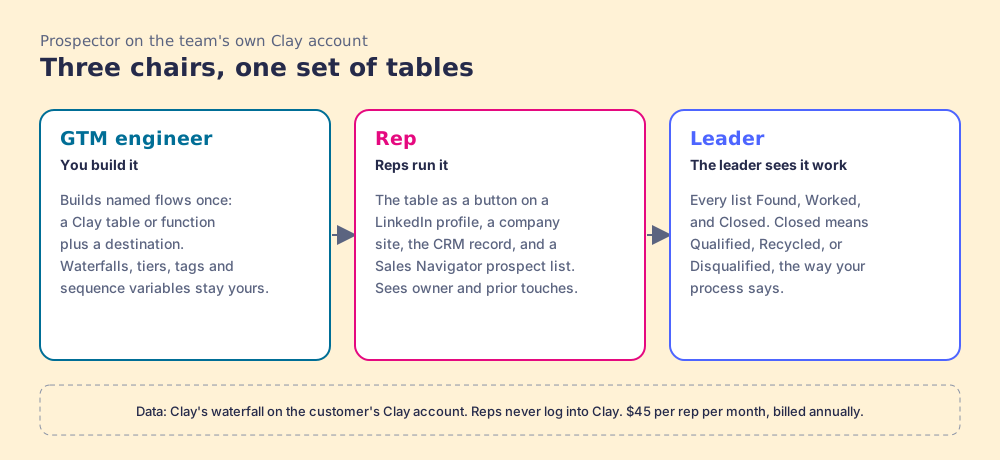
The arithmetic, since a till that phones every store needs a number beside it. Clay’s Growth plan lists at $495 a month, or $446 a month billed annually, which is $5,352 a year (clay.com/pricing, October 2, 2026). Prospector is $45 per rep per month, billed annually, from one rep (Prospector). Ten reps on Prospector plus Clay Growth on annual billing come to $10,752 a year, or $11,340 with Clay billed monthly. ContactOut’s self-serve card stops at one user per company, and its sales page points teams at “less than $299 monthly” on a quote (contactout.com/sales-users). On list price a single ContactOut seat is far cheaper than a Clay plan. The case for the Clay side rests on the team: the second rep, the ninth, and the leader who wants to see the lists close.
Choose something else if you do not have Clay. Prospector runs on the customer’s Clay account and does nothing without one, and a team with no waterfall needs someone to build it. RevPartners, the HubSpot partner I founded and now a Clay Elite Studio Partner, builds and tunes tables for teams that want help; disclosed, because I started it. Choose something else, too, if you are one recruiter who wants personal emails on LinkedIn: ContactOut’s $948 seat is one of the best single-seat deals in this category. The sourcing use case shows the loop from profile to closed, and the Clay Chrome extension page explains why putting Clay where reps work has been harder than it sounds.
What are the non-Clay alternatives to the ContactOut extension?
Two are worth a rep’s install, and both sell seats a team can buy without a quote.
- Lusha. The closest like-for-like extension for a small team: Starter at $449.10 a year and Premium at $3,599.10 a year for 5 seats, with an email at 1 credit and a phone at 5 (lusha.com/pricing, October 1, 2026). It opens on LinkedIn, Sales Navigator, company websites, Gmail, and the CRM. The Lusha Chrome extension page prices it per phone.
- Apollo. The pick when the extension should come with a dialer and sequences in the same seat. Basic is $49 per seat per month billed annually, confirmed on apollo.io/pricing October 2, 2026, with 30,000 credits per seat per year, a phone at 8 credits and an email at 1. The Apollo Chrome extension page covers its install and limits.
- Kaspr. For email-first reps who live in Sales Navigator: Starter at $49 per user per month billed annually ($65 monthly), unlimited B2B emails and 100 phone credits a month, shared credits, and use on Sales Navigator (kaspr.io/pricing, October 2, 2026). The Kaspr alternatives page works it per phone.
The LinkedIn email finder extensions page grades six of these side by side, and the Sales Navigator Chrome extension page sorts the extensions that open on Navigator by the job.
Which should you choose?
The choice resolves on two questions: how many people need the extension, and whether your team pays for Clay.
- ContactOut’s extension, kept. The pick for one recruiter or one rep who wants personal and work emails from LinkedIn and Recruiter, at $948 a year. Buy annual only if you will use the year, and watch the export desk.
- Lusha. The pick for a team of up to five that wants the same extension workflow with seats on a posted price.
- Apollo. The pick when reps call and sequence at volume and want both in the same seat. Size the credits before the seats: a phone costs 8.
- Supered Prospector. The pick when the team already pays for Clay: the GTM engineer’s tables as a button wherever reps prospect, ContactOut kept as one step if it wins its test, and every list found, worked, and closed.
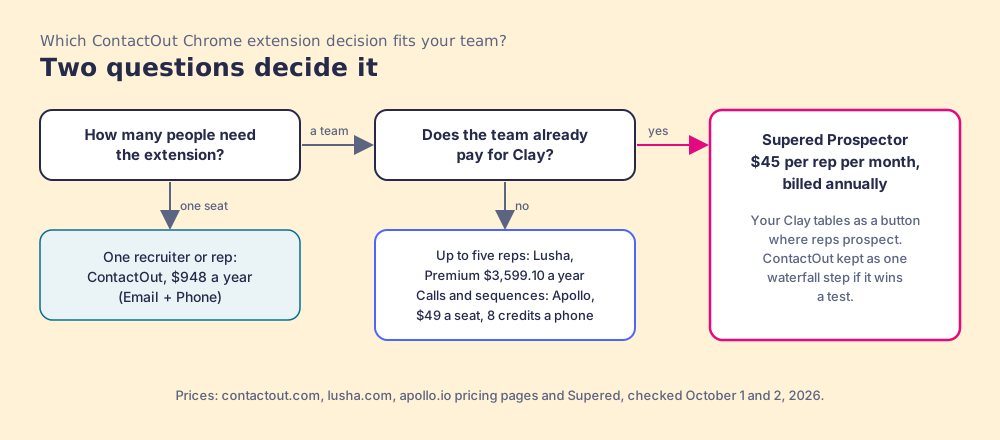
What we recommend depends on one fact about your stack. Without Clay, the ContactOut extension is a good scanner with a good price file for personal emails, and the right move for a sales team is to count how many seats you need before you fall for the $948 card. With Clay, stop buying a second till for each rep. Keep ContactOut’s file in the waterfall if your test says it earns the step, feed it the public LinkedIn URL so the API reads the stripe it can, and put the GTM engineer’s tables where the reps already stand. A Prospector demo on your own Clay account is where you can watch it work from a LinkedIn profile.
Frequently asked questions
Is the ContactOut Chrome extension free?+
Does the ContactOut extension work on Sales Navigator?+
Why does the ContactOut extension say 'refused to connect'?+
Can LinkedIn detect the ContactOut Chrome extension?+
Which browsers does the ContactOut extension support?+
What is the best alternative to the ContactOut Chrome extension for a sales team?+
Your process, running itself.