LinkedIn Sales Navigator API in 2026: What LinkedIn Offers, Who Gets It, and What Works Instead
LinkedIn's Sales Navigator API is a partner program closed to new partners, and its partners never receive the data. What SNAP returns, why unofficial APIs are scrapers, and how to get Navigator leads into the CRM with contacts.
The LinkedIn Sales Navigator API is SNAP, a partner-only program that lets approved software show Sales Navigator inside its own screens; LinkedIn is not accepting new partners, and no SNAP service returns emails, phones, or a bulk lead export.
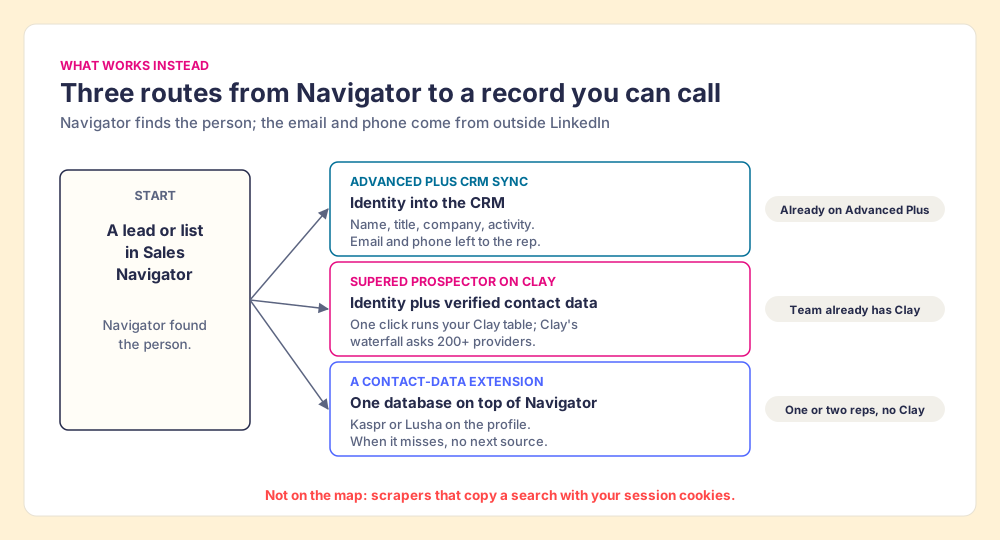
The LinkedIn Sales Navigator API exists, you almost certainly cannot get it, and if you could, it would not hand you what you came for. LinkedIn’s developer documentation says it in one line: “We are not currently accepting new partners for access to the LinkedIn Sales Navigator API” (Microsoft Learn, SNAP documentation, page updated May 28, 2025, checked October 2, 2026). The second half is the part the other guides skip, and it sits in LinkedIn’s own security page and partner terms further down. What works instead, with who each route fits:
- Advanced Plus CRM Sync. For teams already paying for it. Your CRM is the SNAP partner; you get the identity in the CRM, without the email or phone.
- Supered Prospector on Clay. For teams with Clay. One click on the Navigator lead runs Clay’s waterfall across 200+ providers and sends the lead to HubSpot, Salesforce, or Pipedrive.
- A contact-data extension. For one or two reps without Clay: Kaspr or Lusha on top of Navigator.
Does LinkedIn Sales Navigator have an API?
Yes. It is called the Sales Navigator Application Platform, SNAP for short, and it is a partner program that LinkedIn admits companies to one at a time. There is no key to request from a developer console. LinkedIn’s developer catalog lists one sales product, “Sales Display,” described as “View profiles and accounts, and send messages to leads” (LinkedIn Developers). LinkedIn’s help article on API access splits its developer products in two: self-service products anyone can build on, and enterprise products where you “apply to their individual programs” (LinkedIn Help, Accessing LinkedIn APIs, checked October 2, 2026). Sales Navigator is in the second group.
The SNAP documentation names three services:
- Display Services. “UI modules for embedding within external applications via iframe or JavaScript SDK”: viewing profiles and accounts, recent activity and posts, connecting, and sending InMail to leads, all inside the partner’s app.
- Analytics Services. “A bulk export API to retrieve activities performed by sales teams”: searches, profile views, saved leads, InMails accepted and rejected, and each seat holder’s daily Social Selling Index (Analytics Services overview).
- Sync Services. “APIs that enable richer integrations built on top of CRM Sync,” and “all Sync Services features require customers have the CRM Sync feature enabled in their Sales Navigator contract” (Sync Services overview).
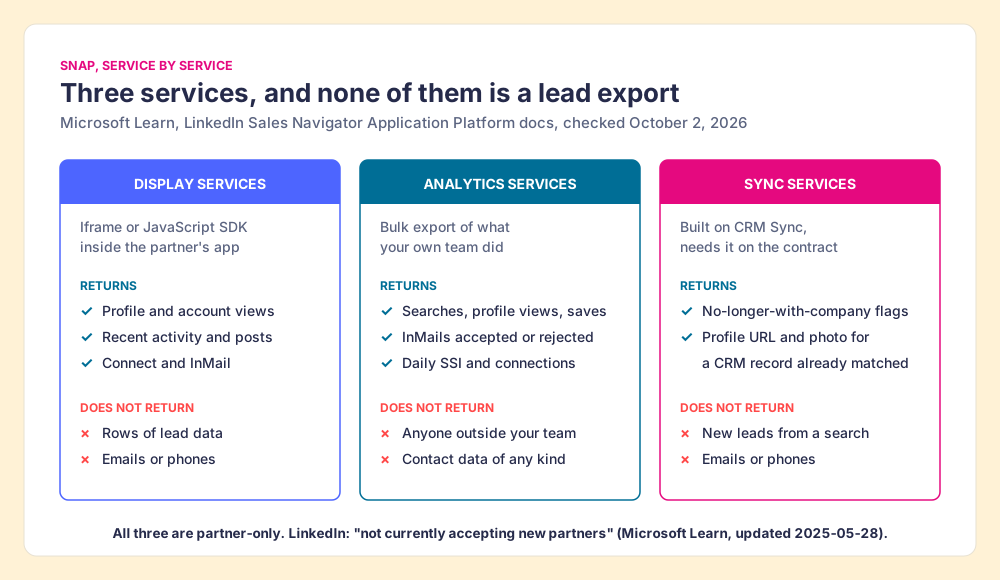
None of the three is a search endpoint. There is no documented call that takes a Sales Navigator search and returns the leads as rows, and none that returns an email address or a phone number.
What does the Sales Navigator API return, and what doesn’t it?
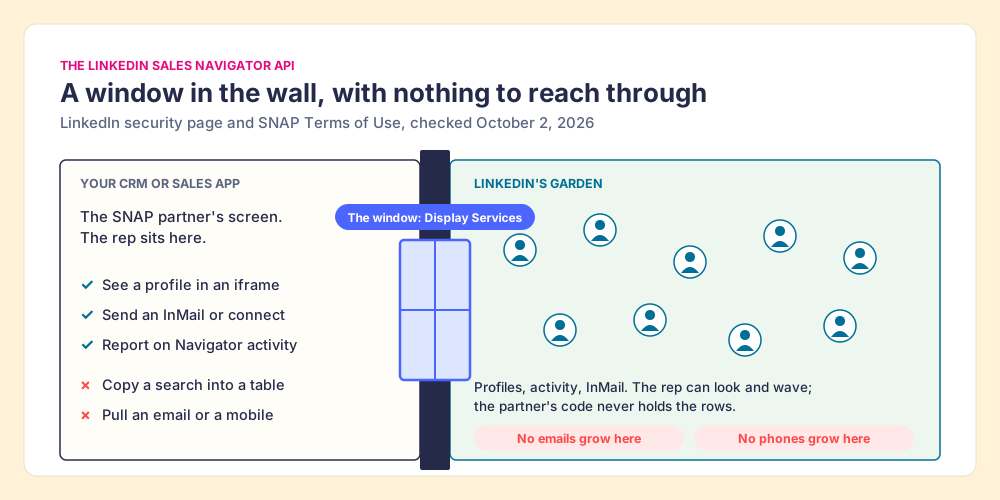
The plainest way to understand SNAP is as a window set into a garden wall. On one side is your CRM, where the rep sits. On the other side is LinkedIn’s garden, with the profiles, the posts, the job changes. Display Services cuts a window in the wall so the rep can look through it and even wave (connect, send an InMail) without leaving the CRM. What the window does not do is open. Nothing gets handed through it.
That is close to LinkedIn’s own description. Its security page says that for SNAP Display integrations, partners “just display content,” that “all the information is accessed directly from LinkedIn within the browser,” and that “the partners do not actually get access to the LinkedIn data” (LinkedIn, sales integrations security and privacy, checked October 2, 2026). The SNAP Terms of Use put the same design into contract language: Display Services lets customers “interact with members and companies on Sales Navigator without directly receiving the underlying LinkedIn data (e.g. provided via iFrame or javascript libraries)” (SNAP Terms of Use, last updated 2/18/22).
The one endpoint that does return something about a person shows how narrow the pipe is. The Profile Associations API “returns associated data for existing high-confidence matches between LinkedIn members and external, vendor-specific IDs.” You send it a CRM record ID that CRM Sync already matched. It sends back three fields: a member ID unique to your app, “the absolute URL of a single Sales Navigator profile,” and an optional profile photo (Profile Associations API reference). No name, no title, no email, no phone. It is a link to the window, for a person you already had.
| SNAP service | What it returns | What it does not return |
|---|---|---|
| Display Services | Navigator profiles, accounts, activity, connect and InMail, rendered in an iframe | Lead data handed to the partner; emails; phones |
| Analytics Services | Your own team’s searches, profile views, saves, InMail outcomes, daily SSI | Anything about people outside your team’s activity; contact data |
| Sync Services: Data Validation | CRM contacts and leads whose LinkedIn company no longer matches the CRM | New leads; contact data |
| Sync Services: Profile Associations | Member ID, Sales Navigator profile URL, optional photo, for an already-matched CRM record | Name, title, email, phone; anyone not already in the CRM |
And even if a partner wanted to bolt contact data on, the contract stops it. SNAP Terms section 3(d): a partner “shall not build or operate the Integration in a way that could result in augmenting, or in any way supplementing, the data that the Licensed Seat Holder has or can view about someone,” with the example that “you will not display someone’s email address” when the person has not made it visible. Section 3(c) adds that content from the SNAP APIs “shall not be used for purposes of creating or populating a profile on a third-party service.” A sales navigator API that returns enriched leads is ruled out twice: once by the plumbing, once by the paperwork.
Who can get LinkedIn Sales Navigator API access?
Two kinds of people search for this, and they meet different doors.
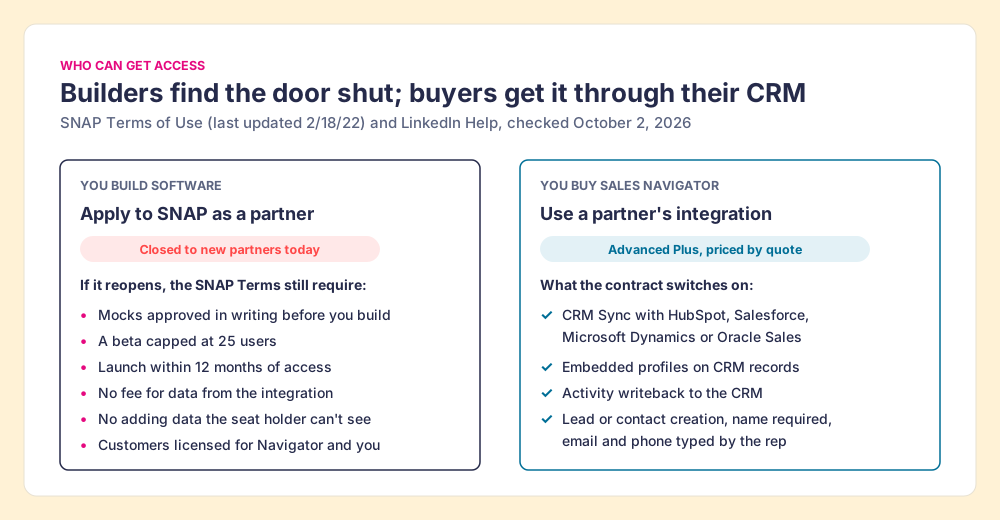
If you build software, the door is shut. The SNAP documentation’s “not currently accepting new partners” note is the current word, and the partner link in LinkedIn’s own developer docs now serves a customer help article, “Get started with Sales Navigator and your CRM,” instead of an application form (link followed October 2, 2026). If the program reopens, the SNAP Terms describe what admission means:
- Design approval first. “You must submit a description of the SNAP API calls and design flow of the proposed Integration, including mocks, to LinkedIn for its written approval before you begin work.”
- A capped beta. “No more than 25 users (in the aggregate)” at a customer during testing, then a demo LinkedIn approves in writing before launch.
- A deadline. Launch “within twelve (12) months” of first access, or LinkedIn may end the terms.
- No charge for the data. “You shall not charge Integration Customers, directly or indirectly, for access and/or usage of data obtained via the integration.”
- Shared customers only. Display is limited to customers “who have an active license to both your Application and LinkedIn Sales Navigator.”
If you buy Sales Navigator, the door is open, but it opens into your CRM. Your linkedin sales navigator api access arrives through a partner that already has it. LinkedIn’s help center says “integration between Sales Navigator and your CRM is only available for Sales Navigator Advanced Plus users,” with CRM Sync guides for HubSpot, Microsoft Dynamics 365, Oracle, and Salesforce (LinkedIn Help, checked October 2, 2026). Advanced Plus is “Request demo for pricing” on the compare-plans page.
What the buyer’s door delivers is covered in depth in our Sales Navigator CRM Sync guide, the HubSpot LinkedIn integration, the Salesforce LinkedIn integration, and the Pipedrive LinkedIn integration. The short version: LinkedIn’s lead-creation form lists first and last name as required, and country, job title, email, phone, and company as optional (LinkedIn Help, checked October 2, 2026). The identity crosses. The email and phone are lines for the rep to fill.
Why are unofficial Sales Navigator APIs scrapers?
Several tools sell themselves as a Sales Navigator API. Their own pages describe a different machine from SNAP. Evaboot’s API page offers to “programmatically export LinkedIn Sales Navigator searches and lists” (Evaboot). An Apify actor sold as a “LinkedIn Sales Navigator API” says it “extracts prospects (Leads) and companies (Accounts) directly from LinkedIn Sales Navigator search URLs,” lists “Authenticated scraping via cookies,” walks the user through copying their own LinkedIn cookies into it, and warns that it “should be used on small batch of results per day, or can increase risk of detection” (Apify). Unipile connects accounts by “credentials, cookies, your chrome extension” (Unipile). All three pages checked October 2, 2026.
Back to the garden wall. SNAP is the window LinkedIn built. These tools are someone climbing the wall after dark with your house key in their pocket: they log in as you, walk the search pages you could see, and carry out what was on the shelves. The word “API” describes how you call them. Where the data comes from is your own logged-in browser.
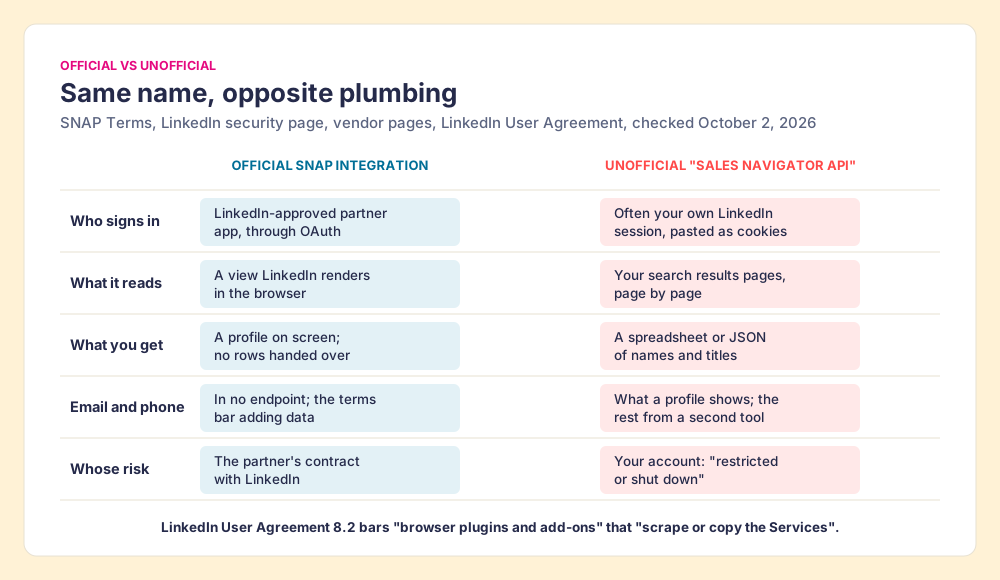
LinkedIn’s terms name the practice. User Agreement section 8.2, effective November 3, 2025, has members agree not to “develop, support or use software, devices, scripts, robots or any other means or processes (such as crawlers, browser plugins and add-ons or any other technology) to scrape or copy the Services, including profiles and other data from the Services,” and not to “use bots or other unauthorized automated methods to access the Services, add or download contacts” (LinkedIn User Agreement). LinkedIn’s prohibited-software page says it does not permit tools “that scrape, modify the appearance of, or automate activity on LinkedIn’s website,” and that members who use them “risk having their accounts restricted or shut down,” with tools that “may become non-operational without notice” (LinkedIn Help, checked October 2, 2026).
The account at risk is a rep’s own network, often years of connections. And the haul still has no phone numbers in it, because Navigator never held them. This page does not rule on any single vendor; our Sales Navigator scraper guide goes further into the tools. The fair test for anything that touches a Navigator page, ours included, is three questions: what does it read from the page, where does the contact data come from, and does anything get copied in bulk. Our answer for Prospector: it works within LinkedIn’s terms and does not copy search results in bulk, and the contact data comes from Clay’s waterfall on your own Clay account.
How do teams get Navigator leads into the CRM with verified contacts?
A team that wants a sales navigator API usually wants one thing: the people from a Navigator search, in the CRM, with an email and a phone, without typing. Sales Navigator is good at the first half. It is where reps find people, a team asking this question is usually already paying for it, and nothing below asks you to drop it. The gap is the second half, and it closes with three routes.
Supered Prospector: Clay’s waterfall on the Navigator lead
For a team that already runs Clay, the missing email and phone are sitting one table away. Clay’s waterfall checks “multiple providers to return the most verified emails (lower bounce rate) and phone numbers (higher connect rate)” (Clay), across what Clay’s homepage calls 200+ providers. Clay’s pricing page adds: “If an enrichment returns no result, you’re not charged Data Credits or Actions” (Clay pricing). The catch has been that reps live in Navigator and the CRM, and the Clay tables live in Clay.
Prospector runs inside the Supered Chrome extension and puts those tables on the Navigator page, on your own Clay account, with no Clay login for reps:
- The CRM check first. On the profile, the rep sees the matching HubSpot, Salesforce, or Pipedrive record and whether the person was already worked in the past, before creating a duplicate.
- One button on the lead or list. The rep runs the team’s Clay table from a Navigator lead or saved list; Clay’s waterfall returns the verified email and phone.
- Whole lists and custom workflows. A rep can push a list into a Clay workflow, run any custom Clay workflow the GTM engineer built, and pull a buying committee tuned to the team’s titles and seniority.
- One click to the CRM. Ops sets the field mapping once; the lead lands in HubSpot, Salesforce, or Pipedrive with the email and phone attached, and the team’s process applies to it from there.
Supered does not bring its own database. It brings Clay’s waterfall, which is every database, routed, and that is why we chose Clay as our only data provider. Clay governs the data. Supered governs the motion. The same button works away from Navigator, on a plain LinkedIn profile, a company website, and a CRM record, which matters for reps who work a named account list. Prospector costs $45 per rep per month, billed annually, from one rep, plus your Clay plan (Prospector). The full rep loop, from the profile to the closed deal, is on the sourcing use case.
Choose something else if:
- No Clay account. Prospector needs one. Kaspr or Lusha is less setup for a rep without Clay.
- Advanced Plus already in the contract, and few new leads. CRM Sync for the identity plus a light email finder may be enough.
- AI-written outreach. Prospector does not draft or send email; it hands the lead to your CRM and sequencer.
Without Clay: a contact-data extension on top of Navigator
For one or two reps with neither Advanced Plus nor Clay, a single-database extension is the shortest path. Kaspr’s pricing page says “Use Kaspr on top of Sales Navigator” on its Starter plan, from $49 per user per month (Kaspr pricing, checked October 1, 2026). Lusha charges 1 credit for a verified email and 5 for a phone (Lusha pricing). Each is one database, so a miss has no next source. The field is graded in Sales Navigator alternatives and the LinkedIn Chrome extension guide, and the email-only question is answered in how to get emails from LinkedIn Sales Navigator.
Why trust this guide?
Before Supered I started RevPartners, a HubSpot partner that did only sales implementations and reached HubSpot’s Elite tier in 13 months, which meant years of watching reps carry people from LinkedIn into a CRM by hand. Supered is the #1 sales enablement app on the HubSpot marketplace, rated 5.0 from 122 reviews there and 4.9 out of 5 from 81 reviews on G2 (checked October 1, 2026). The disclosure: we make Prospector, and it appears above as one of three routes. The LinkedIn quotes on this page come from LinkedIn and Microsoft pages opened on October 2, 2026, linked where they appear.
Should you wait for the Sales Navigator API?
No. The facts line up in one direction:
- Closed program. LinkedIn is not accepting new SNAP partners and has published no date for reopening.
- No rows by design. Display partners “do not actually get access to the LinkedIn data,” and the only person-level endpoint returns a profile link and a photo for someone already in your CRM.
- No contact data by contract. SNAP Terms 3(d) bar adding what the seat holder cannot already see, with an email address as the example.
- Unofficial APIs are a different machine. They read your search pages with your session, which section 8.2 bars, and they still need a second tool for phones.
Our recommendation: treat Navigator as the place reps find people, and fetch the email and phone outside LinkedIn at the moment the rep decides the person is worth a call. If your team is on Advanced Plus, keep CRM Sync for the identity and the activity log. If you have Clay, put it on the Navigator page with Prospector and send the lead to the CRM in one click. The API you were looking for was never going to carry an email address through that window.
If the real goal was a file, how to export Sales Navigator leads walks through what LinkedIn allows on each plan, and Sales Navigator pricing shows what Advanced Plus adds. Teams already on Clay can see the other ways reps reach it from the browser in the Clay Chrome extension guide and our take on Exportly alternatives.
Frequently asked questions
Does LinkedIn Sales Navigator have an API?+
How do I get LinkedIn Sales Navigator API access?+
Can the Sales Navigator API export leads, emails, or phone numbers?+
Is the LinkedIn Sales Navigator API free?+
Are third-party Sales Navigator APIs legal to use?+
How do I get Sales Navigator leads into my CRM with an email and phone?+
Your process, running itself.