Clay vs Lusha in 2026: The Vending Machine and the Kitchen
Lusha now sells a waterfall, and Lusha's data now sits inside Clay's.
Clay vs Lusha checked live on October 2, 2026: who picks the providers, what a miss costs, what ten reps pay, and the option for teams already on Clay.
Clay vs Lusha compares a contact database that reps open themselves, Lusha, with a waterfall that asks 200+ data vendors in turn, Clay, which a GTM engineer builds and which can include Lusha as one step on your own Lusha account.
Clay vs Lusha compares a contact database that reps open themselves, Lusha, with a waterfall that asks 200+ data vendors in turn, Clay, which a GTM engineer builds and which can include Lusha as one step on your own Lusha account. The short answer, checked October 2, 2026:
- Supered Prospector. For teams that already pay for Clay: reps run the GTM engineer’s Clay tables from LinkedIn, a company site or the CRM record, and never open Clay. $45 per rep per month, billed annually.
- Lusha. For one to five reps who reveal a few contacts a day from LinkedIn and want a posted price. Free to $3,599.10 a year.
- Clay, run by a GTM engineer. For teams with a builder who wants 200+ providers in an order they choose, and no charge for a miss. From $185 a month.
A vending machine and a kitchen both feed people. The vending machine has a glass front, a price on every slot, and a button anyone can press; you put in a coin and a snack drops. The kitchen has a pantry stocked from dozens of suppliers, a chef who writes the recipes, and the ability to make something the machine never stocked. Lusha is the vending machine. Its Chrome extension shows 400,000 users (Chrome Web Store, October 2, 2026), and G2 users rate its ease of use 9.2 out of 10. Clay is the kitchen, and its ease of use on the same G2 page is 7.8 (G2, Clay vs Lusha, October 2, 2026). Sales reps do not cook in it, so the chef ends up taking their orders.
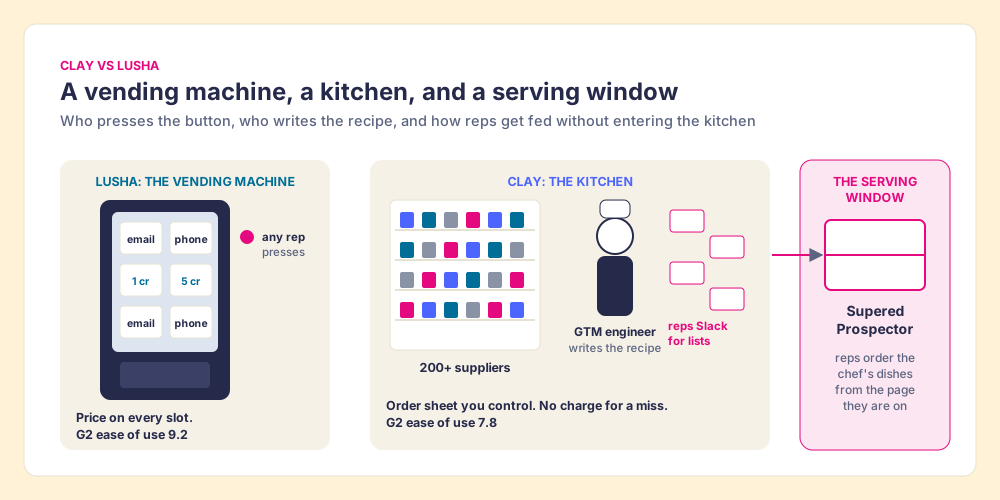
The comparison pages ranking for this search mostly stop at “Clay for builders, Lusha for reps.” That was true in 2025. In 2026 the two walked toward each other: Lusha put its data inside Clay’s marketplace in March, then built its own waterfall and put it on every paid plan in September. So the useful question for a buyer is narrower and has a dollar sign on it. Both now sell a waterfall. Who chooses the suppliers, and who pays when the shelf is empty?
Clay vs Lusha at a glance
The lens is a team of ten to fifty reps that wants contact data reps will use where they already sell, and a leader who can see which lists turn into pipeline. Each setup is scored 1 to 5 on five criteria, weighted: coverage (x3), rep-side delivery (x2), price for the job (x2), what the leader sees after the export (x2), and bundled outreach (x1), out of 50. The weights match Kaspr vs Lusha and the Lusha review, so you can flip them and re-add.
| Rank | Setup | Grade | Score | Best fit | CRM integration | Setup effort | Pricing | Reason to choose |
|---|---|---|---|---|---|---|---|---|
| 1 | Clay plus Supered Prospector | A | 44 | Teams already on Clay with reps in LinkedIn and the CRM | Native in HubSpot, Salesforce and Pipedrive; one-click sync | Under a week on an existing Clay account | $45 per rep per month, billed annually, plus your Clay plan | 200+ providers per lookup, run by reps, lists followed to closed |
| 2 | Clay, run by a GTM engineer | B+ | 31 | Teams with a builder who works the tables for the reps | Native CRM sync on Growth | Days to weeks of table building | Launch from $185 a month, Growth from $495 | Provider order you control, no charge for a miss |
| 3 | Lusha on its own | B+ | 29 | One to five reps revealing from LinkedIn | Native (Salesforce, HubSpot, Pipedrive) | Minutes | Free to $3,599.10 a year | Posted price, easiest extension in the pair |
The scores: Prospector 5, 5, 4, 5, 1. Clay alone 5, 2, 4, 1, 2: the coverage is Clay’s, and the rep-side 2 is the gap between a table and the person meant to run it. Lusha 3, 4, 4, 1, 2: the rep-side 4 and the price 4 are earned, and coverage is one database with a fallback it picks for you. Prospector’s coverage score is Clay’s waterfall, credited to Clay, and its outreach score is low on purpose: it has no dialer and no sequencer of its own.
What is Lusha selling in 2026?
A vending machine with a good glass front. Lusha is a B2B contact database with a Chrome extension that works on LinkedIn, Sales Navigator, company websites and inside the CRM, on every plan (Lusha docs). The prices below come from the plan data embedded in Lusha’s pricing page, read October 2, 2026 (lusha.com/pricing).
| Plan | Monthly billing | Yearly billing | Credits | Seats |
|---|---|---|---|---|
| Free | $0 | $0 | 40 a month | 1 |
| Starter | $49.90 a month | $449.10 a year | 400 a month, or 4,800 a year | 1 |
| Professional | $69.90 a month | $629.10 a year | 600 a month, or 7,200 a year | 2 |
| Premium | $399.90 a month | $3,599.10 a year | 3,400 a month, or 40,800 a year | 5 |
| Scale | Custom | Custom | Custom | Custom |
An email costs 1 credit and a phone 5, and Lusha never charges twice for the same data point (Lusha, how credits are counted). Starter’s 400 monthly credits buy at most 80 phone numbers. Vendr puts the median Lusha contract at $15,999 a year across 147 purchases (Vendr), so the median buyer sits well above one Premium plan.
Its buyers like it. G2 shows 4.3 out of 5 from 1,667 reviews, and on the head-to-head page Lusha leads Clay on ease of setup, 9.0 to 7.7, and on ease of admin, 8.8 to 8.1 (G2, October 2, 2026). It sells further upmarket than Clay does: 46.8% of Lusha’s G2 reviewers are mid-market, against 73.5% of Clay’s who are small businesses. The complaints are the ordinary ones of a single database. A founder told G2 in May 2026 that Lusha could not find details “for about 20% of the contacts,” and a Capterra reviewer in April 2026 wrote that the extension sometimes “returns incomplete results, which wastes credits.” Lusha is independent. In July 2026 Italy’s data protection authority fined it €2 million and ordered it to stop processing data on people in Italy; a Court of Rome interim order of September 8, 2026 suspended the decision while Lusha’s challenge is heard. The Lusha review covers that file in full.
What is Clay, if it is not a database?
Clay has no shelves of its own. Its homepage sells data “from 200+ providers in one place,” and its waterfall is the mechanism: “Combine multiple data providers for the best coverage” (clay.com, October 2, 2026). A request goes to the first provider the builder chose; if that one misses, to the next; the team pays for results. Clay’s pricing page is plain about the miss: “If an enrichment returns no result, you’re not charged Data Credits or Actions.” And about providers you already pay for: “If you bring your own API keys for a data provider, you skip Data Credits entirely” (clay.com/pricing, October 2, 2026).
| Clay plan | Monthly | Annual, per month | Included each month |
|---|---|---|---|
| Free | $0 | $0 | 100 Data Credits, 500 Actions |
| Launch | From $185 | $167 | 2,500 Data Credits, 15,000 Actions |
| Growth | From $495 | $446 | 6,000 Data Credits, 40,000 Actions, CRM auto-sync |
Data Credits start at $0.05 each. Clay is independent and well funded: it raised $115 million at a $7.1 billion valuation on September 9, 2026, led by Wellington (Clay, Series D). Its G2 page shows 4.6 out of 5 from 234 reviews, and Clay leads Lusha on quality of support, 9.1 to 8.1.
The cost of the kitchen is the chef. Clay says it plainly: “GTM engineers build on Clay,” and the builder makes “centralized workflows for any rep to run” (clay.com). The reviews say what happens next. A G2 reviewer wrote in August 2026 that “the learning curve is steeper than the marketing suggests” and that “one or two people on the team become the ones who actually build and maintain the tables.” That person becomes the list desk. Reps Slack them for a list, wait, and get a CSV.
Lusha has a waterfall now. Is it the same as Clay’s?
Same word, different machine. Lusha added Waterfall Reveal to its contact enrichment API on July 27, 2026, and on September 23, 2026 made Data Waterfall available on every paid plan, after it had been limited to Pro and above (Lusha changelog). When Lusha’s own data has no match for a field, the request “falls through to your enabled third-party providers.” The changelog then sets out three terms that decide the comparison:
- The order. “Provider order isn’t configurable - Lusha manages that internally.” You switch providers on or off under Account, Waterfall; Lusha decides who is asked first, and Lusha’s own data is always the first stop.
- The price of a fall-through. “A field resolved via waterfall is charged at the enabled provider’s own credit rate for that field - not a flat rate,” and it “can be higher than a standard Lusha-only reveal.”
- The price of a miss. Lusha’s credit reference lists “API request with no results returned 1 credit (minimum).” Clay charges nothing for an enrichment that returns no result.
So both vendors now stock the vending machine from more than one supplier. In Lusha’s, the machine picks the supplier and the price on the slot can change when it does. In Clay’s kitchen, the chef writes the order sheet across 200+ suppliers, can put a cheap email finder first and an expensive mobile provider last, and pays nothing when the shelf comes back empty.
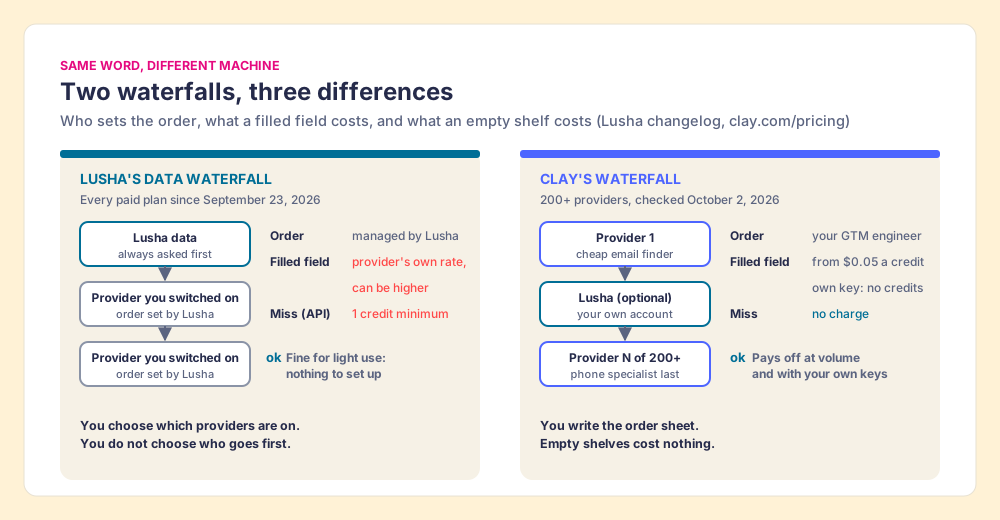
A vending machine that sources its own refills is convenient, and for a rep revealing ten contacts a day, Lusha choosing the order is a feature: nothing to set up, and one bill. The difference only starts to cost money at volume, when a team wants a cheap provider asked first for emails and a phone specialist asked last, and wants to stop paying for empty slots.
Can you run Lusha inside Clay?
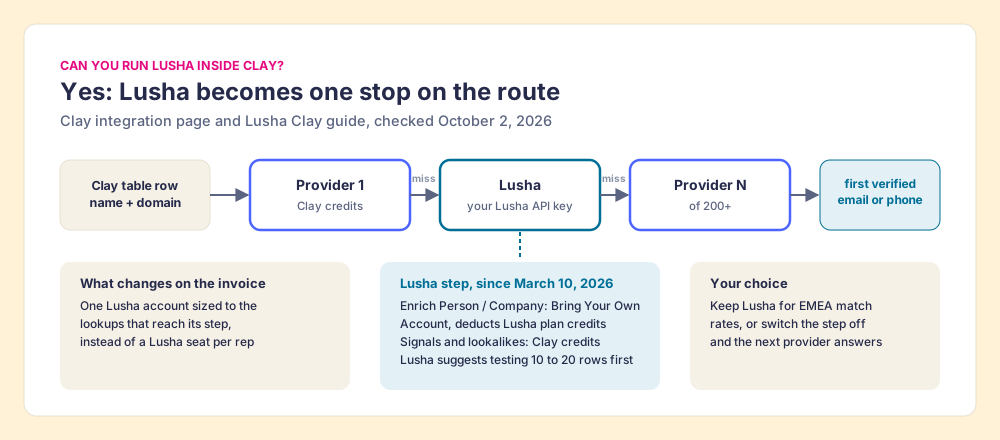
Yes, and since March it is the cleanest way to have both. Lusha joined Clay’s marketplace on March 10, 2026. Clay’s integration page lists Enrich Person with Lusha and Enrich Company with Lusha, each marked “Bring Your Own Account Required,” while Lusha’s signal actions (headcount growth, IT spend, job growth) run on “Clay Credits or Bring Your Own Account” (Clay, Lusha integration, October 2, 2026). Lusha’s own guide spells out the setup (Lusha, Clay connector):
- The key. “An active Clay account and a Lusha API key,” which only Admins and Managers can see in the Lusha dashboard.
- The meter. “Enrich person and Enrich company deduct from your Lusha plan credits,” while “All signal enrichments and Lookalike sources use Clay credits.”
- The column. In a Clay table, add a column, search for Lusha, pick the enrichment, map an email, LinkedIn URL or domain, and run it. Lusha suggests testing on 10 to 20 rows first.
Lusha’s embedded plan data lists public API access on every plan, Free included, and its Clay guide names no minimum tier. So the team keeps one Lusha account sized to the lookups that reach Lusha’s step, instead of a seat per rep. Clay itself said in its Lusha changelog that the step is there “for better EMEA match rates” (Clay changelog, March 10, 2026). A team that wants Lusha’s European coverage puts it in the order sheet. A team that does not takes it out, and the next supplier answers.
Which is cheaper, Clay or Lusha?
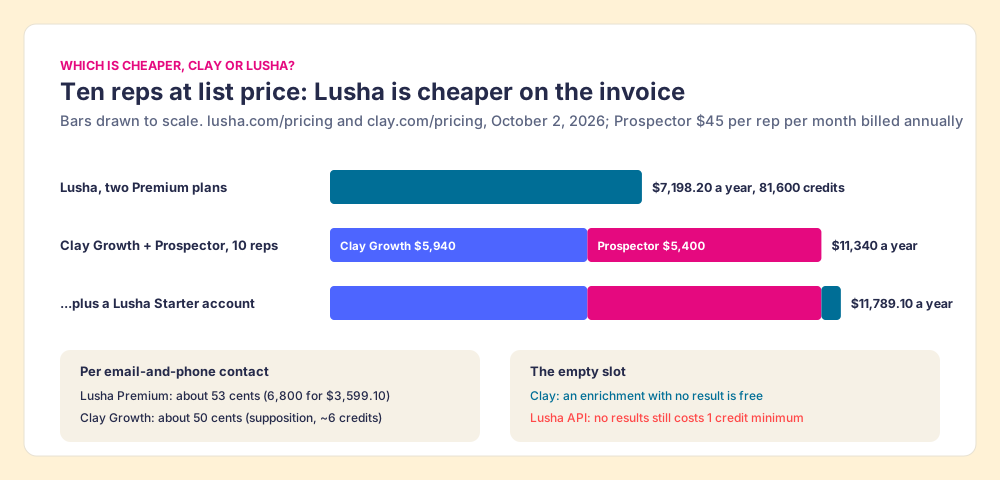
For a small team on list price, Lusha, and the sums are short. Ten reps on Lusha means two Premium plans: $7,198.20 a year, 81,600 credits, enough for 13,600 contacts with an email and a phone at 6 credits each. Clay’s Growth plan lists at $5,940 a year before anyone builds anything. Add Supered Prospector so reps run the tables, at $540 per rep per year, and ten reps on Clay come to $11,340 a year. Add a Lusha Starter account for the EMEA step and it is $11,789.10.
Per contact the two land close. Premium’s 40,800 credits buy 6,800 email-and-phone contacts at $3,599.10, about 53 cents each. Clay Growth’s 72,000 Data Credits a year at roughly 6 credits per email-and-phone contact is about 12,000 contacts for $5,940, about 50 cents each; that 6-credit figure is a supposition that moves with the providers in your order, so test your own table. The real difference is the empty slot. On Clay, a lookup that finds nothing is free. On Lusha’s API, it costs a credit, and a field filled by Lusha’s waterfall costs whatever that provider charges.
Lusha pricing walks Lusha’s whole ladder, and what is Clay explains Data Credits and Actions in more depth.
Why trust this comparison?
I started RevPartners, a HubSpot partner that did only sales implementations, sold roughly twice as much Sales Hub as any other partner, and reached Elite tier in 13 months. Supered came out of that work and is the #1 sales enablement app on the HubSpot marketplace, rated 5.0 from 122 reviews there and 4.9 from 81 on G2, both checked October 1, 2026. The disclosure: we make Supered Prospector, which runs on Clay and competes with Lusha for teams that have Clay. It ranks first here for that job only, and the weights are printed above so you can change them.
Where does Supered Prospector fit?
Clay plus Supered is the best way for a sales team to prospect: GTM engineers build in Clay, reps never open Clay. Prospector is the serving window in the kitchen wall. It runs inside the Supered Chrome extension, on the team’s own Clay account, and turns the chef’s recipes into a button on the page where the rep already is. Supered does not bring its own database. It brings Clay’s waterfall, which is every database, routed, and we chose Clay as our only data provider for that reason.
Three people get something different from it:
- The GTM engineer. No more list desk. Build named flows once, each one a Clay table or function with a destination, a sequence or the CRM, and reps pick them from a Push menu. Your waterfalls, tiers, tags and sequence variables stay yours, Lusha’s step included if you keep it. Start from the Supered Clay template or bring your own tables. The Clay templates guide and Clay workflows guide cover what to build first, and Prospector for GTM engineers shows the builder’s side.
- The rep. The table as a button on a LinkedIn profile, a company website, or a HubSpot, Salesforce or Pipedrive record. Sales Navigator leads go onto a prospect list, and the list goes to a Clay table. Before pushing, the rep sees who owns the record and whether it was prospected before, so reps do not duplicate each other’s work. Plays include research on the buying committee you defined, new logos, expansion, job changers and stalled deals.
- The leader. Found, Worked, Closed: which lists reps found, who is working theirs and who is not, and how each lead ended the way your process says, Qualified, Recycled or Disqualified. That view is how the Clay budget grows.
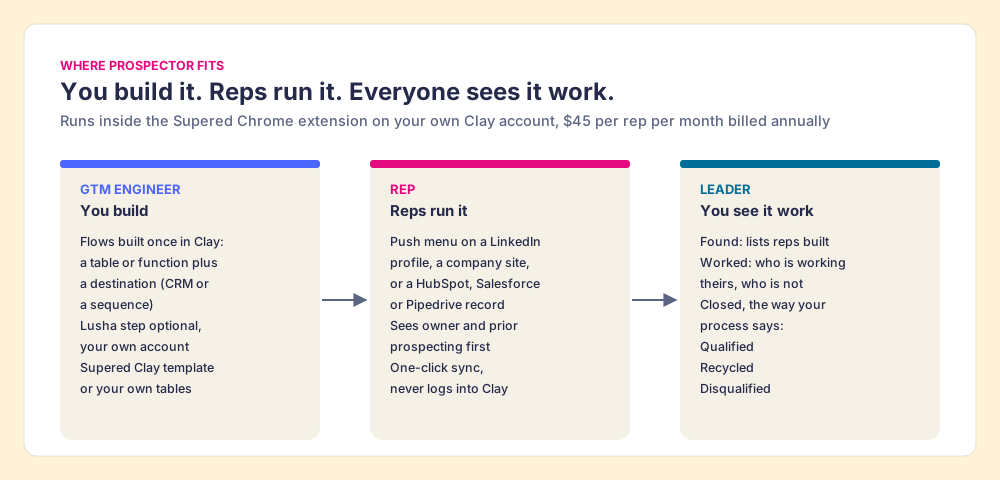
Prospector works within LinkedIn’s terms and does not copy search results in bulk; the contact data comes from Clay’s waterfall on the customer’s Clay account. It costs $45 per rep per month billed annually, from one rep (Prospector), and the sourcing use case shows the setup. The Clay Chrome extension page explains why a Clay table without a rep-side button tends to sit unrun.
Choose something else if you do not have Clay. Prospector does nothing without a Clay account and someone to build the tables. If you want help with that, RevPartners, a Clay Elite Studio Partner that I founded, builds and tunes them. Choose something else, too, if you are one to three reps revealing a few contacts a week: Lusha’s Free plan and $449.10 Starter are hard to undercut for that job.
When does Lusha win?
- A team with no Clay and no builder. A kitchen with no chef is a cold room. Lusha’s extension installs in minutes, G2 users rate its setup 9.0, and the price is on the slot.
- Light, mixed reveals. A rep whose month fits inside 400 credits pays $449.10 a year on Starter, and Lusha’s waterfall now fills some of the gaps without anyone configuring it.
- A mid-market buyer who wants one vendor. Nearly half of Lusha’s G2 reviewers are mid-market, and Premium’s credit pool with admin allocation suits a manager handing out credits to five reps.
If the job is calls and sequences in one seat, Apollo vs Lusha prices that switch, and Lusha vs Cognism covers European pipelines. Teams weighing Clay against another single database can read Clay vs Apollo and Clay vs Cognism, which run the same argument.
Lusha vs Clay: which should you choose?
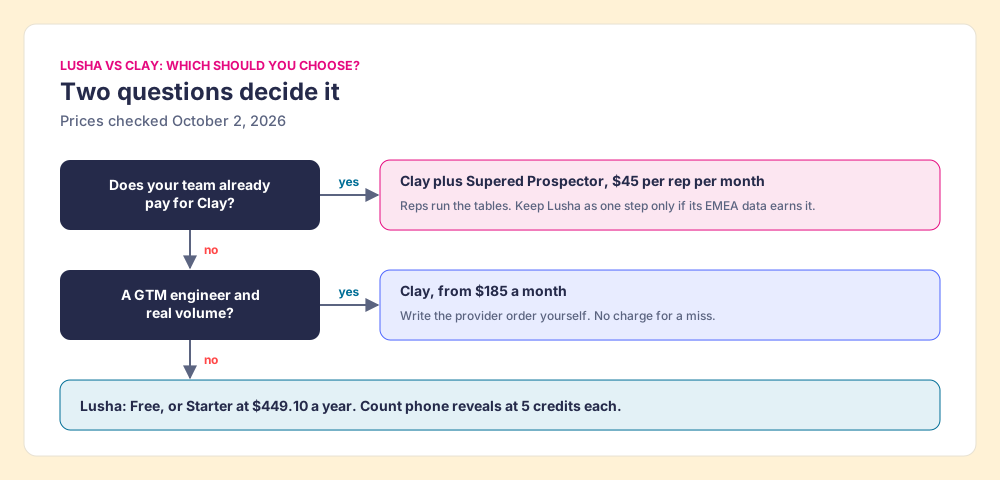
- Lusha itself. The pick for a few reps with no Clay and no builder, revealing a mix of emails and phones from LinkedIn at a posted price. Count the phone reveals before choosing yearly billing, and ask the EU question in writing if Italy is in your territory.
- Clay, run by a builder. The pick for a team with a GTM engineer and volume, who wants to write the provider order, put Lusha in it or leave it out, and stop paying for empty slots.
- Clay plus Supered Prospector. The pick for a team that already pays for Clay and wants reps running the tables from where they sell, with the leader seeing which lists were found, worked and closed.
My recommendation rests on the vendors’ own pages. The search assumes two rival databases, and 2026 broke that frame: Lusha is now one supplier inside Clay’s kitchen, and Lusha’s own waterfall is a smaller kitchen where Lusha writes the recipe and keeps a credit for an empty slot. If you have no builder, buy the vending machine and read the phone meter. If you have Clay, do not buy a Lusha seat per rep. Keep one Lusha account in the order sheet if its European data earns the slot, and open a serving window, so the chef stops taking orders and the reps order straight from the chef’s menu. A Prospector demo shows that window running on your own Clay account, from a LinkedIn profile.
Frequently asked questions
Is Clay better than Lusha?+
Does Lusha have a waterfall like Clay?+
Can I use Lusha inside Clay?+
Which is cheaper, Clay or Lusha?+
Do reps need to learn Clay?+
When should I choose Lusha over Clay?+
Everything we have written on Clay
More on Clay
Supered Prospector: your Clay waterfall, inside LinkedIn and your CRM- Clay Alternatives: What the Question Usually Means, and Why a Sales Team Often Wants a Front End on Clay Instead
- Clay Pricing 3.0, Explained for the Sales Leader Who Is Not the GTM Engineer
- Clay Chrome Extension: What Exists Today, and the Five Moves a Rep-Side Extension Should Be Held To
- Clay HubSpot Integration: What It Writes, Which Plan Turns It On, and the Step After the Sync That Nobody Owns
- Clay Salesforce Integration: Two Doors In, One Tag Out, and the Step After the Sync That Nobody Owns
- Clay Pipedrive Integration (2026): The Six Actions, the Plan It Needs, and How Reps Run It Without Opening Clay
Everything we have written on Lusha
More on Lusha
Supered Prospector vs Lusha: the side-by-side- Lusha Alternatives in 2026: The Corner Shop, the Credit Wall, and the Runner Who Checks Every Shelf
- Lusha Pricing in 2026: Five Credits a Phone, and the Jar That Empties on the Anniversary
- Lusha Review 2026: Rated by Its Buyers, Contested by Its Contacts
- The Lusha Chrome Extension in 2026: A Coin-Operated Viewer With One Lens
- Lusha HubSpot Integration (2026): Three Connections, One Credit per Push
- Lusha Salesforce Integration (2026): The Doorman, the Side Door, and the Seventh Credit
Your Clay waterfall, where reps already work.