Clay Templates: Which to Copy, Which to Keep Live, and the One Your Reps Can Run
Clay templates come in four shapes: gallery tables, Claybooks, Functions, and skills. Which Clay enrichment templates are worth starting from for a sales team, why a copied template drifts, and what changes when the template is one a rep runs from LinkedIn or the CRM.
Clay templates are prebuilt Clay tables and workflows you copy into your workspace and adapt: gallery templates, Claybooks, Functions, and skills, each a starting point for a job such as enrichment, list building, or inbound routing.
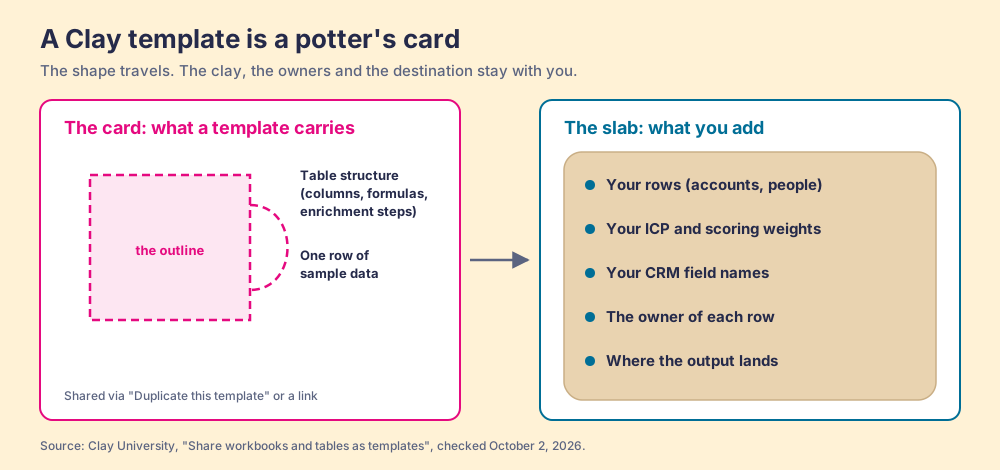
A potter’s template is a curious object. It is a piece of card cut into a shape, laid on a slab of wet clay, and traced around with a needle tool. It saves the potter an afternoon of measuring. It does not make the mug. The clay, the thickness of the slab, the glaze, and whether the handle holds are still the potter’s problem, and two potters with the same card end up with different mugs by spring.
(If you came for slab-building patterns, the potters own this search and Pinterest serves them well. This page is about the other Clay.)
Clay templates are prebuilt Clay tables and workflows you copy into your workspace and adapt: gallery templates, Claybooks, Functions, and skills, each a starting point for a job such as enrichment, list building, or inbound routing. They work exactly like the card. Clay’s own docs say that when a table is shared as a template, “only the table structure and one row of sample data are shared” (Clay University, checked October 2, 2026). The shape travels. Your data stays home, and so does the person who acts on each row.
Picking a template takes a minute. What happens after you copy it decides whether it pays off, and three findings sit at the center of this page:
- The starting set. Seven Clay enrichment templates earn a place on a sales team, led by the email and phone waterfall and the buying-committee lookup from a company URL. The list, with what to change before the first run, is below.
- The copy problem. A copied template drifts from the original and from its siblings the day you edit it. The fix Clay ships is Functions: one workflow, referenced everywhere, updated once.
- The rep problem. Builder templates start from a column of domains. A rep starts from a person on a screen. A template a rep can run needs an input the rep already has and a destination the rep already works in.
What are Clay templates, and where do they come from?
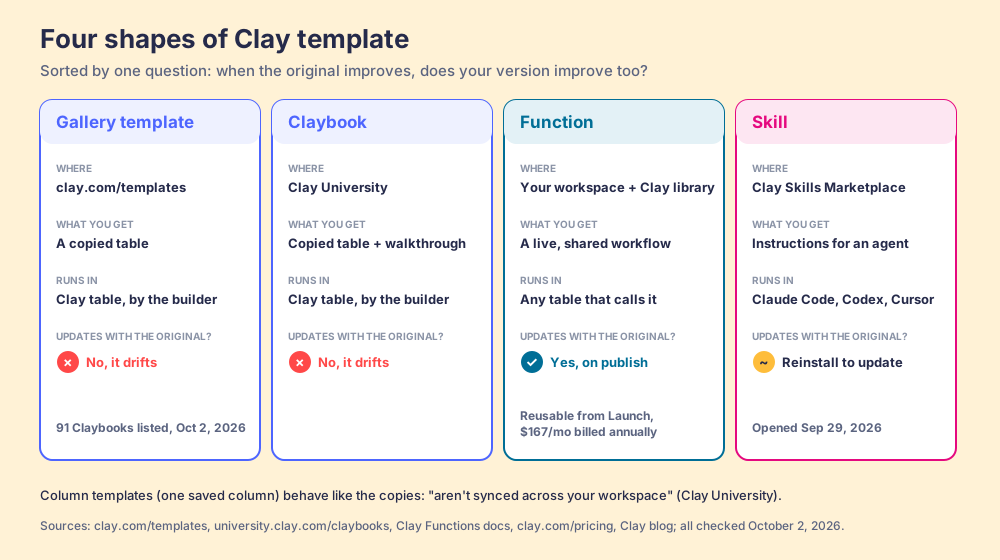
Clay publishes templates in four shapes, and they behave differently enough that it pays to know which one you are holding.
- Gallery templates. The gallery at clay.com/templates bills itself as “our community’s most popular Clay templates to jumpstart your outbound motion,” filtered by use case (enrichment, list building, scoring and signals, automated inbound, and seven more), by provider, and by role. Each page has a “Duplicate this template” link that drops a copy in your workspace.
- Claybooks. Clay University calls them “GTM use case templates”: a template plus an interactive walkthrough of each step. There were 91 on the Claybooks index on October 2, 2026, from champion job changes to Google Maps lists to a few for fun (one finds promo codes for retailers).
- Functions. A Function turns “any enrichment sequence into a reusable workflow” that you call from any table, and Clay keeps a library of them from its Solutions Engineering team, such as Validate Company Domain and Find and Validate Person at Company (Clay Functions).
- Skills. The newest shape. On September 29, 2026 Clay opened the Skills Marketplace, “a library of skills from GTM engineers and agencies” that run in Claude Code, Codex, or Cursor on your own Clay account. “Every skill is free to install,” Clay says, but skills that pull data “use your Clay credits when they run” (Clay blog).
There is a fifth, smaller thing called a column template: a saved configuration for one column. Clay’s docs file it next to Functions and say plainly that column templates “aren’t synced across your workspace” (Clay University, Functions).
| Shape | Where it lives | What you get | Updates when the original changes? | Who runs it |
|---|---|---|---|---|
| Gallery template | clay.com/templates | A copied table | No | The builder, in Clay |
| Claybook | university.clay.com/claybooks | A copied table plus a walkthrough | No | The builder, in Clay |
| Column template | Your workspace | One saved column setup | No | The builder, in Clay |
| Function | Your workspace, Clay’s library | A live, shared workflow | Yes, on publish | Any table in the workspace |
| Skill | Clay Skills Marketplace | Instructions for a coding agent | Reinstall to update | Whoever runs the agent |
Clay sells the copy as a time saver, and the claim is a big one: before templates, “the average salesperson would spend 1-2 days a week building and replicating each step of the prospecting process. Now, it only takes 1-2 hours” (Clay blog, Yash Tekriwal and Ella Spungen). The number is Clay’s, with no study behind it on the page. The direction is right. The card saves the measuring.
Why does a copied Clay template drift?
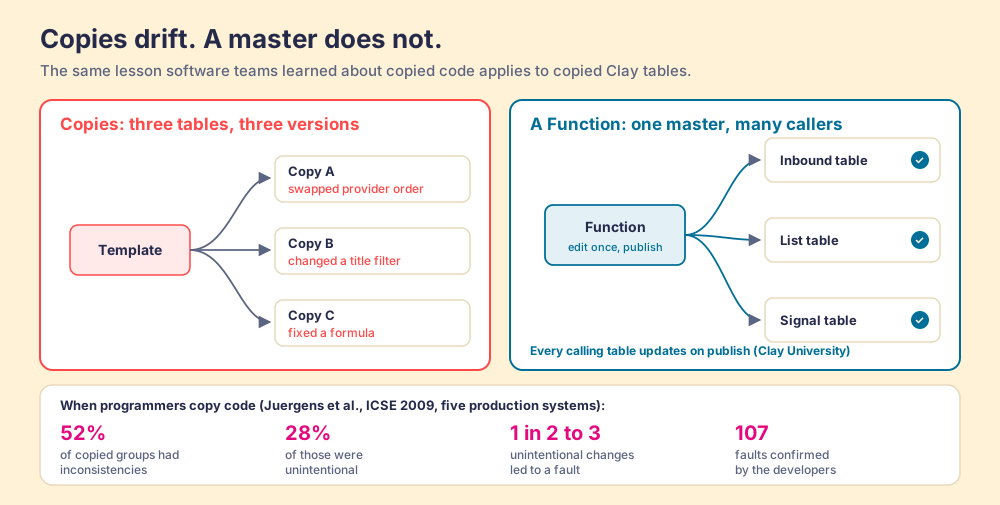
Copy a template into three tables and you own three versions of the same idea. The first time you swap a provider in one, change a title filter in another, or fix a formula in the third, they stop agreeing, and nothing tells you.
Software engineers have studied this exact habit for twenty years, because copying a working block of code and editing the copy is what programmers do under deadline. In 2009 Elmar Juergens and three colleagues examined five production systems and walked more than 700 groups of copied code through with the developers who maintained them. “About half of the clones (52%) contain inconsistencies,” they found, and over a quarter of those inconsistencies (28%) were unintentional. Then the expensive part: “about every second to third unintentional change to a clone leads to a fault,” and the developers confirmed 107 faults that had come from copies drifting apart (Juergens et al., ICSE 2009). Their remedy was less copying and tools that keep copies in step.
A copied Clay table is a code clone with a friendlier face. The waterfall order you tuned for European mobiles lives in one table; the inbound table still runs last spring’s order. Clay’s answer is the same one the engineers reached. A Function is the master copy that every table reads from: “edit the function once and every table calling it updates automatically,” with a sandbox to test changes before you publish them (Clay University). A senior outbound growth manager at Rippling put it on Clay’s page in one line: “Functions let me treat enrichments like code.”
The master copy has one weak spot, and Clay names it: Functions “don’t currently have a version history.” A master with no archive means a bad publish reaches every table at once, so test in the sandbox and keep a change note in the Function’s description. The trade still favors the master. Clay says Functions add no credit cost of their own and are available “on all paid plans at no additional cost.”
Which Clay enrichment templates are worth starting from?
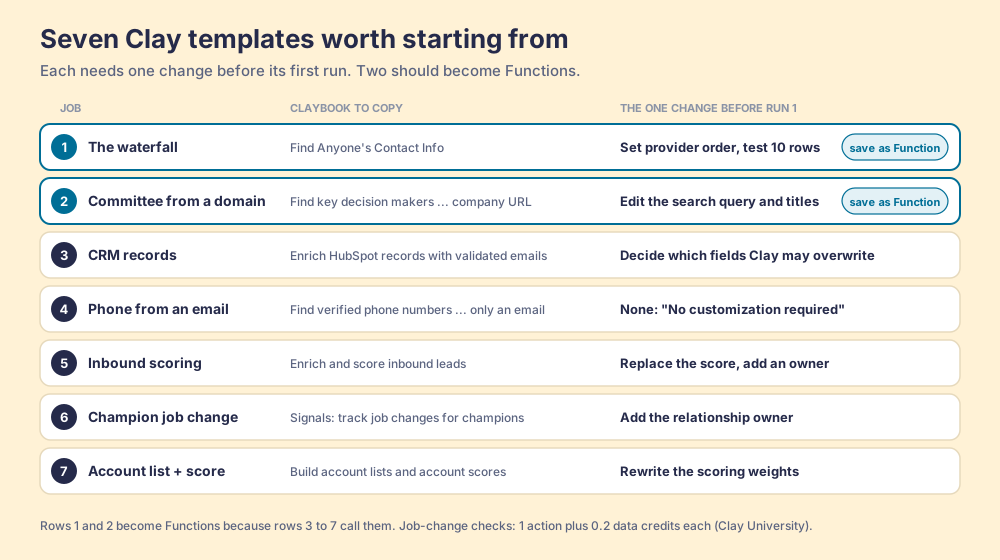
For a sales team, seven. Each is a Claybook or gallery template you can copy today, each needs one change before its first run, and the first two should become Functions as soon as they work, because almost everything else calls them.
- The waterfall. “Find Anyone’s Contact Info” (Claybook) runs Clay’s email and phone waterfalls across providers until one answers. Change the provider order to fit your market, test on ten rows, then save it as a Function keyed on a LinkedIn URL. How the order works is in our waterfall enrichment explainer.
- The buying committee from a domain. “Find key decisions makers and their emails using only a company URL” (Claybook) sets a job title, finds the person through a Google search, then runs the email waterfall. The Claybook tells you to edit the search query so it returns decision makers “relevant to your business (not ours).” Do that first, and write your real titles and seniority in. The why behind committee lookups is in our buying committee guide.
- CRM records with real contact fields. “Enrich Hubspot records with validated emails, companies, and phone numbers” (Claybook) imports contacts, validates emails, finds phones, detects job changes, and writes back with lookup and update columns. “Any CRM will work.” Before the first run, decide which fields Clay may overwrite; the setup is in our Clay HubSpot integration guide.
- The phone from an email. “Find verified phone numbers likely to answer with only an email” (Claybook) runs the mobile waterfall and verifies numbers with Trestle and SureConnect. Clay calls it “No customization required,” which makes it the best first template for a team that dials.
- Inbound enrichment and scoring. “Enrich and score inbound leads from your website instantly” (Claybook). Replace the sample score with your ICP and add an owner column before anything routes.
- The champion who moved. “Signals: Track job changes for champions at existing customers” (Claybook), a staff pick, imports champions from the CRM and watches them; each check costs “1 action plus 0.2 data credits” per Clay University. The play itself is in our job change tracking guide.
- The account list with a score. “Build account lists and account scores based on technographic and firmographic data” (Claybook). Rewrite the scoring weights; a borrowed score ranks someone else’s ideal customer.
We leave two popular families off. The AI copywriting templates are well made, and a first draft is seldom what stands between a rep and a meeting. And the novelty Claybooks (snack links for new hires, AI-written kickoff songs) are fun to read and do not belong in a sales stack.
One skill is worth stealing as a habit even if you never install it. Matteo Fois’s “List Clearance” checks each row against seven tests before a list goes to a sequencer, including whether the email is verified and whether the contact is already a customer, and hands back the rejected rows “with a reason next to every row that was cut” (Clay blog). A template that explains its rejections teaches the next person who opens it.
How is a rep-facing Clay template different?
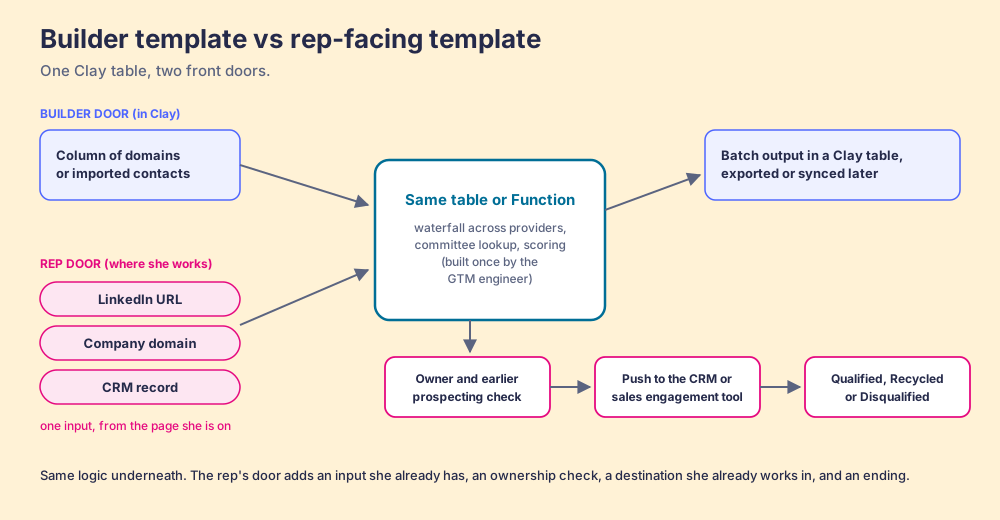
Read the first step of any template above and you meet the same assumption. “Add a list of company domains.” “Import a list of contacts from your CRM.” “Add any email address to the first column.” Each one starts with a builder holding a list. It is the right shape for the GTM engineer, who sits in Clay and works in batches.
A rep works one person at a time, and the person is already on the screen. The Bridge Group’s 2025 SDR report puts the median at 112 activities a day, 19 of them on LinkedIn (Bridge Group, 2025). The rep looking at a VP’s profile does not have a column of domains. She has a URL in the address bar and a question about a mobile number. The builder’s template opens from inside Clay. She needs a door on the page she is already standing on.
A template a rep can run has five parts, and the builder template usually has two:
- One input the rep already has. A LinkedIn URL, a company domain, or a CRM record ID, supplied by the page she is on. Functions are built this way: inputs are “the values that change from table to table,” everything else is fixed logic.
- One output she can act on. A verified email and mobile, or a short buying committee, with the waterfall columns hidden, as the decision-maker Claybook already hides them.
- An ownership check before the push. Who owns this account in the CRM, and whether a teammate prospected this person last month. Without it, two reps email the same VP on the same day.
- A destination she already works in. The CRM record or the sales engagement tool, with field mapping set once by the builder.
- An ending. What happens to the lead after it is worked: qualified, recycled, or disqualified, by the team’s own rules.
Clay has opened two rep doors of its own. Clay MCP lets reps “use Clay Functions” from ChatGPT, Claude, or Codex, with Ops governing “the logic, compliance and spend” (Clay MCP); Clay’s docs gate MCP access to higher tiers. Skills run in coding agents. Both fit a rep who spends the day in a chat window. A rep who spends it in Sales Navigator and the CRM needs the switch there, which is the job a Clay Chrome extension does.
Where does Supered Prospector fit?
Clay plus Supered is the best way for a sales team to prospect: GTM engineers build in Clay, and reps never open Clay. Supered Prospector runs inside the Supered Chrome extension, on your own Clay account, so the credits and the waterfall across 200+ providers (clay.com, checked October 2, 2026) stay yours. Prospector brings no database of its own. It brings Clay’s waterfall, which is every database, routed, and that is why Clay is our only data provider.
Prospector is the rep-facing template, built for each of the three people who touch it:
- The GTM engineer. You built the tables, and reps still Slack you for every list. With Prospector you build named flows once, each tied to a Clay table or Function and a destination, and reps pick them from a Push menu. Your logic stays yours: waterfalls, tiers, tags, and sequence variables. Start from the Supered Clay template or bring your own tables, including any you copied from the gallery. More on Prospector for GTM engineers.
- The rep. Your team’s table becomes a button in Sales Navigator, on a company website, and in the HubSpot, Salesforce, or Pipedrive record. Before pushing, the rep sees who owns the record and whether the person was prospected before, so no two reps work the same lead. Navigator leads go onto a prospect list, and the rep pushes the list to a Clay table.
- The leader. You see every list found, worked, and closed, and each lead ends the way your process says: Qualified, Recycled, or Disqualified. Your VP sees it too, which is how the Clay budget grows.
The fair test for any tool that touches a LinkedIn page, ours included: what does it read, where does the contact data come from, and is anything copied in bulk. Prospector works within LinkedIn’s terms and does not copy search results in bulk; the contact data comes from Clay’s waterfall on the customer’s Clay account.
Prospector costs $45 per rep per month, billed annually, from one rep, and starts with a demo on your own Clay account. Supered holds 4.9 out of 5 from 81 reviews on G2 and 5.0 from 122 on the HubSpot App Marketplace (both checked October 1, 2026).
Choose something else if you do not have Clay: Prospector does nothing without a Clay account. If your reps live in ChatGPT or Claude rather than the CRM, Clay MCP is the closer fit. And if your team has no Clay builder yet, start with a builder before a button; our guide to choosing a Clay agency covers what to ask. RevPartners, the HubSpot partner I founded, is a Clay Elite Studio Partner that builds tables with teams; that is a disclosure as much as a suggestion. The full rep loop is on the sourcing use case page.
Which Clay template should you start with?
Start with the waterfall, because the other six call it. Copy “Find Anyone’s Contact Info,” change the provider order, test it on ten rows, and save it as a Function the same afternoon. Do the same for the buying committee from a domain. Then copy the template whose trigger already fires without you: inbound scoring if forms arrive daily, CRM enrichment if reps keep opening records with no phone, the champion signal if you have customers worth watching. Each of those should call your two Functions rather than carry its own copy of the waterfall.
What we recommend, then, is a short rule. Copy templates freely, keep the parts that repeat as Functions, and put the Functions where reps already stand. The card saves the measuring; the master keeps every mug the same shape; the button by the door means a rep with a profile open gets the number while the prospect is still on screen. How a GTM engineer chains those Functions into a full motion is in our guide to Clay workflows, and the plays that sit on top of them are in Clay use cases.
Frequently asked questions
What are Clay templates?+
What gets copied when you use a Clay template?+
What is the difference between a Clay template and a Clay Function?+
Which Clay enrichment templates should a sales team start with?+
Can sales reps use Clay templates without logging into Clay?+
Which Clay plan do Clay templates need?+
Your process, running itself.