Lusha HubSpot Integration (2026): Three Connections, One Credit per Push
The Lusha HubSpot integration, checked October 2, 2026: the three separate connections, what syncs, setup step by step, the credit each record costs to push, the Salesforce version, the limits, and the alternatives.
The Lusha HubSpot integration is Lusha's one-way connection that pushes contacts and companies revealed in Lusha into HubSpot as new or matched records, set up from Lusha's settings by an admin of both tools, at 1 credit per record exported.
How to set up the Lusha HubSpot integration
- 1
Connect HubSpot from Lusha
Log in to Lusha, go to Settings, then Integrations, select HubSpot, click Connect, and sign in to HubSpot to authorize the connection.
- 2
Map the fields
Click Continue to field mapping and review the default Contact and Company mappings. Change any HubSpot field with the dropdown, and add predefined or conditional values if your routing needs them.
- 3
Decide who owns the records
Exported contacts default to the HubSpot user who connected the integration. If that is wrong, map the owner field to a predefined numeric HubSpot owner ID, or plan to reassign owners in HubSpot after each export.
- 4
Set the duplicate check
On the HubSpot Identifier tab, confirm a contact identifier is set (email is the most reliable), and in Settings turn on the Existing HubSpot indicator so reps see which people are already in the CRM before they reveal.
- 5
Choose what may be created
On the Settings tab, use the Contact and Company toggles to decide whether exports may create new HubSpot records or only update matched ones. The setting applies to the whole Lusha account.
The Lusha HubSpot integration is three connections that share a name, and the one Lusha’s docs call the HubSpot integration is a tube that runs in one direction and charges a coin per capsule. A rep reveals a contact in Lusha, presses export, and the record lands in HubSpot. Lusha’s price book lists that push at 1 credit per record, on every plan, against 1 credit per 25 rows when the same contacts leave as a CSV (lusha.com/pricing, October 2, 2026). The short version of what follows:
- Lusha’s own integration. The right buy for a few reps who already live in Lusha and want verified contacts in HubSpot without a spreadsheet in between. Connected on any plan, Free included.
- Supered Prospector. The right buy for a HubSpot team that already pays for Clay: start from the HubSpot record or the LinkedIn profile, let Clay’s waterfall across 200+ vendors find the email and phone, and sync in one click, at $45 per rep per month billed annually.
- Apollo Enrichment. The non-Clay pick when you want enrichment that lives in HubSpot’s marketplace and runs on a schedule.
The Lusha HubSpot integration is Lusha’s one-way connection that pushes contacts and companies revealed in Lusha into HubSpot as new or matched records, set up from Lusha’s settings by an admin of both tools, at 1 credit per record exported. Lusha’s integration guide says so in its first line: “The HubSpot integration lets you push contacts and companies revealed in Lusha directly into HubSpot” (Lusha, HubSpot integration, read October 2, 2026). Push is the right verb. Nothing comes back the other way.
What is the Lusha HubSpot integration, exactly?
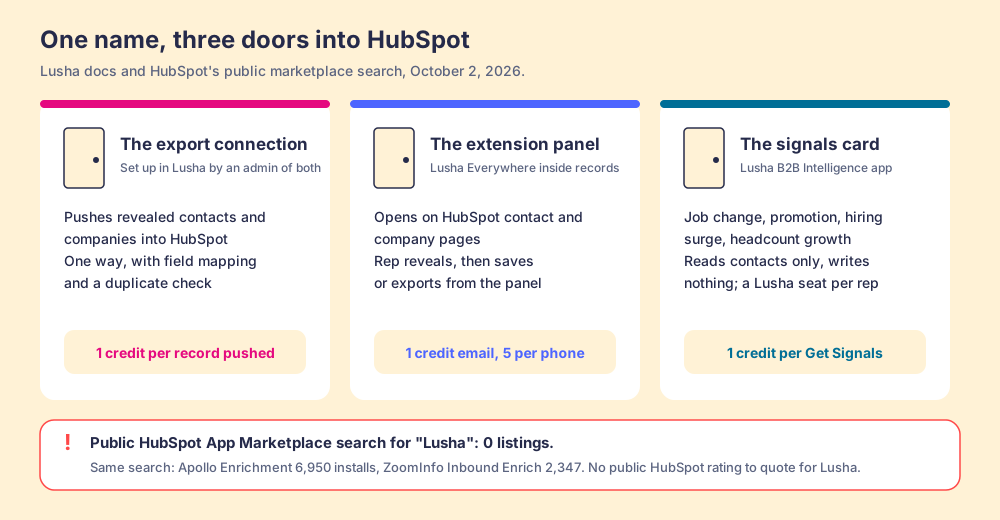
Search Lusha’s docs for HubSpot and you find three different things, each installed by a different person, each charging at a different moment.
- The export connection. Connected from Lusha (Settings, then Integrations, then HubSpot) by someone who is “both a Lusha Admin and a HubSpot Admin.” It sends revealed contacts and companies into HubSpot with field mapping and a duplicate check. The rest of this page is about this one.
- The extension panel inside HubSpot. The Lusha Chrome extension opens on HubSpot contact and company pages when Lusha Everywhere is switched on. A rep reveals from the record and saves or exports from there (Lusha, prospecting on HubSpot). The Lusha Chrome extension page covers it in full.
- The signals card. An app called Lusha B2B Intelligence, installed by a HubSpot Super Admin from the in-portal App Marketplace, adds a card to contact records showing job changes, promotions, hiring surges, and headcount growth. It asks HubSpot for one permission,
crm.objects.contacts.read, so it reads the record and writes nothing back. Each rep needs a Lusha seat and connects their own account, and “1 credit is consumed each time you click Get Signals on a contact record” (Lusha, HubSpot signals setup).
One more fact belongs here, because a buyer usually checks it first. On October 2, 2026, a search of HubSpot’s public App Marketplace for “Lusha” returned zero listings. The same search for “apollo” returned Apollo Enrichment at 6,950 installs, and “zoominfo” returned ZoomInfo Inbound Enrich at 2,347. Lusha’s own troubleshooting page anticipates it: “Lusha is not found in the HubSpot Marketplace,” followed by the instruction to connect from Lusha’s settings instead. So there is no public HubSpot rating or install count for the hubspot lusha integration to quote. The nearest public proof is Lusha’s G2 page, 4.3 out of 5 from 1,667 reviews on the same day (G2).
Why trust this page?
I started RevPartners, a HubSpot partner that did only sales implementations, sold roughly twice as much Sales Hub as any other partner, and reached Elite tier in 13 months. Supered came out of that work and is the #1 sales enablement app on the HubSpot marketplace, with 5.0 from 122 reviews there and 4.9 out of 5 from 81 reviews on G2 (both checked October 1, 2026). The disclosure: we make Supered Prospector, and it sits first among the alternatives below for teams that have Clay. Everything about Lusha on this page comes from Lusha’s own docs and pricing data, read on October 2, 2026.
Which route into HubSpot fits your team?
The lens is a mid-market or SMB HubSpot team, ten to fifty reps. Scores match the Lusha alternatives page and the Lusha Chrome extension page: coverage of the contact you need (x3), rep-side delivery (x2), price structure for mid-market (x2), what the leader sees after the export (x2), bundled outreach (x1), out of 50.
| Rank | Route | Grade | Score | Best fit | HubSpot integration | Setup effort | Pricing (plan that includes it) | Reason to switch |
|---|---|---|---|---|---|---|---|---|
| ref | Lusha export integration | B+ | 29 | A few reps already prospecting in Lusha | Native, one-way push from Lusha | An hour for an admin of both tools | Every plan from Free; 1 credit per record pushed | Stay if one database and a per-record push fee fit your volume |
| 1 | Supered Prospector | A | 44 | HubSpot teams that already pay for Clay | Native, one click from the record or profile | Under a week on an existing Clay account | $45 per rep per month, billed annually, plus your Clay plan | 200+ vendors per lookup, no charge for a miss, start from the HubSpot record |
| 2 | Apollo Enrichment | A- | 36 | Teams wanting scheduled enrichment inside HubSpot | Listed HubSpot app, two-way sync | A day | Basic $49 per seat per month, billed annually | Automatic enrichment of existing records, listed and installable from HubSpot |
Lusha’s 29 is coverage 2, rep-side delivery 5, price 5, what the leader sees 1, outreach 1. The coverage 2 is the single database. Prospector’s coverage score is Clay’s waterfall, credited to Clay, and its outreach score is the lowest on the card because it has no dialer or sequencer.
How do you set up the Lusha HubSpot integration?
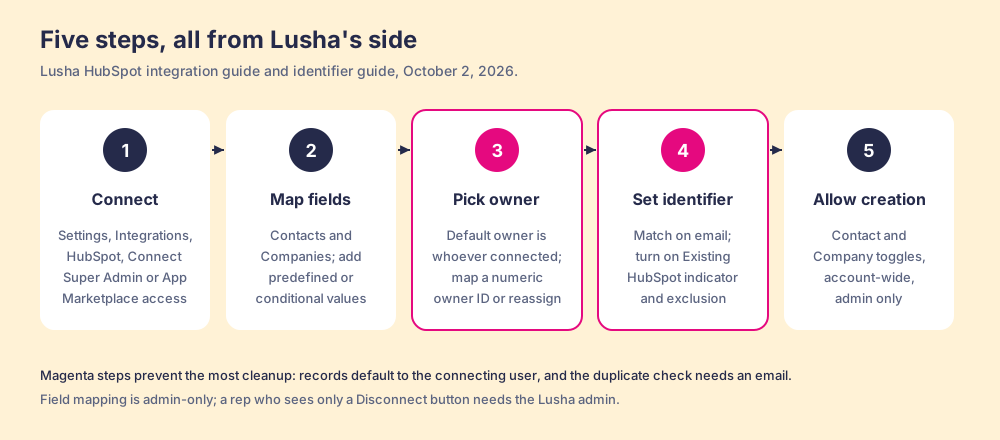
Lusha’s guide runs the setup from Lusha’s side, and HubSpot’s side only asks you to sign in and approve. The one hard requirement sits in HubSpot: the person connecting must be a Super Admin or hold App Marketplace access. A HubSpot community thread on the error “You don’t have permission to connect this integration” got exactly that answer: “Only Super Admins and users with App Marketplace access in admin permissions can connect apps to HubSpot” (HubSpot Community).
- Connect from Lusha. Settings, then Integrations, then HubSpot, then Connect, then sign in to HubSpot.
- Map the fields. Click Continue to field mapping. The defaults are listed in the next section; any of them can be changed with a dropdown.
- Decide who owns the records. Lusha’s guide: “By default, all contacts exported to HubSpot are owned by the HubSpot user who connected the integration.” Read the next section before you skip this step.
- Set the duplicate check. On the HubSpot Identifier tab, confirm an identifier for contacts (Lusha calls email “the most reliable match field”), and turn on the Existing HubSpot indicator so reps see a HubSpot icon next to people already in the CRM (Lusha, HubSpot identifier).
- Choose what may be created. Two toggles on the Settings tab allow or block new contact and company records. They apply to the whole Lusha account.
Field mapping is admin-only. A rep who opens the integration and sees only a Disconnect button lacks admin rights, and Lusha’s troubleshooting page sends them to the account admin.
What syncs from Lusha to HubSpot?
Think of the pneumatic tubes that old department stores and drive-up bank lanes used. The clerk rolls a slip into a capsule, drops it in the pipe, and it arrives at the counting room with a thump. The tube is wonderful at its one job. It runs one way. Each capsule needs an address on it. And whoever installed the tube decides which desk it empties onto.
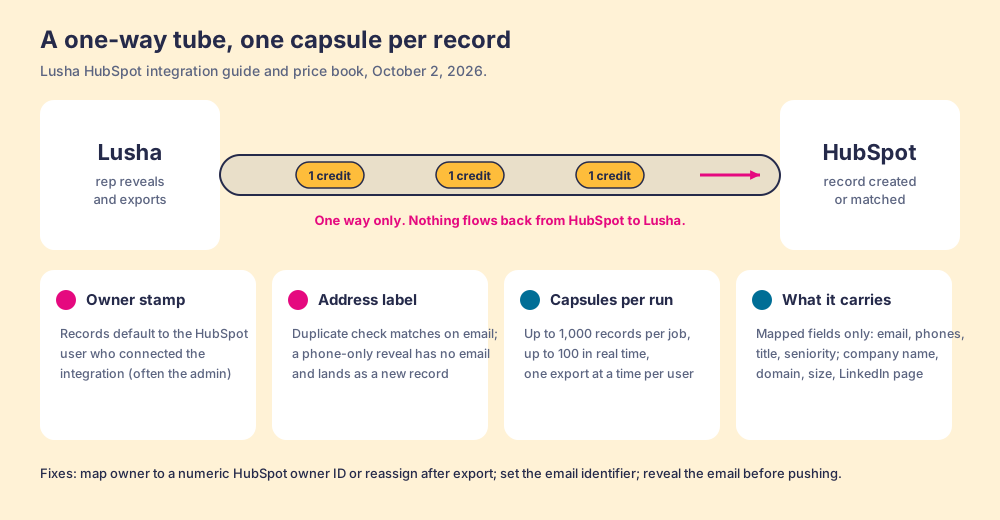
The Lusha export is that tube. By default the capsule carries these fields, from Lusha’s guide:
| Record | Lusha field | HubSpot field |
|---|---|---|
| Contact | Email 1, Phone 1, Phone 2 | Email, Phone, Mobilephone |
| Contact | First Name, Last Name, Job title, Seniority | First Name, Last Name, Jobtitle, Seniority |
| Company | Company Name, Domain, Website | Name, Domain, Website |
| Company | Company Phone, Street, Country | Phone, Address, Country |
| Company | Description, Company Founded, Employees, LinkedIn | Description, Founded_year, Number of employees, Linkedin_company_page |
Three rules on the tube decide whether the capsule lands where you meant it to.
- The owner stamp. Exported contacts default to the HubSpot user who connected the integration. If an admin connects it, the admin owns every Lusha contact, and any HubSpot view or report filtered by owner shows one person holding the whole list. Lusha’s fix for owner errors is to map the owner field to “a predefined numeric HubSpot owner ID,” which is a single fixed value. Lusha’s HubSpot guide describes no per-rep connection; its Salesforce guide does (more below). Plan on a reassignment step in HubSpot, or have each rep’s records exported under the right owner.
- The address label. The duplicate check matches on first name, last name, and company name or domain, or on email. Lusha’s own troubleshooting names the trap: “If you’re matching on email but contacts in Lusha don’t have an email address revealed, the identifier can’t match and a new record will be created.” A rep who revealed only the phone, to save the email credit or because no email came back, sends a capsule with no address, and HubSpot opens a new drawer.
- The direction. Nothing flows back. The export does not return to a record to keep it fresh after the push; when a buyer changes jobs, the HubSpot record keeps the old company until someone reveals and pushes again. Automatic top-ups of existing HubSpot records run through a different route: Lusha’s blog publishes a Make template that needs “a Lusha account with API access” and a Make account, and Lusha’s plan data lists live CRM enrichment by API from the Professional plan (Lusha blog).
The tube image stops at one point. A real tube carries whatever you put in it; Lusha’s carries what you mapped, and an admin can widen the mapping with predefined values (a fixed Lead Source, say) and conditional rules on Email 1 or Phone 1 for routing. The tube is configurable. It still runs one way.
What does each push cost?
The credit rules come from Lusha’s credit reference and the price book embedded in its pricing page, both read October 2, 2026 (Lusha, how credits are counted).
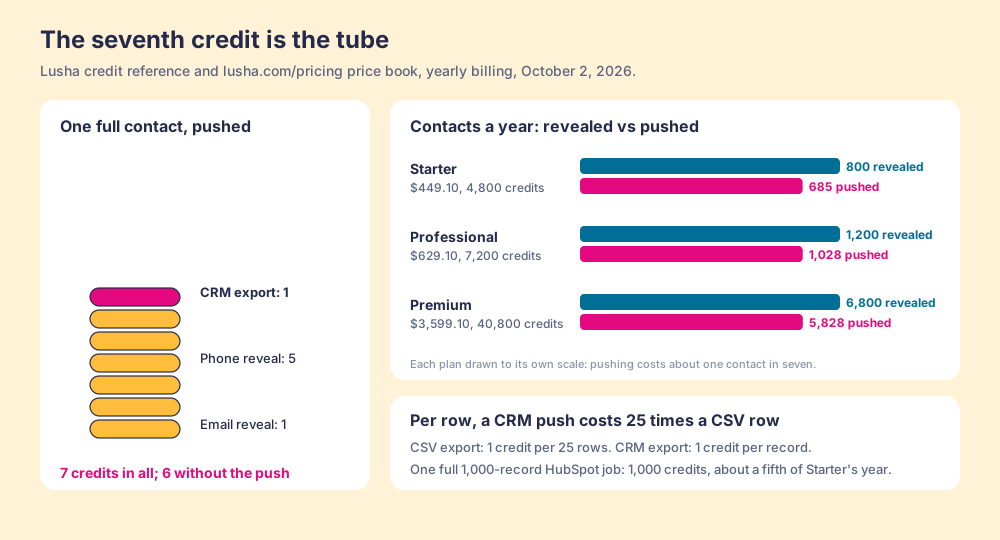
- The reveal. 1 credit for an email, 5 for a phone, up to 6 for both. Re-viewing a contact already revealed is 0.
- The push. The credit reference lists “CRM export (push to Salesforce / HubSpot)” at “1 credit per export” under Workspace. The price book on the pricing page is more precise:
export_crmis 1 credit per 1 record, on every plan from Free to Premium. - The CSV. “1 credit per 25 rows.” Per row, the push into HubSpot costs 25 times what the spreadsheet costs.
The arithmetic for a contact revealed with both email and phone and pushed to HubSpot is 7 credits, and the seventh is the tube. On Starter’s 4,800 credits a year ($449.10, yearly billing), that is 685 pushed contacts instead of 800 revealed ones. On Professional’s 7,200 ($629.10), 1,028 instead of 1,200. On Premium’s 40,800 ($3,599.10, 5 seats), 5,828 instead of 6,800. One full HubSpot job of 1,000 records costs 1,000 credits in export alone, about a fifth of Starter’s year.
Two settings pull the other way, and both are worth switching on. The Existing HubSpot indicator puts a HubSpot icon next to people already in the CRM, using “your company’s HubSpot API quota, not Lusha’s credits.” And Excluding HubSpot objects skips existing contacts during bulk reveals, “no credits charged for those contacts.” A team that turns both on stops paying to reveal people it already has.
One inconsistency to check in your own dashboard: Lusha’s HubSpot prospecting guide says clicking Show contact inside HubSpot “uses one credit,” while its credit reference prices a phone at 5. The credit reference and the price book agree with each other, so budget on 5.
What are the limits of the HubSpot Lusha integration?
All of these come from Lusha’s own HubSpot pages, which is to Lusha’s credit: the limits are written down (Lusha, HubSpot common errors).
- A 1,000-record ceiling. “You can export up to 1,000 contacts to HubSpot in a single job.” Up to 100 process in real time; larger jobs run in the background. Lusha attributes the cap to HubSpot and says it “cannot be changed.”
- One job at a time. “Only one CRM export can run at a time per user.”
- Admin-only repairs. Most errors “can only be resolved by a HubSpot Super Admin and a Lusha Admin.” Expired tokens mean disconnecting, logging out of HubSpot, and reconnecting.
- Picklist case. A predefined value that does not match HubSpot’s internal value (“In Progress” against “IN_PROGRESS”) fails the export.
- Field length. A value over HubSpot’s 100-character limit, most often a website URL or industry, fails the record.
- One last name. “Lusha currently supports exporting one last name only.”
- No writeback. The integration pushes; it does not keep the HubSpot record current afterward.
What do reviewers say about Lusha and HubSpot?
The praise is for the push itself. Frederick S., a mid-market customer success manager, wrote in December 2025 that his team could “transfer their verified information directly into our HubSpot CRM with just one click” (G2). Krupa S., a founder, wrote in April 2026 that “Lusha connects to CRMs like Salesforce and HubSpot.”
The same reviewer who praised the click named the cost. Frederick S. also wrote that “the credit system can sometimes feel limiting for high-volume outbound teams.” That is the tube’s meter talking: a team that pushes most of what it reveals pays a seventh credit on each full contact, and the pool is shared across “all users and all channels.” Lusha’s 4.3 out of 5 from 1,667 G2 reviews on October 2, 2026 is mostly earned on ease of use, and the complaints cluster on credits and on contacts it cannot find, the pattern the Lusha pricing page prices out plan by plan.
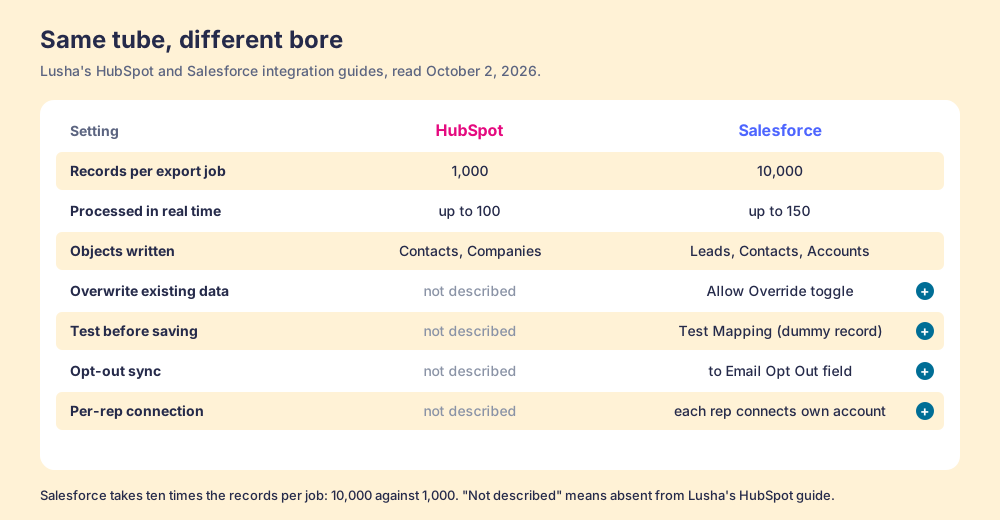
How does the Lusha Salesforce integration differ?
The lusha salesforce integration is the same tube with a bigger bore and more valves. It connects from the same place in Lusha (Settings, then Integrations, then Salesforce), asks you to pick Production or Sandbox, and needs a Salesforce Admin to authorize it (Lusha, Salesforce integration). Then the differences start.
| Setting | HubSpot | Salesforce |
|---|---|---|
| Records per export job | 1,000 | 10,000 |
| Processed in real time | Up to 100 | Up to 150 |
| Objects written | Contacts, Companies | Leads, Contacts, Accounts |
| Overwrite existing data | Not described | ”Allow Override” toggle |
| Test before saving | Not described | ”Test Mapping” creates and deletes a dummy Lead, Contact, and Account |
| Opt-out sync | Not described | Syncs to Email Opt Out or a custom field |
| Per-rep connection | Not described | Each team member connects their own Lusha account |
The per-rep connection is the row that matters most for a sales team. In Salesforce, each rep authorizes their own export, so records arrive under the person who pushed them. In HubSpot, the guide describes one connection and one default owner. The Salesforce tube has its own maintenance: OAuth tokens expire, and when they do “each affected team member needs to reauthenticate individually.” Lusha’s extension also opens inside Salesforce records, the same way it does inside HubSpot.
Where does Supered Prospector fit?
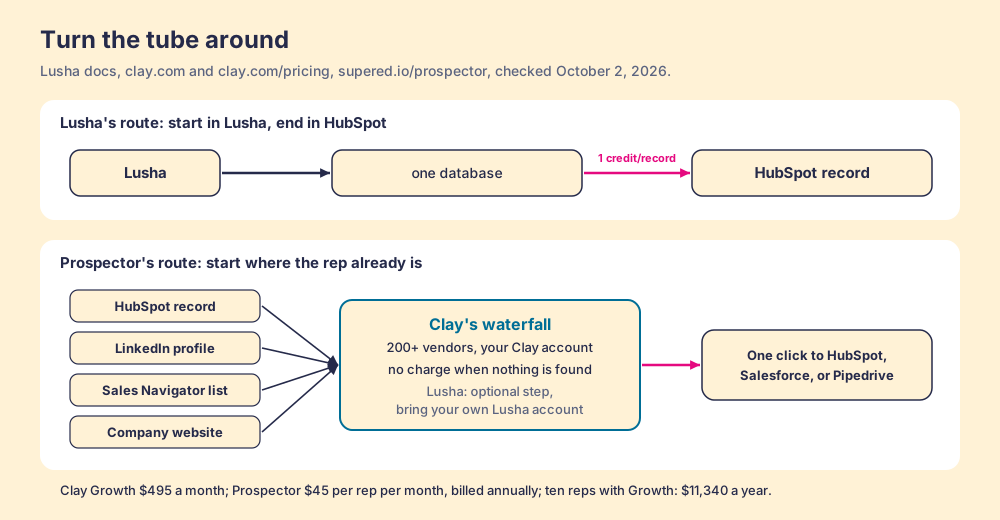
Turn the tube around. Lusha’s integration starts in Lusha and ends in HubSpot, so the rep works in one tool and files into another. A HubSpot team’s reps already stand at the far end of that tube, inside the record, and the useful question is what reaches them there.
Prospector starts where the rep stands. It runs inside the Supered Chrome extension and brings Clay’s waterfall, on the team’s own Clay account, to the HubSpot contact or company record, a LinkedIn profile, a Sales Navigator list, or the company’s website. Supered brings no database of its own. It brings Clay’s waterfall, which is every database, routed, and that is why we chose Clay as our only data provider. Clay describes its waterfalls as checking “multiple providers to return the most verified emails (lower bounce rate) and phone numbers (higher connect rate)” across 200+ data and AI vendors (clay.com), and its pricing page adds the rule a single database cannot offer: “If an enrichment returns no result, you’re not charged Data Credits or Actions” (Clay pricing).
What a HubSpot rep gets, with no Clay login:
- Lookups from the record. Enrich and find the buying committee from inside the HubSpot record, tuned by the titles, departments, and seniority the team set.
- Context before a duplicate. On a LinkedIn profile the rep sees the matching HubSpot record and whether the prospect was already worked, before creating a second one.
- One click into HubSpot. Field mapping is set once; the contact syncs to HubSpot, Salesforce, or Pipedrive.
- Lists the leader can follow. The team’s process applies to worked prospects, so a manager sees which sourced lists got worked and which closed, and coaches from what is converting.
Lusha can still ride along. Lusha joined Clay’s marketplace on March 10, 2026, and Clay’s integration page marks “Enrich Person with Lusha” and “Enrich Company with Lusha” as “Bring Your Own Account Required,” with the signal actions on “Clay Credits or Bring Your Own Account” (Clay, Lusha integration, checked October 2, 2026). A team that values Lusha’s data keeps its Lusha account and plugs it in as one step of the waterfall. A team that does not leaves the step out.
The arithmetic. Clay’s Growth plan lists at $495 a month, $5,940 a year, with 72,000 data credits a year and CRM sync included. Prospector is $45 per rep per month, billed annually, from one rep (Prospector). Ten reps on Prospector plus Clay Growth come to $11,340 a year. Ten reps on Lusha would be two Premium plans at $7,198.20 a year for 81,600 credits, which pushes 11,657 full contacts at 7 credits each, so on list price Lusha is cheaper for the same headcount. On our reading of Clay’s pricing calculator, an email plus a phone is roughly six data credits, about 12,000 contacts on Growth, a supposition labelled as one. The volumes land close. The difference is what stands behind each lookup and where the rep starts.
Choose something else if you do not have Clay. Prospector runs on the customer’s Clay account and does nothing without one, and somebody has to build the waterfall; Clay’s own copy says “GTM engineers build on Clay.” Choose something else, too, if two reps push a few dozen contacts a month, because Lusha’s Starter at $449.10 a year is hard to undercut for that job. The sourcing use case shows how a team sets Prospector up when Clay is in place, and the Clay Chrome extension page explains why a rep-side layer on Clay has been hard to find, including the partner covered on the Exportly alternatives page.
What is the non-Clay alternative inside HubSpot?
Apollo Enrichment is the fair one, because it lives where Lusha’s integration does not: in HubSpot’s public App Marketplace, at 6,950 installs on October 2, 2026. Its listing says it can “manually or automatically enrich your existing contacts in HubSpot with 11 data points” and accounts with 24, syncs HubSpot contacts to Apollo every 15 minutes and accounts every 60, and writes updates back. That is a tube with a return line. Apollo’s plan data on October 2, 2026 listed Basic at $49 per seat per month billed annually ($65 monthly) with 30,000 credits per seat per year, and lists “Automated CRM Enrichment” from Basic; the Free plan carries 100 CRM enrichments a month. A phone costs 8 credits and an email 1 (apollo.io/pricing). The Apollo vs Lusha page works the per-phone math in full.
Which should you choose?
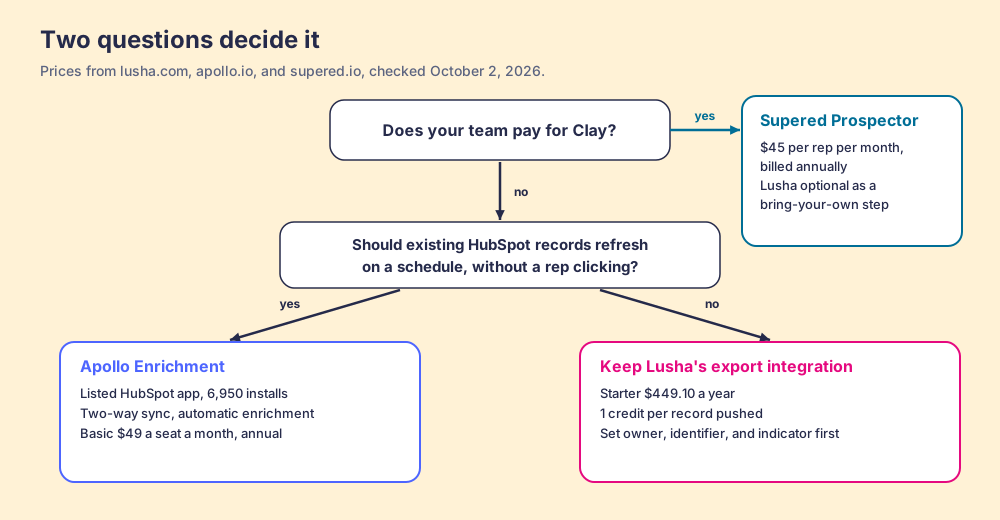
Two questions decide it: does your team pay for Clay, and does the data need to keep itself current inside HubSpot.
- Lusha’s integration, kept. The pick for a few reps who prospect in Lusha and push a modest number of verified contacts a month. Connect it with a named owner plan, set the identifier, and switch on the indicator and the HubSpot exclusion before anyone runs a bulk reveal.
- Apollo Enrichment. The pick without Clay when existing HubSpot records should fill and refresh on a schedule, and phones matter less than coverage of emails and firmographics.
- Supered Prospector. The pick when the team already pays for Clay and the reps live in HubSpot and LinkedIn: one click from the record, every source behind it, Lusha kept only if its data earns a step.
What we recommend: if you keep Lusha, run the owner and identifier settings before the first export, because a thousand capsules addressed to the wrong desk take longer to clean than to send. If your team has Clay, stop routing contacts through a second tool on their way to HubSpot. Let the rep start at the record, ask every source at once, and watch each sourced list move toward closed. For the LinkedIn side of the same question, the HubSpot LinkedIn integration page shows what HubSpot’s native Sales Navigator card does and does not import, and the Salesforce LinkedIn integration page does the same for Salesforce. A Prospector demo on your own Clay account shows the record-first route in HubSpot.
Frequently asked questions
Does Lusha integrate with HubSpot?+
Is the Lusha HubSpot integration free?+
Is Lusha on the HubSpot App Marketplace?+
Why are my Lusha contacts creating duplicates in HubSpot?+
How does the Lusha Salesforce integration differ from the HubSpot one?+
What is the best alternative to the Lusha HubSpot integration?+
Your process, running itself.