Clay MCP: How Reps Run Clay From Claude and ChatGPT, and the Walk Back to the CRM
Clay MCP puts Clay's search, enrichment and Ops-built Functions inside Claude, ChatGPT, Copilot and Glean, under a Sales Rep role that never opens a Clay table. Setup, cost, limits, and when reps need Clay on the page they already have open.
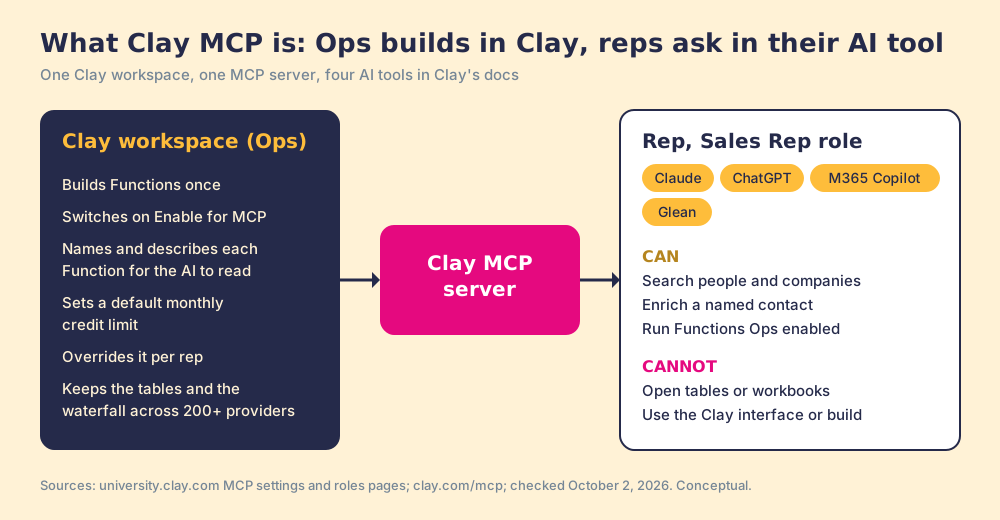
Clay MCP is Clay's connector for the Model Context Protocol: it lets a sales rep search, enrich contacts and run Ops-built Clay Functions from Claude, ChatGPT or other AI tools, under a Sales Rep role with no Clay workspace access and a monthly credit limit Ops sets.
The rep has a VP of Operations open in Sales Navigator, at an account she has wanted for a year, and no mobile number. Her company bought Clay in the spring, and last week RevOps gave her a Sales Rep login and a note: “You can use Clay from Claude now.” So she copies the profile URL, opens Claude, pastes it in, and asks for a verified mobile. Clay’s waterfall finds one, and that part works well. Then she goes back to HubSpot to see whether the VP is already a contact, who owns the account, and whether anyone has emailed her this month.
Clay MCP is Clay’s connector for the Model Context Protocol: it lets a sales rep search, enrich contacts and run Ops-built Clay Functions from Claude, ChatGPT or other AI tools, under a Sales Rep role with no Clay workspace access and a monthly credit limit Ops sets. For a rep who lives in an AI chat, it is a clean, well-governed way into Clay. For a rep who lives in LinkedIn and the CRM, the lookup is the short half of the job, and the walk back is the long one. Both halves get their due below, along with when one tool is enough and when a team needs two.
What is Clay MCP?
MCP stands for Model Context Protocol, which Anthropic released in November 2024 as “an open standard for connecting AI assistants to the systems where data lives” (Anthropic, 2024). The Clay MCP server is Clay’s version: a set of tools Claude or ChatGPT can call on your behalf, with your Clay workspace behind them.
Clay launched it for teams on April 22, 2026, describing it as a way to turn “Clay into a context layer that LLMs can interact with” (Clay blog). On July 14, 2026 it made MCP for Reps “generally available on all modern plans,” with reps calling “Ops-built functions and data from 200+ providers in one place using natural language” (Clay blog). Clay’s docs list four AI tools with connection guides: Claude, ChatGPT, Microsoft 365 Copilot and Glean (MCP settings, checked October 2, 2026). Clay’s marketing pages add Codex and Claude Code.
What a rep can do with it, in Clay’s terms:
- People and company search. Plain-language searches against Clay’s own database, which Clay’s FAQ says cost no credits (MCP FAQs).
- Enrichment. Emails, phones and work history for a named person, run through Clay’s waterfall, which asks provider after provider until one returns a validated result.
- Functions. Reusable workflows Ops builds once in Clay. Clay’s Functions page puts it as “Build your workflows once, apply them everywhere” (clay.com/functions). Ops switches on “Enable for MCP” for each one reps may call.
- CRM and sequencer pushes. Clay’s MCP page lists “Add contacts to CRM and sequencer,” with Ops setting the write rules and a duplicate check against the CRM (clay.com/mcp). These run as Functions, so they exist when Ops has built them.
How can sales reps use Clay without logging into Clay?
Through the Sales Rep role. Clay’s roles page lists four roles (Admin, Editor, Viewer on Enterprise, and Sales Rep) and describes the last one as “designed for users who access Clay through an AI tool connected with Clay MCP.” The role can “use Clay’s data enrichment and Functions through their connected AI tool via MCP” and manage its own sequencer authorization. It cannot “access tables, workbooks, or any other part of the standard Clay interface,” and it cannot build workflows (Clay roles and permissions, checked October 2, 2026).
The design solves a problem RevOps teams describe in almost the same words. One RevOps lead at a B2B SaaS company told us on a discovery call: “Clay is a huge benefit to us, and also massive investment… This gives you that power without you needing to go into Clay regularly.” The builder keeps the tables. The rep gets the output. No seller has to learn what a waterfall column is.
On the rep’s side, Clay’s Claude guide says to connect Clay from the Claude Connectors page, after which the Clay Claude connector “will activate automatically” when the rep asks about people or companies, and that a free Claude account is enough to connect (Using Clay in Claude). The Clay ChatGPT path is the same idea: Clay’s guide says to type @Clay in the browser or /Clay on desktop (Clay MCP guide, June 14, 2026).
How do you give every SDR Clay enrichment without more data-vendor seats?
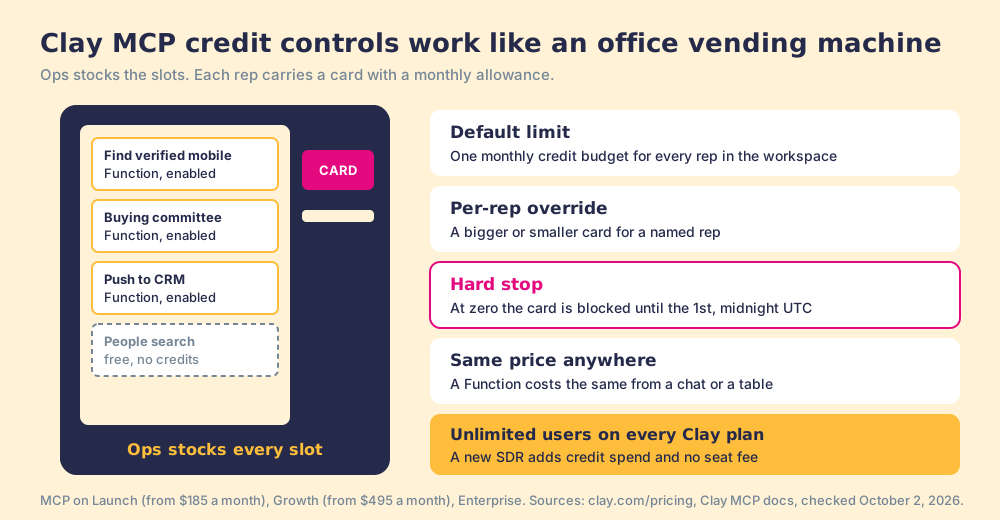
Change what you pay for. A single-database tool sells a seat per rep, and each seat carries its own credit allowance, which is why adding five SDRs means a new line on the renewal (Apollo pricing walks through one example). Clay sells the other way round. Its pricing page lists “Tables and users per workspace: Unlimited” on every plan, from Free to Enterprise, and MCP runs on Launch (from $185 a month), Growth (from $495 a month) and Enterprise (clay.com/pricing, checked October 2, 2026). Adding an SDR as a Sales Rep user adds no seat fee. It adds credit spend from the pool the company already buys, across a waterfall of 200+ providers.
A shared pool needs a tap on every glass, and Clay built one. Its controls work like an office vending machine. Ops stocks the slots (the Functions), and each rep carries a card loaded with a monthly allowance. The card works at any slot Ops has stocked, the machine shows Ops what each card bought, and when a card hits zero the machine stops taking it until the 1st of the month. In Clay’s words, the controls are:
- The default limit. One workspace-wide monthly credit budget that applies to every rep, set with “Set default limit.”
- Per-rep overrides. A higher or lower budget for a named rep, the senior AE who works a strategic list, say.
- The hard stop. At the limit, “further actions through their AI tool are hard-blocked until the monthly reset,” which happens on the 1st at midnight UTC (MCP settings).
- The same price anywhere. Clay’s FAQ says a Function costs the same “regardless of where the Function is triggered,” and people and company search is free.
The comparison fails in one place. A real vending machine sells the same snack to every buyer. Clay’s slots run whatever logic Ops wrote, so two companies with the same plan can get widely different results from their reps’ credits, depending on how good the Functions are.
How do you set up Clay MCP for a sales team?
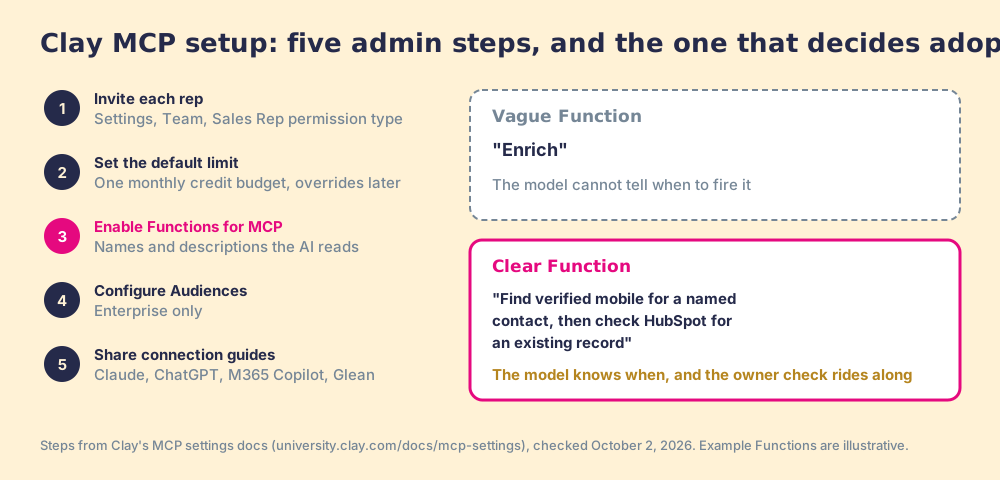
Clay’s admin checklist runs in five steps, and none of them needs an engineer (MCP settings):
- Invite each rep. In Settings, then Team, invite the rep and assign the Sales Rep permission type. Clay’s FAQ is firm that every rep using MCP must be invited to the workspace, SSO or no SSO.
- Set the default limit. One monthly credit budget for every rep, with overrides later.
- Enable Functions. Switch on “Enable for MCP” for the Functions reps may call, and give each a name and description written for the AI, because the model picks Functions by reading them.
- Configure Audiences. Enterprise only: decide which synced Audiences data the AI tool may read.
- Share the connection guides. One each for Claude, ChatGPT, Microsoft 365 Copilot and Glean.
Step three decides whether the rollout works. A Function called “Enrich” with no description gives the model nothing to reason with. A Function called “Find verified mobile for a named contact, then check HubSpot for an existing record” tells it when to fire.
What are Clay MCP’s limits?
Clay documents them plainly, which makes them easy to plan around:
- Result pages. Results come back in groups of 20, up to 100 in total, and bulk work past 100 rows “requires Clay directly” (MCP FAQs).
- The size of the job. Clay’s own guide draws the line: “Reach for the connector when a rep is handling 1 to 20 contacts, doing exploratory research, or writing individual emails. Move into the Clay platform for 20+ contacts, complex automated workflows, and deep CRM syncs” (Clay MCP guide).
- Revoking access. Admins cannot revoke a rep’s AI-tool connection directly; the documented route is removing the rep from the workspace.
- Training data. Clay states that “Your workspace data is not used for training,” and its FAQ cites Anthropic’s and OpenAI’s own policies on commercial and API data.
They describe a tool built for a conversation, which is the right shape for research.
Where does the rep’s work happen, and where does the result go?
A second comparison helps with the rest. Clay MCP works like a reference librarian at a desk down the hall. She is superb. You ask in plain words, she knows every source in the building, and she hands back a slip with the answer. But the book you were reading stays open on your own desk, and the slip has to be carried back, checked against the sign-out card to see whether a colleague already has that drawer, and filed in the right place. The librarian does not come to your desk.
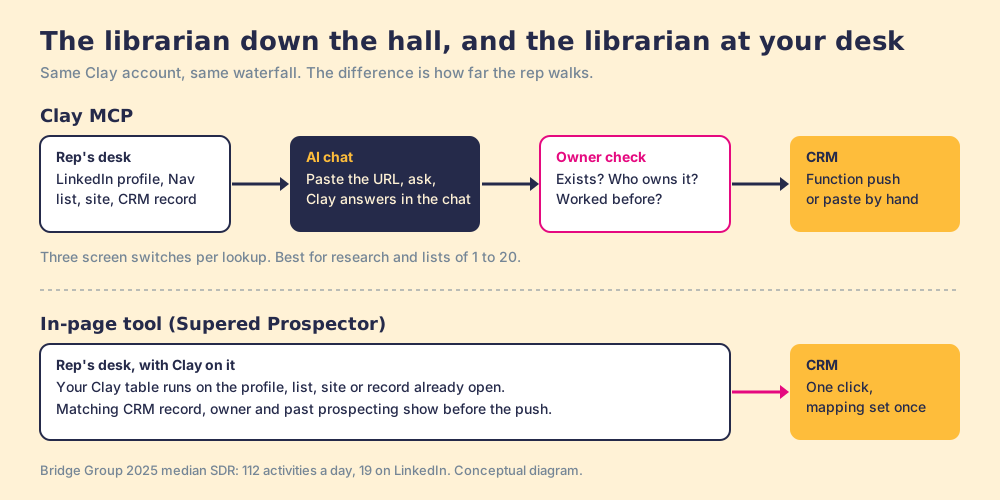
For a rep, the book on the desk is the LinkedIn profile, the Sales Navigator list, the company website, or the CRM record. The Bridge Group’s 2025 SDR report, 351 B2B companies, puts the median SDR at 112 activities a day, 19 of them on LinkedIn, where the prospect is (Bridge Group, 2025). Salesforce’s 2026 State of Sales, 4,050 sales professionals in 22 countries, found sellers spend 40% of their time selling, and that 54% of sellers already use AI agents (Salesforce, February 3, 2026). Half of sellers have an AI tool, and the selling still happens on the profile and the record.
The walk back has three steps, and each one costs a switch of screens:
- Context in. The rep copies the profile URL or the company name into the chat, because the chat cannot see the tab she was on.
- The owner check. Before the contact goes to the CRM, someone has to ask whether the person exists already, who owns the account, and whether a teammate has worked them. Clay’s MCP page credits Functions with a duplicate check against the CRM; whether the rep sees the owner before the push depends on the Function Ops wrote.
- Write-back. Either a Function pushes the contact, or the rep pastes it in by hand.
The librarian comparison overstates the cost in one respect, and it favors Clay: a well-built Function can file the slip for you, owner check and all. The walk to the desk and back still happens on every lookup.
Clay MCP compared with the other ways reps reach Clay
Four routes, scored on the jobs a sales leader cares about. Every route runs on the same Clay account and the same waterfall; the differences are where the rep stands and what happens after.
| Job | Clay MCP (Sales Rep role) | Clay workspace seat | Supered Prospector | CSV handoff from Ops |
|---|---|---|---|---|
| Where the rep works | Claude, ChatGPT, Copilot or Glean | Inside Clay | Sales Navigator, LinkedIn, a company site, or the HubSpot, Salesforce or Pipedrive record | Wherever the file lands |
| Who sees the table | Ops only; the rep sees Functions and results | The rep sees and can edit tables | Ops only; the rep runs the tables Ops chose | Ops only |
| Credit control | Default monthly limit, per-rep overrides, hard stop | Workspace credits and roles | Spends from your Clay account on the tables Ops picked | Ops spends every credit |
| CRM write-back with owner check | Through Functions Ops builds; owner visibility depends on the Function | Clay CRM sync, Growth and up | One click, after the rep sees the matching record, the owner and past prospecting | Manual import; owner check by hand |
| Setup | Invite as Sales Rep, set limits, enable Functions | Clay training for each rep | Admin connects Clay inside Supered, field mapping once, live in under a week | None, plus the wait for Ops |
| Best fit | Research and lists of 1 to 20 for reps who live in AI chat | Builders and power users | Reps who prospect on the web and in the CRM | Occasional bulk lists |
Where does Supered Prospector fit?
Supered Prospector is the librarian at your desk. It brings no database of its own; it brings Clay’s waterfall, which is every provider in Clay’s marketplace, routed, on your own Clay account. We chose Clay as our only data provider for that reason. Clay governs the data. Supered governs the motion.
- The page the rep has open. Prospector runs inside the Supered Chrome extension and opens on a LinkedIn profile, a Sales Navigator list, a company website (with company research), or a HubSpot, Salesforce or Pipedrive record.
- The builder’s tables, unchanged. Any custom Clay workflow runs from Prospector, and a rep can push a whole prospect list into one. The waterfalls, tiers and buying-committee rules stay the ones your GTM engineer wrote.
- The owner check before the push. The rep sees the matching CRM record, who owns it, and whether the person was prospected before, then sends the contact to the CRM in one click with field mapping Ops set once.
- No Clay login. Reps never need a Clay seat or a Clay lesson.
- The list after the push. Your process applies to worked prospects, so the manager sees which lists got worked and how each lead ended (qualified, recycled or disqualified) and coaches from what converts.
Prospector is $45 per rep per month, billed annually, from one rep, and it needs your own Clay account. There is no free trial yet; it starts with a demo on your Clay account. The same idea, rules that live in one place and reach the rep wherever they work, is how Supered handles the whole sales process, including sales expectations a rep can clear from Claude.
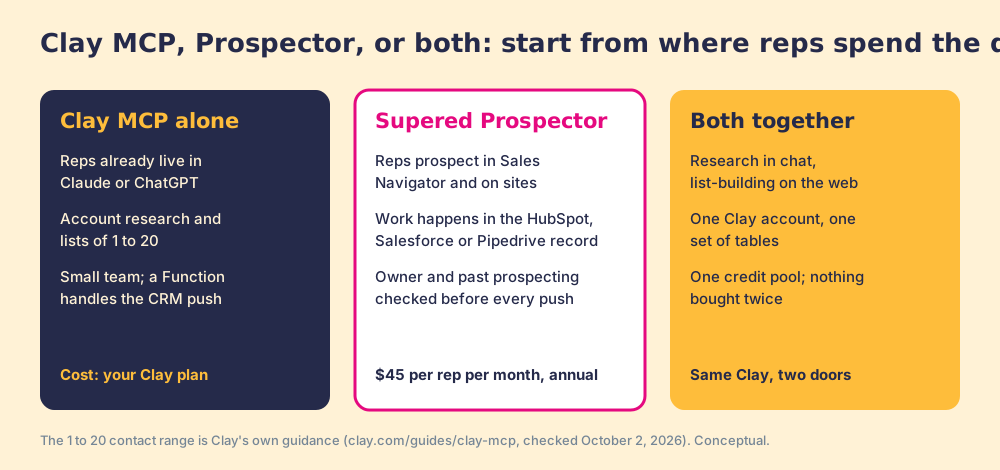
Which should you choose: Clay MCP, Prospector, or both?
- Clay MCP alone. Choose it if your reps already spend the day in Claude or ChatGPT, if the asks are account research and short lists, or if the team is small enough that a Function with a CRM push covers the owner question. It costs nothing beyond your Clay plan, and Clay maintains it.
- Supered Prospector. Choose it if your reps prospect in Sales Navigator, on company websites and inside HubSpot, Salesforce or Pipedrive, and you want the owner and past-prospecting check on the screen before any contact reaches the CRM.
- Both together. Use both if one team does research in chat and list-building on the web. They run on the same Clay account, the same tables and the same credit pool, so nothing is bought twice.
Our recommendation: start with where your reps spend the day, because that is where any tool gets used. Reps who work in an AI chat should get Clay MCP this week; Clay built it well, and the admin side is five steps with no engineer. Reps who work in LinkedIn and the CRM should get Clay on that page. For the full map of how Clay reaches reps, from the builder’s own extension to the rep-side kind, read the Clay Chrome extension guide, and if your team is still deciding what Clay is for, start with what is Clay.
Frequently asked questions
What is Clay MCP?+
Can sales reps use Clay without logging into Clay?+
Which Clay plans include Clay MCP?+
How do Clay MCP credit limits work?+
Can Clay MCP write contacts to HubSpot or Salesforce?+
Is Clay MCP or a Chrome extension better for reps?+
Everything we have written on Clay
More on Clay
Supered Prospector: your Clay waterfall, inside LinkedIn and your CRM- Clay Alternatives: What the Question Usually Means, and Why a Sales Team Often Wants a Front End on Clay Instead
- Clay Pricing 3.0, Explained for the Sales Leader Who Is Not the GTM Engineer
- Clay Chrome Extension: What Exists Today, and the Five Moves a Rep-Side Extension Should Be Held To
- Clay HubSpot Integration: What It Writes, Which Plan Turns It On, and the Step After the Sync That Nobody Owns
- Clay Salesforce Integration: Two Doors In, One Tag Out, and the Step After the Sync That Nobody Owns
- Clay Pipedrive Integration (2026): The Six Actions, the Plan It Needs, and How Reps Run It Without Opening Clay
- Clay Agency: How to Pick One, and Who Runs the Tables After It Leaves
- Clay Email Finder: How the Waterfall Finds Work Emails, What a Found Email Costs, and Why the Last Tenth Is Hard
- Clay Integrations, Explained for the Sales Leader: The Mail Runs Both Ways, and Nobody Checks Whether It Was Answered
- Clay LinkedIn: What Crosses From LinkedIn to Clay, and What Should Never Cross
Your Clay waterfall, where reps already work.