How to Find Someone's Email on LinkedIn: The Free Methods, Why One Finder Misses, and the Waterfall From the Profile
The profile shows an email to 1st-degree connections only, the About section almost never holds one, and the company pattern is a guess until something checks it. Why a single-source finder misses by segment, and how a waterfall from the profile fills the gap.
To find someone's email on LinkedIn, check the Contact info card (visible to 1st-degree connections only), infer it from the company's email pattern and verify it, or run a waterfall enrichment from the profile that asks many data providers in turn and validates the result.
How to find someone's email from a LinkedIn profile
10 min- 1
Open the Contact info card
On the profile, click Contact info under the headline. LinkedIn shows a member's email there to 1st-degree connections only, and the member controls who beyond that can see it. If you are connected and the email is shown, you are done.
- 2
Read the About section and the company site
A few members write a work email into their About section, though LinkedIn's own guidance tells members not to enter an email anywhere else on the profile, so expect a miss. The company website's contact or team page sometimes lists a direct address.
- 3
Infer the address from the company pattern
Find one known address at the company (a press contact, a colleague, a signature) and read its shape: first.last, first initial plus last, first only. Apply it to the name on the profile. This is a guess, not a find, until step four.
- 4
Verify before you send
Run the guessed address through a validation step. A bounce costs sender reputation; a catch-all domain accepts everything and tells you nothing. Clay's email waterfall validates results with ZeroBounce by default and can be set to mark only safe-to-send addresses as valid.
- 5
Run the waterfall from the profile
If the free methods miss, run an enrichment from the profile you have open that reads the page URL and asks Clay's waterfall across 200+ providers in a set order, stopping at the first verified hit and refunding the credit on a miss. Never scrape the page; LinkedIn's User Agreement bars it.
- 6
Sync it and attach an expectation
Push the verified email to the CRM in one click with field mapping set once, and give the contact a next action and a time window, so sourced becomes worked and a manager can see both.
The profile is open, the title is right, the company is on the list, and the one field you need is the one LinkedIn hides. So you search how to find someone’s email on LinkedIn and land on forty tools promising to reveal it. To find someone’s email on LinkedIn, check the Contact info card (visible to 1st-degree connections only), infer it from the company’s email pattern and verify it, or run a waterfall enrichment from the profile that asks many data providers in turn and validates the result. The order matters: the free methods are sometimes right, the single-source finders miss in a pattern you can predict, and the waterfall fills the gaps the others leave. Here is each, plus the step at the end that the tools never mention.
How do you find someone’s email on LinkedIn itself?
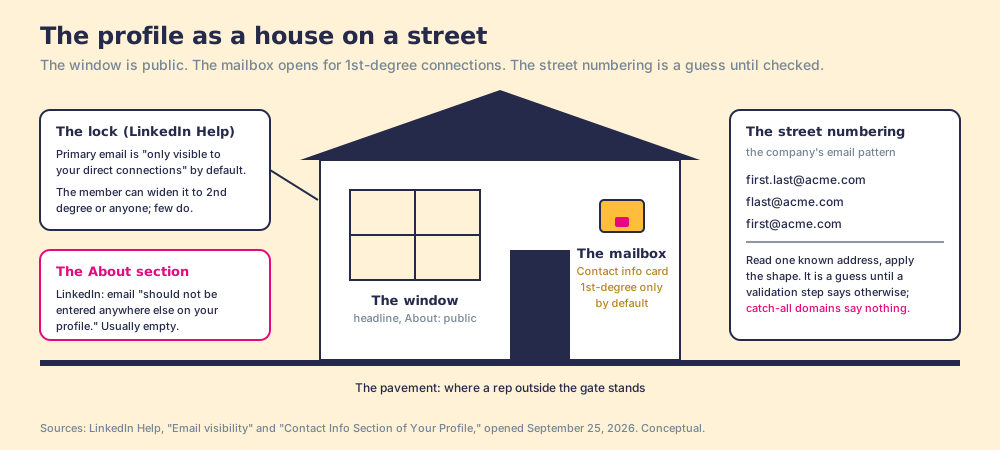
Start on the profile, because the free answer is sometimes sitting there. Under the headline is a Contact info link, and LinkedIn’s help lists what it holds: the profile URL, an email address (pre-filled from the member’s primary email), a phone number, a website, messenger handles, a birthday (Contact Info section, opened September 25, 2026). Then the gate: “By default, the primary email address you’ve registered with LinkedIn is only visible to your direct connections,” and “We will not share your email address with another member unless both of you choose to contact one another or your above settings indicate you are open to others seeing your email address” (Email visibility). Members can widen the setting to 2nd-degree connections or to anyone; the default is 1st degree.
The same page settles the About-section method before you try it: “To avoid unwanted invitations or emails and to comply with LinkedIn User Agreement, email addresses should not be entered anywhere else on your profile.” Some members do it anyway. Read the About section in two seconds and move on when it is empty, which it will usually be.
Picture the profile as a house on a street. The front window is the headline and the About section: anyone walking past can read it. The mailbox is the Contact info card, with a lock that opens for the people the owner has let in, the 1st-degree connections, and for no one else unless the owner changes the lock. The free LinkedIn email lookup comes down to one question: are you inside the gate? If yes, open the mailbox. If no, you are on the pavement guessing at house numbers, which is the next method.
How do you guess the email from the company domain, and how do you check it?
Companies number their houses on a scheme. Find one address at the firm you can trust, a press contact, a colleague’s signature, a support address, and read its shape: first.last, first initial then last, first name alone. Apply it to the name on the profile and you have a candidate, not an email. A guessed address has three ways to be wrong: the scheme has exceptions (two Sarahs), the person left, or the domain is a catch-all that accepts any address and tells you nothing when you test it.
So the guess has to be checked before it is sent, and the check is the same one the paid tools run. Clay’s lesson on people enrichment says its email waterfall validates what it finds, using ZeroBounce by default, and names the catch-all problem directly: “Clay considers catch-all emails valid by default, but you can toggle on the ‘Only mark Safe to Send emails as valid’ setting to exclude catch-all emails” (Clay University, Enriching People Data). Two things follow. A “found” email and a “safe to send” email are different grades, and a bounce spends sender reputation you do not get back. And the input matters: the lesson says the primary input is the company domain, and adding the person’s social profile URL “significantly improves accuracy.” The LinkedIn URL you are already looking at is the best key you have.
- The Contact info card. Free, exact, and gated to the 1st degree by default.
- The About section and the company site. Free, rare, and quick to rule out.
- The company pattern. Free, a guess, and only an email once a validation step says so.
A rep who runs all three on a 2nd-degree VP at a catch-all domain ends with a plausible string and no way to know. That is the gap the finders sell into.
Why do single-source LinkedIn email finders miss?
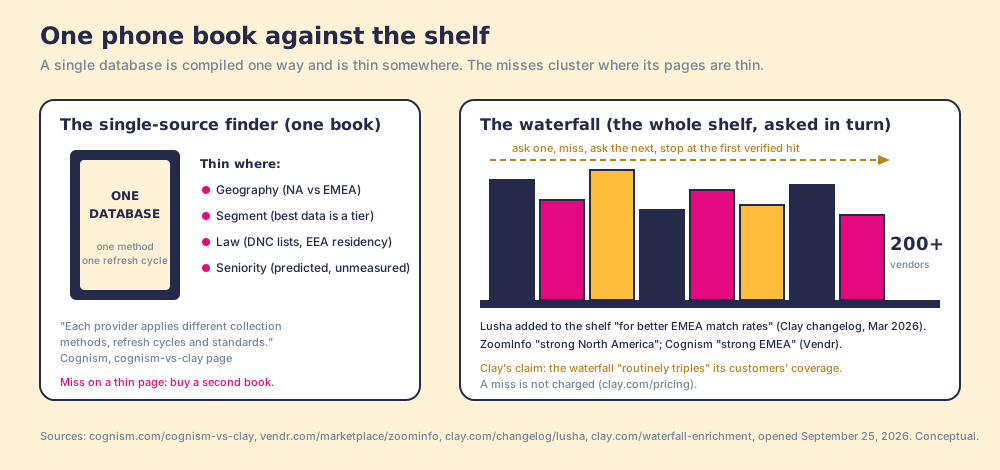
Any LinkedIn email finder that draws on one database is one phone book. A phone book is compiled one way, on one schedule, with one idea of who belongs in it, and it is thick for some streets and thin for others. Cognism, in its own comparison against Clay, states the mechanism as a criticism of multi-provider tools, and in doing so describes each single provider too: “Each provider applies different collection methods, refresh cycles and standards” (cognism.com/cognism-vs-clay, opened September 25, 2026). The differences fall along lines a rep can see on the profile.
- Geography. Vendr’s comparison table describes ZoomInfo as “Global; strong North America coverage” and Cognism as “Strong EMEA coverage; growing North America,” and one Vendr buyer reports “using ZoomInfo in tandem with Cognism” (Vendr, ZoomInfo). Clay’s changelog added Lusha as a step “in your existing contact enrichment waterfall for better EMEA match rates” (Clay changelog, March 10, 2026). Same person, different book, different answer.
- Segment. Cognism sells a Pro tier with “higher-quality, accurate mobile data” and on-demand verification above its Standard tier (cognism.com/pricing); a database’s best coverage is one product line inside it.
- Law. Cognism says it scrubs against Do Not Call and TPS lists in twelve countries and keeps its data inside the EEA (cognism.com/compliance). A provider that will not carry a record in one jurisdiction leaves a gap that another provider, under another regime, fills.
- Seniority. No provider we opened publishes match rates by seniority, so treat this as the mechanism’s prediction rather than a number: a title that appears in press releases and conference bios is collected by more methods than one that appears nowhere, so the same finder runs hot on VPs and cold on the manager who reports to them.
A miss, then, is rarely random. It is the profile landing on a thin page of the one book you bought. Two books cover more streets than one, which is the arithmetic behind Clay’s claim: “Waterfall enrichment lets you search sequentially across multiple tools until you find a valid match. This routinely triples our customers’ data coverage and quality!” (clay.com/waterfall-enrichment). That is Clay’s number for Clay’s customers, printed as Clay’s claim; the mechanism underneath it is the part that transfers to any finder you evaluate.
How does the waterfall work from the profile?
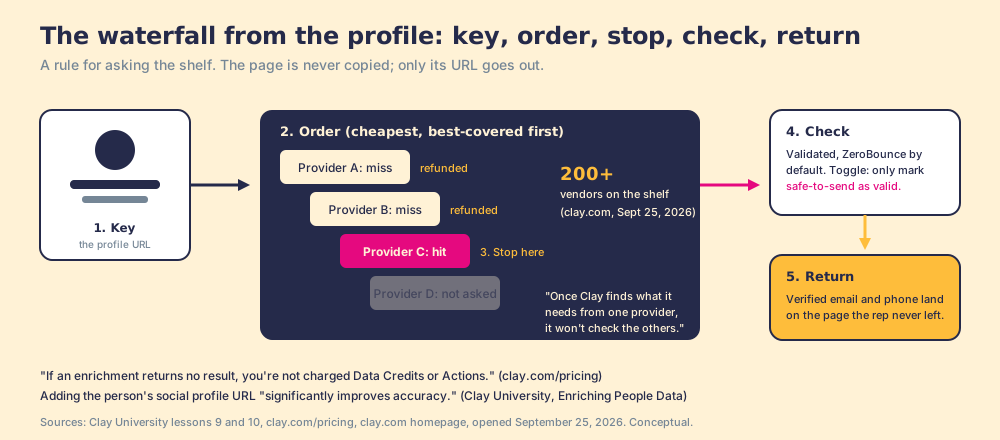
A waterfall is a rule for asking the shelf. Clay’s own lesson: “By using a waterfall, you can pull data from multiple providers, in a specific order,” querying providers “usually starting with the most cost-effective” until the data is found, and “Once Clay finds what it needs from one provider, it won’t check the others. This helps save your credits” (Clay University, Enriching Company Data). Clay’s pricing page adds the part that makes the order cheap to run: “If an enrichment returns no result, you’re not charged Data Credits or Actions” (clay.com/pricing). The marketplace behind it is “200+ data and AI vendors” on Clay’s homepage as of September 25, 2026 (its waterfall page says 150+; cite whichever you read, with the date).
Run it from the profile, in this order:
- The key. The enrichment reads the URL of the profile you have open. It does not copy the page. That distinction is the one LinkedIn’s User Agreement draws, and it is also the one Clay’s lesson says improves accuracy, because the profile URL is a better input than a name.
- The order. Provider one is asked, then two, then three, cheapest and best-covered first. Clay ships a pre-arranged order “optimized for cost and coverage” and lets a builder reorder if a provider is known to cover the ICP better.
- The stop. The first verified hit ends the run. A miss costs nothing and passes to the next provider.
- The check. The returned email is validated (ZeroBounce by default), with the safe-to-send toggle available for teams that will not risk a catch-all.
- The return. The verified email and phone land on the page the rep never left, ready for the CRM.
One rule on the compliance side, read from the source. LinkedIn’s User Agreement, effective November 3, 2025, section 8.2, says a member will not use “software, devices, scripts, robots or any other means or processes (such as crawlers, browser plugins and add-ons or any other technology) to scrape or copy the Services, including profiles and other data from the Services,” and will not use “bots or other unauthorized automated methods to access the Services, add or download contacts” (User Agreement). Reading the Contact info card as a connection is what LinkedIn built. Pushing a URL to outside providers copies nothing from the page. Scraping the profile is the mechanism named. Ask any vendor which of the three theirs does.
What happens after you find the email?
The email is found, verified, and sitting in the tab. The finder’s job ends there. The rep’s does not. The Bridge Group’s 2025 SDR report puts the median rep at 112 activities a day across 351 B2B companies, and the median share of SDRs at quota at 60%, the lowest in the study’s history (Bridge Group, 2025). A found email no one works is a house number on a napkin.
Our field research measures what happens to steps that go uninspected. Across 198 sales leaders, 89% have a defined sales process and 36% see reps run it, a 53-point gap between built and run; reps who get the next step in the flow of work report 49% quota attainment against 15% for reps who have to go somewhere else for it; and teams that inspect deals against the process consistently hit quota at 6.3x the rate of teams that rarely do (The State of Sales Enablement).
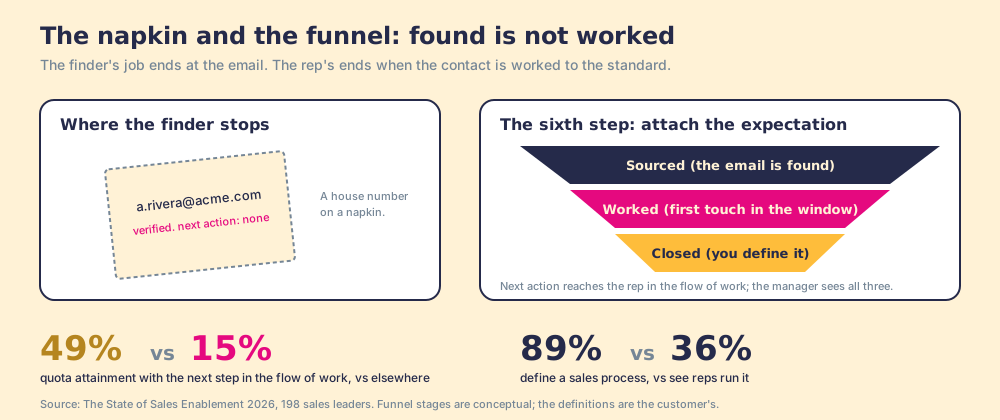
So the sixth step, the one the finders leave out, is to treat the found email as the first step of a process and attach the second. Push it to the CRM in one click, with field mapping Ops set once, after checking whether the person is already there and who owns them. Then give the contact an expectation: first touch inside a set window, the next action named, “worked” defined by your team. And let a manager see sourced, worked, and closed against that expectation, so the coaching goes to the contact that stalled instead of to a credit report.
This is the one place Supered belongs on a page about finding an email, so here it is plainly. Supered is a rep-side front end on the customer’s own Clay account: a rep on a LinkedIn profile, a Sales Navigator list, a company site, or a HubSpot or Salesforce record runs Clay’s waterfall in one click, no Clay login, and syncs to the CRM. It brings no database of its own; it brings Clay’s waterfall, every database, routed. Then the part the email finders never had: the contact enters a motion the Behavior Layer guides and inspects, sourced, worked, closed, by the customer’s definitions. Clay governs the data. Supered governs the motion.
What we recommend
Four ways to find email from LinkedIn, sorted by when each is the right one.
- The Contact info card. When you are a 1st-degree connection. Open the mailbox; it is free and exact.
- The pattern plus a check. When you are outside the gate and the company’s scheme is easy to read. Fair for a handful of names, poor at forty a day.
- A single-source finder. When your territory sits on the one book’s thick pages, North America for one vendor, EMEA for another. Expect the misses to cluster where the book is thin, and budget a second contract to fill them.
- A waterfall from the profile, plus a standard. When your list crosses regions, segments, and seniorities, and you would rather ask the shelf once than buy the books one at a time. Then attach the expectation, because a found email is sourced, not worked.
We recommend the fourth for a team that already has Clay, and the numbers are the reason: one collection method misses by segment, a waterfall asks the next provider at no charge for the miss, and 49% against 15% is what changes when the found email carries its next step with it. Whether to bring the waterfall to reps at all, and what it costs on your own account, is in what is Clay and Clay pricing; getting a whole list, rather than one profile, out of LinkedIn and into the CRM is in how to export LinkedIn contacts; and the process the contact should enter once found is laid out in the sales prospecting guide.
Frequently asked questions
Can you see someone's email on LinkedIn without being connected?+
Is there a free LinkedIn email finder that works?+
Why does my email finder fail on some people and not others?+
What is waterfall enrichment for LinkedIn emails?+
Is it against LinkedIn's terms to use an email finder extension?+
What should I do once I have the email?+
Your process, running itself.