Email Finder Tools, Graded on Who Pays for the Maybe
About a third of business domains accept mail for any address, so no verifier can confirm them. Eight email finder tools graded on coverage, price per found email, and the rule that decides your bill: who pays for the email nobody can confirm.
Email finder tools take a name and a company, or a profile, and return that person's work email, from a database of known addresses or by guessing the pattern and checking it with the mail server, and differ most in what they charge when the check cannot answer.
The best email finder tools depend on what your team already pays for. The short answer, graded in full below:
- Supered Prospector. For teams that already have Clay: Clay’s waterfall across 200+ providers, run by reps from a LinkedIn profile, a Sales Navigator list, a company site, or the CRM record, at $45 per rep per month billed annually.
- Findymail. For a team without Clay that sends email: it charges only for verified results and refunds the credits if your bounce rate passes 5%.
- Apollo. For a team that wants a free start, the widest single database in an outside test, and sequences in the same plan, from $49 a seat a month billed annually.
Email finder tools take a name and a company, or a profile, and return that person’s work email, from a database of known addresses or by guessing the pattern and checking it with the mail server, and differ most in what they charge when the check cannot answer. The top ten results for this search are lists written by email finder vendors, and they compare databases, extensions, and sticker prices. None of the ones we read compares the line on the bill that decides whether your domain stays out of the spam folder: who pays for the maybe.
Why can’t an email finder confirm every address?
A delivery driver has a parcel for Jane Ortiz at 40 Elm Street. At most buildings he rings the bell and a voice says Jane lives here, or no one by that name. An email verifier does the same thing by wire. It opens a conversation with the company’s mail server, asks whether a mailbox exists, and hangs up before sending anything.
Some buildings have a doorman who signs for every parcel. Jane, Jake, a name the driver made up: the doorman takes them all and sorts it out later. The driver walks away with a signature and no idea whether Jane has ever lived there.
That doorman is a catch-all domain, which Hunter’s help center describes as “configured to accept all emails, even if they’re sent to non-existent mailboxes on that domain. As a result, no verification tool, including Hunter, can fully confirm deliverability on these domains” (Hunter Help, dated September 1, 2026). Its own example is hubspot.com: “we will always receive an ‘OK’ response for any mailbox.”
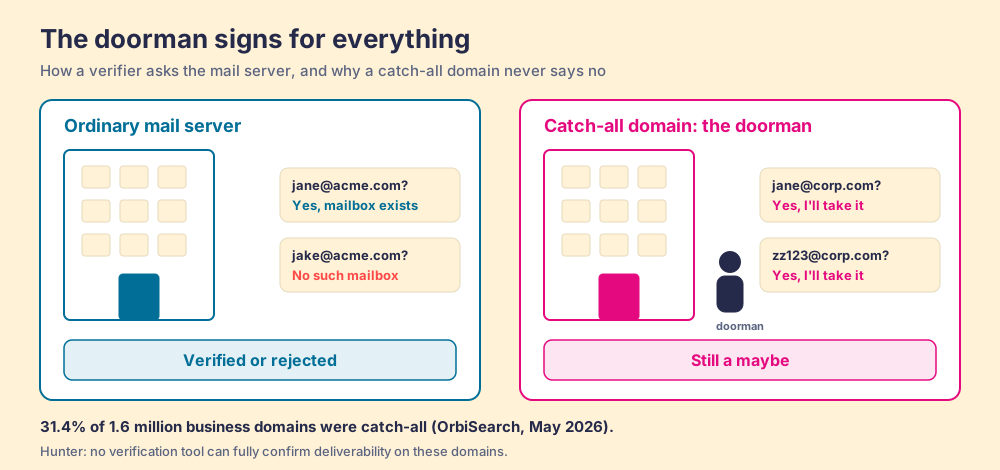
How many doormen are there? OrbiSearch, a verification company, analyzed “1.6 million business domains across more than 23 million verifications” in May 2026 and found “31.4% were catch-all” (OrbiSearch, The State of Catch-All Domains 2026, published May 29, 2026). Read it with the caveat that the publisher sells verification and its sample is lists people were prospecting, which is also the population you care about.
The building’s front desk matters more than the tenant. Domains behind a security gateway answer the probe themselves, because gateways “are built to accept first and filter later.” Barracuda-fronted domains were catch-all 99.9% of the time, Trend Micro 86.1%, Proofpoint 71.4%. Among plain mail hosts, Google Workspace domains were catch-all 36% of the time and Microsoft 365 domains 22.6%. Larger companies buy gateways, so the accounts you most want to reach are the ones most likely to have a doorman.
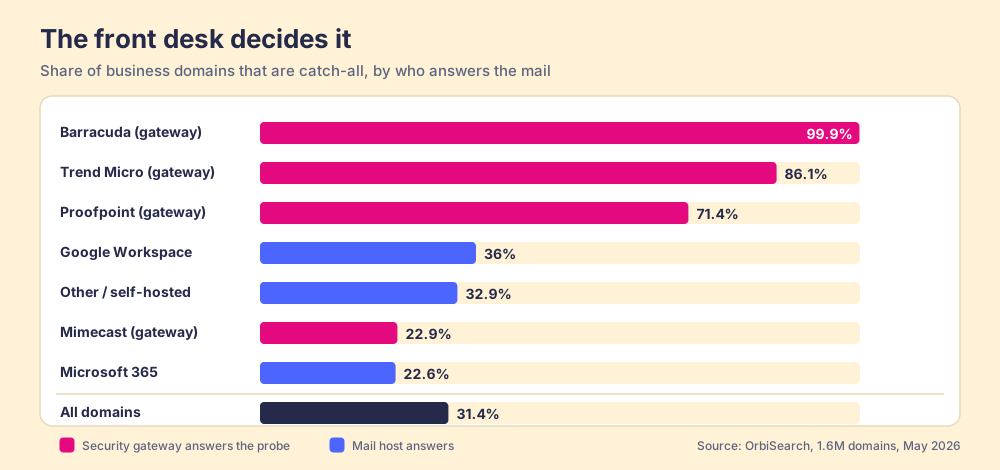
The doorman is not hopeless. OrbiSearch says about 86% of catch-all domains run on platforms that leave signals a careful verifier can read, and that the remaining one in seven are self-hosted, where “the only way to confirm a mailbox is to send a message and watch for a bounce.” Clay’s own catch-all verifier test (last run August 31, 2025) found Findymail resolving 100% of the catch-all addresses it was given and Hunter between 30.62% and 43.89% (Clay data tests). Tools differ widely at the doorman’s desk. Then they bill you differently for what they found there.
Who pays when the email finder cannot confirm the address?
An email finder bill has a printed price per credit and a footnote about which results cost a credit. The footnote is where the tools part ways. Each vendor’s own pages, opened October 2, 2026, say this:
| Tool | Verified email found | Catch-all or unknown result | Nothing found | After a bounce |
|---|---|---|---|---|
| Findymail | 1 credit | Charged only if Findymail verifies it | Free | Credits refunded if your bounce rate passes 5% |
| Wiza | 1 credit (“97% deliverability”) | Risky emails free (“50-70% deliverability”) | Free | Not stated |
| Apollo | 1 credit | Catch-all 1 credit, shown only if you toggle it on | Free | Verified email refunded if it bounces within 30 days |
| Hunter | 1 credit | Counted as found, labelled accept-all with a confidence score | Free | Not stated |
| Skrapp | 1 credit | Catch-all charged; Unknown free | Free | Not stated |
| Snov.io | 1 credit | Unknown (yellow) charged 1 credit | Free | Not stated |
| Prospeo | 1 credit per verified email | Not stated on the pricing page | Free | Not stated |
| Clay (Prospector’s data) | Data Credits per provider | Validation step can exclude catch-alls | Free | Depends on the provider in your order |
Sources: findymail.com/pricing, Wiza help, Apollo email statuses (updated July 31, 2026), hunter.io/pricing, skrapp.io/pricing, Snov.io credits, prospeo.io/pricing, clay.com/pricing, all opened October 2, 2026.
The eight agree on one thing: an empty result costs nothing. So the old worry, paying for searches that come back blank, is settled. The live question is the address that came back with a shrug.
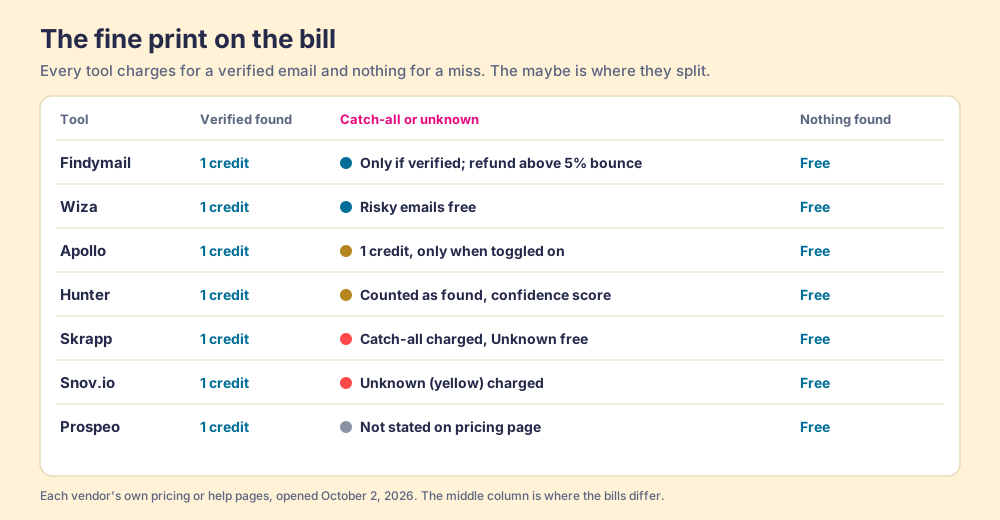
Three readings fall out of that table.
- The free maybe. Wiza hands risky addresses over at no charge and tells you they deliver 50 to 70% of the time. That is generous and candid, and it means 30 to 50 of every 100 risky addresses do not arrive.
- The paid maybe. Snov.io, Skrapp, and Apollo (when you switch catch-alls on) charge the same credit for an address the verifier could not confirm as for one it did. Fair, since the work of finding it was done. It also puts the sorting on you.
- The guaranteed maybe. Findymail’s line, “If your bounce rate exceeds 5% with emails from Findymail, we refund your credits,” is the only one that prices the outcome you care about.
Hunter gives the most useful rule of thumb for deciding what to do with a maybe: “the bounce rate of the accept-all emails in your list is around half the invalid rate of your full list. For instance, if 10% of the emails in your list are invalid, around 5% of the accept-all emails in the list may bounce.” It suggests sending only accept-all addresses with a confidence score of 85% or higher.
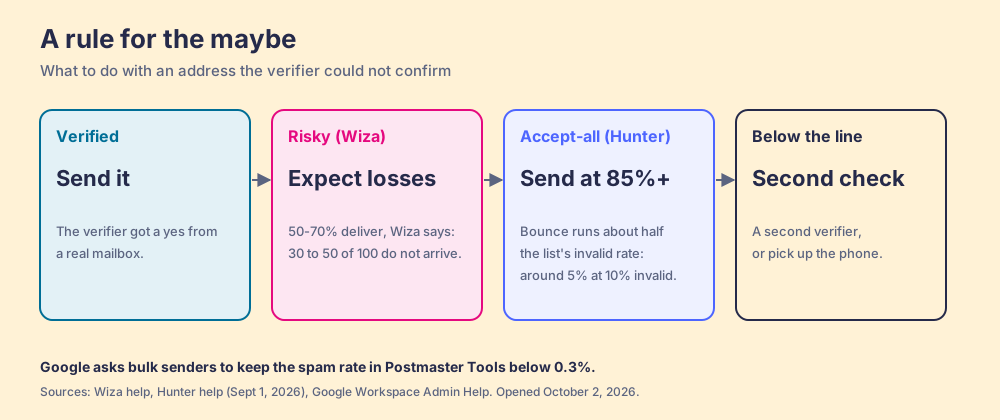
The stakes sit with the inbox providers, not the finder. Google’s sender guidelines ask bulk senders to keep the spam rate reported in Postmaster Tools “below 0.3%” (Google Workspace Admin Help). A domain that keeps mailing doormen earns a reputation slowly and loses it fast.
Why trust this list?
I founded RevPartners, a HubSpot partner that did only sales implementations; it sold roughly twice as much Sales Hub as any other partner and reached Elite tier in 13 months. Supered grew out of that work and is the #1 sales enablement app on the HubSpot marketplace, rated 5.0 from 122 reviews there and 4.9 out of 5 from 81 reviews on G2 (both checked October 1, 2026; the ratings cover Supered as a whole). The disclosure follows from that: we make Supered Prospector, and it ranks first below for teams that have Clay. The weights are printed so you can change them. Remove Clay from the equation and Findymail tops this page.
The email finder tools, graded
The lens is a sales team of five to fifty that wants a B2B email finder for outbound and the results in the CRM. Each criterion is scored 1 to 5 and multiplied by its weight, out of 50. Bands: A 40 and up, A- 36 to 39, B+ 33 to 35, B 29 to 32, B- 25 to 28. This is our scoring, built from the vendors’ pages and the two outside tests cited, not vendor data.
| Criterion | Weight | What it rewards |
|---|---|---|
| Verified coverage | x3 | Measured share of known contacts found, and found correctly |
| Who pays for the maybe | x2 | Not charging for unconfirmed addresses, or standing behind the bounce rate |
| Price per found email | x2 | Published prices, cost per verified email, shared pools |
| CRM push | x2 | Native HubSpot, Salesforce, or Pipedrive on the plan you would buy |
| What the leader sees | x1 | Whether found contacts were worked and how they ended |
| Rank | Tool | Grade | Score | Best fit | CRM integration | Setup effort | Pricing (plan with email finding) | Reason to pick it |
|---|---|---|---|---|---|---|---|---|
| 1 | Supered Prospector | A | 42 | Teams that already have Clay | Native (HubSpot, Salesforce, Pipedrive) | Under a week on an existing Clay account | $45 per rep per month, billed annually, plus your Clay plan | Clay’s waterfall across 200+ providers, run from wherever the rep is |
| 2 | Findymail | A- | 39 | Email-first teams without Clay | Native (HubSpot, Salesforce, Pipedrive) | Minutes | Starter $99 a month, 5,000 credits, shared by the team | Pays only for verified emails, refunds above 5% bounce |
| 3 | Apollo | A- | 36 | Teams wanting data plus sequences | Native (HubSpot, Salesforce) | A day | Basic $49 a seat a month, billed annually | Highest coverage in the May 2026 test, free tier |
| 4 | Wiza | B+ | 35 | Heavy individual users on yearly plans | Native (HubSpot, Salesforce, Pipedrive and more) | Minutes | Email $990 a user a year | Risky emails free, strong coverage in Clay’s test |
| 5 | Hunter | B+ | 34 | Finding emails on company websites | Native (HubSpot, Salesforce, Pipedrive, Zoho) | Minutes | Starter $34 a month billed yearly, unlimited users | Cheapest shared pool, best quality score in Clay’s test |
| 6 | Prospeo | B- | 28 | Solo reps wanting emails and mobiles | HubSpot and Salesforce from Growth | Minutes | Starter $441 a user a year | Verified-only emails, mobiles at 10 credits |
| 7 | Snov.io | B- | 28 | Small teams wanting finder plus sequencer | HubSpot, Pipedrive; Salesforce via Zapier | Minutes | Starter $29.25 a month billed annually, unlimited seats | Unlimited seats and a built-in sequencer |
| 8 | Skrapp | B- | 27 | Two-person teams on a budget | Salesforce, HubSpot | Minutes | Professional $29 a month billed annually, 2 users | Lowest price per found email at list |
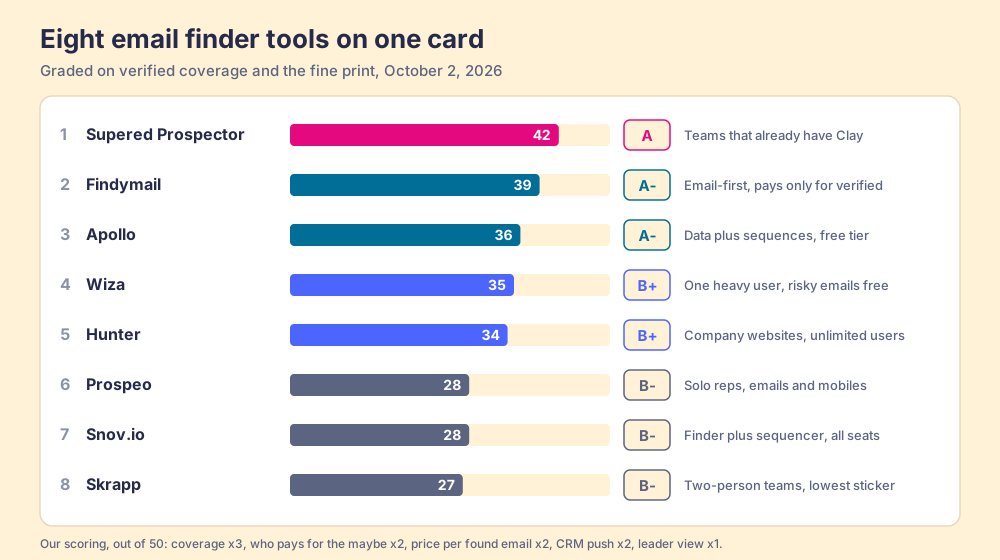
How the scores break down. Prospector’s 42 is coverage 5, maybe 4, price 2, CRM 5, leader 5: the coverage is Clay’s waterfall, credited to Clay, and the price 2 is fair to the others because Prospector needs a Clay plan underneath it. Findymail’s 39 is 4, 5, 4, 4, 1, the only 5 for the maybe on the card. Apollo’s 36 is 4, 3, 4, 4, 2: the 30-day refund on verified bounces offsets charging catch-alls. Hunter’s 34 is 3, 3, 5, 4, 1, carried by price.
Corporate status, checked October 1 and 2, 2026: web searches found no 2026 acquisition, funding round, or rebrand for Findymail, Hunter, Prospeo, Snov.io, Skrapp, or Wiza. Apollo is independent and bought the revenue-intelligence startup Pocus in March 2026 (TNW).
Where does Supered Prospector fit?
Prospector does not bring its own database. It brings Clay’s waterfall, which is every database, routed, and that is why we chose Clay as our only data provider and why Clay is not a row above: it is the row that contains the rows. Four of the tools on this page (Findymail, Hunter, Prospeo, Wiza) sit inside Clay as providers that a waterfall can call in any order, and Clay says plainly, “If an enrichment returns no result, you’re not charged Data Credits or Actions” (clay.com/pricing, October 2, 2026). The doorman problem gets solved once, by the person who writes the order: Clay’s email waterfall validates addresses, by default with ZeroBounce, with a setting to exclude catch-alls (Clay University, checked October 1, 2026).
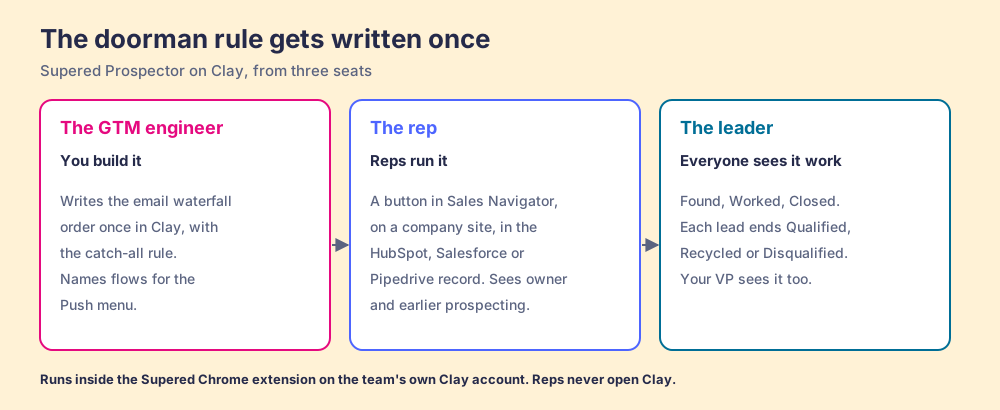
Clay plus Supered is the best way for a sales team to prospect: GTM engineers build in Clay, and reps never open Clay. Prospector runs inside the Supered Chrome extension, on the team’s own Clay account. It looks different from each of the three seats:
- The GTM engineer. You built the tables, and reps still Slack you for every list. With Prospector you stop being the list desk. You build named flows once, each tied to a Clay table or function and a destination, and your logic stays yours: waterfalls, tiers, tags, and sequence variables. Start from the Supered Clay template or bring your own tables.
- The rep. Your team’s table is a button in Sales Navigator, on a company’s website, and in the HubSpot, Salesforce, or Pipedrive record. You pick a flow from the Push menu for the play in front of you (research an account, new logos, expansion, a job changer, a stalled deal), see who owns the record and whether it was prospected before, and send it to the CRM or your sales engagement tool in one click.
- The leader. Found, Worked, Closed. You see which lists reps found, who is working theirs and who isn’t, and how each lead ended the way your process says: Qualified, Recycled, or Disqualified. Your VP sees it too, and that is how the Clay budget grows.
The arithmetic for ten reps, billed annually. Clay Growth is $446 a month on annual billing, $5,352 a year, and Prospector is $540 a rep-year (Prospector), so $10,752 in all. Ten Apollo Basic seats are $5,880. Ten Wiza Email seats are $9,900. Findymail Starter on monthly billing is $1,188 a year for a team pool of 5,000 credits a month. For a team starting from nothing that only needs email, Findymail is far cheaper, and we say so. Prospector is for the team that already pays for Clay and is about to buy its reps a second finder. Skip the extra seats, and get more out of the Clay you already pay for.
Choose something else if you do not have Clay. Prospector runs on the customer’s Clay account and does nothing without one. If you want help building the tables first, RevPartners, the company I founded, is a Clay Elite Studio Partner that builds them with you; any good Clay agency can do the same. And if your team sends a few hundred emails a month, a single finder below will serve you well for a fraction of the cost. The Clay Chrome extension guide explains the rep’s side of Clay, and the sourcing use case shows the loop from profile to closed.
The other seven, one at a time
Prices are from each vendor’s pricing page, opened October 1 or 2, 2026. Coverage figures come from two outside tests. The first, from b2b-email-finder.com, an anonymous review site that ranks Findymail first, ran eight finders on 500 contacts with known emails in May 2026 (the benchmark, published June 8, 2026). The second is Clay’s own work-email test of 13 North American providers, last run October 22, 2025 (Clay data tests).
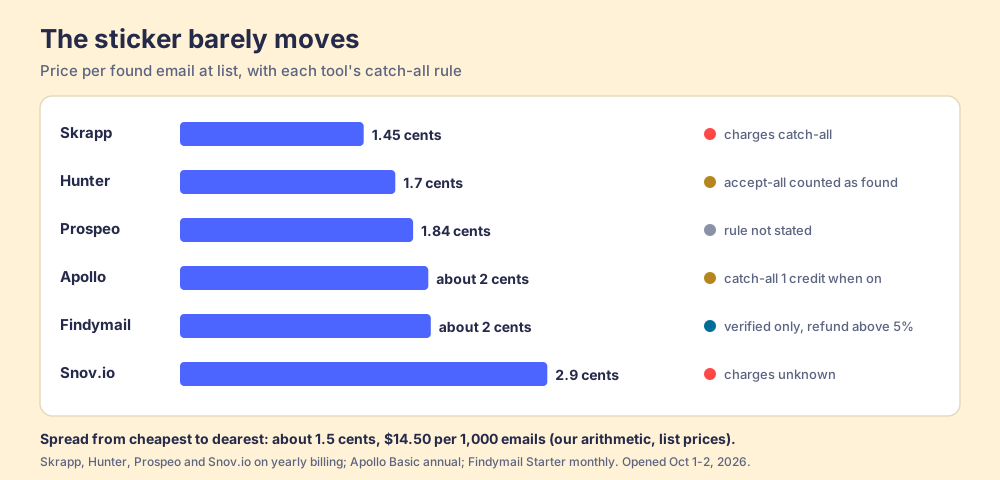
Before the detail, price per found email at list, since every tool now charges by the email found rather than by the search. Skrapp Professional on yearly billing works out to 1.45 cents. Hunter Starter yearly, 1.7 cents. Prospeo Starter yearly, 1.84 cents. Apollo Basic and Findymail Starter, about 2 cents. Snov.io Starter yearly, 2.9 cents. The spread from cheapest to dearest is about 1.5 cents, or $14.50 across 1,000 emails. That is our arithmetic, and it is the smallest number on this page. The footnote about the maybe moves more money than the sticker does.
Findymail
Findymail led Clay’s North American work-email test on coverage, 90.26% with 96.26% quality, and came second in the anonymous benchmark at 83.2% coverage with the highest accuracy of the eight, 93.2%. Clay’s catch-all test had it resolving all the catch-alls it was given. Starter is $99 a month for 5,000 finder credits plus 5,000 verifier credits, shared by the team, two months free on yearly billing; “1 email = 1 credit”, “1 phone = 10 credits”, and “You only pay for verified results” (findymail.com/pricing). Unused credits roll over up to twice the monthly allowance. The weak spot is phones: the same Clay series ranked its mobiles 13th of 15 in North America, and the mobile finder is non-EU only. G2: 4.9 from 57 reviews. More in Findymail alternatives.
Apollo
Apollo had the highest coverage in the May benchmark, 88.2%, with lower accuracy at 81.3% and a catch-all rate of 18.7% among its results. Basic is $49 a seat a month on annual billing ($65 monthly) with 30,000 credits a seat a year; an email costs 1 credit and a phone 8 (apollo.io/pricing, plan data checked October 2, 2026). Its knowledge base says a verified email that bounces within 30 days is refunded automatically, and catch-alls appear only “If you toggle on catch-all emails when prospecting,” at 1 credit each. Leave that toggle off for cold sends unless you validate separately. G2: 4.7 from 9,690 reviews, per Apollo’s pricing page on September 25, 2026.
Wiza
Wiza covered 85.02% of North American work emails in Clay’s test with 94.72% quality. Email is $990 a user a year with unlimited email reveals, under a fair-use limit of 500 contact reveals in 24 hours; Email + Phone is $1,990 (wiza.co/pricing). Risky emails are free. On August 19, 2026 Wiza removed bulk export from LinkedIn and Sales Navigator search pages, saying “LinkedIn has tightened what third-party extensions can do on its platform”; the extension still works on single profiles. G2: 4.5 from 1,274 reviews. Wiza pricing works through the meters.
Hunter
Hunter is the email finder for company websites. It does not work on LinkedIn, citing LinkedIn’s terms (Hunter Help). Its method is published: search “our extensive database of email addresses found publicly on the web,” and if there is no match, consider “the likely permutations of the person’s name on that domain,” then verify (hunter.io/email-finder). Clay’s test gave it the best quality of 13 providers, 97.15%, at 52.87% coverage, and the anonymous benchmark 72.6% coverage. Starter is $34 a month billed yearly, $408 for 24,000 credits, with unlimited users on one pool; “If the email address can’t be found, it’s free.” No phones for sale. G2: 4.4 from 657. See Hunter.io alternatives.
Prospeo
Prospeo sells “one verified business email” per credit and a direct mobile for 10 (prospeo.io/pricing). Starter is $441 a user a year for 24,000 credits; HubSpot and Salesforce sync starts on Growth, $888 a year. Neither outside test cited here includes a Prospeo email row, and one G2 reviewer in September 2026 wrote that it “has a relatively smaller database compared with other providers in this space.” Watch the renewal: the version of the pricing FAQ we saw says credits “reset on renewal and do not roll over.” G2: 4.6 from 854. Prospeo pricing has the per-credit math.
Snov.io
Snov.io pairs an email finder with a sequencer and unlimited team seats. Starter is $39 a month, or $29.25 on annual billing, for 1,000 credits a month (snov.io/pricing), and it charges 1 credit for “yellow emails (unknown)” as well as valid ones. It scored 74.3% coverage and 77.8% accuracy in the May benchmark. Phones come through a separate token balance from two providers, picked one at a time. Salesforce connects through Zapier. G2: 4.5 from 499. Snov.io pricing covers the tokens.
Skrapp
Skrapp is the cheapest found email at list, $29 a month billed annually for 2,000 credits and two users, and it is plain about its rule: “We only charge for deliverable emails marked as ‘Valid’ or ‘Catch-all’” (skrapp.io/pricing). It sells no phone numbers. Its accuracy claims differ by page (92% on its homepage, 85% on Capterra), it was in neither outside test, and it is not a Clay provider. G2: 4.5 from 356. Skrapp alternatives compares the field.
Does LinkedIn allow email finder extensions?
Several tools here work on LinkedIn profiles, so the question belongs on any shortlist. LinkedIn’s User Agreement, section 8.2, has members agree not to use software, “such as crawlers, browser plugins and add-ons,” to “scrape or copy the Services, including profiles and other data” (LinkedIn User Agreement). Hunter left LinkedIn over it, and Wiza pulled bulk export in August 2026. We are not lawyers. Our answer for Prospector: it works within LinkedIn’s terms and does not copy search results in bulk; the contact data comes from Clay’s waterfall on the customer’s Clay account. Put the same three questions to every vendor, us included: what does the extension read from the page, where does the data come from, and is anything copied in bulk. The LinkedIn email finder Chrome extension page grades the extensions on that ground, and how to find someone’s email on LinkedIn covers the manual routes.
Which email finder tool should you choose?
Two facts decide it: whether your company already pays for Clay, and how you want the maybe handled.
- Supered Prospector. The pick when the team has Clay: one waterfall order with one catch-all rule, run by every rep from LinkedIn, the company site, and the CRM record, with the leader seeing Found, Worked, Closed.
- Findymail. The pick without Clay when email is the job and you want the vendor to stand behind the bounce rate.
- Apollo. The pick for a free start and sequences in the same plan; keep catch-alls switched off for cold sends.
- Wiza. The pick for a heavy single user on a yearly plan who wants risky emails free.
- Hunter. The pick for company websites and a shared pool across unlimited users.
- Prospeo, Snov.io, Skrapp. The budget picks, in that order for coverage evidence, each with the footnote above.
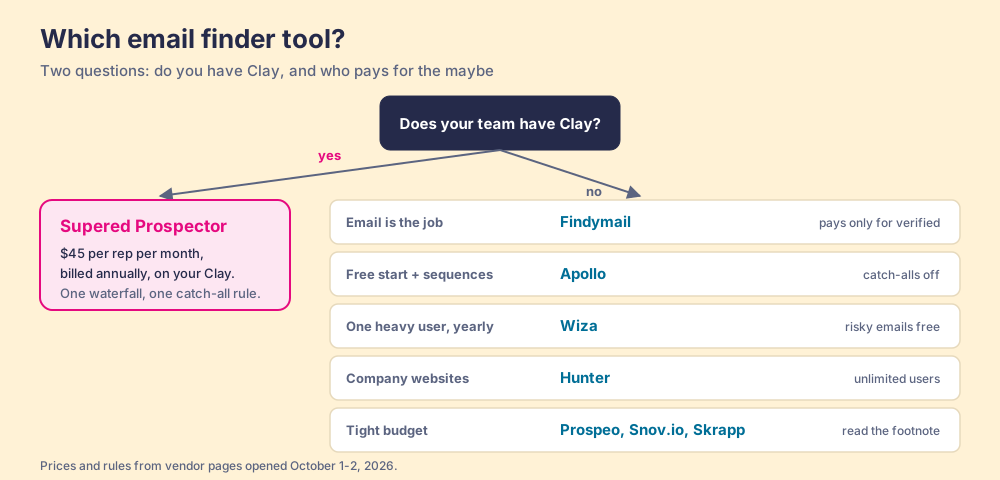
What we recommend. Read the footnote before the price. The sticker spread across these tools is about a cent and a half per email; the difference between a finder that charges you for the doorman’s signature and one that refunds you when it bounces is your sending domain. Without Clay, start with Findymail for email and add a phone source when the reps dial. With Clay, you already own the waterfall that calls Findymail, Hunter, Prospeo, and Wiza in whatever order your GTM engineer writes, with one catch-all rule for the whole team. Put that order behind a button on the page each rep is already reading, and let the leader watch the list end Qualified, Recycled, or Disqualified. Waterfall enrichment explains how the order is built, the Clay email finder guide shows it inside Clay, and a Prospector demo on your own Clay account shows it in a rep’s hands.
Frequently asked questions
What are the best email finder tools in 2026?+
What is a catch-all email, and why does it matter for an email finder?+
Which email finder tools charge for catch-all or unknown emails?+
What is the cheapest B2B email finder per email?+
Is there a free email finder?+
Do I need a Clay account to use Supered Prospector?+
Your process, running itself.