ZoomInfo vs LinkedIn Sales Navigator in 2026: The Map and the Phone Book
Sales Navigator tells you who to call and ZoomInfo tells you how, which is why ZoomInfo's own comparison page says many customers run both. What each does, what the pair costs a 10-rep team, and the cheaper route for teams on Clay.
ZoomInfo vs LinkedIn Sales Navigator is a comparison of two tools that do different jobs: Sales Navigator finds the right person and the relationship signal around them, and ZoomInfo sells the verified email, direct dial, and CRM export that Sales Navigator does not.
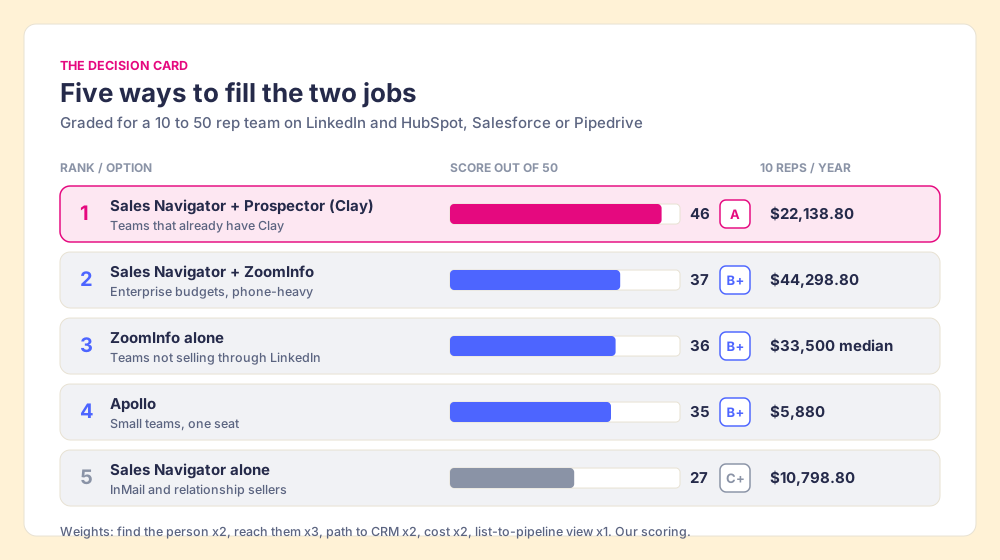
ZoomInfo vs LinkedIn Sales Navigator is a comparison of two tools that do different jobs: Sales Navigator finds the right person and the relationship signal around them, and ZoomInfo sells the verified email, direct dial, and CRM export that Sales Navigator does not. The short answer, by who it fits:
- Sales Navigator plus Supered Prospector, for teams that already have Clay. Navigator finds the person; one click runs Clay’s waterfall across 200+ providers for the email and phone and sends the lead to HubSpot, Salesforce or Pipedrive. About $22,138.80 a year for ten reps at list.
- Sales Navigator plus ZoomInfo, for teams with an enterprise budget. The classic pair, and ZoomInfo’s own page says many of its customers run it. About $44,298.80 a year for ten reps on Core seats and a median ZoomInfo contract.
- ZoomInfo alone, for phone-heavy teams that do not sell through LinkedIn. One deep database with intent data and native CRM export. Vendr median $33,500 a year.
A town needs two books. The first is a map the residents draw themselves: each one marks where they live, rubs out the old house when they move, and notes who they know on the street. It is the most current picture of the town you can buy, and it has no phone numbers on it. The second is a phone book, compiled by a publisher who calls around and buys lists. It has a number for most of the town, and sometimes it still lists the family that moved out in spring. Sales Navigator is the map. ZoomInfo is the phone book. The comparisons that rank for this search ask which book to buy. The people who live in the town carry both.
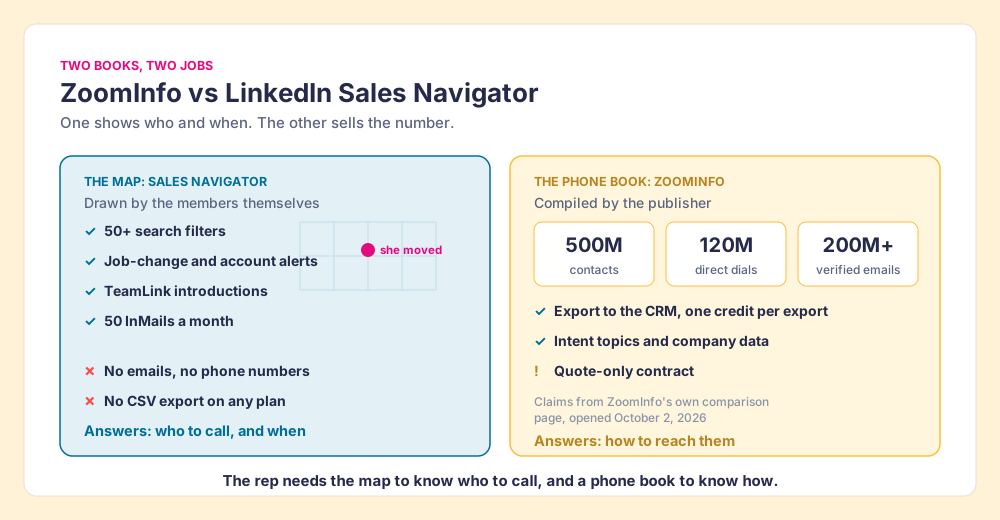
The analogy stops at one point. ZoomInfo has a search of its own and Navigator has InMail, so each book does a little of the other’s job. But the center of each is where the money goes, and the center is different.
ZoomInfo vs LinkedIn Sales Navigator at a glance: the decision table
The lens is a mid-market team of ten to fifty reps that prospects on LinkedIn and works in HubSpot, Salesforce or Pipedrive. The weights serve that job: find the right person, reach them, get them into the CRM, at a price a mid-market budget carries, and see which lists became pipeline.
| Rank | Option | Grade | Best fit | CRM integration | Setup effort | Pricing (10 reps, per year) | Reason to switch |
|---|---|---|---|---|---|---|---|
| 1 | Sales Navigator + Supered Prospector (Clay) | A | Teams that already have Clay | Native: HubSpot, Salesforce, Pipedrive | Medium (Clay tables first) | $22,138.80 at list | Navigator’s search plus Clay’s 200+ providers, one click to CRM |
| 2 | Sales Navigator + ZoomInfo | B+ | Enterprise budgets, phone-heavy teams | Native (ZoomInfo export) | High (contract, admin, two tools) | $44,298.80 (Core + Vendr median) | Both jobs done, at the highest price |
| 3 | ZoomInfo alone | B+ | Teams that do not sell through LinkedIn | Native | High | $33,500 Vendr median | Deepest single database, intent data |
| 4 | Apollo | B+ | Small teams wanting one seat | Native | Low | $5,880 (Basic) | Search, data, and sequences in one seat |
| 5 | Sales Navigator alone | C+ | Relationship-led sellers who work InMail | Advanced Plus only | Low | $10,798.80 (Core) | The best map, with no phone numbers |
Each criterion is scored 1 to 5 and multiplied by its weight, for a maximum of 50. The scoring, so you can argue with it:
| Option | Find the person (x2) | Reach them (x3) | Path to CRM (x2) | Cost (x2) | List-to-pipeline view (x1) | Total |
|---|---|---|---|---|---|---|
| Navigator + Prospector (Clay) | 5 | 5 | 5 | 3 | 5 | 46 |
| Navigator + ZoomInfo | 5 | 5 | 4 | 1 | 2 | 37 |
| ZoomInfo alone | 4 | 5 | 4 | 2 | 1 | 36 |
| Apollo | 3 | 3 | 4 | 5 | 2 | 35 |
| Navigator alone | 5 | 1 | 2 | 4 | 2 | 27 |
Bands: A is 42 and up, B+ is 35 to 39, C+ is 24 to 28. Two scores need defending. Prospector’s reach score of 5 is Clay’s waterfall coverage, credited to Clay, since Prospector has no database of its own; its find score of 5 belongs to the Navigator seat it sits on. Navigator’s reach score of 1 says nothing about its profiles, which G2 reviewers rate highly; it scores the email and the mobile, which are not for sale inside it. Drop the cost weight to zero and Navigator plus ZoomInfo still scores 35 of 40, ahead of ZoomInfo alone at 32, so the pair earns its reputation on capability. It loses rank here on price.
What does Sales Navigator do that ZoomInfo does not?
Sales Navigator is the map, and the residents hold the pen. LinkedIn’s compare-plans page, opened October 2, 2026, says it is “trusted by 1.5M+ sellers” and lists 50+ advanced search filters, lead and account alerts, and 50 InMails a month on every plan, with TeamLink introductions and buyer-intent signals on Advanced (LinkedIn, compare plans). A rep can find the head of RevOps at a 300-person logistics firm, see that she changed jobs six weeks ago, and see that a colleague is connected to her.
What it does not do is let the rep carry any of that out. LinkedIn’s help center says it “currently doesn’t offer the option to export account and lead information from Sales Navigator into a CSV or XLS file” (LinkedIn Help). And ZoomInfo’s comparison page, opened the same day, puts the gap in one line: Sales Navigator has “no direct phone numbers or verified business email addresses at any tier” (ZoomInfo). A G2 reviewer, Tim P., an owner and CEO, wrote it from the buyer’s side in February 2026: “I don’t like the inability to download lead lists to CSV or to CRMs without a third-party add-on” (G2).
What does ZoomInfo do that Sales Navigator does not?
ZoomInfo is the phone book, and the publisher holds the pen. Its comparison page claims “500M contacts, 120M direct-dial phone numbers, and 200M+ verified business emails,” “4,500+ intent topics,” and “120+ CRM and tech stack integrations” (vendor claims, opened October 2, 2026). The rep exports a contact to Salesforce or HubSpot, and ZoomInfo’s pricing page says a credit is used only when a user exports a profile, one credit per export (zoominfo.com/pricing).
The phone book comes with a contract. ZoomInfo publishes no prices. Vendr puts the median buyer at $33,500 a year across 1,574 purchases, with a range from $7,220 to $155,730 and buyers saving 22% on average (Vendr, opened October 2, 2026). The full breakdown sits in our ZoomInfo pricing guide. A small-business reviewer on G2, Salmeen H., said in September 2026: “The pricing feels extremely steep compared to platforms like Apollo.”
Whose data is more accurate, ZoomInfo or Sales Navigator?
G2’s head-to-head page answers this in a way that surprises people who assume the paid database wins. Opened October 2, 2026, it shows ZoomInfo (listed as “GTM Workspace”) at 4.5 out of 5 from 9,108 reviews and Sales Navigator at 4.4 from 2,210, and on the two accuracy rows reviewers score Navigator higher: contact data accuracy 8.1 against 7.7, and company data accuracy 8.4 against 8.1 (G2 compare). ZoomInfo wins quality of support (8.7 against 8.1) and product direction (8.7 against 7.9). Ease of setup is a tie at 8.9.
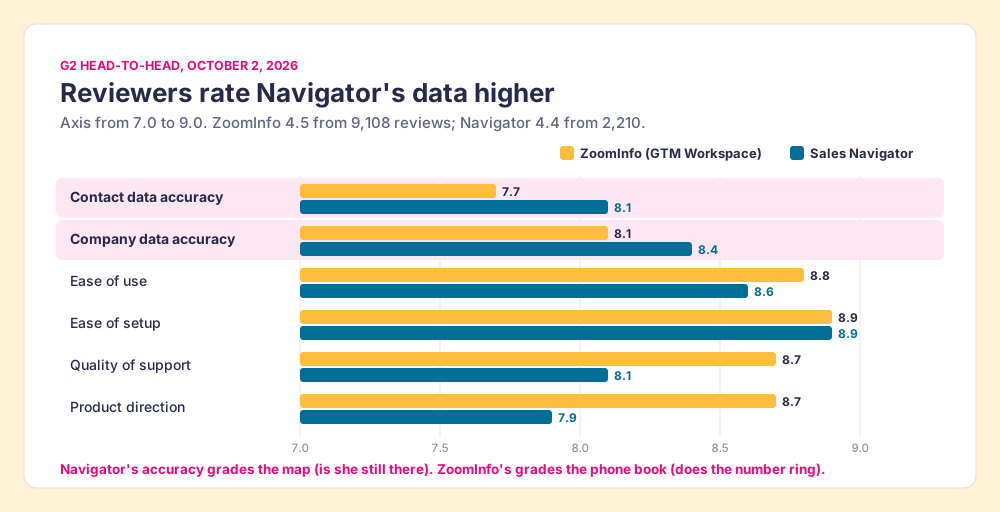
The mechanism explains the score. On LinkedIn, the person updates their own title the week they start a new job, because their career depends on it. A database learns about the move later, from whatever signal it collects, and a G2 reviewer of ZoomInfo, Andrea S., an account executive, wrote in August 2026 that direct-mobile accuracy “drops noticeably in EMEA, APAC, and niche regional markets.” So “accuracy” on Navigator grades the map: is she still there, is that still her title. On ZoomInfo it grades the phone book: does the number ring and does the email land. Navigator scores higher on a question it can answer. It cannot be graded at all on the question ZoomInfo answers, because it sells no email or number to grade.
Why do so many teams buy ZoomInfo and Sales Navigator together?
Because the rep’s day needs both books. The Bridge Group’s 2025 SDR report, across 351 B2B companies, puts the median SDR at 112 activities a day: 44 phone, 41 email, 19 LinkedIn, and 8 other (Bridge Group, 2025). Navigator serves the 19 directly. The 85 calls and emails need a number or an address it does not sell.
ZoomInfo knows this better than anyone, and says so. Its own comparison page reads: “Many ZoomInfo customers run Sales Navigator alongside ZoomInfo. The combination is genuinely complementary.” Its Chrome extension is built for the pairing: ZoomInfo’s extension page says it works “on any site, including corporate websites, LinkedIn and your CRM” (ZoomInfo), and the extension’s code, unpacked in our ZoomInfo Chrome extension review, carries handling for LinkedIn and Sales Navigator pages. The intended workflow is a rep on a Navigator lead, opening ZoomInfo’s side panel, exporting the contact.
LinkedIn’s own route to the CRM has the same hole. On Advanced Plus, a rep can create a lead in Salesforce or Microsoft Dynamics from a Navigator lead page. LinkedIn’s help page lists the form fields: first and last name required; country, job title, email, phone, and company optional (LinkedIn Help). For contact creation, LinkedIn notes that first name, last name, job title, and country are “pre-populated from Sales Navigator”; email and phone carry no such note (LinkedIn Help). In HubSpot, LinkedIn’s CRM Sync guide says that to create a contact, “You will need to provide an email address” (LinkedIn).
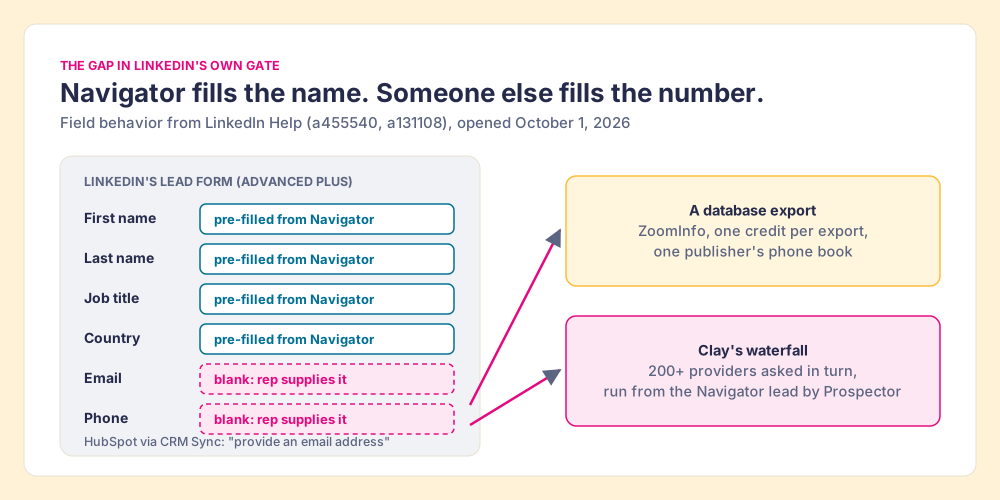
So LinkedIn’s own form asks the question this whole comparison turns on, which is where the email and phone in those blank fields come from. ZoomInfo is one answer, and for a team on Clay it is the expensive one.
Why trust this comparison?
Before Supered I started RevPartners, a HubSpot partner that did only sales implementations and reached HubSpot’s Elite tier in 13 months, so I spent years watching reps copy a name from LinkedIn, look the person up in a database, and retype the result into a CRM. Supered grew out of that work. It is the #1 sales enablement app on the HubSpot marketplace, rated 5.0 from 122 reviews there, and 4.9 out of 5 from 81 reviews on G2 (October 1, 2026).
The disclosure: we make Prospector, it ranks first above, and it works on top of Sales Navigator, so we have every reason to keep you on Navigator and no reason to sell you a database. The weights are printed so you can flip them, and the section after next says plainly when to buy ZoomInfo instead.
What does it cost to run ZoomInfo and Sales Navigator together?
List prices for a ten-rep team for a year. ZoomInfo’s figure is a whole-contract median, not a per-seat price, so treat it as the middle of a wide range.
| Stack | 10 reps, per year | What it buys |
|---|---|---|
| Apollo Basic | $5,880 | Search, contact data, sequences in one seat |
| Sales Navigator Core | $10,798.80 | The map; no emails, phones, or export |
| Sales Navigator Advanced | $17,998.80 | Core plus TeamLink and buyer intent |
| Navigator Core + Clay Growth + Prospector | $22,138.80 | The map, plus Clay’s waterfall and one-click CRM sync |
| ZoomInfo (Vendr median contract) | $33,500 | The phone book, intent, native CRM export |
| Navigator Core + ZoomInfo | $44,298.80 | Both books |
| Navigator Advanced + ZoomInfo | $51,498.80 | Both books, Advanced map |
The sources: Navigator at US$1,079.88 and US$1,799.88 per license per year on LinkedIn’s compare-plans page, which LinkedIn calls estimates that may exclude tax and promotions; ZoomInfo at the Vendr median; Apollo Basic at $49 per user per month on annual billing (apollo.io/pricing, October 1, 2026); Clay Growth at its $495-a-month list price, $5,940 a year (clay.com/pricing); and Prospector at $45 per rep per month billed annually, $5,400 for ten (Prospector).
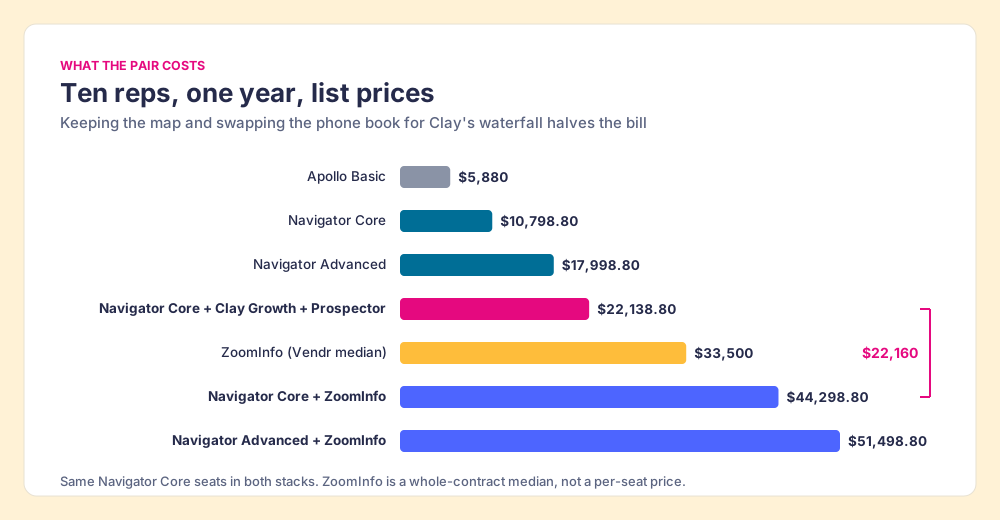
Three readings of that table. The classic pair costs about twice the Clay route, $44,298.80 against $22,138.80, and both keep the same Navigator seats. A comparison table on Vendr’s Lusha page (October 1, 2026) estimates ten ZoomInfo users at about $25,000 to $50,000 a year, so a well-negotiated contract narrows the gap without closing it. And the Clay figure carries its own variable: Clay charges in credits, a team that dials hard will spend more of them, and Clay’s pricing page says “If an enrichment returns no result, you’re not charged Data Credits or Actions.” Price your own volume before you trust either total. The seat-level detail on Navigator lives in the Sales Navigator pricing guide.
The third route for teams on Clay: Navigator to find, Clay to reach
If your company already pays for Clay, you already own something better than one phone book. Clay buys data from “200+ providers in one place” (clay.com, opened October 1, 2026), and its waterfall checks provider after provider “to return the most verified emails (lower bounce rate) and phone numbers (higher connect rate)” (Clay). The analogy stretches one step: instead of buying the biggest phone book in town, you ring every directory in turn until one has the number. Your GTM engineer built those tables, and the reps work in Navigator, a tab away from them. If Clay itself is new to you, what is Clay covers the basics.
Supered Prospector puts those tables on the Navigator lead. It runs inside the Supered Chrome extension, on your own Clay account, and reps never log into Clay.
- One click on the Navigator lead or list. The rep runs your team’s Clay table from the lead, or pushes a whole saved list into a Clay workflow, and Clay’s waterfall returns the verified email and phone.
- The CRM check before the click. On the profile the rep sees the matching HubSpot, Salesforce or Pipedrive record and whether the person was already worked in the past, so the rep does not add a duplicate or step on a teammate.
- One click to the CRM. Ops maps the fields once; every sync after that is one click to HubSpot, Salesforce or Pipedrive. The email and phone fields LinkedIn’s form leaves blank arrive filled.
- The same button off LinkedIn. Prospector also runs from a plain LinkedIn profile, a company’s website, and a CRM record, and pulls a buying committee tuned to your titles and seniority.
- Lists you can follow. A leader sees which sourced lists got worked and which ones closed, and coaches from what is converting.
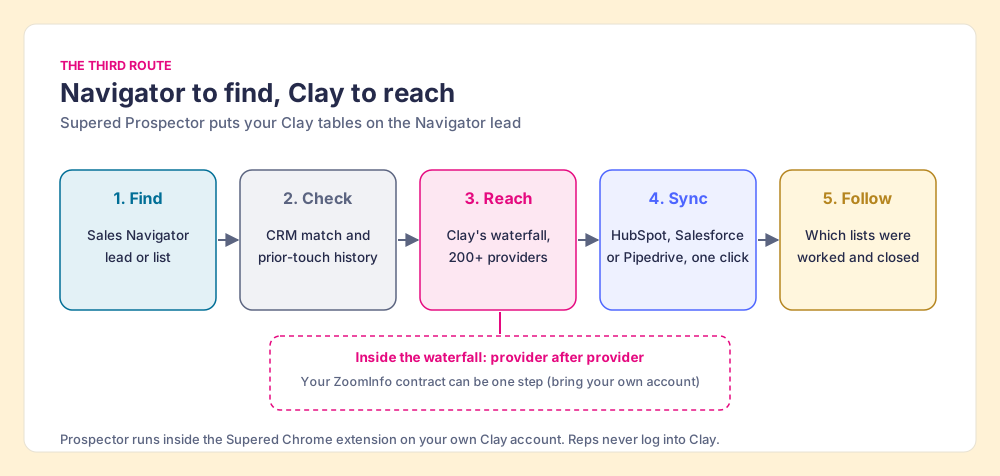
Supered does not bring its own database. It brings Clay’s waterfall, which is every database, routed. We chose Clay as our only data provider for that reason, and it is why Clay is not a row in the decision table: Clay is the row that contains the other rows. If you keep ZoomInfo, it can stay inside that row. Clay’s ZoomInfo integration, which joined January 15, 2025, is marked “Bring Your Own Account Required” (Clay), so your contract becomes one step in the waterfall and keeps that step only if it wins on your own list. Clay governs the data. Supered governs the motion.
Prospector costs $45 per rep per month, billed annually, from one user. The whole team pattern is in the sourcing use case, and the Clay-side view is in the Clay Chrome extension guide.
Choose something else if:
- No Clay account. Prospector needs one. Without Clay, the Navigator plus ZoomInfo pair or Apollo is the simpler buy.
- One deep database with intent, for a large enterprise team. ZoomInfo’s 4,500+ intent topics and single contract are the reason to keep it, and at 200 seats the per-rep math changes.
- Outreach drafted by AI. Prospector does not write or send emails. It hands the lead to your CRM and your sequencer.
Is it safe to use a ZoomInfo or Prospector extension on Sales Navigator?
Ask it of any tool that runs on a LinkedIn page, ours included. Our answer for Prospector: it works within LinkedIn’s terms and does not copy search results in bulk, and the contact data comes from Clay’s waterfall on your own Clay account. LinkedIn’s User Agreement, section 8.2, says members agree not to “develop, support or use software, devices, scripts, robots or any other means or processes (such as crawlers, browser plugins and add-ons or any other technology) to scrape or copy the Services, including profiles and other data from the Services” (LinkedIn User Agreement, effective November 3, 2025). LinkedIn’s prohibited-software page adds that members using such tools “risk having their accounts restricted or shut down” (LinkedIn Help). In March 2025, Apollo’s and Seamless.AI’s company pages disappeared from LinkedIn (MarTech, May 8, 2025).
This page does not rule on any vendor’s compliance, and we do not recommend scrapers or automation tools. Read section 8.2 yourself and ask each vendor what its extension reads from the page, where the contact data comes from, and whether anything is copied in bulk. Prospector’s contact data comes from the providers in your Clay account, through Clay’s waterfall. If you want LinkedIn’s own route into the CRM, the Salesforce LinkedIn integration guide and the HubSpot LinkedIn integration guide cover Advanced Plus and CRM Sync step by step.
What changed at ZoomInfo and LinkedIn in 2026?
Checked October 2, 2026. LinkedIn is owned by Microsoft, and Navigator’s list prices on the compare-plans page match the October 1 capture. ZoomInfo is public (Nasdaq: GTM) and has moved fast this year. In May its board approved a reduction of about 600 employees, “approximately 20%” of first-quarter headcount, to cut about $60 million in annual run-rate expenses (SEC 8-K via Stock Titan). On September 30 it acquired DoubleO.ai, and on October 1 it launched Agent Teams built on that purchase (Business Wire). ZoomInfo now calls itself “the all-in-one AI GTM platform.” For a buyer of the phone book, the direction matters: the roadmap is AI agents running plays, and the contract you sign this year is for that platform.
ZoomInfo vs Sales Navigator: which should you choose?
Name the job, and the choice resolves.
- Sales Navigator alone. The pick for relationship-led sellers who work through InMail, TeamLink, and warm introductions and rarely dial. Drop Advanced to Core if TeamLink and intent go unused.
- ZoomInfo alone. The pick for a phone-heavy team that does not sell through LinkedIn and wants one database with intent.
- Sales Navigator plus ZoomInfo. The pick for an enterprise team with the budget for both books and no Clay account. It does both jobs well, at about $44,298.80 a year for ten reps.
- Apollo. The pick for a small team that wants search, data, and sequences in one $49 seat.
- Sales Navigator plus Supered Prospector. The pick for a team that already has Clay: keep the map, reach the person through Clay’s waterfall across 200+ providers, and follow every list to closed.
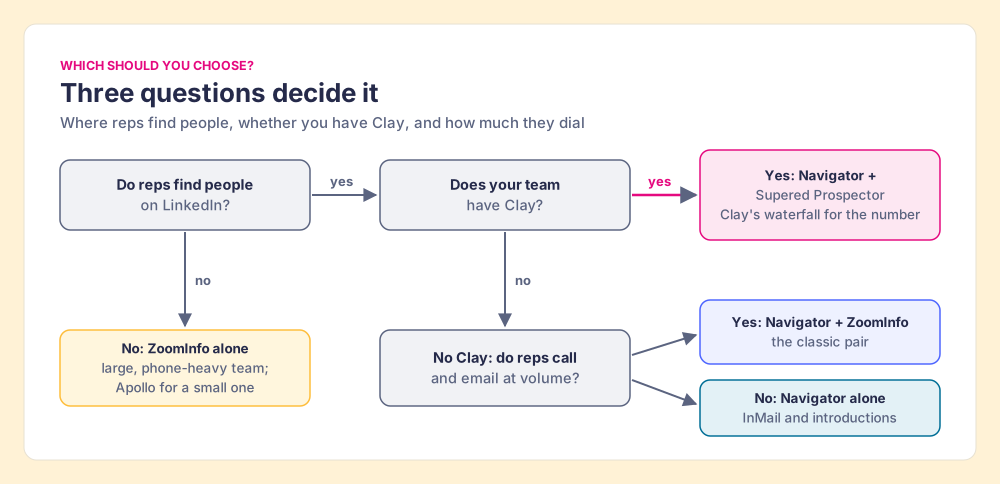
Our recommendation comes from the evidence above more than from our product. G2’s reviewers rate Navigator’s data higher on accuracy, ZoomInfo’s own page tells you its customers keep Navigator, and LinkedIn’s own lead form leaves the email and phone blank. So keep the map. The open decision is who fills in the numbers. If you have no Clay, ZoomInfo is a strong answer and Apollo a cheap one. If you have Clay, the numbers are already in a contract you pay for, and Prospector puts them on the Navigator lead for about half the cost of the classic pair.
The next step after the email and phone is getting a whole list out of Navigator cleanly. How to export Sales Navigator leads walks through every route LinkedIn allows and the ones it does not, and the Sales Navigator alternatives grading ranks the full field if you are rethinking the seat itself. The Apollo version of this question is in Apollo vs LinkedIn Sales Navigator, and the broader ZoomInfo field is in ZoomInfo competitors. Or watch your Clay tables run from a Navigator lead in a Prospector demo.
Frequently asked questions
Is ZoomInfo better than LinkedIn Sales Navigator?+
Should I buy ZoomInfo and Sales Navigator together?+
How much do ZoomInfo and Sales Navigator cost?+
Can Sales Navigator give me email addresses and phone numbers?+
Is there a cheaper alternative to buying both ZoomInfo and Sales Navigator?+
Does Supered Prospector replace ZoomInfo or Sales Navigator?+
Your process, running itself.