ZoomInfo Salesforce Integration in 2026: A Loading Dock With Two Doors
The ZoomInfo Salesforce integration, checked October 2, 2026, from ZoomInfo's own admin guides: what exports, what it imports from Salesforce by default, the plan and credits, setup steps, the limits, what 348 AppExchange reviews say, and the Clay route.
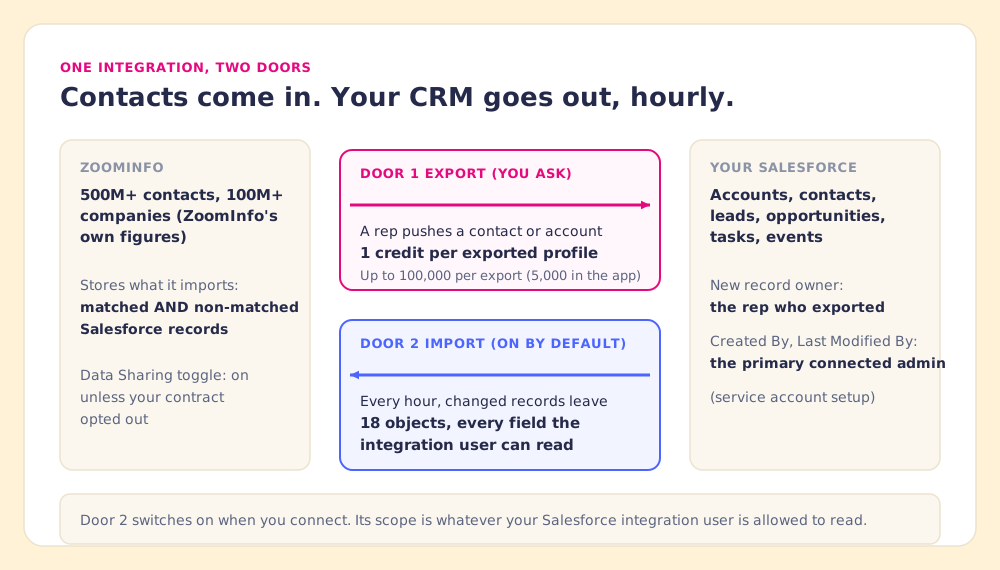
The ZoomInfo Salesforce integration is ZoomInfo's two-way connection to Salesforce: reps export ZoomInfo contacts and accounts into Salesforce for one credit each, and by default ZoomInfo imports your Salesforce accounts, contacts, leads, opportunities and activities every hour.
How to set up the ZoomInfo Salesforce integration
- 1
Check the prerequisites
Confirm Salesforce REST API access (Enterprise, Unlimited, Performance or Developer; Professional must buy it), Bulk API access for exports of 200 records or more, and a dedicated Salesforce integration user with read and write access to accounts, contacts, leads, campaigns and campaign members, and read access to opportunities and users.
- 2
Install the ZoomInfo Salesforce Native Application
On Salesforce AppExchange, open the ZoomInfo listing, click Get It Now, install in a sandbox first if your org tests packages, then install in production for all users. Add the ZoomInfo Lightning component to lead, contact and account record pages.
- 3
Connect Salesforce in the ZoomInfo Admin Portal
In ZoomInfo, go to Admin Portal, Integrations, Connections, find Salesforce and click Connect, sign in as the integration user, keep the default Service Account option, and check that each ZoomInfo user maps to the right Salesforce user.
- 4
Set export settings and mapping
Choose which objects users can export, set a maximum per export (up to 100,000), map ZoomInfo fields to Salesforce fields with Complete if missing or Overwrite for each, choose a duplicate-checking option, and run Test Mapping before saving.
- 5
Scope the Salesforce import
Import is enabled by default when you connect. Decide which objects and fields the integration user can read, add import rules to exclude records ZoomInfo should not store, set the Advanced Search filters, and review the Data Sharing page under Privacy and Security.
- 6
Set up Instant Enrich if you bought Enrich
From native app version 1.51, create a self-signed certificate in Salesforce, upload it in the ZoomInfo Admin Portal under Integrations, Data Enrichment, configure the ZoomInfo Enrich Private Key external credential, and assign the Enrich permission set. The certificate expires after one year.
- 7
Turn the integration on
Toggle the Salesforce integration on in the Admin Portal. With a service account, every ZoomInfo user can export at once; with individual user accounts, each user connects their own Salesforce login first.
A warehouse loading dock has a door for deliveries. Trucks back up, boxes come in, someone signs. What a new warehouse manager tends to learn later is that most docks have a second door, and trucks leave by it too.
The ZoomInfo Salesforce integration is ZoomInfo’s two-way connection to Salesforce: reps export ZoomInfo contacts and accounts into Salesforce for one credit each, and by default ZoomInfo imports your Salesforce accounts, contacts, leads, opportunities and activities every hour. The first door is the one every setup guide describes. The second is in ZoomInfo’s own Salesforce Integration Guide, which I read in full on October 2, 2026, along with the native app’s implementation guide and all 348 reviews on its AppExchange listing.
The quick answer, three ways:
- ZoomInfo’s native integration. The right tool if your company already pays for ZoomInfo: exports, bulk enrichment and ZoomInfo profiles inside Salesforce records, included in ZoomInfo Professional.
- Supered Prospector. The right tool if your team already pays for Clay: Clay’s waterfall across 200+ providers, run from the rep’s screen, one click into Salesforce, $45 a rep a month billed annually.
- Apollo. The fair pick for a team with neither contract, with a Salesforce extension on its free plan and CRM integrations from Basic at $49 a seat a month billed annually.
What does the ZoomInfo Salesforce integration do?
It is three products wearing one name, and the confusion in most reviews starts there.
- The platform integration. Configured in ZoomInfo’s Admin Portal. It exports contacts, leads and accounts from ZoomInfo into Salesforce, checks for duplicates on the way in, and imports Salesforce data back into ZoomInfo to power its search filters and scoring. ZoomInfo’s integration page calls this “bi-directional sync” and lists it for GTM Studio, Copilot, ZI Sales, the API add-on and ZI Talent.
- The Salesforce Native Application (SFNA). A managed package on AppExchange, namespace DOZISF, version 1.54, shipped June 29, 2026, with 12 custom objects and 5 tabs. It puts a ZoomInfo panel on lead, contact and account pages, adds custom objects for Scoops (ZoomInfo’s news items on funding, projects and leadership) and Intent, and installs a ZoomInfo dashboard. Salesforce’s security review last approved version 1.53.0 on February 19, 2026. The listing promises bulk enrichment of “up to 100,000 records at once.”
- ZoomInfo Enrich. The automatic, record-by-record refresh. The implementation guide is plain that Instant Enrich is a separate purchase: “If your organization does not have an Enrich subscription, you can skip this section.”
Two more doors open onto the same building. The ZoomInfo Chrome extension exports to Salesforce from LinkedIn and company sites using the same connection, and Salesforce’s own docs list a ZoomInfo connector for Data 360 (formerly Data Cloud) that is “Data In only.” For a sales team, the first two products are the integration.
Which ZoomInfo plan includes the Salesforce integration, and what does it cost?
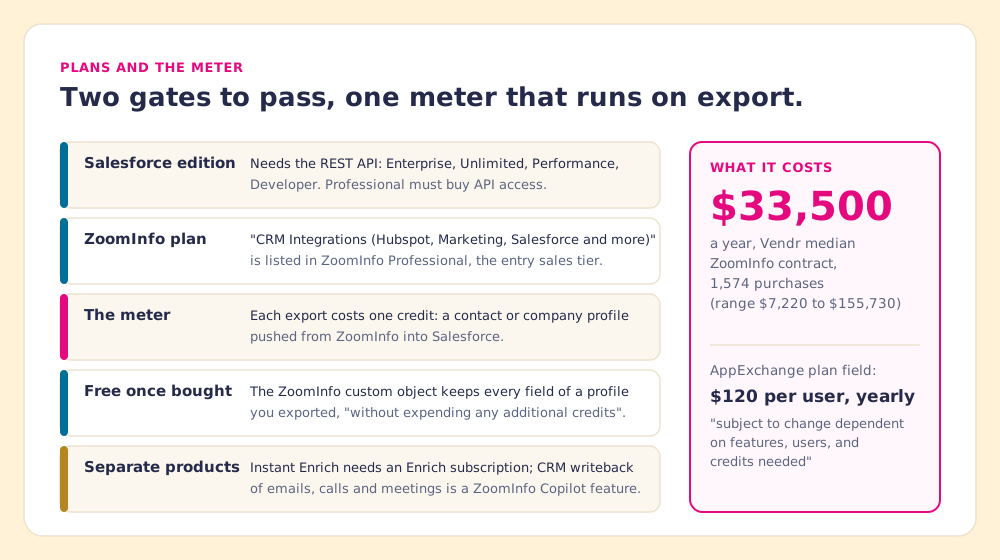
ZoomInfo Professional, the entry sales tier. ZoomInfo’s pricing page, checked October 2, 2026, lists “CRM Integrations (Hubspot, Marketing, Salesforce and more)” under Professional, with “Quick/advanced search and exporting” and the Chrome extension beside it. Copilot Advanced adds “Export emails to Outreach or Salesloft.” No tier shows a price.
The meter runs on the first door. “Each export costs one credit,” ZoomInfo’s pricing FAQ says, and “Whenever your team exports company or contact information, a credit is consumed.” A rep who pushes 40 contacts from a ZoomInfo search into Salesforce has spent 40 credits. One detail in the integration guide matters before you ration credits: the ZoomInfo custom object stores every field of a profile you exported “without expending any additional credits,” so an admin can show reps the full record they already paid for without mapping each field by hand.
The money behind the meter:
| Item | What it says | Source, checked October 2, 2026 |
|---|---|---|
| ZoomInfo contract | Median $33,500 a year across 1,574 purchases, range $7,220 to $155,730, 22% average savings | Vendr |
| SFNA listing price field | $120 per user, yearly, “subject to change dependent on features, users, and credits needed” | AppExchange listing |
| CRM integrations | Listed in ZoomInfo Professional; Vendr says standard CRM integrations are “typically included” | zoominfo.com/pricing, Vendr |
| Instant Enrich | Requires an Enrich subscription | SFNA implementation guide |
| CRM writeback of emails, calls, meetings | A ZoomInfo Copilot feature | Salesforce Integration Guide |
Treat the $120 as a field on a marketplace form; ZoomInfo sells by quote, and our ZoomInfo pricing breakdown walks the contract line by line.
The Salesforce side has its own gate. “The Salesforce Rest API is required for the ZoomInfo integration with Salesforce to function,” the guide says, and it ships with Enterprise, Developer, Performance and Unlimited editions; “If you have any other version of Salesforce (e.g., Professional), you’ll need to purchase access to the REST API.” Exports of 200 records or more also need the Bulk API.
How do you set up the ZoomInfo Salesforce integration?
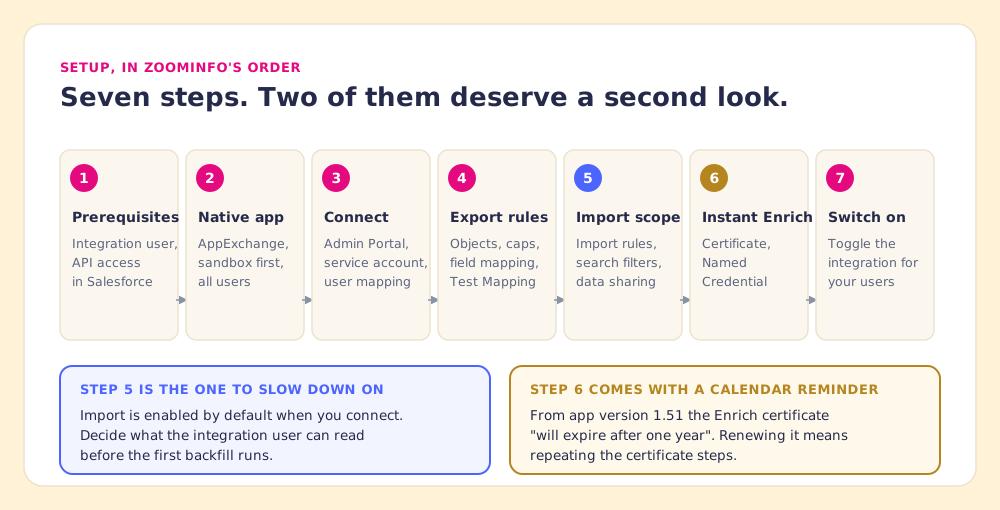
ZoomInfo’s guide gives an eight-part implementation flow; in the order a Salesforce admin does the work, it comes to seven steps, and ZoomInfo suggests a sandbox for the package install.
- Prerequisites. A Salesforce integration user with API access, read and write on accounts, contacts, leads, campaigns and campaign members, read on opportunities and users, and “view setup and configuration” plus “Run Reports.” ZoomInfo recommends an integration user “as a best practice,” because all exports and filtering jobs run as that account.
- The native app. On AppExchange, open the ZoomInfo listing and click Get It Now; install in a sandbox first if your org tests packages, then production, “Install for All Users.” The guide says the download “typically takes 3-5 minutes.” Then add the ZoomInfo Lightning component to lead, contact and account record pages from Object Manager (ZoomInfo prefers the component to the Visualforce page).
- The connection. In ZoomInfo, Admin Portal, Integrations, Connections, Salesforce, Connect. Sign in as the integration user. Keep the default Service Account option and open Edit User Mapping: ZoomInfo matches its users to Salesforce users by email, then by full name, and ownership depends on getting this right.
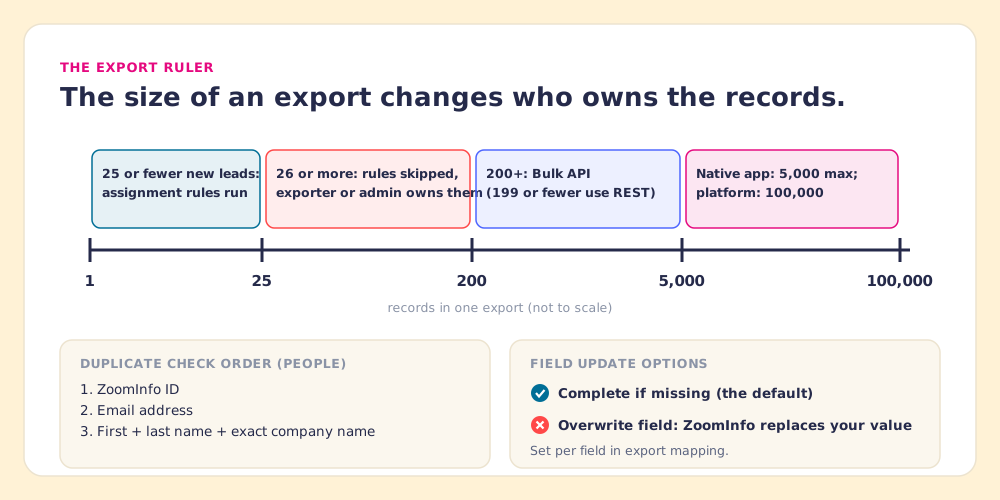
- Export settings and mapping. Choose the objects users may export and a per-export cap “up to 100,000.” On the mapping tab, set each field to “Complete if missing” (the default) or “Overwrite field,” pick standard ZoomInfo duplicate checking or your own Salesforce duplicate rules, and click Test Mapping, which exports and deletes a test record.
- Import scope. The step to slow down on, covered in the next section. Import is on the moment you connect.
- Instant Enrich, if you bought Enrich. From app version 1.51 this uses certificate-based authentication: create a self-signed certificate in Salesforce, upload it in ZoomInfo under Integrations, Data Enrichment, configure the “ZoomInfo Enrich Private Key” external credential, and assign the Enrich permission set. Then put a reminder in the calendar: “The certificate you created will expire after one year,” and renewing it means repeating the configuration.
- The switch. Toggle the integration on. With a service account, every ZoomInfo user can export at once.
What does ZoomInfo import from Salesforce?
Back to the dock. Door 2 is the import, and ZoomInfo’s guide describes it in a paragraph most admins never reach: “When you connect the Salesforce integration, the Import toggle is enabled by default.”
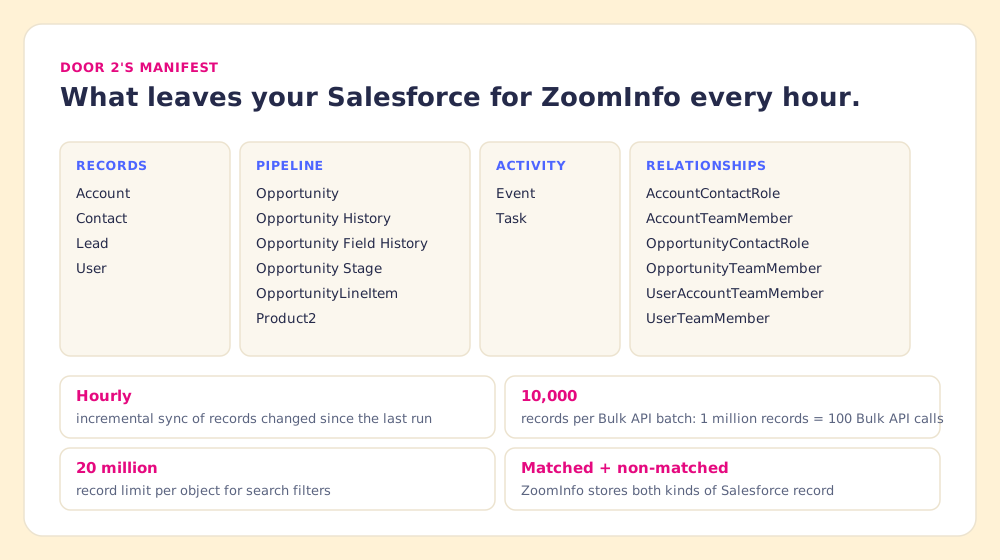
What goes out through it is wider than a contact list. For “the optimal experience,” ZoomInfo asks for read access to 18 objects: Account, Contact, Lead, User, Opportunity, Opportunity History, Opportunity Field History, Opportunity Stage, OpportunityLineItem, Product2, Event, Task, and six team and contact-role objects. “For each Salesforce object, ZoomInfo will import all fields within that object to which the connected user has access.” And on storage: “ZoomInfo stores both matched and non-matched data from these Salesforce objects and fields,” where non-matched data “is used to create rich signals.”
The truck runs hourly on records changed since the last run, in Bulk API batches of 10,000, so “1 million records will consume 100 Bulk API calls.” A full backfill runs on the first connection and whenever you change import mapping or rules. Separately, the Data Sharing page under Privacy and Security is on “if your organization has not contractually opted out of data sharing with ZoomInfo that is intended to analyze your use of connected integrations.”
ZoomInfo documents the import in plain words, and the import pays its way in features: it lets a ZoomInfo search exclude your current customers, filter to accounts a rep owns in Salesforce, and flag a contact who already exists before a rep buys them twice. The dock picture overreaches if it suggests anything furtive, since ZoomInfo hands you the controls. The point is narrower. The scope of door 2 is set by one thing, the Salesforce permissions of the integration user, and the guide’s own advice is to give that user broad read access. Your opportunity amounts, close dates and logged calls go where that user can see.
So the practical move at step 5 is short:
- A dedicated integration user. Its permission set is the import’s scope; “ZoomInfo will import only the records and fields that the authorized user can access.”
- Import rules. ZoomInfo’s Import Rules tab excludes records you do not want stored.
- A Data Sharing decision. Read the page, and check whether your contract opted out.
- The same question for every vendor. Ask what each Salesforce-connected tool reads and keeps, ours included.
What are the limits of the ZoomInfo Salesforce integration?
The guide is candid about them, and five matter to a sales team.
- The 25-record line on ownership. “If a user exports 25 net new records or less, the lead assignment rules will be used to set the record owner. If a user exports 26 net new records or more, the lead assignment rules are not applied.” Above the line, the records belong to the exporting rep, or to the primary connected admin if the rep’s ZoomInfo and Salesforce emails differ. One paragraph of the same guide gives 200 as the cutoff for assignment rules, while its table and ownership section say 25, so test it in your sandbox before a territory plan depends on it.
- The admin’s name on everything. With the default service account, “The Created By and Last Modified By value for each record will reflect the primary connected admin.” Reports built on Created By will credit one admin with every ZoomInfo record.
- Two different ceilings. The platform exports up to 100,000 records at once through the Bulk API. “The Native App does not leverage the Salesforce Bulk API when performing exports. For this reason the export limit through the Native App is 5,000, not 100,000.”
- Duplicate logic by name. People are matched by ZoomInfo ID, then email, then “First Name + Last Name + Exact Company Name”; accounts by ZoomInfo ID, website, then exact company name. A contact whose email changed and whose company renamed itself arrives as a new record. If Salesforce holds several duplicate accounts, “ZoomInfo will only match to one record.”
- A day’s lag in the filters. Search filters built from Salesforce data refresh “every 24 hours,” so a rep can see an account as unowned that a teammate claimed this morning.
What do reviewers say about ZoomInfo’s Salesforce app?
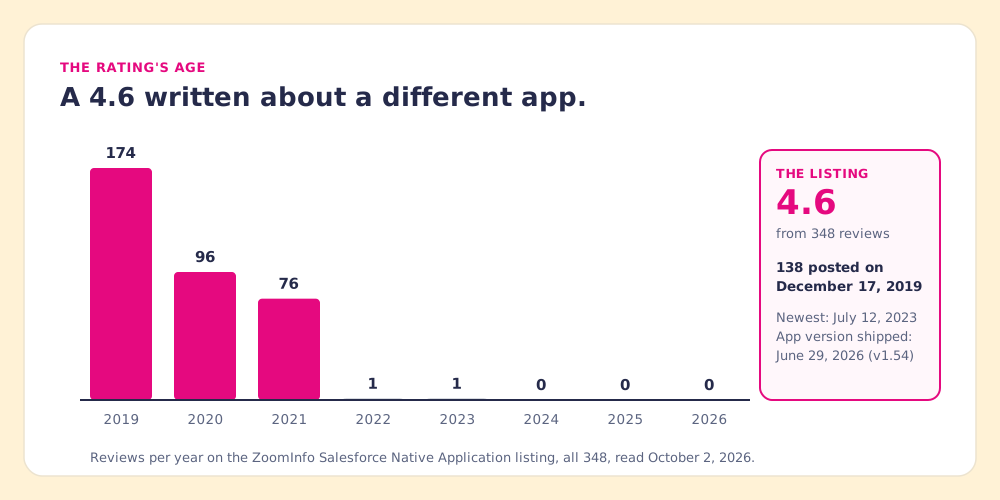
The listing shows 4.6 out of 5 from 348 reviews. I pulled all 348 through the listing’s public review feed on October 2, 2026, and sorted them by date, because a rating is a photograph and the date tells you what was in front of the camera.
A restaurant’s reviews from opening week say a lot about opening week. Of the 348 reviews, 174 were posted in December 2019, the month the listing went up, and 138 of those on a single day, December 17, 2019. Another 96 came in 2020 and 76 in 2021 (43 of them on September 16, 2021). Since then: one review in 2022, one in 2023, and none in 2024, 2025 or 2026. The newest is dated July 12, 2023. The app on the listing today is version 1.54, shipped June 29, 2026. The 4.6 describes a different app.
The old reviews still carry the complaints that matter, because they are about the data and the contract more than the panel. Of 348, three gave one star and eleven gave three.
- Contacts who left. “Most of the time I pull 10+ contacts for an account, I find 2-3 that no longer work at the company” (Tanner Spott, December 17, 2019). Another reviewer, two years into a subscription, reported “finding 36% to 45% of the contact data was bad” (Kuldip Hillyer, June 4, 2020).
- Overwritten clean-up. The same reviewer: “After we cleaned and corrected thousands of records, we found the app would overwrite our updates rather than accept them.” The mapping screen has a setting for this today: each field is “Complete if missing” by default, and “Overwrite field” only when an admin picks it.
- The renewal. He titled the review “Read the fine print on the 10% Renewal Uplift.”
- The meter double-counting. “There’s an known issue with ZoomInfo’s integration with Salesforce, that will double counting view usage” (Evie Song, January 21, 2020), from an ops lead on a 2,000-views-a-month plan.
- Speed. “The SFDC browser is sometimes slower to load when ZoomInfo is loading” (Aaron Browner, July 1, 2020).
- Limits and price. The newest review: “What is bad is that the limits are too low and it is expensive” (July 12, 2023).
For a current read, use G2, where “GTM Workspace - Powered by ZoomInfo” held 4.5 from 9,170 reviews on October 1, 2026. Recent G2 reviewers praise the sync (“bi-directional and real-time with Salesforce,” Loana A., Enterprise, September 17, 2026) and complain about the bill: “The pricing feels extremely steep compared to platforms like Apollo” (Salmeen H., Small-Business, September 17, 2026). For the competitive context, ZoomInfo acquired the agent-orchestration company DoubleO.ai on September 30, 2026, after a May 2026 restructuring that cut about 600 roles while moving upmarket.
Why do Salesforce teams look past the native integration?
Three reasons, and each is a buying criterion.
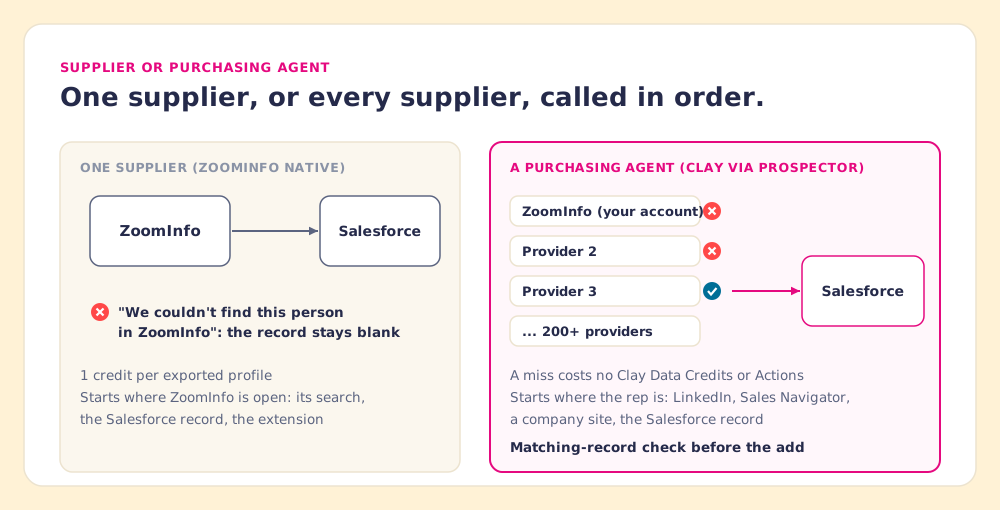
- One database. Door 1 delivers only what ZoomInfo has. When ZoomInfo lacks the mobile, the extension says “We couldn’t find this person in ZoomInfo” and the Salesforce record stays blank. The reviewer who found “2-3 that no longer work at the company” was seeing the same edge from the other side.
- The contract around the integration. The integration is included; the median contract that includes it is $33,500 a year. For a ten-rep team that wanted reachable contacts in Salesforce, that buys a whole warehouse to use the dock.
- Where the rep starts. The native app lives on the Salesforce record, and the ZoomInfo search lives in ZoomInfo. Reps find people on LinkedIn, in Sales Navigator and on company websites. Our LinkedIn Sales Navigator Salesforce integration guide shows LinkedIn’s own connector creating a Salesforce contact with the email and phone lines blank, which is the gap a ZoomInfo seat is often bought to fill.
Why trust this breakdown?
We sell no contact data. Supered has no database of its own; Prospector runs on Clay, so we gain nothing by talking you into or out of a ZoomInfo contract. Supered started inside RevPartners, the HubSpot partner I founded, which sold roughly twice as much Sales Hub as any other partner and reached Elite tier in 13 months, and Supered now runs in Salesforce, HubSpot and Pipedrive. It is rated 4.9 out of 5 from 81 reviews on G2 and 5.0 from 122 on the HubSpot marketplace (checked October 1, 2026). The disclosure: we make Prospector, and it ranks first below for teams that have Clay. The weights are printed so you can flip them.
Which way into Salesforce fits your team?
A Salesforce ZoomInfo integration is one route among four, and the right one depends on the contracts you already hold. The job: a Salesforce team of ten to fifty reps gets reachable contacts into Salesforce, owned by the right rep, without damaging data Ops cleaned. Five criteria, out of 50: reachable contact, a verified email and phone (x3); where the rep works, from LinkedIn, a company site or the record (x2); clean Salesforce, duplicates and ownership (x2); price you can predict (x2); and Salesforce-native depth, inline profiles, custom objects, bulk enrichment (x1). Weight native depth at x3 and ZoomInfo rises to the top.
| Rank | Option | Grade | Score /50 | Best fit | Salesforce integration | Setup effort | Pricing (plan with the feature) | Reason to choose it |
|---|---|---|---|---|---|---|---|---|
| 1 | Supered Prospector on Clay | A | 42 | Teams already paying for Clay | Native, one-click sync, mapping set once | Demo, then live on your own Clay account | $45 a rep a month, billed annually, plus your Clay plan | Clay’s waterfall across 200+ providers from any page the rep is on |
| 2 | Apollo | B+ | 34 | Teams without Clay wanting one database plus outreach | Native; Salesforce extension on every plan | Self-serve | Free tier; CRM integrations from Basic, $49 a seat a month, annual | Published prices and a free start |
| ref | ZoomInfo native integration | B+ | 33 | Companies that already own ZoomInfo | Native managed package plus platform sync | Admin setup in ZoomInfo and Salesforce, sandbox first | Included in ZoomInfo Professional; Vendr median $33,500 a year | Deepest Salesforce footprint: inline profiles, 100,000-record exports, custom objects |
| 3 | Clay’s Salesforce integration, run by Ops | B | 32 | Bulk enrichment of records already in Salesforce | Native (Clay Growth and up) | Ops builds each table | Clay Growth, $495 a month | Lookups, upserts and lead conversion with no rep tool |
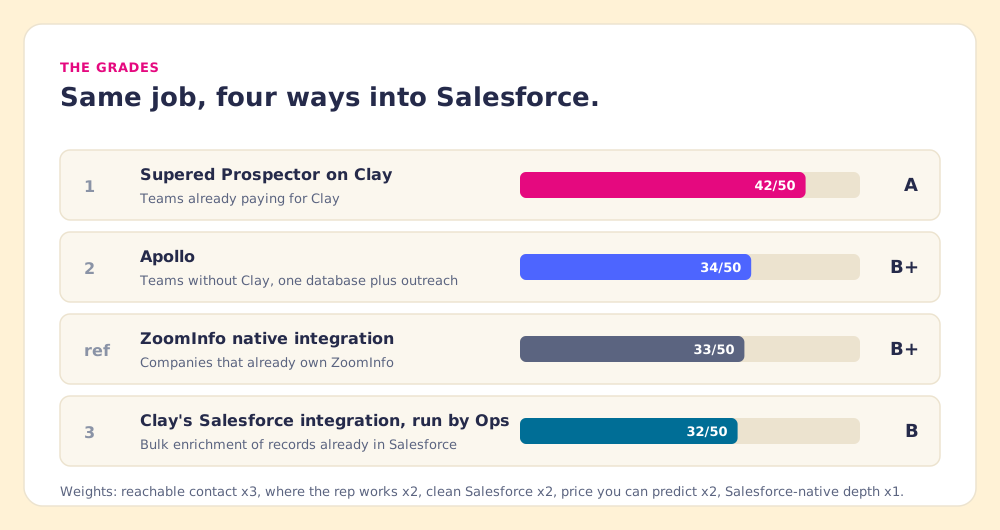
ZoomInfo’s 33 breaks down as reachable contact 4, where the rep works 3, clean Salesforce 4, price 1, native depth 5. The 5 is earned: nothing else here puts a vendor’s profile panel, custom objects for news and intent, and a 100,000-record export inside Salesforce. The 1 is the quote. Prospector scores 1 on native depth on purpose, since it draws no ZoomInfo-style panel and builds no custom objects.
Ten reps, one year: the ZoomInfo median contract is $33,500. Ten Apollo Basic seats are $5,880. Prospector for ten reps is $5,400 on a Clay account you already have, or $11,340 with Clay Growth at $5,940 for a team new to Clay.
How does Supered Prospector get contacts into Salesforce?
A single database is a single supplier. When the supplier is out of stock, the truck arrives with an empty box. Clay is a purchasing agent who calls supplier after supplier until one has it: its marketplace lets you “Buy data from 200+ providers in one place,” its waterfall “check[s] multiple providers to return the most verified emails (lower bounce rate) and phone numbers (higher connect rate),” and its pricing page states the rule a buyer cares about: “If an enrichment returns no result, you’re not charged Data Credits or Actions.” Supered Prospector does not bring its own database. It brings Clay’s waterfall, which is every database, routed, to the page the rep already has open.
What a Salesforce rep gets, on the team’s own Clay account and with no Clay login:
- The starting page. A LinkedIn profile, a Sales Navigator list, a company’s website with company research beside it, or the Salesforce record itself, where Prospector opens a contextual page for the account or contact.
- The check before the add. On a LinkedIn profile the rep sees the matching Salesforce record and whether the person was already worked in the past, before a duplicate is born.
- One click into Salesforce. Your admin sets the field mapping once; each sync after that is one click, so ownership follows your rules from the first record.
- The GTM engineer’s tables on a button. Any custom Clay workflow runs from Prospector, a whole list can be pushed into a Clay workflow, and the buying-committee lookup is tuned by title, department and seniority.
- A list a manager can follow. Your process applies to worked prospects, so the leader sees which sourced lists got worked and which closed, and coaches from what converts.
The useful part for a ZoomInfo customer: you do not have to pick one. ZoomInfo sits in Clay’s marketplace (“Enrich Contact with ZoomInfo,” marked “Bring Your Own Account Required,” on Clay’s ZoomInfo page), and Clay’s pricing page says that with your own keys “you skip Data Credits entirely.” A team mid-contract can keep ZoomInfo as the first supplier the agent calls, on its ZoomInfo contract’s terms, and let the waterfall try the next provider when ZoomInfo comes back empty. At renewal you will know how often ZoomInfo was the one that answered.
Prospector costs $45 per rep per month, billed annually, from one rep (Prospector, Supered pricing), and runs inside the Supered Chrome extension. Clay governs the data. Supered governs what happens to the contact next.
Choose something else if any of these is true:
- No Clay account. Prospector runs on yours and does nothing without one.
- A team that lives in the Salesforce record. If reps prospect from the account page and want a vendor panel and custom objects for news and intent there, ZoomInfo’s native app does that job and Prospector does not try to.
- No waterfall owner. If no one will decide which providers run in which order, one database with one contract is less work. Clay’s own homepage says it plainly: “GTM engineers build on Clay.”
Is Apollo a fair alternative to ZoomInfo for Salesforce?
For a team without Clay, yes. Apollo’s plan data, read October 2, 2026, lists “Prospecting, Gmail & Salesforce Extensions” on every plan including Free, which also carries “CRM Enrichment (100 per month).” “CRM Integrations,” “Automated CRM Enrichment” and “Waterfall Enrichment” start at Basic, $49 a seat a month billed annually ($65 monthly), with 30,000 credits a seat a year at 1 credit per email and 8 per phone. “Salesforce Custom Objects” arrive only at Organization, $119 a seat with a three-seat minimum.
The tradeoffs are the mirror image of ZoomInfo’s. Apollo publishes its prices and lets you start free; its data is one database with a waterfall of partners behind it, and the sequencer in the same seat is a plus if you want one vendor and a tangle if you already run Outreach or Salesloft. The ZoomInfo competitors page grades a longer list, and Lusha vs ZoomInfo covers the lighter single-database option.
What we recommend
- A company that already owns ZoomInfo. Use the native integration, and set it up deliberately: a dedicated integration user scoped to what ZoomInfo should read, import rules on day one, a decision on Data Sharing, the 25-record ownership line tested in a sandbox, and a calendar reminder for the Enrich certificate. Bring the Vendr median ($33,500) and the age of the AppExchange rating to the renewal.
- A Salesforce team with Clay, or one weighing ZoomInfo against Clay. Put Clay’s waterfall where reps already work with Supered Prospector, keep ZoomInfo as one step in it if you are mid-contract, and watch which sourced lists turn into pipeline. The sourcing use case shows the rep’s side.
- A small team with neither. Start on Apollo’s free Salesforce extension and buy Basic when you need the CRM integration.
A loading dock is a fine thing to have. Before you sign for one, walk around the back and count the doors. For the extension side of the same decision, our ZoomInfo Chrome extension and Clay Chrome extension guides cover what reps install, the Clay Salesforce integration guide covers the Ops route, and Exportly alternatives covers the Clay-powered extensions that came before Prospector.
Frequently asked questions
Does ZoomInfo integrate with Salesforce?+
Does exporting from ZoomInfo to Salesforce use credits?+
What Salesforce data does ZoomInfo import?+
Which Salesforce editions work with ZoomInfo?+
Why didn't my ZoomInfo leads follow our Salesforce assignment rules?+
What is the best ZoomInfo Salesforce integration alternative if we already have Clay?+
Your process, running itself.