ZoomInfo Chrome Extension in 2026: A Free Key Card to a $33,500 Room
The ZoomInfo Chrome extension, checked October 1, 2026: what it does, the plan it needs, what it costs, how to install it, why the July update angered reviewers, what it can see, and the alternatives for teams with Clay.
The ZoomInfo Chrome extension is ZoomInfo's browser add-on, free for paying customers, that shows ZoomInfo emails, direct dials and company data on LinkedIn, company websites, Gmail and CRM pages, and exports a record to tools like Salesforce or HubSpot for one credit.
How to install the ZoomInfo Chrome extension
5 min- 1
Confirm your seat includes the extension
Check with your ZoomInfo admin that your user has access. The extension shows 'You don't have access' to accounts without it, and ZoomInfo Lite accounts see 'ZoomInfo Lite is currently unavailable in this extension.'
- 2
Add it from the Chrome Web Store
Open the listing named 'ZoomInfo' by ZoomInfo Technologies Inc. in the Chrome Web Store and click Add to Chrome.
- 3
Pin it and open the side panel
Pin the ZoomInfo icon from the puzzle-piece menu. Clicking it opens the extension in Chrome's side panel on the right of the page.
- 4
Sign in with your ZoomInfo account
Log in with the same ZoomInfo credentials you use in the web app.
- 5
Connect your CRM
On a CRM page the extension asks you to connect that CRM before it shows matches or lets you export.
- 6
Reload open tabs
Reload any page that was open before the install or an update, or the extension shows 'Reload this page.'
A hotel hands you the key card for nothing. Guests do not pay for the plastic. The card is free the way a car key is free: it works only on the thing you already bought, and the thing you bought is the bill.
The ZoomInfo Chrome extension is ZoomInfo’s browser add-on, free for paying customers, that shows ZoomInfo emails, direct dials and company data on LinkedIn, company websites, Gmail and CRM pages, and exports a record to tools like Salesforce or HubSpot for one credit. Its Chrome Web Store listing says it in four words: “Free for ZoomInfo customers” (Chrome Web Store, opened October 1, 2026). The room behind the card has no published price; Vendr’s data on 1,574 purchases puts the median ZoomInfo contract at $33,500 a year.
The quick answer, three ways:
- The ZoomInfo extension itself. The right tool if your company already pays for ZoomInfo seats. Install it, sign in, and the data you bought follows you onto LinkedIn and into the CRM.
- Supered Prospector. The right tool if your team already pays for Clay: Clay’s waterfall across 200+ providers from the rep’s own screen, $45 a rep a month billed annually.
- Apollo’s extension. The right tool for a small team without either contract, with a free tier and Basic at $49 a seat a month billed annually.
What does the ZoomInfo Chrome extension do?
It puts ZoomInfo’s database beside whatever page the rep has open. The store listing promises “Verified business emails, direct dials, and mobile numbers,” company and contact profiles, “Intent, buying signals, and account fit score,” and an AI layer that drafts outreach and writes call briefs. ZoomInfo’s own figures, from the same listing: “500M+ contacts, 100M+ companies,” “trusted by 35,000+ customers worldwide.” The listing counts 300,000 users.
The name has moved twice. Older store URLs still carry the slugs “zoominfo-reachout-b2b-con” and “zoominfo-chrome-extension,” and the code still uses ReachOut identifiers from the days it was called ZoomInfo ReachOut. Today the listing is called “ZoomInfo,” version 12.21.4, updated September 24, 2026, and inside it the app is titled GTM Workspace, which is what ZoomInfo now calls its sales product (G2 lists it as “GTM Workspace - Powered by ZoomInfo”).
I downloaded the extension package and read its code, because the marketing page names a few places and the code names all of them. Beyond LinkedIn, Sales Navigator, Gmail and any company website, version 12.21.4 recognizes record pages in 14 business apps: Salesforce, HubSpot, Microsoft Dynamics, Zoho, Pipedrive, SugarCRM, Outreach, Salesloft, Marketo, Pardot, Bullhorn, Greenhouse, Crelate and Chorus. On a CRM record it matches the record to ZoomInfo and offers to fill or export; on a profile it shows the person.
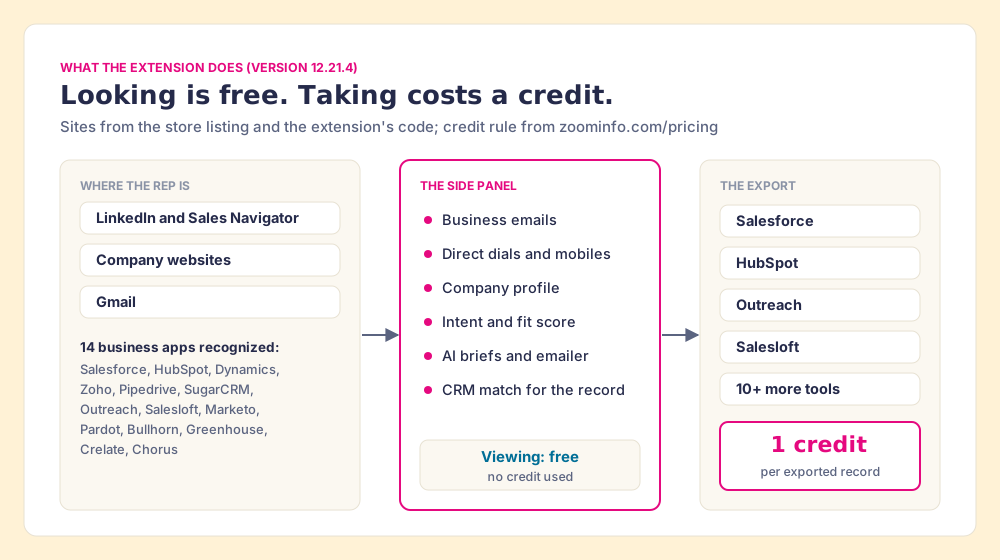
The meter sits on the exit. ZoomInfo’s pricing page says “Credit usage occurs only when a user exports a contact or company profile from the platform to a CSV file or an application, most commonly an Excel file or internal CRM,” and “Each export costs one credit.” Looking is free. Taking is not.
Is the ZoomInfo Chrome extension free?
Back to the hotel. The key card is free, and the ZoomInfo extension is free in the same sense: no line item, no separate SKU. ZoomInfo’s pricing page lists “Chrome extension and mobile app” inside its entry sales tier, ZoomInfo Professional, below Copilot Advanced and Copilot Enterprise, and shows no dollar figures for any of them.
So the extension costs whatever the seat costs, and ZoomInfo publishes no seat price. Vendr, which brokers software purchases, shows a median of $33,500 a year across 1,574 ZoomInfo purchases, in a range from $7,220 to $155,730, with buyers saving 22% on average off the first quote (checked October 1, 2026). Vendr describes the structure as “a base platform fee plus per-seat licensing,” with data access “governed by credit allocations or export limits.” Our ZoomInfo pricing breakdown walks through that contract line by line.
The hotel picture extends one room further. Inside the room is a minibar. Looking at the bottles costs nothing; you are charged for the one you open. The side panel is the minibar door, and the export is the bottle.
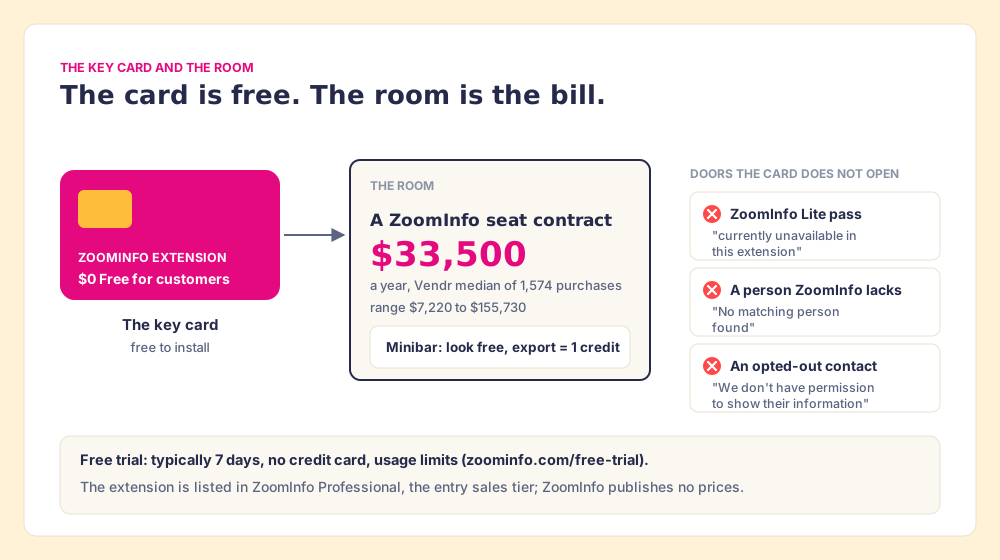
Two cheaper doors exist, and neither opens the extension the way a paying seat does.
- ZoomInfo Lite. ZoomInfo’s Lite FAQ calls it “a free version of the ZoomInfo platform,” with a “standard monthly allowance.” The extension’s current code shows Lite users a fixed message: “ZoomInfo Lite is currently unavailable in this extension,” followed by “You can still access our web app at zi-lite.zoominfo.com.” A free Lite account works in a tab, not on your LinkedIn page.
- The free trial. ZoomInfo’s trial page says “ZoomInfo typically offers a 7-day free trial,” with “No credit card required,” and “usage limits.” Long enough to see the extension work; too short to judge the data on your territory.
The searcher typing “zoominfo chrome extension free” deserves the plain answer: the extension is free, the access is not, and the only free access is a week.
How do you install the ZoomInfo Chrome extension?
Five minutes, if your admin has already said yes. The steps below come from the store listing (“Install the extension and sign in with your ZoomInfo account”) and from the prompts the extension itself shows.
- Seat access. Confirm with your ZoomInfo admin that your user has the extension. Without it, the panel says “Your account doesn’t have access to the ZoomInfo Chrome Extension” and points you to “Contact your admin.”
- The store listing. Open the listing named “ZoomInfo” by ZoomInfo Technologies Inc. (300,000 users) and click Add to Chrome. ZoomInfo publishes two other extensions under the same name, “ZoomInfo Engage Chrome Extension” for calling and email, and “ZoomInfo Extension for Recruiters” for TalentOS; neither is the prospecting one.
- The pin. Pin the icon from Chrome’s puzzle-piece menu. Its tooltip reads “Open ZoomInfo Chrome Extension,” and it opens in the side panel.
- The sign-in. Log in with your ZoomInfo web credentials.
- The CRM connection. On a CRM page the extension shows “Connect your CRM” until you do; matches and exports wait on it.
- The reload. Refresh tabs that were open during the install or an update.
The extension also lets a rep switch it off on a single site (“ZoomInfo is blocked on this site”), which matters for the permissions section below.
Why is my ZoomInfo Chrome extension not working?
Since mid-July 2026, many complaints trace to the redesign covered in the next section. Otherwise the cause is usually one of the messages ZoomInfo wrote into the extension, and reading them in the code gives the troubleshooting list in ZoomInfo’s own words:
- A stale tab. “The ZoomInfo extension was updated or restarted. Reload this page to reconnect.”
- An unconnected CRM. “You’re not connected to this CRM yet. Connect it to see matches and export.”
- An inactive or unlicensed user. “Your user account is currently inactive” and “Your account doesn’t have access” both send you to your ZoomInfo admin.
- A site you blocked. “You’ve blocked ZoomInfo on this site. Re-enable it here, or anytime from the account menu.”
- A Lite account. “ZoomInfo Lite is currently unavailable in this extension.”
- A person ZoomInfo does not have. “We couldn’t find this person in ZoomInfo,” or for someone who opted out, “We don’t have permission to show their information.”
The last two mark the edges of one database, and we will come back to them.
What changed in the July 2026 update, and what do reviewers say?
In July 2026 ZoomInfo moved the extension from a floating overlay into Chrome’s side panel. One reviewer pinned the version, 12.9.3, and described the cost on a small screen: “your webpage view shrinks even more because it has to make space for the extension on the side” (Kathleen Quilaga, July 15, 2026). ZoomInfo’s developer account replied the same day: “Our main goal with this latest version was to address worsening speed and performance issues. In order to do that the extension needs to sit in that dedicated panel, not an overlay.”
A reasonable engineering trade, stated plainly by the vendor. Reviewers did not take it well. The ten most recent reviews on the store, dated July 15 to September 2, 2026, include eight one-star ratings, one two-star and one four-star:
- The lost overlay. “It lost about 95% of its functionality, and the navigation of the new extension is extremely unintuitive” (Noah Pagley, July 23, 2026).
- The side-panel collision. “By opening a side panel now, it closes another side panel I use constantly” (PNW BorderLAN, July 27, 2026).
- The export crash. “It stops working and needs to be shut down after every contact export” (Callum, July 21, 2026). ZoomInfo replied asking for details.
- The request to roll back. “This is a request to bring back the previous version of Zoominfo’s chrome extension” (Naveen Kumawat, September 2, 2026).
The overall store rating stands at 3.5 out of 5 from 298 ratings. For scale, on the same day Apollo’s extension held 4.7 from 2.2K ratings with 1,000,000 users, and Lusha’s 4.6 from 1.9K ratings with 400,000 users.
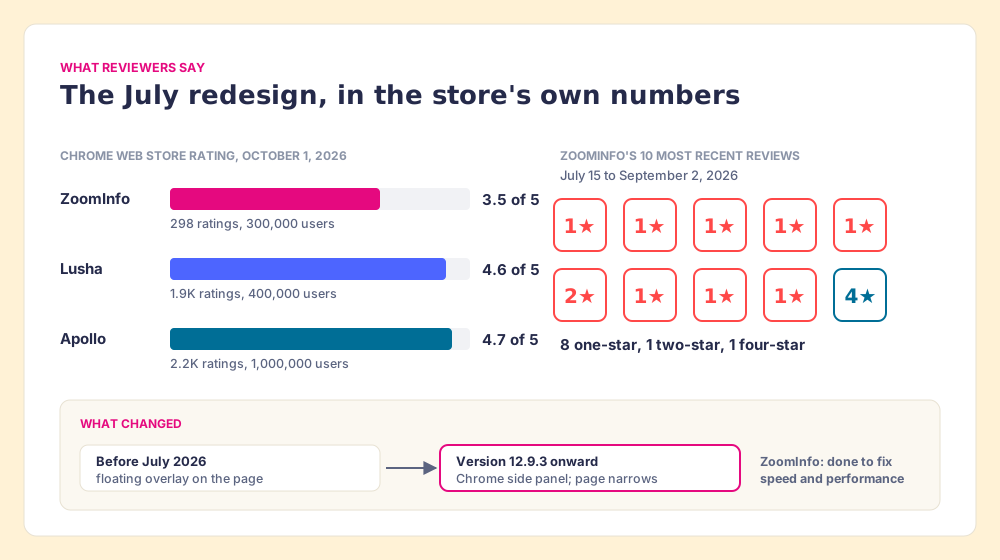
Store reviews are a small sample: 298 ratings against 300,000 users, about one rating per thousand. The broader verdict on ZoomInfo’s data is kinder. On G2, “GTM Workspace - Powered by ZoomInfo” held 4.5 out of 5 from 9,170 reviews on October 1, 2026, and Forrester named ZoomInfo a Leader in its Q1 2026 Wave for B2B marketing and sales data providers, with the highest current-offering score (per ZoomInfo’s Q1 2026 results). The G2 complaints that recur are about price and reach, not the panel: “The pricing feels extremely steep compared to platforms like Apollo” (Salmeen H., Small-Business, September 17, 2026), and “Data coverage can be patchy for UK-based contacts and mid-sized companies” (Verified User, Small-Business, October 1, 2026).
One more piece of context for a buyer reading those reviews. ZoomInfo’s board approved a restructuring in May 2026 that cut about 600 roles, about 20% of headcount, while “accelerating our move upmarket” in CEO Henry Schuck’s words, and on September 30, 2026 it acquired DoubleO.ai, an agent-orchestration company. The extension’s store copy now leads with AI briefs and an AI emailer. The company is pointing its effort at large accounts and agents; the rep with the side-panel complaint is downstream of that choice.
What can the ZoomInfo extension see?
A contact finder that “works on any website” has to be allowed to read any website. The extension’s manifest asks Chrome for host access to all URLs and runs its script on every site except ZoomInfo’s own domains and localhost, with the cookies, tabs, webNavigation, contextMenus, storage and sidePanel permissions. The store’s privacy panel adds ZoomInfo’s own disclosure: the extension handles “Personally identifiable information,” “Location,” “Web history” and “Website content,” and ZoomInfo declares that data is not sold outside approved uses.
None of that is unusual for the category, and it would be unfair to present it as a ZoomInfo quirk. I read the other two manifests the same day.
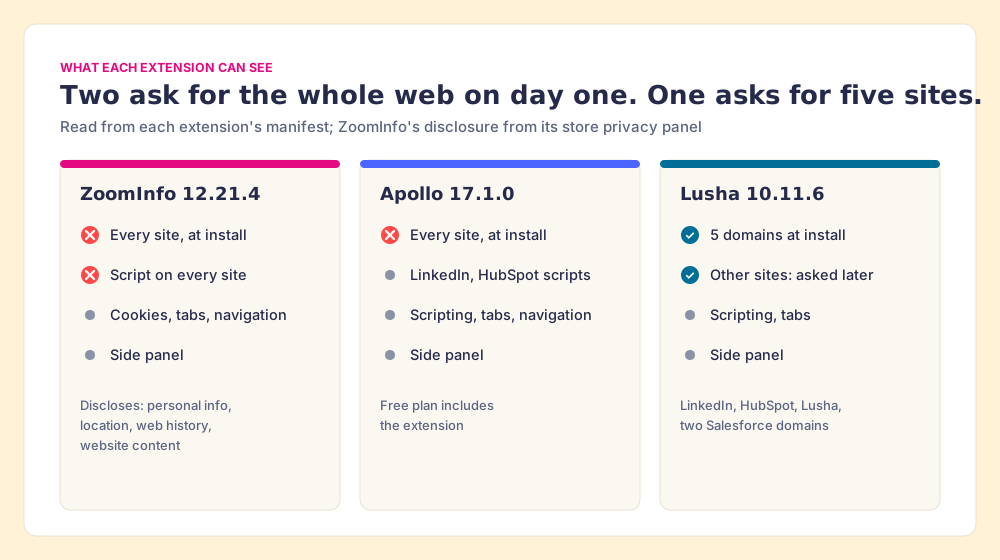
The difference that matters to a security reviewer is Lusha’s: five named domains at install, everything else optional. ZoomInfo and Apollo ask for the whole web on day one. If your IT team approves extensions one by one, bring the manifest, not the marketing page, and ask the same of any vendor on this list, us included.
Why do teams look past the ZoomInfo extension?
Three reasons recur, and each one is a buying criterion.
- The contract behind the card. The extension is free; the median seat contract is $33,500 a year. For a mid-market team that wanted a LinkedIn contact finder, that is a hotel room bought to use the lobby.
- The edge of one database. “No matching person found” is the extension being truthful about a single source. When ZoomInfo does not have the mobile, the card does not open the hotel next door. The G2 reviews on UK and mid-sized coverage are the same edge seen from the buyer’s side.
- The panel itself. Eight one-star reviews in the latest ten is a signal that the July change broke workflows reps had built around the overlay, and ZoomInfo’s reply says the panel is staying.
The first two have the same remedy: stop paying for one hotel and pay a concierge who calls all of them.
Why trust this breakdown?
We sell no contact data. Supered has no database of its own, on purpose; Prospector runs on Clay, the only data provider we use, so we gain nothing by talking you into or out of a ZoomInfo contract.
Supered started inside RevPartners, the HubSpot partner I founded, which sold roughly twice as much Sales Hub as any other partner and reached HubSpot’s Elite tier in 13 months. Supered is the #1 sales enablement app on the HubSpot marketplace, rated 5.0 from 122 reviews there and 4.9 out of 5 from 81 reviews on G2, both checked October 1, 2026. The ZoomInfo facts on this page link to the pages they came from, and the extension facts come from the extension’s own package, version 12.21.4.
Which ZoomInfo Chrome extension alternative fits your team?
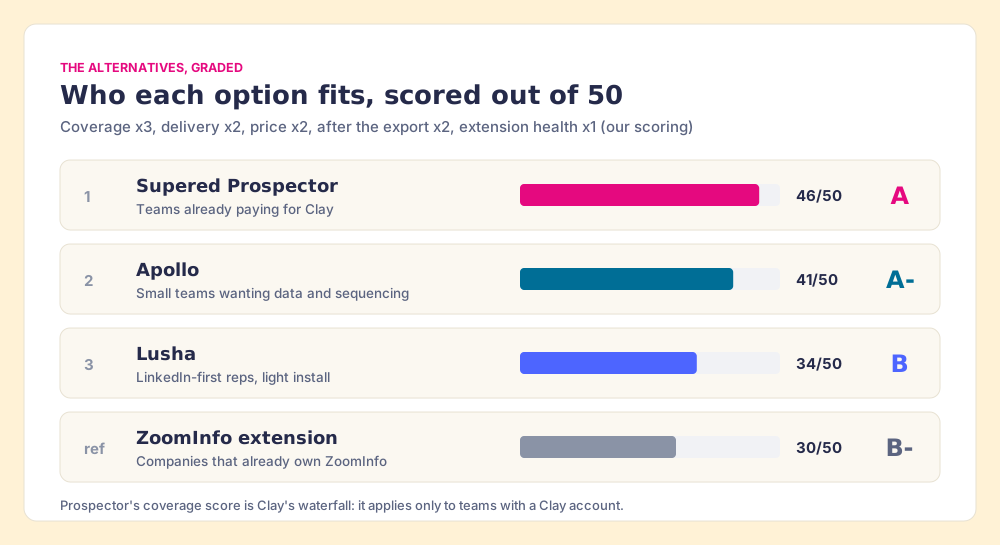
The job here is narrow: a rep on LinkedIn, a company site or a CRM record gets a verified email or phone into the CRM. We weighted five criteria for that job, out of 50: coverage of the contact (x3), delivery where the rep already works, including the CRM push (x2), price for a ten-to-fifty-rep team (x2), what happens to the contact after the export (x2), and the extension’s own health, read from its store rating (x1). Flip the weights toward “deepest single US database, cost no object” and ZoomInfo climbs the table.
| Rank | Option | Grade | Best fit | CRM integration | Setup effort | Pricing (plan with the extension) | Reason to switch |
|---|---|---|---|---|---|---|---|
| 1 | Supered Prospector | A (46) | Teams already paying for Clay | Native: HubSpot, Salesforce, Pipedrive | Demo, then live on your own Clay account | $45 a rep a month, billed annually, plus your Clay plan | Clay’s waterfall across 200+ providers from the rep’s screen; ZoomInfo can stay in it as one step |
| 2 | Apollo | A- (41) | Small teams wanting data and sequencing in one seat | Native | Self-serve | Free tier; Basic $49 a seat a month, annual | 4.7 store rating, a free start, outreach in the same seat |
| 3 | Lusha | B (34) | LinkedIn-first reps who want a light install | Native: HubSpot, Salesforce; API and webhooks from Pro | Self-serve | Free 40 credits a month; Starter $37.45 a month billed yearly | Narrowest permissions; cheapest way to try |
| ref | ZoomInfo extension | B- (30) | Companies that already own ZoomInfo seats | Native, 14 business apps recognized | Admin-provisioned | Included in ZoomInfo Professional; Vendr median $33,500 a year | The reference: deep data, the widest app coverage, the steepest contract |
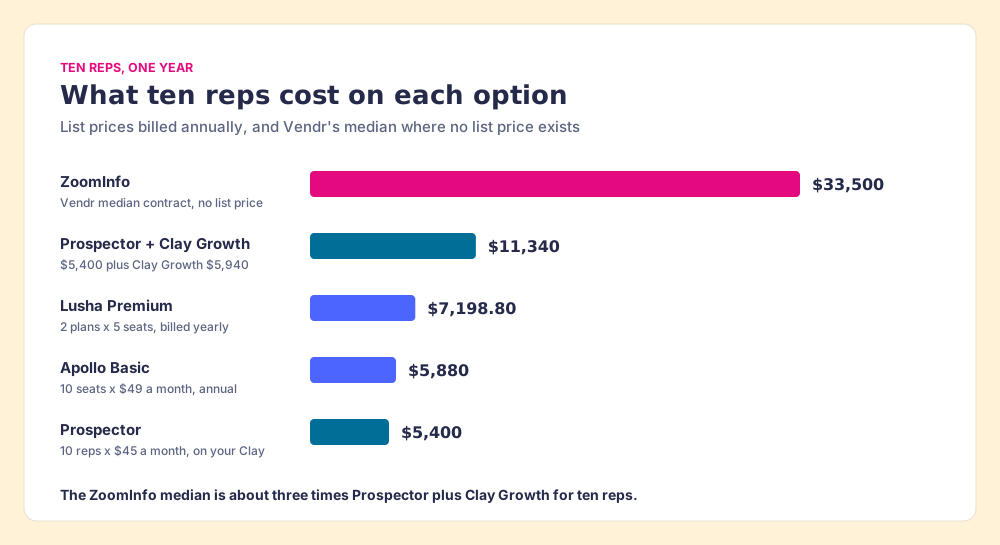
Ten reps, one year, at list or median prices: ZoomInfo’s median contract is $33,500. Ten Apollo Basic seats are $5,880. Two Lusha Premium plans (five seats each) are $7,198.80. Prospector for ten reps is $5,400, or $11,340 including Clay Growth at $5,940 if you are buying Clay for the first time. The ZoomInfo median is about three times the Clay-plus-Prospector total.
| Ten reps, one year | Annual cost | What the figure is |
|---|---|---|
| ZoomInfo | $33,500 | Vendr median contract, 1,574 purchases (no list price exists) |
| Apollo Basic | $5,880 | 10 seats at $49 a month, billed annually |
| Lusha Premium | $7,198.80 | 2 plans of 5 seats at $299.95 a month, billed yearly |
| Supered Prospector | $5,400 | 10 reps at $45 a month, billed annually, on a Clay account you already have |
| Prospector plus Clay Growth | $11,340 | Adds Clay Growth at $495 a month for a team new to Clay |
Supered Prospector: the concierge in the rep’s pocket
A hotel key opens one hotel. A good concierge does something else: asked for a room, he phones one hotel, then the next, then the next, and you pay only for the one that says yes.
Clay is that concierge. Its marketplace lets you “Buy data from 200+ providers in one place” and its waterfall asks provider after provider until one returns a verified email or phone; its pricing page states the rule a buyer should care about: “If an enrichment returns no result, you’re not charged Data Credits or Actions.” Supered Prospector does not bring its own database. It brings Clay’s waterfall, which is every database, routed, and puts it in the rep’s hands on the page they already have open.
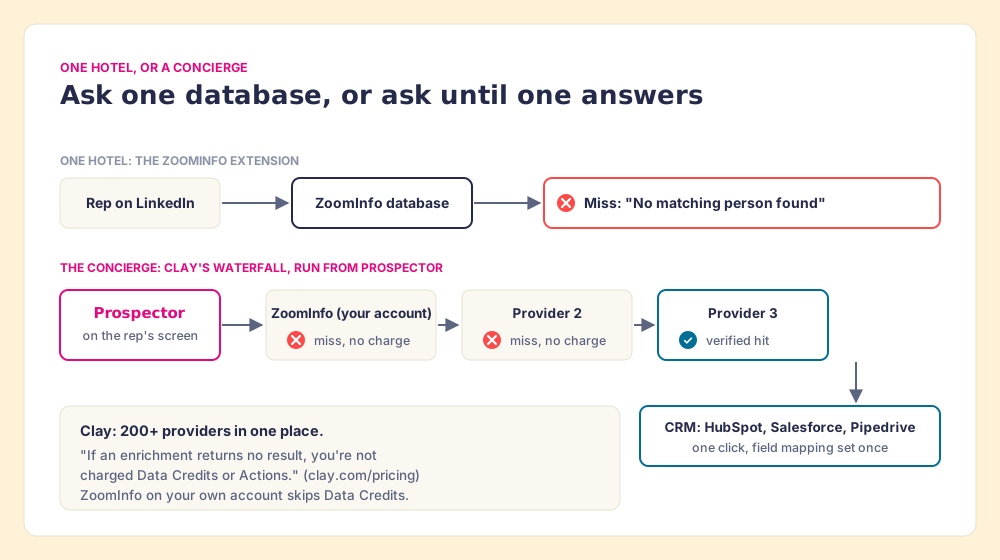
The hotel picture stops working in one place. A concierge needs a hotel list someone wrote down; in Clay, a GTM engineer or RevOps person decides which providers sit in which order. Prospector puts the concierge’s phone in the rep’s pocket; it does not replace the person who built the list of hotels.
What the rep gets, in the order the work happens:
- The starting page. A LinkedIn profile, a Sales Navigator list, a company’s website, or a HubSpot, Salesforce or Pipedrive record. One click runs the waterfall, and reps never log in to Clay.
- The duplicate check. On a LinkedIn profile the rep sees whether the person already has a matching CRM record, and whether the prospect was worked in the past.
- The GTM engineer’s tables, on a button. Any custom Clay workflow runs from Prospector, a whole list can be pushed into a Clay workflow, and the buying-committee lookup is tuned by title, department and seniority for your team.
- The list after the export. The contact lands in the CRM with your process applied to it, and the manager sees which lists get worked and which ones close, then coaches from what converts.
The non-obvious part for a ZoomInfo customer: you do not have to choose. ZoomInfo is a Clay integration (“Enrich Contact with ZoomInfo,” marked “Bring Your Own Account Required,” on Clay’s ZoomInfo page), and Clay’s pricing page says “If you bring your own API keys for third-party data, you skip Data Credit costs entirely.” A team mid-contract can keep ZoomInfo as the first hotel the concierge calls and let the waterfall try the next provider when ZoomInfo returns “No matching person found.” At renewal, you will know how often ZoomInfo was the one that answered.
Prospector costs $45 per rep per month, billed annually, from one user (Prospector, Supered pricing). It runs inside the Supered Chrome extension, on your Clay account and your Clay credits. Clay governs the data. Supered governs the motion.
Choose something else if any of these is true:
- No Clay account. Prospector needs one. Without Clay, Apollo’s extension is the nearest like-for-like, and our Apollo Chrome extension breakdown covers it.
- A ZoomInfo contract with years left and a happy team. Keep the extension, connect the CRM, and close whichever side panel it collides with.
- No waterfall owner. If no one on the team will decide which providers run in which order, one database with one contract is less work.
How do Apollo and Lusha compare as ZoomInfo extension alternatives?
Both are single databases, like ZoomInfo, and both are fair choices for a team without Clay.
- Apollo. The extension is on Apollo’s free plan, which lists “Prospecting, Gmail & Salesforce Extensions,” and paid seats start at Basic, $49 a month billed annually with 30,000 credits a seat a year, at 1 credit per email and 8 per phone. Apollo also runs its own Waterfall Enrichment with 20+ partners behind its database. The store rating (4.7, 2.2K ratings) is the best of the three. Sequencing comes in the same seat, which is a plus if you want one vendor and a tangle if you already run Outreach or Salesloft. See the Apollo Chrome extension page.
- Lusha. Forty free credits a month, Starter at $37.45 a month billed yearly for 4,800 credits, 1 credit per email and 5 per phone, and since September 23, 2026 a data waterfall on every paid plan, per Lusha’s changelog. Its install asks for the fewest permissions of the three. Our Lusha Chrome extension and Lusha vs ZoomInfo pages carry the details.
For the broader field, our ZoomInfo competitors page grades a longer list, and ZoomInfo vs Seamless.AI covers the other high-volume extension.
What we recommend
Three ways forward, and our view on each.
- A company that already owns ZoomInfo seats. Use the extension. It is included, it recognizes more business apps than any rival here, and the side panel, whatever reviewers think of it, is where ZoomInfo says it will stay. Bring the Vendr median ($33,500) and the store reviews to your renewal.
- A team with Clay, or one deciding between ZoomInfo and Clay. Skip the second hotel. Run Clay’s waterfall from where reps already work with Supered Prospector, keep ZoomInfo as one step in it if you are mid-contract, and see which sourced lists turn into pipeline. The sourcing use case shows the rep’s side.
- A small team with neither. Start on Apollo’s free extension, and move to Lusha if your security team wants the narrowest install.
A free key card is a fine thing to be handed. Before you sign for the room, ask how often the card will open a door that has the person behind it, and what happens to that person once they are in your CRM. Our Clay Chrome extension guide sets out the spec a rep-side extension should meet, and Exportly alternatives covers the Clay-powered extensions that came before Prospector.
Frequently asked questions
Is the ZoomInfo Chrome extension free?+
Does ZoomInfo Lite work with the Chrome extension?+
Does viewing a contact in the ZoomInfo extension use a credit?+
Why is my ZoomInfo Chrome extension not working?+
What was the ZoomInfo extension called before?+
What is the best ZoomInfo Chrome extension alternative if my team already has Clay?+
Your process, running itself.