Pipedrive LinkedIn Integration (2026): What Exists, What Doesn't, and How Reps Get LinkedIn People into Pipedrive
The Pipedrive LinkedIn integration, checked October 2, 2026: why LinkedIn's Sales Navigator CRM Sync does not cover Pipedrive, which Marketplace apps fill the gap, and how a rep gets a LinkedIn person into Pipedrive with an email and phone.
A Pipedrive LinkedIn integration is any tool that moves a person you found on LinkedIn or Sales Navigator into Pipedrive; LinkedIn's Sales Navigator CRM features do not cover Pipedrive, so in 2026 every option is a third-party Marketplace app, browser extension, or data workflow.
How to connect LinkedIn to Pipedrive
- 1
Decide what has to cross
Write down whether reps need LinkedIn context on Pipedrive records, new Pipedrive persons with an email and phone, or form leads from LinkedIn ads. Each need maps to a different kind of app, because LinkedIn offers no certified Sales Navigator integration for Pipedrive.
- 2
Pick the app for that job
For profile saving with email credits, a Pipedrive Marketplace extension such as LinkMatch. For email and phone from a waterfall of providers, Clay, run by reps through Supered Prospector. For LinkedIn Lead Gen Forms, a sync app such as Outfunnel or LeadsBridge.
- 3
Connect it to Pipedrive
Install the extension or app and sign in with your Pipedrive account. Clay connects to Pipedrive through OAuth from Settings, Connections, or from the enrichment panel.
- 4
Map the fields once
Map email, phone, organization, owner and a lead source in the app. Pipedrive's required fields do not stop records created through the API or third-party integrations, so the app's mapping is the standard the records will meet.
- 5
Test on one profile
Add one LinkedIn person, confirm the app spotted any existing Pipedrive record, and check every mapped field on the new person before rolling it out to the team.
A ferry is a fine way to cross water, provided you know what it carries. Some take foot passengers only. Some take cars. A few take freight. LinkedIn and Pipedrive are two islands with no bridge between them, because LinkedIn’s CRM program leaves Pipedrive out and Pipedrive has not built its own, and the Pipedrive LinkedIn integration you are searching for is a choice of ferry. Pick the one that takes foot passengers and the person arrives in Pipedrive with a name and a title. A name and a title do not ring a phone.
The quick answer for a Pipedrive team in October 2026:
- Supered Prospector on Clay, for new people with emails and phones. The pick when your team has Clay and reps find people on LinkedIn or Sales Navigator. $45 per rep per month, billed annually.
- LinkMatch for Pipedrive, for teams without Clay. A Pipedrive Marketplace extension that saves profiles, spots duplicates and includes a monthly email enrichment allowance. From €15.99 to €35.99 per user per month, depending on plan and billing term.
- A Lead Gen Forms sync app, for paid inbound. Outfunnel or LeadsBridge, if you run LinkedIn ads.
We make the first one, so check our arithmetic; each price below links to the page we opened.
Which Pipedrive LinkedIn integration route fits your team?
The table grades five routes on one job: the person you found on LinkedIn becomes a Pipedrive person a rep can call or email. A sixth row is there because buyers coming from HubSpot or Salesforce expect it, and on Pipedrive it does not exist.
| Route | Best fit | Pipedrive connection | Setup effort | Pricing (plan that includes it) | Email and phone in Pipedrive | Grade | Rank |
|---|---|---|---|---|---|---|---|
| Supered Prospector on Clay | Teams with Clay whose reps source on LinkedIn | One click to Pipedrive, fields mapped once | Medium: Clay table built once | $45 per rep per month, billed annually, plus your Clay plan | Yes, from Clay’s waterfall | A (43/50) | 1 |
| LinkMatch for Pipedrive | Pipedrive teams without Clay | Chrome extension, Pipedrive Marketplace app | Low | €15.99 to €22.99 Standard, €28.99 to €35.99 Professional, per user per month | Email on a monthly allowance (300 or 1,100) | B+ (40/50) | 2 |
| Clay table run by Ops | Batch enrichment of lists RevOps owns | Clay’s Pipedrive integration (OAuth) | Medium | Your Clay plan | Yes, but the rep never touches it | C+ (29/50) | 3 |
| Manual entry or LinkedIn export | A founder moving a few hundred contacts once | CSV import | Low per file, high over time | Free | Only 1st-degree emails members share | C (24/50) | 4 |
| Lead Gen Forms through an app | Inbound from LinkedIn ads | Outfunnel, LeadsBridge, Zapier | Low | App fee plus ad spend | Email from people who fill the form | C (23/50) | 5 |
| Sales Navigator CRM Sync | Not available | Not offered for Pipedrive | n/a | n/a | n/a | n/a | n/a |
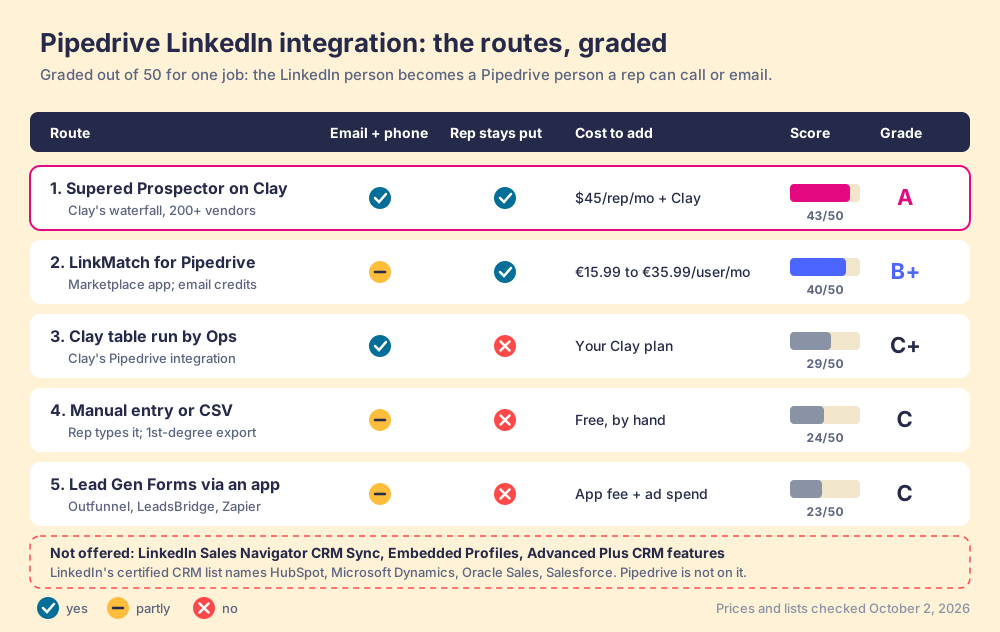
How we graded. Five criteria out of 50, weighted for a 10 to 50 rep Pipedrive team that finds new people on LinkedIn: an email and phone land in Pipedrive (x3), the rep does it from where they already work (x2), the rep sees the existing Pipedrive record before adding (x2), cost you can predict (x2), and setup effort (x1). Prospector scores 5, 5, 4, 4, 2. LinkMatch 3, 4, 5, 4, 5. A Clay table run by Ops 5, 1, 2, 3, 2. Manual entry 1, 2, 1, 5, 5. Lead Gen apps 3, 1, 1, 3, 4. Bands: A from 42, B+ from 37, C+ from 26, C from 20. If your reps mostly log LinkedIn conversations against people already in Pipedrive, move the duplicate-check weight to x3 and the email weight to x1, and LinkMatch takes first place. That flip is the decision on this page.
Why trust this guide?
Supered started inside RevPartners, the HubSpot partner I founded, which sold roughly twice as much Sales Hub as any other partner and reached Elite tier in 13 months. Supered holds 4.9 stars on G2 from 81 reviews and 5.0 on the HubSpot Marketplace from 122 (checked October 1, 2026), and Supered now runs on Pipedrive as well as HubSpot and Salesforce. We have now written this guide for three CRMs, and Pipedrive is the one where LinkedIn’s own answer is missing. We sell one of the options in the table, which is a good reason to open each link.
Does Pipedrive have a native LinkedIn integration?
No, and the reason sits on LinkedIn’s side of the water.
LinkedIn’s help article on CRM integration lists the CRMs that get the full set (CRM Sync, Embedded Profiles, Embedded Experiences): “HubSpot, Microsoft Dynamics, Oracle Sales, Salesforce.” A second table gives partial support to Pega, SAP, SugarCRM and Freshworks. Pipedrive appears in neither, and the same article says the integration “is only available for Sales Navigator Advanced Plus users” (LinkedIn Sales Navigator Help, a106005). LinkedIn’s Lead Gen Forms help page, which walks through re-syncing forms for its integration partners (Dynamics, HubSpot, Eloqua, LeadsBridge, and others), has no Pipedrive entry either (LinkedIn Help, a426297). On Pipedrive’s side, the LinkedIn listings we opened in its Marketplace come from independent developers: LeadCRM from Intricare Technologies, LinkMatch from Logical Pure Minds, a profile saver from a solo developer, and a Lead Gen Forms sync from Outfunnel.
So a Pipedrive Sales Navigator setup is different in kind from the HubSpot or Salesforce one. On those CRMs a team can pay for Advanced Plus and get a LinkedIn-built window on the record. On Pipedrive there is no window to buy. The upgrade to Advanced Plus, which LinkedIn quotes on request, buys a Pipedrive team none of its CRM features.
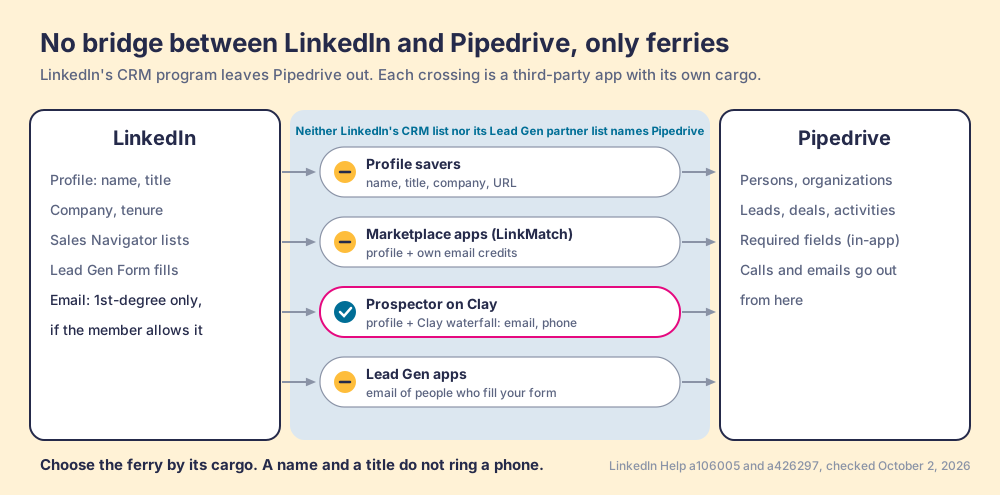
Of course this is only a picture, and it breaks at one point: a ferry company can sail any day it likes, and LinkedIn decides which crossings it tolerates. LinkedIn’s rules come next.
What does LinkedIn allow a Pipedrive extension to do?
LinkedIn’s rules are plain. Its prohibited-software page says “we don’t permit the use of any third party software, including ‘crawlers’, bots, browser plug-ins, or browser extensions that scrape, modify the appearance of, or automate activity on LinkedIn’s website,” and warns that members who use them “risk having their accounts restricted or shut down” (LinkedIn Help, prohibited software). Section 8.2 of the User Agreement, effective November 3, 2025, bars using bots or “other unauthorized automated methods to access the Services, add or download contacts” (LinkedIn User Agreement).
The rule has teeth. In March 2025 Apollo’s and Seamless.AI’s company pages disappeared from LinkedIn, and MarTech reported that scraping through Chrome extensions “appears to be against LinkedIn’s terms of service” (MarTech, May 8, 2025).
Three questions sort the ferries, and we ask buyers to put all three to us as well:
- The page read. What does the extension read from the LinkedIn page the rep is on, and does it read anything the rep did not open?
- The automation. Does it send connection requests, messages or views on the rep’s behalf? Those are the actions LinkedIn names.
- The data source. Where does the email and phone come from? A tool that claims LinkedIn as the source deserves a walk to the door; LinkedIn shows a member’s email only to 1st-degree connections, and only if the member allows it (LinkedIn Help, email visibility).
Bulk “export this Sales Navigator search” features fail the first two questions on most tools. Sales Navigator itself “doesn’t offer the option to export account and lead information” to CSV (Sales Navigator Help, a102031), and our guide to exporting Sales Navigator leads covers what that leaves you.
What does Sales Navigator cost a Pipedrive team?
More than Pipedrive does. LinkedIn lists Sales Navigator Core at US$1,079.88 per seat per year on annual billing and Advanced at US$1,799.88 (LinkedIn compare plans). Pipedrive lists Lite at $14, Growth at $39, Premium at $59 and Ultimate at $79 per seat per month billed annually, which is $168, $468, $708 and $948 a year (Pipedrive pricing).
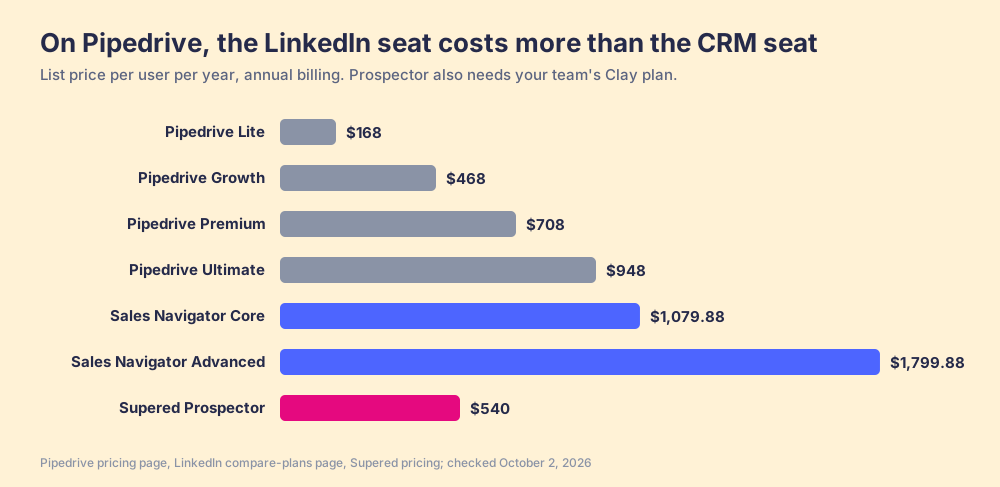
A Core seat costs 2.3 times a Growth seat. For ten reps on Growth, that is $4,680 a year for the CRM and $10,798.80 for Navigator Core. HubSpot and Salesforce teams rarely meet this arithmetic, because their CRM seat is the larger bill. A Pipedrive team pays more for the place it finds people than for the place it works them, and then the two do not talk.
Keep Navigator. Its search filters are the reason reps pay for it, and the Sales Navigator alternatives guide prices the replacements fairly. The sum argues for stopping the LinkedIn spend at Core or Advanced, since Advanced Plus adds CRM features Pipedrive cannot receive, and to put the next dollar into the crossing.
Why does a LinkedIn app skip Pipedrive’s required fields?
Because Pipedrive built required fields for people, not for software. Its knowledge base says the feature “won’t stop deals from progressing if the fields are updated via import, bulk-editing, API, automations, or third-party integrations,” and the rule covers adding and editing persons and organizations too (Pipedrive Knowledge Base, updated September 3, 2026).
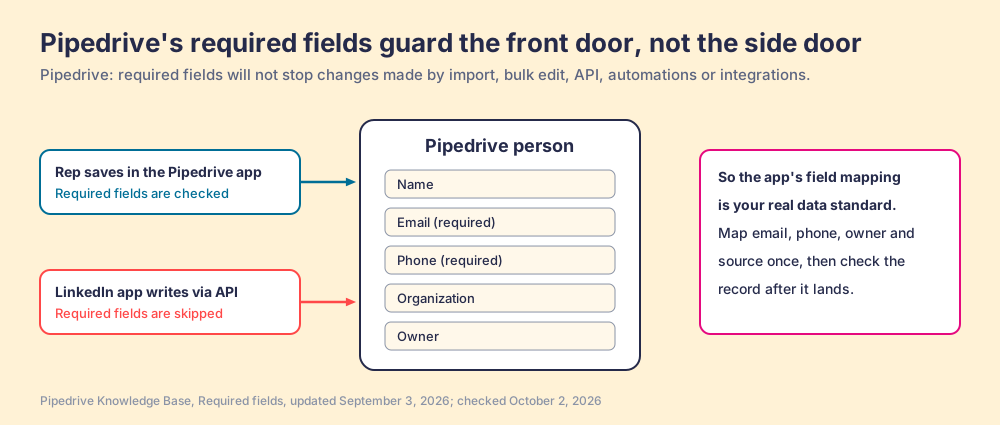
So the ferry you choose also decides what your Pipedrive data looks like, which makes the linkedin pipedrive integration a data-quality decision as much as a prospecting one. A profile saver that writes name and title will happily fill Pipedrive with people who have no email, and the “Email (required)” setting your admin turned on will not object. The field mapping inside the app is the standard. Set it once, with email, phone, owner and a lead source, and check the first records by eye. If you want a rule that checks each record after it lands, whatever wrote it, Supered for Pipedrive does that with Process Rules, and the Pipedrive MCP guide covers the same gap for changes Claude makes.
How do reps get LinkedIn people into Pipedrive with an email and phone?
They add something that finds the contact data outside LinkedIn and writes the person to Pipedrive. Good Pipedrive prospecting starts on LinkedIn and ends on a phone call, and the route between them is the whole purchase.
Supered Prospector on Clay
Prospector is our answer for teams that already have Clay. Clay is a waterfall across 200+ data and AI vendors (clay.com, checked October 1, 2026): a Clay table asks provider after provider until one returns a verified email or phone. Supered does not bring its own database. It brings Clay’s waterfall, which is every database, routed, and we chose Clay as our only data provider for that reason. Clay already writes to Pipedrive on its own, through an OAuth connection that can “lookup people and organizations,” create them and update them (Clay University); Prospector puts that power in the rep’s hands, inside the Supered Chrome extension.
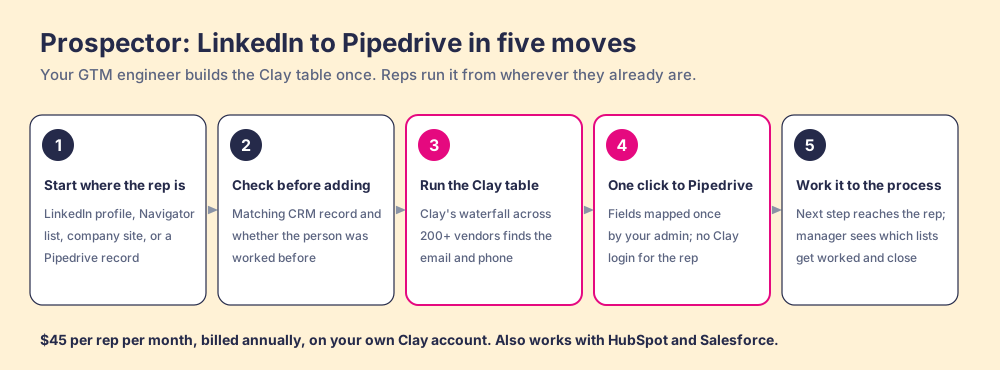
What a rep does with it:
- A start from wherever the rep is. A LinkedIn profile, a Sales Navigator list, a company’s website (with company research pulled while they are on it), or a Pipedrive person or organization that is missing a phone or a champion. The buying-committee lookup takes the titles, departments and seniority your team sets.
- A Pipedrive check before the add. On a LinkedIn profile the rep sees the matching CRM record and whether someone already worked this person, so they do not create a duplicate or step on a teammate.
- One click to Pipedrive. The person lands in Pipedrive with the email and phone Clay found, with field mapping set once by your admin, which is also how the side door gets a lock. Reps never log into Clay; Prospector runs on your own Clay account and credits. The same rep can sync to HubSpot or Salesforce if part of the team lives there.
- Your process on the worked prospect. From there the next step in your process reaches the rep while they work, and the manager sees which lists got worked and which closed, so coaching starts from what is converting.
Clay governs the data. Supered governs the motion.
Prospector costs $45 per rep per month, billed annually ($540 a year), from one user, as its own plan (Prospector). It requires your own Clay account, priced by Clay; with Clay’s Growth plan at its $495 monthly list price, ten reps come to $11,340 a year all in, about what ten Navigator Core seats cost. The wider use case is on the sourcing page, and the Clay Chrome extension guide explains running Clay from a profile.
Choose something else in three cases:
- No Clay account. Prospector runs only on Clay. Without it, LinkMatch below is the shorter path.
- Logging as the whole need. If your people are already in Pipedrive and the pain is LinkedIn conversations that never reach the record, an extension built around message sync does that job directly.
- A team of two or three. A founder adding a dozen people a week can type them in, and the €4 profile savers in the Marketplace cover the rest.
LinkMatch for Pipedrive, for teams without Clay
LinkMatch is a Chrome extension listed in the Pipedrive Marketplace (4.5 stars from 43 reviews, 900+ installs there) and in the Chrome Web Store (5.0 from 11 ratings, 5,000 users, updated October 1, 2026) (Pipedrive Marketplace; Chrome Web Store). It shows which LinkedIn profiles are already in Pipedrive, saves new persons in one click with leads, deals and activities, and lets reps edit the Pipedrive record from the browser. Its Pipedrive page lists a Standard plan at €15.99 to €22.99 per user per month with 300 email enrichments, and Professional at €28.99 to €35.99 with 1,100 email enrichments, message sync, and the Sales Navigator support Standard lacks; the range depends on monthly, quarterly or annual billing (LinkMatch pricing). The strength is fit: it was built around Pipedrive’s objects, and the duplicate check is first-class. The tradeoff is the meter. Its plan lists email enrichments, not phones, and they come from one allowance, so a rep sourcing 20 new people a day spends Standard’s 300 in about three weeks.
Lead Gen Forms apps, for inbound
If you run LinkedIn ads, Outfunnel’s LinkedIn Lead Gen Forms Sync in the Pipedrive Marketplace maps form fields to Pipedrive persons, leads or deals (Pipedrive Marketplace), and LeadsBridge is on LinkedIn’s own partner list. It is a guest book by the dock: the people who sign it arrive with an email, and the rest stay on the other island.
Manual entry or a LinkedIn export, for one-offs
LinkedIn’s connection export plus a Pipedrive CSV import moves a founder’s 1st-degree network once. It brings only the emails members chose to share, and it ages the day you download it. For a team doing Pipedrive prospecting daily, it is a chore that never finishes.
Which Pipedrive LinkedIn integration should you choose?
- Prospector, for Pipedrive teams with Clay who source on LinkedIn. The freight ferry: email and phone from Clay’s waterfall, one click to Pipedrive, at $45 per rep per month, billed annually.
- LinkMatch, for Pipedrive teams without Clay. A Pipedrive-shaped extension with a duplicate check and an email allowance, from €15.99 per user per month.
- A Lead Gen Forms app, for paid inbound. Outfunnel or LeadsBridge, priced by the app.
- Sales Navigator, kept at Core or Advanced. Advanced Plus buys CRM features LinkedIn does not offer for Pipedrive.
Our recommendation, on this page’s weights: if you have Clay, keep Sales Navigator for search, put Prospector on the profile, and let the person arrive in Pipedrive with an email and phone and a field mapping you chose. If you do not, LinkMatch is the simpler buy. Either way, map the fields before the first rep clicks, because Pipedrive’s required fields will not do it for you.
HubSpot and Salesforce teams have a LinkedIn-built window that Pipedrive does not; the HubSpot LinkedIn integration guide and the Salesforce LinkedIn integration guide show what that window buys and what it still leaves out. Our LinkedIn Chrome extension guide sorts the extensions by job, and if you ran Exportly for this before it became Frontier, the Exportly alternatives list is the short version. For the browser side, the Pipedrive Chrome extension guide sorts the options, and Supered for Pipedrive shows the process rules that run on the deal once the person lands.
Frequently asked questions
Does Pipedrive have a native LinkedIn integration?+
Does LinkedIn Sales Navigator integrate with Pipedrive?+
How do I add LinkedIn contacts to Pipedrive with an email and phone?+
Can I sync LinkedIn Lead Gen Forms to Pipedrive?+
Is a LinkedIn Chrome extension for Pipedrive allowed by LinkedIn?+
Do Pipedrive required fields apply to contacts created by LinkedIn apps?+
Your process, running itself.