The LinkedIn Email Finder Chrome Extension, Graded: Six Phone Books and a Librarian
A LinkedIn email finder Chrome extension is only as good as the database behind it, and the vendors print their own miss rates. Seven extensions graded on finding the email and the phone, with live prices and free tiers.
A LinkedIn email finder Chrome extension is a browser add-on that takes the LinkedIn profile you are viewing and returns that person's work email, and often a phone, from one vendor's database or, through Clay, from a waterfall of many.
The best LinkedIn email finder Chrome extension depends on what your team already pays for. The short answer, graded in full below:
- Supered Prospector. For teams that already have Clay: Clay’s waterfall across 200+ vendors, run from the LinkedIn profile, a Sales Navigator list, a company site, or the CRM record, at $45 per rep per month billed annually.
- Apollo. For a team without Clay that wants the widest single database, a free tier, and a sequencer, from $49 a seat on annual billing.
- RocketReach. For the rep who dials: unlimited verified mobile and direct numbers on Pro, $899 a year billed annually.
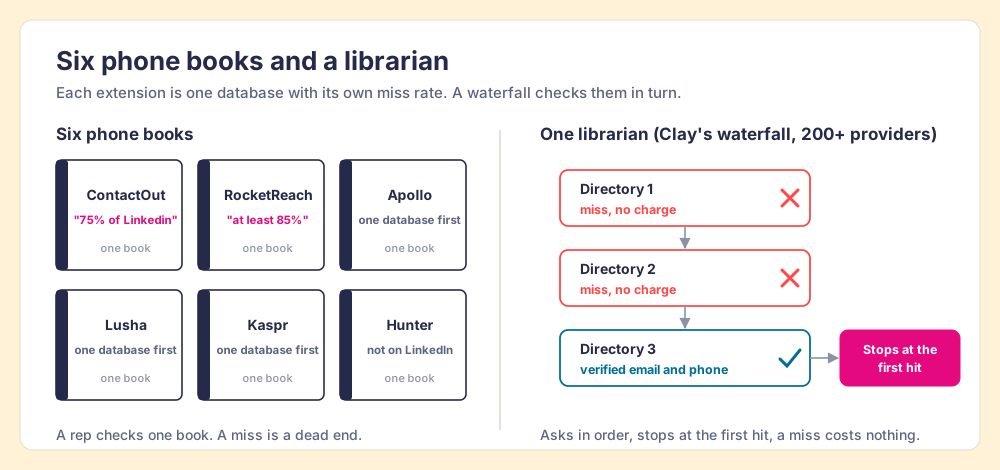
The paper phone book carried a confession printed nowhere on it. It listed only the people who had agreed to be listed. If the buyer had moved, or paid to stay out, you could turn pages until lunch and the book would never tell you he was missing. You found out by not finding him.
A LinkedIn email finder Chrome extension is a phone book bolted to the side of a profile. The modern ones are more candid than the old directory, and they print the confession on the cover. ContactOut’s Chrome Web Store listing says it finds emails “for 75% of Linkedin.” RocketReach’s says it “will return emails and social links for at least 85% of your prospects” (both listings opened October 1, 2026). Read those as promises and they sound strong. Read them the other way and one prospect in four, or one in seven, is a name the book does not have.
A LinkedIn email finder Chrome extension is a browser add-on that takes the LinkedIn profile you are viewing and returns that person’s work email, and often a phone, from one vendor’s database or, through Clay, from a waterfall of many. All seven extensions on this page do the first half well. The rows below are graded on the half that decides your week: what happens when the first book comes up empty. The manual ways to find an address without any extension, LinkedIn’s contact-info panel and connection export among them, live in how to find someone’s email on LinkedIn. This page is for the rep who wants it in one click.
Why does one database miss the person on your screen?
Because a database is a list of people someone managed to collect, and no collector reaches all of them. The vendors say so themselves, in the numbers above. The interesting part is how far apart their own claims and an outside test land.
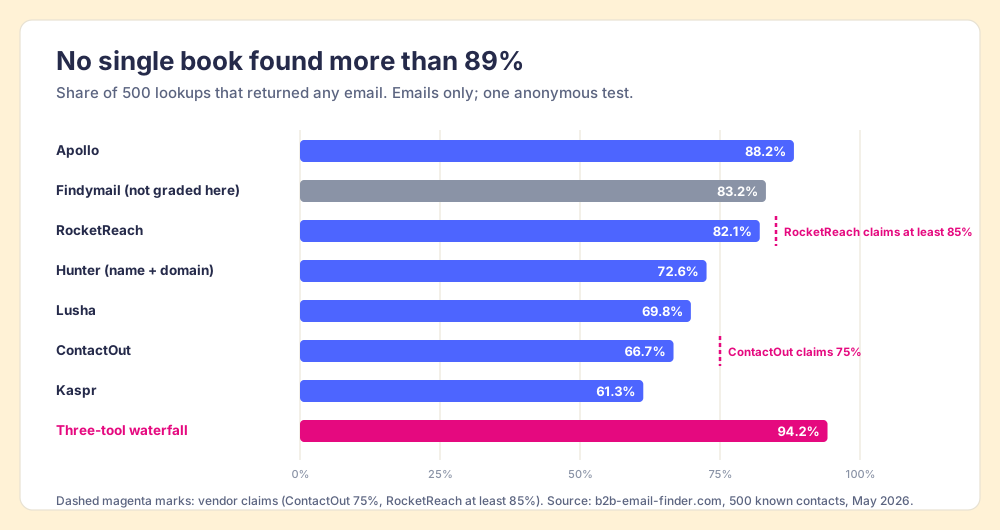
A review site, b2b-email-finder.com, ran eight email finders against 500 B2B contacts whose correct addresses it already knew, over May 2026, and published the results on June 8 (the benchmark). Coverage meant the share of the 500 lookups that returned any email at all. Read it as one test from an anonymous publisher that ranks Findymail first, tested emails only, and ran on a single date. Its coverage column still teaches more than any feature list:
| Tool | Coverage (any email returned) | Accuracy (returned email correct) | What the vendor’s own listing claims |
|---|---|---|---|
| Apollo | 88.2% | 81.3% | “210M contacts and 35M accounts” |
| Findymail (not graded here) | 83.2% | 93.2% | n/a |
| RocketReach | 82.1% | 79.4% | “at least 85% of your prospects” |
| Hunter (name plus domain, no LinkedIn) | 72.6% | 84.7% | n/a |
| Lusha | 69.8% | 86.1% | “98% email accuracy” |
| ContactOut | 66.7% | 82.6% | “75% of Linkedin” |
| Kaspr | 61.3% | 80.1% | “500 million phone numbers and emails” |
| Three-tool waterfall (Findymail, Apollo, Hunter) | 94.2% | above 87% | n/a |
Three things fall out of the table.
- A ceiling under 90%. “No single tool exceeded 89% coverage,” the authors wrote. The best book still missed 59 of the 500 people.
- A trade between finding and being right. Apollo returned the most addresses and was right 81.3% of the time; Lusha returned fewer and was right 86.1%. The test’s own reading is that conservative tools say “not found” rather than guess at catch-all domains, which accept mail for any address and so cannot be checked.
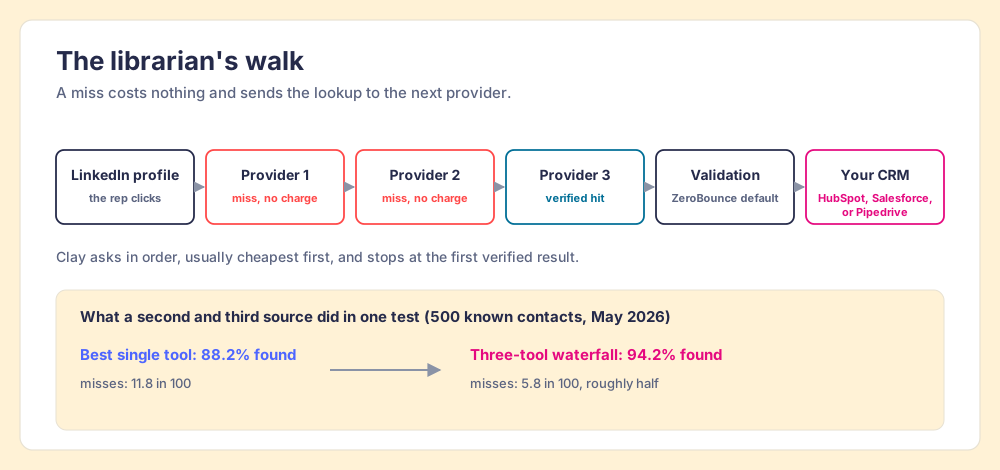
- A floor that moves when you add books. Three finders in sequence reached 94.2%. The misses fell from 11.8 in every 100 to 5.8, roughly half.
The floor moves for one reason, and it is easiest to see in small steps. Suppose two finders each miss one contact in four, ContactOut’s own figure. If their misses were unrelated, the pair would miss one in sixteen. They are related, since a person who is hard for one collector to reach (the benchmark found all eight tools least accurate on enterprise executives) tends to be hard for the next, so the real gain is smaller than the arithmetic. Smaller is still large. Each vendor collects differently, from different partners, in different countries, and refreshes on its own schedule. A miss in one book is often a listing in the next.
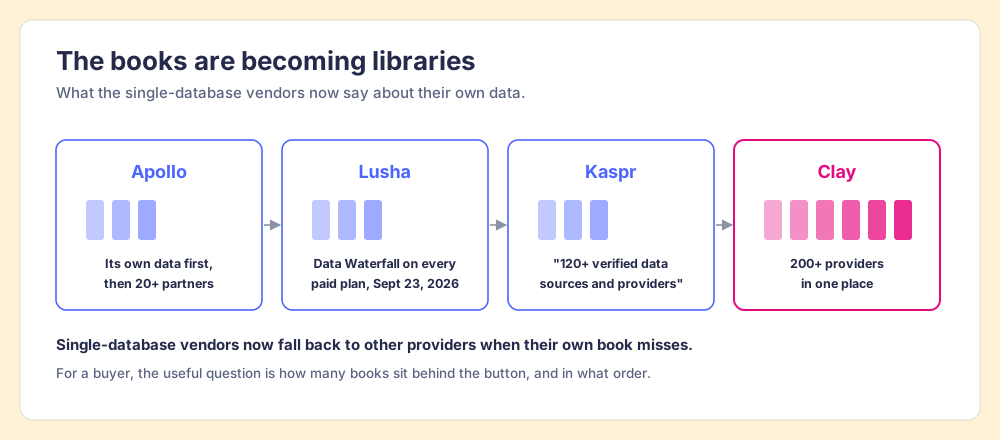
The vendors have reached the same conclusion. Apollo’s own product page sells a feature that “fills each record with Apollo data first, then lets 20+ partners fill in the rest” (Apollo Waterfall Enrichment). Lusha’s changelog of September 23, 2026 says its Data Waterfall, which falls back to third-party providers when Lusha’s data cannot match a field, “is now available on every paid plan” (Lusha changelog). Kaspr’s data page says it is “powered by 120+ verified data sources and providers.” The best single books of 2026 are turning into small libraries. If your company already pays for Clay, you own the big one.
Why trust this list?
I started RevPartners, a HubSpot partner that did only sales implementations, sold roughly twice as much Sales Hub as any other partner, and reached Elite tier in 13 months. Supered came out of that work and is the #1 sales enablement app on the HubSpot marketplace, rated 5.0 from 122 reviews there and 4.9 out of 5 from 81 reviews on G2 (both checked October 1, 2026; the ratings cover Supered as a whole, not Prospector alone). That is also the disclosure. We make Supered Prospector, and it sits first on this page for teams that have Clay. The weights are printed so you can flip them, and for a solo rep with no Clay account the flip puts Apollo on top.
The LinkedIn email finder Chrome extensions, graded
The lens is a rep on a team of ten to fifty who wants an email and a phone from a LinkedIn profile in one click, and a leader who wants to know what happened to the contacts afterward. Each criterion is scored 1 to 5 and multiplied by its weight, for a maximum of 50. Bands: A 40 and up, A- 36 to 39, B+ 33 to 35, B 29 to 32, B- 25 to 28, C 20 to 24. This is our scoring, not vendor data.
| Criterion | Weight | What it rewards |
|---|---|---|
| Find rate when the first source misses | x3 | More than one source behind the button, measured coverage |
| Phones included | x2 | Mobiles and direct dials without a punishing credit price |
| One click to the CRM | x2 | Native push to HubSpot, Salesforce, or Pipedrive on the plan you would buy |
| Price per found contact | x2 | Published prices, a usable free tier, no charge for a miss |
| What the leader sees afterward | x1 | Whether the sourced contacts were worked and closed |
| Rank | Extension | Grade | Score | Best fit | CRM integration | Setup effort | Pricing (plan with email and phone) | Reason to pick it |
|---|---|---|---|---|---|---|---|---|
| 1 | Supered Prospector | A | 44 | Teams that already have Clay | Native (HubSpot, Salesforce, Pipedrive) | Under a week on an existing Clay account | $45 per rep per month, billed annually, plus your Clay plan | 200+ vendors behind one click, on any page the rep is on |
| 2 | Apollo | A- | 36 | Teams without Clay wanting data plus outreach | Native (HubSpot, Salesforce) | A day | $49 per seat per month, billed annually; phone 8 credits | Widest single database in the May 2026 test, free tier, sequencer |
| 3 | RocketReach | B+ | 35 | Phone-heavy reps | Native from Pro | Minutes | Pro, $899 a year billed annually | Unlimited verified mobiles and direct dials (fair use) |
| 4 | Lusha | B | 30 | Mid-market teams wanting a posted ladder | Native (HubSpot, Salesforce) | Minutes | Starter $449.10 a year; phone 5 credits | Data Waterfall now on every paid plan |
| 5 | ContactOut | B- | 27 | Individual sellers and recruiters | Salesforce and ATS on the Team plan | Minutes | Email + Phone, $948 a year billed annually | Unlimited emails and phones for one user (fair use) |
| 6 | Kaspr | B- | 27 | Email-first reps on LinkedIn, EMEA | Native (HubSpot, Salesforce, Pipedrive) | Minutes | Starter $49 a month billed annually, 100 phones a month | Unlimited B2B emails under a fair-use cap |
| 7 | Hunter | C | 20 | Finding emails on company websites | Integrations listed; not on LinkedIn | Minutes | Starter $34 a month billed annually, emails only | Cheapest emails, unlimited users; wrong tool for LinkedIn |
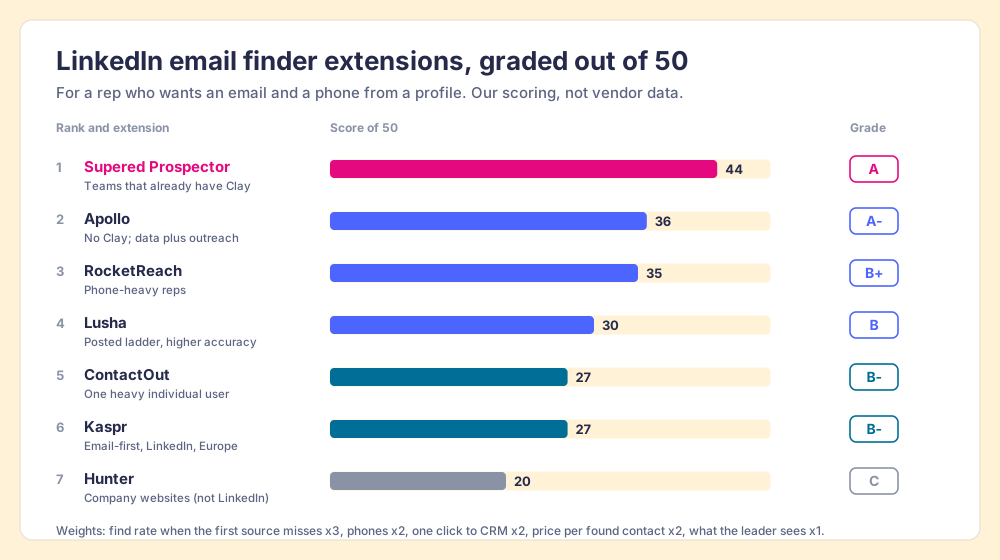
Prospector’s 44 is coverage 5, phones 4, CRM 5, price 3, leader 5. The coverage score is Clay’s waterfall, credited to Clay. The price 3 is fair to the others, since Prospector needs a Clay plan underneath it and has no free tier. Apollo’s 36 is 4, 3, 4, 4, 2: the widest single book and a real free plan, with phones at 8 credits pulling it down. RocketReach’s 35 is 4, 4, 3, 4, 1, earned mostly by unlimited phones on Pro. Hunter’s 20 is a lane problem, explained below.
Corporate status, checked October 1, 2026. Apollo is independent and bought the revenue-intelligence startup Pocus in March 2026 (TNW). Lusha is independent and cut about 8% of staff in December 2025. Kaspr has been part of Cognism since 2022. RocketReach has been majority-owned by Brighton Park Capital since August 2020. Web searches the same day found no 2026 acquisition, funding round, or rebrand for ContactOut or Hunter.
How does a waterfall find the email a single database misses?
Go back to the phone books. A rep with six of them on the desk could check each in turn, with six extensions installed and six logins. The librarian does the same walk without being asked, in a fixed order, and stops the moment one directory has the name.
A waterfall is that walk, written down. Clay’s own course describes it: “you’ll be querying providers in a specific order,” “usually starting with the most cost-effective,” and “once Clay finds what it needs from one provider, it won’t check the others. This helps save your credits” (Clay University, Enriching Company Data). Two more rules make the walk safe to run on every profile.
- A check before the email reaches you. “Clay’s email waterfall doesn’t just find people’s emails” and validates them too, by default with ZeroBounce, with a setting to exclude catch-all addresses (Clay University, Enriching People Data).
- No charge for an empty shelf. “If an enrichment returns no result, you’re not charged Data Credits or Actions” (clay.com/pricing, checked October 1, 2026).
- A long list of shelves. Clay names work-email providers including Prospeo, Hunter, People Data Labs, Apollo, Lusha, and Snov, and mobile providers including People Data Labs and ContactOut, out of “200+ providers in one place” (Clay waterfall enrichment; clay.com).
Four of the extensions graded on this page (Apollo, Lusha, Hunter, and ContactOut) sit inside Clay’s waterfall as shelves. Seen from there, the question “Lusha or ContactOut?” stops being a choice of one book and becomes an order of books. Clay’s waterfall page puts its own claim plainly: the approach “routinely triples our customers’ data coverage and quality.” That is Clay’s number, unmeasured by us, and the independent test above found a smaller and still large gain. The waterfall enrichment explainer walks the ordering and the credit math in detail.
Where does Supered Prospector fit?
Prospector does not bring its own database. It brings Clay’s waterfall, which is every database, routed. We chose Clay as our only data provider for that reason, and Clay is not a row in the table above because Clay is the row that contains the other rows. Clay governs the data. Supered governs the motion.
Clay is built for the person who builds the workflow, the GTM engineer, and Clay’s own homepage says “GTM engineers build on Clay.” Prospector hands what that person built to the rep, in the browser through the Supered Chrome extension, on the team’s own Clay account, with no Clay login:
- Lookups from the page the rep is on. A LinkedIn profile, a Sales Navigator list, a company’s website with company research alongside, or a HubSpot, Salesforce or Pipedrive record. Most extensions on this page start on LinkedIn; Prospector starts wherever the prospect is.
- A list the rep builds. Clay’s waterfall fills the emails and phones, and a buying-committee lookup returns the titles, departments, and seniority the team chose.
- Context before the first touch. On a LinkedIn profile the rep sees the matching CRM record and whether the prospect was already worked in the past, before adding a duplicate or stepping on a teammate.
- One click to the CRM, or into a workflow. Field mapping is set once by Ops. A contact syncs to HubSpot, Salesforce, or Pipedrive in one click, and a whole list can be pushed into any custom Clay workflow.
- Lists the leader can follow. The team’s process applies to worked prospects, so the manager sees which sourced lists were worked and which closed, and coaches from what is converting.
The arithmetic, since “one contract” means nothing until it has numbers in it. Clay’s Growth plan, which includes CRM sync, starts at $495 a month, or $446 a month billed annually, which is $5,352 a year (clay.com/pricing, October 1, 2026). Prospector is $45 per rep per month billed annually, $540 a rep-year, from one rep (Prospector). Ten reps: $5,352 plus $5,400, or $10,752 a year. Ten Apollo Basic seats on annual billing are $5,880. So for a team starting from nothing, Apollo is cheaper, and we say so. The case for Prospector is the team that already pays for Clay and would rather not buy its reps a second book.
Choose something else if you do not have Clay. Prospector runs on the customer’s Clay account and does nothing without one, and a team with no waterfall built yet needs someone to build it. Choose something else, too, if you are one rep on a budget: a free plan below will cover a light week. The sourcing use case shows the full rep loop, and the Clay Chrome extension guide explains which Clay extension does what.
The other six extensions, one at a time
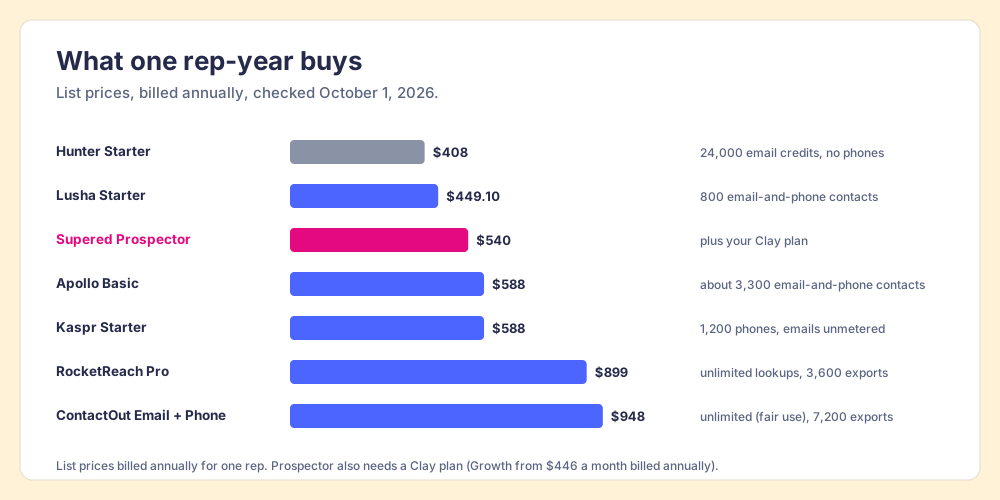
Chrome Web Store figures are from each listing, opened October 1, 2026. Prices are from each vendor’s pricing page the same day unless noted. Before the detail, the price of one rep-year at list. Hunter, $408, buys 24,000 email credits and no phones. Lusha Starter, $449.10, buys 800 email-and-phone contacts at 6 credits each. Apollo Basic, $588, buys about 3,300 at 9 credits each. Kaspr Starter, $588, buys 1,200 phones with B2B emails unmetered. RocketReach Pro, $899, buys unlimited lookups and 3,600 exports. ContactOut Email + Phone, $948, buys unlimited lookups under fair use and 7,200 exports. Prospector, $540, buys the button, and the contacts come from your Clay plan.
Apollo
Apollo’s extension shows 1,000,000 users and 4.7 stars from 2.2K ratings, updated September 29, 2026. It works on LinkedIn and Gmail and hands off to the full platform: sequences, a dialer, and Apollo’s own waterfall. Basic is $49 a seat a month on annual billing ($65 monthly) with 30,000 credits a seat a year; an email costs 1 credit and a phone 8 (apollo.io/pricing). Nine credits per email-and-phone contact puts a Basic seat at about 18 cents a contact. The tradeoff is the one the benchmark found: the most addresses returned, the lowest accuracy of the top three, and an 18.7% catch-all rate, so validate before a big send. The Apollo Chrome extension page covers install and plan limits.
RocketReach
RocketReach’s extension shows 300,000 users and 4.2 stars from 459 ratings, updated August 11, 2026. It is the strongest LinkedIn phone number finder on price structure. Pro is $899 a year billed annually, with “Unlimited verified mobile & direct phone numbers,” a fair-use limit of 10,000 lookups a month, 3,600 exports a year, and HubSpot and Salesforce integrations; Essentials at $399 is email only (rocketreach.co/pricing). “A lookup is used if we find and verify email or phone, otherwise it is refunded.” Watch the export count, which is what a CRM push spends. RocketReach pricing works the meter through.
Lusha
Lusha’s extension shows 400,000 users and 4.6 stars from 1.9K ratings, updated September 2, 2026, and works on LinkedIn, Gmail, and company websites. Starter is $449.10 a year for 4,800 credits ($49.90 monthly); an email costs 1 credit and a phone 5 (lusha.com/pricing), so an email-and-phone contact costs 6 credits, about 56 cents on Starter. Lusha had the best accuracy among the extensions graded here in the May test (86.1%) and the third-lowest coverage (69.8%), and the new Data Waterfall on every paid plan is aimed at that gap. The Lusha Chrome extension page and Apollo vs Lusha go deeper.
ContactOut
ContactOut’s extension shows 600,000 users and 4.4 stars from 796 ratings, updated May 17, 2026, and works on LinkedIn, Sales Navigator, Recruiter, and company websites. The Email + Phone plan is $79 a month billed annually, $948 a year ($99 monthly), with unlimited emails and phones subject to a fair-use policy and 7,200 exports a year; the Email plan is $468 a year (contactout.com/pricing). For one heavy user that is a generous meter. CRM pushes to Salesforce sit on the sales-led Team plan, and its coverage in the May test, 66.7%, sat about eight points under its own 75% claim. ContactOut alternatives compares the field.
Kaspr
Kaspr’s extension shows 100,000 users and 4.7 stars from 1.2K ratings, updated June 15, 2026, and runs on LinkedIn and Sales Navigator. Starter is $49 a user a month on annual billing with unlimited B2B emails under a fair-use cap of 10,000 credits per account per month and 100 phones a month; Business is $79 with 200 (kaspr.io/pricing). HubSpot, Salesforce, and Pipedrive pushes come on every plan, Free included. Kaspr sold itself on “200 million + European B2B contacts” and had the lowest coverage in the May test, 61.3%, on a contact set with 100 of 500 in Europe. Kaspr alternatives works its price out per phone.
Hunter
Hunter’s extension shows 600,000 users and 4.7 stars from 12.5K ratings, updated September 12, 2026, the most ratings of any extension here. It finds emails on company websites with a domain search and a confidence score. It does not work on LinkedIn: “Hunter cannot be integrated with LinkedIn as we need to comply with LinkedIn’s Terms of Use,” its help center says (Hunter Help). Starter is $34 a month billed annually ($49 monthly) for 24,000 credits a year, unlimited users, 1 credit per email found and nothing charged when no email is found (hunter.io/pricing). No phones. On the company site it is cheap and good; Hunter.io alternatives is the page for that lane.
Which free LinkedIn email finder extension gives you the most?
The free plans are tasting spoons, and they differ more than the paid plans do. As of October 1, 2026:
| Free plan | Emails | Phones | The catch |
|---|---|---|---|
| ContactOut Free | 5 a day | 5 a day | One user per company; marked “limited time only” |
| Apollo Free | about 75 a month (900 credits a seat a year) | about 9 a month at 8 credits | Granted monthly; unused credits expire |
| Lusha Free | 40 a month | 8 a month at 5 credits | Same 40 credits for both |
| Kaspr Free | 15 a month | 5 a month | Plus 5 direct emails |
| RocketReach | 5 lookups in all | within the 5 | A trial, no card required |
| Hunter Free | 50 a month | none | Websites only, not LinkedIn |
| Prospector | no free trial | no free trial | Clay Free has 100 data credits a month |
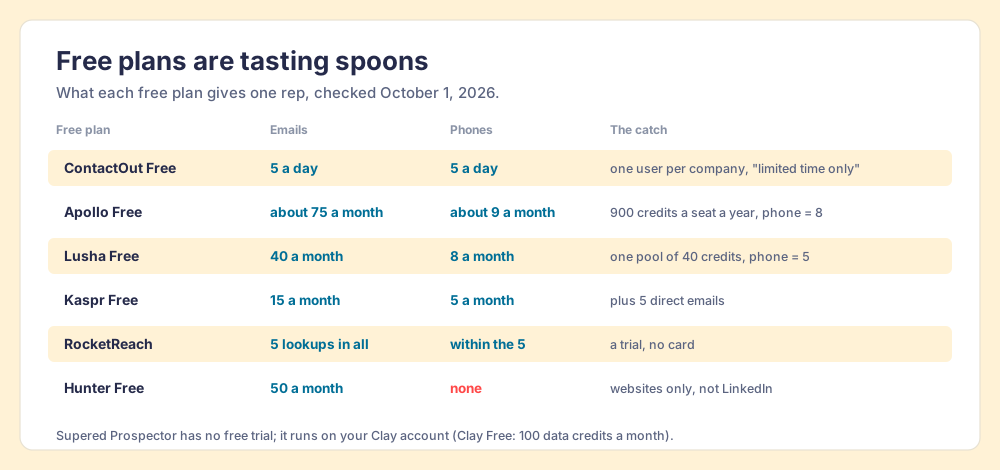
For one rep testing the idea, ContactOut’s daily allowance is the largest spoon, if it survives its “limited time only” label. For a small team, Apollo’s free seat is the one that grows into a paid plan without a migration. None of them is a prospecting program. The Bridge Group’s 2025 report of 351 companies puts the median SDR at 112 activities a day, 44 of them phone calls and 41 emails (Bridge Group, 2025). Eight free phones a month covers under a fifth of one median SDR’s dials for a single day.
Does LinkedIn allow email finder Chrome extensions?
Google’s own “People also ask” box for this search carries the question, and the answer has edges. LinkedIn’s User Agreement, section 8.2, effective November 3, 2025, says members agree not to “develop, support or use software, devices, scripts, robots or any other means or processes (such as crawlers, browser plugins and add-ons or any other technology) to scrape or copy the Services, including profiles and other data” (LinkedIn User Agreement).
The vendors read that sentence differently, and you can see the readings in what they did:
- Hunter’s exit. It replaced its LinkedIn integration with a name-and-company search, citing LinkedIn’s terms.
- Apollo’s missing company page. Apollo kept its LinkedIn extension. Around March 6, 2025, Apollo’s and Seamless.AI’s company pages disappeared from LinkedIn; Apollo said it was “actively working with LinkedIn to understand the nature of our brand page restriction” (MarTech).
- The line between reading the page and pointing at it. In a Clay community thread from July 2025, a member said of his free extension, “all it does is push the URL of your page to Clay, it doesn’t scrape [LinkedIn] at all,” while another warned that extensions are “how multiple companies and individuals got banned” (Clay community). Those are members talking, not Clay or LinkedIn.
We are not lawyers and do not certify any tool, ours included. Our answer for Prospector: it works within LinkedIn’s terms and does not copy search results in bulk, and the contact data comes from Clay’s waterfall on your own Clay account. The useful move is a plain question for every vendor on this page, us among them: what does your extension do on the LinkedIn page, does it read the page or send the URL elsewhere, and what happens to a rep’s account if LinkedIn objects? A vendor with a good answer will give it in one sentence.
Which LinkedIn email finder Chrome extension should you choose?
Two facts decide it: whether your company already pays for Clay, and whether your reps need phones or only emails.
- Supered Prospector. The pick when the team has Clay and you want its waterfall in every rep’s hands on LinkedIn, the company site, and the CRM record, and want to see which lists get worked and closed.
- Apollo. The pick without Clay when you want the widest single book, a free start, and sequences in the same plan. Validate before large sends.
- RocketReach. The pick for a phone-first rep: unlimited verified mobiles on Pro, watched by the export count.
- Lusha. The pick for a mid-market team that wants posted prices, higher accuracy, and a waterfall inside the vendor.
- ContactOut. The pick for one heavy individual user, seller or recruiter, who wants unlimited emails and phones on one card.
- Kaspr. The pick for an email-first rep on LinkedIn and Sales Navigator, especially in Europe.
- Hunter. The pick for finding emails on company websites. Not for LinkedIn.
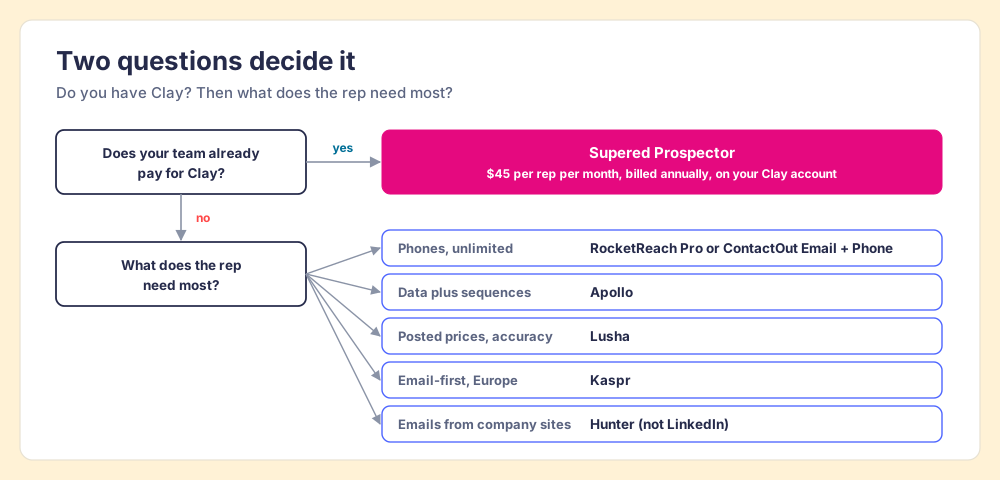
What we recommend. If you do not have Clay and your reps send email, start on Apollo’s free seat and pay for Basic when it runs dry; add a validation step and you have the best single book on the shelf. If the phone is the job, buy RocketReach Pro before you buy anything with a per-phone credit. If you already pay for Clay, stop buying second books for your reps. The May test showed what a second and third source do to the miss rate, Apollo and Lusha have both rebuilt their products around the same idea, and the Clay account you already pay for routes 200+ providers. Put that behind a button on the profile your rep is reading, and let the leader see which lists were worked and which closed, which no phone book has ever reported. The Exportly alternatives page shows where that idea started, and a Prospector demo on your own Clay account shows the librarian at work. Next, the LinkedIn Chrome extension guide covers the rest of what a rep’s browser can do on a profile.
Frequently asked questions
What is the best LinkedIn email finder Chrome extension in 2026?+
Is there a free LinkedIn email finder extension?+
Which LinkedIn phone number finder finds the most mobiles?+
Does LinkedIn allow email finder Chrome extensions?+
Why does a waterfall find more emails than one database?+
Do I need a Clay account to use Supered Prospector?+
Your process, running itself.