The RocketReach Chrome Extension in 2026: An All-You-Can-Eat Buffet That Charges for the Takeout Box
The RocketReach Chrome extension is free, and on annual plans the lookups are unlimited up to 10,000 a month.
The meter that matters is the export: every push to your CRM counts. What it does, where it will not load, what each plan buys, and the alternatives.
The RocketReach Chrome extension is RocketReach's free browser add-on that finds verified emails and phones for the person on a LinkedIn profile or company site, spending a lookup credit only on a hit and an export credit when the contact goes to your CRM.
The RocketReach Chrome extension is free, and on an annual plan the lookups are unlimited, up to 10,000 a month. For a sales team the pricing conversation starts one step later, because RocketReach meters a second thing, and that second thing is what a team does with a contact the moment it has one: send it to the CRM (RocketReach, credits, October 2, 2026). The short version:
- RocketReach’s extension. A good buy for individual reps and small teams who want phones on a posted price, from $899 a year on Pro.
- Supered Prospector. The buy for a team that already pays for Clay: one extension that also works from a Sales Navigator list, Clay’s waterfall across 200+ providers behind it, at $45 per rep per month billed annually.
- Apollo or Lusha. The non-Clay alternatives: Apollo when the dialer and sequences belong in the same seat, Lusha for a few reps who want a panel in Gmail too.
The RocketReach Chrome extension is RocketReach’s free browser add-on that finds verified emails and phones for the person on a LinkedIn profile or company site, spending a lookup credit only on a hit and an export credit when the contact goes to your CRM. Its Chrome Web Store listing showed 300,000 users and 4.2 out of 5 from 459 ratings on October 2, 2026, version 4.0.15, updated August 11 (Chrome Web Store).
What does the RocketReach Chrome extension do?
Walk into an all-you-can-eat buffet. You pay one price at the door and eat as much as you like at the table; the staff do not count your trips to the counter. Then you ask for a box to take the leftovers home, and the server smiles and tells you boxes are counted. At most buffets that rule barely matters. In a sales team it is the whole bill, because the table is not where the work happens. The CRM is.
The RocketReach extension is that buffet, set up on the right edge of a LinkedIn profile. RocketReach’s help center describes the motion: open a supported page, “click the RocketReach icon on the right edge of your browser window,” scroll the matched profiles, and “click the ‘+Add’ button to access the available contact information” (RocketReach help, browser extension). The meter at the table is kind. A lookup credit is spent “only if you receive at least 1 verified email address (or phone number, with +Phone plans),” and “You will never be charged more than one lookup credit for a single profile” (RocketReach help, lookups). On annual plans, the table is open: “Unlimited Lookups,” with “A fair use limit of 10,000 lookups per month.”
Then the box. RocketReach defines the two meters in one line each: “A lookup reveals a person’s contact information and stores it inside RocketReach,” while “An export takes contact information out of RocketReach,” which includes “sending data to an integration.” The credits table names the extension’s own buttons: “Browser Extension, Add” spends a lookup, and “Integration, Export to” Salesforce, SalesLoft, and others spends a person export. “A plan with unlimited lookups still has a limited number of exports.”
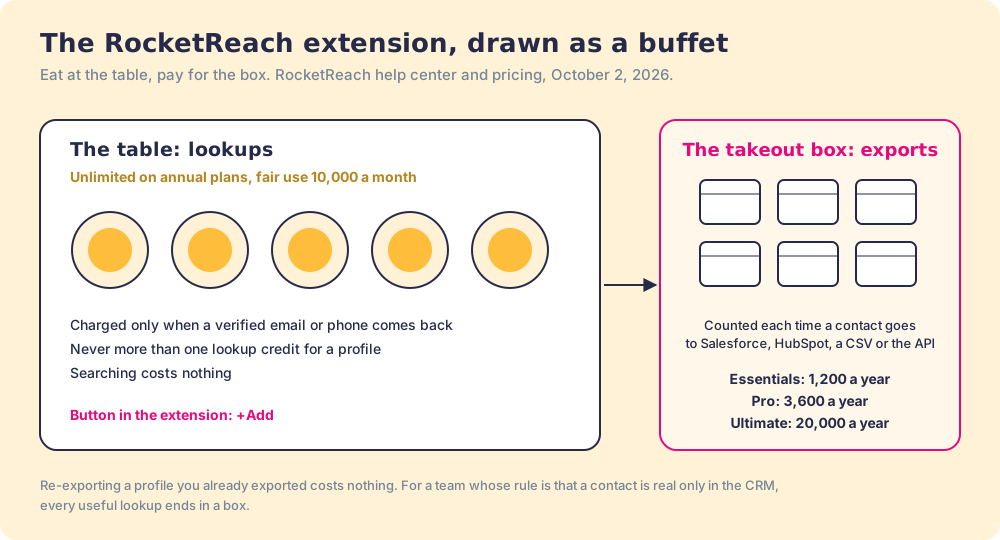
The picture fits a rep who reads contacts in RocketReach and dials from there. It fits less well for a team whose rule is that a contact is not real until it is in HubSpot, because for that team every useful lookup ends in a box.
What does the RocketReach extension cost, in lookups and exports?
The extension is included on every plan; RocketReach’s compare grid lists “Google Chrome Extension” on Essentials, Pro, and Ultimate. Prices below come from rocketreach.co/pricing on the default annual view, read October 2, 2026.
| Plan | Annual price | Data | Lookups | Exports a year | Exports a working day |
|---|---|---|---|---|---|
| Free | $0 | 5 in total | n/a | n/a | |
| Essentials | $399 ($33 a month) | Email only | Unlimited, 10,000 a month fair use | 1,200 | about 4.8 |
| Pro | $899 ($75 a month) | Email and phone | Unlimited, 10,000 a month fair use | 3,600 | about 14.4 |
| Ultimate | $1,699 ($142 a month) | Email and phone, intent data | Unlimited, 10,000 a month fair use | 20,000 | 80 |
“Exports a working day” divides the annual allowance by 250 working days. Monthly billing flips the model: the monthly plans give limited lookup credits that roll over, 100, 250, and 1,000 a month, and RocketReach listed them at $69, $119, and $209 a month when we captured the monthly toggle on September 25, 2026. Teams start at “$6K annually.” The RocketReach pricing page works through the whole ladder.
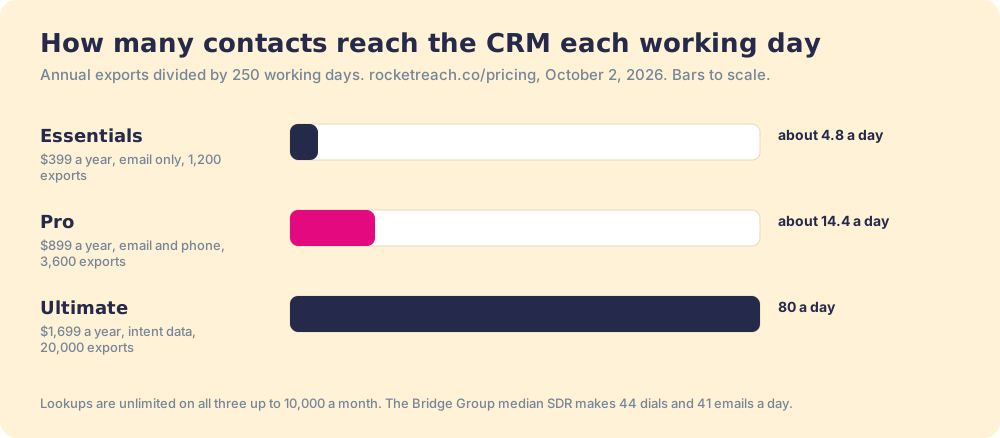
Run the numbers against a real day. The Bridge Group’s 2025 report, 351 companies, puts the median SDR at 44 dials and 41 emails a day (Bridge Group). Suppose, for the arithmetic only, that a rep pushes every new contact to the CRM before touching it. Pro’s 3,600 exports cover about 14 new contacts a day. A rep who re-touches existing contacts needs fewer, and the direction holds: on Pro, the box runs out long before the 10,000-lookup table does. Two rules soften it. Exporting a profile you already exported “does not spend another Export Credit,” and searching costs nothing.
How do you install the RocketReach Chrome extension?
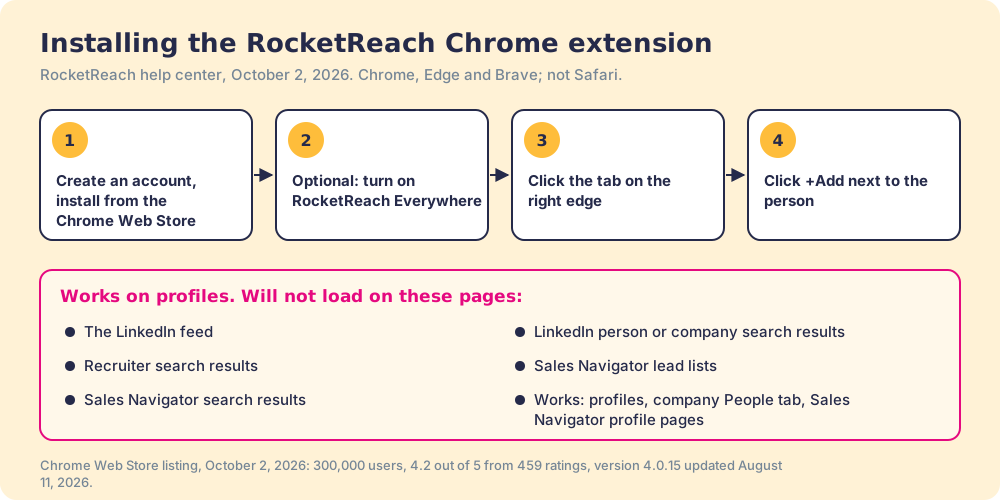
RocketReach’s help center gives three steps and one optional switch:
- Create a RocketReach account, then install the extension from the Chrome Web Store.
- Optionally, click the toolbar icon and turn on “RocketReach Everywhere” to use it on company websites as well as LinkedIn.
- Open a supported page and click the RocketReach tab on the right edge of the window.
- Click +Add next to the person you want. If you connected a native integration, an Export button appears after the lookup.
Chrome is the home; Edge and Brave work through the Chrome Web Store, and “Other browsers such as Safari currently are not supported.” If the extension keeps asking you to log in, RocketReach’s fix is to set its site access to “on all sites” in chrome://extensions.
Where does the RocketReach extension not work?
RocketReach is specific about it, which saves a rep a frustrating afternoon. The extension works on LinkedIn person profiles, company profiles (on the People tab), and “profile pages within LinkedIn Recruiter and LinkedIn Sales Navigator.” It “will not load profiles” on five kinds of page:
- The LinkedIn feed. /feed shows nothing.
- LinkedIn search results. Person or company search results at /search.
- Recruiter search results. The /talent/search pages.
- Sales Navigator lead lists. The /sales/lists pages, where a rep keeps the accounts they are working.
- Sales Navigator search results. The /sales/search pages, where a rep builds those lists.
The last two matter most. A rep who builds a list in Sales Navigator works it profile by profile in the extension, or moves to RocketReach’s own search and bulk tools in the web app, where bulk lookups and list uploads spend exports.
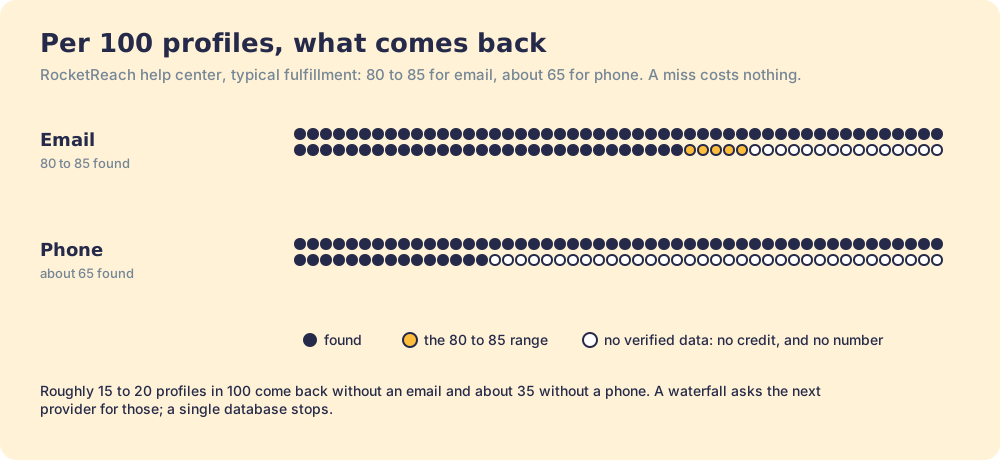
The other limit is the one in any single database: some lookups come back empty. RocketReach’s help center says that “most users experience 80-85% fulfillment rate with email data and about 65% fulfillment rate with phone data,” and that with phone plans “you are not guaranteed a verified email address AND a verified phone number.” Per 100 profiles, that is roughly 15 to 20 without an email and 35 without a phone. The meter is fair about it, since a miss costs nothing; the rep still has a profile and no number.
What do RocketReach’s reviewers say about the extension?
RocketReach held 4.4 out of 5 from 1,385 reviews on G2 on October 2, 2026, and G2’s head-to-head with ZoomInfo scores it 9.0 for ease of use. The extension-specific complaints are short and plain.
- An extension that needs a refresh. “Sometimes the extension also doesn’t work, where I’ll have to keep refreshing,” a business development associate wrote in April 2026.
- Credits that are hard to read. “I’m sometimes not clear how many lookups I get to do,” a small-business reviewer wrote the same month. Two meters with different rules on monthly and annual plans explain the confusion.
- Emails that bounce. “Sometimes the email addresses provided by RocketReach simply don’t work,” another reviewer wrote in April 2026.
None of this makes the extension a poor buy. For one rep who wants phones on a posted price, Pro at $899 a year with unlimited lookups is good value, and a refunded miss is a fairer meter than most. It becomes the wrong tool when a team’s rule is “it is not real until it is in the CRM,” or when the list lives in Sales Navigator.
Why trust this page?
I started RevPartners, a HubSpot partner that did only sales implementations, which sold roughly twice as much Sales Hub as any other partner and reached Elite tier in 13 months. Supered came out of that work and holds 4.9 out of 5 from 81 reviews on G2 and 5.0 from 122 on the HubSpot App Marketplace (both checked October 1, 2026). The disclosure: we make Supered Prospector, and it ranks first below for teams that pay for Clay. The weights are printed so you can flip them.
How does the RocketReach extension compare with the alternatives?
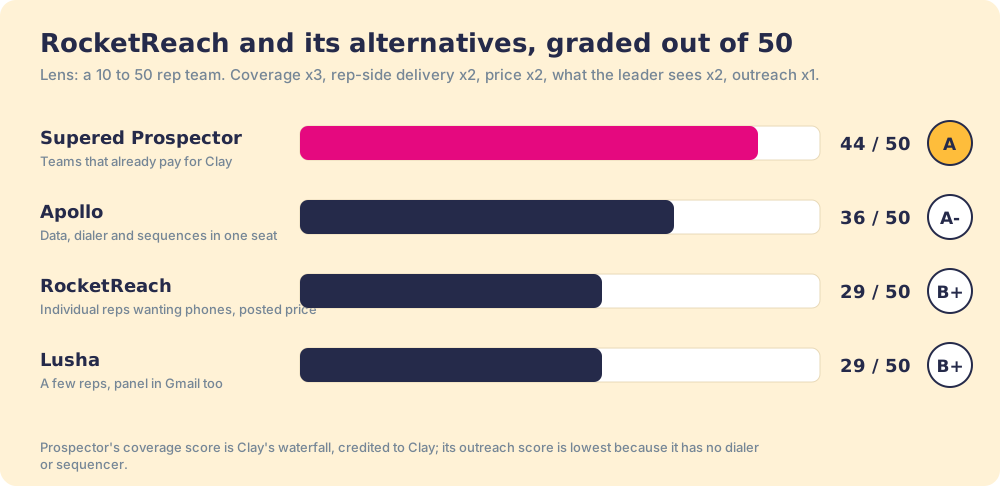
The lens is a ten-to-fifty-rep team that wants contact data reps use where they work and a leader who can see which lists turn into pipeline. Five criteria, scored 1 to 5 and weighted: coverage of the contact you need (x3), rep-side delivery (x2), price structure for mid-market (x2), what the leader sees after the export (x2), and bundled outreach (x1), out of 50. The scores match the RocketReach vs ZoomInfo page, which rescored RocketReach upward from the RocketReach alternatives page on newer G2 and Chrome Web Store data.
| Rank | Tool | Grade | Score | Best fit | CRM integration | Setup effort | Pricing (plan with phones) | Reason to switch from RocketReach |
|---|---|---|---|---|---|---|---|---|
| ref | RocketReach extension | B+ | 29 | Individual reps and small teams wanting phones on a posted price | Native from Pro (Salesforce, HubSpot, Outreach, Salesloft, Bullhorn) | Minutes | $899 a year (Pro) | Stay if exports cover the CRM pushes and lists live outside Sales Navigator |
| 1 | Supered Prospector | A | 44 | Teams that already pay for Clay | Native (HubSpot, Salesforce, Pipedrive) | Under a week on an existing Clay account | $45 per rep per month, billed annually, plus your Clay plan | Works from a Sales Navigator list, 200+ providers per lookup, no export meter |
| 2 | Apollo | A- | 36 | Small teams wanting data, dialer, and sequences | Native (HubSpot, Salesforce, Pipedrive) | A day | $49 a seat a month, billed annually | Sequences and a dialer in the seat |
| 3 | Lusha | B+ | 29 | One to five reps on a posted price | Native (HubSpot, Salesforce, Pipedrive) | Minutes | Free to $3,599.10 a year (Premium, 5 seats) | A panel in Gmail and on company sites |
RocketReach’s 29 is coverage 3, rep-side delivery 4, price 4, what the leader sees 1, outreach 2 (Sequences launched in February 2026). Prospector’s coverage score is Clay’s waterfall, credited to Clay, and its outreach score is the lowest on the card on purpose, because it has no dialer or sequencer.
Corporate status, checked October 2, 2026: RocketReach is private, with Brighton Park holding a majority stake since 2020, and launched AI email Sequences and expanded intent data on February 17, 2026 (PR Newswire). A news search found no acquisition or funding round this year. Vendr reports a median RocketReach contract of $6,750 a year (Vendr).
Where does Supered Prospector fit?
Prospector runs inside the Supered Chrome extension, brings no database of its own, and brings Clay’s waterfall, on the team’s own Clay account, to the page the rep is already on. RocketReach is in Clay’s provider directory (Clay, RocketReach), so a GTM engineer can make it one rung of the ladder. Clay’s pricing page calls the marketplace “200+ providers in one place” and keeps the rule RocketReach’s table has, then extends it to the whole ladder: “If an enrichment returns no result, you’re not charged Data Credits or Actions” (clay.com/pricing, October 2, 2026). We chose Clay as our only data provider for that reason. One caveat from Clay’s fine print: some providers, Apollo, Lusha and ZoomInfo among them, run on your own account with that vendor (“Bring Your Own Account Required”).
What a rep gets, with no Clay login:
- Lookups from four starting points. A LinkedIn profile, a Sales Navigator list, a company website with company research alongside, or the HubSpot, Salesforce, or Pipedrive record. The Sales Navigator list is the page RocketReach’s extension will not load.
- A look before the first touch. On a profile the rep sees the matching CRM record and whether the prospect was already worked in the past.
- A buying committee, by your definition. Titles, departments, and seniority the team set, and a whole list pushed into any custom Clay workflow your GTM engineer built.
- One click to the CRM. Field mapping set once, and no export allowance at the door.
- Lists the leader can follow. Found, worked, closed: the team’s process applies to worked prospects, and each lead ends the way your process says, qualified, recycled, or disqualified.
The arithmetic for ten reps. Clay’s Growth plan is $495 a month on monthly billing, $5,940 a year (Clay pricing). Prospector is $45 per rep per month, billed annually, from one rep (Prospector). Ten reps come to $11,340 a year. Ten RocketReach Pro seats come to $8,990, so RocketReach is $2,350 cheaper on list price for the same headcount, and ten Ultimate seats come to $16,990. The difference is what sits behind each lookup and what happens at the door: one database with a counted box, or a waterfall across 200+ providers with one click into the CRM. Implementation is included, and teams go live in under a week.
Choose something else if you do not have Clay. Prospector runs on the customer’s Clay account and does nothing without one. Choose something else, too, if you are one rep who wants phones on a posted price, because RocketReach Pro is a fair deal for that job. The sourcing use case shows how a Clay team sets Prospector up.
What are the non-Clay alternatives to the RocketReach extension?
- Apollo. The pick when the extension should come with a dialer and sequences in one seat. Apollo’s public pricing data on October 2, 2026 listed Basic at $49 per seat per month billed annually ($65 monthly) with 30,000 credits a seat a year; a phone costs 8 credits and an email 1 (apollo.io/pricing). The Apollo Chrome extension page covers its install and limits.
- Lusha. The pick for a few reps who want a posted price and a panel that opens in Gmail and on company websites as well as LinkedIn. Lusha charges 1 credit an email and 5 a phone, from 40 free credits a month to Starter at $449.10 a year for 4,800 credits (lusha.com/pricing). The Lusha Chrome extension page covers the rest.
The LinkedIn email finder roundup grades seven extensions on finding the email and the phone, and our RocketReach review covers the privacy questions around the database itself.
Which should you choose?
Two questions decide it: does your team pay for Clay, and where do your reps build lists.
- RocketReach’s extension, kept. The pick for individual reps and small teams who want phones on a posted price, work profile by profile, and push fewer than about 14 new contacts a day on Pro.
- Apollo. The pick when reps call at volume and want the dialer and sequences in the same seat.
- Lusha. The pick for one to five reps who want a panel in Gmail and on company sites.
- Supered Prospector. The pick when the team pays for Clay, builds lists in Sales Navigator, and wants every new contact in the CRM without a box count.
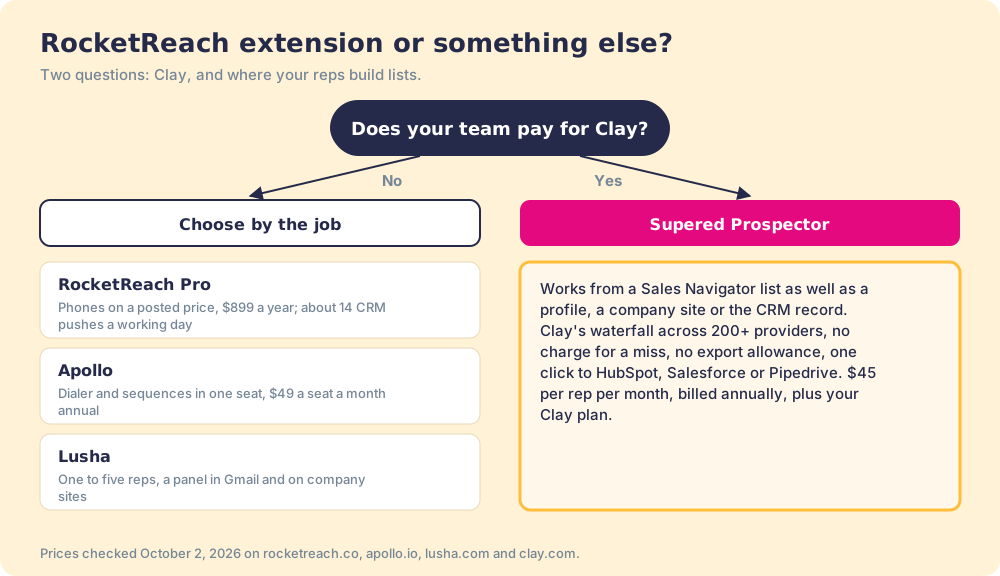
What we recommend turns on where your contacts need to end up. If a rep reads a contact in RocketReach and dials from there, the buffet is generous, and Pro’s unlimited lookups at $899 a year are hard to beat. If your team’s rule is that a contact is not real until it is in the CRM, count your boxes before you renew: on Pro, 3,600 a year is about 14 a working day. And if you already pay for Clay, skip the box entirely. Put the waterfall on the Sales Navigator list your rep is already building, send each contact to HubSpot, Salesforce, or Pipedrive in one click, and watch the list go from found to closed. A Prospector demo on your own Clay account shows it.
Frequently asked questions
Is the RocketReach Chrome extension free?+
Does the RocketReach extension use credits?+
Does the RocketReach extension work on Sales Navigator?+
Which browsers does the RocketReach extension support?+
Is the RocketReach Chrome extension safe to use?+
What is the best alternative to the RocketReach Chrome extension?+
Everything we have written on RocketReach
More on RocketReach
Supered Prospector vs RocketReach: the side-by-side- RocketReach Alternatives in 2026: The Cap Is on the Door, Not the Shelves
- RocketReach Pricing in 2026: Unlimited Talk and Text, a Metered Hotspot
- Is RocketReach Legit? A 2026 Review From the Three Chairs Around It
- RocketReach vs Apollo in 2026: The On-Ramp Toll and the Off-Ramp Toll
- RocketReach vs ZoomInfo in 2026: The Lending Library, the Archive, and Interlibrary Loan
Your Clay waterfall, where reps already work.