Hublead Alternatives in 2026: Who Else Can Carry a LinkedIn Contact Across the Bridge
Hublead is a good LinkedIn-to-HubSpot extension with thin enrichment credits.
The alternatives graded on the same job, with Hublead's live pricing, when Supered Prospector wins on a Clay team, and when Hublead is the simpler buy.
Hublead alternatives are tools that do Hublead's job, moving a LinkedIn contact and its context into HubSpot or Salesforce, with a different trade-off on data coverage, supported CRMs, message sync, or price per seat.
Hublead does one job well, and it is worth naming the job before you shop for a replacement. It carries a person from LinkedIn into your CRM in one click, keeps the conversation with them on the record, and finds an email along the way. Teams leave it for the third part, the enrichment, far more often than for the first two. The short version:
- Supered Prospector. The pick for a team that already pays for Clay and runs HubSpot, Salesforce, or Pipedrive: Clay’s waterfall across 200+ providers behind one click, at $45 per rep per month billed annually.
- Apollo. The pick without Clay when reps need more phone numbers per dollar and want sequences in the same seat.
- Hublead, kept. The simpler buy for a HubSpot team with no Clay that mostly needs LinkedIn messages and activity logged to the CRM.
Hublead alternatives are tools that do Hublead’s job, moving a LinkedIn contact and its context into HubSpot or Salesforce, with a different trade-off on data coverage, supported CRMs, message sync, or price per seat. Below: what Hublead does and costs, checked live on October 2, 2026, why teams look elsewhere, a graded table, and each alternative with the case where it loses.
What does Hublead do, and what does Hublead cost?
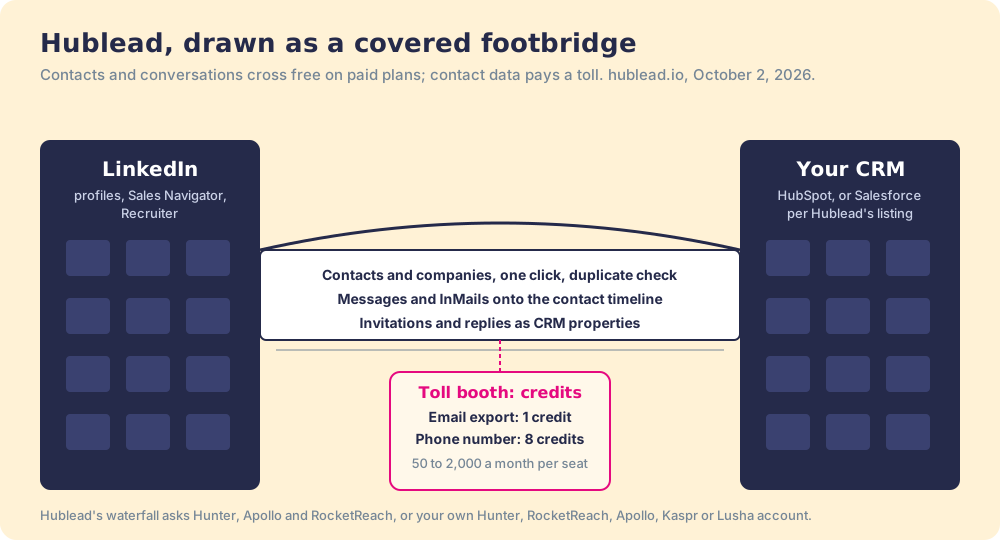
Two office buildings face each other across a street. In one, your reps read about prospects all day (LinkedIn). In the other, the company keeps its records (HubSpot or Salesforce). Without help, a rep carries each person across by hand, down the stairs, through traffic, and up the other side, retyping the name, the title, and the last message on arrival. Hublead is a covered footbridge between the two buildings.
The Hublead Chrome extension’s store listing describes the bridge: “Push LinkedIn contacts and companies to HubSpot or Salesforce in one click, with built-in duplicate detection,” and “Sync any LinkedIn & Sales Navigator conversation, including InMails, onto the contact timeline” (Chrome Web Store, October 2, 2026). The bridge carries more than people. Profile visits, invitations, and replies arrive “as real CRM properties, not just a note,” so a HubSpot workflow can enroll a contact in a sequence the moment they accept an invitation. The listing showed 6,000 users and 4.8 out of 5 from 151 ratings, version 1.190.0, updated the same day we checked.
The bridge also has a toll booth. Getting a person across is unlimited on paid plans; finding their email or phone number on the way costs credits, and the credits are where the plans differ.
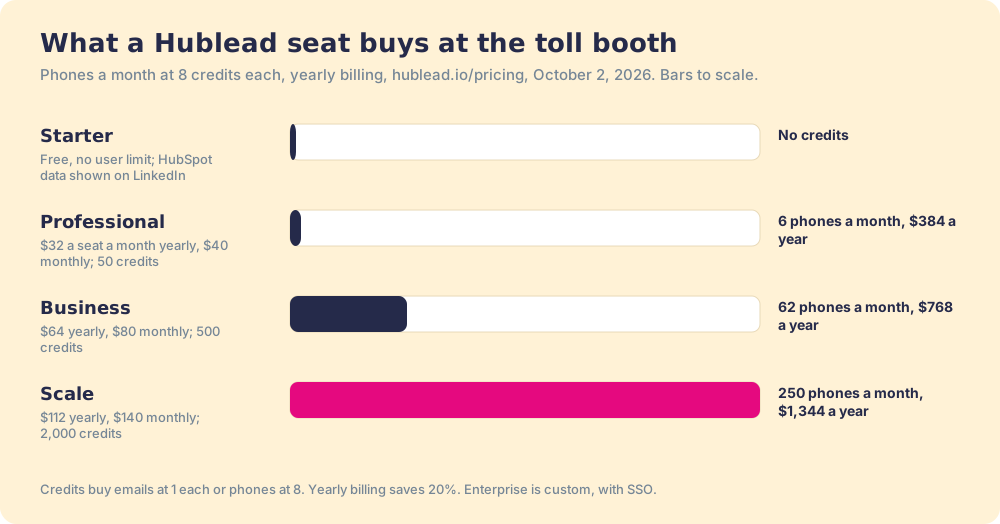
Hublead’s own pricing page, read October 2, 2026, in US dollars per seat per month (hublead.io/pricing):
| Plan | Billed yearly | Billed monthly | Credits a month | Phones a month at 8 credits | Message sync |
|---|---|---|---|---|---|
| Starter | Free, no user limit | Free | None | None | No (HubSpot data shown on LinkedIn) |
| Professional | $32 | $40 | 50 | 6 | One click |
| Business | $64 | $80 | 500 | 62 | Synced on view |
| Scale | $112 | $140 | 2,000 | 250 | Live sync |
| Enterprise | Custom | Custom | Custom | Custom | SSO, custom permissions |
Yearly billing saves 20%. The credit rules sit lower on the page: “Export contacts 1 credit,” “HubSpot list enrichment 1 credit,” and “Phone number access 8 credits.” The compare grid lists “Waterfall Enrichment” through Hunter, Apollo, and RocketReach, and lets you connect your own Hunter, RocketReach, Apollo, Kaspr, or Lusha account. Hublead takes credit or debit cards only, and a cancellation earns “a prorated credit for the remainder of that month’s billing cycle.”
One line on the pricing page needs a phone call before you buy. The FAQ says, “We only integrate with HubSpot for now, and we prefer to stick to that!” The Chrome Web Store listing and Hublead’s Salesforce page both say it works with Salesforce (Hublead, Salesforce). The FAQ looks out of date, and a Salesforce team should confirm in a trial. No page we read mentions Pipedrive.
Why do teams look for a Hublead alternative?
Hublead held 4.9 out of 5 from 67 reviews on G2 on October 2, 2026. That is a happy customer base, and the complaints are few and specific. They are worth reading closely, because each one names a criterion for whatever you buy next.
- Thin enrichment credits. “With basic plans, the number of enrichment credits seems quite limited while processing large amounts of leads,” a reviewer wrote in August 2026. Professional’s 50 credits a month is 50 emails or 6 phones. The Bridge Group’s 2025 report puts the median SDR at 44 dials and 41 emails a day (Bridge Group), so a calling rep outruns Professional before lunch on day one.
- Phones that cost eight times an email. “If it could pull phone numbers, that’d be helpful,” a founding BDR wrote in May 2026. Hublead does pull phones; at 8 credits each, a Business seat’s 500 credits buys 62 a month.
- A short provider list. Hublead’s waterfall names three providers. More rungs on the ladder find more people; an anonymous May 2026 test of 500 known contacts found that “No single tool exceeded 89% coverage,” while a three-tool waterfall reached 94.2% (b2b-email-finder.com). A waterfall across 200+ providers asks more doors before it gives up.
- Two CRMs, not three. Hublead says it is built for HubSpot and Salesforce, and its alternatives page argues against “generic multi-CRM extensions” (hublead.io/alternatives). A Pipedrive team is outside the bridge.
- Slow lists and a reload now and then. “During high contact list imports, there is some delay in contact enrichment” (August 2026), and “Sometimes I have to reload LI in order for Hublead to register messages” (October 2025). Small, and both on G2.
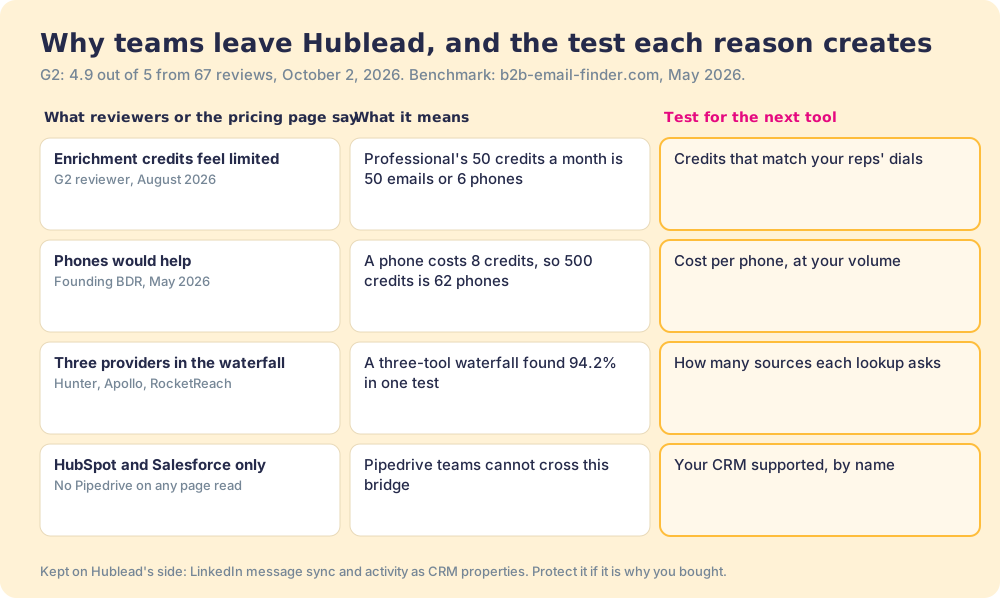
Missing from the complaints: the bridge itself. None of the G2 complaints we read say contacts fail to cross or messages go missing for long. That tells you what to protect when you switch.
Why trust this page?
I started RevPartners, a HubSpot partner that did only sales implementations. It sold roughly twice as much Sales Hub as any other partner and reached Elite tier in 13 months, and most of those implementations involved some version of the LinkedIn-to-HubSpot question this page answers. Supered came out of that work and holds 4.9 out of 5 from 81 reviews on G2 and 5.0 from 122 on the HubSpot App Marketplace (both checked October 1, 2026). The disclosure: we make Supered Prospector, and it ranks first below for Clay teams. The weights are printed, and the section after the alternatives says plainly when Hublead is the better buy.
How do the Hublead alternatives compare?
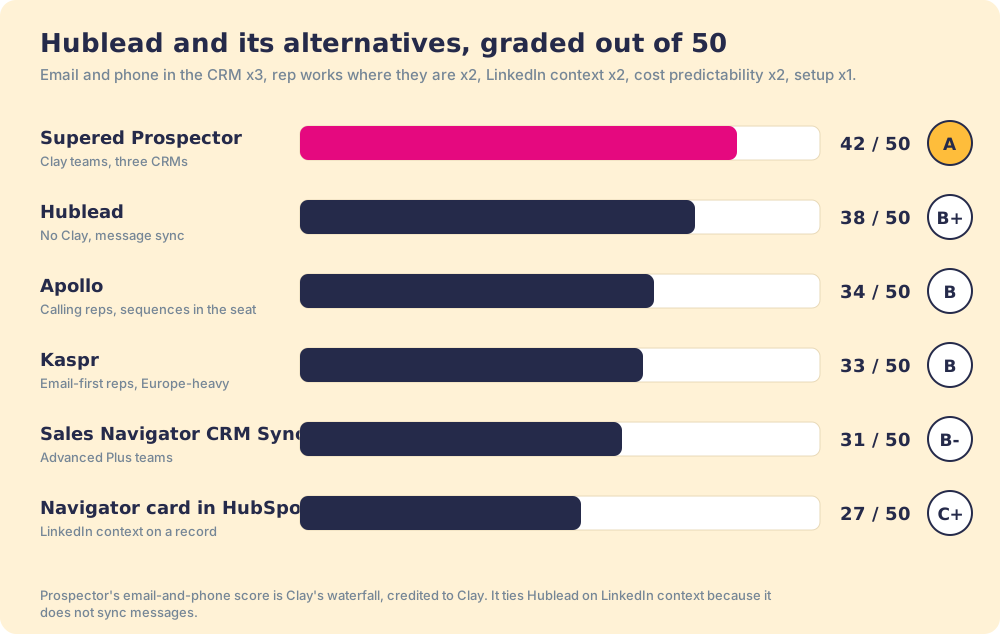
The lens is a ten-to-fifty-rep team that sources new people on LinkedIn and works them in the CRM. Five criteria, scored 1 to 5 and weighted: an email and phone land in the CRM (x3), the rep does it from where they already work (x2), LinkedIn context shows on the record (x2), cost you can predict (x2), and setup effort (x1), for a maximum of 50. The weights and the rows for Prospector, Hublead, and LinkedIn’s routes match the HubSpot LinkedIn integration page, so the two read together.
| Rank | Tool | Grade | Score | Best fit | CRM integration | Setup effort | Pricing | Reason to switch from Hublead |
|---|---|---|---|---|---|---|---|---|
| ref | Hublead | B+ | 38 | HubSpot teams without Clay that want messages logged | Native (HubSpot; Salesforce per its listing) | Minutes | Free; $32 to $112 a seat a month, yearly | Stay if message sync is the job and 50 to 2,000 credits a month cover it |
| 1 | Supered Prospector | A | 42 | Teams on Clay, any of HubSpot, Salesforce, Pipedrive | Native (HubSpot, Salesforce, Pipedrive) | Under a week on an existing Clay account | $45 per rep per month, billed annually, plus your Clay plan | 200+ providers per lookup, no charge for a miss, Pipedrive covered |
| 2 | Apollo | B | 34 | Calling reps who want sequences in the seat | Native (HubSpot, Salesforce, Pipedrive) | A day | $49 a seat a month, billed annually | 30,000 credits a seat a year, 3,750 phones |
| 3 | Kaspr | B | 33 | Email-first reps, Europe-heavy | Native (HubSpot, Salesforce, Pipedrive, Zoho) | Minutes | $49 a seat a month, billed annually | Unlimited B2B emails under fair use |
| 4 | Sales Navigator CRM Sync | B- | 31 | Teams already on Advanced Plus and Sales Hub Pro | LinkedIn’s own sync | Admin work in both tools | Advanced Plus quote plus Sales Hub Pro | Activity writeback from LinkedIn itself |
| 5 | HubSpot’s Sales Navigator card | C+ | 27 | Viewing LinkedIn context on a record | HubSpot integration | Install plus layout | Same seats as CRM Sync | No extension at all |
Hublead’s 38 is 4, 4, 3, 4, 4. Prospector’s 42 is 5, 5, 3, 4, 3: the email-and-phone 5 is Clay’s waterfall, credited to Clay, and the LinkedIn-context 3 is the same as Hublead’s because Prospector shows the matching CRM record and prior work on the profile but does not sync messages. Apollo is 4, 4, 2, 3, 4 and Kaspr 3, 4, 2, 4, 4; neither writes LinkedIn activity to the record, and Apollo’s meter is harder to predict across a team.
Corporate status, checked October 2, 2026: Hublead is independent, based in Avignon, France, with no acquisition or funding news found. Kaspr has been part of Cognism since 2022.
1. Supered Prospector: for teams already paying for Clay
Prospector builds a wider bridge with a market at the far end. It runs inside the Supered Chrome extension, brings no database of its own, and brings Clay’s waterfall, on the team’s own Clay account, to the page the rep is already on. Clay’s pricing page calls its marketplace “200+ providers in one place” and adds the rule that changes the arithmetic: “If an enrichment returns no result, you’re not charged Data Credits or Actions” (clay.com/pricing, October 2, 2026). Hublead’s toll booth asks three providers. Clay’s waterfall asks the providers your GTM engineer chose, in the order they chose, and bills only for a hit. We chose Clay as our only data provider for that reason.
One caveat from Clay’s fine print. Some providers in Clay, Apollo, Lusha and ZoomInfo among them, run on your own account with that vendor (“Bring Your Own Account Required”), so a Clay waterfall does not hand you their data on Clay credits.
What a rep gets, with no Clay login:
- Lookups from four starting points. A LinkedIn profile, a Sales Navigator list, a company website with company research alongside, or the HubSpot, Salesforce, or Pipedrive record.
- A look before the first touch. On a profile the rep sees the matching CRM record and whether the prospect was already worked in the past, the job Hublead’s duplicate detection does, plus the history.
- A buying committee, by your definition. Titles, departments, and seniority the team set, and a whole list pushed into any custom Clay workflow your GTM engineer built.
- One click to the CRM. Field mapping set once, into HubSpot, Salesforce, or Pipedrive.
- Lists the leader can follow. Found, worked, closed: the team’s process applies to worked prospects, and each lead ends the way your process says, qualified, recycled, or disqualified.
What Prospector does not do: sync LinkedIn messages or write invitation events to the CRM. Its shipped feature list has no message sync. If that is the reason you bought Hublead, keep reading to the section on staying put.
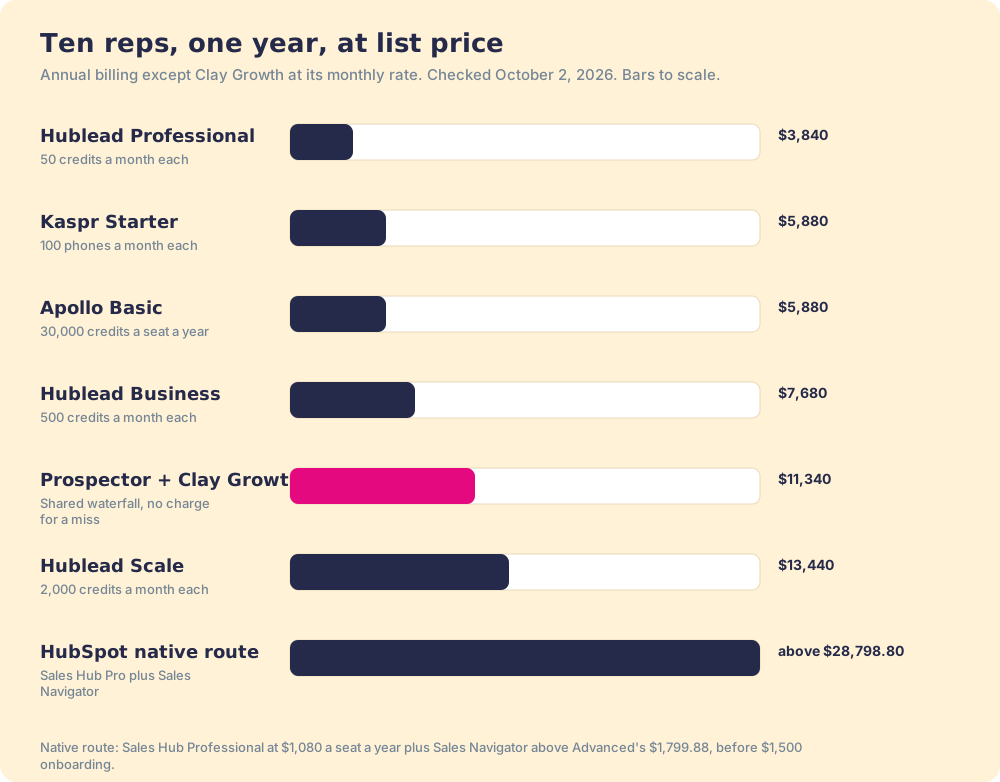
The arithmetic for ten reps. Clay’s Growth plan is $495 a month on monthly billing, $5,940 a year (Clay pricing). Prospector is $45 per rep per month, billed annually, from one rep (Prospector). Ten reps come to $11,340 a year. Ten Hublead Business seats come to $7,680 and ten Scale seats to $13,440, so Hublead Business is cheaper on list price, and Scale costs more. The difference is the toll rule: Hublead charges 8 credits a phone from a fixed monthly allowance; the Clay waterfall charges only when a provider returns a result, from a credit pool the whole team shares. Implementation is included, and teams go live in under a week. The Prospector vs Hublead comparison sets the two side by side.
Choose something else if you do not have Clay: Prospector runs on the customer’s Clay account and does nothing without one. Choose something else if LinkedIn message sync is the job. The sourcing use case shows how a Clay team sets Prospector up.
2. Apollo: for calling reps without Clay
Apollo is a database, a dialer, and a sequencer in one seat, with a Chrome extension that opens on LinkedIn. Its public pricing data on October 2, 2026 listed Basic at $49 per seat per month billed annually ($65 monthly) with 30,000 credits a seat a year, and Professional at $79 with 48,000; a phone costs 8 credits and an email 1 (apollo.io/pricing). The phone costs the same 8 credits as on Hublead, but the pocket is bigger: 30,000 credits a year is 3,750 phones, against a Hublead Business seat’s 744 a year (62 a month) for $768.
Where it loses to Hublead: no LinkedIn message sync and no LinkedIn activity written to HubSpot properties, and a credit meter that is harder to forecast when ten reps share it. The Apollo Chrome extension page covers its install and limits.
3. Kaspr: for email-first reps
Kaspr’s LinkedIn extension reveals emails and phones from its own database, strongest in Europe. Starter is $49 a seat a month billed annually ($65 monthly) with unlimited B2B emails under a fair-use cap of 10,000 credits per account per month and 100 phone credits a month; Business is $79 with 200 (kaspr.io/pricing). It connects natively to HubSpot, Salesforce, Pipedrive, and Zoho. Hublead lets you plug a Kaspr account into its own enrichment, so the two are not mutually exclusive.
Where it loses to Hublead: no message sync, and a separate export credit each time a contact leaves Kaspr for the CRM. The Kaspr Chrome extension page walks its four credit types.
4. LinkedIn’s own routes: CRM Sync and the Sales Navigator card
HubSpot’s native integration is a window more than a bridge. It shows LinkedIn context on a HubSpot record, and HubSpot’s help page is direct about the limit: “It is not possible to import contacts from LinkedIn using the integration.” It requires a Sales Hub Professional or Enterprise seat and a Sales Navigator Advanced Plus account (HubSpot KB). LinkedIn’s CRM Sync goes further, creating and updating HubSpot contacts and writing back InMails, messages, and notes, on the same Advanced Plus requirement (LinkedIn). Sales Hub Professional lists at $90 a seat a month on annual billing ($1,080 a year), and Advanced Plus is quoted above Advanced’s $1,799.88 a year, so the floor is above $2,879.88 per rep per year before HubSpot’s $1,500 onboarding.
Where it loses to Hublead: price, and the lack of contact data. Neither route finds an email or a phone.
When is Hublead the simpler buy?
More often than a vendor page usually admits. Stay on Hublead, or buy it, when these are true:
- A HubSpot team with no Clay. Prospector does nothing without a Clay account, and building a waterfall is a GTM engineer’s job you may not have.
- Message sync as the main job. If the value is LinkedIn conversations and invitation events on the HubSpot timeline, feeding workflows and reports, Hublead does that and none of the database tools above do.
- Email-light, call-light reps. If a rep reveals a handful of emails a day, Professional’s 50 credits at $384 a year is the cheapest seat on this page.
The day Hublead stops fitting tends to arrive with a dialer or a Clay contract. When reps start calling, the 8-credit phone eats the allowance. When the company buys Clay, Hublead’s toll booth becomes a second meter alongside the one you already pay for.
Which Hublead alternative should you choose?
Two questions decide it: does your team pay for Clay, and is message sync the job.
- Hublead, kept. The pick for a HubSpot team without Clay that wants LinkedIn messages and activity on the record.
- Supered Prospector. The pick for a team on Clay running HubSpot, Salesforce, or Pipedrive, that wants every lookup to ask the waterfall and the leader to see which lists got worked.
- Apollo. The pick without Clay when reps call at volume and want sequences in the seat.
- Kaspr. The pick without Clay for email-first reps selling into Europe.
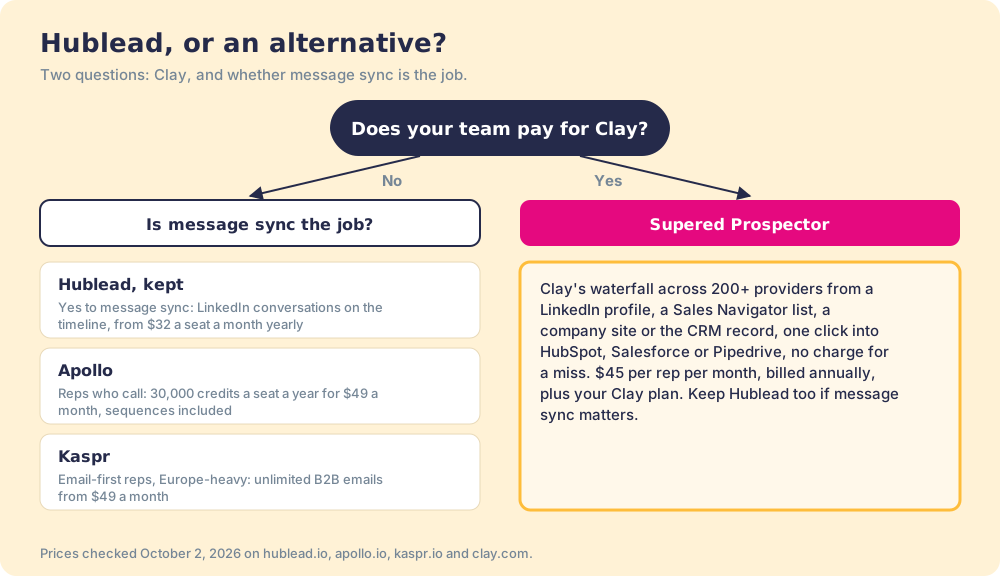
What we recommend turns on the contract you already hold. Without Clay, Hublead is a well-built footbridge, and the right move is to size the toll booth to your reps’ dials before you pick a plan; if phones are most of the work, Apollo’s bigger pocket wins. With Clay, you are paying for the market and then paying a second toll to carry the shopping across. Put the waterfall on the profile your rep is reading, send the contact to HubSpot, Salesforce, or Pipedrive in one click, and watch each list go from found to closed. A Prospector demo on your own Clay account shows it working from a LinkedIn profile.
Frequently asked questions
What is the best Hublead alternative?+
How much does Hublead cost?+
Does Hublead work with Salesforce?+
Is the Hublead Chrome extension free?+
Can HubSpot connect to LinkedIn without Hublead?+
Does Supered Prospector sync LinkedIn messages like Hublead?+
Your Clay waterfall, where reps already work.