The Kaspr Chrome Extension in 2026: A Hotel Minibar With Three Price Tags
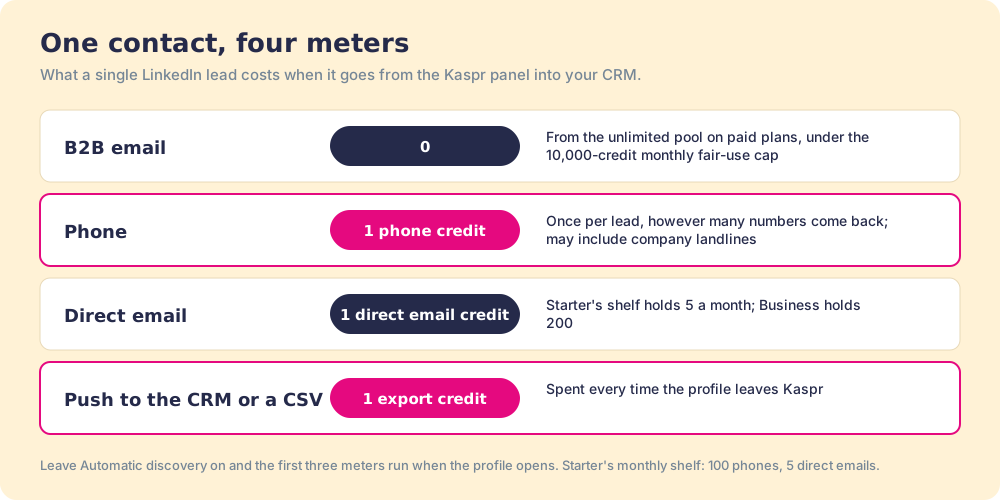
The Kaspr Chrome extension is free to install and meters four things: B2B emails, phones, direct emails, and exports.
What each plan buys, how to install it, the setting that spends credits for you, the CNIL fine, and the alternatives.
The Kaspr Chrome extension is Kaspr's free LinkedIn and Sales Navigator add-on that reveals B2B emails, direct emails, and phone numbers from Kaspr's own database, charging separate credits for phones, direct emails, and exports to your CRM.
The Kaspr Chrome extension is free to install, and the free part tells you almost nothing about what it will cost. Kaspr meters four different things, and only one of them is what a buyer expects to pay for. B2B emails are unlimited on paid plans, phones and direct emails come from a monthly allowance, and pushing the contact into your CRM spends a fourth kind of credit, an export (Kaspr help, what are credits, October 2, 2026). The short version:
- Kaspr’s extension. A good buy for one to five email-first reps on LinkedIn, especially selling into Europe, from $49 a seat a month on annual billing.
- Supered Prospector. The buy for a team that already pays for Clay: one extension, Clay’s waterfall across 200+ providers behind it, no charge for a miss, at $45 per rep per month billed annually.
- Apollo or Lusha. The non-Clay alternatives: Apollo when the dialer and sequences should sit in the same seat, Lusha when a few reps want a posted price and a panel that also opens in Gmail.
The Kaspr Chrome extension is Kaspr’s free LinkedIn and Sales Navigator add-on that reveals B2B emails, direct emails, and phone numbers from Kaspr’s own database, charging separate credits for phones, direct emails, and exports to your CRM. Its Chrome Web Store listing, “Kaspr: B2B Phone Number and Email Finder,” showed 100,000 users and 4.7 out of 5 from 1.2K ratings on October 2, 2026, version 2.0.20, last updated June 15 (Chrome Web Store). The reasons people stop liking it sit in the fine print below.
What does the Kaspr Chrome extension do?
Open the minibar in a decent hotel room. The bottled water on the top shelf has a little card next to it that says complimentary. The cashews and the small bottle of gin have prices. And in the better hotels there is one more wrinkle: the shelf has a sensor, so the charge posts the moment you lift the item, whether or not you drink it.
The Kaspr extension is that minibar, set into the side of a LinkedIn profile. The listing describes the job plainly: “Instantly reveal accurate B2B phone numbers and emails from LinkedIn profiles, groups, and events,” with the extension opened “while on the LinkedIn profiles or search list.” Behind the panel sits Kaspr’s own database. The store listing claims “over 500 million phone numbers and emails”; Kaspr’s data page describes “200 million + European B2B contacts” drawn from “120+ verified data sources and providers” (kaspr.io/our-data). The second number tells you where its strength lies.
The shelves map cleanly onto Kaspr’s four credit types:
- The complimentary water. B2B emails, unlimited on Starter and Business. The card next to the bottle is the fair-use clause in Kaspr’s terms: “a maximum limit of 10,000 credits per account per month applies” (kaspr.io/terms).
- The priced shelf. Phone credits and direct email credits, a fixed allowance a month. A phone credit is spent once per lead: “Regardless of the number of phone numbers associated with a lead, it will always cost 1 Phone Credit per lead,” and it may return “company landlines” as well as mobiles.
- The charge for carrying it out. Export credits. “Export Credits are spent every time you export your lead’s profile outside the Kaspr platform,” and the help center names the destination it means: “into your CRM or to a CSV file.”
- The sensor on the shelf. Kaspr’s Automatic discovery setting pre-selects emails, direct emails, and phones for reveal. Kaspr’s own help article shows how to switch all three off so the rep clicks Show per detail, “so you can ensure you’re only spending credits on the contact data you’re looking for” (Kaspr help, saving credits).
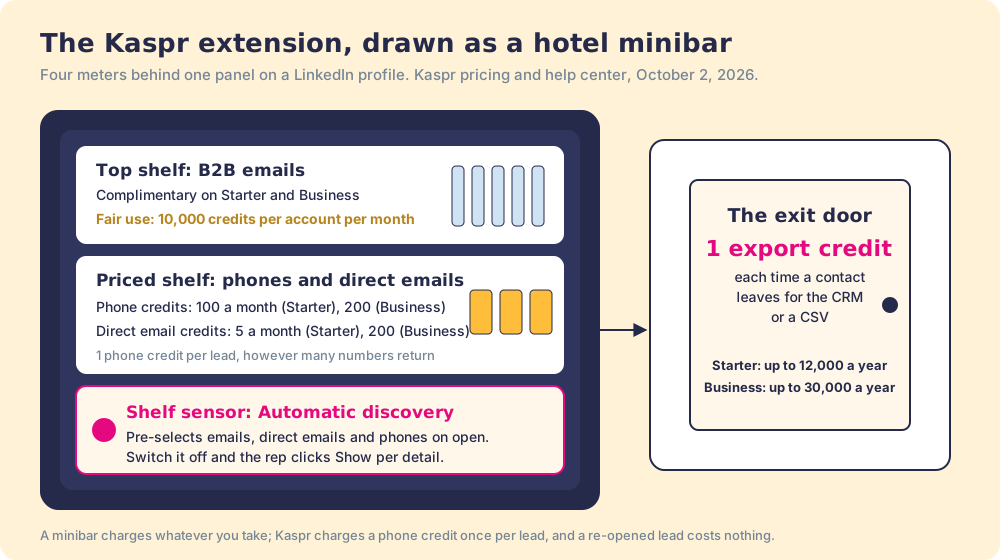
A hotel minibar charges whatever you take; Kaspr is kinder in one respect, charging a phone credit only once per lead, so re-opening a lead you already revealed costs nothing. Hold onto the sensor and the door. They explain most of the bills that surprise Kaspr customers.
Which Kaspr plan does the extension need, and what does it cost?
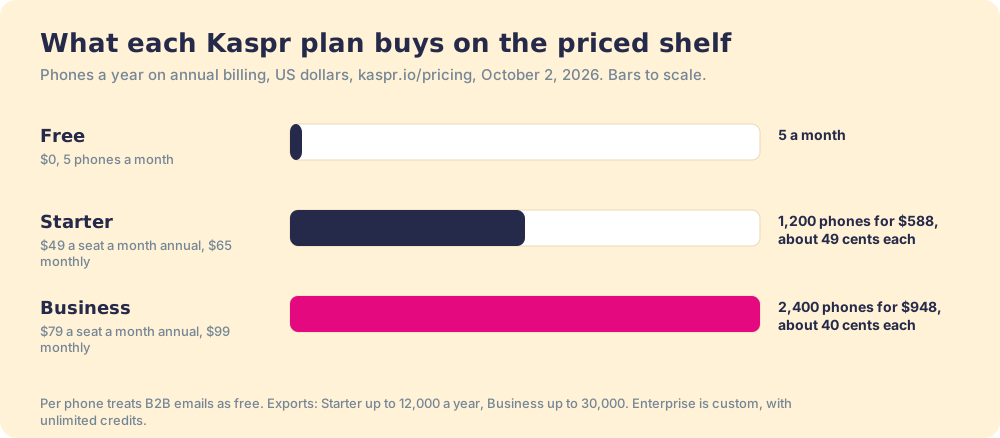
All plans include the extension. What changes is the size of the priced shelf, the number of times you can use the door, and a few features. The prices below come from kaspr.io/pricing, read October 2, 2026, in US dollars per user per month.
| Plan | Annual billing | Monthly billing | Phone credits | Direct email credits | Exports | Per phone (annual) |
|---|---|---|---|---|---|---|
| Free | $0 | $0 | 5 a month | 5 a month | 10 a month (help center) | n/a |
| Starter | $49 | $65 | 100 a month (1,200 a year) | 5 a month | up to 12,000 a year | about 49 cents |
| Business | $79 | $99 | 200 a month (2,400 a year) | 200 a month | up to 30,000 a year | about 40 cents |
| Enterprise | Custom | Custom | Unlimited | Unlimited | Custom | n/a |
“Per phone” divides the seat-year by the phone allowance and treats the emails as free: $588 a year for 1,200 phones on Starter, $948 for 2,400 on Business. The Kaspr pricing page walks the add-on credit ladders, which run from $91 for 250 extra phone credits down to about 21 cents a credit at 10,000.
Kaspr describes the Free plan two ways. The pricing page says 15 B2B email credits, 5 phone, and 5 direct email credits a month. The help center says 5 phone credits, 5 direct email credits, 10 export credits, and unlimited B2B emails “inviting three colleagues with gold invitations!” (Kaspr help, plans). Either way, five phones a month is a trial.
Three lines in the fine print change the arithmetic.
- The shared pool. On paid plans, “All users in your account can use the available credits collectively, without restrictions per user.” Business adds custom member permissions to cap a heavy user; Starter does not list them.
- The rollover that may not roll. The pricing page’s compare table says “Unused monthly credits roll over to the next month,” while the terms, last updated July 1, 2023, say credits “expire at the end of the current Subscription period and cannot be carried over.” Get the version that applies to your contract in writing before you count on a rollover.
- The renewal clause. The terms renew automatically “at the same price, subject to changes in pricing conditions,” with price changes notified 15 days before renewal, and silence for 15 days counts as acceptance.
How do you install the Kaspr Chrome extension?
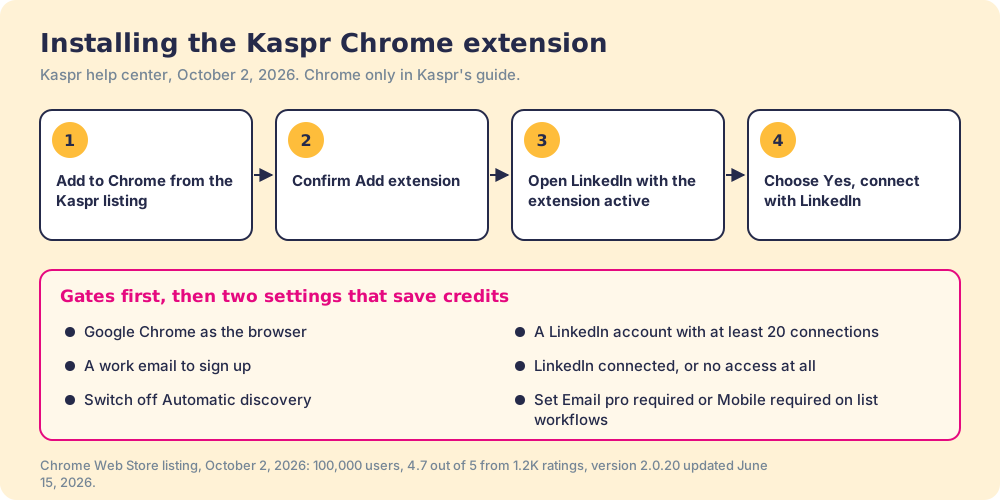
Kaspr’s install guide is five clicks and one handshake with LinkedIn (Kaspr help, install):
- Open the Kaspr listing in the Chrome Web Store and click Add to Chrome.
- Click Add extension in the confirmation pop-up.
- Go to LinkedIn with the extension active.
- Select “Yes, connect with LinkedIn” when Kaspr asks.
- Refresh LinkedIn if you clicked Cancel, and repeat the connect step.
The handshake is not optional. “You will only be able to use Kaspr if you sync your LinkedIn account,” the guide says, and the account guide adds two more gates: “a minimum of 20 connections on your LinkedIn account is required,” and sign-up needs “a valid work email” (Kaspr help, create an account). The guide also asks you to use Google Chrome; Kaspr does not list Edge or Firefox.
Once connected, the panel opens on its own on LinkedIn. To work a list instead of a profile, Kaspr’s Sales Navigator guide has you filter a search by lead list, open the extension, pick an enrichment workflow, and click Launch now on the number of leads you choose (Kaspr help, Sales Navigator). The workflow lets you set a condition that saves credits: with “Email pro required,” Kaspr says it “will only spend the credit if Kaspr finds at least 1 professional email.” Leave the conditions blank, and the credit is spent whatever comes back.
What are the Kaspr extension’s limits?
Kaspr is open about most of them, which is to its credit. Read them before a rollout.
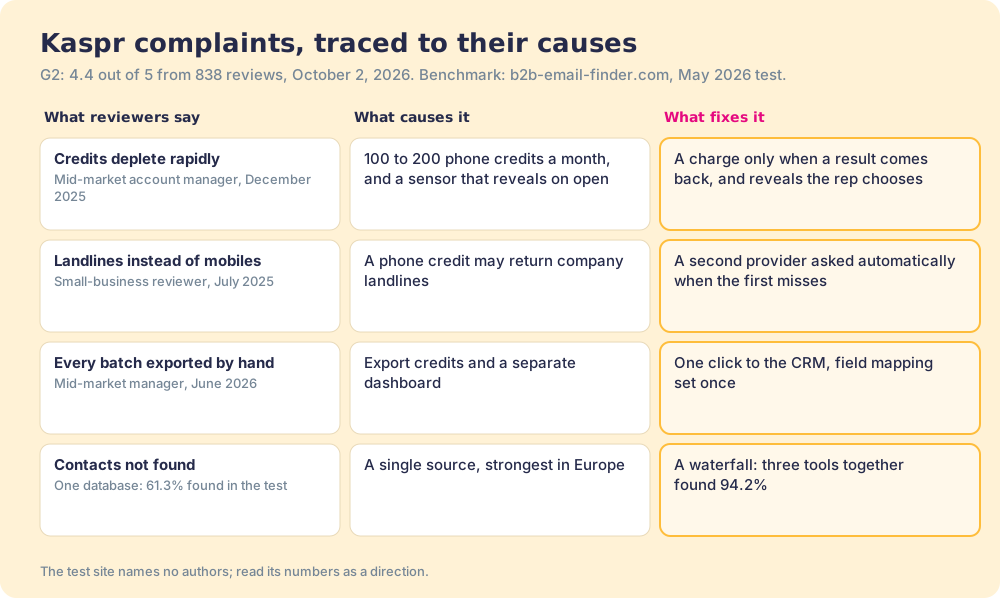
- One database. The panel shows Kaspr’s data. In an anonymous May 2026 test of 500 contacts with known emails, Kaspr found 61.3% of them, against 88.2% for Apollo and 83.2% for Findymail; the same test found that “No single tool exceeded 89% coverage” and that a three-tool waterfall reached 94.2% (b2b-email-finder.com, June 8, 2026). The site names no authors, so treat it as a direction rather than a verdict.
- A thin phone shelf. The Bridge Group’s 2025 report puts the median SDR at 44 dials a day (Bridge Group). Suppose, for the arithmetic only, that each dial needed a freshly revealed number. Starter’s 100 phones a month would last 2.3 working days and Business’s 200 about 4.5. Reps redial, so the real burn is slower, and the direction holds.
- The export door. A rep who reveals in the extension and then sends the contact to HubSpot spends an export credit on top of the reveal. Starter’s 12,000 exports a year is 48 per working day, generous for one rep, and shared across the team pool.
- The LinkedIn handshake. The extension needs your LinkedIn account connected, and bulk enrichment of whole search lists is built in. Convenient, and also the part of the product a regulator has looked at.
The regulator’s look is public. On December 5, 2024, France’s CNIL fined Kaspr EUR 240,000 over its Chrome extension, which collected the contact details of LinkedIn members, including members who had limited the visibility of those details to their own connections; the CNIL counted a database of “about 160 million contacts” and contact details kept “for 5 years from each data update” (CNIL). The decision concerned practices at the time. We make no compliance claim for Kaspr, or for any extension, including our own. Ask every vendor what its extension reads from LinkedIn, ours included, and ask for the answer in writing.
What do Kaspr’s reviewers complain about?
Kaspr held 4.4 out of 5 from 838 reviews on G2 on October 2, 2026, and G2’s own reviewer mix leans small: 69.1% small business on the Kaspr vs Lusha comparison. The praise is for speed on LinkedIn. The complaints repeat, and each one traces back to a shelf or the door.
- Credits that run out. “One drawback is that the credit system depletes rapidly when engaging in high volume sourcing,” a mid-market account manager wrote in December 2025. The priced shelf, and the sensor that spends it, explain the speed.
- Numbers that ring a switchboard. A small-business reviewer wrote in July 2025 that “the phone number data isn’t available or only includes landlines.” Kaspr’s help center warns that a phone credit may return company landlines.
- Contacts that do not reach the CRM on their own. “Every batch of contacts must be exported and uploaded manually,” a mid-market trade manager wrote in June 2026. The export door, seen from the rep’s side.
For an email-first rep selling into Europe, unlimited B2B emails at $49 a month on annual billing is hard to beat. The extension becomes the wrong tool when phones are the job, or when the missing 40% is the account that decides the year.
Why trust this page?
I started RevPartners, a HubSpot partner that did only sales implementations, sold roughly twice as much Sales Hub as any other partner, and reached Elite tier in 13 months. Supered grew out of that work. It holds 4.9 out of 5 from 81 reviews on G2 and 5.0 from 122 reviews on the HubSpot App Marketplace, both checked October 1, 2026. That is also the disclosure: we make Supered Prospector, and it ranks first below for teams that pay for Clay. The weights are printed so you can flip them, and a solo, email-first rep who flips them will find Kaspr near the top.
How does the Kaspr extension compare with the alternatives?
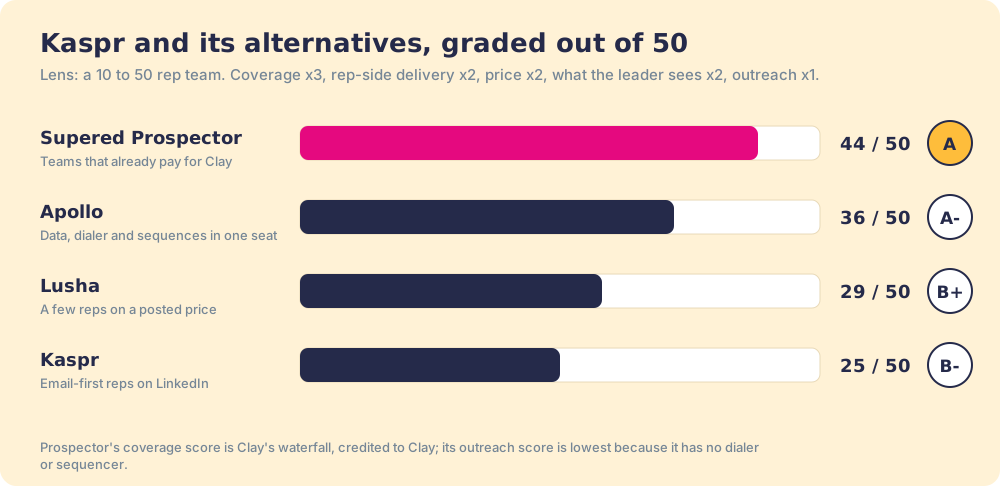
The lens is a mid-market or SMB team, ten to fifty reps, that wants contact data reps will use where they already work and a leader who can see which lists turn into pipeline. Each criterion is scored 1 to 5 and weighted: coverage of the contact you need (x3), rep-side delivery (x2), price structure for mid-market (x2), what the leader sees after the export (x2), bundled outreach (x1), for a maximum of 50. The scores match the Kaspr alternatives page and the Lusha Chrome extension page, so the pages read together.
| Rank | Tool | Grade | Score | Best fit | CRM integration | Setup effort | Pricing (plan with the extension) | Reason to switch from Kaspr |
|---|---|---|---|---|---|---|---|---|
| ref | Kaspr extension | B- | 25 | Email-first reps on LinkedIn, Europe-heavy | Native (HubSpot, Salesforce, Pipedrive, Zoho) | Minutes | Free to $79 a seat a month, annual | Stay if emails are the job and 100 to 200 phones a month cover the dials |
| 1 | Supered Prospector | A | 44 | Teams that already pay for Clay | Native (HubSpot, Salesforce, Pipedrive) | Under a week on an existing Clay account | $45 per rep per month, billed annually, plus your Clay plan | 200+ providers per lookup, no charge for a miss, lists followed to closed |
| 2 | Apollo | A- | 36 | Small teams wanting data, dialer, and sequences in one plan | Native (HubSpot, Salesforce, Pipedrive) | A day | $49 a seat a month, billed annually | More phones per dollar, outreach in the seat |
| 3 | Lusha | B+ | 29 | One to five reps who want a posted price | Native (HubSpot, Salesforce, Pipedrive) | Minutes | Free to $3,599.10 a year (Premium, 5 seats) | Panel in Gmail and on company sites too |
Kaspr’s 25 is coverage 2, rep-side delivery 4, price 4, what the leader sees 1, outreach 1. The price 4 is earned by unlimited B2B emails on a posted, monthly-cancellable price; the coverage 2 is one database, strongest in Europe. Prospector’s coverage score is Clay’s waterfall, credited to Clay, and its outreach score is the lowest on the card on purpose, because it has no dialer or sequencer.
Corporate status, checked October 2, 2026: Kaspr has been part of Cognism since April 2022 (“We joined Cognism in 2022,” kaspr.io/about-us), and a news search found no newer acquisition or funding for either. That matters if you plan to wave a Kaspr quote in a Cognism negotiation.
Where does Supered Prospector fit?
Prospector runs inside the Supered Chrome extension, brings no database of its own, and brings Clay’s waterfall, on the team’s own Clay account, to the page the rep is already on. Clay’s pricing page calls its marketplace “200+ providers in one place,” and its rep-prospecting page describes waterfalls that “check multiple providers to return the most verified emails (lower bounce rate) and phone numbers (higher connect rate)” (clay.com). And the bill has a rule Kaspr’s minibar lacks: “If an enrichment returns no result, you’re not charged Data Credits or Actions” (clay.com/pricing, October 2, 2026). We chose Clay as our only data provider for that reason.
One detail matters for a Kaspr buyer in particular. Kaspr is not a step you can add to Clay: on October 2, 2026, Clay’s directory had no Kaspr page, while it listed Lusha, Apollo, ZoomInfo, RocketReach, and Hunter. Several of those, Lusha, Apollo and ZoomInfo among them, run in Clay on your own account with that vendor (“Bring Your Own Account Required”), so a Clay waterfall does not hand you their data on Clay credits. The coverage comes from the providers Clay sells directly, routed in the order your GTM engineer sets.
What a rep gets, with no Clay login:
- Lookups from four starting points. A LinkedIn profile, a Sales Navigator list, a company website with company research alongside, or the HubSpot, Salesforce, or Pipedrive record.
- A look before the first touch. On a LinkedIn profile the rep sees the matching CRM record and whether the prospect was already worked in the past, before creating a duplicate.
- A buying committee, by your definition. The lookup returns the titles, departments, and seniority the team set, and a whole list can go into any custom Clay workflow your GTM engineer built.
- One click to the CRM. Field mapping is set once; there is no export credit at the door.
- Lists the leader can follow. Found, worked, closed: the team’s process applies to worked prospects, and each lead ends the way your process says, qualified, recycled, or disqualified.
The arithmetic, side by side. Clay’s Growth plan is $495 a month on monthly billing, or $5,940 a year ($446 a month if you pay annually) (Clay pricing). Prospector is $45 per rep per month, billed annually, from one rep (Prospector). Ten reps on Prospector plus Clay Growth at the monthly rate come to $11,340 a year. Ten Kaspr Starter seats come to $5,880 and ten Business seats to $9,480, so on list price Kaspr is cheaper for the same headcount. The difference is what stands behind each lookup: one database on one side, a waterfall across 200+ providers on the other, with no charge for the empty shelf. Implementation is included, and teams go live in under a week. The Prospector vs Kaspr comparison sets the two side by side feature for feature.
Choose something else if you do not have Clay. Prospector runs on the customer’s Clay account and does nothing without one, and a team that has never built a waterfall needs someone to build it. Choose something else, too, if you are one rep sending email into Europe, because unlimited B2B emails at $49 a month is a fine deal for that job. The sourcing use case shows how a team sets Prospector up when Clay is already in place.
What are the non-Clay alternatives to the Kaspr extension?
Two are worth a rep’s install, and each meters the minibar differently.
- Apollo. The pick when the extension should come with a dialer and sequences. Apollo’s public pricing data on October 2, 2026 listed Basic at $49 per seat per month billed annually ($65 monthly) with 30,000 credits a seat a year, and Professional at $79 with 48,000; a phone costs 8 credits and an email 1 (apollo.io/pricing). That is 3,750 phones a year on Basic against Kaspr Starter’s 1,200, for the same $49. The Apollo Chrome extension page covers its install and limits.
- Lusha. The pick for a handful of reps who want a posted price and a panel that opens beyond LinkedIn, in Gmail and on company websites. Lusha charges 1 credit an email and 5 a phone, from a Free plan of 40 credits a month to Starter at $449.10 a year for 4,800 credits (lusha.com/pricing). The Kaspr vs Lusha page prices the two per phone.
The same questions about other vendors’ extensions are answered on the Cognism Chrome extension page, whose parent company owns Kaspr, and the LinkedIn email finder roundup grades seven extensions on finding the email and the phone.
Which should you choose?
Two questions decide it: does your team pay for Clay, and what do your reps reveal most.
- Kaspr’s extension, kept. The pick for email-first reps, especially in Europe, who can live inside 100 or 200 phones a month. Switch off Automatic discovery on day one, and require the field you want on list workflows.
- Apollo. The pick when reps call at volume and want the dialer and sequences in the same seat.
- Lusha. The pick for one to five reps who want a posted, cancellable price and a panel in Gmail and on company sites.
- Supered Prospector. The pick when the team already pays for Clay and you want one extension, a waterfall behind it, no export meter at the door, and a view of which sourced lists got worked and closed.
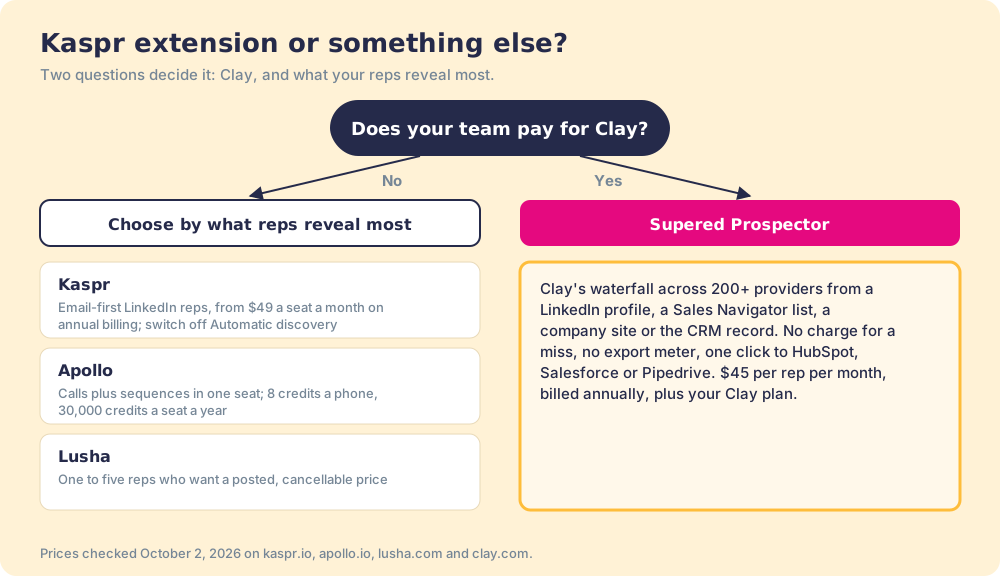
What we recommend turns on one fact about your stack. Without Clay, the Kaspr extension is a well-stocked minibar for email, and the right move is to count your reps’ phone reveals and exports before you renew; if the phone is most of the bill, Apollo’s meter gives you about three times the phones for the same seat price. With Clay, stop paying for a second minibar your reps have to carry from room to room. Put the waterfall on the profile they are already reading, pay nothing for the lookups that come back empty, and watch each list go from found to closed. A Prospector demo on your own Clay account is the fastest way to see it.
Frequently asked questions
Is the Kaspr Chrome extension free?+
How many credits does the Kaspr extension use per contact?+
Does the Kaspr extension work on Sales Navigator?+
Is the Kaspr LinkedIn extension safe to use?+
Can I use Kaspr inside Clay?+
What is the best alternative to the Kaspr Chrome extension?+
Everything we have written on Kaspr
More on Kaspr
Supered Prospector vs Kaspr: the side-by-side- Kaspr Alternatives in 2026: Bottomless Bread, Wine by the Glass, and One Kitchen
- Kaspr Pricing in 2026: Four Meters on One House
- Apollo vs Kaspr in 2026: The Same $49 at the Door, Two Very Different Clubs
- Cognism vs Kaspr in 2026: One Owner, a Flagship, and the Outlet Round the Corner
- Kaspr vs Lusha in 2026: Unlimited Texts or a Prepaid Card
- Kaspr vs Waalaxy in 2026: The Phone Book and the Postman
- Kaspr vs ZoomInfo in 2026: A Bike Off the Shop Floor or a Company Car Lease
Your Clay waterfall, where reps already work.