The Seamless.AI Chrome Extension in 2026: A Free Table at a Market-Price Restaurant
The Seamless.AI Chrome extension is free; the credits behind it are priced on request.
What it does on LinkedIn, Gmail, and Salesforce, how Find and Find All spend credits, the 60-day renewal clause, what reviewers report, and the alternatives.
The Seamless.AI Chrome extension is Seamless's free browser sidebar that researches the people on a LinkedIn profile, company website, Gmail, or Salesforce page in real time and returns emails and phones, spending one contact search credit per person found.
The Seamless.AI Chrome extension is free, and so is the table at a good seafood restaurant. The bill depends on what you order, and at Seamless the menu says “market price.” Its pricing page became an inquiry form on or before October 1, 2026, and a buyer now learns the price of the credits behind the extension from a sales call (seamless.ai/pricing, checked October 2, 2026). The short version:
- Seamless’s extension. A capable sidebar for a rep who prospects on LinkedIn, company websites, Gmail, and Salesforce in one place, on an annual contract priced by Seamless’s sales team.
- Supered Prospector. The buy for a team that already pays for Clay: Clay’s waterfall across 200+ providers in one extension, a posted $45 per rep per month billed annually, no charge for a miss.
- Apollo or RocketReach. The non-Clay alternatives with posted prices: Apollo when the dialer and sequences belong in the seat, RocketReach for phones with a refunded miss.
The Seamless.AI Chrome extension is Seamless’s free browser sidebar that researches the people on a LinkedIn profile, company website, Gmail, or Salesforce page in real time and returns emails and phones, spending one contact search credit per person found. Its Chrome Web Store listing showed 90,000 users and 4.5 out of 5 from 199 ratings on October 2, 2026, version 13.96.6, updated September 17 (Chrome Web Store). A naming note before we start: Seamless also sells a product it calls Prospector. Supered Prospector, which appears later on this page, is a different product from a different company.
What does the Seamless.AI Chrome extension do?
Sit down at a seafood place where half the menu reads “market price.” The bread is free and the table is yours for the evening. The waiter is attentive, and there is one habit to watch: he will take an order for the whole table on a single nod, and each plate lands on your bill.
The Seamless extension is that table, opened as a sidebar on whatever page you are reading. Seamless’s product page says it “auto-detects contacts and companies as you browse, pulling verified data and insights into a sleek sidebar,” with actions to “Add contacts to lists, send to your CRM, build tasks, run enrichment, or download data” (Seamless, Chrome extension). Its help center names the pages: “prospect on LinkedIn, Gmail, and Salesforce,” with LinkedIn Basic, Recruiter, and Sales Navigator all supported, plus company websites (Seamless help, Chrome extension).
What makes Seamless different from a database extension is the kitchen. Seamless calls itself “a real-time search engine” that “pulls information in real time” (Seamless FAQ), so clicking Find starts research on that person rather than reading a stored record. Each email comes back with “an AI confidence percentage ranging from 0% to 99%,” and Seamless’s own guidance is that “the higher the percentage, the more confident the AI is in that email.”
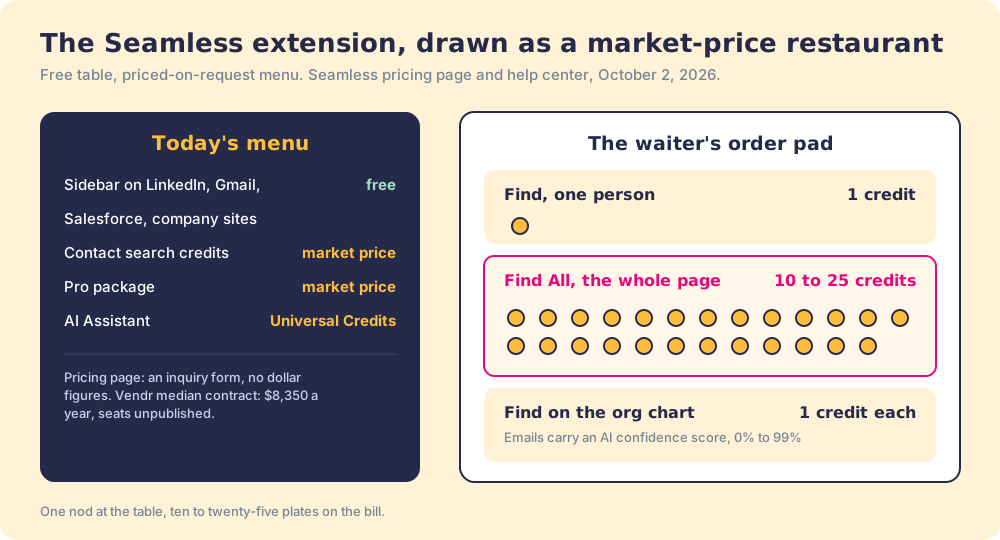
Then the order for the table. “One contact search credit will be used when you click Find next to a contact,” the help center says. Find All researches “all available records on the page,” and “Each individual contact researched uses one contact search credit. The number of contacts shown per extension page varies by website, but typically ranges from 10 to 25 contacts per page” (Seamless help, navigating the extension). One nod, ten to twenty-five plates.
What do Seamless.AI’s credits and plans cost?
Here the restaurant analogy stops being a figure of speech. Seamless publishes no prices. On October 2, 2026, its pricing page read “Perfect Pricing for Startups to the Fortune 500” and “Get special pricing for unlimited users, bulk credits, prospector, job changes, buyer intent, and enrichment,” followed by a two-question form: how many contacts you need a month, and your company size. No plan cards, no dollar figure.
A week earlier the same page carried plan names. On September 25, 2026 it listed a Free plan for one user with 50 credits, a Pro plan “Per User” with “Annual Credit Packages,” and an Enterprise plan with “Unlimited Users,” and its FAQ said “Pro plans start off at 10,000 annual credits.” Still no prices. The best outside number is Vendr’s: a median Seamless.AI contract of $8,350 a year, with the seat count behind it unpublished (Vendr, comparison block, checked October 1, 2026). The Seamless AI pricing page goes through what is known.
| What you can learn | Where | Date |
|---|---|---|
| Extension: free | Seamless product page FAQ | October 2, 2026 |
| Free plan: 1 user, 50 credits | Seamless pricing page (since removed) | September 25, 2026 |
| Pro: “start off at 10,000 annual credits” | Seamless pricing FAQ (since removed) | September 25, 2026 |
| Prices: none published; inquiry form | seamless.ai/pricing | October 2, 2026 |
| Median contract: $8,350 a year, seats unpublished | Vendr | October 1, 2026 |
| Find: 1 credit; Find All: 10 to 25 per page | Seamless help center | October 2, 2026 |
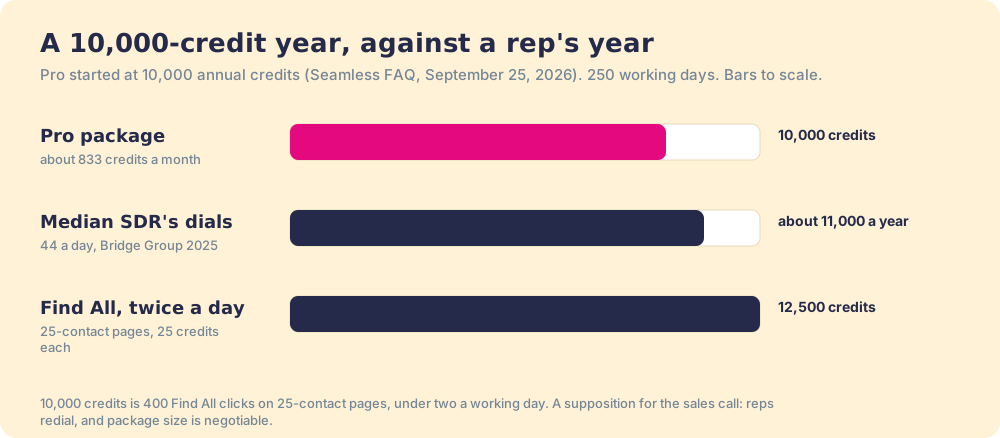
Put the two halves together. A 10,000-credit year is about 833 credits a month. A rep who clicks Find All on a page of 25 spends 25 of them, so the year holds 400 such clicks, under two a working day; two a day would need 12,500 credits. The Bridge Group’s 2025 report puts the median SDR at 44 dials a day (Bridge Group), which over 250 working days is about 11,000 dials, more than the 10,000 credits even if every credit found a new number. Reps redial, and the size of your Pro package is negotiable; the arithmetic is a supposition to bring to the sales call.
How do you install the Seamless Chrome extension?
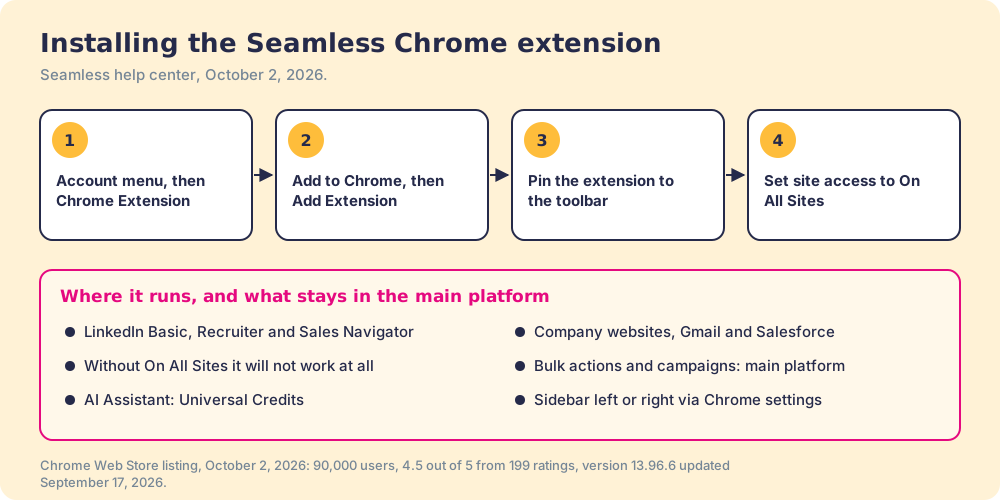
Seamless’s install guide has five steps (Seamless help, install):
- Log in to Seamless, open the account menu, and select Chrome Extension.
- Click “Add to Chrome” on the extension landing page.
- On the Chrome Web Store page, click “Add to Chrome,” then confirm “Add Extension.”
- Pin the extension from the puzzle-piece menu.
- Set its site access to “On All Sites.” Seamless is blunt about this one: “Not having this setting will not allow the extension to work at all.”
The sidebar can sit on the left or right through Chrome’s side panel setting. On the listing’s privacy panel, Seamless discloses that the extension handles “Personally identifiable information,” “Personal communications,” and “Location,” which is worth a look by whoever approves extensions at your company.
What are the Seamless extension’s limits?
- Bulk work lives elsewhere. The help center says campaigns and actions “in bulk, that should be done in the main Seamless platform.” The sidebar is for research and single actions.
- AI features cost a second currency. “AI Assistant is a premium feature that requires Universal Credits to use.”
- Confidence scores instead of a guarantee. An email marked 70% is Seamless’s estimate that it will work. A rep has to decide what number is good enough, and a team should set that number once.
- One kitchen. Seamless’s data comes from Seamless’s own research. On October 2, 2026, Clay’s provider directory had no page for Seamless, so a Clay waterfall cannot add it as a step.
- An annual contract with a 60-day exit. Seamless’s terms say “All subscriptions for the Services are annual with monthly or annual billing cycles,” and a cancellation must be completed “no later than 60 days prior to the next annual contract renewal date,” or “the annual contract will automatically renew for an additional 12 months” (Seamless terms). The help center adds that an admin or owner must submit a form “and meet with your Customer Success Representative.”
What do Seamless.AI’s reviewers report?
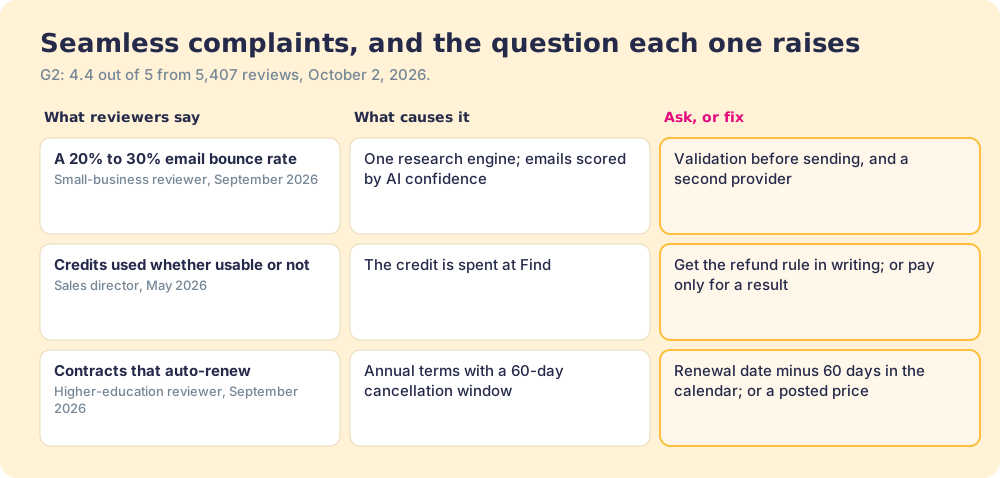
Seamless held 4.4 out of 5 from 5,407 reviews on G2 on October 2, 2026, one of the largest review bases in the category, and the extension is a frequent reason for the praise. The complaints cluster in three places.
- Bounces. “While it markets a near-perfect accuracy rate, real-world usage often results in a 20% to 30% email bounce rate,” a small-business reviewer wrote in September 2026.
- Credits spent on misses. “A ‘credit’ gets used whether the contact data ends up being usable or not,” a sales director wrote in May 2026. Seamless’s Bulk Credits page says the opposite for one case: “Credits automatically return for invalid emails or bad data” (Seamless, Bulk Credits). Ask which rule applies to your package, in writing.
- Contracts. “They lock you into rigid, multi-year contracts that auto-renew,” a higher-education reviewer wrote in September 2026. The terms describe annual contracts; the reviewer describes a longer one. Read your own order form.
For a rep who prospects across LinkedIn, Gmail, and Salesforce and likes one sidebar for all of it, the Seamless extension is a capable tool, and the 5,407 reviews show plenty of happy users. It becomes the wrong buy when a team needs to know its price before the call, or when a 20% bounce rate lands on the domain you send from.
Why trust this page?
I started RevPartners, a HubSpot partner that did only sales implementations. It sold roughly twice as much Sales Hub as any other partner and reached Elite tier in 13 months. Supered came out of that work and holds 4.9 out of 5 from 81 reviews on G2 and 5.0 from 122 on the HubSpot App Marketplace (both checked October 1, 2026). The disclosure: we make Supered Prospector, and it ranks first below for teams on Clay. The weights are printed so you can flip them.
How does the Seamless extension compare with the alternatives?
The lens is a ten-to-fifty-rep team that wants contact data reps use where they work and a leader who can see which lists turn into pipeline. Five criteria, scored 1 to 5 and weighted: coverage of the contact you need (x3), rep-side delivery (x2), price structure for mid-market (x2), what the leader sees after the export (x2), and bundled outreach (x1), out of 50. The scores match the Seamless AI alternatives page and the ZoomInfo vs Seamless page.
| Rank | Tool | Grade | Score | Best fit | CRM integration | Setup effort | Pricing | Reason to switch from Seamless |
|---|---|---|---|---|---|---|---|---|
| ref | Seamless extension | C+ | 21 | Reps who want one sidebar on LinkedIn, Gmail, and Salesforce | Native (Salesforce, HubSpot, Dynamics) | Minutes, plus a sales call | Unpublished; Vendr median $8,350 a year | Stay if the quoted price and the contract terms work for you |
| 1 | Supered Prospector | A | 44 | Teams that already pay for Clay | Native (HubSpot, Salesforce, Pipedrive) | Under a week on an existing Clay account | $45 per rep per month, billed annually, plus your Clay plan | Posted price, 200+ providers per lookup, no charge for a miss |
| 2 | Apollo | A- | 36 | Small teams wanting data, dialer, and sequences | Native (HubSpot, Salesforce, Pipedrive) | A day | $49 a seat a month, billed annually | Posted price, outreach in the seat |
| 3 | RocketReach | B+ | 29 | Individual reps wanting phones on a posted price | Native from Pro (Salesforce, HubSpot, Outreach, Salesloft) | Minutes | $899 a year (Pro) | Posted price, a lookup refunded when nothing is found |
Seamless’s 21 is coverage 2, rep-side delivery 3, price 2, what the leader sees 1, outreach 3. The price 2 is the unpublished price and the 60-day renewal window; the outreach 3 is real, since the sidebar can email, call through Twilio, and add a contact to a campaign. Prospector’s coverage score is Clay’s waterfall, credited to Clay, and its outreach score is the lowest on the card on purpose, because it has no dialer or sequencer.
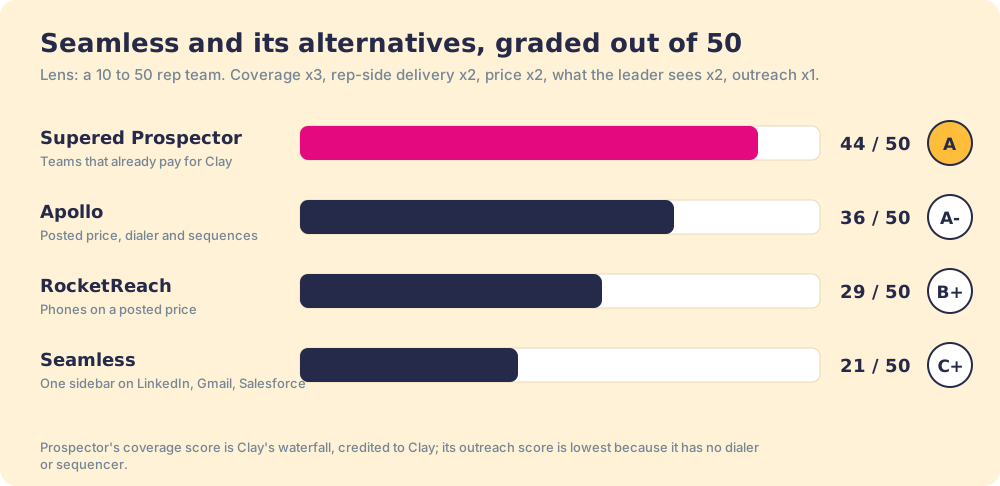
Corporate status, checked October 2, 2026: Seamless Contacts Inc., of Dublin, Ohio, announced its “evolution to Seamless” with a new brand on February 10, 2026 (Seamless news); the G2 page now reads “Seamless (formally Seamless.AI).” A news search found no acquisition or funding round this year.
Where does Supered Prospector fit?
Supered Prospector is the restaurant with the prices on the menu. It runs inside the Supered Chrome extension, brings no database of its own, and brings Clay’s waterfall, on the team’s own Clay account, to the page the rep is already on. Clay’s pricing page calls the marketplace “200+ providers in one place” and states the rule that answers the second reviewer complaint: “If an enrichment returns no result, you’re not charged Data Credits or Actions” (clay.com/pricing, October 2, 2026). We chose Clay as our only data provider for that reason. One caveat: some providers in Clay, Apollo, Lusha and ZoomInfo among them, run on your own account with that vendor (“Bring Your Own Account Required”).
What a rep gets, with no Clay login:
- Lookups from four starting points. A LinkedIn profile, a Sales Navigator list, a company website with company research alongside, or the HubSpot, Salesforce, or Pipedrive record.
- A look before the first touch. On a profile the rep sees the matching CRM record and whether the prospect was already worked in the past.
- A buying committee, by your definition. Titles, departments, and seniority the team set, so a rep does not order for the whole table, and a whole list pushed into any custom Clay workflow your GTM engineer built.
- One click to the CRM. Field mapping set once.
- Lists the leader can follow. Found, worked, closed: the team’s process applies to worked prospects, and each lead ends the way your process says, qualified, recycled, or disqualified.
The arithmetic, with posted numbers on our side and Vendr’s on theirs. Clay’s Growth plan is $495 a month on monthly billing, $5,940 a year (Clay pricing). Supered Prospector is $45 per rep per month, billed annually, from one rep (Prospector). Ten reps come to $11,340 a year. Vendr’s median Seamless contract is $8,350, and because Vendr does not publish the seat count behind it, the two cannot be compared seat for seat. What can be compared is the shape: one research engine with credits spent at Find, against a waterfall across 200+ providers that charges only for a result. Implementation is included, and teams go live in under a week.
Choose something else if you do not have Clay. Prospector runs on the customer’s Clay account and does nothing without one. Choose something else, too, if your reps want email, calls, and campaigns inside one sidebar on Gmail and Salesforce, because Prospector has no dialer or sequencer. The sourcing use case shows how a Clay team sets it up.
What are the non-Clay alternatives to the Seamless extension?
Both publish their prices, which after a market-price menu is a relief.
- Apollo. The pick for a sidebar with a dialer and sequences behind it. Apollo’s public pricing data on October 2, 2026 listed Basic at $49 per seat per month billed annually ($65 monthly) with 30,000 credits a seat a year; a phone costs 8 credits and an email 1 (apollo.io/pricing). The Apollo Chrome extension page covers its install and limits.
- RocketReach. The pick for phones on a posted price with a fair meter. Pro is $899 a year with unlimited lookups up to 10,000 a month and 3,600 exports, and “A lookup is used if we find and verify email or phone, otherwise it is refunded” (rocketreach.co/pricing). The RocketReach Chrome extension page explains its lookup and export meters.
The LinkedIn email finder roundup grades seven extensions on finding the email and the phone.
Which should you choose?
Two questions decide it: does your team pay for Clay, and do you need to know the price before the call.
- Seamless’s extension, kept. The pick for reps who want one sidebar across LinkedIn, Gmail, and Salesforce with outreach built in, when the quoted price and the 60-day renewal window work for you.
- Apollo. The pick for a posted price with a dialer and sequences in the seat.
- RocketReach. The pick for phones on a posted price, with a lookup refunded when it finds nothing.
- Supered Prospector. The pick when the team pays for Clay and wants a posted price, a waterfall behind every lookup, and a view of which lists got worked and closed.
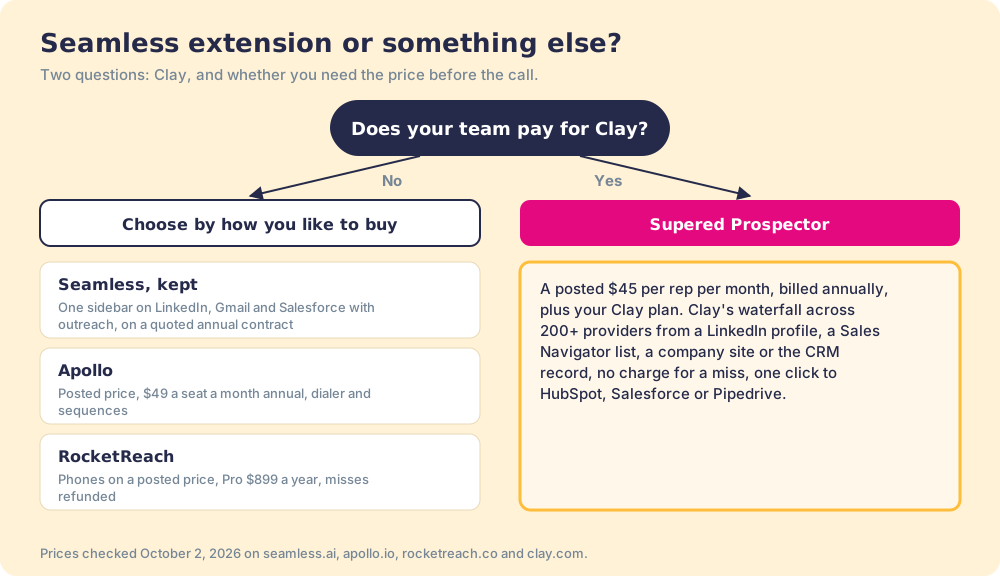
What we recommend turns on how you like to buy. If you are happy to negotiate, the Seamless sidebar is a capable table, and the right move is to walk into the sales call with three numbers: your reps’ Find All clicks a day, the credit refund rule in writing, and the renewal date minus 60 days. If you would rather see the price first, Apollo and RocketReach post theirs. And if you already pay for Clay, stop ordering from a second kitchen. Put the waterfall on the page your rep is already reading, pay nothing for the lookups that come back empty, and watch each list go from found to closed. A Prospector demo on your own Clay account shows it.
Frequently asked questions
Is the Seamless.AI Chrome extension free?+
How many credits does the Seamless extension use?+
Does the Seamless Chrome extension work on LinkedIn Sales Navigator?+
Can I cancel Seamless.AI at any time?+
Is Seamless's Prospector the same as Supered Prospector?+
What is the best alternative to the Seamless.AI Chrome extension?+
Everything we have written on Seamless.AI
More on Seamless.AI
Supered Prospector vs Seamless.AI: the side-by-side- Seamless AI Alternatives in 2026: The Storage Unit That Renews Itself, and the Courier Who Charges Per Parcel
- Seamless AI Pricing in 2026: Market Price on the Board, a Yearly Lease Behind It
- Seamless.AI Review 2026: A Sketch Artist for Contact Data, and the People in the Sketches
- Lusha vs Seamless in 2026: The Price Tag and the Showroom
- ZoomInfo vs Seamless AI in 2026: A Library, a Detective, and the Bill for Each
Your Clay waterfall, where reps already work.