Pipedrive Chrome Extension: There Isn't One, So Here Is What to Install
Pipedrive publishes no Chrome extension. Its browser tool is a Gmail add-on rated 2.1 of 5. What that add-on does, how to install it, and a graded list of the extensions Pipedrive teams add for LinkedIn, Sales Navigator, contact data and process.
A Pipedrive Chrome extension is a browser add-on that files people from Gmail, LinkedIn, Sales Navigator or a company website into Pipedrive; Pipedrive publishes none in the Chrome Web Store, so each Chrome extension for Pipedrive comes from a third party.
A Pipedrive Chrome extension is a browser add-on that files people from Gmail, LinkedIn, Sales Navigator or a company website into Pipedrive; Pipedrive publishes none in the Chrome Web Store, so each Chrome extension for Pipedrive comes from a third party. I ran four store searches on October 2, 2026 and got 26 listings back, none of them Pipedrive’s. One of the pages ranking for this search still tells readers to “install the official extension” (Modjo, June 2025). You will not find it. Three answers cover what most Pipedrive teams want from the browser:
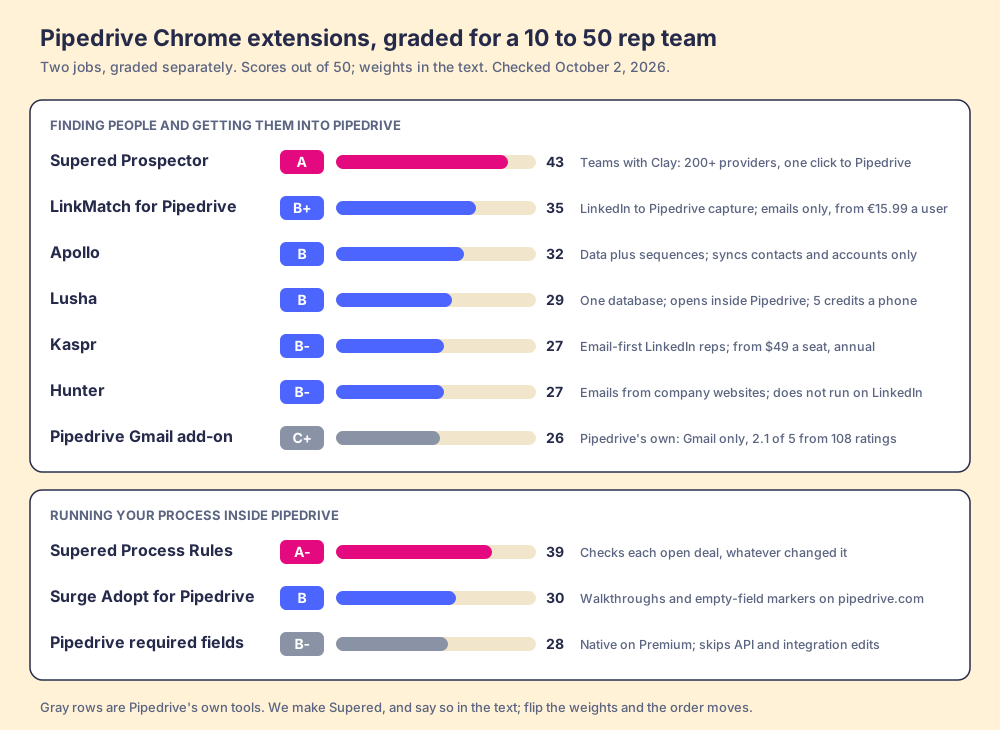
- Supered Prospector. For a team that already pays for Clay: one click from a LinkedIn profile, a Sales Navigator list, a company site or a Pipedrive record runs Clay’s waterfall across 200+ providers and files the person in Pipedrive, at $45 per rep per month billed annually.
- LinkMatch for Pipedrive. For LinkedIn capture without Clay: the most-installed Pipedrive-specific extension, from 15.99 euros a user a month, emails but no phones.
- Lusha or Kaspr. For phone numbers without Clay: database extensions that run on LinkedIn and sync to Pipedrive, from $449.10 a year (Lusha Starter) or $49 a seat a month on annual billing (Kaspr).
Below that sits the native Gmail add-on, the full graded list, and the second job Pipedrive teams install extensions for, which is keeping the pipeline to a standard once the people are in it.
Does Pipedrive have a Chrome extension?
Pipedrive is a tidy filing cabinet. Persons in one drawer, organizations in the next, deals and leads below, every folder labelled, the pipeline a pleasure to look at. It is used by more than 100,000 companies (Pipedrive), and G2 reviewers give it 4.3 out of 5 from 5,040 reviews (G2, October 1, 2026). The trouble with a filing cabinet is that it stays in the office. Prospects live out on the street, on LinkedIn and in Sales Navigator and on company websites, and the rep who meets one there needs a clipboard that files itself.
Pipedrive built the cabinet a mail slot and stopped. The slot is the Pipedrive CRM Gmail add-on, published by the Pipedrive Team in the Google Workspace Marketplace, which showed 83K+ installs and an average of 2.1 out of 5 from 108 ratings on October 2, 2026 (Google Workspace Marketplace). A Gmail add-on is a different animal from a Chrome extension. Google runs it inside Gmail, in any browser, and it sees only the email you have open. It cannot see a LinkedIn profile.
The street door does not exist. Searching the Chrome Web Store for “pipedrive,” “pipedrive linkedin,” “pipedrive gmail” and “pipedrive extension” returned 26 distinct listings that day, from LinkedIn-capture tools to softphones to a migration utility. Not one names Pipedrive as its developer.
There is no LinkedIn door either. LinkedIn’s page on integrating Sales Navigator with a CRM names HubSpot, Microsoft Dynamics 365, Oracle Sales and Salesforce, says integration “is only available for Sales Navigator Advanced Plus users,” and does not mention Pipedrive (LinkedIn Help, read October 2, 2026). A HubSpot team can pay its way to an embedded Navigator card. A Pipedrive team cannot buy one at any price.
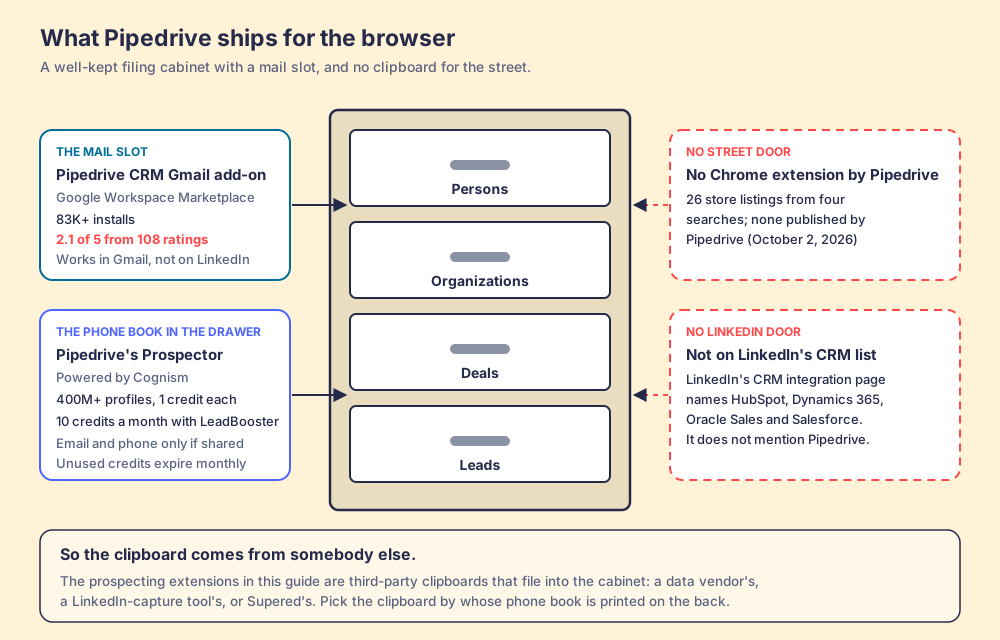
One caveat on the drawing. Pipedrive also syncs email without any add-on: its pricing page lists “full email sync with tracking” for Gmail, Outlook or company email on Growth and higher, from $39 per seat per month billed annually (Pipedrive pricing, October 2, 2026). So the mail slot is a convenience on top of a sync that already runs. The missing doors are the real gap.
What does the Pipedrive Gmail add-on do, and how do you install it?
Pipedrive’s help article describes the add-on as a Gmail sidebar that shows the sender’s Pipedrive record and lets you “add new contacts, deals and activities that automatically sync to Pipedrive,” edit person details, log activities and notes, and insert a scheduling link while you compose. The meeting scheduler “is available on Growth and higher plans” (Pipedrive Knowledge Base, updated September 3, 2026). Installing it takes four steps:
- In Gmail, click the plus icon (Get Add-ons), or open the Google Workspace Marketplace.
- Search for Pipedrive CRM and click Install.
- Complete the authorization.
- Click Log in in the sidebar to connect your Pipedrive account.
If it throws an error, Pipedrive says the cause is “typically” several Google accounts signed in to the same browser window, and suggests an Incognito window or a separate Chrome profile.
Read the reviews behind the 2.1 and they split cleanly by job. One Pipedrive user wrote in March 2026 that the add-on “makes it so much easier to log an email that I send from my inbox.” The complaints are about depth and speed. “So slow that is useless,” wrote Martin Lenc in March 2026, adding that third-party apps such as Superhuman “can integrate Pipedrive flawlessly.” Gabrielle Segal wanted to “add a label to a new contact right from this app” and could not. Gregg Bleakney, a customer of two years, called it “a joke” in April 2026. A few low ratings are about Pipedrive’s billing rather than the add-on, so the number undersells the tool somewhat. The pattern still holds: the add-on files the email in front of you and does little else.
Which Chrome extensions do Pipedrive users install instead?
The store’s user counts answer this better than any listicle. On October 2, 2026, the most-installed extension built only for Pipedrive, LinkMatch, had 5,000 users (Chrome Web Store). The four big contact-data extensions that sync to Pipedrive had between 100,000 and 1,000,000 each. Pipedrive teams do not mostly install a Pipedrive extension. They install a data vendor’s, and point it at Pipedrive.
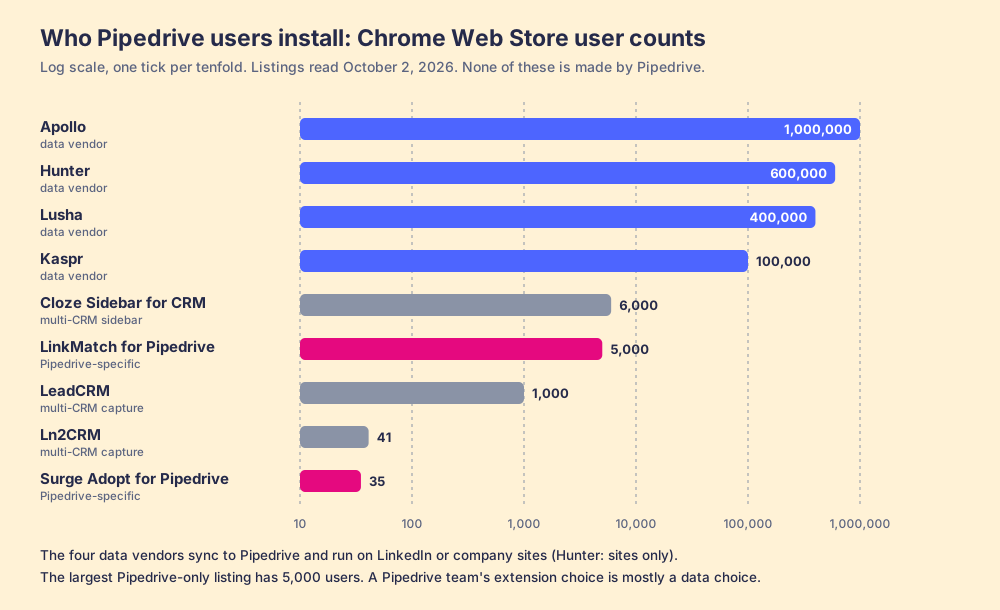
That reframes the choice. A rep on a LinkedIn profile wants two things the profile does not hold: a verified email and a phone number. Sales Navigator does not hold them either. It is where reps find people, and it is good at that, but it has no CSV export on any plan and no contact data to sell (LinkedIn Help). So the extension a Pipedrive team picks is a decision about whose phone book is printed on the back of the clipboard. Exporting Sales Navigator leads walks through why, and the Sales Navigator alternatives page covers the tools that compete with Navigator itself.
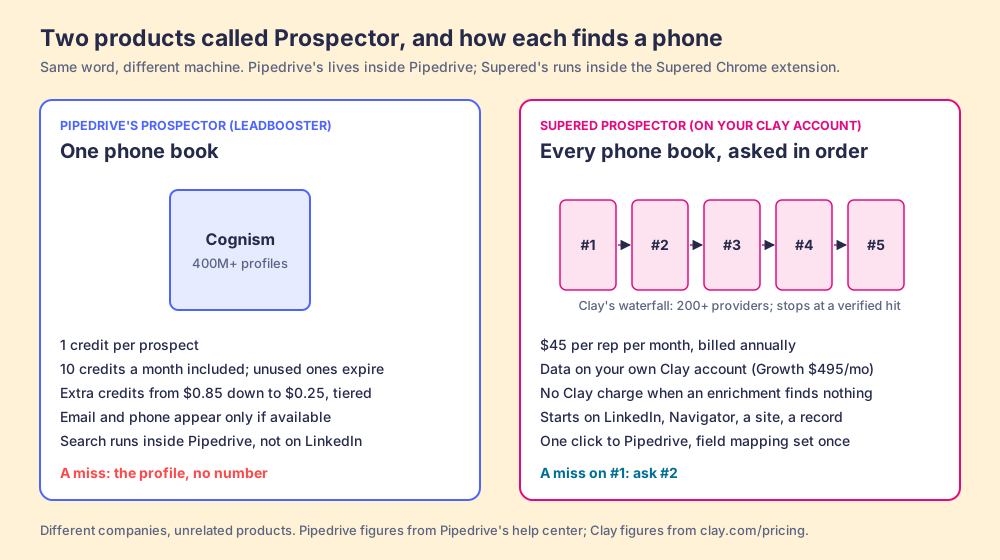
Pipedrive does sell a phone book. Its LeadBooster add-on includes a feature called Prospector, “an outbound lead generation tool powered by Cognism” that searches “over 400 million profiles and 10 million companies” from inside Pipedrive. “Every prospect costs one credit,” email and phone fields fill in only when the profile includes them, and the add-on comes with “10 Prospector lead credits each month” that expire if unused, with extra credits tiered from $0.85 down to $0.25 (Pipedrive Knowledge Base, billing, both updated September 3, 2026). LeadBooster is included on Premium and higher. Ten credits is ten people a month, enough to sample the data and too few to prospect from.
A naming note before the list, because it will confuse someone in your next pipeline review. Supered also sells a product called Prospector. The two are unrelated, made by different companies, and built on opposite ideas about data.
How did we grade the Pipedrive extensions?
The lens is a Pipedrive team of 10 to 50 reps that prospects on LinkedIn and the web. Five criteria, each scored 1 to 5 and weighted, for a maximum of 50:
- Contact data that lands in Pipedrive (x3). A verified email and a phone on the person record, from as many sources as possible.
- Works where the rep already is (x2). LinkedIn, Sales Navigator, company sites, the Pipedrive record.
- Pipedrive depth (x2). Which objects it writes (persons, organizations, deals, leads), duplicate checks, custom fields.
- Price for 10 to 50 reps (x2). A posted price, and how it scales.
- What happens after the sync (x1). Whether anyone can see that the people filed were worked.
Bands: A 40 and up, A- 37 to 39, B+ 34 to 36, B 29 to 33, B- 27 to 28, C+ 24 to 26. The weights serve a team that dials. A solo founder who only emails should drop the first weight to x1, and LinkMatch rises to the top.
| Rank | Extension | Grade | Score | Best fit | Pipedrive integration | Setup | Pricing (plan that includes it) | Reason to add it |
|---|---|---|---|---|---|---|---|---|
| 1 | Supered Prospector | A | 43 | Teams that already pay for Clay | Native: one-click sync, Pipedrive record as a starting point | Under a week on an existing Clay account | $45 per rep per month, billed annually, plus your Clay plan | 200+ providers per lookup, no Clay charge for a miss |
| 2 | LinkMatch for Pipedrive | B+ | 35 | LinkedIn capture into Pipedrive | Native: persons, organizations, deals, activities, notes, leads, custom fields | Minutes | 15.99 euros a user a month, annual (Standard); 28.99 (Professional, adds Sales Navigator) | Deepest Pipedrive write-back for the price |
| 3 | Apollo | B | 32 | Data plus dialer and sequences in one seat | API sync of contacts and accounts only | A day | $49 per seat per month, annual (Basic) | Cheap phones per credit, outreach included |
| 4 | Lusha | B | 29 | A few reps revealing phones on LinkedIn | Native; panel opens inside Pipedrive | Minutes | $449.10 a year (Starter, 1 seat) | Posted price, phones at 5 credits |
| 5 | Kaspr | B- | 27 | Email-first reps on LinkedIn | Native | Minutes | $49 per seat per month, annual (Starter) | Unlimited B2B emails under fair use |
| 6 | Hunter | B- | 27 | Emails from company websites | Native | Minutes | Free 50 credits a month; Starter $34 a month, annual | Unlimited users, no phones |
| ref | Pipedrive Gmail add-on | C+ | 26 | Logging the email in front of you | Native (Pipedrive’s own) | Minutes | Included with Pipedrive | Keep it if Gmail is the job |
Why trust this page?
I started RevPartners, a HubSpot partner that did only sales implementations, sold roughly twice as much Sales Hub as any other partner, and reached Elite tier in 13 months. Supered came out of that work. It is the #1 sales enablement app on the HubSpot marketplace, with 5.0 from 122 reviews there and 4.9 out of 5 from 81 reviews on G2 (both checked October 1, 2026), and we announced Supered for Pipedrive at the Pipedrive Partner Summit in Orlando this month. That is also the disclosure. We make two of the products graded here, they sit first in their lanes for teams that fit them, and the weights are printed so you can flip them.
Where does Supered Prospector fit for a Pipedrive team?
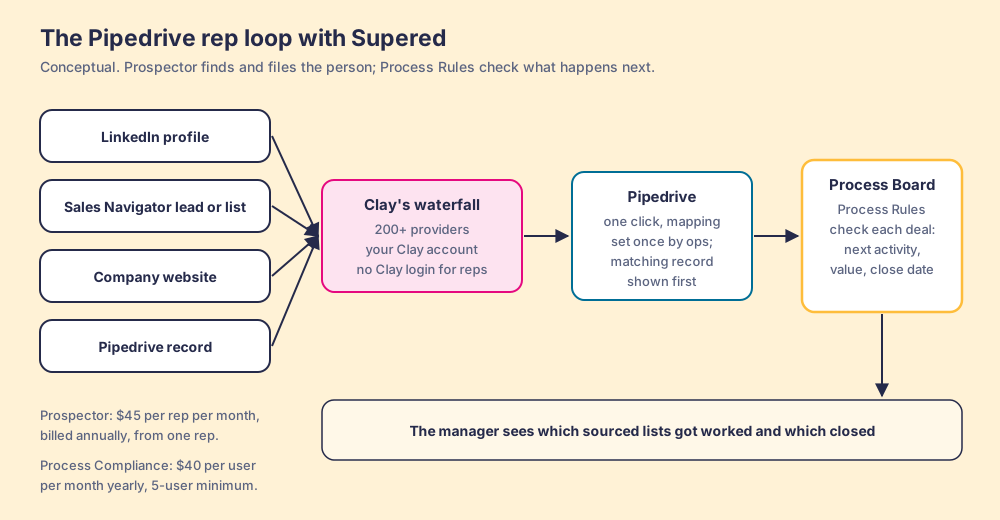
Go back to the clipboard. A data vendor’s extension is a clipboard with one phone book printed on the back. Clay is different in kind: it is an aggregation layer that asks provider after provider, its “signature data waterfalls check multiple providers to return the most verified emails (lower bounce rate) and phone numbers (higher connect rate),” across 200+ providers, and “if an enrichment returns no result, you’re not charged Data Credits or Actions” (clay.com/pricing, October 2, 2026). Clay already connects to Pipedrive to “create, update, and lookup people and organizations” (Clay integrations). What Clay does not do is stand next to the rep on LinkedIn. Its tables live in Clay, and reps live in their tabs.
Supered Prospector is the clipboard with Clay behind it. It brings no database of its own, which is why Clay is not a row in the table above: the other rows can sit inside Clay’s waterfall as steps. It runs inside the Supered Chrome extension, on your team’s own Clay account, and a rep never logs in to Clay. On Pipedrive, a rep gets:
- Four starting points. A LinkedIn profile, a Sales Navigator lead or list, a company website with company research alongside, or the Pipedrive record of an account that needs its missing champion or phone.
- Context before the first touch. On a profile the rep sees the matching CRM record and whether the person was already worked, before creating a duplicate or stepping on a teammate.
- A buying committee by your definition. Titles, departments and seniority set by the team, and a whole list can be pushed into any custom Clay workflow your GTM engineer built.
- One click into Pipedrive. Field mapping is set once by ops; the person lands in Pipedrive with the email and phone Clay found.
- Lists the leader can follow. The team’s process applies to worked prospects, so a manager sees which sourced lists got worked and which closed, and coaches from what converts.
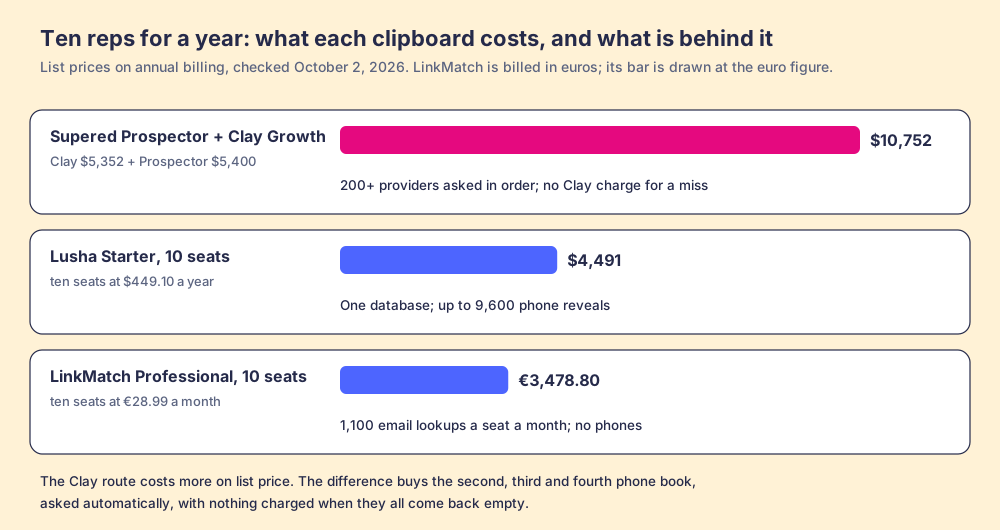
The arithmetic, since “every source” needs a number next to it. Clay Growth lists at $495 a month, or $446 a month billed annually ($5,352 a year), and Prospector is $45 per rep per month billed annually, from one rep (Prospector). Ten reps on Prospector plus Clay Growth come to $10,752 a year. Ten Lusha Starter seats are $4,491 a year for up to 9,600 phone reveals, and ten LinkMatch Professional seats are 3,478.80 euros a year with no phones at all. On list price, the Clay route costs more. What the extra buys is the second, third and fourth phone book asked automatically, with nothing charged when they all come back empty.
Choose something else if you do not have Clay. Prospector runs on the customer’s Clay account and does nothing without one, and a waterfall needs someone to build it. Choose something else, too, if you are one rep sending a few emails a week; LinkMatch’s Standard plan or Hunter’s free tier is hard to undercut for that job. The sourcing use case shows how a team with Clay sets Prospector up, and the Clay Chrome extension page explains why getting Clay to the rep has been harder than it sounds, including the partner that used to fill the gap, now covered on the Exportly alternatives page.
What are the best Pipedrive extensions without Clay?
Five deserve a rep’s install, each for a different job.
- LinkMatch for Pipedrive. The best pure Pipedrive LinkedIn extension. It shows whether a profile is already saved in Pipedrive and writes “Persons, Organizations, Deals, Activities, Notes, and Leads,” including custom fields, from a side panel (LinkMatch, October 2, 2026). Standard is 15.99 euros a user a month on annual billing with 300 email lookups a month; Professional is 28.99 with 1,100 and adds Sales Navigator. It lists no phone numbers. The store shows 5,000 users and 5.0 from 11 ratings, and the developer is a small Romanian company. That makes it the right buy for capture and the wrong one for dialing.
- Apollo. Data, a dialer and sequences in one seat, from $49 a month on annual billing. Its Pipedrive sync is narrower than the brochure suggests: Apollo’s help center says it syncs contacts and accounts and “doesn’t sync Pipedrive leads, deals, activities, emails, calls, meetings, tasks, notes,” and that you “can only integrate one CRM with Apollo” (Apollo Knowledge Base, updated July 8, 2026). Its docs also disagree with themselves: the extension overview lists Pipedrive as a supported platform, while the troubleshooting article says “Apollo Everywhere doesn’t run on Pipedrive tabs.” The Apollo Chrome extension page covers the rest.
- Lusha. The cleanest phone reveal on LinkedIn for a few reps, and its panel opens inside Pipedrive as well as on LinkedIn, Sales Navigator and company sites (Lusha docs). A phone costs 5 credits; Starter is $449.10 a year for 4,800 credits (lusha.com/pricing, October 2, 2026). One database, so the misses are real. The Lusha Chrome extension page does the per-phone math.
- Kaspr. The email-first LinkedIn extension. Starter is $49 per seat per month on annual billing with unlimited B2B emails and 100 phone credits a month, and Pipedrive is a listed integration (kaspr.io/pricing, October 2, 2026). Kaspr has been part of Cognism since 2022, the same company that powers Pipedrive’s own Prospector data. Kaspr alternatives prices it per phone.
- Hunter. Emails from company websites, with unlimited users on every plan and a Pipedrive sync. It does not run on LinkedIn at all; Hunter’s help center says it replaced its LinkedIn integration to comply with LinkedIn’s terms (Hunter).
A word on the LinkedIn-capture tools that promise more. Some listings advertise bulk export from Sales Navigator; LeadCRM’s, for one, offers to “Export up to 250 leads from Sales Navigator search results with one click.” LinkedIn’s User Agreement, section 8.2, bars “browser plugins and add-ons” that “scrape or copy the Services, including profiles,” and LinkedIn’s prohibited-software page says members who use such tools “risk having their accounts restricted or shut down” (LinkedIn User Agreement; LinkedIn Help). The account at risk is the rep’s network. Skip bulk-export and automation features, and ask every vendor what its extension reads from the page, ours included.
The LinkedIn Chrome extension roundup sorts the whole category by job, and the Pipedrive LinkedIn integration guide covers the LinkedIn side in depth: Lead Gen Forms, manual routes, and what syncs where.
Which extension keeps a Pipedrive pipeline to your standard?
Getting the person into Pipedrive is half the job. The other half starts the moment the record exists: does the deal get a next activity, a value past discovery, a close date that is not in the past. Pipedrive teams install extensions for this too, and the options are few.
- Pipedrive required fields. The native lock. On Premium and above ($59 per seat per month billed annually, Pipedrive pricing), a rep cannot save or move a deal until the field is filled. Pipedrive is plain about the gap: the feature “won’t stop deals from progressing if the fields are updated via import, bulk-editing, API, automations, or third-party integrations” (Pipedrive Knowledge Base, updated September 3, 2026). The prospecting extensions above all write through that side door.
- Surge Adopt for Pipedrive. Walkthroughs, a checklist and markers on empty fields, drawn over pipedrive.com and nowhere else, built by Sales-Surge B.V., a Pipedrive Platinum Partner. The listing showed 35 users and no ratings on October 2, 2026, version 0.1.36, and we found no public price (Chrome Web Store). Good for a team that wants on-screen guidance in Dutch or English.
- Supered Process Rules. Your expectations written as Process Rules, a Process Board that checks each open deal against them whatever changed it (a rep, an import, an extension or Claude), and a list for each rep and the manager of which deals break which rule. It is new on Pipedrive, launched this month, which is why its track-record score is low. Process Compliance is $40 per user per month paid yearly, 5-user minimum (pricing). Supered’s cards and guides, the short in-the-moment answers reps see on the record, live in the same Supered Chrome extension and work on Pipedrive the same way they do on HubSpot and Salesforce.
Scored on catching changes from any route (x3), guidance in the Pipedrive screen (x2), a manager view of who followed the rules (x2), price (x2) and track record on Pipedrive (x1), Supered lands at 39 (A-), Surge Adopt at 30 (B) and required fields at 28 (B-). Supered for Pipedrive shows the rep and manager views, and the sales expectations use case has a starter set of rules. If Claude writes to your pipeline through Pipedrive’s MCP server, the Pipedrive MCP guide explains why the rules need to live somewhere Claude reads them first.
Which Pipedrive Chrome extension should you choose?
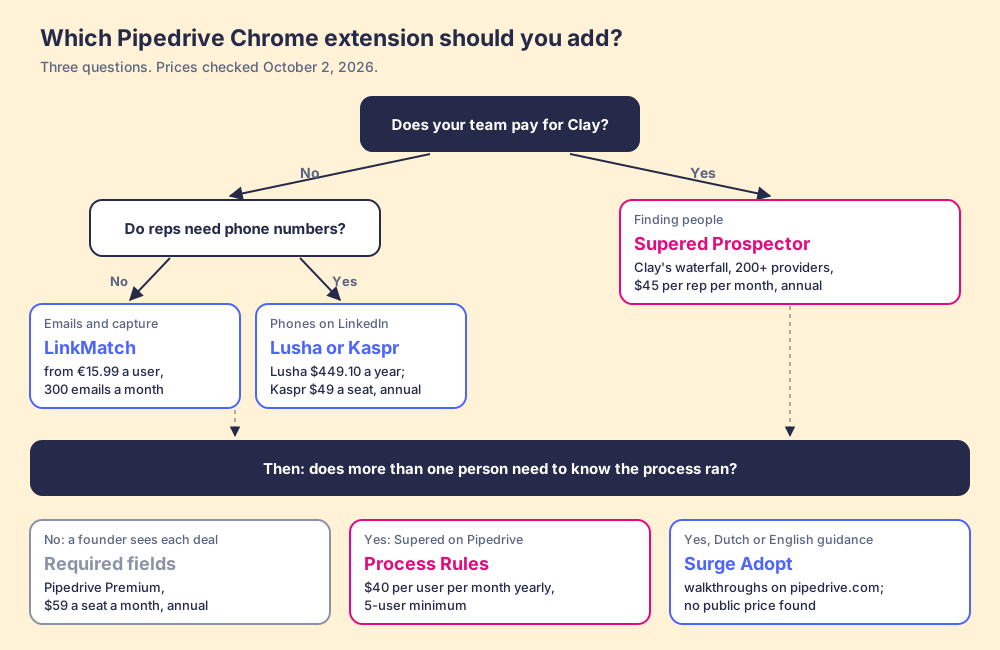
Three questions decide it.
- No Clay, emails only. LinkMatch for LinkedIn capture into Pipedrive, or Hunter if the job is company websites.
- No Clay, phones needed. Lusha for a few reps revealing on LinkedIn; Kaspr when email is most of the work and 100 phones a month covers the dials; Apollo when the rep wants a dialer and sequences in the same seat and can live with a contacts-and-accounts sync.
- Clay already paid for. Supered Prospector, so the waterfall your GTM engineer built runs from the rep’s LinkedIn tab, Sales Navigator list or Pipedrive record, and lands in Pipedrive in one click.
- Process, once more than one person needs to know it ran. Required fields while a founder still sees each deal; Supered Process Rules once a manager needs the team view, or once imports, extensions and AI write to deals.
What we recommend rests on one fact about your stack. Pipedrive gave its cabinet a mail slot and a ten-page phone book, and left the clipboard to other companies. Without Clay, buy the clipboard whose phone book matches what your reps do most, and count the phone reveals before you renew. With Clay, stop carrying a single phone book to the street: put the waterfall on the rep’s clipboard, and watch the lists they file become worked deals. A Prospector demo on your own Clay account and Pipedrive is the quickest way to see it from a LinkedIn profile.
Frequently asked questions
Does Pipedrive have a Chrome extension?+
How do I install the Pipedrive Gmail add-on?+
What is the best Pipedrive LinkedIn extension?+
Is Pipedrive's Prospector the same as Supered Prospector?+
Does Sales Navigator integrate with Pipedrive?+
Can a LinkedIn extension get my account restricted?+
Your process, running itself.