Job Change Tracking: Two Signals in One Move, and Who Acts on Them
What job change tracking is, why one move is two signals (an opening at the new company and a risk at the old one), what the tools cost from $0 to $40,000 a year, and how to route the alert to a rep who acts.
Job change tracking is the practice of watching the people your company already knows, usually past champions, buyers and users, for a move to a new company or role, and turning each move into an action: outreach at the new account and a coverage check at the old one.
Your CRM is an address book written in pen. The names are right on the day you write them, and then people move. The post office has handled this problem for a long time: when someone moves house, the letter going to the old address comes back stamped with a forwarding address, and a sensible sender does two things with it. They write the new address in the book, and they ask who lives at the old house now.
Job change tracking is the practice of watching the people your company already knows, usually past champions, buyers and users, for a move to a new company or role, and turning each move into an action: outreach at the new account and a coverage check at the old one. The short version of this guide:
- Two signals per move. The company your champion joined has gained someone who knows your product. The company they left has lost the person who argued for it.
- Cheap detection. Watching a name costs under two cents a check on Clay and nothing on LeadIQ’s Free plan. The same alert sells for $40,000 a year bundled into UserGems Core.
- The expensive part. Deciding who acts on the alert, and checking that someone did.
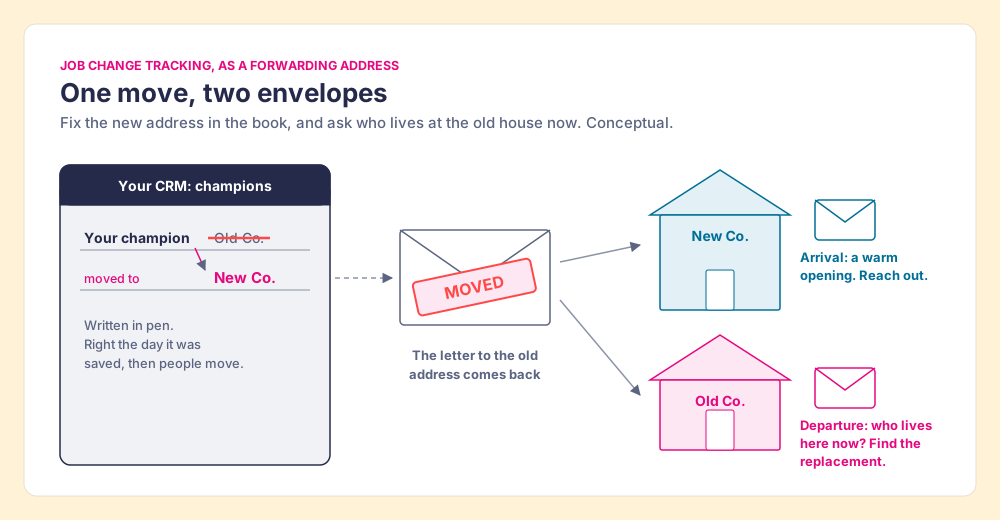
The pages that rank for job change tracking treat the move as one signal, the opening at the new company, and spend their words on detection. The research on how business relationships survive a move says it is two signals, and the price lists say detection is the cheap half. This guide covers both, then the step the alert usually skips: getting it to a rep who owns the account.
What is job change tracking, and why does it work?
A champion who changes jobs carries three things with them: knowledge of your product, the memory of how it got bought, and the trust of the rep who sold it. None of that stays behind in the old company’s CRM. Researchers who study business ties have measured what happens next.
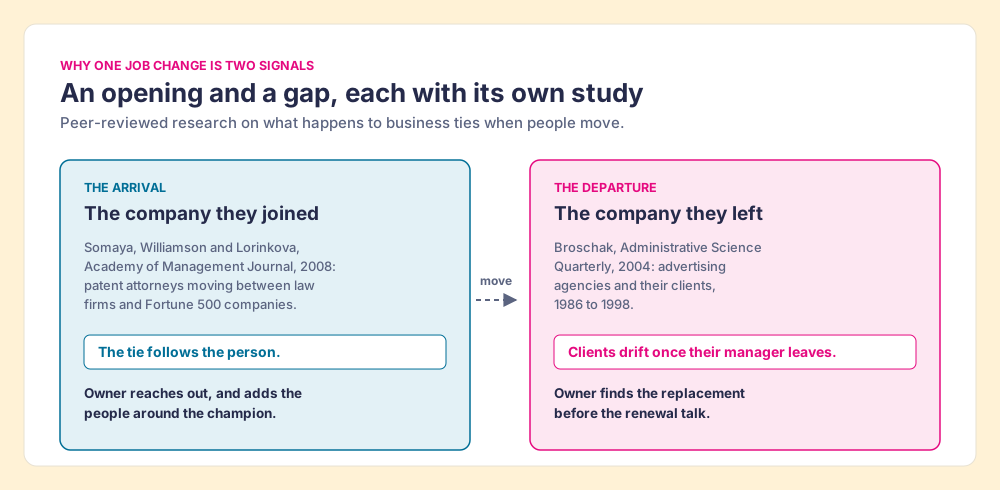
Deepak Somaya, Ian Williamson and Natalia Lorinkova tracked patent attorneys moving between law firms and Fortune 500 companies and argued “that movement of employees both to and from clients may enhance firm performance” (Academy of Management Journal, 2008). The paper’s title is the thesis: gone but not lost. A lawyer who leaves a firm to work inside a client carries the relationship into the client, and the firm that lost the lawyer can gain a buyer who already trusts it. The authors tested the idea on a dyadic data set of attorney moves, firm by client.
Vendors make bolder claims, and they deserve the usual salt. UserGems’s product page says “Previous customers are 3X more likely to buy again” (UserGems). LinkedIn’s guide to Sales Navigator says decision-makers are “62% more receptive to outreach once they’ve made that move” (LinkedIn). Neither page shows a method. The academic result is the one to lean on: the tie follows the person.
There is a limit to what one champion can do. Gartner puts a typical B2B buying group at 6 to 10 people (Gartner). A champion who arrives at a new company knows your product and has not yet met the people in procurement. The tracking finds the door; the B2B buying committee guide covers the rest of the people who sign.
How often do your contacts change jobs?
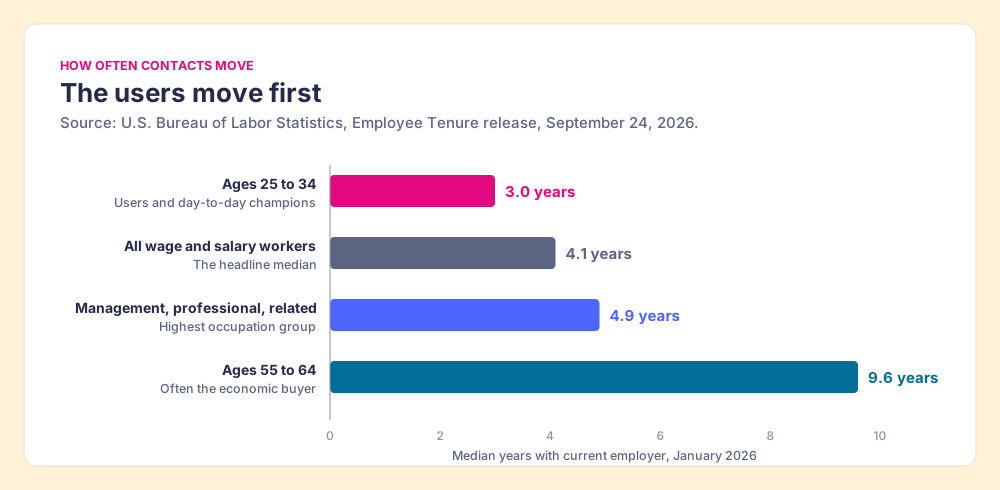
Slower than the vendor pages imply, and faster than a CRM can keep up with by hand. The Bureau of Labor Statistics reported on September 24, 2026 that the median wage and salary worker had been with their current employer 4.1 years in January 2026 (BLS). The figure moves a lot with age and role:
- Workers aged 25 to 34. Median tenure of 3.0 years. Many of your champions and power users sit here.
- Management, professional and related occupations. Median tenure of 4.9 years, the highest of any occupation group BLS reports.
- Workers aged 55 to 64. Median tenure of 9.6 years. The economic buyer often sits here and moves least.
UserGems claims “20% of people change their jobs every year” and that after a first backfill, “2%-4% every month depending on your industry” of tracked contacts move (UserGems). Take the vendor’s own range at face value and a list of 1,000 champions produces 20 to 40 moves a month (our arithmetic). About one to two a working day, each one a decision someone has to make.
Why is one job change two signals?
The forwarding address has two halves, and the top-ranking pages read only the first.
Joseph Broschak studied advertising agencies and their clients from 1986 to 1998 and found that when managers left the client organization, the client became more likely to end its relationship with the agency (Administrative Science Quarterly, 2004). Put Broschak’s finding next to Somaya’s and the job change looks like this:
- The arrival. The company the champion joined is warmer than any cold account on your list. Somaya’s lawyers brought work back to the firms they knew. The tools sell this half.
- The departure. The company the champion left is now an account without the person inside who argued for you. Broschak’s clients drifted from agencies after their managers left. For a customer, this is renewal risk; for an open opportunity, the deal may have lost its internal sponsor.
A team that tracks only arrivals is writing new addresses into the book and never asking who lives at the old house. The departure alert belongs to whoever owns the old account: the account manager or customer success manager for a customer, the rep for an open opportunity. Their job is to find who replaced the champion and to add more than one contact, which is the case the multithreading guide makes in full.
How do you track job changes, and what do the tools cost?
Three methods sit underneath the tools in this guide. A profile check compares the employer on a person’s LinkedIn profile with the employer in your CRM. A data provider match compares your contact against a vendor’s database. An email bounce tells you the old address is dead, which says the person left and not where they went. Clay’s job change signal uses the first: it needs “the contact’s LinkedIn URL as an identifier,” and “each check consumes 1 action plus 0.2 data credits” (Clay University).
| Tool (checked) | How it watches | Where the alert lands | Entry price for job changes | Fits |
|---|---|---|---|---|
| LeadIQ (pricing page, Oct 2, 2026) | “Track Job Changes for Champions” | LeadIQ | $0 Free plan; Pro $15/mo billed annually for up to 5 users | A small team starting from nothing |
| Prospeo (pricing page, Oct 2, 2026) | “Job Change Tracking” on Growth | Prospeo, HubSpot and Salesforce sync on Growth | $74/mo billed yearly ($888) | A team already buying emails there |
| Clay (pricing page and Clay University, Oct 2, 2026) | Signal on each LinkedIn URL | A Clay table, then Slack, the CRM or a sequence you build | Launch $167/mo billed yearly; under 2 cents a check | Teams with a GTM engineer |
| Sales Navigator (LinkedIn help, Oct 2, 2026) | Champions lists from closed-won opportunities | Sales Navigator, visible only to you | Advanced Plus with CRM Sync, quote only | Reps who live in Navigator |
| Lusha (help docs, Oct 2, 2026) | Job Change signal on a HubSpot record | The HubSpot record, when the rep clicks | 1 credit per Get Signals click; a Lusha seat per rep | HubSpot teams on Lusha |
| Champify (pricing page, Oct 2, 2026) | Relationship Tracking, 15k+ contacts on Core | Salesforce package | From $2,000/mo | Salesforce teams that want it managed |
| UserGems (pricing page, Oct 2, 2026) | Contact tracking plus list building and scoring | UserGems automated campaigns | Core $40,000/yr plus $3,000 implementation | Larger teams buying a full program |
The spread runs from $0 to $40,000 a year for an alert that says the same thing in every case: this person now works there. The spread says the expensive tools are selling what happens after detection. Champify’s Core plan includes a Salesforce package, a dedicated CSM and a “2x ROI Guarantee” (Champify pricing). UserGems Core includes 4,000,000 credits, list building, scoring and automated campaigns, with a “Money back guarantee if you don’t see ROI in closed won revenue” (UserGems pricing). Those are real services. Buy them when you want the vendor to run the program; skip them when your team can run it on tools you already pay for.
The Sales Navigator route has its own fine print. LinkedIn’s help page says Champions lists need Advanced Plus with CRM Sync, draw on closed-won opportunities from the past five years, refresh every 24 hours, and are visible only to the user who sees them (LinkedIn help). A list only one rep can see is an address book kept in one rep’s coat pocket. The Sales Navigator CRM sync guide covers what Advanced Plus adds and costs. On Lusha, the signal shows on the HubSpot record and “1 credit is consumed each time you click Get Signals on a contact record” (Lusha docs), so the rep has to be on the record already to learn anything.
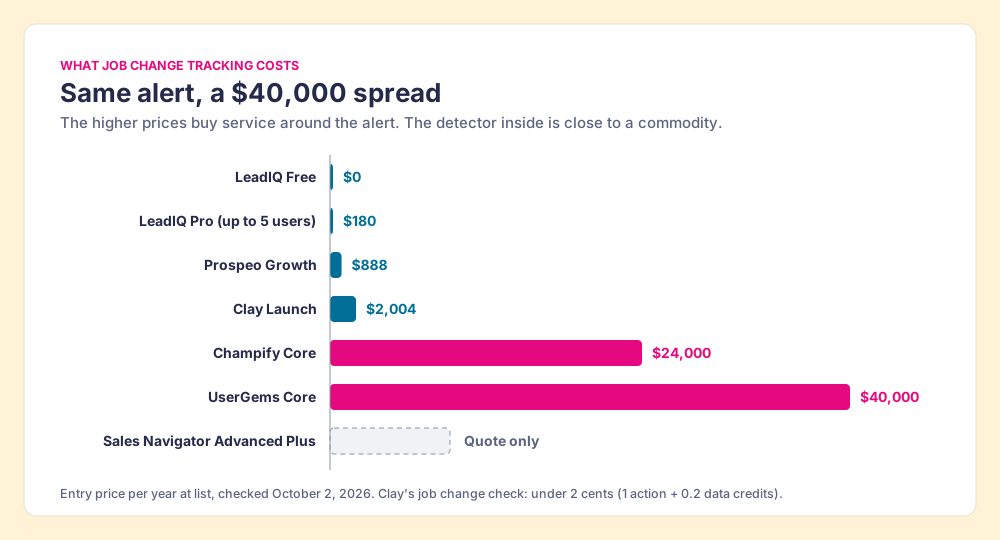
On Clay, the detection arithmetic is short. A check is one action (Clay says actions start at less than $0.01) plus 0.2 data credits (data credits start at $0.05, so $0.01), which comes to under two cents (Clay pricing). Checking 1,000 champions once a month uses 1,000 actions and 200 data credits, inside the 15,000 actions and 2,500 data credits Launch includes each month. The check frequency is our supposition; Clay lets you set it. Clay’s Claybook for the play suggests what to do with a hit: “send Slack alerts to sales when champions change jobs” (Clay University).
What should happen after a job change alert?
A Slack alert to a sales channel is a postcard pinned to the break-room board, addressed to whoever reads it first. Two reps may read it. None may. The rep who reaches out may not own the account the champion joined, and the account manager at the old company may never see it at all. The alert has a sender and no addressee.
The fix is a routing rule, written once, that reads where the champion landed and sends the alert to one person:
- A current customer. The new company already pays you. The alert goes to the account owner or CSM as an expansion lead, and a new rep reaching out would step on a live relationship.
- An account another rep owns, or an open opportunity. The alert goes to that owner. The champion is now a friendly voice inside their deal.
- An unowned account that fits your ideal customer profile. The BDR play: reach the champion while they are new, and add the people around them so the deal has more than one thread.
- An account outside your profile. Update the record, note the relationship, and move on. A warm hello to a company that cannot buy is a pleasant waste of a rep’s afternoon.
- The company they left. A separate alert to the old account’s owner: find the replacement before the renewal conversation starts.
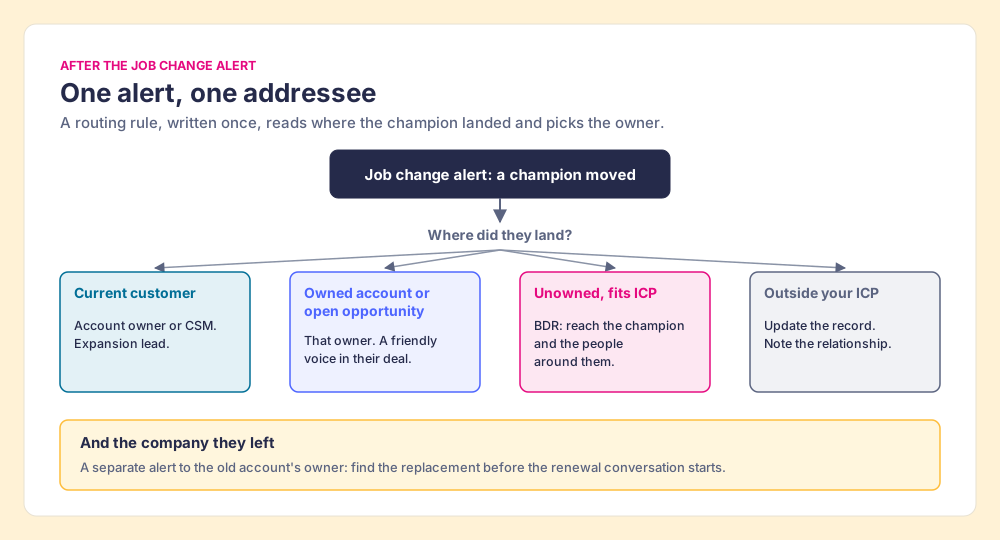
When reps double up on a champion or let the alert sit, the cause is the system. A Slack channel hands the alert to the whole channel, which in practice leaves it with whoever reads first, or with no owner at all. The rule above takes a judgment call away from whoever happens to see the postcard and makes it once, in advance, for the whole team.
Which job change tracking tool fits your team?
The table above sorts by price. Sorted by the job, the choice is shorter:
- A team with no Clay account and a small budget. LeadIQ’s Free plan includes champion tracking; the LeadIQ pricing guide shows what Pro adds and what credits cost. Prospeo Growth suits a team already buying emails there.
- A Salesforce team that wants the program run for it. Champify, from $2,000 a month with a dedicated CSM, or UserGems if you also want list building, scoring and campaigns in one contract at $40,000 a year and up.
- A team that already runs Clay. The signal costs under two cents a check on the plan you have. What is missing is the rep side: a way for the person who gets the alert to see who owns the account and act from the page they are on.
Where does Supered Prospector fit for job change tracking?
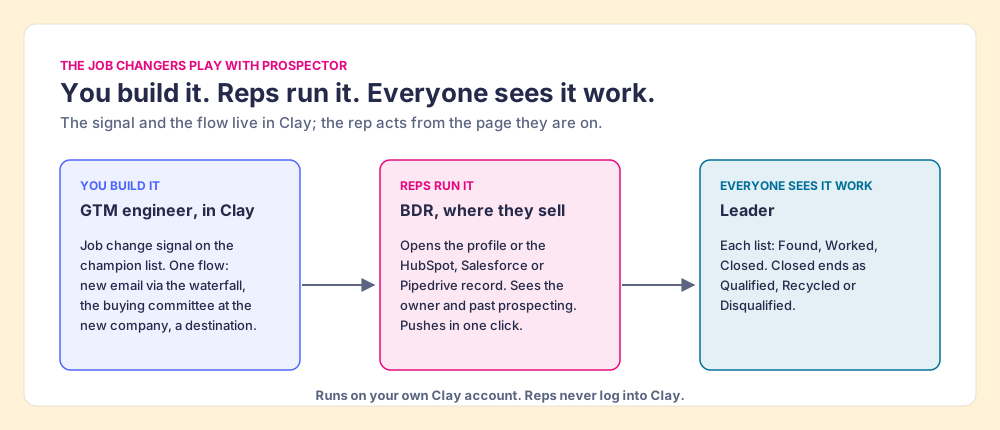
Clay plus Supered is the best way for a sales team to prospect: GTM engineers build in Clay, reps never open Clay. Job changers are one of the plays Prospector is built to run, and the work splits three ways.
- The GTM engineer’s signal and flow. The job change signal runs in Clay on your champion list. The engineer builds the flow once: enrich the champion’s new work email through the waterfall, pull the buying committee at the new company with the titles and seniority your team defined, and send both to a sequence or to the CRM on the account. Prospector turns that flow into a named button reps pick from a Push menu. “Your logic stays yours: waterfalls, tiers, tags, and sequence variables.”
- The rep’s button. The BDR opens the champion’s LinkedIn profile or the HubSpot, Salesforce or Pipedrive record and sees the matching CRM record, who owns the account, and a flag when someone already prospected the person. If another rep owns it, the BDR hands it over; if the account is unowned, the BDR pushes the champion and their new team into a sequence in one click. Prospector for reps shows the rep’s side.
- The leader’s view. Each list is Found, Worked or Closed, and a closed lead ends the way your process says: Qualified, Recycled or Disqualified. A leader sees whether job-change leads got worked and which ones turned into pipeline, which is how the Clay budget grows.
Prospector works within LinkedIn’s terms and does not copy search results in bulk; the contact data comes from Clay’s waterfall on the customer’s Clay account. Supered does not bring its own database. It brings Clay’s waterfall across 200+ providers, which is every database, routed, and that is why we chose Clay as our only data provider. Prospector runs inside the Supered Chrome extension and costs $45 per rep per month, billed annually, from one rep, on your Clay plan and credits. Start fast with the Supered Clay template, or bring your own tables. The rep loop is on the sourcing use case, the product on the Prospector page, and the extension options in the Clay Chrome extension guide.
Choose something else if:
- No Clay account. Prospector needs one. LeadIQ’s Free plan is the low-cost start, and Apollo vs LeadIQ compares the two databases reps reach for.
- A program you want someone else to run. Champify and UserGems sell the service around the alert, with guarantees, at a price to match.
- No one to build the Clay side. RevPartners, the company I founded, is a Clay Elite Studio Partner that builds and tunes Clay tables with teams that want help.
Why trust this guide?
Before Supered I started RevPartners, a HubSpot partner that did only sales implementations, sold roughly twice as much Sales Hub as any other partner, and reached HubSpot’s Elite tier in 13 months. We ran RevOps as a service for our clients, and the champion who moved, and the account left behind without one, came up in most of those engagements. Supered is the #1 sales enablement app on the HubSpot marketplace, rated 5.0 from 122 reviews there and 4.9 out of 5 from 81 reviews on G2 (checked October 1, 2026). The disclosure: we make Prospector, and it appears above for teams that run Clay.
What we recommend
Track job changes, and spend your effort on the second half of the forwarding address. Detection is close to free; the value sits in sending each alert to one owner and in covering the account the champion left. For a team that runs Clay, we recommend the Clay signal on your champion list, a routing rule written once, and the rep acting from the profile or record they already have open, for three reasons the evidence gives:
- The tie follows the person. Somaya, Williamson and Lorinkova tested attorney moves into client companies on the premise that the relationship travels with the lawyer, so a moved champion is the warmest account you can open.
- The tie at the old company weakens. Broschak’s agency clients drifted after their managers left, so the departure alert protects revenue you already have.
- The detector is a commodity. Under two cents a check on Clay and $0 on LeadIQ Free, against $40,000 a year for UserGems Core; pay for the program only when you want someone else to run it.
Teams without Clay have fair routes: LeadIQ or Prospeo to start cheaply, Champify or UserGems for a managed program. Whichever you pick, ask the vendor one question before you buy: when the alert fires, whose name is on it?
A champion rarely buys alone at the new company. The B2B buying committee guide is the next read for finding the other people who sign, and the direct dials guide covers reaching them by phone once you know who they are.
Frequently asked questions
What is job change tracking?+
How do you track job changes for free?+
What is champion tracking?+
How much do job change tracking tools cost?+
What should a rep do after a job change alert?+
Does Supered Prospector track job changes?+
Your process, running itself.