LinkedIn Prospecting Tools: The Stack That Does Its Work Off LinkedIn
LinkedIn prospecting tools graded for a 10 to 50 rep team: Sales Navigator, Supered Prospector on Clay, Apollo, Kaspr, Premium Business and ContactOut, with prices checked October 2, 2026, and why more than half the tools on the top-ranking lists are the kind LinkedIn bans.
LinkedIn prospecting tools are the software a sales team uses to find buyers on LinkedIn, get each buyer's verified email and phone, and move them into the CRM and a sequence, ideally without any software acting on LinkedIn under the rep's login.
LinkedIn prospecting tools sort into the ones that do their work off LinkedIn and the ones that do it on LinkedIn under your login. The short answer, graded in full below:
- Supered Prospector. For teams that already have Clay: reps run the team’s Clay tables from a Sales Navigator list, a profile, a company site, or the CRM record, at $45 per rep per month billed annually.
- LinkedIn Sales Navigator. The finder nearly every stack keeps, from $119.99 a month on Core.
- Apollo. For a team without Clay that wants contact data and sequences in one tool, from $49 a seat a month billed annually.
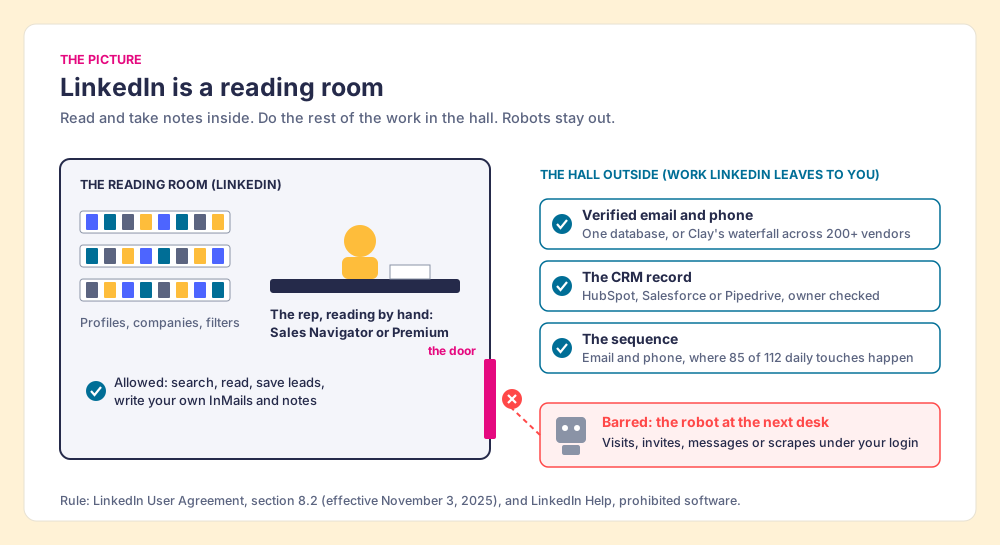
A good library has a reading room. You may sit there all day, pull any volume off any shelf, and take careful notes in your own hand. You may not carry the shelves out under your coat, and you may not hire a man to sit at the next desk and pass notes to every reader in the room on your behalf. The librarian will not tell you how many notes is too many. She will ask you to leave.
LinkedIn is the reading room. LinkedIn prospecting tools are the software a sales team uses to find buyers on LinkedIn, get each buyer’s verified email and phone, and move them into the CRM and a sequence, ideally without any software acting on LinkedIn under the rep’s login. That last clause decides most of this page, because I read the lists that rank for this search and found that more than half of the tools on them are the man at the next desk.
What do the top LinkedIn prospecting tool lists recommend?
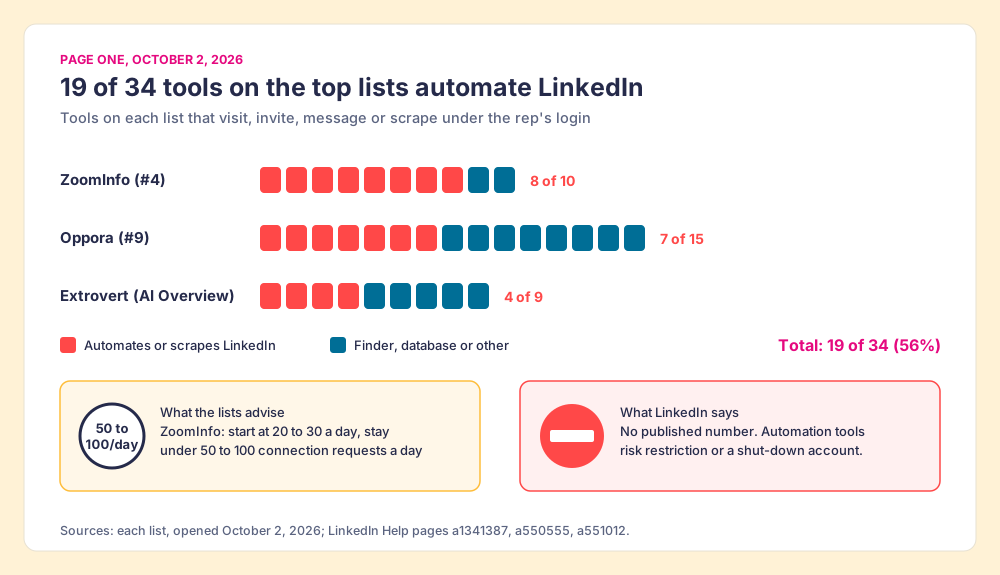
I opened the pages that rank on Google’s first page for “linkedin prospecting tools” on October 2, 2026 (Ahrefs SERP data, US) and sorted every tool on each list by one question: does it act on LinkedIn under the rep’s login, by visiting profiles, sending invitations, sending messages, or scraping? Three of the pages are numbered lists of tools.
| List (position, date) | Tools listed | Tools that automate or scrape LinkedIn | Examples |
|---|---|---|---|
| ZoomInfo, “Best LinkedIn Automation & Prospecting Tools in 2026” (#4, 2026) | 10 | 8 | Dux-Soup, Expandi, Phantombuster, Lemlist, Waalaxy, Octopus CRM, Meet Alfred, Dripify |
| Oppora, “15 LinkedIn Prospecting Tools” (#9, January 2026) | 15 | 7 | Phantombuster, Dux-Soup, Dripify, Expandi, Waalaxy, HeyReach, Octopus CRM |
| Extrovert, “9 best LinkedIn prospecting tools for SDRs” (cited in Google’s AI Overview, August 2026) | 9 | 4 | Waalaxy, GetSales, Dux-Soup, Closely |
| Total | 34 | 19 |
Nineteen of 34 tool slots, 56%, go to software that automates activity on LinkedIn. HeyReach, at #6, ranks “40+ best LinkedIn automation tools” and lists its own automation product among them (HeyReach). The search asks for prospecting tools. The page one answer is mostly robots.
LinkedIn’s position is not ambiguous. Its help page on prohibited software, still live on October 2, 2026, says: “we don’t permit the use of any third party software, including ‘crawlers’, bots, browser plug-ins, or browser extensions that scrape, modify the appearance of, or automate activity on LinkedIn’s website,” and that members who use such tools “risk having their accounts restricted or shut down” (LinkedIn Help, prohibited software). Section 8.2 of the User Agreement, effective November 3, 2025, bans using “bots or other unauthorized automated methods to access the Services, add or download contacts, send or redirect messages” (LinkedIn User Agreement).
The lists know this, and their advice is the giveaway. ZoomInfo’s FAQ tells readers to start new accounts at “20-30 requests per day” and stay “within recommended daily limits of 50-100 connection requests” (ZoomInfo). HeyReach writes that while “LinkedIn officially discourages the use of third-party automation tools, there’s a nuanced understanding of their role.” LinkedIn has published no daily number to stay within. Its help center says every member is “subject to these limits,” that a restriction “typically lasts one week,” and that “LinkedIn Support cannot disclose the type or reason for the restriction” (LinkedIn Help, invitation limit). A second page adds: “If you send an excessive number of invitations and we suspect the use of an automation tool, we may suspend or restrict your account” (LinkedIn Help, invitation restrictions).
The lists are giving advice on how slowly to drive past a no-entry sign. A speed limit tells you a number and lets you through. A no-entry sign has no number on it, and driving past it at 20 miles an hour is still driving past it.
Some people will say the risk is overstated, and they have a point worth granting. Dux-Soup alone had 50,000 Chrome Web Store users and a 4.4 rating from 443 ratings on October 1, 2026, and people do not keep installing a tool that gets every account shut down in a week. Extrovert’s list concedes the point fairly: pacing and warm-up “reduce risk rather than remove it.” But the account at risk belongs to the rep, the network on it took years to build, and LinkedIn will not tell you which week it runs out. So this page grades no automation tool; the LinkedIn Chrome extension page shows how to tell a lookup from an automation before you install one. The tools below either are LinkedIn’s own, or read the profile the rep opened by hand and do their work somewhere else.
Why trust this ranking?
I started RevPartners, a HubSpot partner that did only sales implementations, sold roughly twice as much Sales Hub as any other partner, and reached Elite tier in 13 months. Supered came out of that work and is rated 4.9 from 81 reviews on G2 and 5.0 from 122 reviews on the HubSpot App Marketplace (both checked October 1, 2026). That is also the disclosure: we make Supered Prospector, and it ranks first here for teams that have Clay. The weights are printed so you can flip them. Flip them for a team without Clay and Sales Navigator plus Apollo is the stack.
Which LinkedIn prospecting tools are best for a sales team?
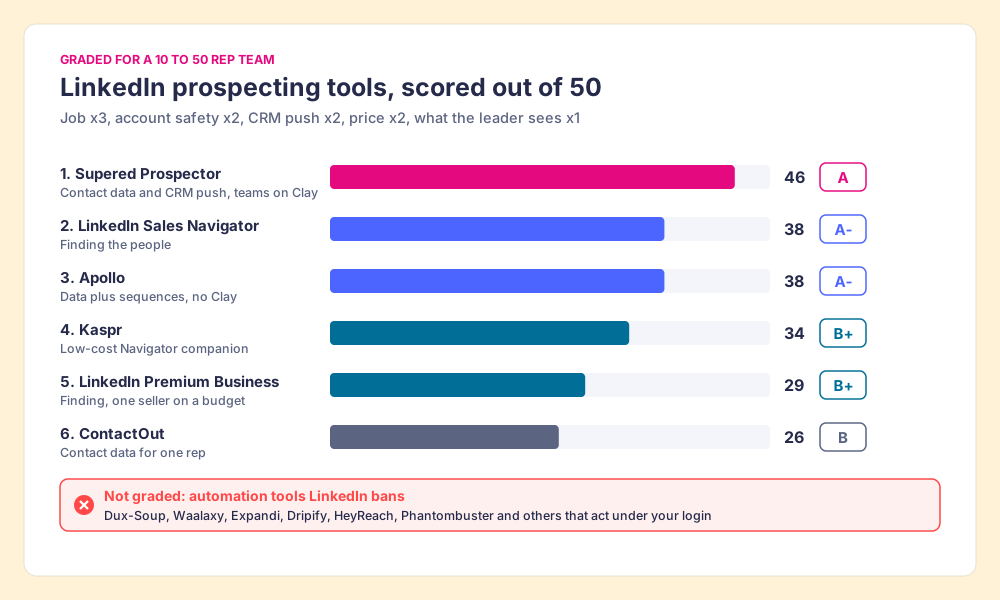
The lens is a mid-market or SMB team of 10 to 50 reps. Each tool is graded on the job it does in the stack, scored 1 to 5 per criterion and multiplied by the weight, for a maximum of 50. A finder and a contact-data tool do different jobs, so each earns its job score in its own lane.
| Criterion | Weight | What it rewards |
|---|---|---|
| The job, done well | x3 | Finding the right people, or returning a verified email and phone for them |
| Account safety | x2 | Nothing runs on LinkedIn under the rep’s login; 5 is LinkedIn’s own product |
| Gets the contact into the CRM | x2 | One click to HubSpot, Salesforce, or Pipedrive, with owner and duplicate checks |
| Price for 10 to 50 reps | x2 | Published, per seat or per result, no quote wall |
| What the leader sees after | x1 | Which lists got worked and how they ended |
| Rank | Tool | Grade | Score | Job in the stack | CRM integration | Setup effort | Pricing (checked Oct 2, 2026) | Why it ranks here |
|---|---|---|---|---|---|---|---|---|
| 1 | Supered Prospector | A | 46 | Contact data and CRM push, for teams on Clay | Native (HubSpot, Salesforce, Pipedrive) | Under a week on an existing Clay account | $45 per rep per month, billed annually, plus your Clay plan | Clay’s waterfall across 200+ vendors from wherever the rep is; lists followed to Qualified, Recycled, or Disqualified |
| 2 | LinkedIn Sales Navigator | A- | 38 | Finding the people | CRM Sync on Advanced Plus only | Minutes | Core $119.99/mo or $1,079.88/yr; Advanced $159.99/mo | LinkedIn’s own index, zero account risk, no CSV export |
| 3 | Apollo | A- | 38 | Contact data plus sequences, without Clay | Native (HubSpot, Salesforce) | A day | Free; Basic $49/seat/mo annual ($65 monthly) | One tool for data and outreach; single-database coverage |
| 4 | Kaspr | B+ | 34 | Low-cost Sales Navigator companion | Native (HubSpot, Salesforce, Pipedrive, Zoho) | Minutes | Free; Starter $49/user/mo annual | Unlimited B2B emails, 100 phones a month |
| 5 | LinkedIn Premium Business | B+ | 29 | Finding, for one seller on a budget | None | Minutes | $69.99/mo or $539.88/yr | Advanced filters and 15 InMails a month, no lead lists for a team |
| 6 | ContactOut | B | 26 | Contact data for one rep | Salesforce on the Team plan | Minutes | Email + Phone $79/mo annual ($948/yr) | Unlimited reveals, one user per company on self-serve |
The scores, criterion by criterion: Prospector 5, 4, 5, 4, 5. Sales Navigator 5, 5, 2, 3, 3. Apollo 4, 4, 4, 4, 2. Kaspr 3, 4, 4, 4, 1. Premium Business 2, 5, 1, 5, 1. ContactOut 3, 4, 2, 2, 1. Sales Navigator and Apollo tie at 38; the finder ranks ahead because the job carries the heaviest weight and every other row depends on it. No contact-data tool, ours included, scores a 5 on account safety, because only LinkedIn’s own products can.
Corporate status, checked against news on October 1 and 2, 2026: Kaspr has been part of Cognism since April 2022. Apollo is independent and bought Pocus in March 2026 (TNW). ContactOut is independent with no 2026 deal found. Sales Navigator and Premium belong to LinkedIn, which belongs to Microsoft.
Where does a LinkedIn prospect get reached?
Mostly off LinkedIn. The Bridge Group’s 2025 SDR report, covering 351 B2B companies, puts the median SDR at 112 activities a day: 44 phone, 41 email, 19 LinkedIn, and 8 text or other (Bridge Group, 2025). Eighty-five of the 112 touches happen on the phone or in the inbox, and both need a number or an address that LinkedIn does not hand over. LinkedIn shows a member’s email only to the connections that member allows (LinkedIn Help, email visibility).
The LinkedIn channel itself is rationed by design. Sales Navigator gives every plan, Core to Advanced Plus, 50 InMail credits a month, banks at most 150, and sells no top-ups: “you can’t purchase additional InMail credits” (Sales Navigator Help, InMail credits). Fifty a month across about 21 working days is roughly 2.5 a day, while the median SDR sends 41 emails. A month of InMail covers under two days of email volume.
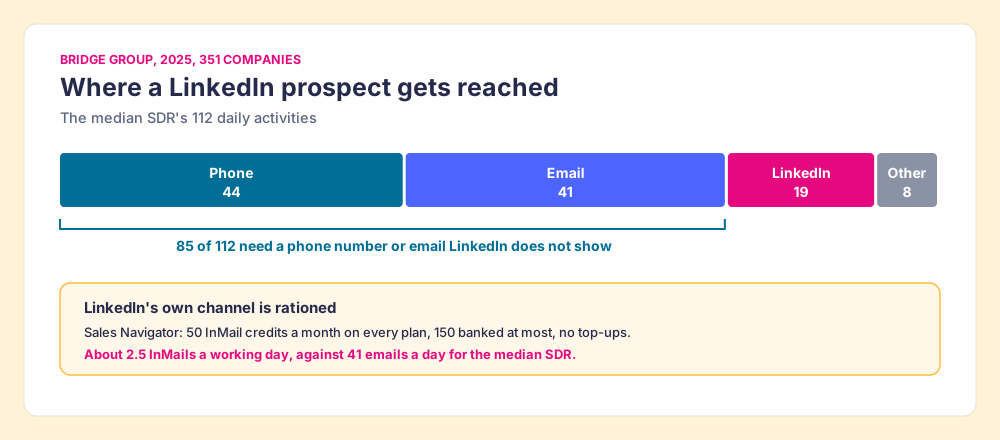
So the tools that move the number for a sales team are the ones that turn a LinkedIn profile into a working email, a working mobile, and a CRM record the rep can sequence. LinkedIn is where the rep finds the buyer. The phone and the inbox are where the rep reaches them. The robots on the top lists spend their effort on the 19, under the strictest rules, and the 85 are where the meetings come from.
The LinkedIn prospecting stack, job by job
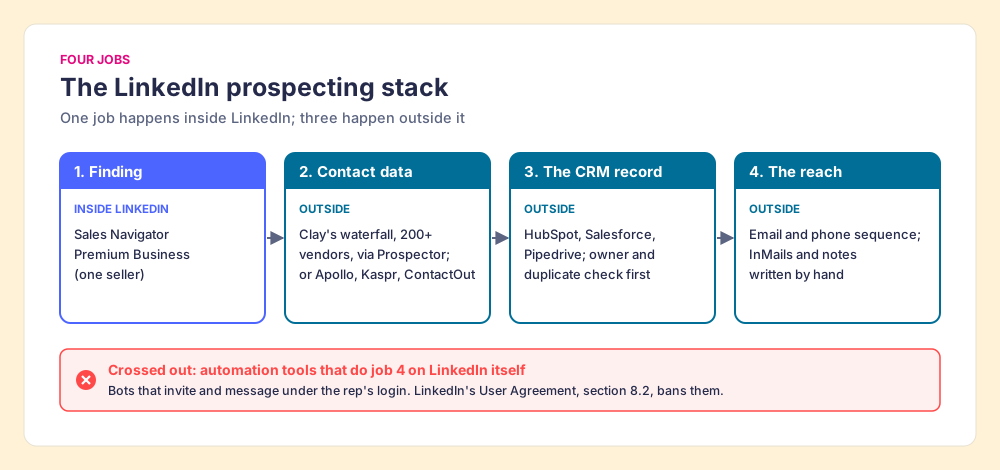
A working stack has four jobs, and a tool should earn its place by doing one of them better than the alternative.
- Finding. The search, the filters, the lead list. Sales Navigator, or Premium Business for one seller.
- Contact data. The verified email and mobile for the person on screen. One database (Apollo, Kaspr, ContactOut) or Clay’s waterfall across many.
- The CRM record. One click into HubSpot, Salesforce, or Pipedrive, with a check for who already owns the contact.
- The reach. The email and phone sequence in whatever sales engagement tool the team runs, plus the InMails and connection notes a rep writes by hand.
1. Supered Prospector: Clay’s tables, run by the reps, for teams on Clay
The buyer problem is familiar to any team that bought Clay. A GTM engineer built good tables: the waterfall, the ICP scoring, the buying-committee lookup. Reps still Slack that engineer for every list, export CSVs from Sales Navigator, and paste contacts into the CRM, sometimes on top of a teammate’s record. The engineer has become the list desk.
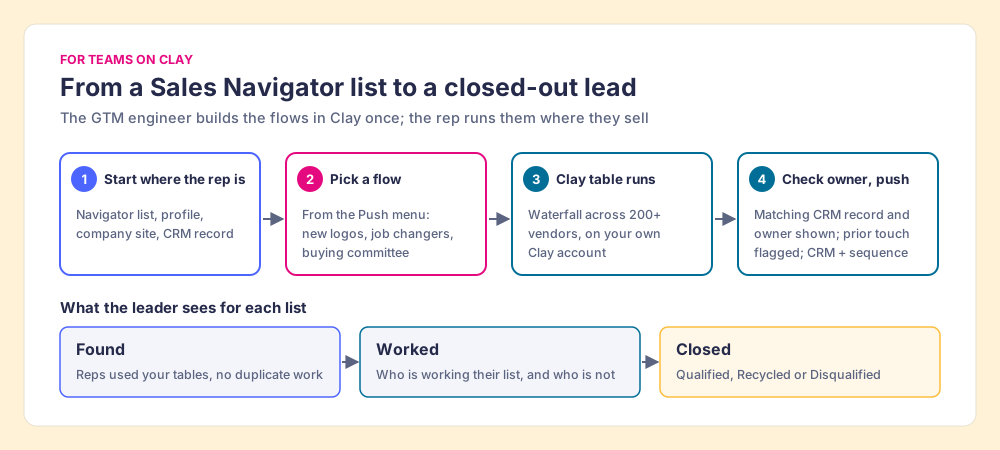
Prospector runs inside the Supered Chrome extension and puts those tables in the rep’s hands. Clay plus Supered is the best way for a sales team to prospect: GTM engineers build in Clay, reps never open Clay. On a Sales Navigator lead or list, the rep adds the leads to a prospect list and pushes the list to the team’s Clay table. On a LinkedIn profile, the rep sees the matching CRM record and its owner, and a flag if the person was prospected before, so no two reps work the same buyer. On a company website, the rep runs company research and the buying-committee lookup the team defined. Inside a HubSpot, Salesforce, or Pipedrive record, the rep fills the missing phone or finds the rest of the team. The data comes from Clay’s waterfall, which Clay describes as checking “multiple providers to return the most verified emails (lower bounce rate) and phone numbers (higher connect rate)” (Clay, rep prospecting), across “200+ providers in one place” (clay.com, October 2, 2026). Clay charges nothing when an enrichment returns no result (Clay pricing, October 2, 2026).
The GTM engineer builds named flows once, each mapped to a Clay table and a destination, and the rep picks one from a Push menu: research an account, load a new-logo campaign, find the rest of the team at a customer, follow a past champion who changed jobs, or add the economic buyer and two peers to a stalled opportunity. The waterfalls, tiers, tags, and sequence variables stay the engineer’s.
The leader sees each list as Found, Worked, and Closed. Found means reps used the team’s tables with no duplicate work. Worked shows who is working their list and who is not. Closed means every lead ends the way the process says: Qualified, Recycled, or Disqualified. A VP sees from it whether Clay is producing pipeline, and that is how the Clay budget grows; Prospector for sales leaders shows that view.
On LinkedIn’s terms, Supered’s own statement: Prospector works within LinkedIn’s terms and does not copy search results in bulk; the contact data comes from Clay’s waterfall on the customer’s Clay account. We do not claim LinkedIn approval or partnership. Ask every vendor on this page what its extension reads from the page, ours included.
Prospector is $45 per rep per month, billed annually, from one rep, on your own Clay account, and it starts with a demo (Prospector). Teams go live in under a week. Choose something else if you are not on Clay (Apollo or Kaspr next to Sales Navigator is the better buy, or have a partner build your Clay tables first; RevPartners, the Clay Elite Studio Partner I founded, is one), if you want a sequencer and dialer in the same plan (Apollo), if you are one rep buying for yourself (ContactOut or Kaspr), or if your sellers work from phones in the field, since Supered has no mobile product.
2. LinkedIn Sales Navigator: the finder
Sales Navigator is the reading room with a better catalogue. Core lists at US$119.99 a month or US$1,079.88 a year, Advanced at US$159.99 or US$1,799.88, and Advanced Plus is quoted (LinkedIn, compare plans, checked October 2, 2026). It brings 50+ search filters, lead lists, alerts, and 50 InMails a month. It is rated 4.4 from 2,211 reviews on G2 (October 1, 2026). It carries no account risk, because it is LinkedIn.
The limits are what send buyers to the other rows. “LinkedIn currently doesn’t offer the option to export account and lead information from Sales Navigator into a CSV or XLS file,” and CRM Sync with lead creation needs Advanced Plus (Sales Navigator Help). A search shows at most 2,500 lead results (Sales Navigator Help). LinkedIn also warns that “using browser plugins and extensions may limit your ability to conduct searches in Sales Navigator” (Sales Navigator Help, search), which is why the Sales Navigator Chrome extension page sorts extensions by what they touch. Which plan to buy is worked out on the Sales Navigator pricing page, and getting the leads out is on the Sales Navigator export guide.
3. Apollo: data and sequences in one tool
Apollo is a single database with a sequencer, dialer, and Chrome extension attached, and for a team without Clay it is the most complete single purchase. Basic is $49 a seat a month billed annually or $65 monthly, with 30,000 credits a seat a year; a mobile number costs 8 credits (Apollo’s pricing API, October 2, 2026). It is rated 4.7 from 9,778 reviews on G2 (October 1, 2026), and its extension had 1,000,000 Chrome Web Store users on October 1, 2026. The tradeoff is one book: when Apollo lacks the number, the rep is stuck. In March 2025 Apollo’s own LinkedIn company page disappeared from LinkedIn, and Apollo said it was “actively working with LinkedIn to understand the nature of our brand page restriction” (MarTech, May 8, 2025). The Apollo Chrome extension page covers the extension in detail.
4. Kaspr: the low-cost companion
Kaspr sits on top of Sales Navigator and returns emails and phones. Starter is $49 per user per month billed annually, with unlimited B2B email credits and 100 phone credits a month, and Sales Navigator support (kaspr.io/pricing, October 2, 2026). It is the cheapest way to give an email-first rep contact data next to Navigator, and the phone allowance runs out fast for a rep who dials. The Kaspr alternatives page works out the per-phone cost.
5. LinkedIn Premium Business: the budget finder
For one seller, Premium Business at US$69.99 a month or US$539.88 a year gives advanced search filters, unlimited profile views beyond the network, and 15 InMail credits a month (LinkedIn Premium, October 2, 2026). It has no team lead lists and no CRM link. It is the right finder for a founder doing the selling, and the wrong one for ten SDRs.
6. ContactOut: unlimited, for one
ContactOut’s Email + Phone plan is $79 a month billed annually ($948 a year) with unlimited emails and phones and 7,200 exports a year, limited to one user per company on self-serve (contactout.com/pricing, October 2, 2026). It is rated 4.5 from 113 reviews on G2. For a single rep it is the plainest price in the category; for a team it needs the quoted Team plan. The email finder tools page compares how often each of these finds the address.
What does a LinkedIn prospecting stack cost for ten reps?
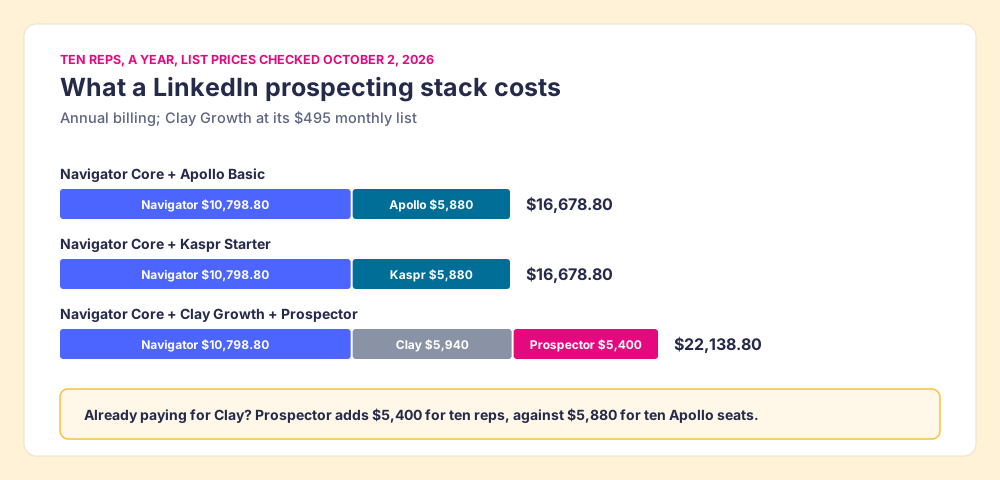
At list prices checked October 2, 2026, annual billing, ten reps:
| Stack | Finding | Contact data and CRM push | Total a year |
|---|---|---|---|
| Sales Navigator Core + Apollo Basic | $10,798.80 | $5,880 | $16,678.80 |
| Sales Navigator Core + Kaspr Starter | $10,798.80 | $5,880 | $16,678.80 |
| Sales Navigator Core + Clay Growth + Supered Prospector | $10,798.80 | $5,940 (Clay) + $5,400 (Prospector) | $22,138.80 |
For a team that already pays for Clay, the comparison that matters is the last column minus the Clay line it was paying anyway: $5,400 a year to put Clay in ten reps’ hands, against $5,880 for ten Apollo seats that bring a second database the reps keep asking for. Clay’s credits for each lookup come out of the team’s Clay plan, and the Clay figure here is Growth at its $495 monthly list (Clay pricing). For a team that does not have Clay, the cheaper stacks are cheaper, and Apollo is the safer of the two.
Which LinkedIn sales tools should you buy?
Two facts about your team decide it: whether you have Clay, and how many reps are prospecting.
- A team on Clay. Sales Navigator to find, Supered Prospector to run the team’s Clay tables from the list, the profile, the company site, and the CRM record, and the sequencer you already own to reach.
- A team without Clay. Sales Navigator plus Apollo, so data and sequences live in one tool with a posted price. Kaspr if the reps are email-first and the budget is tight.
- One seller. Premium Business to find and ContactOut for unlimited reveals.
- Automation tools. None, at any pace. The rule has no number in it.
The best LinkedIn prospecting tools do the finding inside the reading room and everything else in the hall: the email, the phone, the CRM record, the sequence. The hall is where 85 of the median SDR’s 112 daily touches happen, and it is the part of the work LinkedIn has no rule against. What we recommend for a team on Clay is to stop buying seats at a second database and give reps the tables you already built, then watch each list end Qualified, Recycled, or Disqualified. The broader sales prospecting tools page covers the stack beyond LinkedIn, the sourcing use case shows the rep’s loop end to end, the Clay Chrome extension page compares the ways to run Clay from the browser, and a Prospector demo on your own Clay account is where you can watch a Sales Navigator list become a Clay table without anyone opening Clay.
Frequently asked questions
What are the best LinkedIn prospecting tools in 2026?+
Are LinkedIn automation tools allowed?+
How many LinkedIn connection requests can I send per week?+
Do I need Sales Navigator for LinkedIn prospecting?+
What do LinkedIn sales tools cost for a 10-rep team?+
Do I need a Clay account to use Supered Prospector?+
Your process, running itself.